

Domain Checking: 5 Types You Need to Know in 2026
You searched for a domain last Tuesday. By Thursday, the price doubled. Coincidence? Maybe. But that nagging feeling - that someone's watching your searches - is exactly why domain checking is more nuanced than most people realize.
There are five distinct types of domain checks, and most guides only cover one. Let's fix that.
What Domain Checking Actually Means
Every major registrar - GoDaddy, Namecheap, Squarespace - wants you to type in a name so they can sell it to you. That's the only version they care about. But this isn't one activity. It's five, and they serve completely different purposes.
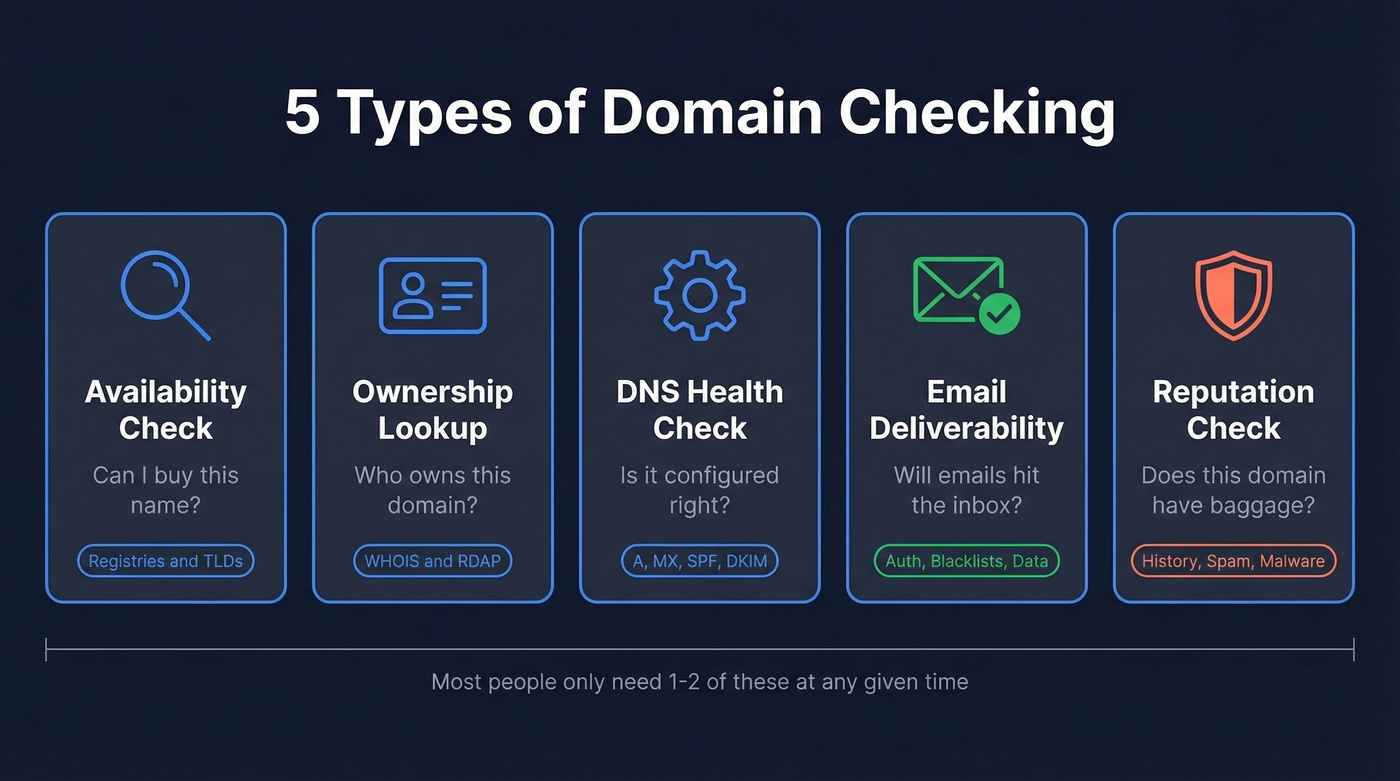
Availability checking answers "can I buy this name?" You're querying registries to see if a domain is unregistered and what it'll cost across TLDs.
Ownership lookup (WHOIS/RDAP) answers "who owns this?" You're pulling registration records to find the registrar, key dates like expiration, nameservers, and status codes.
DNS health checking answers "is this domain configured correctly?" You're inspecting A/AAAA records, MX records, nameservers, and authentication entries like SPF and DKIM.
Email deliverability checking answers "will emails from this domain land in inboxes?" You're verifying authentication records, blacklist status, and the quality of your sending data.
Reputation and history checking answers "does this domain have baggage?" You're looking at historical content, blacklist presence, and whether the domain was previously used for spam or malware. Running a reputation check before purchasing can save you months of remediation work.
Most people only need one or two of these at any given time. Here's how to figure out which ones matter to you.
What You Need (Quick Version)
Find your situation and jump to the right section:
Buying a domain? You need availability checking. Use Instant Domain Search for speed, then buy through a registrar with transparent renewal pricing. → Jump to How to Check Domain Availability
Finding out who owns a domain? You need a WHOIS/RDAP lookup. Use lookup.icann.org - it's neutral and free. → Jump to How to Check Who Owns a Domain
Worried a registrar stole your domain idea? This is the front-running question. The answer is more complicated than Reddit thinks. → Jump to Is Domain Front-Running Real?
Checking your sending domain's health? You need email deliverability checking. Start with MXToolbox for authentication records and verify your email lists before sending. → Jump to Domain Checking for Email Deliverability
Already own a domain and want to protect it? You need a monitoring framework with expiration alerts and DNS change tracking. → Jump to Domain Health Monitoring for Owners
How to Check Domain Availability
Availability checking is the simplest type - and the one most people think of when they hear "domain checking." You type a name, the tool queries the registry, and you get a yes or no.
Instant Domain Search checks availability across 800+ extensions and shows results in under 25 milliseconds as you type. It also compares registrar pricing so you can spot the lowest listed price without bouncing between sites.
A standard .com runs $10-15/year. Newer TLDs like .io and .ai range from $20-80/year. Premium domains - short, dictionary words, brandable names - can cost hundreds to thousands. But the sticker price isn't the number that matters most.
The real trap is renewal pricing. Registrars love offering a cheap first-year deal, then charging a much higher renewal rate. Always check the renewal rate before registering. (If you care about SaaS metrics, this is basically the same logic as renewal rate in subscriptions.)
Two registrars stand out for straightforward pricing. Cloudflare Registrar charges at-cost with no added markup. Namecheap clearly shows renewal pricing during the purchase flow and on its pricing pages. Either one reduces renewal surprises.
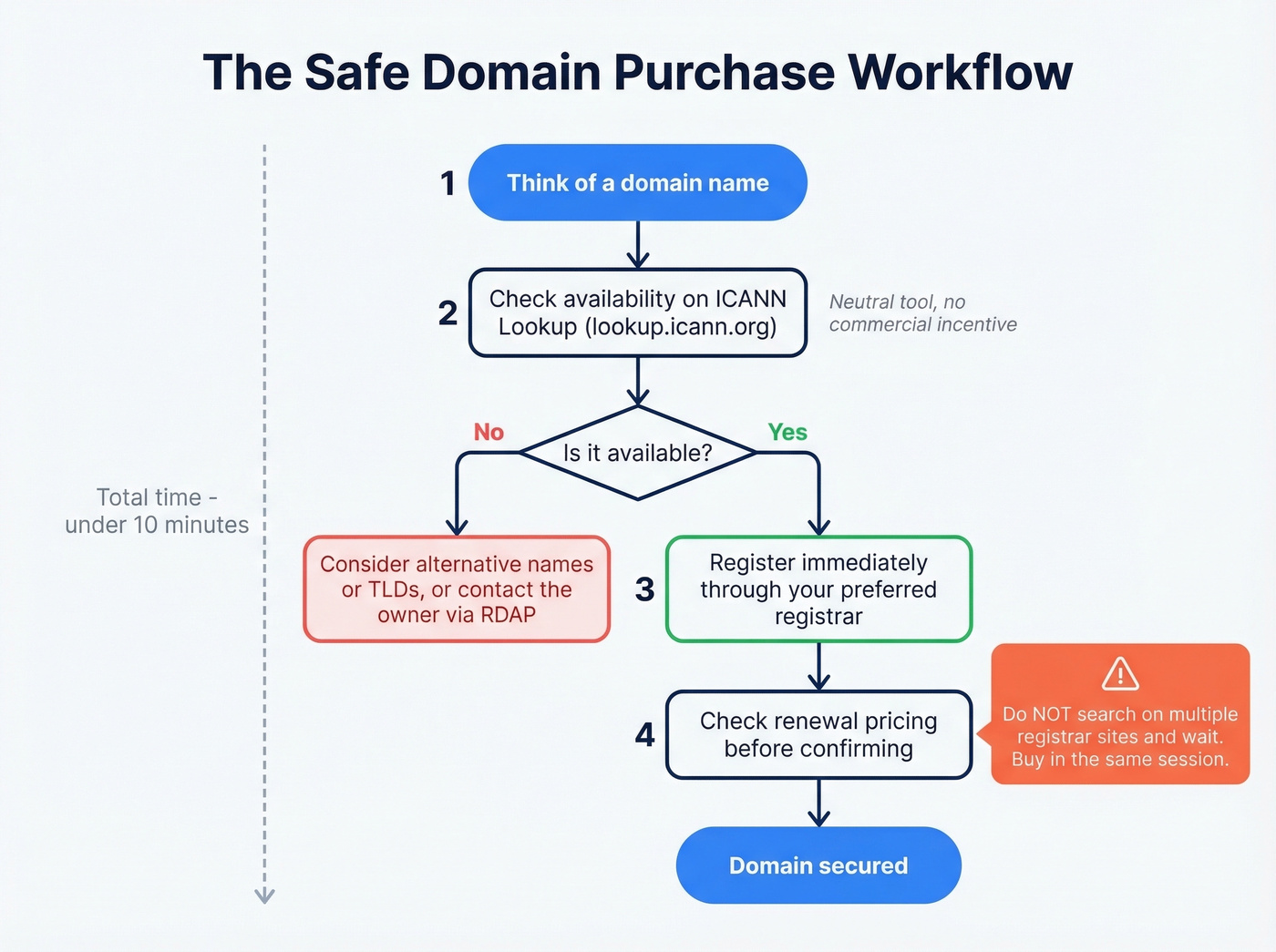
One more thing: don't search for a domain you want on a registrar's site and then walk away to "think about it." If you want it, buy it in the same session.
Is Domain Front-Running Real?
A RevOps lead we know searched for a domain on GoDaddy. Didn't buy it. Came back two days later and the price had jumped from $12 to $70. He was convinced GoDaddy had front-run him. The Reddit thread where he posted about it has thousands of upvotes and a comment section full of people with identical stories.
So is domain front-running - where a registrar registers a domain you searched for and resells it at a markup - actually happening?
Here's the thing: it's nearly impossible to prove, but the fear isn't irrational.
Automated bots and domain watchers explain a lot of this. When a domain gets searched repeatedly or shows up in public signals like certificate transparency logs, bots flag it as desirable and speculators register it. This isn't necessarily the registrar doing it - it can be third parties reacting to the same signals.
[Domain tasting](https://www.icann.org/en/announcements/details/the-end-of-domain-tasting - agp-deletes-decrease-997-12-8-2009-en) used to be rampant. Registrars could register a domain, hold it briefly under ICANN's Add Grace Period, and drop it if nobody bit. ICANN discouraged the practice by changing the economics, but it left a lasting impression. Coincidence plays a bigger role than people admit, too. If you thought of a good domain name, someone else probably did too. Generic, brandable names get registered constantly.
Reputable registrars deny front-running, and for good reason - getting caught could risk their ICANN accreditation. That's an existential threat to their business.
If your average deal size is under five figures and you're agonizing over a $70 premium domain, you're optimizing the wrong thing. Buy it, move on, and spend that energy on pipeline. (If you're building a repeatable outbound motion, see sales prospecting techniques that actually move pipeline.)
The safer workflow: use ICANN Lookup (lookup.icann.org) to check whether a domain is registered. It's a neutral tool with no commercial incentive. If the domain is available and you want it, register it immediately through your preferred registrar. Don't search on three different sites, sleep on it, and come back a week later.

Domain checks protect your sender reputation, but your data quality determines whether emails actually land. Prospeo's 5-step verification delivers 98% email accuracy - with spam-trap removal, honeypot filtering, and catch-all handling built in. One agency cut bounce rates from 35% to under 3% across every client.
Stop blaming your domain when the real problem is bad data.
How to Check Who Owns a Domain
Step-by-Step WHOIS/RDAP Lookup
The neutral, no-strings-attached way to check domain ownership is lookup.icann.org. It's run by ICANN itself - no registrar bias, no upsell.
Type in a domain and you'll see the registrar name, key dates like creation and expiration, nameservers, and domain status codes. You'll also see the four standard contact roles: the registrant (legal owner), administrative contact (day-to-day management), technical contact (DNS and server configuration), and billing contact (invoices and renewals). For most gTLD domains, the personal contact fields are redacted, so you'll often see "REDACTED FOR PRIVACY" where names, emails, and addresses used to appear.
In practice, the registrar, expiration date, nameservers, and status codes are still visible - and for most use cases, that's enough to determine who controls a domain.
WHOIS vs. RDAP
If you've tried a WHOIS lookup recently and wondered why the results look empty, GDPR is the reason. Privacy regulations pushed registrars to redact personal information from public query results.
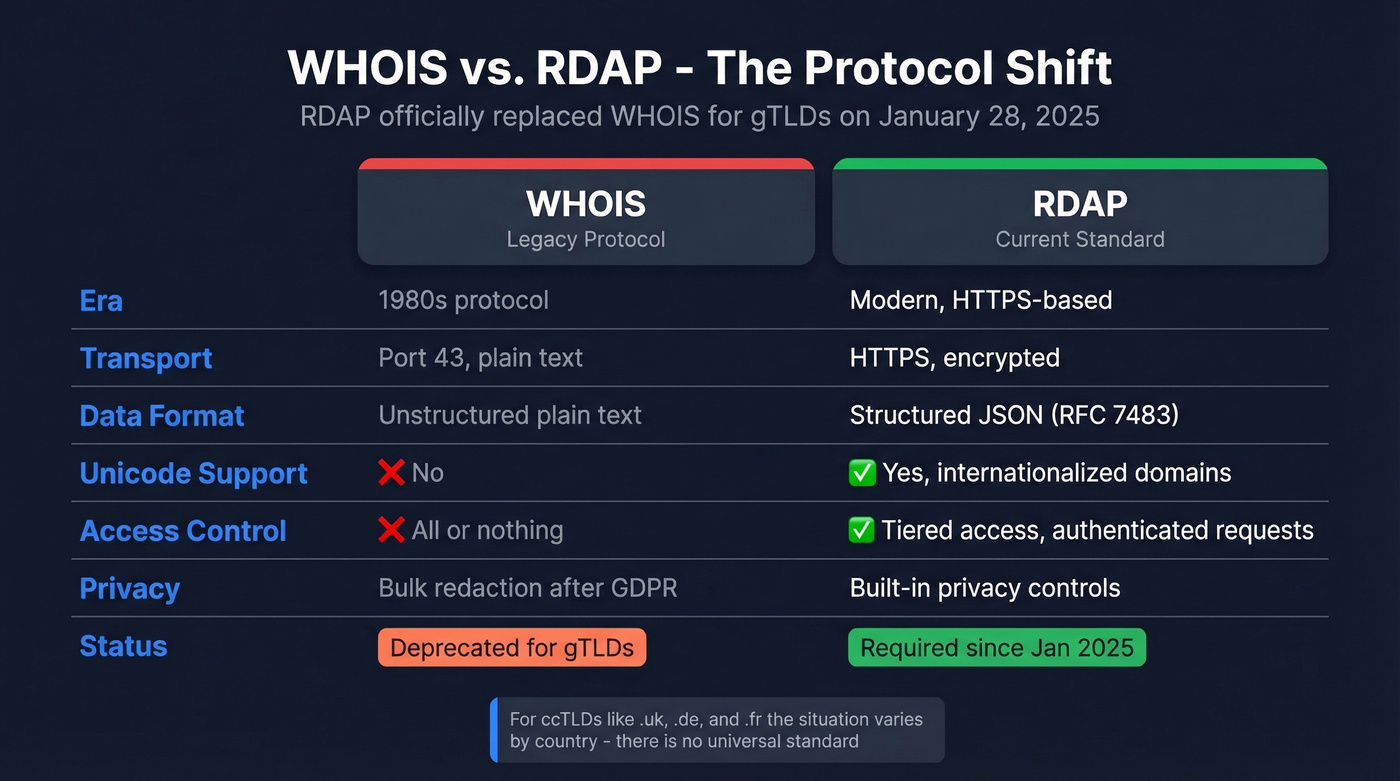
The technical shift runs deeper than privacy. RDAP (Registration Data Access Protocol) officially replaced WHOIS as the sole required Registration Data Directory Service for gTLDs on January 28, 2025. WHOIS was a plain-text protocol from the 1980s running on port 43. RDAP is HTTPS-based, returns structured JSON per RFC 7483, supports Unicode and internationalized domain names, and enables tiered access controls - meaning unauthenticated users get limited, redacted data while authenticated parties can request fuller records through ICANN's Registration Data Request Service or registrar-specific processes.
For ccTLDs (.uk, .de, .fr), the situation varies by country. Some registries expose more data than gTLD registrars, others are even more restrictive. There's no universal standard.
The practical takeaway: if you need to identify a domain owner and the public RDAP results are redacted, your options are the RDRS process for legitimate requests or contacting the registrar directly.
Pre-Registration Checklist
Before you hand over your credit card, run through this. Skipping any of these has burned people we've worked with.
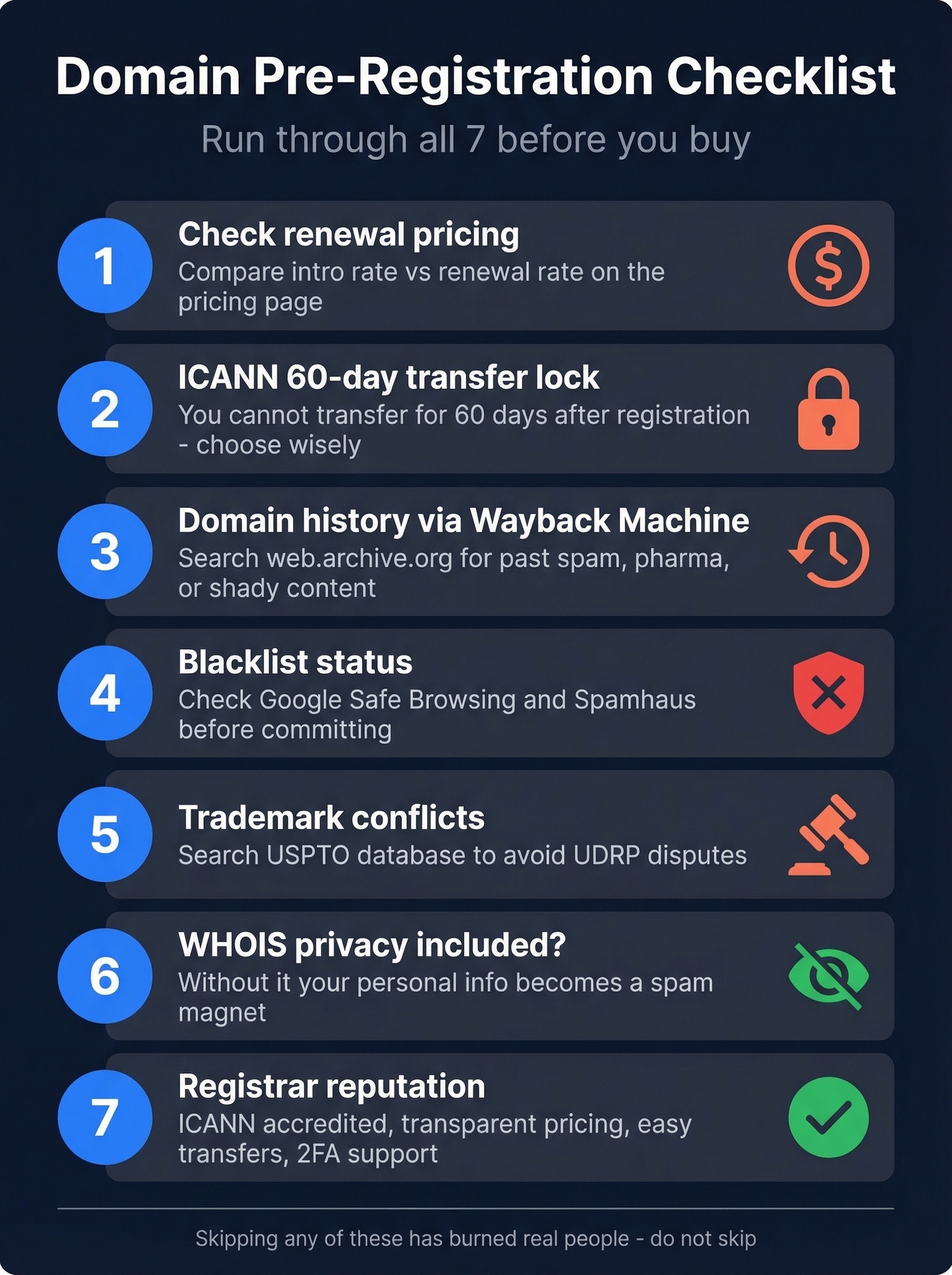
1. Renewal pricing vs. intro rate. A cheap first-year domain that renews at 3x the price is a trap. Check the renewal rate on the registrar's pricing page before registering.
2. ICANN's 60-day transfer lock. After registering or transferring a domain, ICANN imposes a 60-day lock during which you can't move it to another registrar. Choose wisely upfront.
3. Domain history via Wayback Machine. Head to web.archive.org and search the domain. If it was previously used for a payday loan site or pharma spam, that history can follow the domain. Search engines and email providers have long memories.
4. Blacklist status. Check Google Safe Browsing and Spamhaus to see if the domain has a bad reputation. A blacklisted domain is poison for email deliverability and SEO. Use MXToolbox to verify it isn't listed on any major blacklists before committing. (If you do get listed, follow a proper Spamhaus blacklist removal process.)
5. Trademark conflicts. Search the USPTO database for the domain name. Registering a domain that matches someone else's trademark is a fast track to a UDRP dispute and losing the domain entirely.
6. WHOIS privacy. Many registrars include free WHOIS privacy for eligible domains, but verify this before registering. Without it, your personal name, address, and email get exposed - and become spam magnets.
7. Registrar reputation. Look for ICANN accreditation, transparent pricing, easy transfer processes, and two-factor authentication. Cheap doesn't help if the registrar makes it impossible to transfer your domain later.
Domain Checking for Email Deliverability
This is where domain checking gets directly relevant to sales and marketing teams. Your sending domain's health determines whether your emails reach inboxes or vanish into spam folders.
Delivery vs. Deliverability
These terms sound interchangeable. They're not.
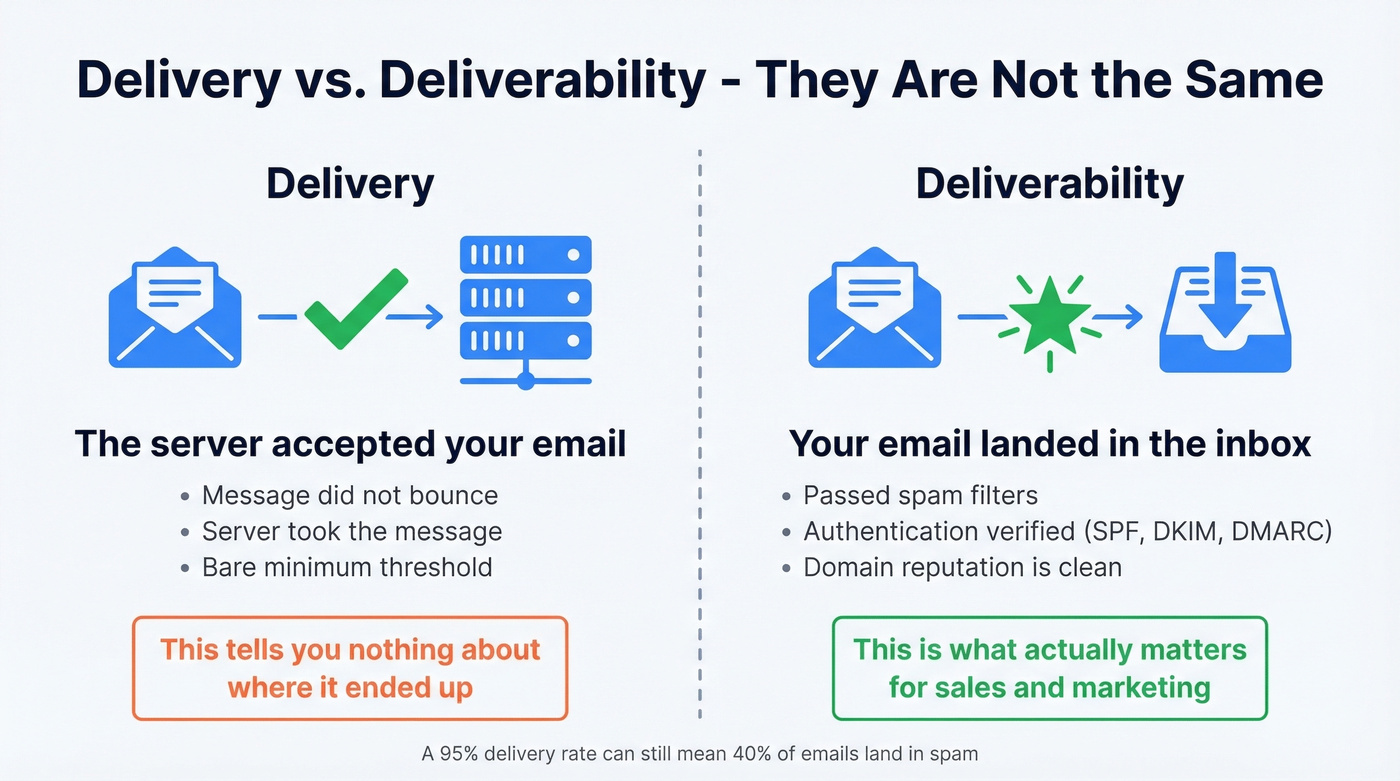
Delivery means the receiving mail server accepted your email. It didn't bounce. That's the bare minimum - it tells you the server took the message, not where it ended up. Deliverability means your email landed in the inbox, not the spam folder or promotions tab. An email that's "delivered" to spam is functionally the same as one that bounced. Nobody reads it.
Marketers who describe their email programs as successful are 22% more likely to actively monitor deliverability and inbox placement. The rest are flying blind.
The Authentication Stack
Modern email deliverability starts with four authentication protocols. If any of these are misconfigured, your domain is leaking reputation.
SPF (Sender Policy Framework) tells receiving servers which IP addresses are authorized to send email on behalf of your domain. One critical constraint: SPF has a 10 DNS lookup limit. Exceed it and your SPF record fails - emails fail authentication even though you technically set it up. (If you want to sanity-check syntax, use these SPF record examples.) DKIM (DomainKeys Identified Mail) adds a cryptographic signature to your emails, proving they haven't been tampered with in transit. DMARC ties SPF and DKIM together and tells receiving servers what to do when authentication fails - nothing, quarantine, or reject. BIMI displays your brand logo next to authenticated emails in supported inboxes. Not required, but a trust signal.

Google, Yahoo, and Microsoft now enforce bulk sender requirements that include SPF, DKIM, and DMARC alignment, plus RFC 8058 one-click unsubscribe headers. The thresholds are tight: spam complaints must stay under 0.3%, and bounces under 2%. Exceed either and your domain reputation takes a hit that can take weeks to recover from. (For the full operational playbook, see our email deliverability guide.)
MXToolbox is the go-to free tool for inspecting all of these records. Paste your domain, and it'll show your SPF, DKIM, and DMARC configuration, flag errors, and check blacklists.
Clean Data Protects Your Domain
You can have perfect SPF, DKIM, and DMARC records and still destroy your sender reputation.
Authentication proves you're a legitimate sender. It doesn't prevent you from sending to addresses that don't exist. If your list is bouncing heavily, mailbox providers notice. If you're hitting spam traps - recycled addresses that ISPs use specifically to catch senders with dirty lists - your domain gets flagged fast. Authentication is the lock on your front door. Data quality is not leaving the door wide open. (If you suspect traps, start with spam trap removal.)
This is where email verification becomes essential. Prospeo runs every address through a 5-step verification process that catches invalid emails, spam traps, honeypots, and catch-all domains before you ever hit send, delivering 98% email accuracy that keeps bounce rates well under the 2% threshold. Stack Optimize built their agency from $0 to $1M ARR using this workflow: client deliverability stayed above 94%, bounce stayed under 3%, and they saw zero domain flags across all clients. (If you're comparing vendors, start with Bouncer alternatives.)
You just spent 20 minutes auditing SPF records and blacklist status. Good. Now make sure the contact lists you're sending to don't undo all that work. Prospeo refreshes 300M+ profiles every 7 days - not every 6 weeks like competitors - so your outbound hits real inboxes, not dead addresses that tank your domain reputation.
Protect the domain you just checked - start with emails that actually exist.
Domain Health Monitoring
Buying a domain is step one. Keeping it healthy is the ongoing job that most people neglect until something breaks.
Expiration Alerts
Domain expiration is the most preventable disaster in web operations. We've seen teams lose domains they'd been building on for years because auto-renewal failed silently. Set up a graduated alert schedule:
- 90 days out - first reminder, budget the renewal
- 60 days out - confirm auto-renewal is enabled and payment method is current
- 30 days out - verify the domain hasn't been flagged or locked
- 14 days out - escalation alert to a second team member
- 7 days out - final warning, manual check that renewal processed
If you think this is overkill, remember the Google Domains to Squarespace migration. When Google sold its registrar business in 2023, domains moved to a new provider and users had to pay attention to notices and settings to avoid surprises. Monitoring isn't paranoia - it's operational hygiene.
DNS and WHOIS Monitoring
Beyond expiration, monitor these DNS records for unexpected changes: A/AAAA records (IPv4/IPv6 address mapping), MX records (where email is routed), CNAME records (aliases and subdomains), TXT records (SPF, DKIM, and domain verification entries), and NS records (your nameservers - a change here means someone moved your entire DNS).
On the WHOIS/RDAP side, watch for unauthorized changes to registrant contacts, nameservers, and domain status codes. A domain losing transfer-prohibited/lock statuses without your knowledge is a red flag that someone's attempting a transfer.
Most registrars offer basic expiration alerts. For DNS changes, blacklist status, and WHOIS modifications, tools like MXToolbox's paid tiers ($129-399/mo) or dedicated domain management platforms provide automated tracking and alerting. Skip the paid monitoring if you only manage one or two domains - manual monthly checks are fine at that scale.
Best Tools for Every Type of Check
| Tool | Best For | Price | Key Feature |
|---|---|---|---|
| ICANN Lookup | Ownership/WHOIS | Free | Neutral, no registrar bias |
| Instant Domain Search | Availability | Free | 800+ TLDs, sub-25ms |
| Who.is | WHOIS + DNS data | Free | WHOIS/RDAP support + DNS tools |
| MXToolbox | Email/DNS health | Free - $399/mo | Blacklist + auth analysis |
| Prospeo | Email verification | Free - ~$0.01/email | 98% accuracy, 7-day refresh |
| Wayback Machine | Domain history | Free | Historical snapshots |
| Google Safe Browsing | Reputation/blacklist | Free | Flags malware/phishing |
| Cloudflare Registrar | Registration | At-cost, $0 markup | Wholesale-style pricing |
ICANN Lookup is the tool you should use first for any ownership question. It's run by the organization that governs domain registration, so there's no commercial angle. The results are limited by GDPR redaction, but you'll get the registrar, expiration date, nameservers, and status codes - which is usually enough.
MXToolbox is the Swiss Army knife for email and DNS health. The free tier handles one-off lookups - SPF checks, blacklist scans, DMARC analysis. The paid Delivery Center ($129/mo) adds ongoing monitoring and historical tracking.
Prospeo fills the gap that authentication tools can't cover. MXToolbox tells you if your SPF record is valid. Prospeo tells you if the 5,000 addresses you're about to email are valid. The free tier (75 emails/month) is enough to test the workflow; at scale, it's roughly $0.01 per verification - a fraction of the cost of a damaged sender reputation. (If you're troubleshooting bounces, use our email bounce rate benchmarks and fixes.)
FAQ
Can registrars see my domain searches?
Registrar search tools log the queries you run, but no major registrar has been proven to act on that data for front-running. Use ICANN Lookup for neutral ownership checks, then register immediately through your preferred registrar if the domain is available.
Why is WHOIS data hidden now?
GDPR requires registrars to redact personal information from public WHOIS and RDAP results, and many registrars apply this globally. For legitimate access to redacted data, submit a request through ICANN's Registration Data Request Service.
What's the difference between WHOIS and RDAP?
WHOIS is the legacy protocol - plain text over port 43, no privacy controls. RDAP is its HTTPS-based, JSON-formatted replacement with standardized privacy tiers. RDAP became the sole required lookup protocol for gTLDs in January 2025.
How often should I monitor domain health?
Set automated expiration alerts at 90, 60, 30, 14, and 7 days before renewal. Monitor DNS records and WHOIS contacts monthly. If you send email at volume, check blacklist status weekly - a single spam trap hit can land your domain on a blacklist within days.
How do I verify domain reputation before buying?
Run the domain through Google Safe Browsing, Spamhaus, and the Wayback Machine before purchasing. These three reveal whether it was previously associated with spam, malware, or phishing - issues that can tank email deliverability and SEO from day one.