

Domain Reputation Monitoring: The 2026 Playbook
70% of emails show at least one spam-related issue. That's the baseline for most sending domains, and domain reputation monitoring is the only way to catch problems before they compound into full-blown deliverability crises. Ask any email ops team how they track sender reputation and you'll get a patchwork of half-workflows - if you get an answer at all.
This playbook covers the full stack: free tools, paid upgrades, thresholds, cadence, and the upstream fix most guides skip entirely.
What You Need (Quick Version)
The free monitoring foundation:
- Google Postmaster Tools + Microsoft SNDS + Yahoo Sender Hub + MxToolbox blacklist checks
- Check daily with automated alerts, review manually each week
The thresholds that matter:
- Spam complaint rate below 0.1%
- Bounce rate under 2% (see bounce rate benchmarks and fixes)
- Sender Score above 80
If you're managing multiple domains, campaign metrics - reply rate drops, bounce spikes - are your earliest warning. Especially for low-volume domains where Postmaster shows nothing.
And the single biggest thing you can do to protect reputation isn't monitoring. It's sending to verified data in the first place.
What Domain Reputation Actually Is
Your domain reputation isn't one score. It's a collection of assessments, calculated independently by every mailbox provider that receives your email. Gmail has its own model. Microsoft has a different one. Yahoo runs yet another. There's no universal number, and anyone selling you a single "reputation score" is oversimplifying.
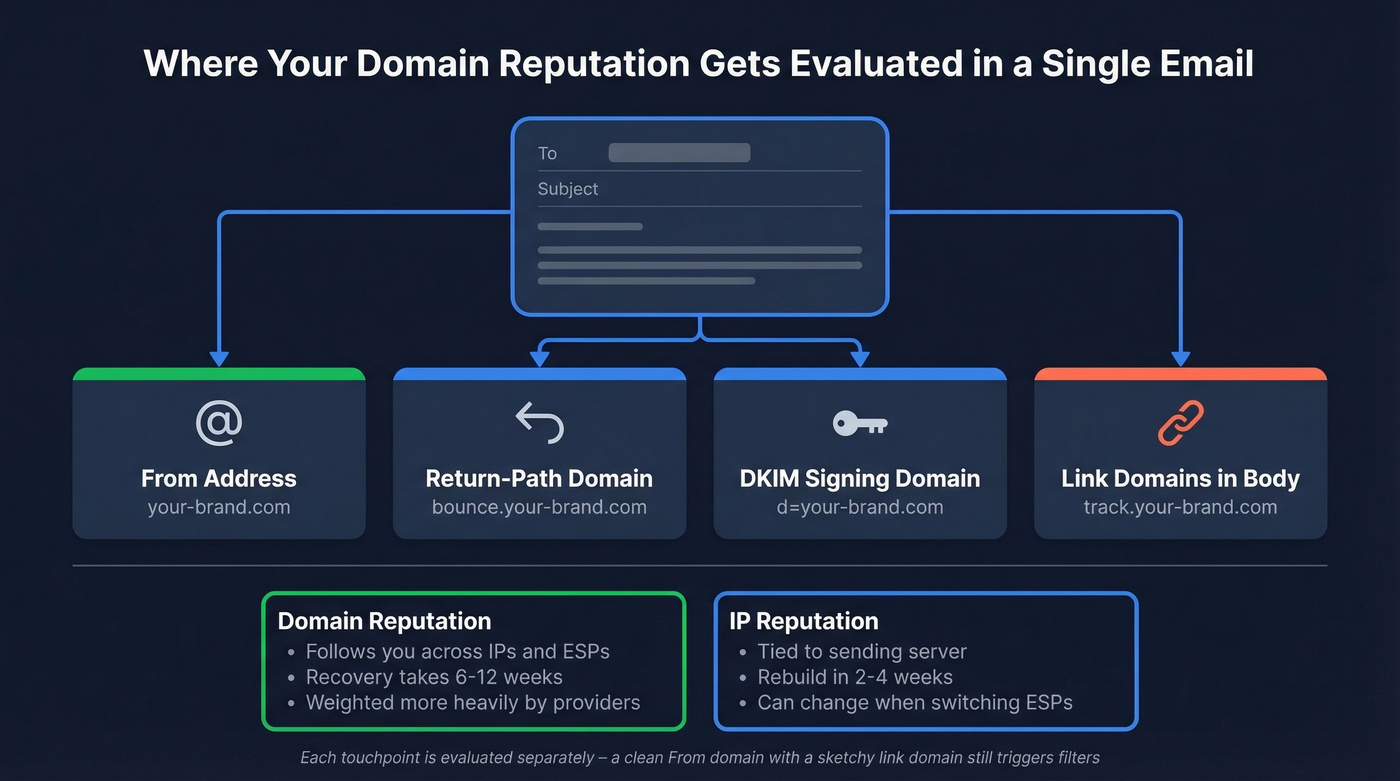
What makes this tricky is that your domain shows up in multiple places within a single email: the From address, the Return-Path domain, the DKIM signing domain, plus any links and brand assets in the body. Each touchpoint gets evaluated separately. A clean From domain paired with a sketchy link domain still triggers filters.
Here's the critical distinction: domain reputation vs. IP reputation. IP reputation is tied to the sending server and can be rebuilt in 2-4 weeks. Domain reputation follows you across IPs and ESPs - switch providers, and the reputation comes with you. Recovery takes 6-12 weeks. Providers increasingly weight domain reputation more heavily, which means you can't just hop to a new IP and start fresh anymore.
One angle most monitoring guides miss: authentication protocols like SPF, DKIM, DMARC, and BIMI aren't just deliverability checkboxes. They're brand protection. A failing DMARC policy means anyone can spoof your domain, and the resulting spam complaints land on your reputation, not the spoofer's. (If you need the technical nuance, start with DMARC alignment and a practical SPF record example.)
Sender Reputation Metrics That Matter
These are the benchmarks to pin to your email deliverability dashboard. Miss any of them consistently and you've got a reputation problem brewing.
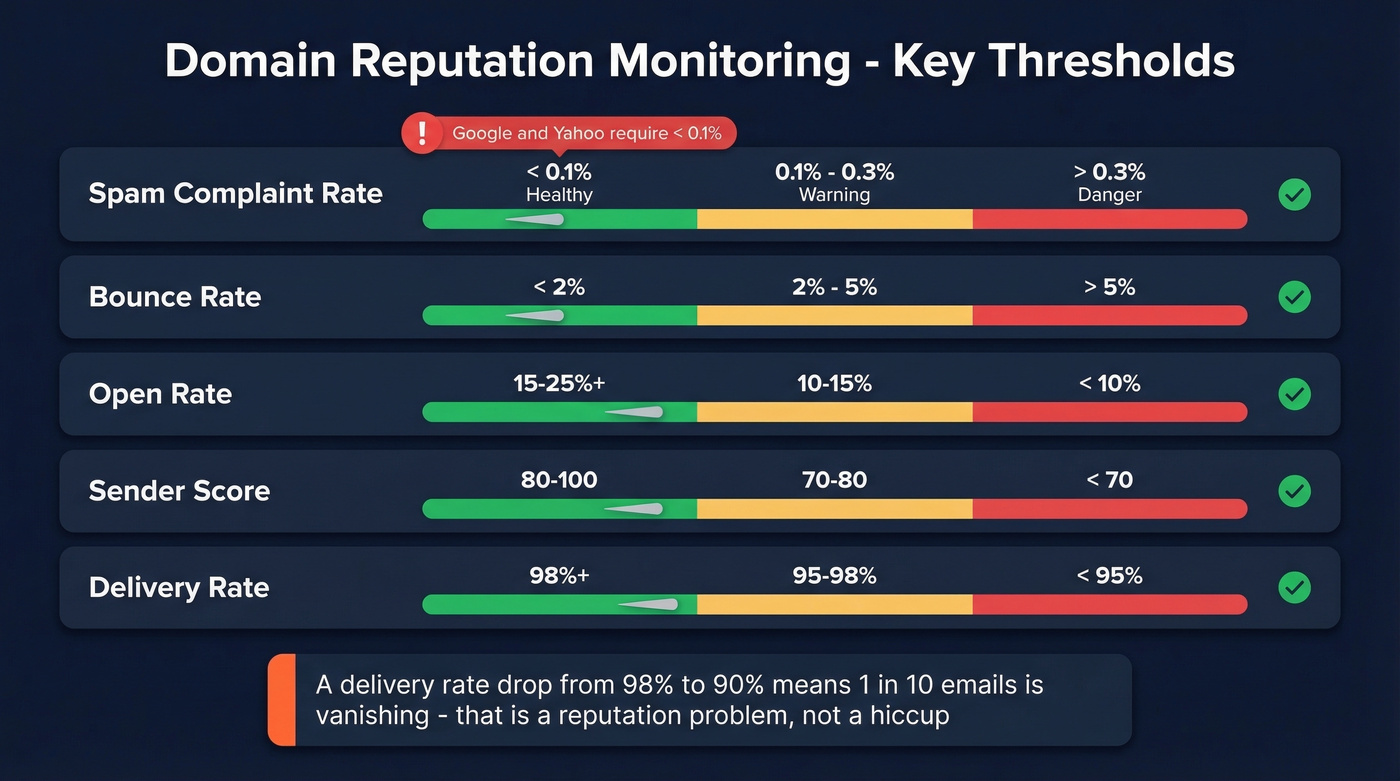
| Metric | Healthy | Warning | Danger |
|---|---|---|---|
| Spam complaint rate | < 0.1% | 0.1-0.3% | > 0.3% |
| Bounce rate | < 2% | 2-5% | > 5% |
| Open rate | 15-25%+ | 10-15% | < 10% |
| Sender Score | 80-100 | 70-80 | < 70 |
| Delivery rate | 98%+ | 95-98% | < 95% |
The 0.1% spam complaint threshold isn't a suggestion - Google and Yahoo require it for bulk senders. Never exceed 0.3%. That's the line where serious filtering kicks in and recovery becomes a multi-week project.
A delivery rate drop from 98% to 90% doesn't sound dramatic, but it means roughly 1 in 10 emails is vanishing. That's a reputation problem, not a hiccup. Marketers who actively monitor deliverability are 22% more likely to describe their email program as successful - and the pattern is clear: teams that watch the numbers catch problems before they compound.
Your Monitoring Tool Stack
Free Foundation
Don't spend money on monitoring until you've maxed out what's free.
Google Postmaster Tools (V2) is the most important free tool for Gmail deliverability. Add your domain, grab the TXT verification record, drop it in your DNS, and verify. The V1 interface was retired on September 30, 2025 - everything runs on V2 now. Data updates with a 24-48 hour lag, and there's no role-based permission system. The catch: you need roughly 100+ daily messages to unique Gmail recipients before data appears consistently, and warm-up takes 1-2 weeks.
Microsoft SNDS covers Outlook and Hotmail. It requires a Microsoft account, your sending IPv4, and access to the WHOIS-listed email for IP verification. SNDS covers consumer Outlook/Hotmail mailboxes only - not Microsoft 365 or Exchange Online enterprise accounts.
The diagnostic trick worth knowing: compare RCPT vs. DATA SMTP command counts. If RCPT shows 1,000 and DATA shows 950, that's 50 messages rejected before acceptance. A healthy reputation shows only a tiny percentage difference. A large gap signals outdated lists or namespace farming.
Yahoo Sender Hub rounds out the big three mailbox providers - it's the main free dashboard for monitoring sending performance to Yahoo and AOL recipients, a blind spot if you're only watching Google and Microsoft.
MxToolbox and multiRBL handle blacklist checks. Sender Score provides a 0-100 overall rating. Cisco Talos offers free lookups with reputation labels, though "Neutral" usually just means low volume. EasyDMARC offers a free IP/domain reputation checker with unlimited checks and no account required.
Mid-Tier Tools
GlockApps is the strongest option here. It checks against 50+ blacklists, runs inbox placement tests against a seed list of around 100 mailboxes, and includes DMARC monitoring. The free plan gives you 2 spam tests per month - enough to kick the tires. The Essential plan at $59/month bumps that to 360 spam test credits and 600,000 DMARC checks/month.
We've found GlockApps offers the best value in this tier for most outbound teams. Skip it if you're sending under 500 emails/day - the free tools cover you.
InboxAlly takes a different approach: instead of just measuring inbox placement, it actively trains mailbox provider algorithms by simulating positive engagement with your emails. Plans start at $149/month. Worth considering if you're recovering from a reputation hit and need to accelerate the rebuild, but it's not a substitute for fixing the root cause.
MxToolbox Delivery Center starts at $129/month with consolidated reporting. Mailtrap runs from $15/month with a testing-first approach. SendForensics starts at $49/month for reputation analytics.
Enterprise Solutions
Validity Everest is the gold standard for enterprise email programs. It covers a network of 2.5B+ mailboxes, analyzes 3T+ data points per year, and monitors 40+ blocklist operators with real-time alerts. It consolidates Google Postmaster Tools, Microsoft SNDS, Signal Spam, and feedback loops into a single dashboard.
Pricing reflects the positioning: Elements starts at $20/month, Elements Plus jumps to $525/month, and enterprise bundles typically land in the $35K-$65K/year range after negotiation.
Let's be honest: most teams should never touch Everest. If you're sending under 100K emails/month from fewer than 5 domains, the free stack plus GlockApps gives you 90% of the insight at 1% of the cost. Enterprise monitoring tools exist for enterprise problems - don't buy a fire truck to watch a campfire.
Tools at a Glance
| Tool | Free? | Starting Price | Primary Use | Best For |
|---|---|---|---|---|
| Google Postmaster | Yes | $0 | Gmail reputation | Every sender |
| Microsoft SNDS | Yes | $0 | Outlook/Hotmail rep | Every sender |
| Yahoo Sender Hub | Yes | $0 | Yahoo/AOL monitoring | Every sender |
| MxToolbox | Yes | $0 | Blacklist checks | Daily monitoring |
| Sender Score | Yes | $0 | Overall 0-100 score | Quick health check |
| GlockApps | Freemium | $59/mo | Inbox placement | Mid-volume senders |
| InboxAlly | No | $149/mo | Engagement training | Reputation recovery |
| MxToolbox DC | No | $129/mo | Consolidated reports | Marketing teams |
| Validity Everest | No | $20/mo (Elements) | Full-stack monitoring | Enterprise |

You just read that bounce rates above 2% trigger reputation warnings. The fastest fix isn't better monitoring - it's better data. Prospeo's 5-step email verification delivers 98% accuracy, keeping bounce rates under control before they ever hit your domain.
Fix your reputation at the source - send only to verified contacts.
How to Track Sender Reputation on a Cadence
Daily (automated): Set up blacklist alerts through MxToolbox. Monitor campaign metrics - bounce rate, reply rate, and open rate drops are your earliest warning signals. If bounce rate spikes above 2% on any given day, investigate immediately. (If you're also managing sending limits, pair this with an email velocity cap.)
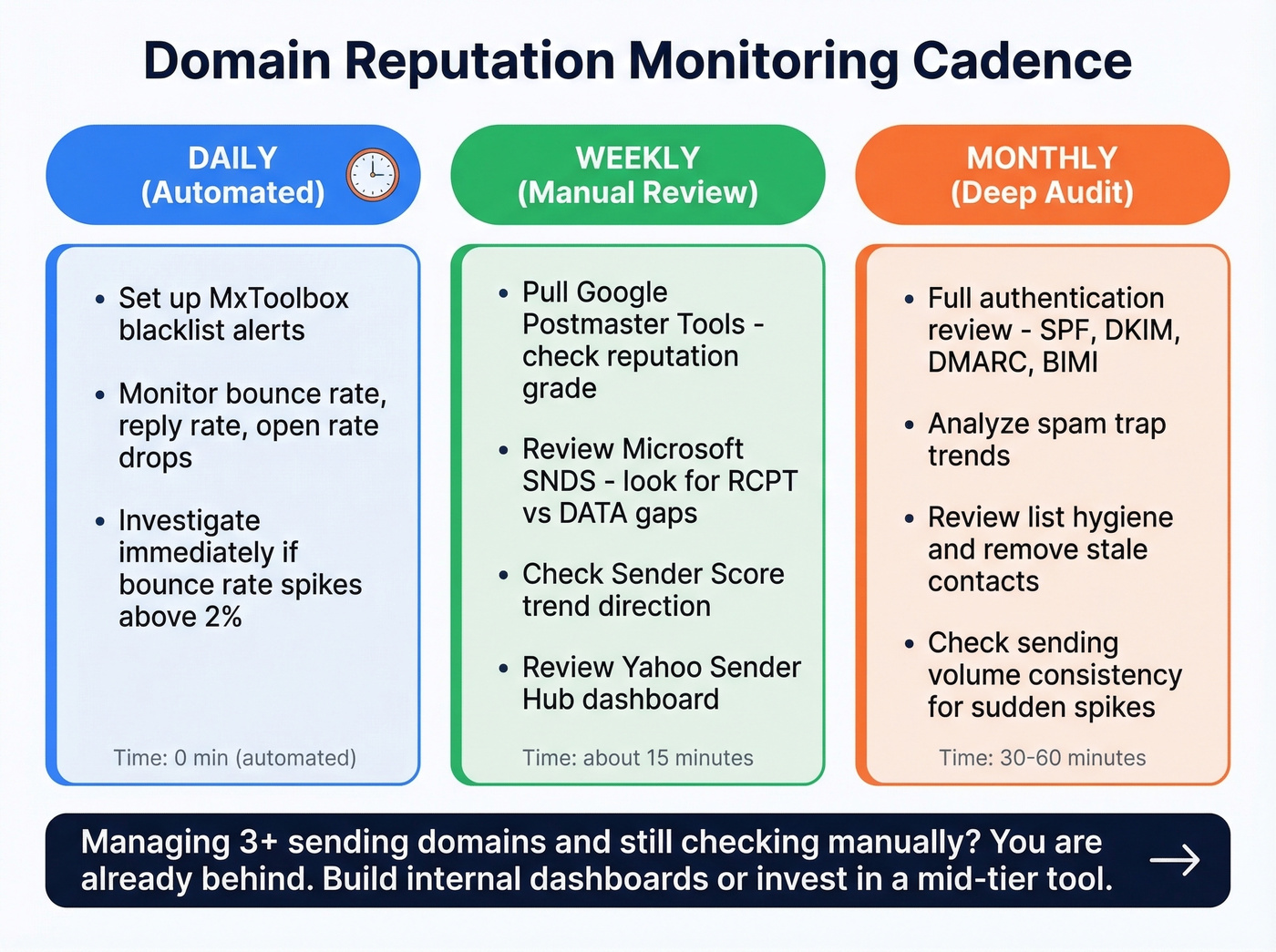
Weekly (manual review): Pull up Google Postmaster and check your reputation grade. Review the SNDS dashboard for any RCPT/DATA gaps. Check Sender Score for trend direction. This takes 15 minutes once you've got the routine down.
Monthly (deep audit): Run a full authentication review - SPF, DKIM, DMARC, and BIMI. Analyze spam trap trends. Review list hygiene and sending volume consistency. A sudden volume spike triggers scrutiny from providers even if your content is clean.
For teams managing more than 3 sending domains and still checking manually - you're already behind. Build internal dashboards or invest in a mid-tier tool that consolidates the data.
When Postmaster Shows Nothing
This is the #1 frustration we hear from practitioners. You set up Google Postmaster Tools, verify your domain, wait a week - and the dashboard is blank. Google won't publish the exact minimum volume threshold, but in practice it's roughly 100+ daily messages to unique Gmail recipients before data appears consistently.
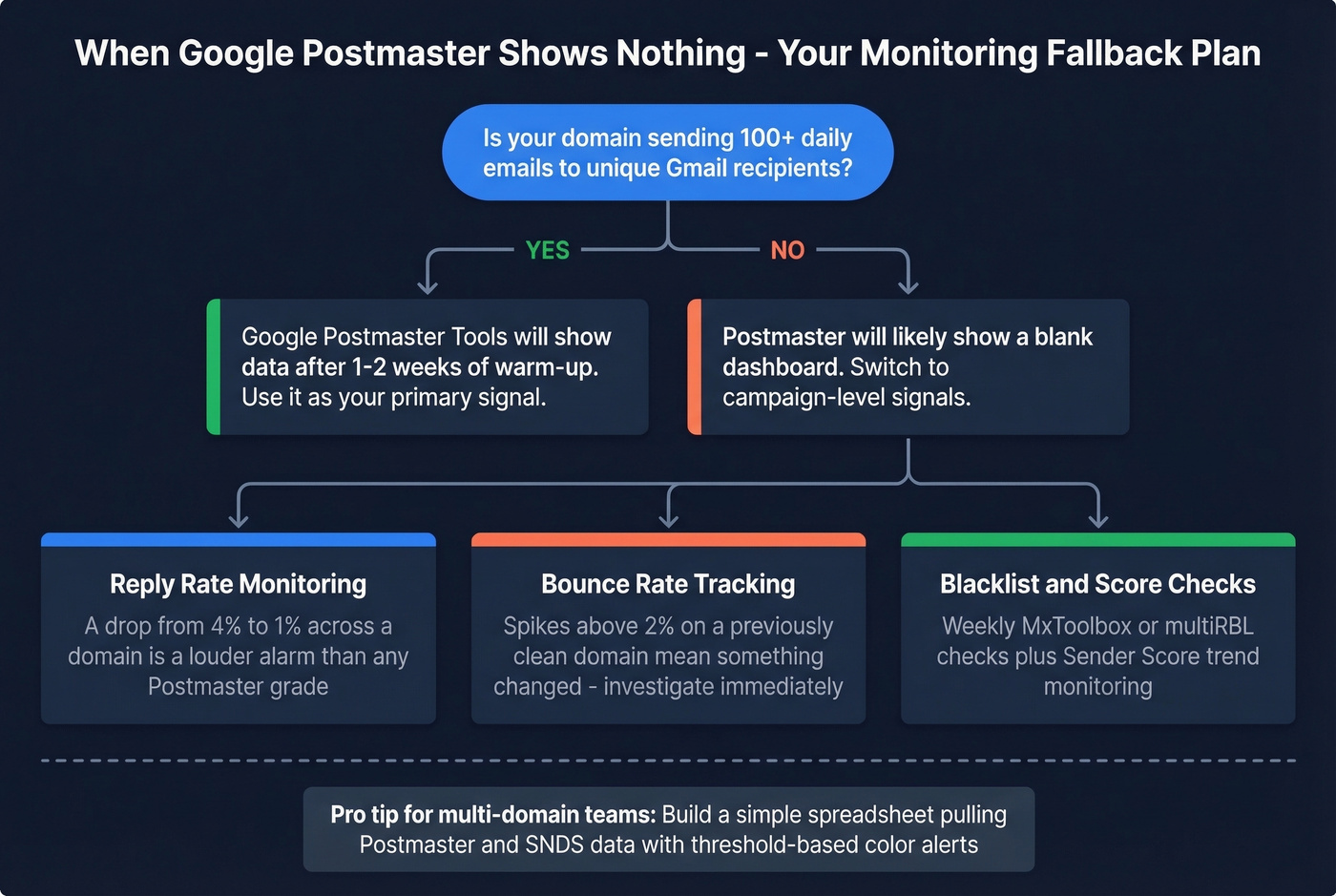
For cold email operators managing 10-50+ domains, this is a constant problem. Most of those domains send well under 100 emails/day to Gmail. The consensus on r/coldemail is that most teams end up building internal dashboards because the free tools simply don't cover low-volume domains. We've seen the same pattern across dozens of outbound teams - campaign metrics become the primary signal by default.
The workaround: a reply rate that drops from 4% to 1% across a domain is a louder alarm than any Postmaster grade. Bounce spikes above 2% on a previously clean domain mean something changed. Supplement with blacklist checks through MxToolbox or multiRBL and weekly Sender Score checks. For multi-domain teams, build a simple spreadsheet pulling Postmaster and SNDS data with threshold-based alerts.
When Reputation Tanks
Your bounce rate just spiked from 2% to 8% overnight. Here's the diagnostic checklist:
- Check blacklists first - MxToolbox or multiRBL. If you're listed, that's a primary cause to address before anything else. (If you’re on Spamhaus, follow a dedicated Spamhaus blacklist removal process.)
- Review Google Postmaster - has your reputation grade dropped from High to Low?
- Check SNDS - look for a large gap between RCPT and DATA counts.
- Audit recent list uploads - did you import a new data source? Stale records?
- Verify authentication - are SPF, DKIM, and DMARC all passing?
- Review sending volume - did you spike volume suddenly?
Recovery steps: submit delisting requests for any blacklists, pause sending from the affected domain, reduce volume dramatically and rebuild gradually. We've seen teams recover in as little as 6 weeks with aggressive list cleaning, but 8-12 weeks is more typical. There's no shortcut.
Why Data Quality Is Reputation Insurance
Every guide on domain reputation monitoring tells you which tools to use. Almost none of them address the root cause.
The upstream chain is simple: bad contact data leads to bounces from invalid emails, spam trap hits from stale lists, complaints from wrong-person outreach, and eventually reputation damage that takes months to undo. Monitoring without prevention is just watching your reputation die in slow motion. (If you need remediation, start with spam trap removal.)
The proof is in the results. Stack Optimize built from $0 to $1M ARR using verified data as the foundation - 94%+ deliverability across all clients, bounce rates under 3%, zero domain flags. Meritt cut bounce rates from 35% to under 4% and tripled their pipeline.
Prospeo's 5-step verification with spam-trap removal and honeypot filtering delivers 98% email accuracy on a 7-day refresh cycle. Compared to the 6-week industry average, that's the difference between catching a stale record before it becomes a spam trap and finding out after your domain is flagged. (If you're evaluating vendors, compare options in data enrichment services and email list providers.)
The best monitoring stack in the world can't save you from sending to a list full of dead addresses. Fix the input, and the monitoring becomes a safety net instead of a fire alarm.
Every bad email you send chips away at the domain reputation you're working so hard to monitor. Prospeo refreshes 300M+ profiles every 7 days - not every 6 weeks like competitors - so your lists never go stale enough to spike complaints or bounces.
Weekly-fresh data means fewer bounces, cleaner sends, and a domain reputation that stays healthy.
FAQ
What's the difference between domain reputation and IP reputation?
Domain reputation follows your sending domain across IPs and ESPs - you can't escape it by switching providers. IP reputation is tied to the server's IP address and can be rebuilt in 2-4 weeks. Providers increasingly weight domain signals more heavily, and domain recovery takes 6-12 weeks.
How do I check my domain reputation for free?
Use Google Postmaster Tools for Gmail grades, Microsoft SNDS for Outlook data, Yahoo Sender Hub for Yahoo/AOL, and MxToolbox for blacklist checks. Sender Score gives a 0-100 rating. EasyDMARC offers unlimited free lookups with no account required.
What spam complaint rate is too high?
Google and Yahoo require bulk senders to stay below 0.1%, and exceeding 0.3% triggers aggressive filtering that can take weeks to reverse. Monitor complaint rates daily through feedback loops and Postmaster Tools - a single bad list import can push you over the threshold.
Why does Google Postmaster Tools show no data?
Postmaster requires roughly 100+ daily messages to unique Gmail recipients before data populates. Low-volume domains - common in cold outbound - see blank dashboards indefinitely. Use campaign metrics like bounce rate, reply rate, and open rate trends as your primary signal instead.
How can I prevent reputation damage before it starts?
Verify every email address before sending. Tools with 98% accuracy catch invalid addresses, spam traps, and honeypots that destroy sender scores. Combine pre-send verification with consistent sending volume and proper SPF/DKIM/DMARC authentication for the strongest defense.