

The Practitioner's Guide to Drip Email Campaigns in 2026
2% of email send volume generates 41% of total email revenue. Let that sink in. The vast majority of email blasts you're sending - the newsletters, the promos, the "just checking in" broadcasts - account for a fraction of the money. The automated sequences running quietly in the background? They're doing the heavy lifting.
A drip email campaign isn't a nice-to-have. It's the highest-ROI email activity most teams aren't doing well, or aren't doing at all.
What You Need (Quick Version)
Automated flows generated 22x more revenue per recipient than one-off campaigns in a February 2026 ecommerce portfolio analysis. Start with a welcome series, because it nearly outearns all other workflows combined. Most guides skip deliverability; if your bounce rate is above 2-3%, fix your list before touching your copy. Three drip campaigns to build first: welcome series, abandoned cart (ecommerce) or lead nurture (B2B), and re-engagement.
What Is a Drip Email Campaign?
A drip email campaign is a sequence of pre-written, automated emails sent on a fixed schedule after a trigger event. Someone signs up for your newsletter - they get email one on day zero, email two on day three, email three on day seven. The sequence is predetermined. The timing is predetermined. You write it once, set the triggers, and let it run.
The key word is automated. Unlike a one-off campaign blast, a drip sequence fires based on when each individual enters the flow - ten people signing up on ten different days each get their own timeline, which is what makes drips scalable.
Think of it as the difference between broadcasting and conversing. A campaign blast is a megaphone. A drip sequence is a conversation that starts when the other person is ready.
Drip vs. Nurture
| Drip Campaign | Nurture Campaign | |
|---|---|---|
| Trigger | Time-based (fixed schedule) | Behavior-based (clicks, visits) |
| Personalization | Low-medium (same path) | High (adaptive branching) |
| Best for | Onboarding, reminders, education | Lead scoring, complex funnels |
A drip sends the same sequence to everyone on a clock. A nurture adapts - if someone clicks a pricing link, they get a different next email than someone who ignored the first three messages. In practice, most modern platforms blur the line. You'll start with drips and layer in nurture logic as you get more data on what your audience actually does.
Why Automated Sequences Outperform Everything Else
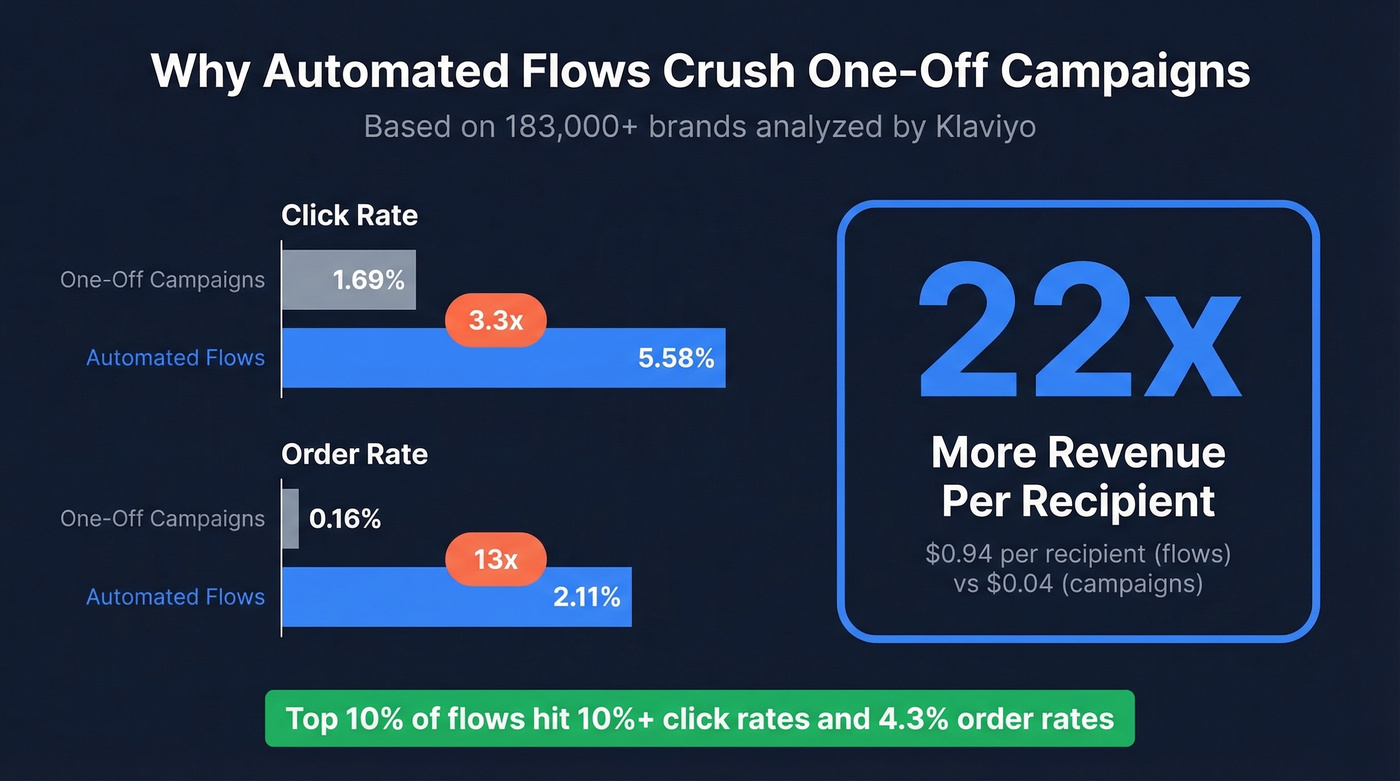
Klaviyo's benchmarks analyzed data from 183,000+ brands, and the gap between campaigns and automated flows is stark:
| Metric | Campaigns (one-off) | Automated Flows | Top 10% Flows |
|---|---|---|---|
| Click rate | 1.69% | 5.58% | 10.48% |
| Order rate | 0.16% | 2.11% | 4.30% |
Flows click at 3.3x the rate of campaigns and convert at 13x. Not a marginal improvement - a different category of performance entirely.
The revenue picture is even more dramatic. A BS&Co portfolio analysis across 11 ecommerce brands and 7.55 million recipients found flows generated $0.94 revenue per recipient versus $0.04 for campaigns - a 22x gap. Across the portfolio, email drove 25% of total store revenue, and flows did the heavy lifting.
Here's what makes this worse: only 20% of ecommerce merchants use segmentation at all. The ones who do earn 5x more revenue. Merchants using two or more segments earn 17x the revenue of those using a single segment. The opportunity isn't just in building automated email sequences - it's in building segmented ones, and almost nobody's doing it.
There's a strategic angle too. Every drip interaction generates first-party behavioral data - opens, clicks, replies, purchases. As third-party tracking continues to erode, your drip sequences become a data collection engine, not just a revenue channel.
What good looks like: If your automated flows hit 5%+ click rates and 2%+ conversion rates, you're performing at or above average. Top 10% performers hit 10%+ click rates. One caveat on open rates: Apple Mail Privacy Protection pre-fetches emails, which inflates open rate numbers. Treat open rates as directional. Click rate and conversion rate are the metrics that actually tell you what's working.
Examples and Types (With Timing Maps)
Welcome Series
Use this if: You have any kind of signup flow - email list, free trial, first purchase.
The welcome series is the single highest-revenue workflow. Per Drip's automation report, it almost earned more revenue than all other workflows combined, with a 24.46% click-through rate. Not a typo.
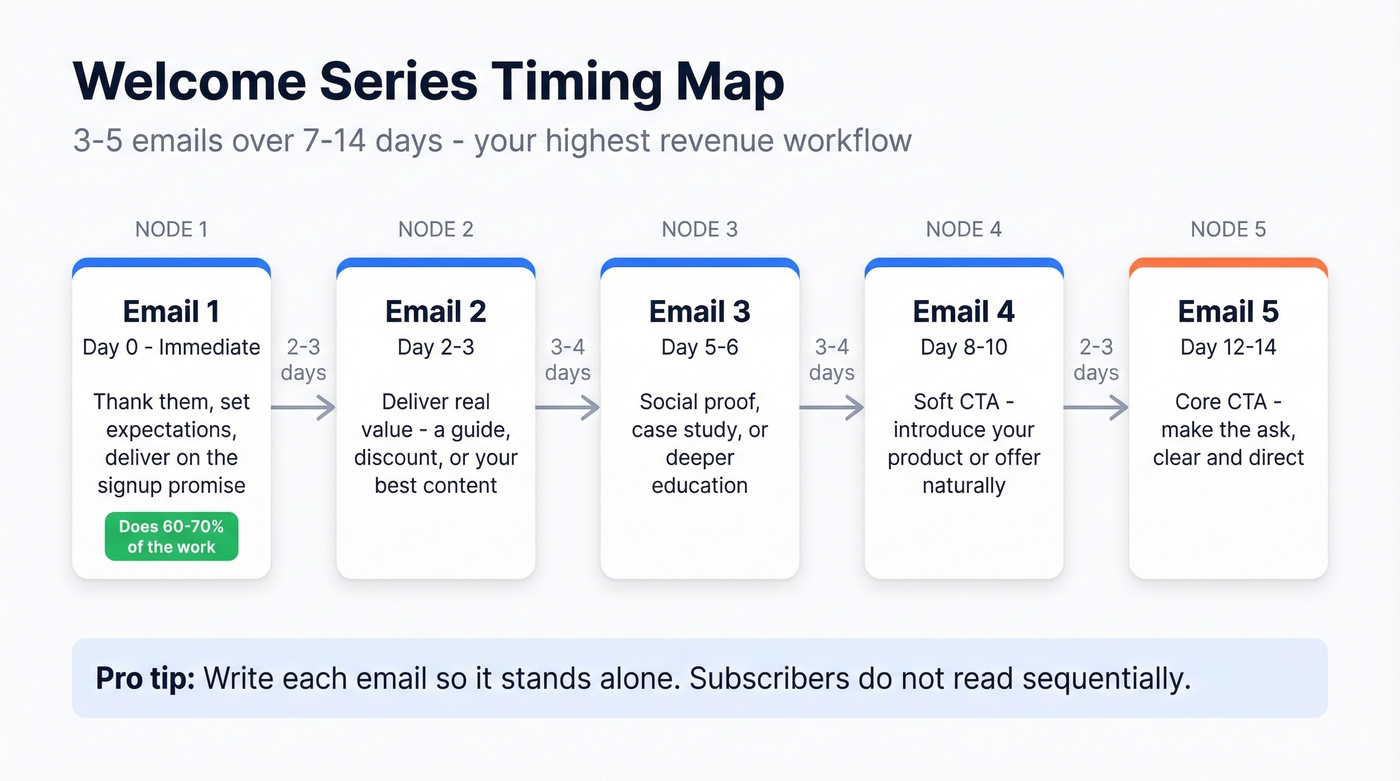
Build 3-5 emails over 7-14 days. Email one fires immediately - thank them, set expectations. Email two hits day two or three and delivers real value: a guide, a discount, your best content. Emails three through five space out to every 3-4 days, moving toward your core CTA. Don't sell hard in email one. Earn the right to ask. In our experience, the first email in a welcome series does 60-70% of the work - nail that one before optimizing the rest.
One principle worth internalizing: write each email so it makes sense on its own. Subscribers don't read sequentially. Someone might open email four without ever seeing emails two or three. If your fourth email references "the guide we sent last Tuesday," you've lost them.
Abandoned Cart
Use this if: You sell anything online and people leave without buying.
Skip this if: You don't have ecommerce, though B2B "abandoned demo" flows work on the same principle.
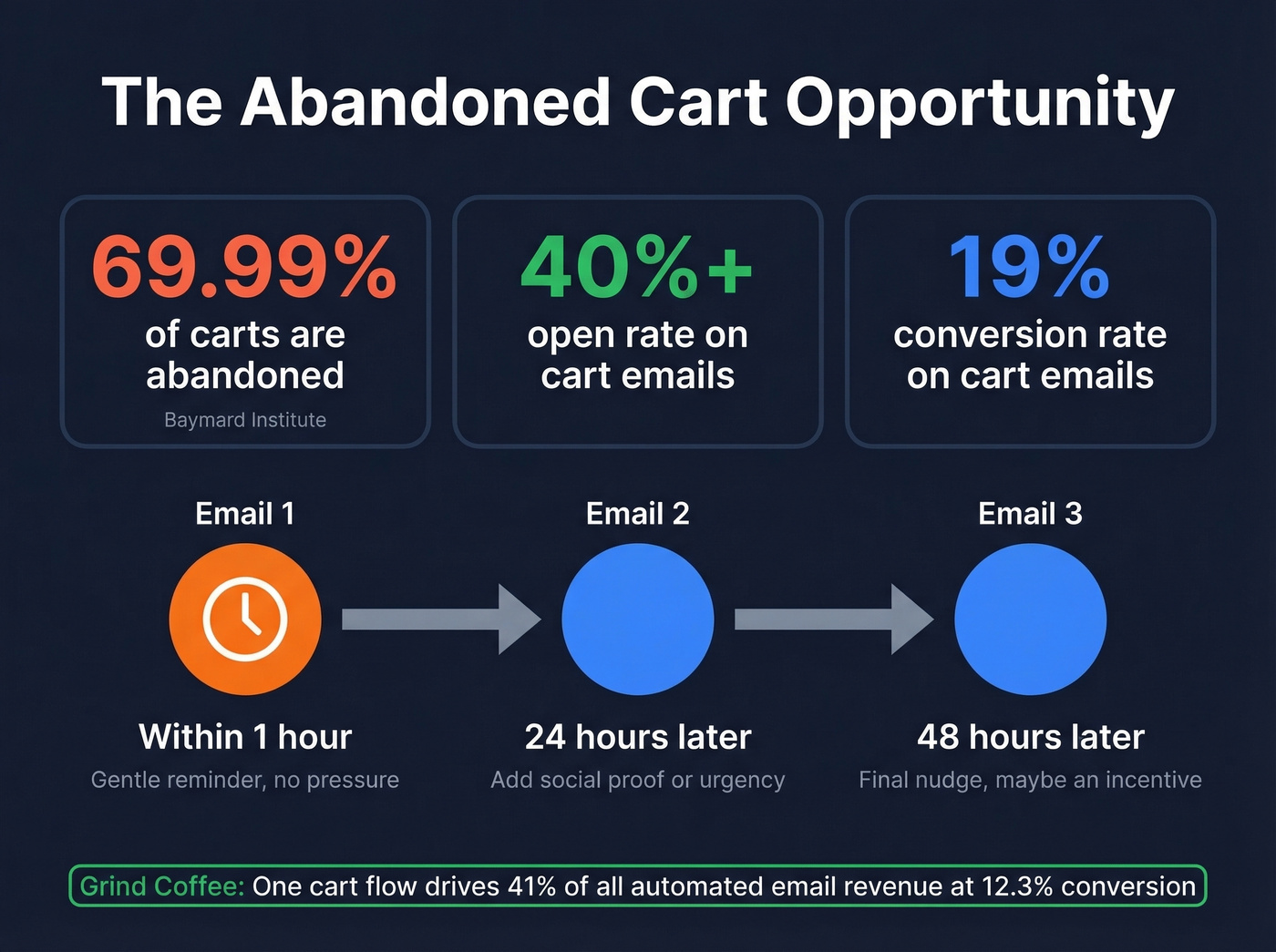
The Baymard Institute puts average cart abandonment at 69.99%. Seven out of ten people who add something to their cart walk away. Cart abandonment emails average 40%+ open rates and 19% conversion rates.
Timing matters enormously here. Send the first email within one hour of abandonment - not the next day. Follow up with one or two reminders over the next 48 hours. Grind, a coffee subscription brand, runs a cart flow that converts at 12.3% and drives 41% of their total automated email revenue. One flow doing nearly half the work.
A word of caution: don't show the exact item someone abandoned in the subject line. "You left your Patagonia Nano Puff in your cart!" feels surveillance-y. Promote the category or offer a general nudge instead. The goal is helpful, not creepy.
Post-Purchase & Replenishment
Use this if: You sell consumable or replenishable products, or you want to drive repeat purchases.
Grind's replenishment automation is a masterclass. They timed emails to when a customer would finish 30 coffee pods, converting at 4.4% and generating 19% of total flow revenue. Simple logic - you know what they bought, you know roughly when they'll run out, you email them before they do.
The Kewl Shop took a different approach: a 50-email weekly post-purchase series that drove 22% revenue growth over 12 months. Birthday and anniversary flows also perform well, with a 24.43% click-to-open rate. These aren't glamorous workflows, but they stack revenue month over month.
Re-Engagement / Winback
Use this if: You have a growing list of subscribers who've gone quiet.
Expect lower engagement here - you're emailing people who stopped paying attention. Winback workflows average a 7.21% click-through rate, which sounds low until you remember the alternative is losing those contacts entirely. Build 3-5 emails. Check in at the 3-month and 6-month marks. End with a "breakup email" - a final message that says "we're removing you from the list unless you want to stay." It works surprisingly well as a re-engagement trigger.
B2B Lead Nurture
Use this if: You're running outbound, trial nurture, or demo follow-up sequences.
B2B drip sequences operate on a different rhythm. Most B2B prospects need 7-11 touchpoints before they engage, so start with 6-10 emails as your baseline sequence. Space them 3-5 days apart early, then widen to weekly. Cold email reply benchmarks sit at 3-5.1% average, 10% for strong campaigns, and 15%+ for top quartile. If someone clicks a link in your sequence, follow up within 24 hours - that's a buying signal, and the window closes fast.
For B2B sequences, start with verified contact data. Prospeo's real-time verification catches invalid addresses, spam traps, and honeypots before they hit your ESP, so you're not burning sends on dead addresses or tanking your domain reputation before the sequence even starts.

Drip sequences only work when emails reach real inboxes. If your bounce rate is above 2-3%, your automation is leaking revenue before it starts. Prospeo delivers 98% email accuracy with 5-step verification - so every drip hits a real person, not a dead address.
Fix your list before you fix your copy. Start at $0.01 per verified email.
How to Build Your First Drip Sequence
Define Your Segment
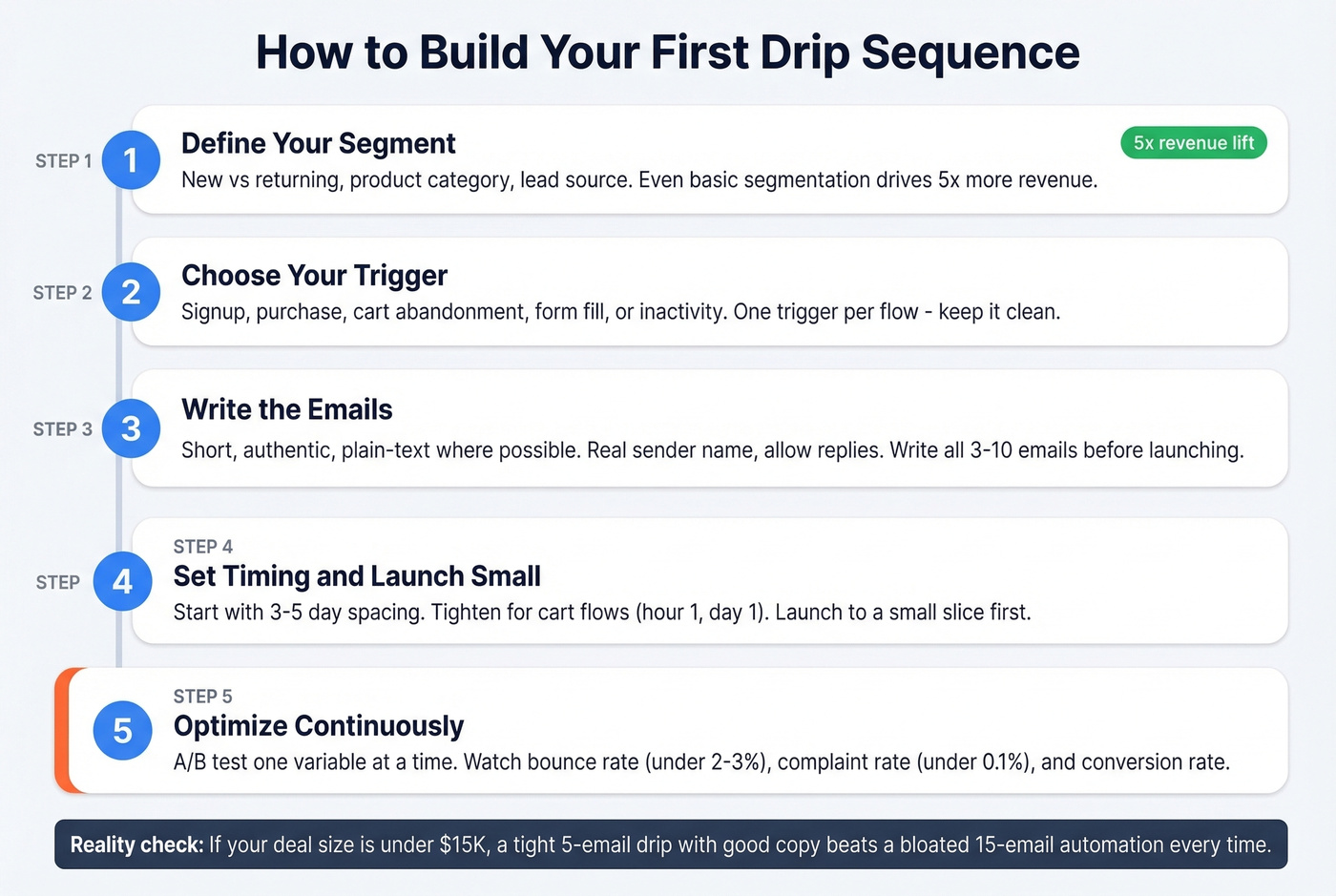
Don't drip everyone the same sequence. A first-time buyer and a returning customer need different messages. Even basic segmentation - new vs. returning, product category, lead source - drives 5x more revenue than no segmentation.
Choose Your Trigger
What event starts the sequence? Signup, purchase, cart abandonment, form fill, inactivity threshold. One trigger per flow. Keep it clean.
Write the Emails
Keep them short, authentic, and plain-text where possible. Use a real sender name - not "The Marketing Team." Allow replies (never use noreply@). Most sequences run 3-10 emails. Write them all before you launch so the narrative arc makes sense. Most modern platforms now offer AI subject line suggestions and send-time optimization - use them as a starting point, not a replacement for testing.
If you need a starting point for hooks and angles, pull from a swipe file of subject line suggestions and adapt them to your offer.
Set Timing and Launch Small
The timing and testing steps are where most teams either rush or overthink. Start with 3-5 day spacing as a baseline. Tighten the first two emails for time-sensitive flows like cart abandonment (day 0 and hour 1), widen spacing as the sequence progresses.
Launch to a small slice of your audience first. Watch bounce rates, complaint rates, and unsubscribes. Fix problems before scaling. Then optimize continuously - A/B test one variable at a time, monitor bounce rate (target under 2-3%), complaint rate (target under 0.1%), and conversion rate. The first version of your drip is never the best version.
Let's be honest: if your deal size is under $15K, you probably don't need a 15-email nurture sequence with behavioral branching. A tight 5-email drip with good copy will outperform a bloated automation that took your team three months to build. Complexity isn't a strategy.
The Deliverability Checklist Nobody Talks About
Look - 16.9% of marketing emails never reach the inbox. About 10.5% land in spam. Average inbox placement hovers around 83-85%. Roughly one in six of your carefully crafted emails is disappearing into the void, and most drip campaign guides pretend this problem doesn't exist.
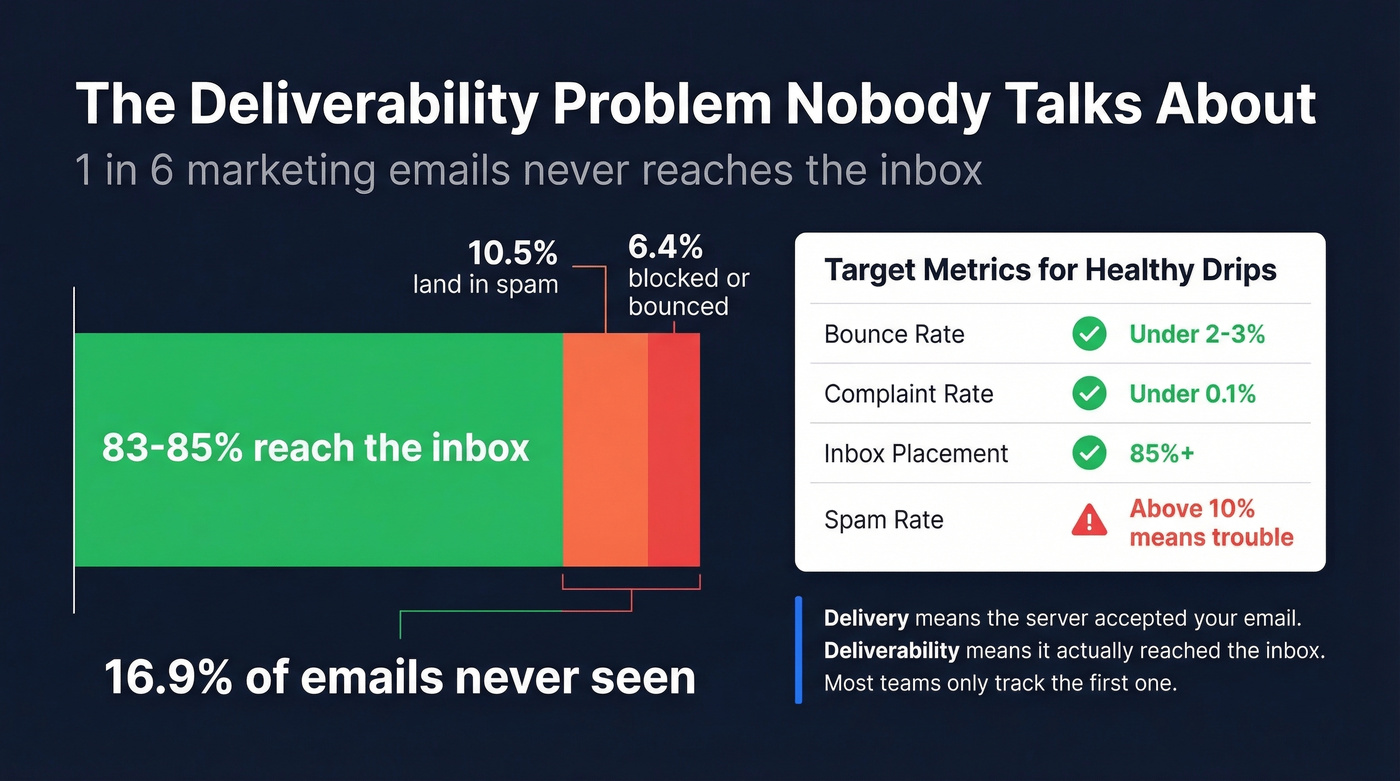
Understand the difference: Delivery means the server accepted your email (it didn't bounce). Deliverability means it reached the primary inbox - not spam, not promotions, not the void. A 98% delivery rate can coexist with a 70% inbox placement rate. They're different metrics.
Authentication is non-negotiable. Google, Yahoo, and Microsoft now enforce these:
- SPF + DKIM required for all senders, no exceptions
- DMARC required for bulk senders (5,000+ emails/day)
- One-click unsubscribe via List-Unsubscribe header, processed within 2 days
- Spam complaint rate below 0.3% - Google's recommended target is 0.1%
For DMARC, roll out gradually: start at p=none (monitoring only), move to quarantine, then reject. Don't jump straight to reject or you'll block your own legitimate emails. Once you're at DMARC quarantine or reject, you can set up BIMI to display your brand logo in the inbox - a trust signal that improves open rates.
If you want a deeper technical walkthrough, use this email deliverability guide as your checklist.
Clean your list before you launch. Before you send any drip sequence, run your list through a verification tool. A 5% bounce rate will tank your sender reputation fast. We've seen teams spend weeks perfecting copy only to discover half their emails were landing in spam because they never verified their list.
Expect higher unsubscribe rates on flows (~0.54%) than campaigns (~0.16%) - that's normal and healthy. People self-selecting out keeps your list clean.
Segmented drip campaigns earn 17x more revenue - but segmentation is useless without accurate contact data. Prospeo gives you 30+ filters including buyer intent, job changes, and technographics across 300M+ profiles, so every drip sequence targets the right person at the right moment.
Stop dripping into the void. Target in-market buyers with verified data.
Mistakes That Kill Your Drip Campaigns
No segmentation. 80% of ecommerce merchants skip segmentation entirely, despite the data showing a 5x revenue uplift for those who use it. Sending the same welcome series to a first-time visitor and a repeat buyer is leaving money on the table.
Wrong cadence. Too frequent and you'll spike unsubscribes. Too sparse and subscribers forget who you are. Start with 3-5 day spacing. Watch your unsubscribe rate by email position in the sequence - if email four has a spike, the gap between three and four is too short, or the content isn't earning its place.
Ignoring deliverability. SPF, DKIM, and DMARC aren't optional anymore. If you haven't authenticated your sending domain, your automated sequences are fighting with one hand tied behind their back. (If you need to troubleshoot, start with sender reputation and work outward.)
No A/B testing. Test one variable at a time. Subject line A vs. B. CTA button vs. text link. Morning send vs. afternoon. The teams that iterate on their drips outperform the teams that set and forget - every platform makes this easy now, so there's no excuse.
If you want to get more rigorous, use a simple click rate formula and track it by email position in the flow.
Bad contact data. If your bounce rate is above 3%, your data is the problem, not your copy. Invalid addresses, spam traps, and role-based emails silently destroy sender reputation, and once it's damaged, recovery takes months. If you're cleaning up a list, start with spam trap removal basics before you scale sends again.
Best Tools for Drip Campaigns
| Tool | Best For | Starting Price | Automation Depth | Key Limitation |
|---|---|---|---|---|
| Klaviyo | Ecommerce flows | $20/mo | Deep | Pricey outside ecom |
| ActiveCampaign | Complex automation | $15/mo (1K contacts) | Deepest | Steep learning curve |
| Brevo | Budget teams | $9/mo (free tier) | Moderate | Limited advanced logic |
| MailerLite | Beginners | $10/mo | Basic-moderate | Outgrows fast |
| Kit (ConvertKit) | Creators | Free up to 10K / $39/mo | Moderate | Limited for ecom |
| Omnisend | Ecom on a budget | ~$15-20/mo (free tier) | Moderate-deep | Smaller ecosystem |
| Mailchimp | Up to 500 contacts | Free / $13/mo paid | Basic | Automation gated |
Klaviyo
The default for ecommerce, and for good reason. Shopify and WooCommerce integrations are best-in-class, and the flow builder handles complex branching without much fuss. Starts at $20/mo. The catch: the consensus on r/MarketingAutomation is that Klaviyo is overpriced if you're not running an ecommerce store. If you're B2B or content-focused, you're paying a premium for features you won't use. For teams that live and breathe ecommerce, though, it's hard to beat - the pre-built flow templates alone save hours of setup, and the revenue attribution reporting is genuinely useful for proving ROI to stakeholders who question the email budget.
ActiveCampaign
The learning curve is brutal - practitioners on r/MarketingAutomation consistently flag this - but if you survive onboarding, you get the deepest automation builder on this list. Conditional logic, lead scoring, multi-path branching, CRM built in. Starts at $15/mo for 1,000 contacts. We've tested most of these platforms, and ActiveCampaign's automation builder is genuinely the most powerful. Budget a full week for setup. Pricing ramps fast once you pass 10K contacts.
Brevo
Best budget option for small teams. The free tier gives you 300 emails per day, and paid plans start at $9/mo. The automation builder is simpler than ActiveCampaign or Klaviyo, but it covers the basics well. For a team of 1-3 people running straightforward automated sequences, Brevo gets you there without the overhead.
The Rest of the Field
MailerLite ($10/mo) is simple, clean, and affordable - a great starting point for beginners who want a welcome series running without a week of onboarding. You'll outgrow it once your automation needs get complex. Kit (ConvertKit) is creator-focused, built for newsletters, courses, and digital products. Free up to 10,000 contacts, paid from $39/mo. Not the right tool for ecommerce or complex B2B sequences, but excellent for solo creators.
Omnisend (~$15-20/mo, free tier available) is the ecommerce alternative to Klaviyo that's usually cheaper. If Klaviyo's pricing makes you flinch but you need solid ecommerce automation, give it a trial - the pre-built flows get you running fast. Mailchimp is fine for up to 500 contacts. The email editor is genuinely easy to use, and the free tier gets you started. Paid plans from $13/mo. But automation is limited on free and lower tiers - you'll hit walls quickly. Think of it as training wheels.
FAQ
How many emails should a drip campaign have?
Most sequences run 3-10 emails. Welcome series: 3-5 over 7-14 days. Abandoned cart: 2-3 within 48 hours. B2B lead nurture: 6-10 over several weeks. Start shorter and extend based on engagement - if your last email still gets clicks, add another.
What's the difference between a drip campaign and a nurture campaign?
Drip campaigns follow a fixed, time-based schedule - every subscriber gets the same emails at the same intervals. Nurture campaigns adapt based on recipient behavior like clicks, page visits, and downloads. Most modern platforms let you blend both approaches as you gather engagement data.
What's a good click rate for automated email flows?
Klaviyo's benchmarks across 183,000+ brands show a 5.58% average click rate for automated flows, with top 10% performers hitting 10.48%. One-off campaigns average just 1.69%. Focus on click rate and conversion rate over open rate - Apple Mail Privacy Protection makes opens unreliable.
How do I stop drip emails from landing in spam?
Authenticate your domain with SPF, DKIM, and DMARC. Keep your complaint rate below 0.3% (target 0.1%). Include one-click unsubscribe in every email. Verify your list before launching - tools like Prospeo catch invalid addresses and spam traps, keeping your bounce rate low and your sender reputation intact.
What's the best free tool for starting a drip email campaign?
For ecommerce, Omnisend's free tier includes basic automation flows. For creators, Kit (ConvertKit) is free up to 10,000 contacts. Mailchimp covers up to 500 contacts free but gates automation features. For B2B teams, pair any of these with a verification tool to keep your list clean from day one - bad data is the fastest way to kill a new drip sequence before it gains traction.