

Dynamic Content in Emails: What It Is, How It Works, and How to Use It
You send 10,000 emails with the same hero image, the same CTA, the same opening line - and wonder why reply rates sit at 2%. The problem isn't your copy. It's that you're treating every recipient like the same person. Dynamic content in emails fixes this, and it's simpler than most teams think.
What Is Dynamic Email Content?
Dynamic content is email content that changes automatically based on who's receiving it. Unlike basic mail merge - where you swap in a first name and call it personalization - dynamic content replaces entire blocks of your email. Different images, different CTAs, different paragraphs, different product recommendations. All from a single template.
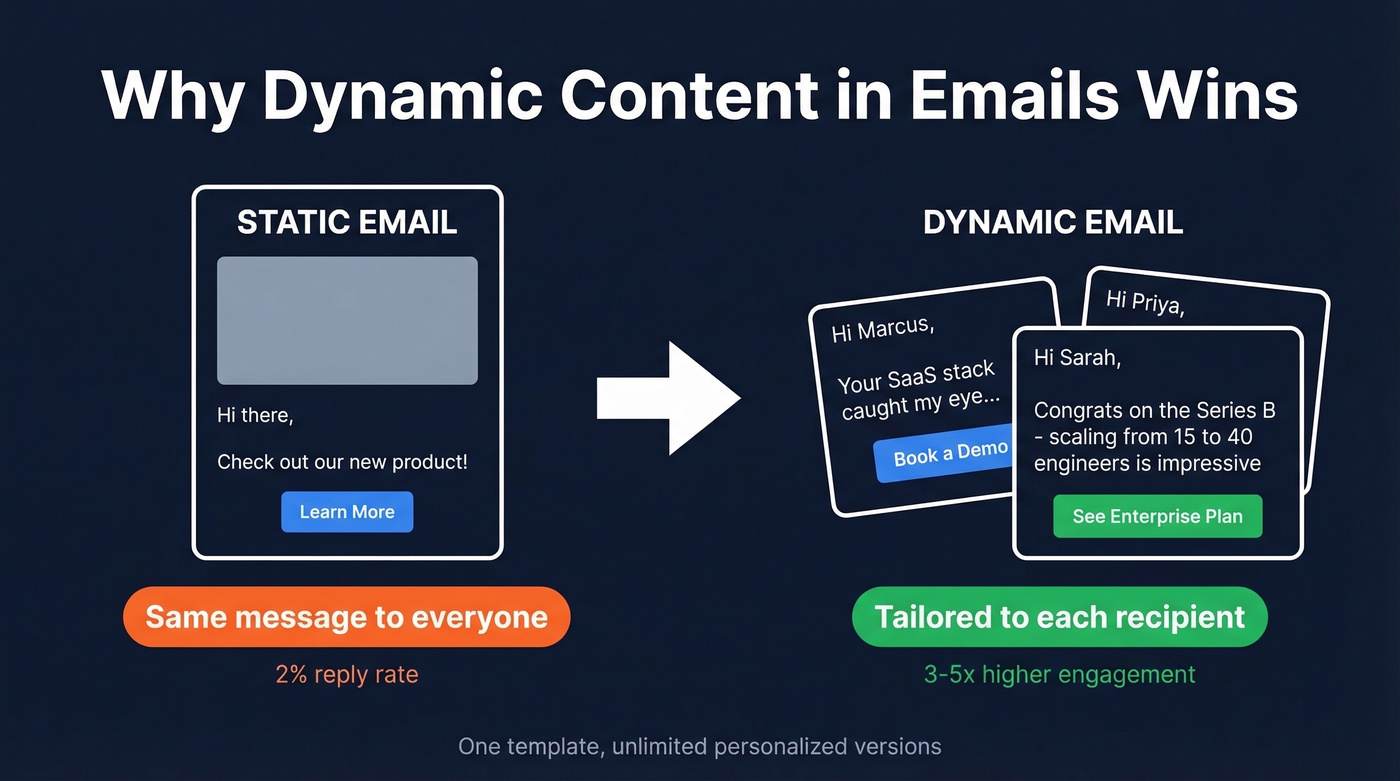
It's conditional logic applied to email design. If the recipient is a VP of Engineering at a Series B company, they see one version. If they're a marketing director at an enterprise, they see another. Same send, completely different experience.
The impact isn't subtle. Personalized email blocks improve engagement by making messages relevant, and it's one of the easiest ways to deliver personalization at scale without manually building 15 email variants. And personalization moves revenue - 82% of consumers say they'd buy more if marketing emails had better personalization.
What You Need Before You Start
Before you touch a single conditional block, three things need to be in place.
Clean, segmented data. Dynamic content is only as good as the variables feeding it. Job title, company size, industry, tech stack - if these fields are empty or wrong, your "personalized" email looks broken or generic.
An ESP or outreach platform that supports dynamic blocks. Most modern tools do. You need if/then logic at the content-block level, not just merge tags. We cover the best options further down.
Get these three right and you're 90% of the way there.
Types of Dynamic Content
Not all dynamic content works the same way. Here's what you can swap inside an email:
| Type | What Changes | Best For |
|---|---|---|
| Personalized text | Name, company, title | Cold outreach, newsletters |
| Conditional images | Hero image, product shots | E-commerce, ABM |
| Dynamic CTAs | Button text, link destination | Lifecycle emails |
| Location-based | Currency, language, events | Global campaigns |
| Behavior-triggered | Content based on past actions | Re-engagement, nurture |
| Product recs | Recommended items/features | E-commerce, SaaS upsell |
Personalized text is where most teams start - and honestly, it's where you get the biggest bang for the least effort. More relevant subject lines and intros lift opens and clicks because the email feels like it was written for the reader, not blasted to a list. If you want to push this further, pair it with proven cold email subject line examples.
Some platforms also support open-time personalization, where content updates when the recipient opens the email rather than when it's sent. Countdown timers are the classic example, and they're worth testing if your ESP supports them.
How Dynamic Content Works
The mechanics are less complicated than they sound. Let's break it down.
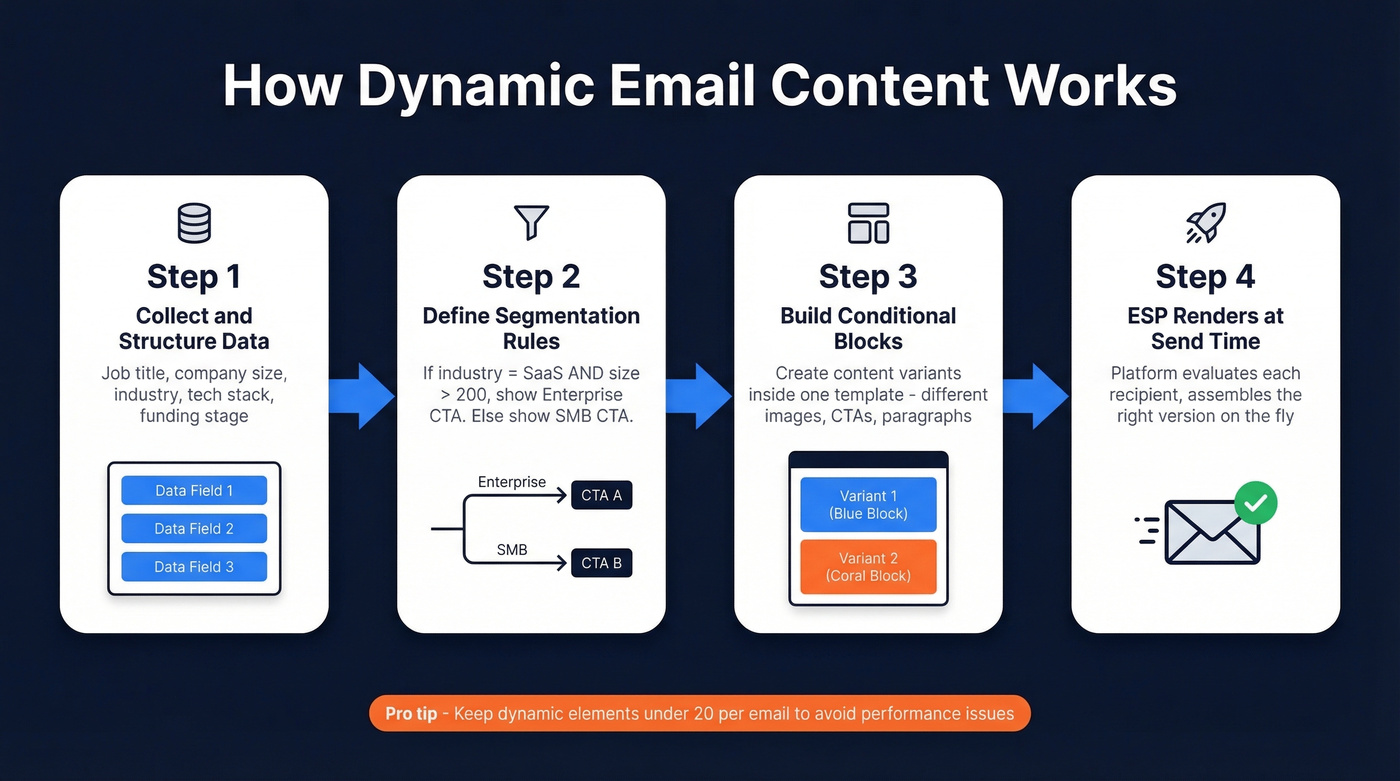
Step 1: Collect and structure your data. Every dynamic variable needs a corresponding data field. If you want to personalize by tech stack, you need a "tech stack" column in your CRM or outreach tool. Enrichment platforms earn their keep here - they fill in dozens of fields you'd never collect manually. (If you're comparing providers, see data enrichment services.)
Step 2: Define your segmentation rules. These are the if/then conditions that drive what each recipient sees. "If industry = SaaS AND company size > 200, show Enterprise CTA. Else, show SMB CTA." Most ESPs let you build these visually without writing code. This is also where intent based segmentation can make your dynamic blocks feel dramatically more relevant.
Step 3: Build conditional blocks in your template. Inside your email editor, create content blocks tied to your rules. One block for each variant. The ESP stores all versions in a single template.
Step 4: The ESP renders at send time. When the email fires, the platform evaluates each recipient against your rules and assembles the right version on the fly. The recipient never sees the logic - just a clean, personalized email.
One practical limit: keep dynamic elements under 20 per email to avoid performance issues. Adobe recommends this cap for dynamic content setups, and we've found it holds true in practice.
A common workflow shared across outbound communities goes: data collection, segmentation, content creation, automation tooling, testing, implementation, monitoring, feedback loops, compliance. It's straightforward, but most teams skip the testing step and pay for it with broken renders.
Litmus has a solid breakdown of dynamic content examples showing how brands use countdown timers and behavior-based content to make emails more relevant.

Dynamic content only works when the data behind it is accurate. Prospeo enriches every contact with 50+ data points - job title, tech stack, funding, headcount growth - at an 83% match rate. Fields that map directly to your dynamic variables, no manual research.
Stop personalizing emails with broken data. Start with fields you can trust.
Real-World Examples
B2B cold outreach - dynamic intro by prospect context
A static cold email opens with "I noticed your company is growing." A dynamic version opens with "Congrats on the $12M Series B - scaling the engineering team from 15 to 40 in six months is no joke." We've tested dynamic intros against static ones across multiple campaigns, and dynamic context consistently wins when the data is accurate.
To pull this off, you need enrichment data feeding your email variables: tech stack, funding signals, headcount growth. Prospeo's enrichment returns these as structured fields - 50+ data points per contact with an 83% match rate - that map directly to your dynamic variables without manual research. (If you're building a repeatable outbound motion, start with a solid B2B cold email sequence.)

E-commerce - product recommendations by browse history
Picture the difference:
Static version: "Check out our new arrivals!"
Dynamic version: Three products the customer actually viewed, plus a related item they haven't seen yet.
This kind of relevance is exactly why conditional email blocks improve click-through rates. You're matching the message to what the reader already cares about.
SaaS onboarding - dynamic CTA by plan tier
Free-tier users see "Upgrade to Pro" with a feature comparison. Pro users see "Explore Enterprise" with an ROI calculator. Same sequence, different conversion paths. This is the easiest dynamic content implementation and one of the highest-ROI - skip it if you're only running cold outreach, but for product-led growth teams, it's a no-brainer.
Getting Your Data Right
Here's the thing: dynamic content with bad data is worse than no dynamic content at all.
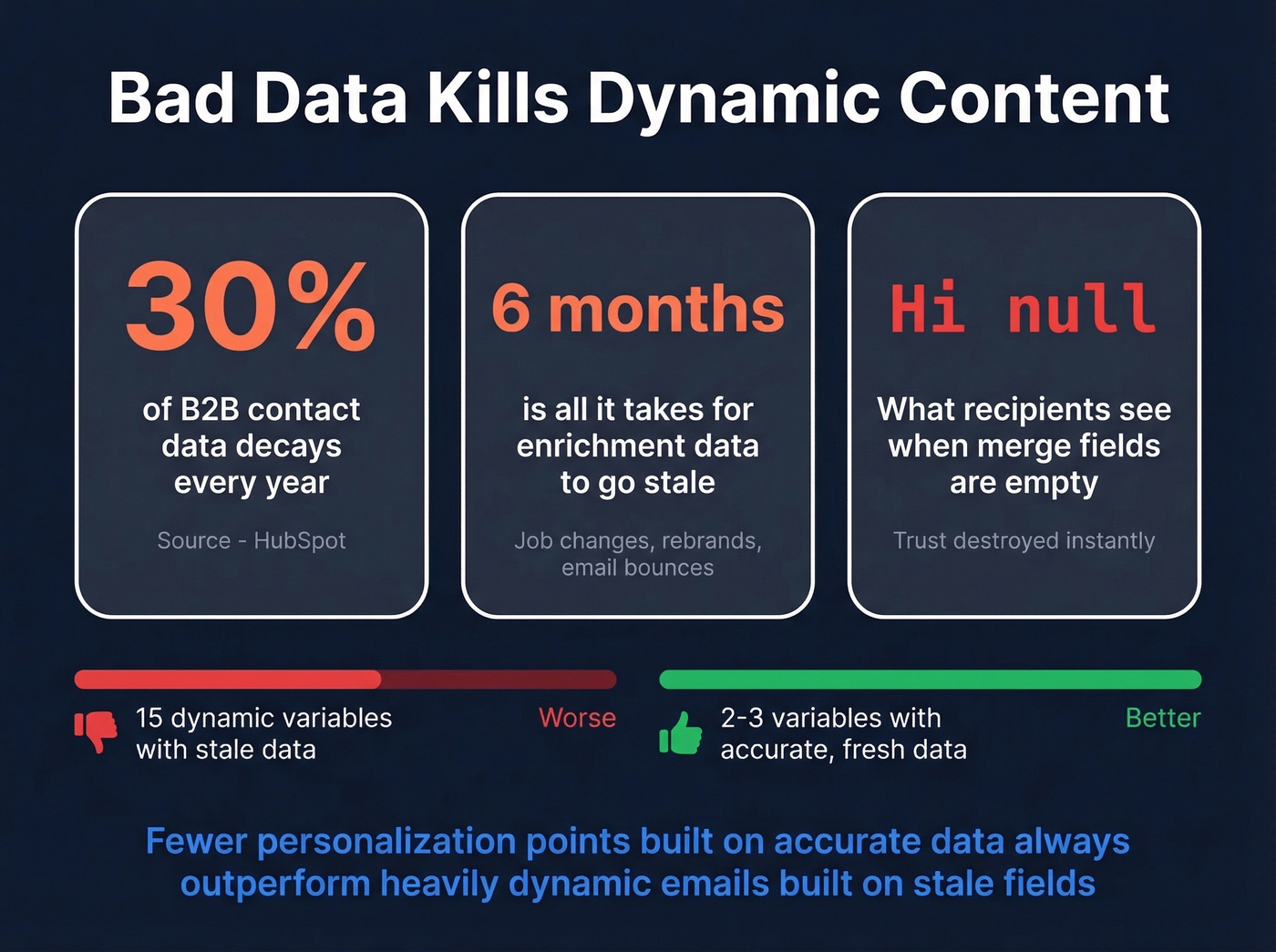
"Hi {{first_name}}" rendering as "Hi null" destroys trust instantly. And that's the mild version - wrong job titles, outdated company names, and bounced emails are the real killers. I've seen teams spend weeks building sophisticated dynamic sequences only to watch deliverability crater because a chunk of their list was invalid. The personalization was beautiful. The emails just never arrived.
B2B contact data decays fast. People change jobs, companies rebrand, email addresses go stale. If you're running personalized blocks off data you enriched six months ago, a meaningful chunk of your personalization references information that's no longer true. HubSpot's research on data decay puts the annual decay rate for B2B contact data at roughly 30%. If you want to protect performance while scaling, follow a real email deliverability guide and monitor your email bounce rate.
If your deal sizes are in the SMB range, you probably don't need 15 dynamic variables per email. Two or three well-chosen personalization points built on accurate data will outperform a heavily dynamic email built on stale fields every time.

Tools for Dynamic Email Content
You need two layers: a platform that renders dynamic content, and a data source that feeds the variables.
| Tool | Role | Dynamic Feature | Best For | Starting Price |
|---|---|---|---|---|
| Prospeo | Data layer | 50+ enrichment fields, verified emails | Data accuracy & enrichment | Free tier; paid plans available |
| HubSpot | ESP / CRM | Smart content modules | All-in-one marketing teams | Free CRM; smart content requires ~$890/mo |
| Lemlist | Outreach | Dynamic images, variables | Visual cold outreach | ~$39/mo |
| Smartlead | Outreach | Conditional sequences | High-volume outbound | ~$39/mo |
| Instantly | Outreach | Dynamic variables, A/B | Budget-friendly scale | ~$30/mo |
The outreach platforms handle the rendering. The data layer handles the variables.
For teams already using Smartlead, Instantly, Lemlist, HubSpot, or Salesforce, Prospeo integrates natively - enriched contact data flows directly into your dynamic variables without manual CSV imports. One thing to watch: advanced automation features like conditional logic and personalized blocks are typically locked behind mid-tier plans. Budget accordingly, especially with HubSpot, where the gap between free and dynamic-content-capable is significant. If you're evaluating your stack, compare options in our SDR tools guide.
If you're just getting started and budget is tight, Instantly at ~$30/mo paired with Prospeo's free tier gives you dynamic variables and verified data without a big upfront commitment.
Common Mistakes to Avoid
We've seen the fallback value issue alone account for more broken personalization than any other mistake. Here are the five that trip up the most teams:
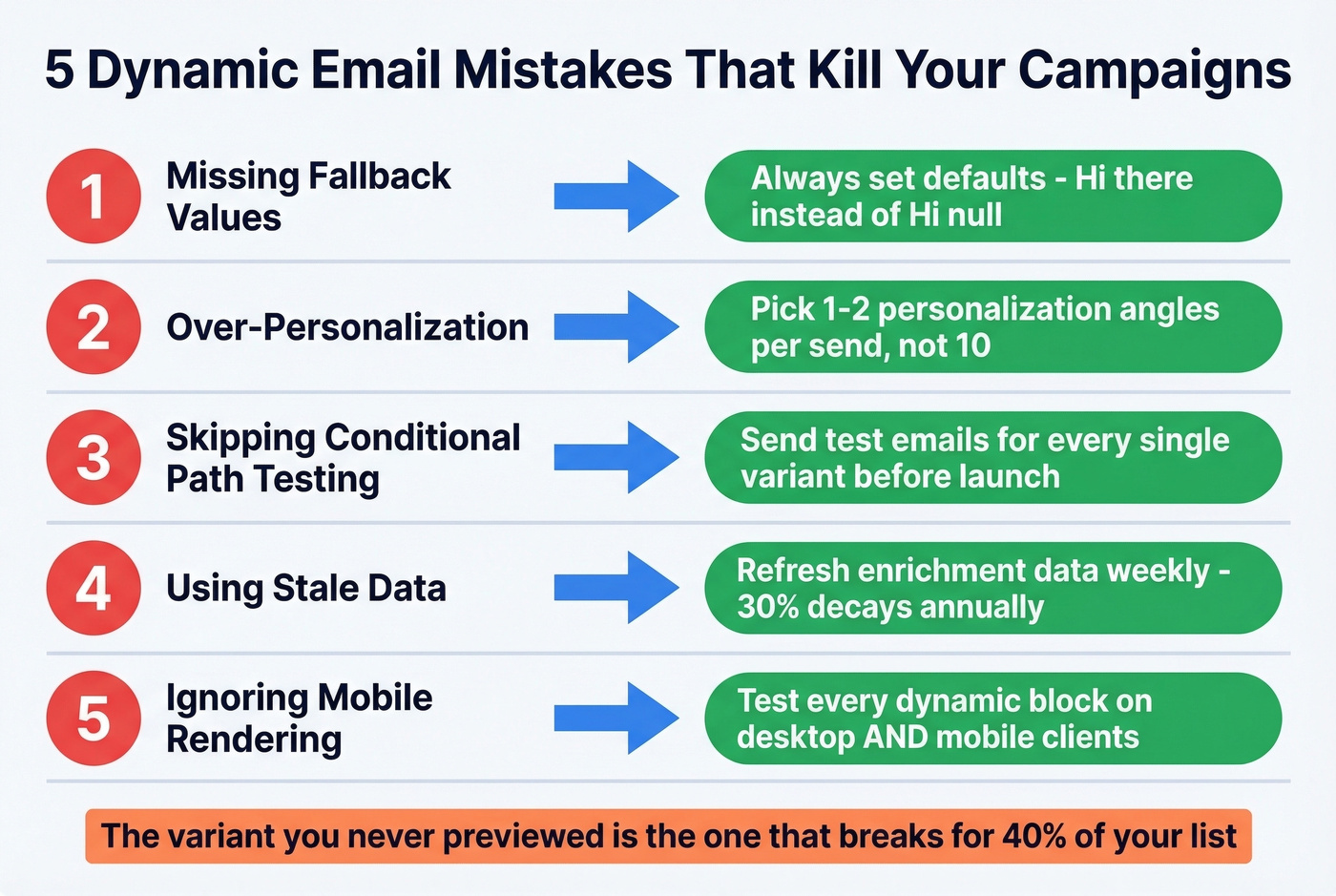
Missing fallback values. If a merge field is empty, your email should default to something sensible. "Hi there" instead of "Hi {{first_name}}." Always set fallbacks for every dynamic variable - no exceptions.
Over-personalization. Referencing someone's exact browsing history, location, and recent purchases in one email crosses from helpful to creepy. Pick one or two personalization angles per send.
Not testing conditional paths. Send test emails for every conditional path. The variant you never previewed is the one that renders broken for 40% of your list. The consensus on r/coldemail is that this single step prevents most "personalization horror stories." If you're tightening your process, borrow a few sales follow-up templates to standardize what happens after the first send.
Using stale data. Personalized content referencing a job title someone left eight months ago undermines your credibility. Refresh your data regularly - weekly if possible.
Ignoring mobile rendering. Dynamic image blocks and multi-column layouts often break on mobile. Test every variant on both desktop and mobile before sending. Email on Acid's rendering guide is a good reference for cross-client testing.
Your dynamic intros need funding signals, technographics, and headcount data to actually convert. Prospeo's 30+ search filters and 7-day data refresh give you the freshest context for every prospect - at $0.01 per verified email.
Feed your dynamic blocks real-time prospect data instead of stale CRM fields.
FAQ
What's the difference between dynamic content and mail merge?
Mail merge swaps a single variable - typically a name or company. Dynamic content in emails changes entire blocks, including images, CTAs, and full paragraphs, based on conditional rules. It's the difference between inserting a name and building a different email experience per segment.
Does dynamic email content hurt deliverability?
Not inherently. The risk comes from the data underneath. If your contact list has invalid addresses, personalized emails bounce, and bounces tank sender reputation fast. Use verified emails with 98%+ accuracy to protect deliverability while scaling personalization.
What data do I need to start?
At minimum: name, company, and job title. For advanced personalization, add tech stack, company size, funding stage, and buyer intent signals. Enrichment platforms can return 50+ data points per contact, giving you a deep variable library without manual research.
Can I use dynamic content in cold outreach?
Yes - and it's one of the highest-impact use cases. Dynamic intros referencing a prospect's tech stack, recent funding, or headcount growth outperform generic templates. The key is accurate, fresh enrichment data powering those variables so personalization feels relevant, not outdated.