

The 9 Best Email Address Extractors in 2026 - And Why Extraction Alone Isn't Enough
You scraped 1,000 emails from a prospect list last Tuesday. By Friday, your first sequence bounced 23% of them. Your domain reputation took a hit, deliverability tanked, and you spent the weekend cleaning up a mess that a better email address extractor would've prevented entirely.
That's the core problem with email extraction: getting addresses is easy. Getting good addresses is the hard part. Email lists decay by roughly 23% every year, and anything above a 2% bounce rate starts triggering spam filters. Unverified lists often bounce 10-25%+ depending on list age. The tool you pick matters less for what it extracts and more for what it does after extraction.
Our Picks (TL;DR)
| Tool | Best For | Starting Price | Verification Included? |
|---|---|---|---|
| Prospeo | B2B prospecting | Free (75 emails/mo) | Yes - 5-step |
| Hunter | Free Chrome extension | Free (50 searches/mo) | Yes - basic |
| Snov.io | Extraction + outreach | $39/mo (5K credits) | Yes |
| Mailmeteor | Free URL crawling | Free (extractor) | No |
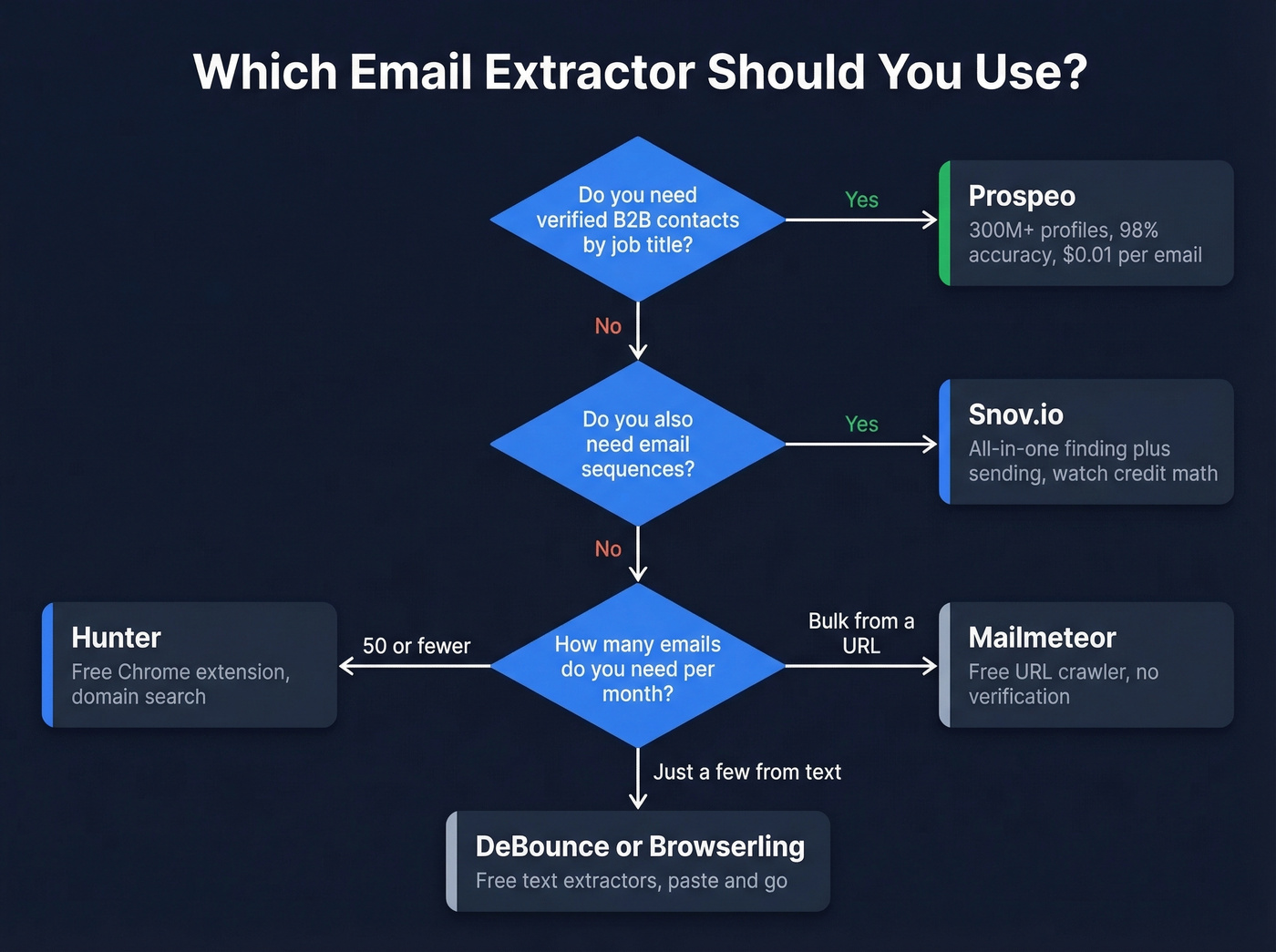
Prospeo is the pick if you want verified B2B emails without scraping anything. Hunter is the best free extension for quick lookups. Snov.io bundles extraction with email sequences. And Mailmeteor is the fastest way to crawl a URL for free with zero signup.
Here's the thing: most teams shopping for an extraction tool don't actually need a scraper. They need a database. Scraping visible emails off websites gives you whatever a company decided to publish - usually role-based inboxes like info@ and sales@. A B2B database gives you the VP of Engineering's verified work email directly. If your deal sizes run above $5k, skip the scraping entirely and go straight to a sales prospecting database platform.
Three Types of Extractors
Not all extraction tools work the same way, and picking the wrong type wastes time.

Text-based extractors are the simplest. You paste raw text - a webpage, a document, a spreadsheet - and the tool runs regex patterns to pull anything that looks like an email address. DeBounce and Browserling fall here. They're fast, free, and dumb. No verification, no enrichment, no context about who owns the address.
URL crawlers go a step further. You enter a website URL, and the tool crawls internal pages, scans HTML, follows links, and collects every email it finds. Many modern web contact extractors also handle subpage scraping and pagination. The limitation: crawlers only find emails that are publicly visible on the site. (If you're comparing crawler-style tools, see our guide to email crawlers.)
B2B database platforms skip scraping entirely. You search by filters - job title, company size, industry, location - and get verified contact data back. Instead of hoping a website publishes the VP of Sales' email, you just look them up. These platforms function as an extraction and enrichment engine rolled into one, which is why we've seen them replace standalone scrapers for most serious outbound teams.

The category you need depends on your workflow. Scraping a conference sponsor page for quick emails? A text extractor works. Building a targeted outbound list of 500 decision-makers? You need a database.
When evaluating any email extraction tool, look for five capabilities: bulk URL handling, CSV/JSON export, built-in deduplication, source URL metadata so you know where each address came from, and verification or confidence scoring on every result. (For the enrichment step, compare top data enrichment services.)
9 Best Tools for Extracting Emails in 2026
Prospeo - Best for B2B Prospecting
Skip scraping entirely. Prospeo's database covers 300M+ professional profiles with 143M+ verified emails, all refreshed on a 7-day cycle. That refresh rate matters - the industry average is around 6 weeks, which means most competitors are serving you data on people who changed jobs a month ago.
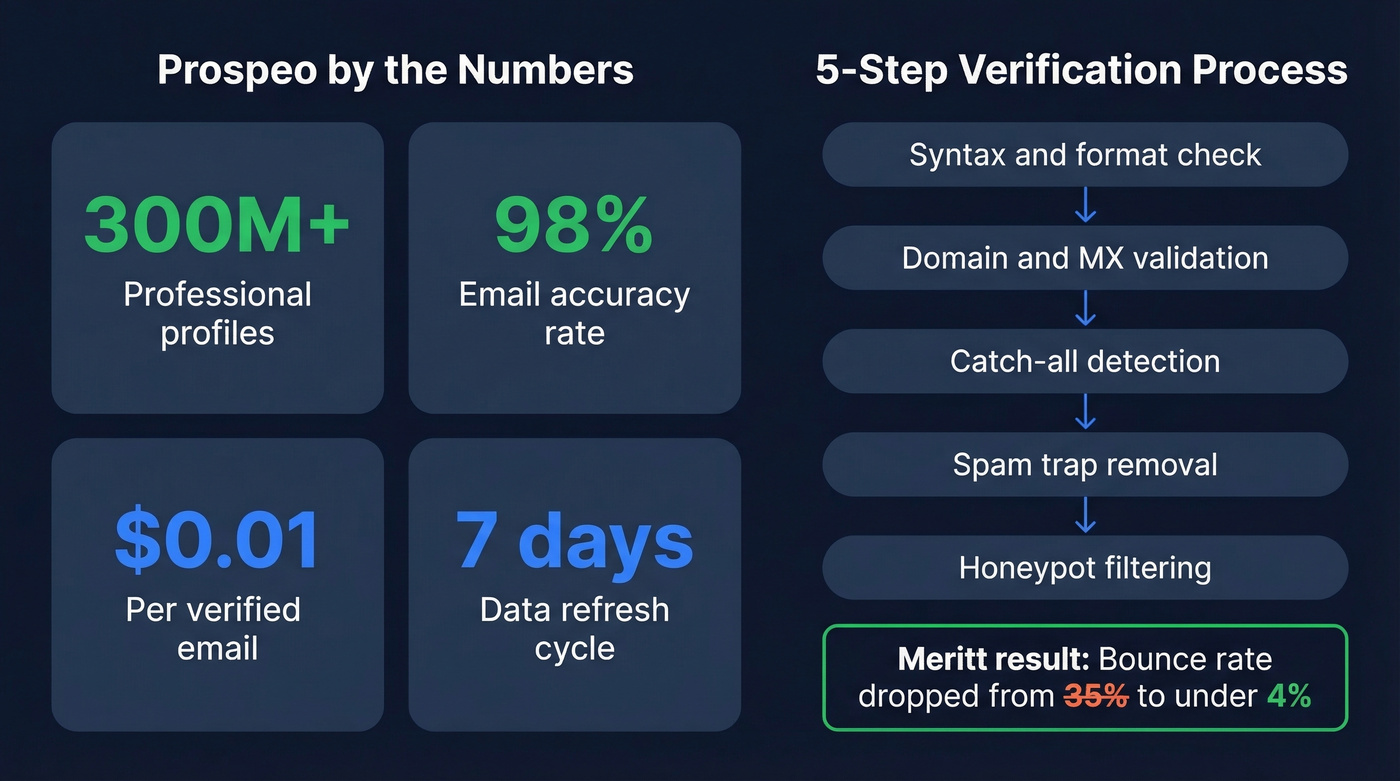
The 5-step verification process includes catch-all handling, spam-trap removal, and honeypot filtering, delivering 98% email accuracy. One customer, Meritt, saw bounce rates drop from 35% to under 4% after switching - that's not a marginal improvement, that's the difference between a healthy domain and a blacklisted one. (If you're troubleshooting bounces, see our email bounce rate benchmarks and fixes.)

The Chrome extension has 40,000+ users and works on company websites and professional profiles. Pricing works out to about $0.01 per email, with a free tier of 75 emails per month. No contracts, no sales calls.
Use this if you're running B2B outbound and need verified emails at scale without stitching together three separate tools.
Skip this if you just need to pull a handful of emails off a single webpage - a free text extractor handles that faster.
Hunter - The Domain Search Standard
Everyone's first email finder story starts with Hunter. You type in a company domain, hit search, and get back every email pattern and known address associated with it. That domain search feature is still Hunter's killer app, and it's why the tool carries 4.7 stars and 12,500+ reviews on the Chrome Web Store - more than any other extension in this roundup. (If you're evaluating similar tools, see our tested list of Hunter alternatives.)
The free plan gives you 50 searches and 50 verifications per month, which is genuinely useful for individual prospectors or founders doing their own outreach. Paid plans start at $49/mo (roughly $34/mo billed annually).
Where Hunter falls short is enrichment. You get emails, maybe a name and title, but no intent data, no technographics, no mobile numbers. It's a single-purpose tool that does one thing well. The consensus on r/ColdEmailTools is that Hunter's simplicity is both its strength and its ceiling - people love it for quick lookups but outgrow it fast once they need more context on their prospects.
Use this if you need a reliable, free email finder for low-volume prospecting.
Skip this if you need phone numbers, company data, or anything beyond email addresses.

Snov.io - Watch the Credit Math
Let's be honest about the pricing. Snov.io's credit-based model looks attractive at $39/mo for 5,000 credits, but credits get consumed by searches, verifications, and email sends. We've seen teams start on the $39 plan and end up at $150+/mo within a quarter as volume grows.
That said, Snov.io is the Swiss Army knife of this list. It combines email finding, 98%+ verification accuracy, and built-in email sequences in a single platform. The Chrome extension carries a 4.9-star rating across 6,000+ reviews - the highest in this roundup. As an email extraction tool that also handles outreach, it eliminates the need for separate sending tools. (If you're building sequences, start with our B2B cold email sequence guide.)
The all-in-one approach is genuinely useful if you don't want to pay for separate tools for each step of your outreach workflow. Just model the credit consumption before you commit.
Use this if you want extraction, verification, and cold email sequences in one tool and your volume is moderate.
Skip this if you're sending 10,000+ emails per month. The credit math stops working in your favor.
Mailmeteor - Best Free URL Crawler
Dead simple: paste a URL, hit extract, get emails. No signup required. It crawls internal links automatically and uses advanced rendering for JavaScript-heavy websites, so it catches emails that basic regex scrapers miss on modern sites.
The catch: zero deliverability verification. You'll get every email-shaped string on the site, including outdated addresses and role-based inboxes like info@ and sales@. Run results through a verification tool before you send anything. (If you need a broader list of options, see our roundup of free lead generation tools.)
Mailmeteor's broader product is a mail merge tool, with pricing from Free up to $49.99/mo. The extractor itself is free. A thread in r/Emailmarketing highlights personalization bugs on the mail merge side, but the extractor does its narrow job fine.
Kaspr - B2B Database with CNIL History
Kaspr claims a database of 500M+ email addresses and offers a Chrome extension for prospecting. Pricing tiers: Free (5 emails/month), Starter at $49/mo (60 emails), Business at $79/mo (2,400 emails), Organization at $99/mo (24,000 emails).
The per-email math tells the real story. The Starter plan works out to $0.82 per email - steep by any standard. The Business plan brings it down to about $0.03/email, which is more reasonable but still triple what top competitors charge.
The elephant in the room: CNIL (France's data protection authority) previously sanctioned Kaspr over GDPR-related data scraping issues. The regulator closed the case in 2026 after Kaspr implemented compliance measures, but it's worth knowing if you're selling into the EU.
GetProspect - Reliable Mid-Range Option
GetProspect carries a 4.8-star rating across 1,300+ reviews and reports 95% data accuracy. Pricing follows the standard pattern: Free (50 emails), Starter at $49/mo (1,000), Growth at $99/mo (5,000).
The Chrome extension is solid for one-off lookups, and the per-email cost at the Starter tier ($0.049) is competitive. Where GetProspect lags is database depth - you'll hit more "not found" results for niche industries or smaller companies. A reliable mid-range option when Hunter's free tier isn't enough but you don't need a full-scale data platform.
DeBounce - Free Text Extractor
DeBounce offers a free text-based extraction tool plus verification starting at $0.00045 per check. Their own data suggests unverified lists carry 12-18% duplicate rates and that verification lifts deliverability by 10-30%. Best for one-off text extraction when you've got a block of text and need to pull emails out quickly.
Browserling - Developer Utility
Browserling's extractor is free, no-nonsense, and supports query parameters for custom extraction patterns. It's a developer tool at heart - if you need quick regex-based extraction from raw text and you're comfortable with that workflow, it works. No verification, no enrichment, no frills.
Email Extractor (Chrome Extension) - Basic and Free
A free Chrome extension that extracts email addresses from the current page you're viewing. No verification, no enrichment, no multi-page crawling. Fine for casual, one-page scraping when you just need to grab a few addresses fast.

Extracting emails from websites gives you info@ inboxes. Prospeo gives you the decision-maker's verified work email from 300M+ profiles - 98% accurate, refreshed every 7 days, at $0.01 per address. Meritt dropped their bounce rate from 35% to under 4%.
Skip the scraper. Search verified B2B emails directly.
Pricing Comparison
| Tool | Free Tier | Paid From | Per-Email Cost | Verification? |
|---|---|---|---|---|
| Prospeo | 75 emails/mo | ~$39/mo | ~$0.01 | Yes (5-step) |
| Hunter | 50 searches/mo | $49/mo | ~$0.05-0.10 | Yes (basic) |
| Snov.io | Trial credits | $39/mo | ~$0.008/credit | Yes |
| Mailmeteor | Free (extractor) | $9.99/mo (merge) | Free (extractor) | No |
| Kaspr | 5 emails/mo | $49/mo | $0.03-0.82 | Partial |
| GetProspect | 50 emails/mo | $49/mo | ~$0.05 | Yes |
| DeBounce | Free extractor | ~$0.00045/check | Free (extractor) | Yes (separate) |
| Browserling | Unlimited | Free | Free | No |
| Email Extractor | Unlimited | Free | Free | No |
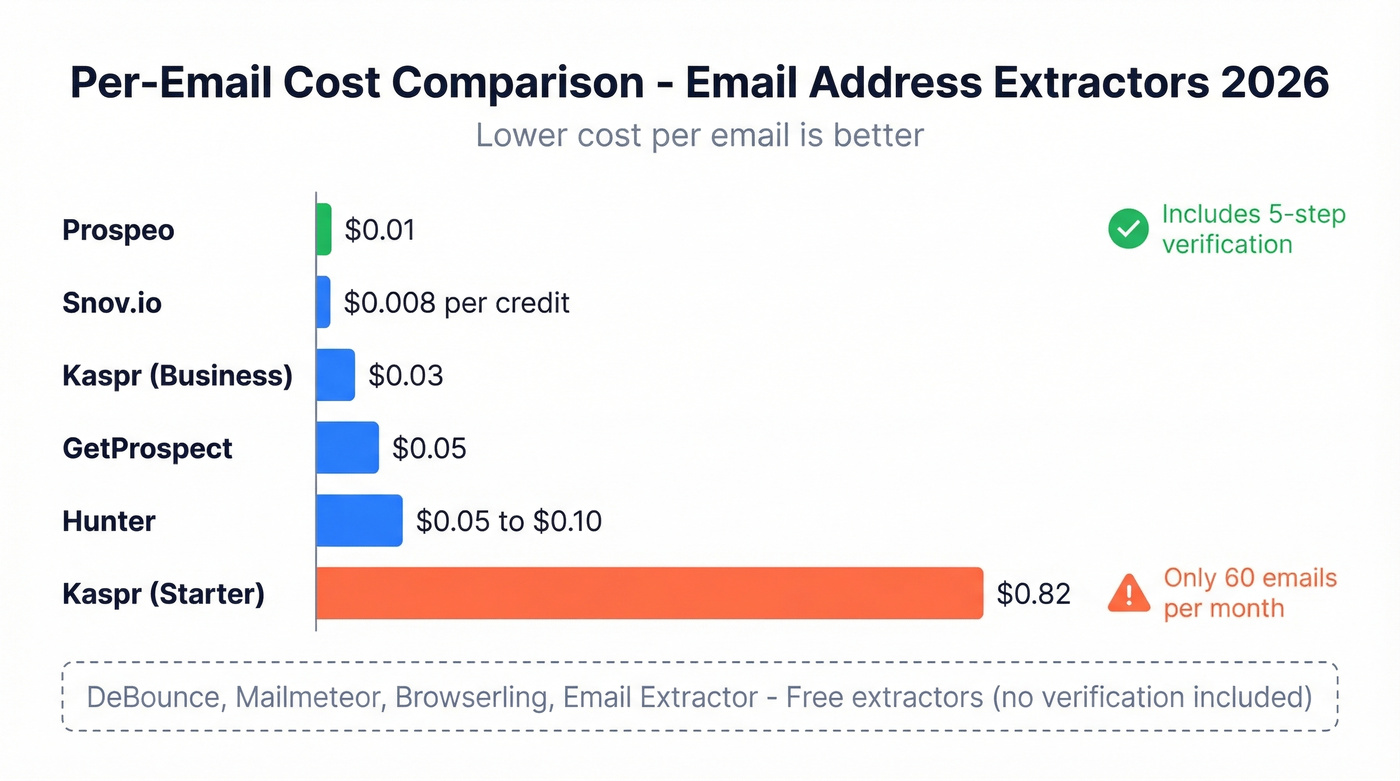
The $0.01 per verified email benchmark is hard to beat. Kaspr's Starter tier at $0.82/email is hard to justify unless you're locked into their ecosystem - jump to their Business plan or look elsewhere.
Why Verification Matters More Than Extraction
Extraction is step one of five. And it's the step that matters least.
Email lists decay by 23-25% annually. Average global email deliverability sits around 84%, meaning roughly 1 in 6 emails never reaches the inbox. Gmail and Yahoo now require spam complaint rates below 0.3%, and anything above a 2% bounce rate signals poor list quality to mailbox providers. We've watched teams burn through three domains in a single quarter because they treated extraction as the finish line instead of the starting point. (For a full playbook, see our email deliverability guide.)
Regex-based extractors make this worse. As Stack Overflow discussions point out, TLDs evolve constantly, and overly strict patterns create false negatives while loose patterns pull in garbage. You end up with addresses that look valid but bounce, role-based inboxes that tank engagement metrics, and spam traps that get your domain blacklisted.
If you're using a raw extractor, budget for a separate verification tool. The cost of verification is trivial compared to the cost of rebuilding a burned domain - a process that takes 4-8 weeks minimum and kills your pipeline the entire time. (If you're shopping verifiers, start with these Bouncer alternatives.)

Most email extractors pull addresses but leave verification to you. Prospeo's 5-step process handles catch-all domains, spam traps, and honeypots before you ever hit send. That's why teams book 26% more meetings than with ZoomInfo and 35% more than Apollo.
Stop bouncing emails and start booking meetings.
Is Email Extraction Legal?
The short answer: it depends on where you are and what you do with the data.
Under GDPR, even publicly posted email addresses are personal data. You need a lawful basis to collect them - and "I found it on their website" doesn't qualify on its own. The "legitimate interest" basis requires a documented balancing test: your interest in contacting them versus their reasonable expectation of privacy. Cumulative GDPR fines have exceeded EUR5.88 billion across 2,245+ enforcement actions, and the number keeps climbing. Regulators aren't bluffing.
Under CAN-SPAM, the rules focus on how you send rather than how you collect. You need truthful headers, clear sender identification, a working unsubscribe mechanism, and you must honor opt-outs. There's no opt-in requirement for B2B email in the US.
Beyond regulation, there's the ToS risk. Scraping platforms often prohibit automated data collection in their terms of service. Violations can lead to account bans, IP blocks, or legal action. The CNIL's enforcement against Kaspr is a concrete example of what happens when scraping practices cross regulatory lines.
Look - if you're doing B2B outreach, use a compliant database platform rather than scraping. It's not just safer legally. It's also better data.
Building a Complete Extraction Workflow
Most email address extractors stop at step one. Here's the full pipeline we recommend to our clients:
- Extract - Pull email addresses from text, URLs, or a database search.
- Deduplicate - Remove duplicate entries and merge records from multiple sources.
- Verify - Run every address through syntax, MX, SMTP, catch-all, and spam-trap checks. This is where most lists fail.
- Enrich - Append job title, company, phone number, intent signals, and technographics. Without enrichment, you're sending generic emails to unknown people.
- Outreach - Push verified, enriched contacts into your sequencer (Instantly, Lemlist, Outreach, etc.) and personalize at scale. (For tactics, see our sales prospecting techniques.)
B2B database platforms collapse steps 1 through 4 into a single search. You query by filters, get verified and enriched contacts back, and push directly to your outreach tool. That's the workflow advantage over raw extraction - you skip the messy middle entirely.
FAQ
What's the difference between an email address extractor and an email finder?
An extractor scrapes visible email addresses from web pages or text. An email finder discovers professional emails from a name and company domain - even if the address isn't published anywhere. For B2B outreach, finders return verified addresses rather than whatever regex happens to match, making them far more reliable for actual campaigns.
Are free email extractors accurate enough for outreach?
Free text-based extractors pull whatever matches an email pattern - including outdated, role-based (info@, sales@), and malformed addresses. Expect 10-30% of extracted emails to be invalid. Always run results through a verification tool before sending any campaigns.
How many extracted emails will bounce without verification?
Without verification, expect bounce rates of 10-25%+ depending on list age. Email lists decay by ~23% annually. Anything above a 2% bounce rate risks triggering spam filters and damaging your sender reputation - sometimes for months.
Can I legally extract emails from websites?
It depends on jurisdiction. Under GDPR, even publicly posted emails are personal data requiring a lawful basis to collect. Under CAN-SPAM, the focus is on how you send, not how you collect. Always verify compliance with local regulations before bulk extraction.
Do I need a separate verification tool?
If your extractor doesn't include built-in verification - yes, absolutely. Some platforms bundle multi-step verification directly into the extraction workflow, eliminating the extra step and cost. If yours doesn't, treat verification as non-negotiable before sending a single email.