

Email Address Format: Rules, Examples & Best Picks (2026)
Someone on r/careerguidance recently asked what the "least cringe" format for a work email would be. They were starting a new role and didn't want to look amateurish. The answer is simpler than most people think: firstname.lastname@yourcompany.com. That's the gold standard, and it's still the most common professional default.
But there's more to it than picking a username. There are technical rules governing what characters are legal, length limits most people don't know about, provider quirks that trip you up, and a critical gap between "syntactically valid" and "actually deliverable." We've helped teams clean millions of email lists, and the format mistakes are always the same. Let's cover all of it.
Quick Version
Structure: Every email address follows local-part@domain.tld. The local-part can be up to 64 characters, the domain up to 255, for a maximum total of 320 characters.
Best professional format: firstname.lastname@yourdomain.com. Custom domain is non-negotiable for business.
Validation: Regex catches typos and malformed syntax. Real verification catches bounces, spam traps, and dead mailboxes. You need both - but the second one requires a tool (see best email validation).
Anatomy and Structure
Every email address has the same core structure: the local-part (everything before the @), the @ symbol itself, and the domain (everything after it). So jane.doe@acme.com breaks down to jane.doe (local-part) + @ + acme.com (domain, which includes the TLD .com). If you want a deeper breakdown of each piece, see local-part.
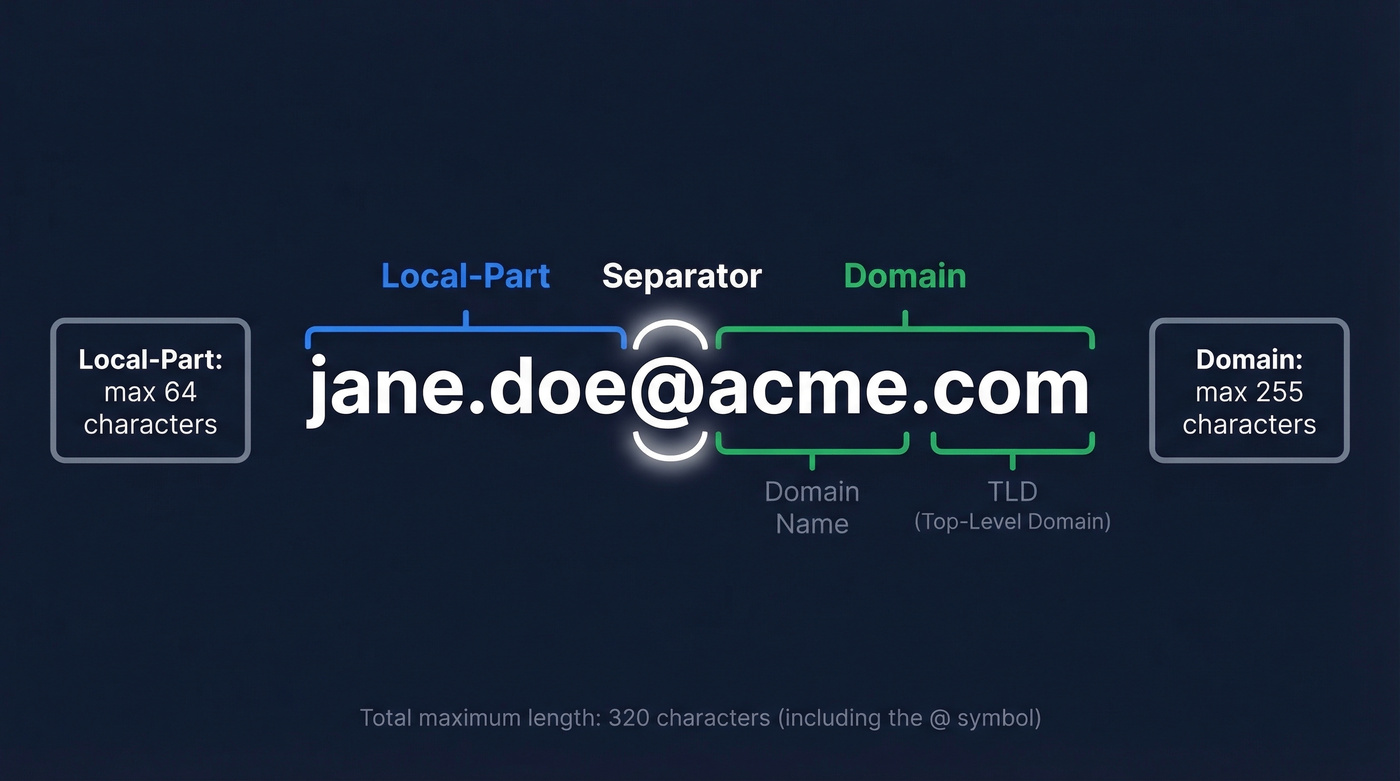
The RFC specs set hard limits. The local-part maxes out at 64 characters. The domain can run up to 255. Combined with the @, that's a theoretical maximum of 320 characters - though understanding this nomenclature (local-part, domain, TLD) matters more when you're troubleshooting validation errors or writing form logic than it does for everyday use.
Here's the thing: if your email address is longer than 30 characters, you have a different problem entirely. Nobody's typing alexandrina.konstantinopolous@multinationalcorporation.co.uk into a contact form without a typo.
Keep it short, keep it pronounceable. You'll need to say it out loud at some point - on a phone call, at a conference, in a noisy coffee shop. If you can't rattle it off in under three seconds, it's too long.
Allowed Characters and Rules
The rules for the local-part and the domain are different, and they're more permissive than most people realize.
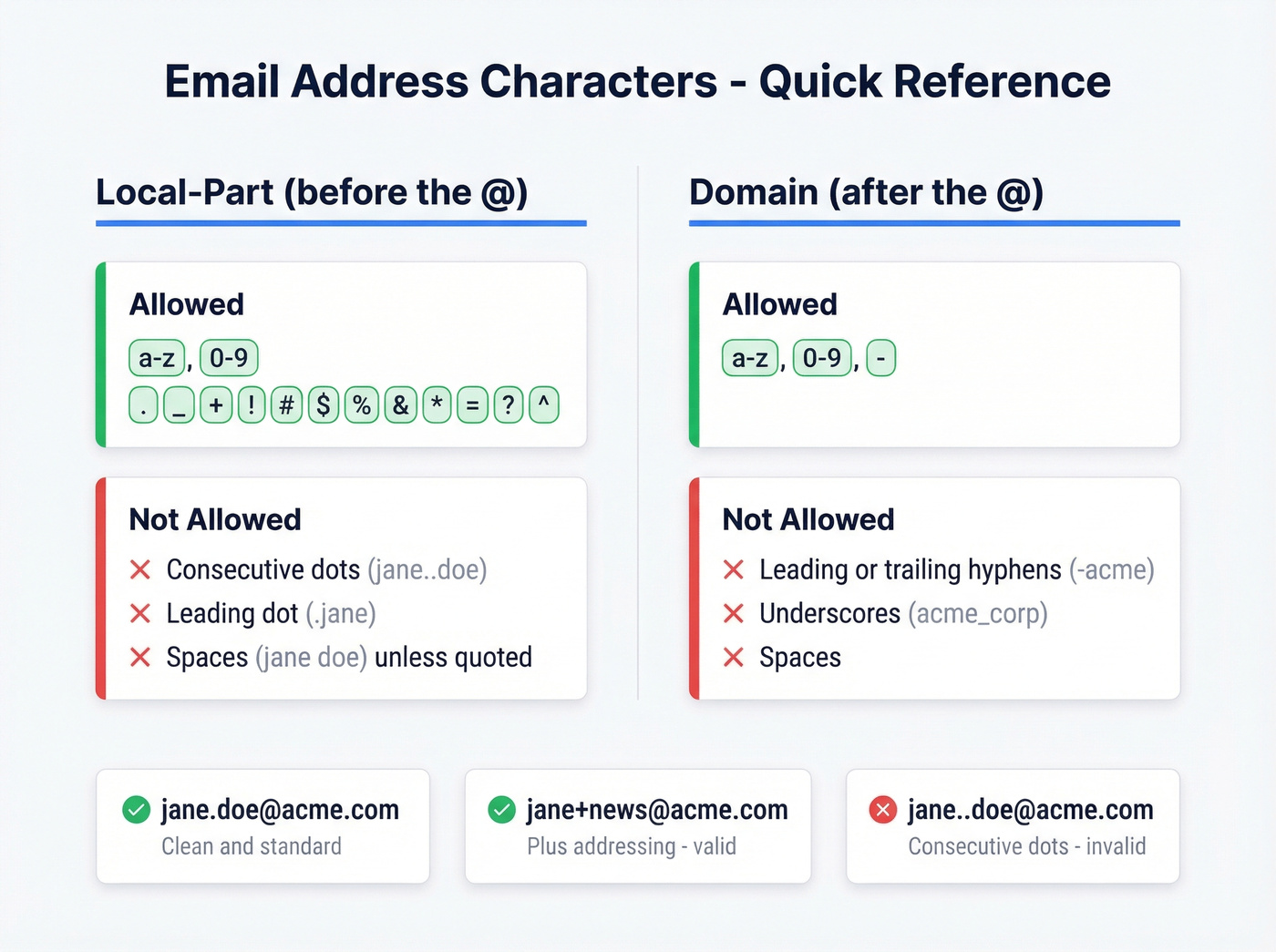
| Part | Allowed Characters | Not Allowed |
|---|---|---|
| Local-part | a-z, 0-9, . _ - + ! # $ % & ' * / = ? ^ ` { \| } ~ |
Spaces (unless quoted), consecutive dots, leading dots, trailing dots in unquoted local-parts |
| Domain | a-z, 0-9, - |
Leading/trailing hyphens, spaces, underscores |
Some quick examples to calibrate your intuition:
- ✅
jane.doe@acme.com- standard, clean - ✅
jane+newsletters@acme.com- plus addressing, valid - ✅
jane_doe@acme.com- underscore is legal in the local-part - ❌
jane..doe@acme.com- consecutive dots are invalid in an unquoted local-part - ❌
.jane@acme.com- leading dot, invalid - ❌
jane @acme.com- spaces aren't allowed in an unquoted local-part
Technically Valid, Never Use
RFC 5321 also allows quoted strings in the local-part - "john doe"@example.com is technically valid, as are IP-literal domains like user@[192.168.1.1]. These are rare in the wild, and many mail systems reject them outright. Don't use them. Just know they exist if you're ever writing validation logic and wondering why the spec feels so strange.
Case Sensitivity
This trips people up constantly. Technically, the local-part can be case-sensitive per RFC 5321. In practice, virtually every mail server treats Jane.Doe and jane.doe identically. Always store and compare addresses in lowercase - you'll avoid a whole category of bugs (more detail in are email addresses case-sensitive).
One quirk worth knowing: Gmail ignores dots in the local-part entirely. j.a.n.e.d.o.e@gmail.com and janedoe@gmail.com deliver to the same inbox. Outlook, Yahoo, and most other providers treat dots as significant characters.
Professional Email Examples
The Gold Standard (And Why)
firstname.lastname@yourdomain.com wins for three reasons: it's immediately recognizable, it's easy to guess (which matters for inbound), and it scales across an organization without ambiguity. Spark Mail's guide emphasizes pronounceability as a top criterion, and GMass recommends keeping addresses future-proof by never tying them to a job title, since roles change but addresses stick.
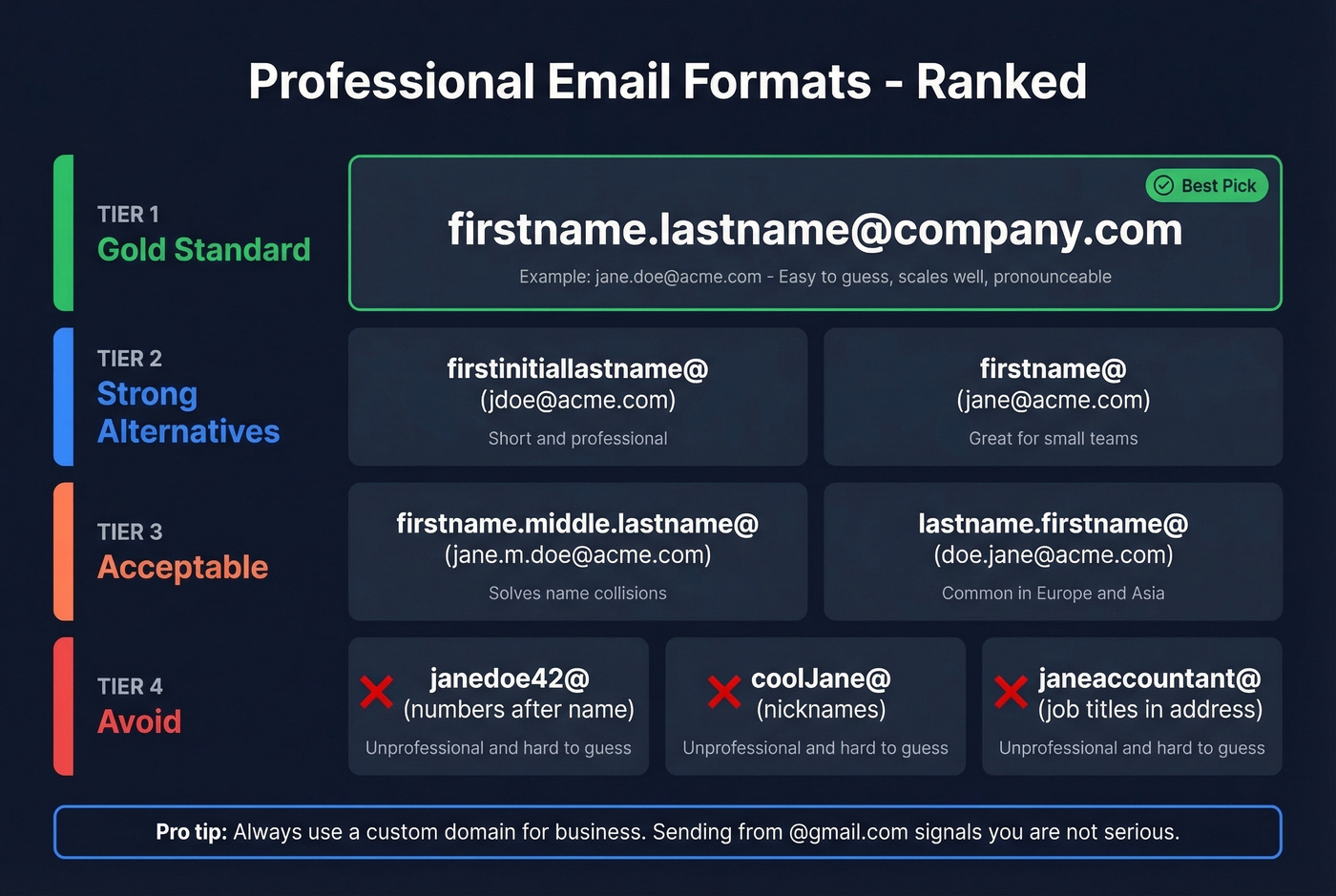
A custom domain is non-negotiable for business. Sending sales emails from @gmail.com signals "solo freelancer" at best and "not serious" at worst. Even a simple yourname.com domain running through Google Workspace or Microsoft 365 changes the perception entirely.
Acceptable Alternatives
When firstname.lastname is taken - common at larger companies - these work:
firstinitiallastname@-jdoe@acme.com. Short, professional, widely used.firstname.middleinitial.lastname@-jane.m.doe@acme.com. Solves collisions cleanly.firstname@-jane@acme.com. Works well at small companies where there's only one Jane.lastname.firstname@- less common in the US, standard in some European and Asian organizations.
If you're trying to infer a company's pattern from a few known addresses, use an email permutation workflow.
What to Avoid
Numbers after your name like janedoe42@, nicknames like coolJane@, job titles baked into the address like janeaccountant@, and puns of any kind. Also skip outdated providers like Hotmail or AOL for anything professional - it signals you haven't updated your tech stack since 2008.
Company Email Format Conventions
Most modern organizations default to firstname.lastname@company.com. It's the path of least resistance: professional, predictable, and easy for external contacts to guess. The most common fallback is firstinitiallastname@company.com. Whichever convention you choose, document it before your team grows - retroactive changes are painful.
The collision fallback matters more than people think. When you hire a second "Jane Doe," you need a policy already in place. Common approaches: add a middle initial (jane.m.doe@), append a number (jane.doe2@ - ugly but it works), or switch to firstinitiallastname@ for the newer employee.
Edge Cases: Hyphens, Apostrophes, Accents
This is where IT admins lose sleep. An r/sysadmin thread captures the exact dilemma: what do you do with O'Brien, Garcia, or Mary-Jane? The practical approach is to strip diacritics to their closest ASCII equivalent (Garcia becomes garcia), remove apostrophes (O'Brien becomes obrien), and keep or remove hyphens based on your org's preference. Document the policy, apply it consistently, and move on.
Role-Based Addresses
sales@, support@, hello@, info@ - these are useful for routing but come with a deliverability caveat. Most email verification tools flag role-based addresses as higher risk because they're often unmonitored or shared across teams. Use them for inbound routing, not cold outbound (see email verification for outreach).
There's also a real privacy vs. professionalism trade-off that surfaces during migrations. We've seen CEOs push back on firstname.lastname@ because it reveals full names to anyone who receives an email. It's a legitimate concern for public-facing roles, but for most teams, the professionalism benefit outweighs the privacy cost.

You now know the rules behind email address formats. But when you're prospecting, guessing formats like firstname.lastname@ is slow and error-prone. Prospeo's email finder uses proprietary infrastructure to locate and verify professional emails across 300M+ profiles - at 98% accuracy and $0.01 per email.
Stop guessing email formats. Get verified addresses in one click.
Provider-Specific Quirks
Not all email providers handle addresses the same way. These differences matter when you're setting up aliases, filtering, or debugging why a form rejected your address.
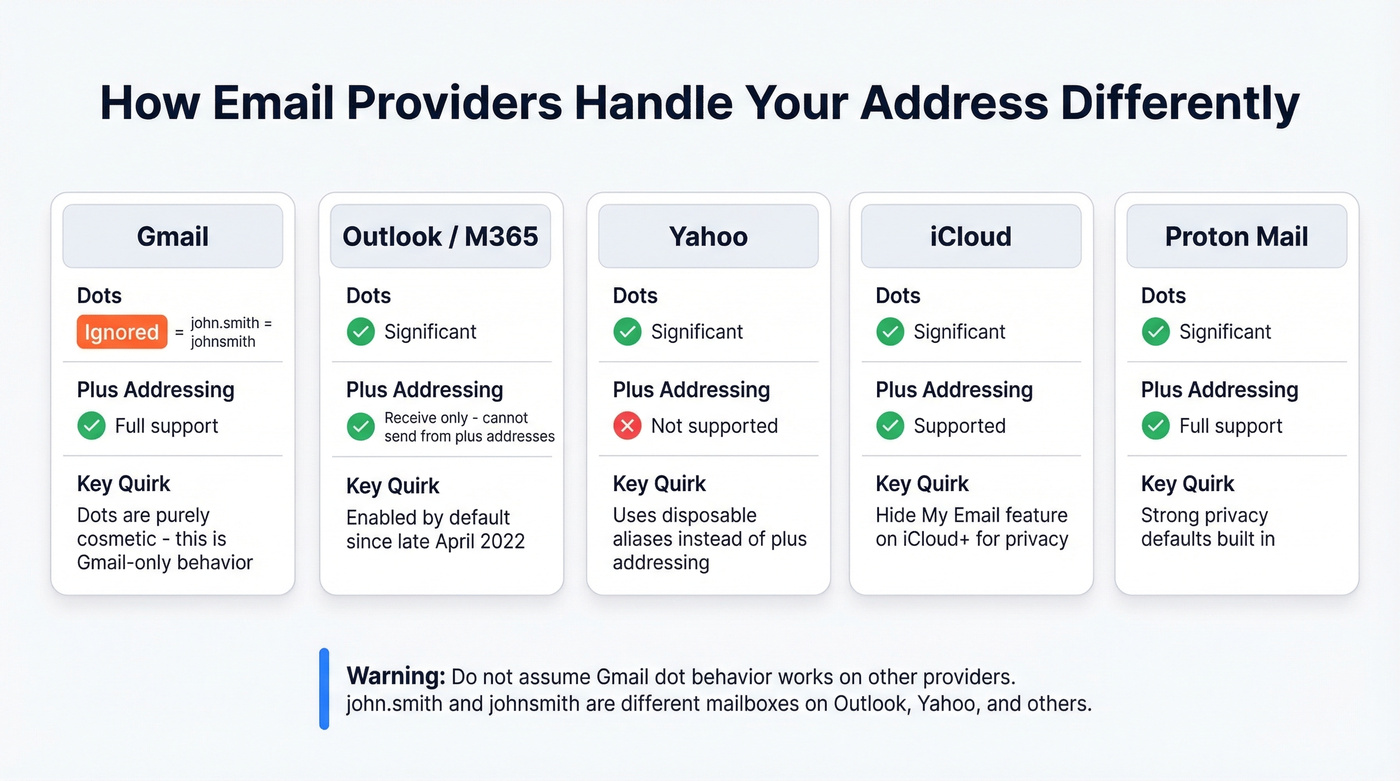
| Provider | Dots | Plus Addressing | Notable Quirk |
|---|---|---|---|
| Gmail | Ignored | ✅ Full support | Dots are cosmetic only |
| Outlook/M365 | Significant | ✅ Enabled by default since late Apr 2022 | Receive-only; can't send from plus addresses |
| Yahoo | Significant | ❌ | Uses disposable/alias features instead |
| iCloud | Significant | ✅ Supported | Supports aliases and Hide My Email on iCloud+ |
| Proton Mail | Significant | ✅ Full support | Strong privacy defaults |
Gmail's dot behavior is the one that catches people off guard most often. john.smith@gmail.com and johnsmith@gmail.com are the same mailbox. This is Gmail-specific - don't assume it works elsewhere.
Plus Addressing (Sub-Addressing)
Plus addressing lets you append +tag to your local-part to create receive-only variants. jane+newsletters@acme.com delivers to jane@acme.com but lets you filter or track where you gave out that address.
Gmail and Proton Mail support it fully. Exchange Online enabled it by default since late April 2022, though with a key limitation: you can receive at a plus address but can't send from one. Admins can disable it via PowerShell (Set-OrganizationConfig -DisablePlusAddressInRecipients $true) if it's causing issues.
The frustrating reality: it's 2026 and a significant number of web forms still reject the + character in email fields. If you rely on plus addressing for tracking signups, keep a dot-variant or alias as a fallback.
Internationalized Email Addresses
Email wasn't always global. The original specs assumed ASCII - fine for English, useless for half the world's population. SMTPUTF8 (RFC 6531) changed that in 2012, enabling Unicode characters in the local-part. Internationalized domain names are handled via IDNA and punycode.
Valid internationalized addresses look like this:
用户@例え.jp- Chinese and Japanese charactersпользователь@пример.рф- Cyrillicمستخدم@مثال.عربي- Arabic
Behind the scenes, internationalized domain names get converted to punycode - an ASCII-compatible encoding system - for routing. So sorensen.example.com becomes xn - srensen-90a.example.com in its punycode form. With EAI support, the local-part stays UTF-8.
Support isn't universal. Many legacy systems, web forms, and enterprise gateways still choke on non-ASCII local-parts. If you're using an internationalized address, keep an ASCII fallback for the systems that haven't caught up yet.
How to Validate an Email Address
Validation happens in three tiers, and most teams stop too early.
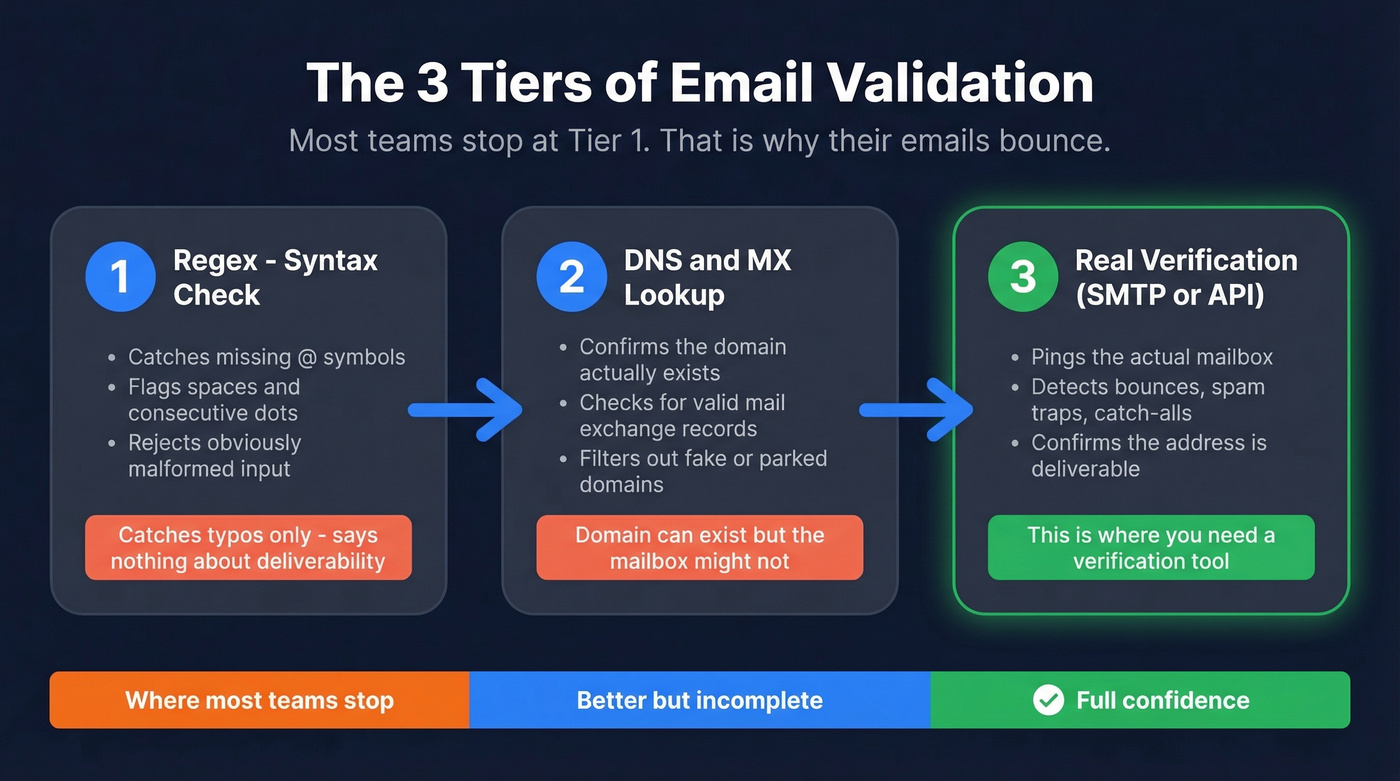
Tier 1: Regex (syntax check). This catches obvious garbage - missing @ symbols, spaces, consecutive dots. The HTML5 type="email" input uses this regex under the hood:
^[a-zA-Z0-9.!#$%&'*+/=?^_`{|}~-]+@[a-zA-Z0-9-]+(?:\.[a-zA-Z0-9-]+)*$
For server-side validation, the commonly circulated "99.99% works" pattern from emailregex.com handles most real-world addresses. Don't try to write a regex that perfectly matches RFC 5322 - the full grammar is context-free thanks to nested comments, which means traditional regex literally can't capture it. You'll waste days and still miss edge cases.
Tier 2: MX record check. Confirms the domain actually has mail servers configured. Catches typos like @gmial.com that pass regex just fine.
Tier 3: Mailbox verification. This is where syntax validation ends and real verification begins. Does the mailbox actually exist? Is it a spam trap? A catch-all domain that accepts everything? You can't answer these questions with regex. For real verification - checking whether the mailbox is live, catching spam traps, handling catch-all domains - you need a dedicated tool (see email verification process). Prospeo runs a 5-step verification process across 143M+ verified emails with 98% accuracy, including catch-all handling and honeypot filtering.
Regex gives you a false sense of security. An address can be perfectly formatted and still bounce, land in a spam trap, or belong to a mailbox that's been dead for two years.
Format vs. Deliverability
A valid format doesn't mean a deliverable email. This distinction costs companies real money in bounced campaigns and damaged sender reputation.
Look - if your bounce rate is above 5%, your formatting isn't the problem. Your list hygiene is. Most deliverability issues trace back to sending to unverified addresses, not to malformed ones (see email bounce rate).
The address types that hurt deliverability most are disposable emails that expire within hours, spam traps designed to catch senders with bad list hygiene, role-based addresses like info@ and sales@ that are often unmonitored, catch-all domains that accept everything so you never get a hard bounce signal until the damage is done, and inactive accounts with valid syntax but dead mailboxes.

Beyond address structure, authentication protocols like SPF, DKIM, and DMARC determine whether your emails actually reach the inbox - but that's a separate guide. What you can control right now is list quality (see list quality). Meritt cut their bounce rate from 35% to under 4% after switching to verified data, and their pipeline tripled from $100K to $300K per week.
A syntactically valid email and a deliverable one are two different things. Prospeo's 5-step verification catches bounces, spam traps, and catch-all domains - refreshed every 7 days, not the 6-week industry average. Teams using Prospeo cut bounce rates from 35%+ to under 4%.
Validate beyond format. Verify that real humans receive your emails.
FAQ
What is the correct email address format?
Every valid address follows the structure local-part@domain.tld - up to 64 characters before the @, up to 255 after, and 320 total. For professional use, firstname.lastname@yourdomain.com is the universally accepted standard across industries.
Are email addresses case-sensitive?
Technically, the local-part can be case-sensitive per RFC 5321, but virtually every major provider - Gmail, Outlook, Yahoo - treats them as case-insensitive. Always store and compare in lowercase to avoid duplicate records and edge-case bugs in your CRM.
What special characters are allowed in an email address?
The local-part permits letters, digits, and characters including ., _, -, +, !, #, and several others. The domain allows only letters, digits, and hyphens. Consecutive dots and leading or trailing dots are invalid in unquoted local-parts. Quoted strings like "john doe"@example.com are technically valid per RFC but rejected by many systems in practice.
How do I verify if an email address actually exists?
Regex only checks syntax - it can't confirm a live mailbox. You need a verification tool that checks MX records, SMTP responses, and catch-all behavior. Prospeo's Email Finder handles this across 143M+ verified emails with 98% accuracy, including spam-trap and honeypot removal. The free tier includes 75 verifications per month.
What's the best email format for a business domain?
firstname.lastname@company.com is the standard for organizations of any size. It's predictable, professional, and easy for prospects to guess. For name collisions, add a middle initial (jane.m.doe@) or use firstinitiallastname@ as a documented fallback policy.