

Email Address Search: Find and Verify Any Email in 2026
Most email finder tools claim 90%+ accuracy. Independent benchmarks show real enrichment rates of ~31-55%. That gap - between what vendors promise and what actually lands in an inbox - is the single most important thing to understand before you spend a dollar on an email address search.
When someone searches for an email address, they typically mean one of two things. Forward lookup: you have a name and a company, and you need the email. Classic sales prospecting. Or reverse lookup: you have an email address and want to know who it belongs to - common in OSINT, fraud investigation, and inbound lead qualification. These are different problems that need different tools, and most articles lump them together. We won't.
Here's a number that should keep you up at night: email lists decay by roughly 28% every year. A list you built six months ago is already rotting. Whether you're finding an email for the first time or verifying old ones, the verification step isn't optional - it's the whole game.
The Quick Decision Framework
Short on time? Here's how to pick:
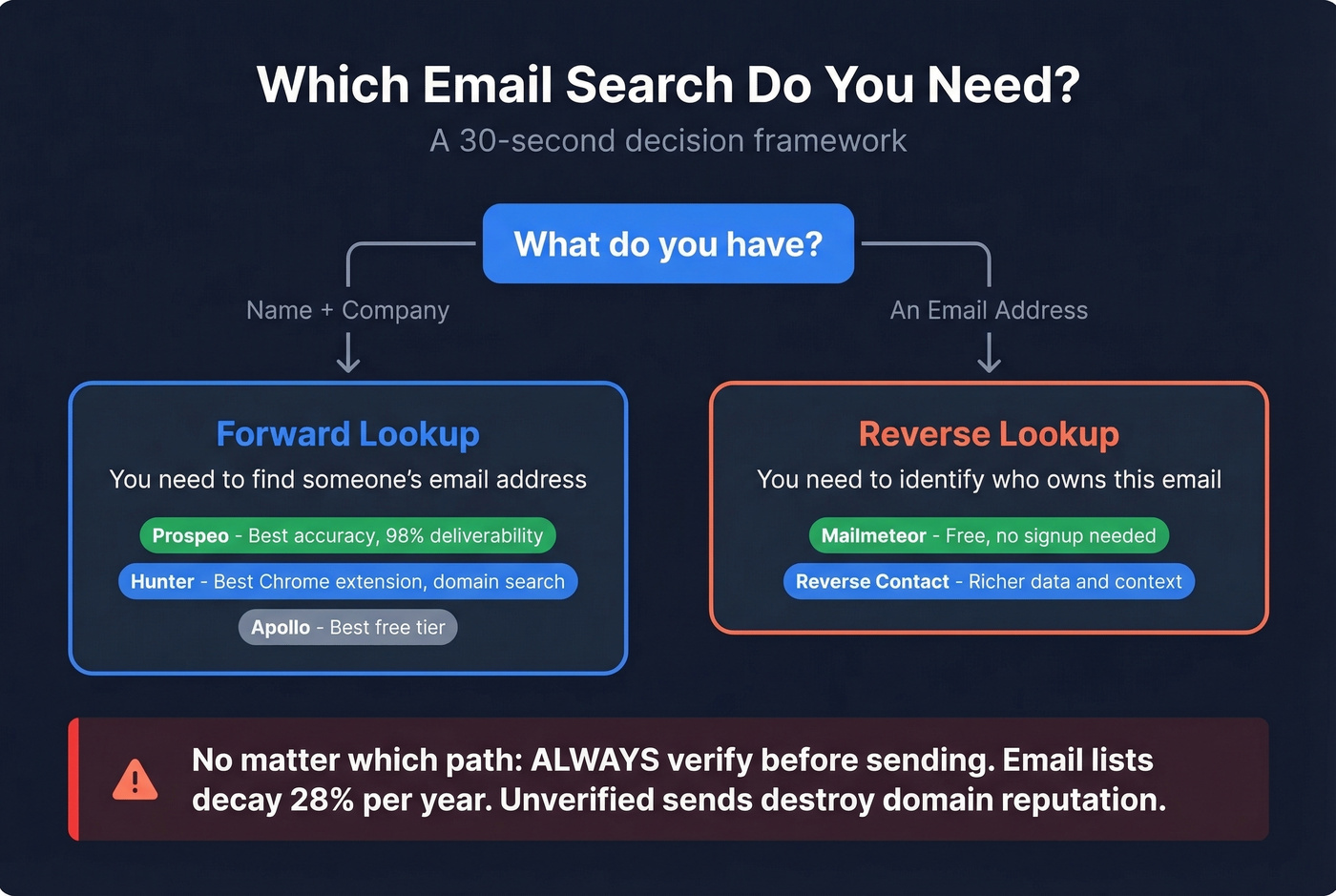
- Forward email search (name + company → email): Prospeo for accuracy-first results with 98% deliverability on found emails. Hunter for brand recognition and a polished Chrome extension. Apollo for one of the most generous free tiers in the space.
- Reverse email lookup (email → identity): Mailmeteor for free, instant lookups with no signup. Reverse Contact for richer data when you need more context.
- The non-negotiable rule: Never send to unverified emails. A single bad campaign can tank your domain reputation, and recovering from a deliverability spiral takes months (see our email deliverability guide).
If you're currently on RocketReach and seeing low reply rates - a complaint that surfaces constantly on r/sales - keep reading.
How Email Finders Actually Work
Most email finder tools use some combination of four techniques, and understanding them helps you evaluate which tool deserves your money.
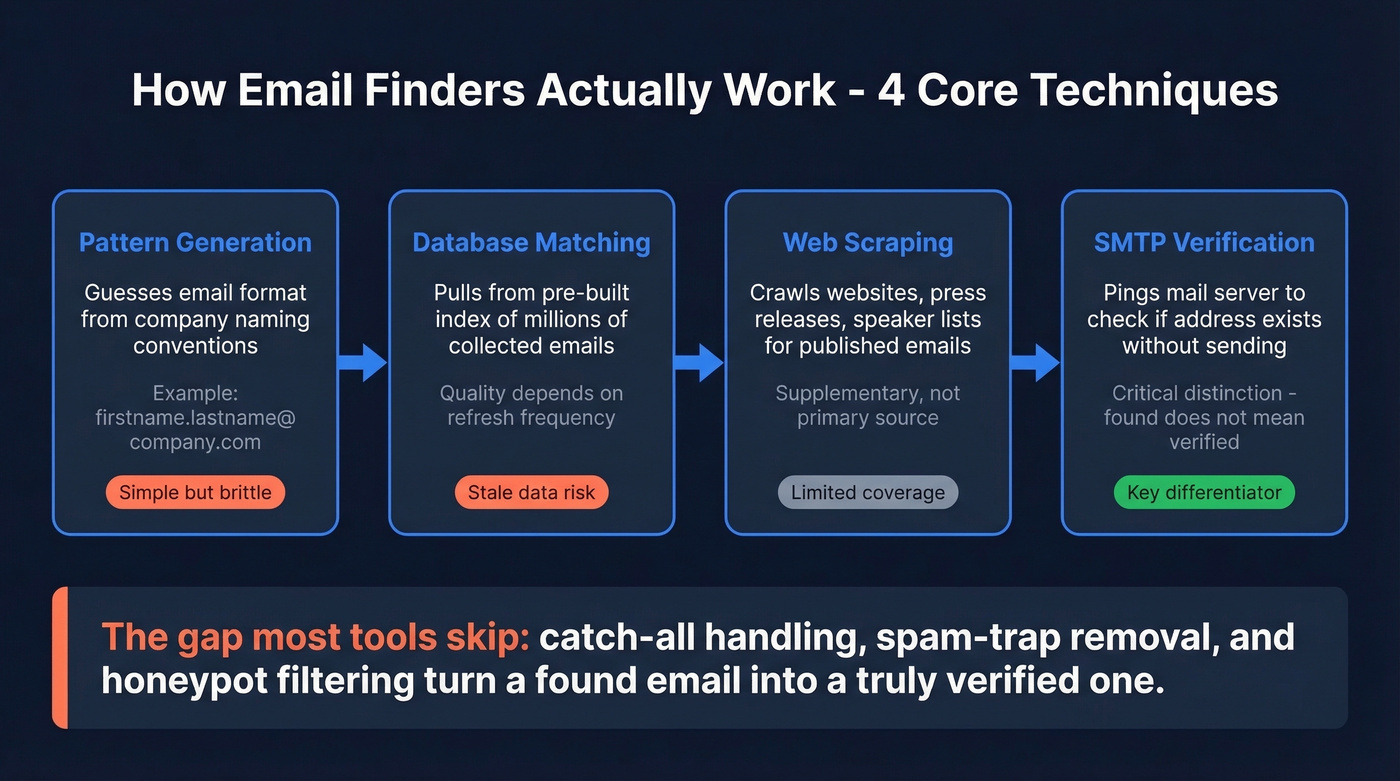
Pattern generation is the simplest approach. The tool knows that Acme Corp uses firstname.lastname@acme.com, so it generates john.smith@acme.com and checks whether it exists. Works great for companies with consistent naming conventions. Falls apart for organizations that use employee IDs or randomized handles.
Database matching pulls from a pre-built index of email addresses collected from public sources, partnerships, and web crawls. This is how tools like Apollo maintain databases of hundreds of millions of contacts. Quality depends entirely on how often the database refreshes - stale data means bounced emails.
Web scraping crawls company websites, press releases, conference speaker lists, and other public pages where people publish their contact information. It's supplementary, not primary (if you’re considering scraping, read our guide to web scraping lead generation).
SMTP verification is where the real differentiation happens. The tool pings the recipient's mail server to check whether the address exists without actually sending an email. But here's the critical distinction most articles skip: "found" doesn't mean "verified." A tool can find an email pattern that looks right but bounces on delivery. Many tools skip catch-all handling entirely or charge extra for it, which means your "verified" list still contains risky addresses that'll hurt your sender reputation.
What the Accuracy Benchmarks Actually Show
Let's be honest - the accuracy numbers vendors put on their marketing pages are mostly fiction. Here's what benchmark testing reveals when you run lookups at scale.
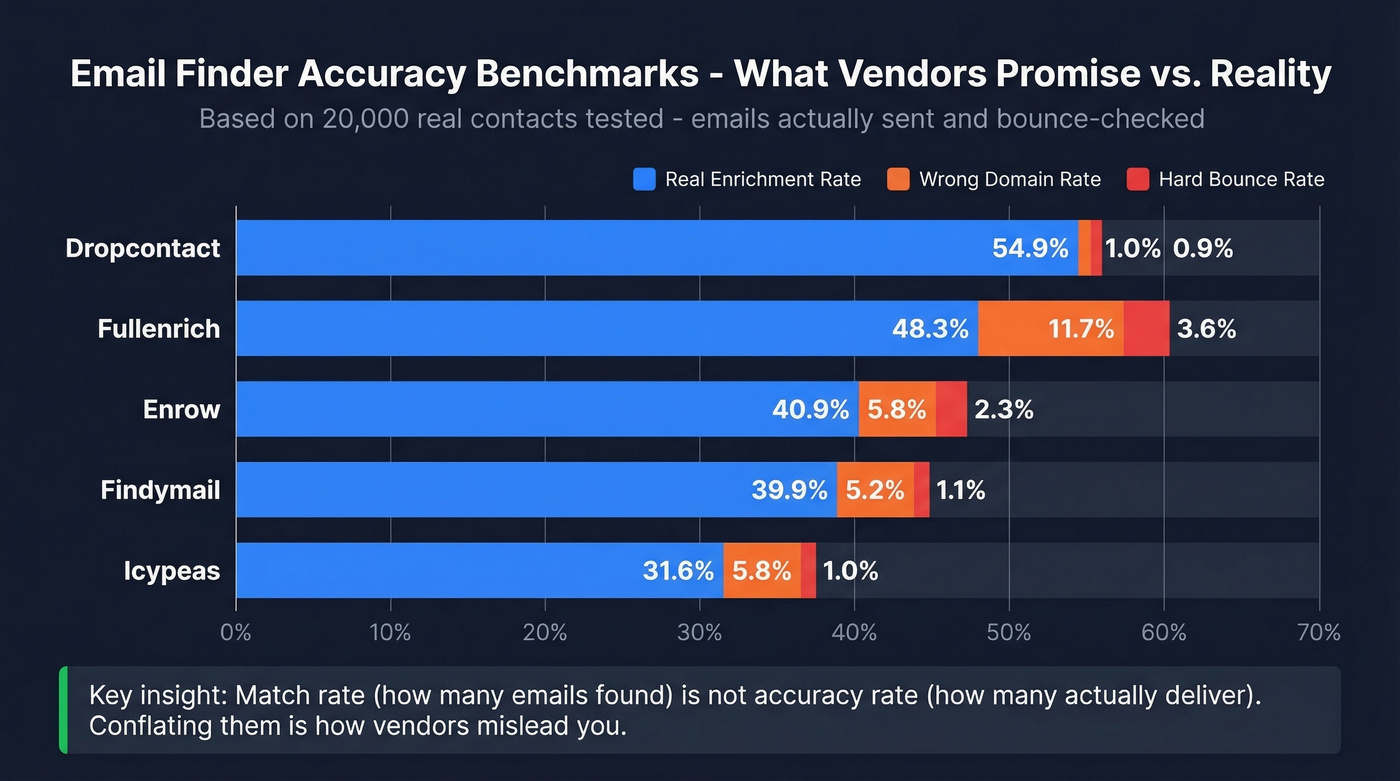
The most thorough benchmark we've seen comes from Dropcontact's 2026 study, which tested 15 tools on 20,000 real contacts using only first name, last name, and company name as inputs. They actually sent a real email to every address found and measured hard bounces - not just SMTP pings. They also ran dual-operator domain verification to catch wrong-domain errors, which is a step most benchmarks skip entirely.
The top performers by real enrichment rate (found emails minus bounces minus wrong domains):
| Tool | Real Enrichment Rate | Hard Bounce Rate | Wrong Domain Rate |
|---|---|---|---|
| Dropcontact | 54.9% | 0.9% | 1.0% |
| Fullenrich | 48.3% | 3.6% | 11.7% |
| Enrow | 40.9% | 2.3% | 5.8% |
| Findymail | 39.9% | 1.1% | 5.2% |
| Icypeas | 31.6% | 1.0% | 5.8% |
A separate benchmark from Anymail Finder tested 8 tools on 5,000 fresh contacts and reported verified rates ranging from 16.9% to 77.5%. The spread is enormous, and it highlights a distinction most buyers miss: match rate (recall) measures how many emails a tool finds from a given list, while accuracy rate (precision) measures how many of those found emails are actually deliverable. Conflating them is how vendors mislead you.
If your average deal size is under $15k, you probably don't need the tool with the highest match rate. You need the one with the highest precision. Sending 500 emails where 75 bounce does more damage to your pipeline than sending 200 emails where 3 bounce. Sender reputation compounds - protect it like the asset it is (more: how to improve sender reputation).
Best Email Finder Tools in 2026
You don't need 10 email finder tools. You need one good one and a verification step (see also: best email search tools).
Prospeo
Use this if you care more about deliverability than volume. Prospeo's database covers 300M+ professional profiles with 143M+ verified emails, refreshed on a 7-day cycle while the industry average sits at six weeks. The proprietary email-finding infrastructure means it doesn't rely on third-party email providers - it builds and verifies its own data through a 5-step process including catch-all handling, spam-trap removal, and honeypot filtering.

The proof is in production results. Meritt went from a 35% bounce rate to under 4% after switching, and Stack Optimize built from $0 to $1M ARR while maintaining 94%+ deliverability with zero domain flags across all clients. At ~$0.01 per email with a free tier of 75 verified emails per month, the effective cost is a fraction of what you'd pay for tools with higher match rates but worse deliverability. For outbound teams and agencies where domain reputation is the asset, this is the accuracy leader.

Benchmarks show most email finders deliver 31-55% real enrichment. Prospeo's 5-step verification - with catch-all handling, spam-trap removal, and honeypot filtering - hits 98% email accuracy at $0.01/email. Your domain reputation isn't worth gambling on tools that skip verification steps.
Stop sending to addresses that bounce. Search emails that actually land.
Hunter.io
Use this if you want the most recognized finder with a solid Chrome extension and domain search feature. Hunter is the tool most people think of first when they hear "email finder," and its platform - outreach sequences, domain search, bulk tasks - is polished.

Skip this if accuracy is your top priority. In the Anymail Finder benchmark, Hunter scored 37.6% verified rate. In PhantomBuster's Aug 2025 test, it hit 68% success rate with 97% verification. One genuine perk: Hunter only charges credits for successful searches - failed lookups are free. Pricing starts at $49/mo for 2,000 credits on the Starter plan, with a free tier of 50 credits. Annual billing drops Starter to $34/mo. It's a safe default - not the accuracy leader, not the cheapest, but reliable and well-documented (if you’re comparing options, see Hunter alternatives).
Apollo.io
Use this if you want a generous free tier and an all-in-one platform. Apollo's free plan is one of the most generous in the space - expect thousands of credits per month compared to the 50-credit free tiers common with dedicated email finders. Paid plans typically start around $49-$99/mo per user and include sequencing, sales workflow features, and intent signals on higher tiers.
Skip this if you need transparent accuracy benchmarks. Apollo's email accuracy data is less publicly tested than dedicated finders, and we've seen mixed results in production. It's a GTM platform that happens to find emails - not an email finder that happens to have a platform. For teams that want everything in one place and don't mind running their own verification pass, it's hard to beat on value (related: best SDR tools).
Snov.io
Snov.io bundles email finding, verification, and outreach automation into a single credit pool. One credit equals one search or one verification. Starter runs $29.25/mo on annual billing for 1,000 credits; Pro is $74.25/mo for 5,000 credits.
The catch: in PhantomBuster's Aug 2025 test, Snov.io showed a 31% success rate with no verification. And the automation add-on costs an extra $69/mo per slot, which adds up fast. It works as a multi-tool for small teams on a budget, but dedicated finders outperform it on the core lookup task. If you're doing under 500 searches a month and want one login for everything, it's a reasonable choice. Beyond that, you'll outgrow it.
GetProspect
GetProspect scored 61.9% verified rate in the Anymail Finder benchmark - one of the stronger showings among mid-tier tools. That result alone makes it worth a look.
The free tier gives you 50 emails per month. Paid plans start at $49/month for 1,000 valid emails + 2,000 verifications ($34/month with annual payment). It's a focused email finder without the platform bloat, and that focus shows in its benchmark performance. The trade-off is limited integrations and no built-in outreach.
Anymail Finder
Here's a billing model that should be the industry standard but isn't: you only pay for verified emails. Anymail Finder charges $49/mo for 1,000 verified emails and uses a 97% certainty threshold before counting a credit. If you're tired of burning credits on unverifiable results, this approach eliminates that frustration entirely. The platform itself is bare-bones compared to Apollo or Hunter, but if all you need is accurate email addresses, that's a feature, not a bug.
Skrapp.io and Voila Norbert
Skrapp offers 50 free credits per month with paid plans starting around $50/mo. Its verification status documentation is one of the better public explanations of catch-all handling. Decent for basic prospecting, but lacks the benchmark data to make a strong case over the tools above.
Voila Norbert gives you 50 free emails to start, then $49/mo for 1,000 credits. In the Anymail Finder benchmark, it scored 36% verified rate - below average. Not our first recommendation unless you're already in their ecosystem.

How They Stack Up
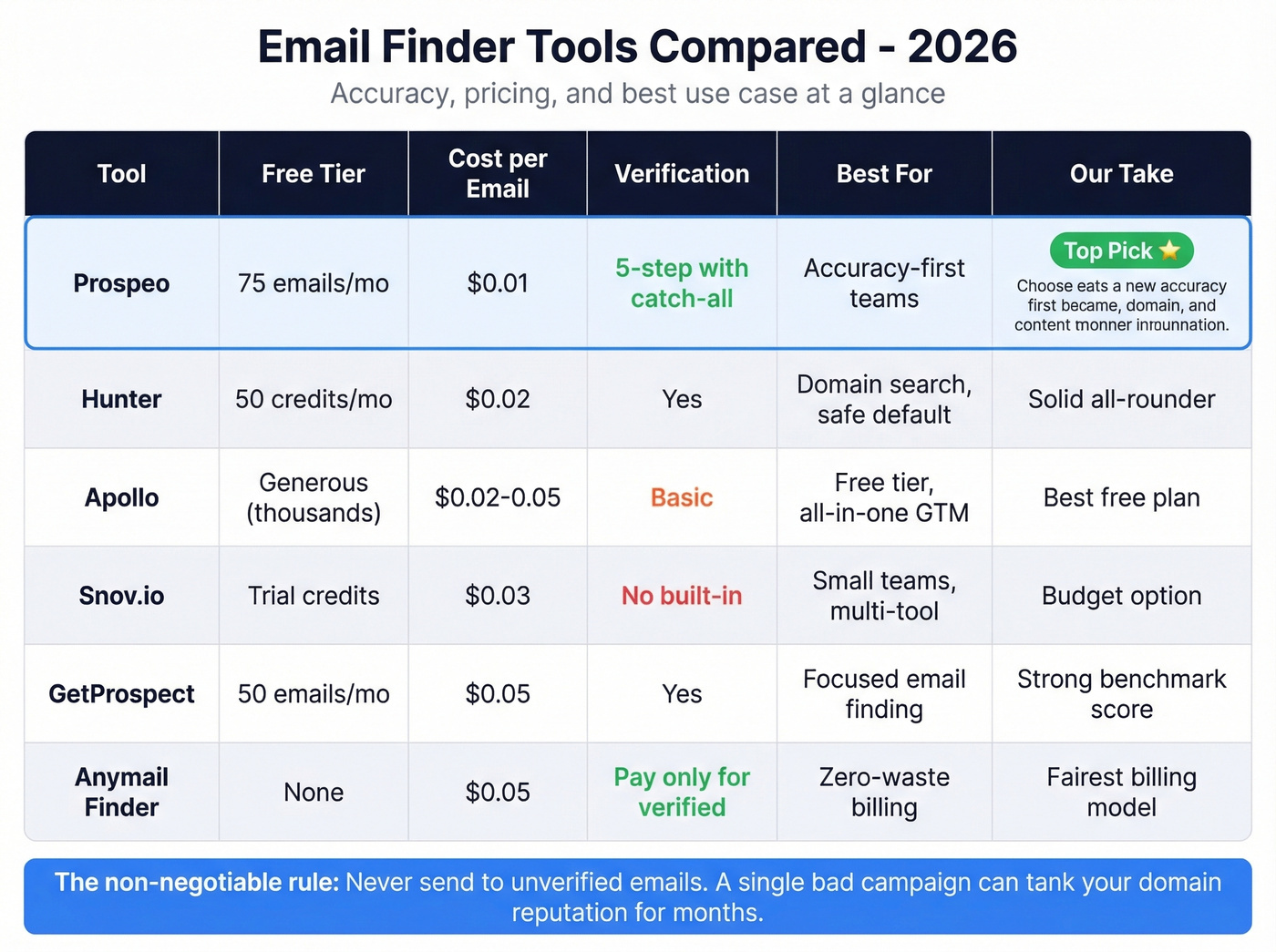
| Tool | Free / Paid | Verification | Best For | ~Cost/Verified Email |
|---|---|---|---|---|
| Prospeo | 75 emails/mo / ~$0.01/email | 5-step with catch-all | Accuracy-first teams | ~$0.01 |
| Hunter | 50 credits/mo / $49/mo | Yes | Safe default, domain search | ~$0.02 |
| Apollo | Generous free tier / ~$49-$99/mo/user | Basic | Free tier, all-in-one | ~$0.005 |
| Snov.io | 50 credits/mo / $29.25/mo | 1 credit each | Budget multi-tool | ~$0.03 |
| GetProspect | 50 emails/mo / $49/mo | Yes | Benchmark-proven mid-tier | ~$0.05 |
| Anymail Finder | Trial / $49/mo | 97%+ threshold | Pay-per-verified model | ~$0.05 |
| Skrapp | 50 credits/mo / ~$50/mo | Yes | Basic prospecting | ~$0.05 |
| Voila Norbert | 50 emails / $49/mo | Yes | Enrichment add-on users | ~$0.05 |
Email lists decay 28% per year. Prospeo refreshes every 7 days - not the 6-week industry average. Stack Optimize maintained 94%+ deliverability with zero domain flags across every client. That's what a proprietary email-finding infrastructure delivers.
Find and verify any professional email in seconds. 75 free searches, no card required.
Reverse Email Lookup Tools
Reverse lookup is the other half of the equation, and it's a different world entirely. Instead of "give me this person's email," you're asking "who owns this email address?" Use cases range from verifying inbound leads to OSINT investigations to simple curiosity.
The frustration with reverse lookup tools is well-documented. Reddit's OSINT community regularly complains that tools advertise "free" results but gate the actual data behind paid reports - a bait-and-switch pattern that's become the norm. Most OSINT practitioners don't rely on a single tool. The typical workflow chains multiple sources: start with a free lookup for basic identification, cross-reference against social profiles, check breach databases for associated accounts, then pivot to social connections for deeper context.
Mailmeteor is the best free reverse email lookup available right now. No signup required, instant results, and it actually delivers without a paywall. It won't give you a full dossier, but for basic identification - name, social profiles, company - it's the fastest path from email to identity at zero cost.
Reverse Contact offers 20 free trial requests and returns richer data: job titles, company details, social links. Worth the upgrade if you're doing reverse lookups regularly or need more context than a name and photo.
Epieos is the OSINT baseline tool that most practitioners have tried. Free for basic lookups. The consensus from the security research community? Results are "pretty minimal most of the time." Use it as a starting point, not a destination.
Understanding Verification Results
When an email finder returns results, you'll see status labels that determine whether you should actually send to that address.
| Status | What It Means | Should You Send? |
|---|---|---|
| Valid | Server confirmed the mailbox exists | Yes |
| Catch-All | Server accepts all addresses | Maybe - risky |
| Invalid | Mailbox doesn't exist or domain is dead | Never |
| Unknown | Server didn't respond clearly | Risky - recheck later |
Catch-all domains deserve special attention because they often belong to Fortune 500 companies and large tech firms - your highest-value targets. Verification tools can't confirm whether john.smith@bigcorp.com actually exists because the server says "yes" to everything. Most tools either skip catch-all handling entirely, flag these addresses as "risky" and leave you guessing, or charge extra for the additional check. Look for tools that include catch-all handling in their standard verification process rather than treating it as a premium upsell.
Sending to unverified or invalid emails triggers hard bounces. Hard bounces signal to email service providers that you're not maintaining your list, which damages your sender reputation and pushes future emails - even to valid addresses - into spam folders. It's a downward spiral that's far easier to prevent than to fix (benchmarks: email bounce rate).
Waterfall Enrichment: When One Tool Isn't Enough
When a single tool's coverage falls short, teams run waterfall enrichment - passing a list through multiple finders sequentially and deduplicating the results. Tool A finds 68% of your list, Tool B finds a different 72%, and the combined result covers 73% with near-perfect verification.
PhantomBuster's August 2025 test on 1,000 profiles showed exactly this pattern. Hunter alone hit 68% with 97% verification. Dropcontact alone hit 72% with 100% verification. Combined, they reached 73% with 97-100% verification. The marginal gain from adding a second tool was only 1-5 percentage points.
In our experience, waterfall enrichment makes sense if you're running 10,000+ lookups per month and every percentage point of coverage matters. For most teams doing a few hundred searches, a single good tool with proper verification gets you 90% of the way there. Don't over-engineer this (related: data enrichment services).
Compliance and Legal Risks
GDPR enforcement has reached ~EUR 5.88 billion across 2,245 actions, and the fines aren't slowing down. If you're using email finder tools for B2B outreach, compliance isn't optional - it's a real financial risk.
The legal basis most B2B teams rely on is "legitimate interest" under GDPR, which allows outreach to business contacts when you have a reasonable commercial reason. This differs from consent-based marketing to consumers. But legitimate interest still requires you to offer opt-out mechanisms, process data through compliant infrastructure, and document your reasoning. GDPR applies extraterritorially - if you're processing EU residents' data, the regulation applies regardless of where your company is based.
When evaluating tools, look for EU-based data processing, published DPAs, and clear opt-out enforcement. Self-serve tools with transparent data practices are generally safer bets than black-box providers who won't tell you where your data lives (more: is it illegal to buy email lists).
FAQ
Is email address search legal?
Yes, for B2B purposes under GDPR's legitimate interest basis, provided you have a lawful commercial reason, offer a clear opt-out, and use compliant tools with proper data processing agreements. Consumer and personal email scraping operates under stricter consent requirements and carries significantly higher regulatory risk.
How accurate are email finder tools really?
Independent benchmarks show real enrichment rates of ~31-55%, far below the 90%+ many tools advertise. The critical metric is the gap between "found" and "deliverable" - a tool might find 500 emails from a 1,000-contact list, but if 15% bounce, you've damaged your sender reputation for 75 bad addresses.
Email finder vs. email verifier - what's the difference?
A finder locates email addresses you don't have, taking a name and company as input and returning an address. A verifier checks whether an email you already possess is deliverable. Many tools bundle both, but they're separate processes - you need finding first, then verification. Never skip the second step.
How do I search email addresses in bulk?
Upload a CSV with names and company domains to any major finder tool. Prospeo, Hunter, and Apollo all support bulk operations, though credit costs scale accordingly. For lists over 10,000 contacts, waterfall enrichment across two tools typically maximizes coverage while keeping bounce rates under 4%.