

Email Automation Workflows: The Practitioner's Guide for 2026
You built a beautiful 5-email welcome sequence, launched it, and your bounce rate hit 12%. Now your sender reputation is damaged and even your manual campaigns are landing in spam. That's the reality most guides skip - your workflow logic doesn't matter if the data underneath it is broken. Here's how to build email automation workflows that actually convert, with real benchmarks, templates, and the upstream fixes most teams ignore.
What Is an Automated Email Workflow?
An email automation workflow is a trigger-based sequence that sends the right message when a recipient takes - or doesn't take - a specific action. Someone signs up? They get a welcome series. Someone abandons a cart? They get a reminder within the hour. Someone goes dark for 60 days? Re-engagement sequence.
The gap between this and manually blasting your list is staggering. Automated sequences generate roughly 40% of email revenue while representing just 3% of total sends. You're not sending more email. You're sending the right email at the right moment and letting the system handle timing and branching. With email ROI commonly cited around $36-$42 per dollar spent, the efficiency case writes itself.
What You Need Before Building
Before you build anything complex, nail these three things:
- Three workflows to start: Welcome series, abandoned cart, and re-engagement. These cover the highest-impact moments in the customer lifecycle.
- Clean data first: Your automation platform assumes the emails you feed it are valid. Once bounces climb above 2%, deliverability starts falling fast and every workflow suffers - including your manual campaigns. Verify before you automate.
- Stop measuring by open rates. Apple Mail Privacy Protection inflates them. Gmail AI summaries can reduce them by giving users the gist without opening the email. Click-through rate and conversion rate tell you whether your workflows are actually working.
The biggest threat to your automated sequences isn't your workflow logic. It's your contact data.
Five Essential Workflows (With Templates)
Welcome Series
The welcome series is your highest-engagement window. New subscribers are paying attention right now - don't waste it with a single "thanks for signing up" email.
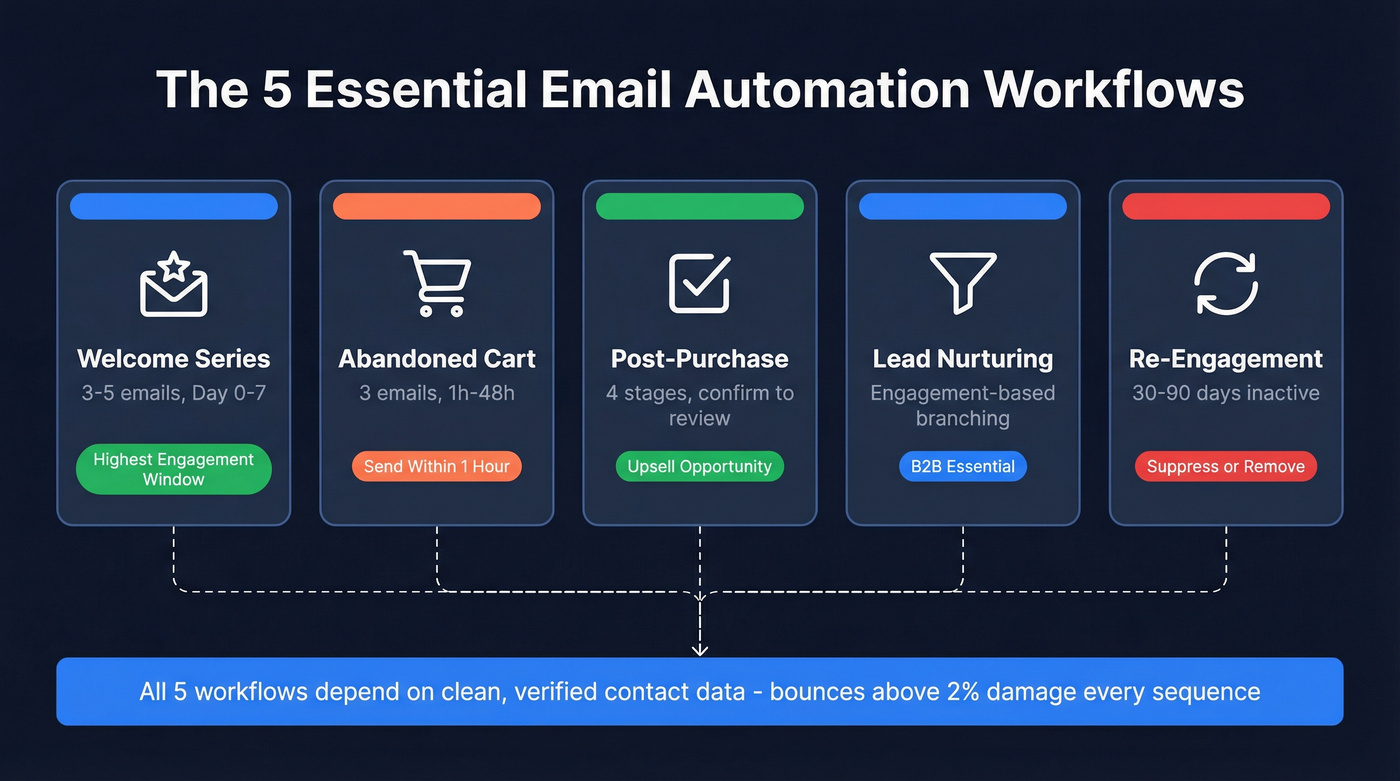
Structure: 3-5 emails over the first week.
- Day 0 (immediate): Deliver the promised value - lead magnet, discount code, account confirmation. Subject line: "Here's your [thing] - plus what's coming next."
- Day 1: Introduce your brand story or top product. Subject line: "The one thing most [audience] get wrong about [topic]."
- Day 3: Social proof - case study, testimonial, or user-generated content. Subject line: "How [customer name] got [specific result]."
- Day 7 (branch): If they've purchased, move them to a post-purchase flow. If they haven't, send a nudge with urgency. Subject line: "Still thinking it over? Here's 10% off."
One case study from Remix showed a 104% increase in first purchases after implementing behavior-based branching at Day 7. The branch is what makes this a workflow, not a drip.
Abandoned Cart
Three emails. That's all you need. More than that and you're annoying people.

- 1 hour after abandonment: Reminder with the exact items they left behind. Subject line: "You left something behind." No discount yet - just a nudge.
- 24 hours: Add social proof or answer common objections. Subject line: "Still interested? Here's why [product] is worth it."
- 48 hours: Final push with urgency or a small incentive. Subject line: "Last chance - your cart expires soon."
Sending within one hour often outperforms waiting a full day. Layer in SMS as a second channel on the 24-hour touchpoint - multi-channel cart recovery outperforms email-only by a wide margin.
Post-Purchase
Most teams stop at order confirmation. That's leaving money on the table.
- Stage 1 - Order confirmation: Immediate. Sets expectations on shipping and next steps.
- Stage 2 - Pre-shipment upsell: Complementary products while excitement is high.
- Stage 3 - Shipping confirmation: Tracking info plus a "what to expect" note.
- Stage 4 - Post-delivery check-in: 3-5 days after delivery. This is your review request moment. If your ESP supports AMP emails, embed a survey directly in the message to remove friction.
Lead Nurturing
This is where B2B teams live. The key is engagement-based branching, not fixed timing.
For engaged contacts who are opening and clicking, use 2-3 day waits between emails. For low-engagement contacts, stretch to 5-7 days - you're giving them space, not hammering them. When a contact's engagement score crosses your threshold, route them directly into a sales sequence. Don't let warm leads sit in a nurture flow when they're ready to talk.
Re-Engagement
Trigger this at 30-90 days of inactivity, depending on your typical sales cycle.
- Email 1: "We miss you" - light, value-driven. Resurface your best content.
- Email 2: Exclusive offer or new feature announcement.
- Email 3 (optional): Direct ask - "Is this still relevant to you?"
- Final email: "We're going to remove you from our list." This isn't a threat. It's list hygiene. The people who don't respond get suppressed, which improves deliverability for everyone else.
Benchmarks by Workflow Type
Every automation guide says "monitor your KPIs" and then doesn't tell you what good looks like. A 36% open rate on your abandoned cart - is that good? It's average. Here are the actual benchmarks.

| Workflow Type | Open Rate | Conversion Rate |
|---|---|---|
| Shipping confirmation | 62.9% | 2.08% |
| Back-in-stock | 57.3% | 6.41% |
| Order confirmation | 55.9% | 1.59% |
| Cross-sell / upsell | 42.3% | 0.84% |
| Birthday greeting | 41.4% | - |
| Abandoned cart | 36.8% | 1.69% |
| Welcome emails | 34.1% | 2.08% |
These are directional benchmarks from recent industry data. In our experience, teams with sub-20% welcome series open rates almost always have a data quality problem, not a content problem. For general context, open rates of 25-35% are solid for most automated flows, while 50%+ is common for transactional and triggered messages.
The standout is back-in-stock at 6.41% conversion. If you're in ecommerce and you're not running this workflow, you're missing the highest-converting automated email type entirely.

The article said it clearly: bounces above 2% tank every workflow you build - welcome, cart, nurture, all of it. Prospeo's 5-step email verification delivers 98% accuracy with catch-all handling and spam-trap removal, so your sequences actually reach inboxes.
Fix the data under your workflows before you optimize a single subject line.
Advanced Workflow Patterns
Once your core workflows are running, these patterns separate good automation from great.
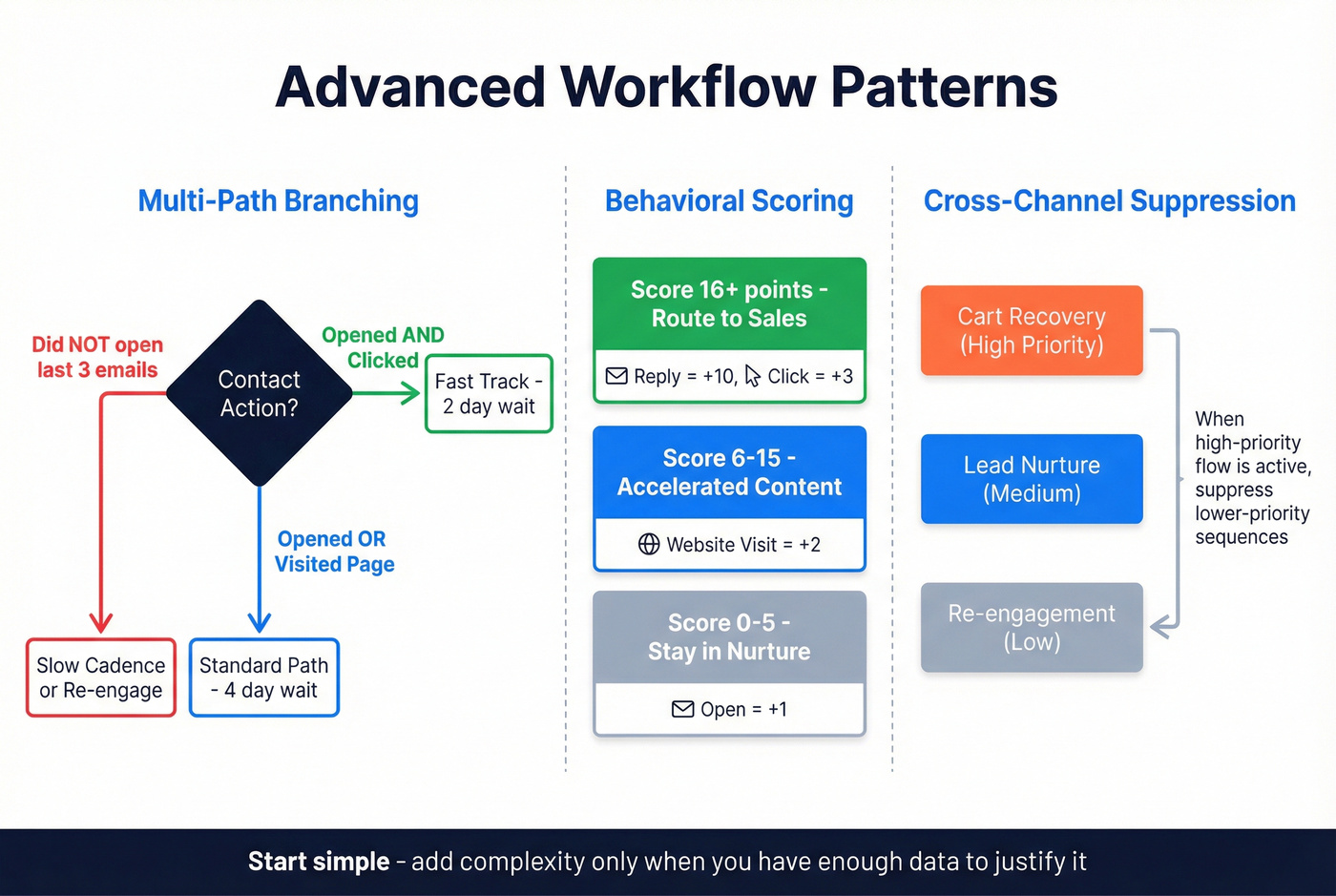
Multi-path branching goes beyond simple if/then. Use AND/OR logic to create nuanced paths - "opened email AND clicked link" routes differently than "opened email OR visited pricing page." Negative conditions matter too: "did NOT open any of the last 3 emails" should trigger a different cadence, not the same one louder.
Behavioral scoring gives you a quantitative trigger for routing. A simple model: open = +1 point, click = +3, website visit = +2, reply = +10. Score bands determine the path - 0-5 stays in nurture, 6-15 gets accelerated content, 16+ routes to sales. We've seen teams overcomplicate scoring with dozens of variables. Start simple. Add complexity only when you have enough data to justify it.

Dynamic waits adjust timing based on engagement signals and time zones. An engaged contact who clicked yesterday doesn't need a 5-day wait - send the next email in 2 days. A contact in Singapore shouldn't get your email at 3 AM their time because your ESP defaults to EST.
Cross-channel orchestration prevents the worst automation sin: sending someone a re-engagement email the same day they get an abandoned cart reminder. Use shared tags and priority/suppression systems so workflows know about each other. When a contact enters a high-priority flow like cart recovery, suppress them from lower-priority sequences until they exit. Coordinating email with SMS, push notifications, and retargeting ads within a single workflow ensures consistent messaging and avoids channel fatigue.
Tips That Actually Move the Needle
1. Define goals before you build. 91% of marketers say automation is critical, but most still wing it. "We should automate our emails" isn't a strategy. Define what each workflow is supposed to achieve, set a conversion target, and measure against it. A welcome series with no defined success metric is just scheduled spam.

3. Segment aggressively. Sending the same abandoned cart email to a first-time visitor and a repeat customer with $2,000 in lifetime value is lazy. Segment by behavior, purchase history, and engagement level. The workflow templates above include branching for a reason. (If you need a framework, start with behavioral segmentation.)
4. Don't rely on email alone. Email is the backbone, but it's not the only channel. An abandoned cart sequence that includes an SMS touchpoint at the 24-hour mark outperforms email-only. Push notifications, in-app messages, and retargeting ads can all complement your email automation workflows - multi-channel coordination is what separates modern automation from 2015-era drip campaigns.
5. Handle deliverability prerequisites first. Before you build a single workflow, authenticate your domain with SPF, DKIM, and DMARC. Warm up new sending domains gradually. Keep bounce rates under 2% and spam complaint rates under 0.1%. Skip this step and it doesn't matter how good your subject lines are - your emails won't reach the inbox. (Use a proper email deliverability checklist so nothing gets missed.)
Here's my hot take: most teams spend 80% of their time optimizing subject lines and email copy, and 20% on data quality and deliverability. Flip that ratio. A mediocre email that reaches the inbox will always outperform a brilliant email that lands in spam.
Lead nurture workflows only convert when engagement scores route warm buyers to sales - and sales needs real contact data to close. Prospeo gives you verified emails and 125M+ direct dials, refreshed every 7 days, so your hottest leads never stall on bad data.
Stop routing high-intent leads into sequences built on stale contacts.
How to Measure Performance in 2026
Open rates used to be the default metric. That era is over. Apple Mail Privacy Protection inflates opens by pre-loading tracking pixels, and Gmail's AI summaries reduce them by giving users the gist without opening the email. Treat open rates as a directional trend signal - useful for A/B testing subject lines over time, useless as a standalone success metric.
Shift your focus to click-through rate and click-to-open rate. A good CTR runs 2-5% depending on industry. Below 1% signals a relevance or targeting problem. Above 5% is typical for transactional emails where the recipient is already expecting the message. CTOR measures content effectiveness among people who actually opened - it tells you whether your email body is doing its job. (If you want the nuance, see open rate vs click rate.)
Deliverability guardrails matter just as much as engagement metrics. Target 95%+ delivery rate. Keep total bounces under 2% and hard bounces under 0.5%. Spam complaint rate should stay below 0.1% - above 0.3% is critical territory where mailbox providers start throttling or blocking your domain entirely. If you suspect reputation issues, run a blacklist alert process before you scale volume.
Best Tools for Building Workflows
| Tool | Best For | Starting Price |
|---|---|---|
| ActiveCampaign | Advanced workflows | $15/mo (500 contacts) |
| Brevo | Best value | $8.08/mo |
| MailerLite | SMB simplicity | $9/mo |
| Mailchimp | All-in-one marketing | $13/mo |
| HubSpot | CRM + automation | $20/mo |
| Omnisend | Ecommerce | $16/mo |
| GetResponse | Mid-market | $15/mo |
| Constant Contact | Beginners | $12/mo |
| Kit | Creators | $33/mo |
| Drip | Ecommerce (advanced) | $39/mo |
ActiveCampaign is the best pure workflow builder on this list. Its visual automation editor handles complex branching, conditional logic, and scoring natively - no workarounds needed. The $15/mo starting price covers 500 contacts; expect $29/mo+ at 1,000 contacts. If workflow sophistication is your priority, start here.
Brevo is the most underrated option. Unlimited contacts on the free plan - you pay by email volume, not list size - and EmailToolTester benchmarks put it at 94% inbox placement vs Mailchimp's 83%. In our testing, Brevo's workflow builder handles all five essential workflows without friction. For teams watching their budget, that's a meaningful edge.
MailerLite is the simplest option for small teams who want clean automation without a learning curve. Mailchimp does everything but charges for unsubscribes sitting in your list - a pricing model that frustrates teams with high churn. HubSpot starts at $20/mo, but full automation features live in the Marketing Hub Professional tier at ~$800/mo. It's overkill unless you need CRM-native automation.
FAQ
How many emails should a workflow have?
Most workflows perform best with 3-5 emails. Welcome series can stretch to 7 if engagement stays high. Abandoned cart sequences rarely need more than 3. Monitor engagement drop-off between steps and trim where click rates crater.
What's the difference between a drip campaign and an automation workflow?
Drip campaigns send pre-written emails on a fixed schedule regardless of recipient behavior. Automation workflows use behavioral triggers and conditional branching - opens, clicks, purchases, and inactivity all change the path. A drip is a conveyor belt; a workflow is a decision tree.
How do I prevent automated emails from landing in spam?
Authenticate your domain with SPF, DKIM, and DMARC, and warm up new sending domains gradually. Keep bounce rates under 2% and verify your list before loading it into any platform. Even a small verification pass on a test segment will show you the impact before you commit to cleaning your full database.
What are the most important tips for beginners?
Start with three workflows - welcome, abandoned cart, and re-engagement - and get them running cleanly before adding complexity. Verify your contact list before importing, segment from day one even if your segments are simple, and measure click-through rate instead of open rate. Nail the fundamentals and you'll outperform teams running dozens of poorly maintained sequences.