

The Best Email Checker Chrome Extensions for 2026
Half the tools called "email checker Chrome extensions" are actually Gmail notification badges - Checker Plus, Google Mail Checker, inbox counters. Useful if you want unread-email alerts. Useless if you need to verify that a prospect's address won't bounce before you hit send.
With global inbox placement sitting around 83.5%, roughly one in six legitimate emails never reaches the inbox. A good verification extension is the cheapest insurance your outbound stack can buy. This article covers extensions that confirm whether an email address is deliverable - not whether you have new mail.
Our Picks (TL;DR)
| Pick | Tool | Why |
|---|---|---|
| Best overall | Prospeo | Finds and verifies in one click - 98% accuracy, no second tool needed |
| Best all-in-one suite | Snov.io | Full prospecting platform with 7-tier verification built in |
| Best for compliance | Clearout | SOC 2 Type II + ISO 27001, AI-powered verdict system |
| Best budget option | EmailListVerify | ~$4 per 1,000 verifications - hard to beat on price |
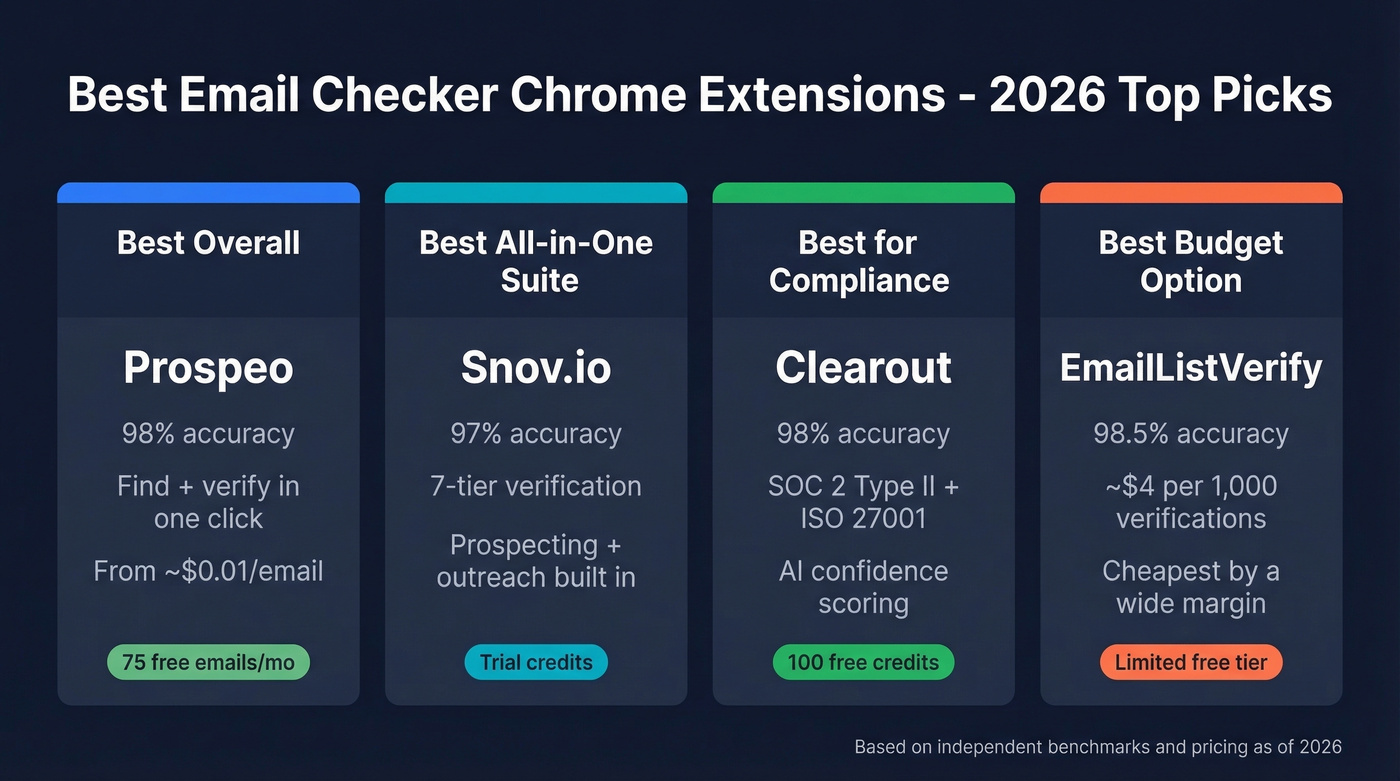
Short on time? Prospeo is the pick for teams that want finding and verification in a single workflow. Snov.io wins if you want outreach sequences bundled in. Clearout is the play for regulated industries. EmailListVerify is for pure cost optimization.
Best Email Verification Extensions for Chrome
Here's how the field stacks up side by side.
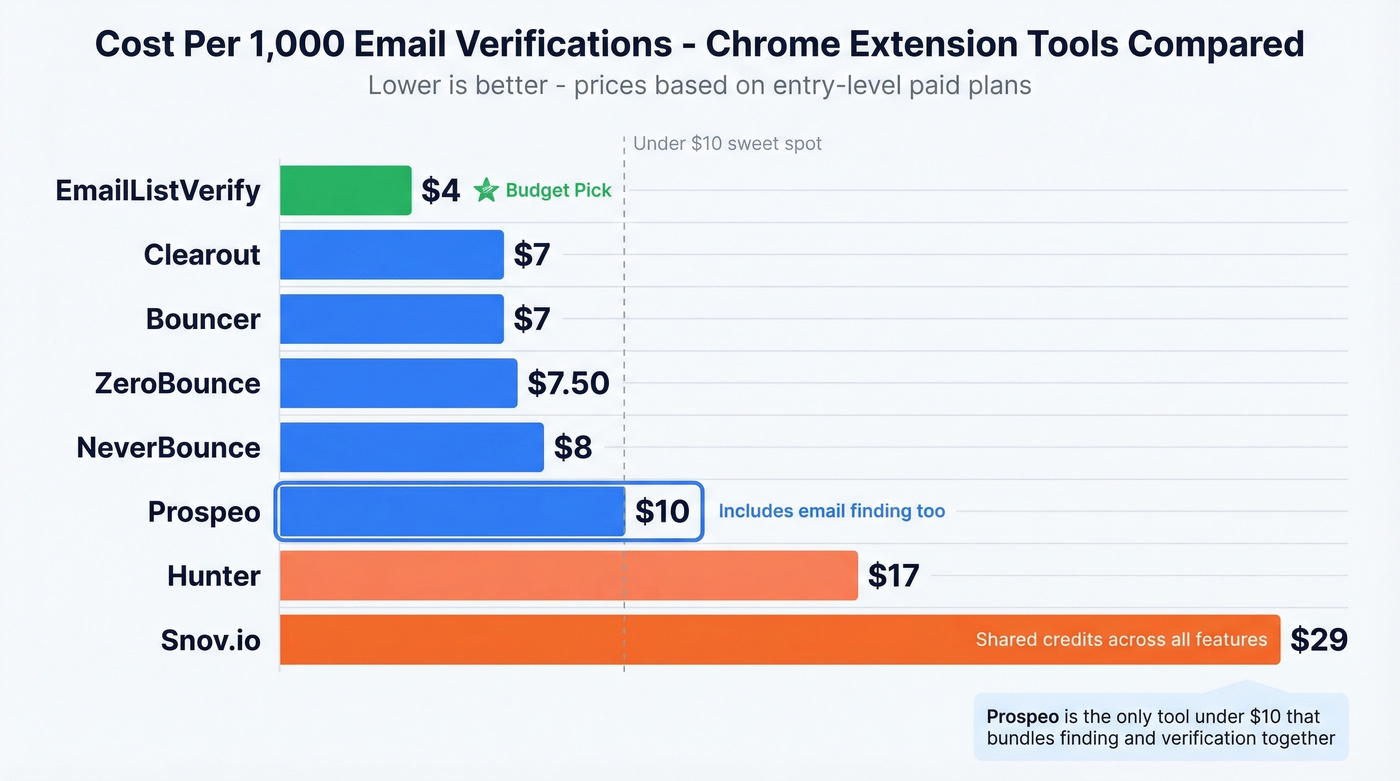
| Tool | Accuracy | Cost/1K Verifications | Free Tier | Best For |
|---|---|---|---|---|
| Prospeo | 98% | ~$10 | 75 emails + 100 credits/mo | Find + verify in one step |
| Hunter | ~96% | ~$17 (Starter, yearly) | 100 verifications/mo | Brand recognition |
| Snov.io | ~97% | ~$29 (shared credits) | Trial credits | Full prospecting suite |
| Clearout | ~98% | $7 (PAYG) | 100 credits | Compliance-heavy teams |
| Truelist | Not benchmarked | $30-60/mo flat | Unlimited in-app | High-volume, flat billing |
| EmailListVerify | ~98.5% | ~$4 | Limited | Budget-conscious teams |
| Skrapp | 98% | ~$49/mo | 100 credits/mo | Combined finder + verifier |
| ZeroBounce | ~98.8% | ~$7.50 | 100 credits | Permissive verification |
| NeverBounce | ~98.6% | $8 | 1,000 credits | Conservative verification |
| Bouncer | ~98.9% | $7 | 1,000 credits | Budget + high accuracy |
Prospeo
Use this if you're tired of running one tool to find emails and a second tool to verify them. Skip this if you need a full outreach sequencer built into the same platform.
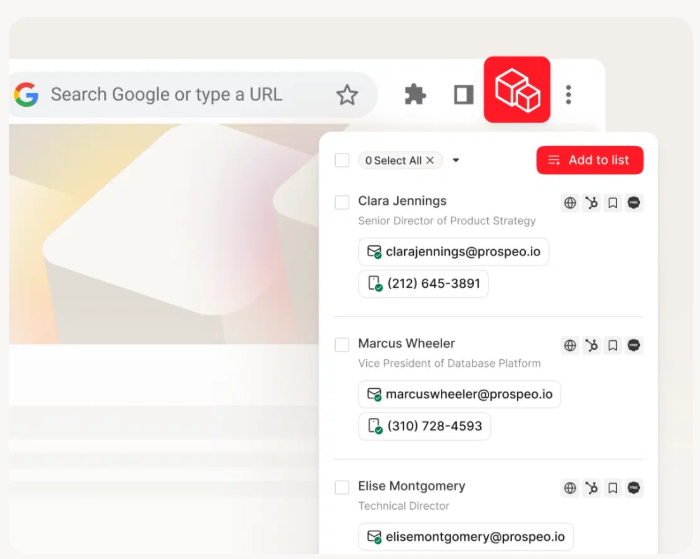
Prospeo's Chrome extension collapses the find-and-verify workflow into a single click. Browse any company website or professional profile, and the extension surfaces verified contact data - emails, mobile numbers, 50+ data points per contact. The 5-step verification engine handles catch-all domains, strips spam traps, and filters honeypots, which is why the 98% email accuracy holds up across real campaigns. The database behind it draws from 300M+ professional profiles, with 143M+ verified emails and 125M+ verified mobile numbers refreshed on a 7-day cycle compared to the 6-week industry average.
The free tier gives you 75 emails plus 100 extension credits per month - enough to run a genuine test. Paid plans work out to roughly $0.01 per email, and everything pushes natively into Salesforce, HubSpot, Lemlist, and Clay. With 40,000+ extension users, it's one of the most-installed B2B verification extensions in the Chrome Web Store.
Hunter
Hunter is the name most people think of first, and the free tier is genuinely generous - 50 credits per month, with verification costing just 0.5 credits each, so you get 100 free verifications monthly. That's enough for light prospecting without spending a dollar.
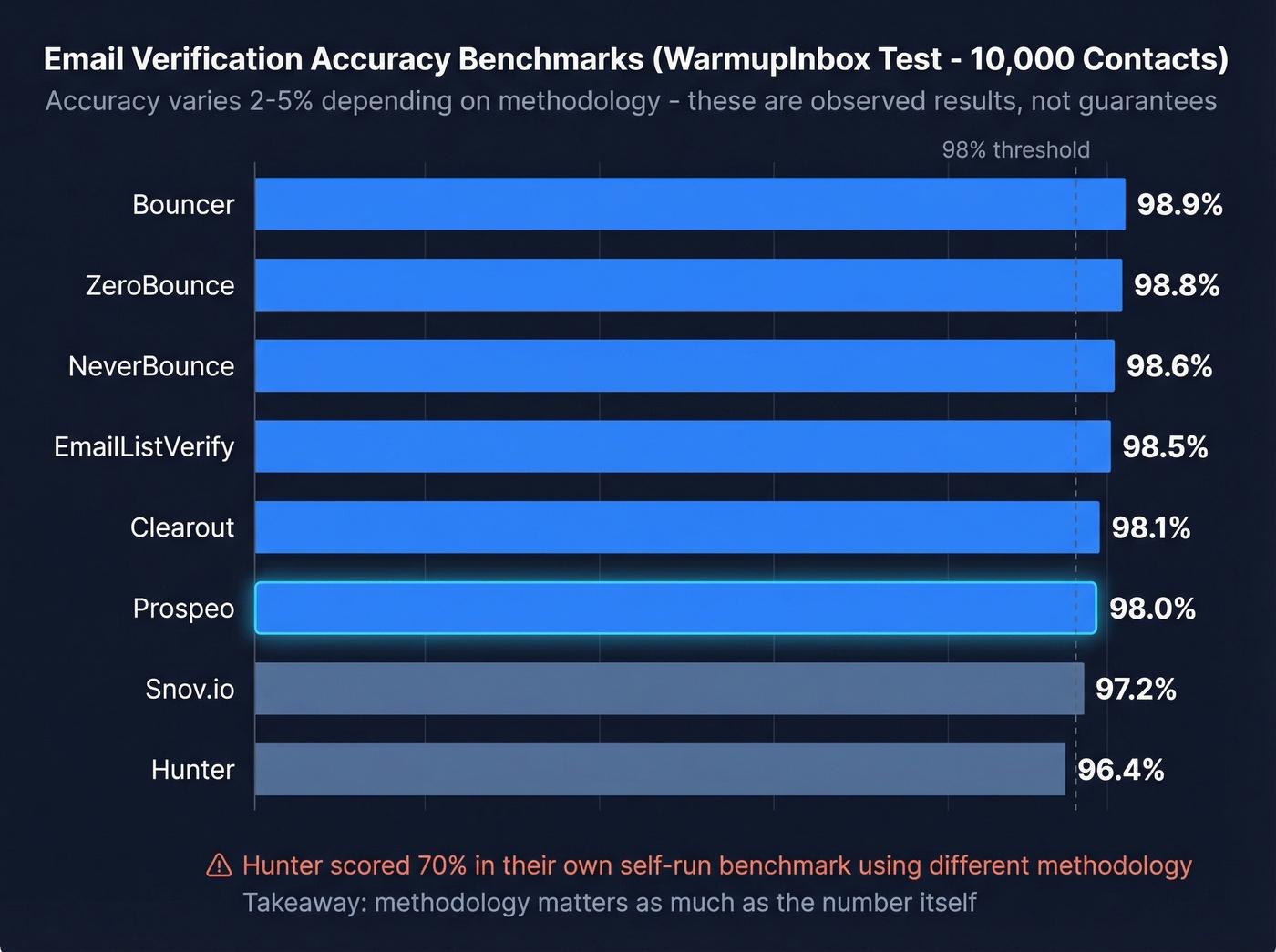
The accuracy picture is complicated, though. In a WarmupInbox benchmark testing 10,000 contacts, Hunter came in at 96.4% observed accuracy - solid, but noticeably behind tools like Bouncer (98.9%) and EmailListVerify (98.5%). More striking: Hunter ran their own 15-verifier benchmark using 3,000 emails tested in Clay, and their own tool scored just 70% accuracy under that methodology. They transparently disclosed a bias in the dataset, which used "email activity recorded in Hunter" to classify validity. The gap between 96.4% and 70% on the same tool is a perfect illustration of how much methodology shapes results - a theme we'll return to.
Starter runs $34/mo billed yearly ($49/mo monthly). At 0.5 credits per verification, that's roughly $17 per 1,000 verifications on the yearly plan - competitive on price, if not on accuracy.

Snov.io
Seven verification tiers. Email finding. Outreach sequences. CRM. Snov.io packs more into one subscription than any other tool on this list, and that's exactly why it works for teams that hate stitching together three separate platforms.
Verification costs 1 credit per email on the Starter plan at $29.25/mo, which includes 1,000 credits shared across finding and verification. The 7-tier process checks syntax, domain, MX records, SMTP response, and more. In the WarmupInbox benchmark, Snov.io hit 97.2% observed accuracy - middle of the pack, but the all-in-one convenience often outweighs a percentage point or two for smaller teams.
Use this if you want prospecting, verification, and outreach in one subscription. Skip this if you only need verification - you'd be paying for features you won't touch.
Clearout
Clearout is the compliance-first option. SOC 2 Type II and ISO 27001 certified, with 256-bit SSL and a default 30-day data retention policy. If your legal team has opinions about where prospect data lives, Clearout makes that conversation easier.
The AI verdict system goes beyond simple valid/invalid - it assigns deliverability confidence scores that help you decide how aggressively to send. The WarmupInbox benchmark measured 98.1% accuracy. Entry pay-as-you-go pricing works out to about $7 per 1,000 verifications, and you get 100 free credits with no card required.
Truelist
Truelist flips the pricing model entirely. Instead of credits, you pay a flat $30/mo or $60/mo subscription - and the founder confirmed on Reddit that this includes unlimited in-app validations plus generous CSV/XLSX support in the 50K-150K emails/month range.
The Chrome extension auto-detects emails on any page and gives one-click valid/invalid/risky verdicts, with copy and CSV export. SOC 2 Type II certified. The main tradeoff: Truelist hasn't appeared in the major independent benchmarks, so you're trusting their own accuracy claims without third-party validation. For high-volume teams that already know their data quality is decent, the flat pricing can save serious money. For everyone else, the lack of independent testing is a real concern.
EmailListVerify
The budget leader, full stop. Pricing sits at around $4 per 1,000 verifications, which makes it the cheapest option in this category by a wide margin. The Chrome extension handles both single and bulk verification directly in the browser - extract emails from a webpage or text, verify them in batches, and export results in one click. Verification includes syntax, domain, MX, and SMTP checks, plus detection for role-based, disposable, and free email addresses. The extension encrypts your API key and sends requests over HTTPS.
In the WarmupInbox benchmark, EmailListVerify posted 98.5% observed accuracy. You're not sacrificing quality for the lower price. If verification volume is your primary concern and you don't need email finding, this is the obvious budget pick.
Skrapp
Skrapp combines email finding and verification in one tool, with 100 free credits per month. Verification checks cover syntax, role-based addresses, gibberish detection, disposable domains, and free mailbox providers. It carries a 4.6/5 on Capterra and its Starter plan sits at $49/mo - a solid mid-tier option, though it lacks the database depth or outreach features of the top-tier tools above.
ZeroBounce
The permissive verifier. ZeroBounce's 98.8% benchmark accuracy is strong, and it starts at $15 per 2,000 emails with 100 free credits. It tends to mark more emails as "safe" than conservative tools - good for reach, slightly riskier for bounce rates. We'll dig into why that matters in the accuracy section below.
NeverBounce
The conservative counterpart. At $8 per 1,000 emails with 1,000 free credits, NeverBounce flags borderline addresses more aggressively. Benchmark accuracy: 98.6%. If protecting sender reputation is priority one, this is the safer bet.
Bouncer
Bouncer rounds out the budget tier at $7 per 1,000 emails with 1,000 free credits. The WarmupInbox benchmark measured 98.9% accuracy - the highest in that test. Woodpecker integrates and recommends it, which says something about real-world reliability.

Most email checker extensions verify addresses someone else found. Prospeo's Chrome extension finds and verifies in a single click - 98% accuracy, 5-step verification with catch-all handling, spam-trap removal, and honeypot filtering. 40,000+ users already installed it.
Get 75 free emails and 100 extension credits every month - no card required.
At ~$0.01 per email, Prospeo costs less than most standalone verifiers on this list - and it bundles finding, verification, and 125M+ mobile numbers into one extension. Data refreshes every 7 days, not every 6 weeks.
Pay less than the cheapest verifier and get a complete prospecting tool.
Email Finder vs. Email Checker
These terms get used interchangeably, but they're different jobs. An email finder discovers addresses - you give it a name and company, it returns an email. An email checker confirms whether an existing address is deliverable. That distinction matters because an unverified found email is a bounce waiting to happen.
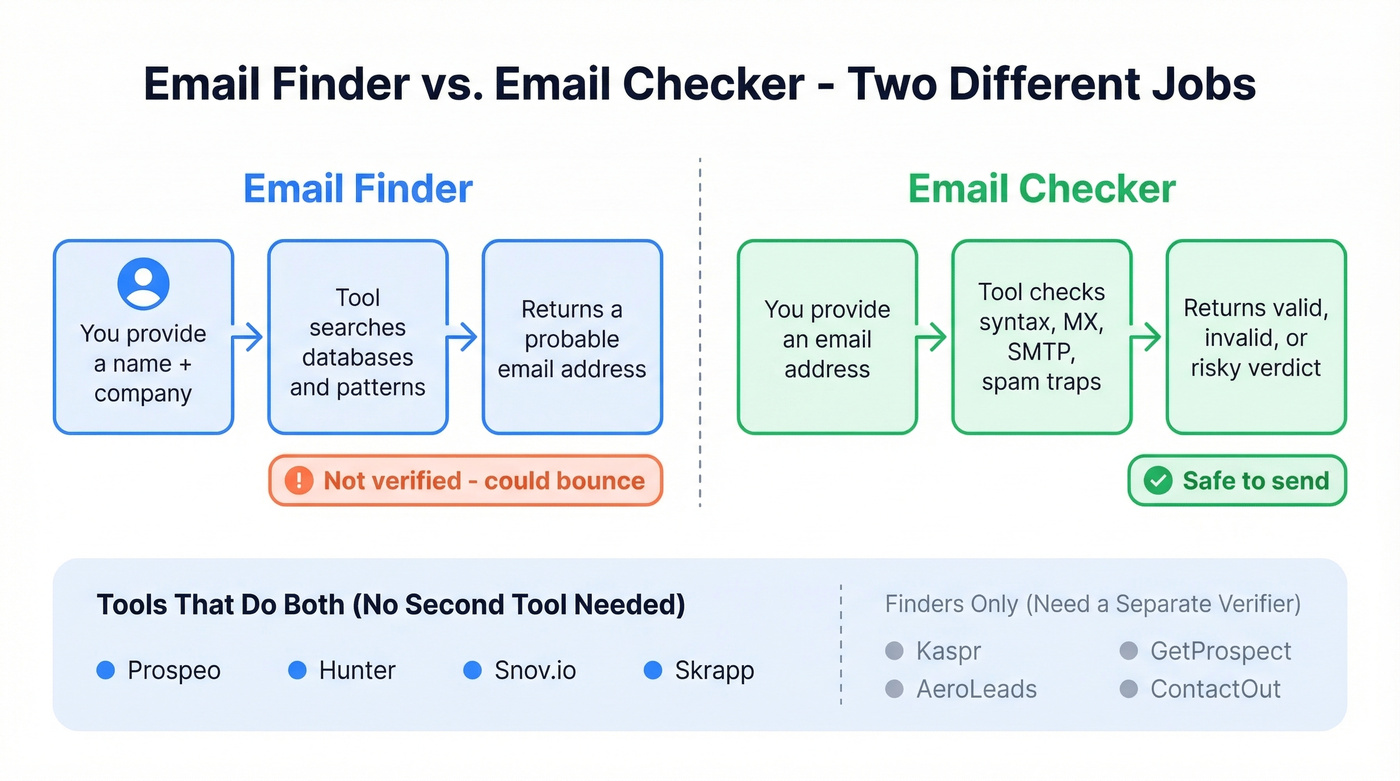
| Finders Only | Finders + Verifiers |
|---|---|
| Kaspr, AeroLeads, GetProspect, ContactOut | Prospeo, Hunter, Snov.io, Skrapp |
If your current tool only finds addresses, pair it with a dedicated verifier - or switch to a tool that handles both steps natively.
For more on the mechanics, see our guide on how to check if an email exists.
Why Accuracy Benchmarks Vary
Here's the thing: accuracy benchmarks are half-useful at best. We've run the same lists through multiple verifiers and consistently seen 2-5% variance in valid counts. The tools aren't broken - they're making different judgment calls.
A real-world test of 563 emails through ZeroBounce and NeverBounce illustrates this perfectly. ZeroBounce marked 61 more emails as safe than NeverBounce did. When the tester sent to ZeroBounce's full "valid" set, 2 emails bounced. NeverBounce had flagged those exact same 2 as invalid - producing zero bounces on its approved set. Same list, different philosophy, different outcome.
This is the conservative-vs-permissive spectrum in action. Permissive verifiers maximize your sendable list but accept slightly higher bounce risk. Conservative verifiers protect your sender reputation at the cost of smaller lists. Neither approach is wrong - it depends on whether you prioritize reach or deliverability.
Catch-all domains are the biggest wildcard. These domains accept all incoming mail regardless of whether the specific mailbox exists, so no verifier can confirm the address is real. How a tool handles catch-all addresses - flag them, pass them, or score them - is often the single biggest driver of accuracy differences. In our testing, aggressive catch-all handling keeps bounce rates lower, even if it means a smaller sendable list.
If your deal sizes are modest, say sub-$15k ACV, you probably don't need 99% accuracy. A 97% tool at half the price will serve you fine. Save the premium verifiers for enterprise outbound where a single bounced email to a C-suite inbox can torch a domain.
If you want to go deeper on bounces and what they do to deliverability, start with email bounce rate and then how to improve sender reputation.

What to Look For Before Installing
Before you add any email checker Chrome extension to your browser, run through this checklist:
- Verification methodology - Does it check MX records, SMTP responses, and DNS? Surface-level syntax checks aren't enough.
- Catch-all handling - How does the tool treat catch-all domains? This is where most accuracy differences live.
- Pricing transparency - Know your cost per verification, not just "credits." A credit that costs $0.05 and takes 2 credits per check is $0.10 per email.
- Free tier size - 50 free verifications won't tell you much. You need at least 100 to run a meaningful test.
- Export and integrations - Can you push verified contacts directly into your CRM or sequencer, or are you stuck downloading CSVs?
- Data security - GDPR compliance is table stakes. SOC 2 and ISO 27001 matter if you're handling enterprise prospect data.
Let's be honest - most teams skip this checklist and just install whatever has the most Chrome Web Store reviews. That works until your bounce rate spikes and your domain reputation tanks. Spend 10 minutes testing before you commit.
FAQ
Are free email verification extensions accurate?
Free tiers use the same verification engine as paid plans - accuracy doesn't degrade. The limitation is volume, with most capping at 50-100 verifications per month. Prospeo's free tier is more generous at 75 emails plus 100 extension credits, enough to test on a real prospect list before committing.
How many verifications do I need monthly?
Multiply your weekly outbound email volume by 1.3 to account for list churn and new prospects. An SDR sending 200 cold emails per week needs roughly 1,000 verifications monthly. Most entry-level tiers cover that, and pay-as-you-go options like EmailListVerify keep costs under $5/mo at that volume.
Can I bulk-verify emails from Chrome?
Some extensions support bulk verification directly in the browser - EmailListVerify and Truelist both handle this. For lists over 1,000 contacts, a web-based bulk tool or API is usually faster and more reliable than running everything through a browser extension.
What does "catch-all" mean in verification results?
It means the domain accepts all incoming emails regardless of whether the specific mailbox exists, so the verifier can't confirm the address is real. Sending to catch-all addresses carries higher bounce risk - most teams either skip them or send at reduced volume to protect sender reputation.
How is a Gmail checker extension different from a verification tool?
A Gmail checker like Checker Plus or Google Mail Checker monitors your inbox for new messages and displays unread counts. A verification extension does the opposite - it confirms whether someone else's email address is deliverable before you send. Outbound prospecting requires the latter.