

Email Gen: 5 Types of Email Generators in 2026
"Email gen" means five completely different things depending on who you are. A developer testing email workflows, a sales rep hunting for a prospect's address, and someone dodging newsletter spam all need different tools - but they're all lumped together under the same two-word search.
Most guides only cover disposable inboxes. This one breaks down all five categories so you pick the right tool instead of burning an hour in the wrong one.
What You Need (Quick Version)
Here's the decision tree:
- Signing up for something you'll never use again? Disposable email. Use Temp-Mail.
- Testing email delivery in your app's staging environment? Developer email tool. Use MailSlurp.
- Finding real, verified business emails for outreach? B2B email finder. Use Prospeo.
- Creating a new professional email address from your name? Address idea generator. Use Mailmeteor.
If you're in that third bucket - and most sales, marketing, and recruiting teams are - skip straight to the B2B section. That's where the real ROI lives.
5 Types of Email Generator Tools
The term "email gen" covers five distinct tool categories. Here's the full picture.
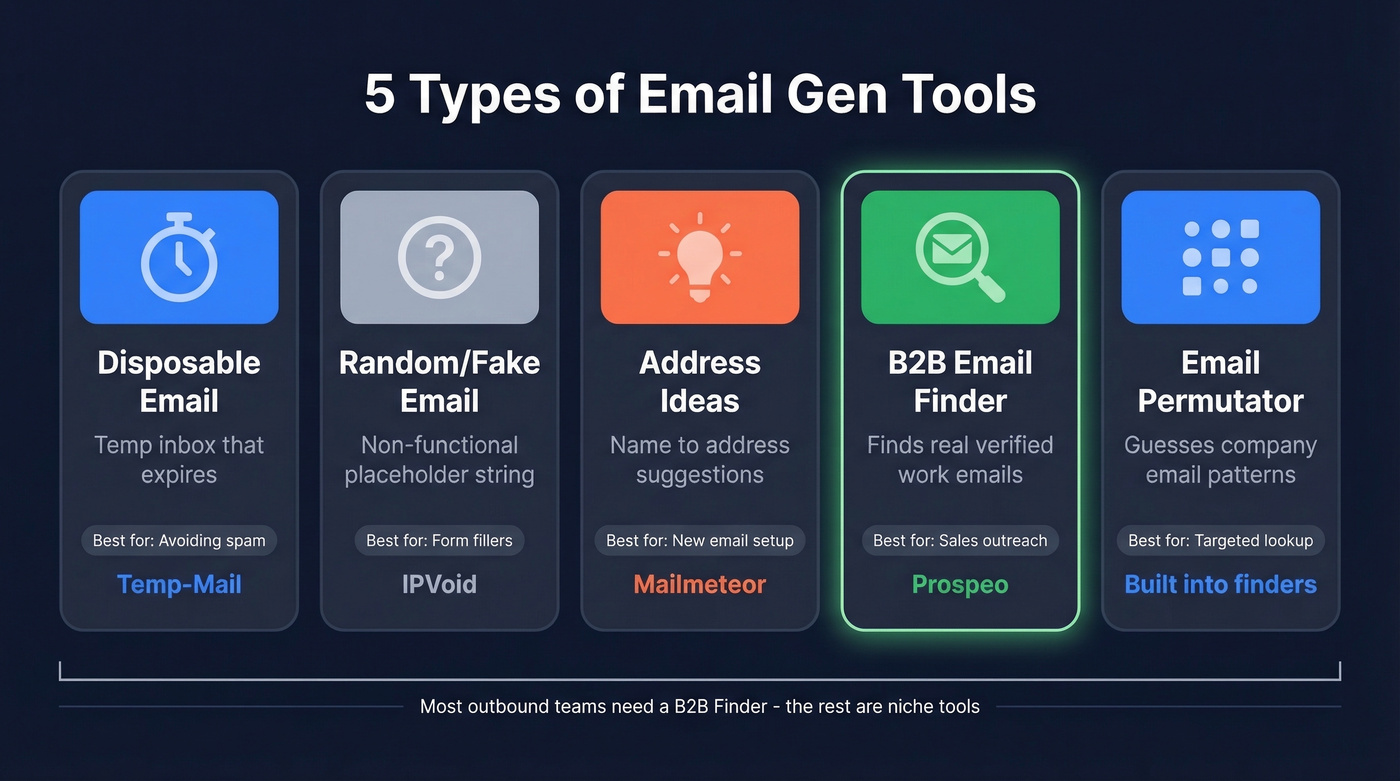
Disposable/temporary email generators create a real inbox that expires after a set period. You use them to dodge spam when signing up for things you don't care about. Temp-Mail is the category leader.
Random/fake email generators produce email-formatted strings that don't actually receive mail. They're placeholders for forms that require an email field but don't verify it - think dummy data, not real inboxes. IPVoid offers these.
Email address idea generators take your name and suggest professional address variations like firstname.lastname@ or f.lastname@. Mailmeteor offers this as a free tool alongside its mail merge product.
B2B email finders search databases of professional profiles to locate and verify someone's actual work email. Hunter.io and Snov.io live here. This is what outbound teams need. If you’re building lists at scale, it helps to understand the broader landscape of email search tools and how they compare.
Email permutators are a subset of B2B tools. They guess email formats based on a company's naming convention and then verify which pattern works. Most B2B finders include this natively - especially if you’re doing name to email lookups.
| Type | What It Does | Example Tool | Best For |
|---|---|---|---|
| Disposable | Temp inbox, expires | Temp-Mail | Avoiding spam |
| Random/Fake | Non-functional placeholder | IPVoid | Form placeholders |
| Address Ideas | Name to address suggestions | Mailmeteor | New email setup |
| B2B Finder | Finds real work emails | Prospeo | Sales outreach |
| Permutator | Guesses email patterns | Built into finders | Targeted lookup |
Best Disposable Email Tools
If you just need a throwaway inbox, these are the tools worth knowing.
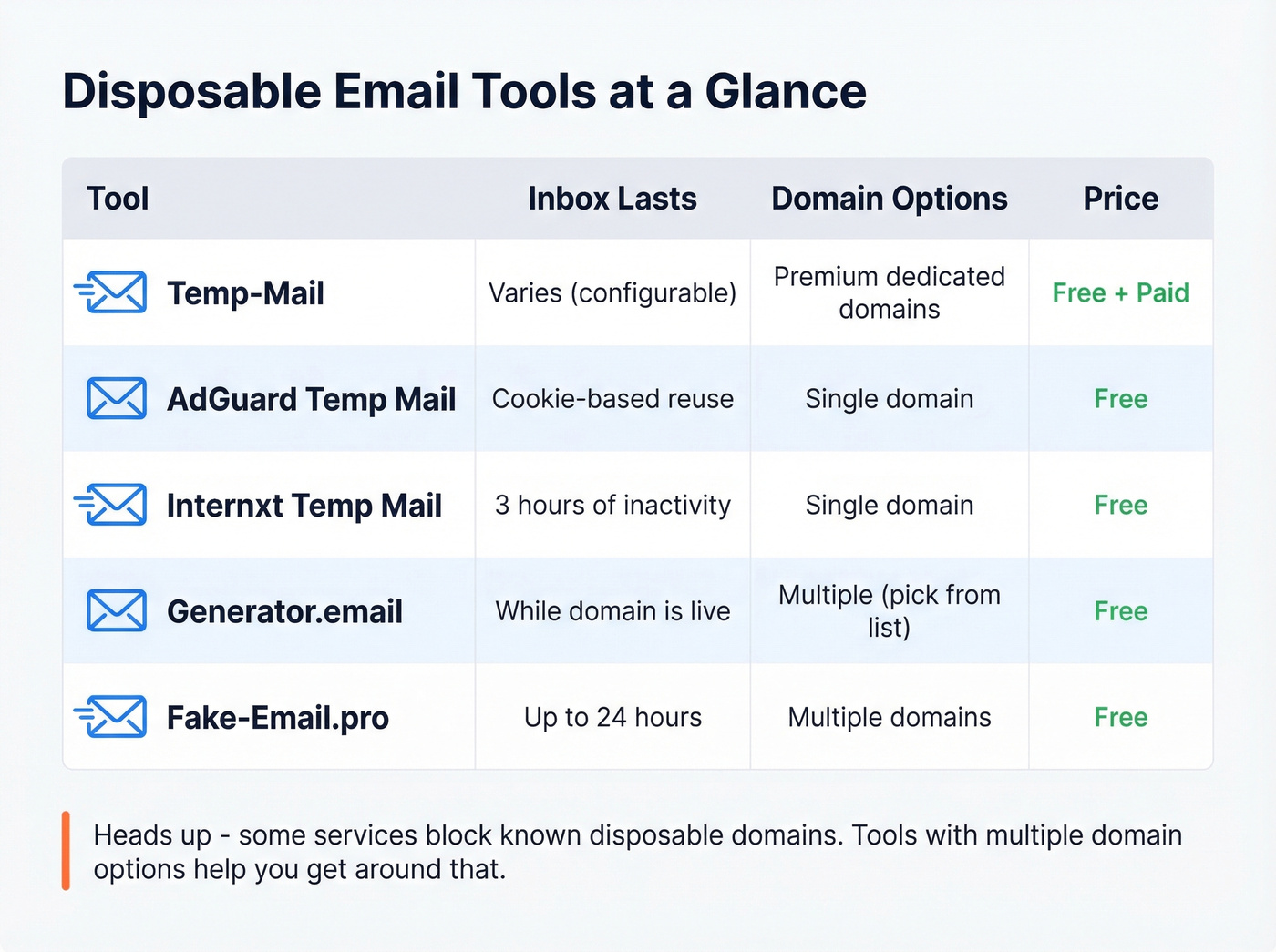
| Tool | Retention | Domain Options | Price |
|---|---|---|---|
| Temp-Mail | Varies | Premium includes dedicated domains | Free + paid |
| AdGuard Temp Mail | Cookie-based reuse | Single | Free |
| Internxt Temp Mail | 3 hours of inactivity | Single | Free |
| Generator.email | Active while domain is live | Multiple (choose from list) | Free |
| Fake-Email.pro | Up to 24 hours | Multiple | Free |
Temp-Mail
Temp-Mail is the default disposable email tool for good reason. Zero signup, working inbox in seconds.
The free tier covers most use cases. Premium adds custom domains, dedicated premium domains, multiple simultaneous addresses, more storage, no ads, and priority support. One thing to know: some services actively block well-known disposable email domains. If that happens, tools with broader domain selection like Generator.email or Fake-Email.pro can work around it.
AdGuard Temp Mail
AdGuard Temp Mail instantly gives you a random email address for receiving messages. It's receive-only - you can't send - and it doesn't accept attachments. AdGuard uses cookies to remember your temporary address for future visits, but if you change your address, the previous inbox is permanently deleted.
Internxt Temp Mail
Internxt provides free, anonymous temporary email addresses that expire after 3 hours of inactivity. Good fit for quick, one-off verifications where you don't need the inbox to stick around.
Generator.email
Generator.email's big advantage is domain flexibility. You can pick from a dropdown list of domains and search using patterns, which helps when a site blocks common disposable domains. It also supports direct links to specific inboxes via URL - handy for bookmarking a test inbox or sharing one with a teammate.
Fake-Email.pro
Fake-Email.pro generates a working disposable inbox instantly, requires no signup, and is receive-only by design. Default mailbox lifetime is up to 24 hours, and multiple domains improve acceptance on sites that block disposable addresses.
Developer & QA Email Tools
Disposable email tools are built for consumers. Developer email tools are built for automated testing pipelines - completely different architecture, completely different use case. If you’re specifically testing signup and confirmation flows, it’s worth comparing against a dedicated verification email generator approach too.
MailSlurp
Use this if you're running automated email tests in CI/CD pipelines and need private, programmable inboxes with API and SDK support.
Skip this if you just need a quick throwaway address. This is overkill for personal use.
MailSlurp lets you generate inboxes and receive real emails programmatically - purpose-built for testing signup flows, verification emails, password resets, and transactional email templates. It supports webhooks, attachments, custom domains, and integrations with popular test frameworks. Free tier available, with paid plans for teams needing private inboxes and higher volume.
Mailtrap
Use this if your staging environment needs to capture outbound emails before they hit real inboxes.
Skip this if you need to create inboxes programmatically or test inbound email flows.
Mailtrap intercepts outgoing emails in a sandbox - your app thinks it's sending, but Mailtrap catches everything for inspection. Free tier covers basic staging needs. Paid plans start around $15/month for higher volume.
Mailinator
Use this if you need to check a test email instantly with zero setup and don't care about privacy.
Skip this if you're testing anything involving sensitive data - these inboxes are public.
Type any address @mailinator.com and check it. Anyone else can read that inbox too, so never use it for anything beyond throwaway testing. Free for public inboxes; private inboxes and API access run about $65/month.

Disposable inboxes and permutators are fine for testing - but outbound teams need verified emails that actually land. Prospeo's B2B database covers 143M+ verified emails with 98% accuracy, refreshed every 7 days. No pattern guessing. No bounced emails torching your domain.
Stop generating fake emails. Start finding real ones at $0.01 each.
Best B2B Tools to Generate Emails for Outreach
Here's the thing: if your deal sizes are modest - say under $10K ACV - you probably don't need a $15K/year data platform. But you absolutely need accurate email data, because every bounced email chips away at your sender reputation. Once your domain gets flagged, no amount of clever copywriting saves your campaign. We've seen teams torch months of domain warmup work because they trusted a cheap, unverified list. If you want the deeper mechanics, start with email deliverability and the benchmarks behind a healthy email bounce rate.
The tools below give you enterprise-grade accuracy without enterprise pricing.

Prospeo
Prospeo is our pick, and it's not close on data quality. The platform covers 300M+ professional profiles with 143M+ verified emails, and the accuracy rate is 98%. That number matters because sender reputation is fragile - a few percentage points of bounce rate can tank an entire campaign.
If you’re evaluating vendors, it’s also useful to compare categories like data enrichment services and email list providers depending on whether you need net-new leads or just better data on existing contacts.
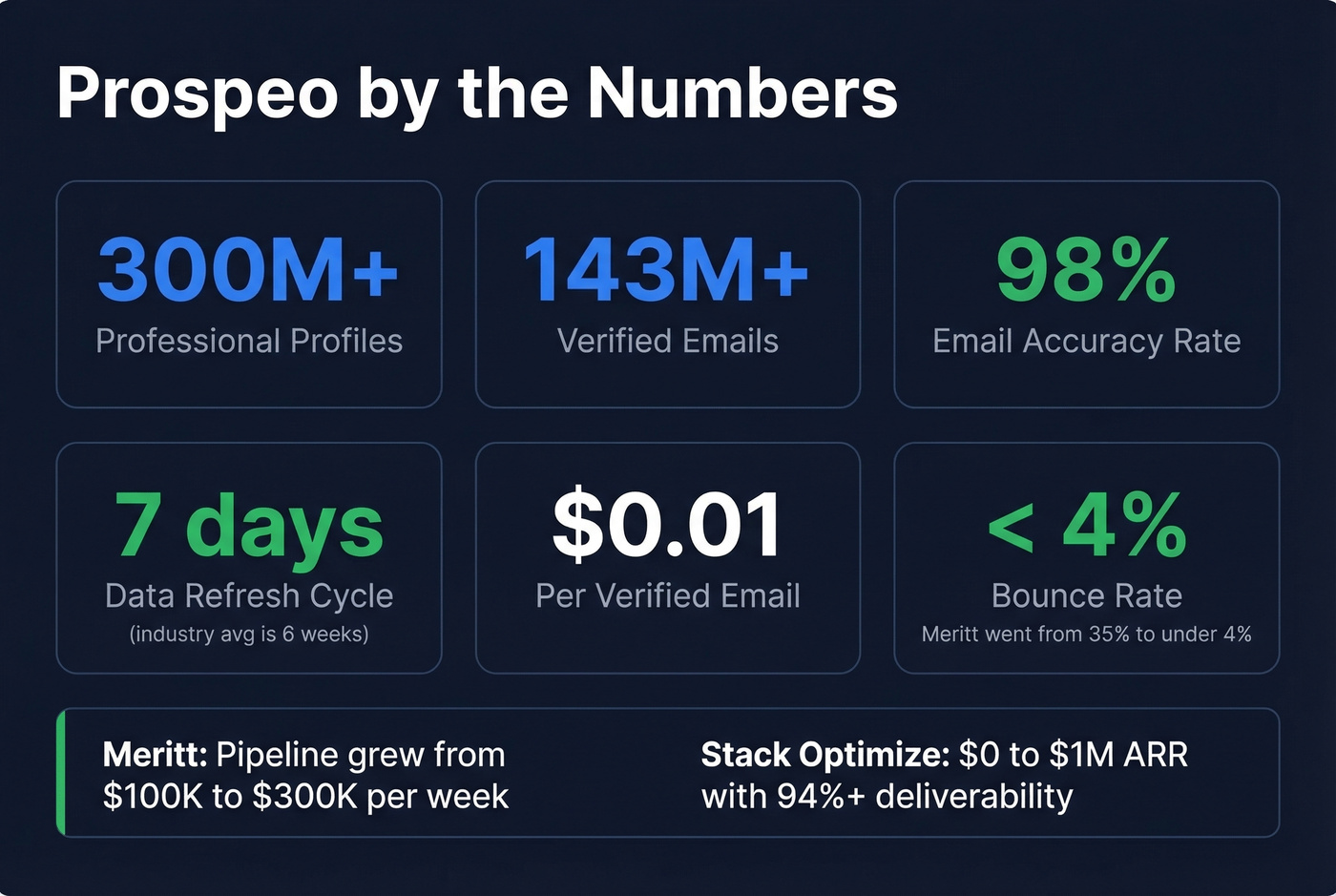
What separates Prospeo is the verification infrastructure. A proprietary 5-step process handles catch-all domains, spam-trap removal, and honeypot filtering. Data refreshes every 7 days, compared to the 6-week industry average. That gap is enormous - a contact who changed jobs three weeks ago shows up as stale data in most tools but gets caught by weekly refresh. If you’re cleaning lists, the details of spam trap removal matter more than most teams realize.
The proof is in the results. Meritt, an outbound agency, went from a 35% bounce rate with their previous provider to under 4% with Prospeo. Their pipeline tripled from $100K to $300K per week. Stack Optimize built from $0 to $1M ARR using Prospeo data, maintaining 94%+ deliverability and under 3% bounce across all their clients with zero domain flags.
Pricing: ~$0.01 per email, credit-based, no contracts. Free tier gives you 75 verified emails plus 100 Chrome extension credits per month. Paid plans scale from ~$39/month.
Hunter.io
Hunter.io's strongest feature is domain search - type in a company domain and it maps the email pattern used across the organization. It's been around since 2015 and has a loyal following, especially among content marketers doing link-building outreach. Free tier available, paid plans start around $49/month.
In our experience, Hunter works well for pattern detection but doesn't match the verification depth you get from a dedicated 5-step process. If you're sending fewer than 100 emails a month, it's a solid option. For a broader shortlist, see our breakdown of Hunter alternatives.
Snov.io
Snov.io bundles email finding with basic email sequences - a decent starter kit for small teams running their first outbound campaigns. The consensus on r/sales is that it's fine for getting started but teams tend to outgrow it once volume picks up. Free tier available, paid plans start around $39/month. If you’re building a full outbound stack, start with the best SDR tools and work backward from your workflow.
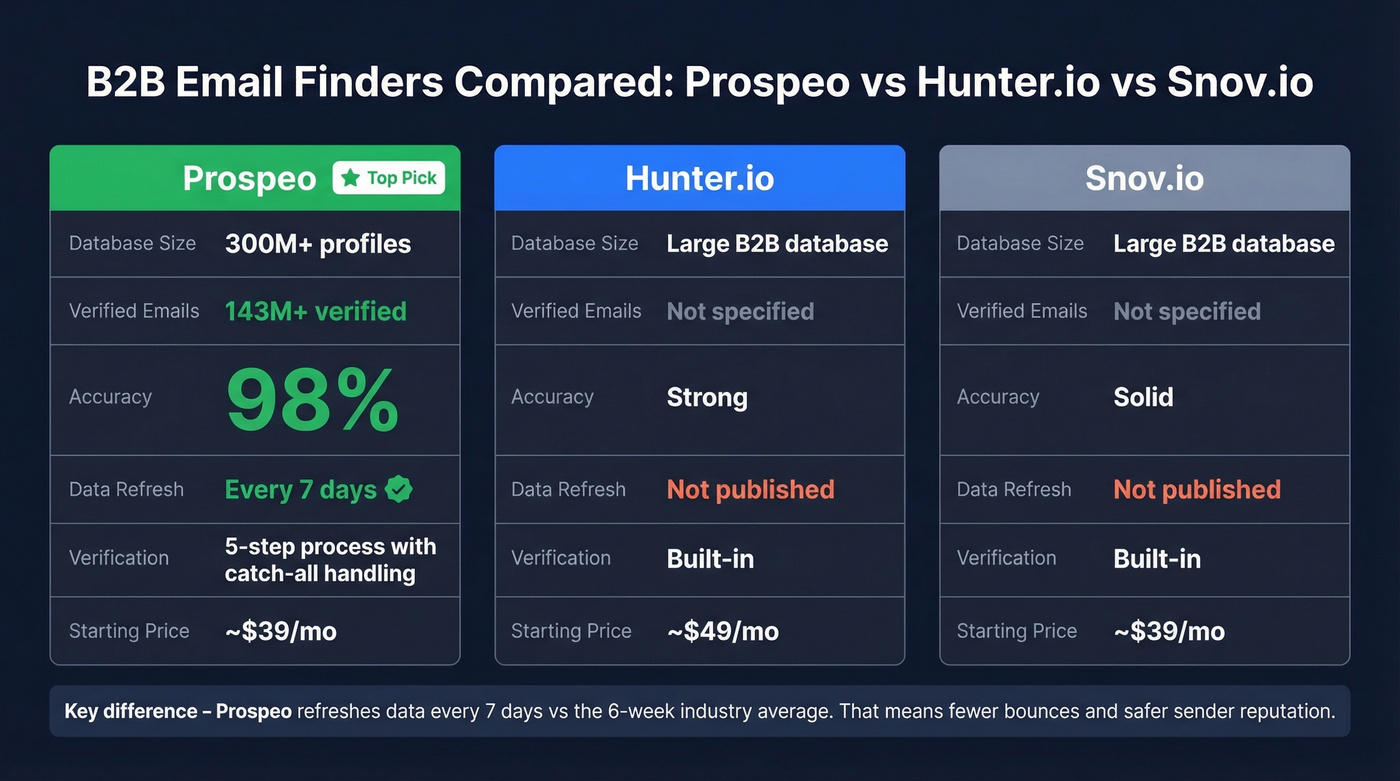
| Feature | Prospeo | Hunter.io | Snov.io |
|---|---|---|---|
| Database | 300M+ profiles | Large B2B database | Large B2B database |
| Email Accuracy | 98% | Strong | Solid |
| Free Tier | 75 emails/mo | Available | Available |
| Paid From | ~$39/mo | ~$49/mo | ~$39/mo |
| Verification | Built-in, 5-step | Built-in | Built-in |
| Data Refresh | 7 days | Not published | Not published |
Every bounced email from a bad email gen tool damages your sender reputation. Prospeo's 5-step verification with catch-all handling and spam-trap removal keeps bounce rates under 4% - proven across 15,000+ companies running real outbound campaigns.
Protect your domain with emails that are verified before you hit send.
Email Address Idea Generators
This is the oddball category that most email gen articles ignore entirely.
Mailmeteor offers a free tool that takes your first and last name and generates professional email address variations across providers like Gmail and Outlook. It's not finding someone else's email - it's helping you create your own. Mailmeteor's core product is a mail merge tool for Gmail starting at $10/month; the address generator is a free lead magnet. Smart marketing, and genuinely useful if you're setting up a clean professional address.
When to Use What
Let's break this down with two common scenarios.
Scenario 1: You're signing up for a free trial you'll never use again. Grab a disposable address from Temp-Mail, use it, move on. If the domain gets rejected, try AdGuard or Generator.email for more options. This cat-and-mouse game between temp email providers and signup forms isn't going away anytime soon.
Scenario 2: You need a prospect list of 500 verified emails by Friday. Your SDRs need contacts and your current list is stale. A B2B email finder lets you search by role, company size, and industry, then export verified addresses directly to your sequencer. These are the tools that actually move pipeline. If you need a repeatable process, use this how to generate an email list playbook.
Never use a disposable email for outbound. Sending cold emails from a temp address destroys sender reputation instantly, and most disposable tools can't send in the first place. We've seen teams make this mistake - mixing up the categories is how campaigns fail before they start.
Risks of Disposable Email
Disposable email tools are useful, but they come with real limitations.
Domain blocklists are growing. Many consumer services, banking apps, and enterprise SaaS platforms actively block known temp email domains. Tools with multiple domains like Fake-Email.pro and Generator.email can help work around this, but it's an arms race that tilts further toward the blockers every year.
Account recovery is impossible. If you sign up with a temp address and later need to reset your password, that inbox is gone. You've locked yourself out permanently. This sounds obvious, but it catches people more often than you'd think.
No outbound capability. Most disposable tools are receive-only. You can't reply to emails, which limits usefulness to one-way verification.
Public inboxes are a security risk. Mailinator's model - where anyone can check any inbox - means sensitive verification codes are visible to anyone who guesses the address. Never use a public inbox for anything involving personal data or financial accounts.
FAQ
Is using a temporary email legal?
Yes, in most jurisdictions. Using a disposable email to protect your privacy is perfectly legal. It may violate specific platform terms of service, though - some apps explicitly prohibit temporary addresses in their signup flows. Not illegal, but check the ToS for accounts you actually care about keeping.
Can I send emails from a temp address?
Most disposable email tools are receive-only. Replies are unreliable and deliverability is poor. If you need to send emails for outreach, you need a real account or a B2B finder, not a disposable inbox.
How long do temp emails last?
Retention varies dramatically. Internxt expires after 3 hours of inactivity. Fake-Email.pro keeps inboxes for up to 24 hours. Some tools reuse addresses across visits via cookies. Always check retention before relying on a temp address for verification codes you might need later.
Fake Email vs Temp Email: What's the Difference?
A fake email is a random string formatted like an address but doesn't receive mail - it's a placeholder for forms. A temp email is a real, working inbox that receives messages and expires after a set period. If you need to actually read incoming mail, you need a temp email.