

Email ID Search by Name: Every Method That Works in 2026
You have a name and a company. You need an email. That's the whole problem - and it's deceptively hard to solve well.
Nearly 28% of all emails checked in recent validation studies came back invalid or risky. Whatever method you use for email ID search by name, accuracy isn't optional - it's the difference between a campaign that books meetings and one that torches your domain reputation.
We've tested the claims, compared independent benchmarks, and mapped every method worth your time. Here's what actually works.
Quick Orientation
Just need a few emails? The manual methods below - Google operators, pattern guessing, social bio checks - cost nothing and work surprisingly well for one-off lookups.
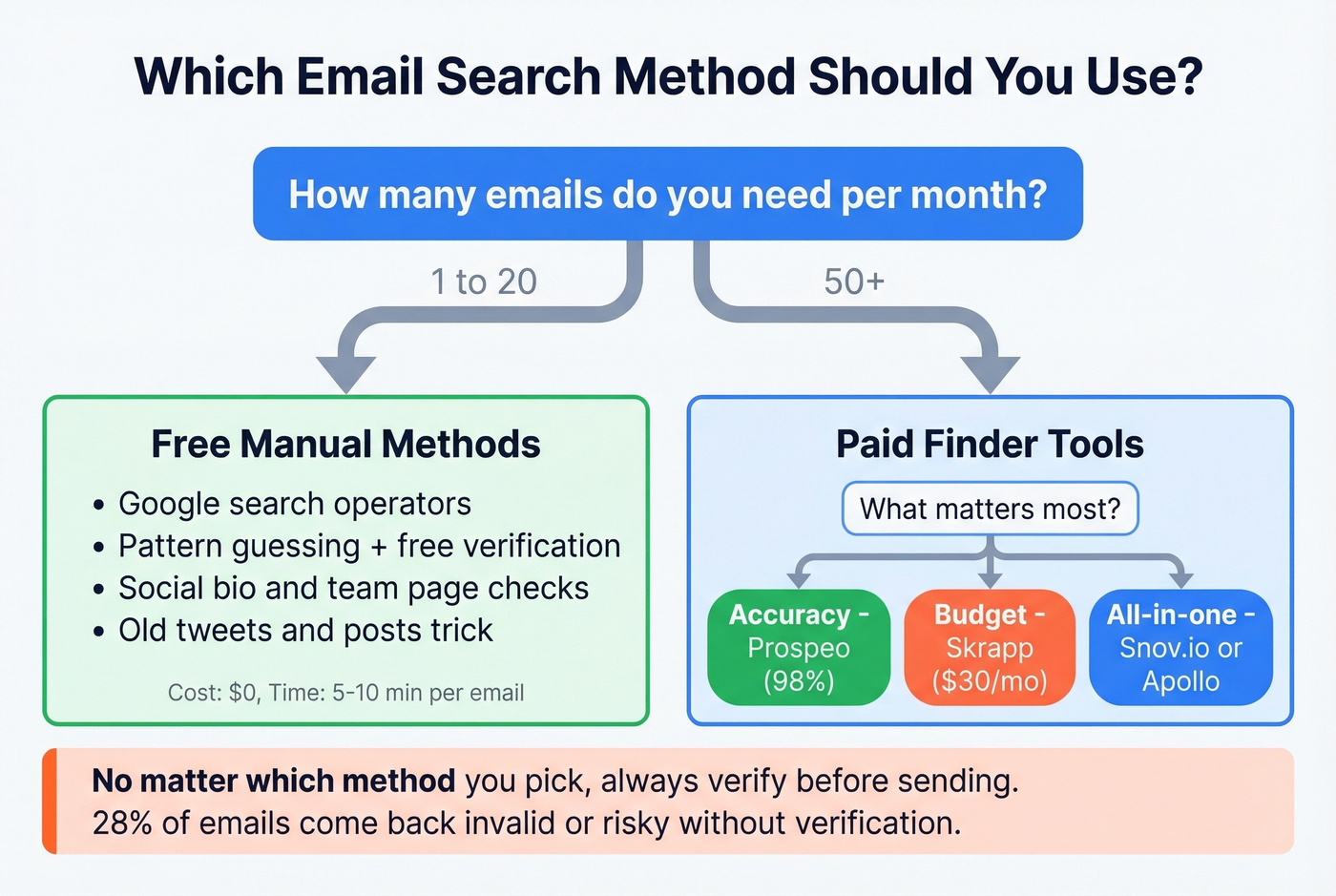
Running outbound campaigns? Jump straight to the tool comparison. We've included independent accuracy benchmarks so you can see what these tools actually deliver versus what they claim.
How Email Lookup by Name Works
Every email finder uses one of three core methods, and the method determines how accurate your results will be.
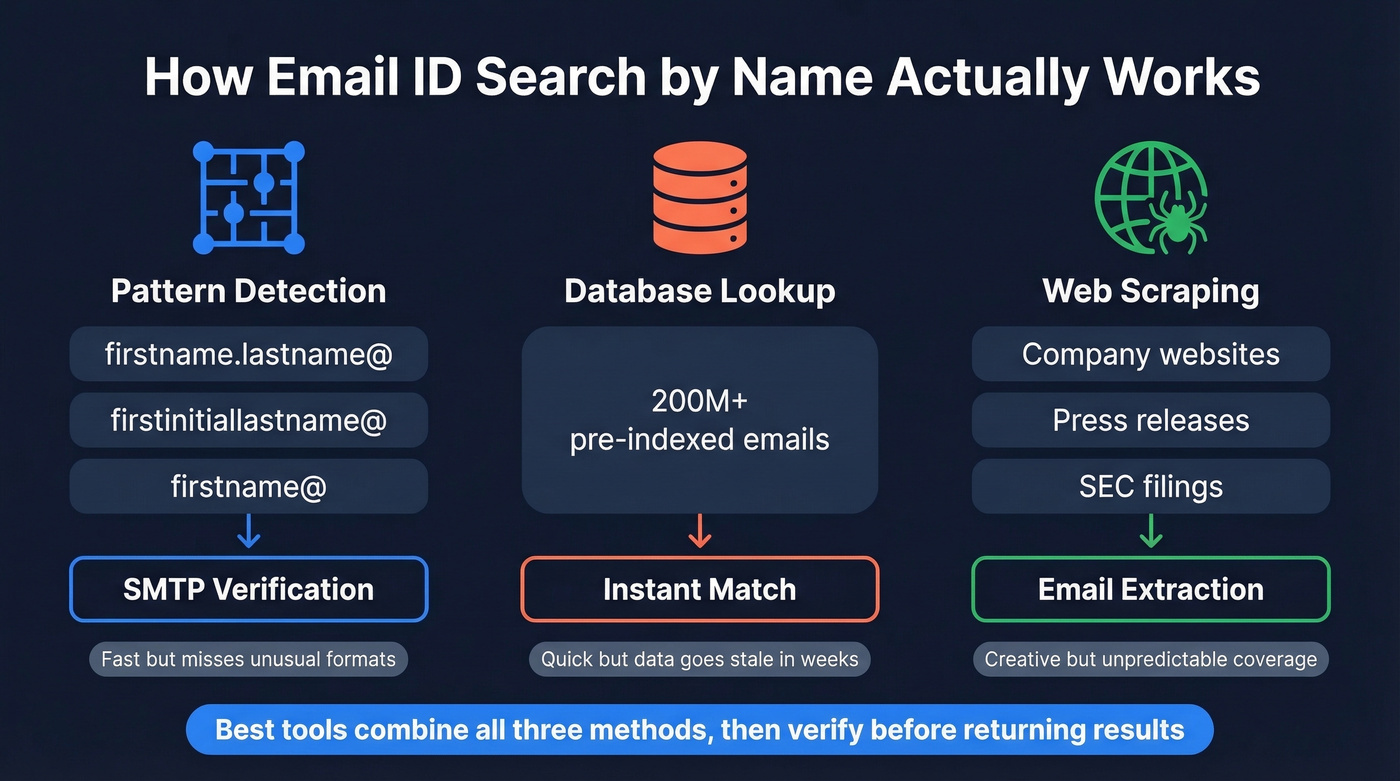
Pattern detection is the simplest approach. The tool takes a name and domain, runs it through a permutator that generates likely formats (firstname.lastname@, firstinitiallastname@, firstname@), then verifies which one exists via SMTP checks against the domain's MX records. It's fast but fails on companies with unusual naming conventions or recent rebrands.
Database lookup pulls from a pre-built index of known email addresses. Tools like Apollo and GetProspect maintain databases of hundreds of millions of contacts. Speed is the upside. Staleness is the downside - people change jobs, and databases lag behind reality by weeks or months. (If you're comparing providers, start with our breakdown of data enrichment services.)
Web scraping crawls public sources - company websites, press releases, conference speaker lists, regulatory filings - to find email addresses in the wild. Creative, but unpredictable. If you're doing this at scale, see web scraping lead generation for the operational and compliance pitfalls.
Most modern tools combine all three. The quality difference comes down to how aggressively they verify results before returning them to you.
Free Methods to Find Emails
Before you pay for anything, try these. They're more effective than you'd expect for small-volume lookups.
Google Operator Strings
Google's advanced search operators can surface emails buried in web pages, PDFs, and company sites:
"John Smith" + "email" + site:acmecompany.com
"John Smith" + "@acmecompany.com"
"John Smith" + "contact" + "acme" filetype:pdf
That last one is underrated. Whitepapers, speaker bios, and regulatory filings often contain direct email addresses that don't appear on the company's main site. We've pulled executive emails from SEC filings and conference programs that no finder tool had indexed.
Pattern Guessing
Most companies use one of four email formats. Try them in order of likelihood:
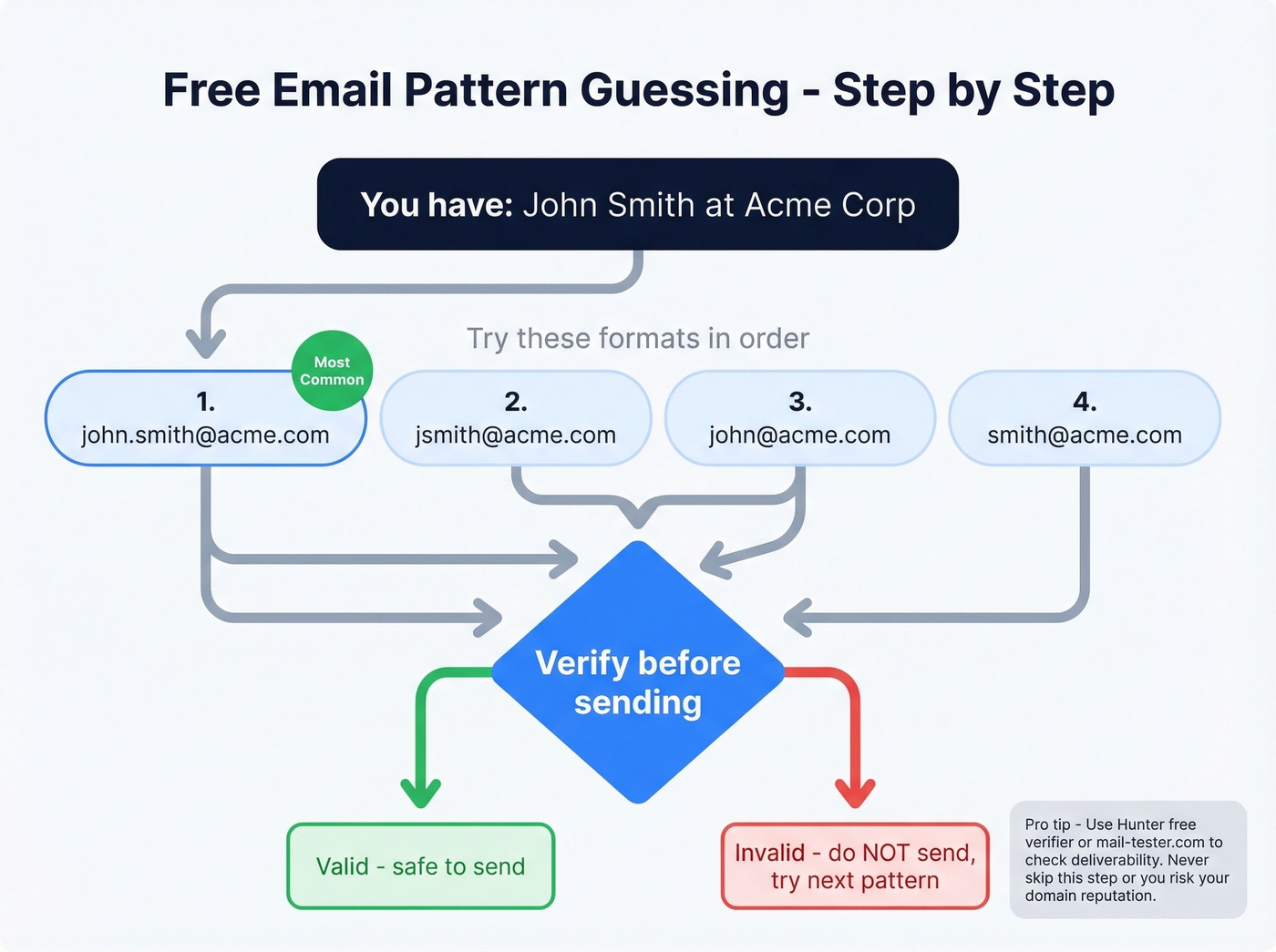
firstname.lastname@company.com(most common by far)firstinitiallastname@company.comfirstname@company.comlastname@company.com
Once you've guessed a format, verify it before sending. Hunter's free single-email checker can confirm whether the address is deliverable. Hit-or-miss, but worth trying for zero cost. If you keep getting "not found" results, use this email not found troubleshooting flow.
Social Bio Checks
Check professional profiles, personal websites, and company team pages. Many people list a direct email in their bio or "about" section. Conference speaker pages are another goldmine - event organizers often publish speaker contact details that stay indexed for years.
The Old Tweets Trick
This one comes from Reddit's marketing community and still works: search a person's social posts for "gmail.com," "email me," or their company domain. People share their email addresses more often than you'd think, especially in older posts they've forgotten about.
Best Tools for Email ID Search by Name
When manual methods don't scale, these tools do. We've organized them by depth - the first three get full reviews, the rest get quick takes. (If you want a broader shortlist, see our guide to the best email search tools.)
Prospeo
Prospeo delivers 98% email accuracy with a 7-day data refresh cycle - the fastest in the industry, where six weeks is the norm.
The 5-step verification process includes catch-all handling, spam-trap removal, and honeypot filtering, all running on proprietary infrastructure that doesn't depend on third-party data providers. That independence matters more than it sounds: most tools pull from the same upstream sources, which means they return the same recycled results with the same blind spots. Prospeo's infrastructure draws from 300M+ professional profiles and 143M+ verified emails independently.

The free tier gives you 75 emails per month - enough to test quality before committing. Paid plans work on credits at roughly $0.01 per email, with no contracts and no sales calls required. If you also need phone numbers, the platform covers 125M+ verified mobiles with a 30% pickup rate. Native integrations push contacts straight into Salesforce, HubSpot, Smartlead, Instantly, Lemlist, Clay, Zapier, and Make. (For deliverability hygiene, pair any finder with email reputation tools.)
One real-world proof point: Stack Optimize built from $0 to $1M ARR using Prospeo's data, maintaining 94%+ deliverability with bounce rates under 3% and zero domain flags across all their clients.
Hunter.io
Hunter is the tool most people think of first, and for good reason - it's well-known and the interface is dead simple. Type a name and domain into Hunter's email finder, and you get a result with a confidence score in seconds.
The free plan gives you 50 credits per month. Verification uses just 0.5 credits, so you can verify 100 emails on the free tier. Paid plans start at $49/mo for 2,000 credits, dropping to $34/mo billed annually, and scale to $299/mo for 25,000 credits.
Here's the honest tradeoff: Hunter lists 100M+ professional email addresses, but some competitors claim 200M+ databases. Independent tests show a wide accuracy range - a SalesHandy 100-contact test put Hunter at 90%, while a PhantomBuster 1,000-contact test showed just 68% verified matches. The consensus on r/agency is that Hunter works better as a verification layer than as your primary email source. For a handful of lookups per week, the free tier is hard to beat. At scale, you'll want a larger database feeding it. If you're shopping around, compare options in our Hunter alternatives roundup.
GetProspect
Use this if you want a large database with a credit-back accuracy guarantee and a well-reviewed Chrome extension.
Skip this if you need the absolute freshest data - GetProspect doesn't publish its refresh cycle, and database-first tools tend to lag on job changes.
GetProspect covers 200M+ B2B contacts and 230M corporate emails across 26M companies, with a 95% data accuracy guarantee or you get credits back. Their Chrome extension carries a 4.8/5 rating with over 1,000 reviews. Free tier: 50 emails per month, lifetime access. Paid plans start at $49/mo for 1,000 valid emails plus 2,000 verifications, dropping to $34/mo on annual billing.
Skrapp.io
Skrapp's standout feature is its Fair Credit Policy - you're only charged for emails returned as Valid or Catch-all. Invalid and Unknown results don't cost you anything. The free plan is generous at 100 credits per month, and paid plans start at $30/mo for 1,000 credits. For teams prospecting into industries with high employee turnover, that policy alone saves real money. Skip it if you need a full outbound platform - Skrapp is a focused finder, not a sequencing tool.
Anymail Finder
Anymail Finder takes the "pay only for valid" model further - if more than 3% of your results bounce, you can get a refund with proof. Plans start at $108/year billed annually, which works out to $9/mo for 600 credits/year. Monthly flexibility isn't available on that starter plan. The credit system is efficient: 1 credit per name search, 1 credit per domain search returning up to 20 emails, and verification costs just 0.2 credits.
Snov.io
Snov.io combines email finding with built-in automation - drip campaigns, email warm-up, and a CRM. It's particularly strong for international leads, where some US-centric tools fall short. The free tier includes 50 credits per month, and paid plans start around $39/mo. The tradeoff is significant: a PhantomBuster test of 1,000 contacts showed Snov.io at just 31% verified match rate, while a separate SalesHandy 100-contact test put it at 79%. That's a wide gap, so run your own test before committing budget.
ZeroBounce
ZeroBounce is a verification tool, not a finder - and it's the best at what it does, carrying a 4.7/5 on G2 from 1,361 reviews with 99.6% verification accuracy. But the email finder costs 20 credits per successful query, making it roughly 20x more expensive per lookup than dedicated finders. Plans start at $99/mo. Use it to validate lists you've built elsewhere, not as your primary search tool. For more verifier options, see Bouncer alternatives.
Apollo.io
Apollo has one of the largest databases in the space and a generous free tier of 100 credits per month. But practitioners consistently flag bounce rate issues on older contacts - "data feels bad sometimes" and "lots of bounces" are common refrains on Reddit. Per-seat pricing starting around $49/user/mo also adds up fast for teams. Apollo works well as a prospecting and sequencing platform; just don't trust its email data without running verification through a separate tool. If you're building a full stack, start with these SDR tools.
Comparison Table
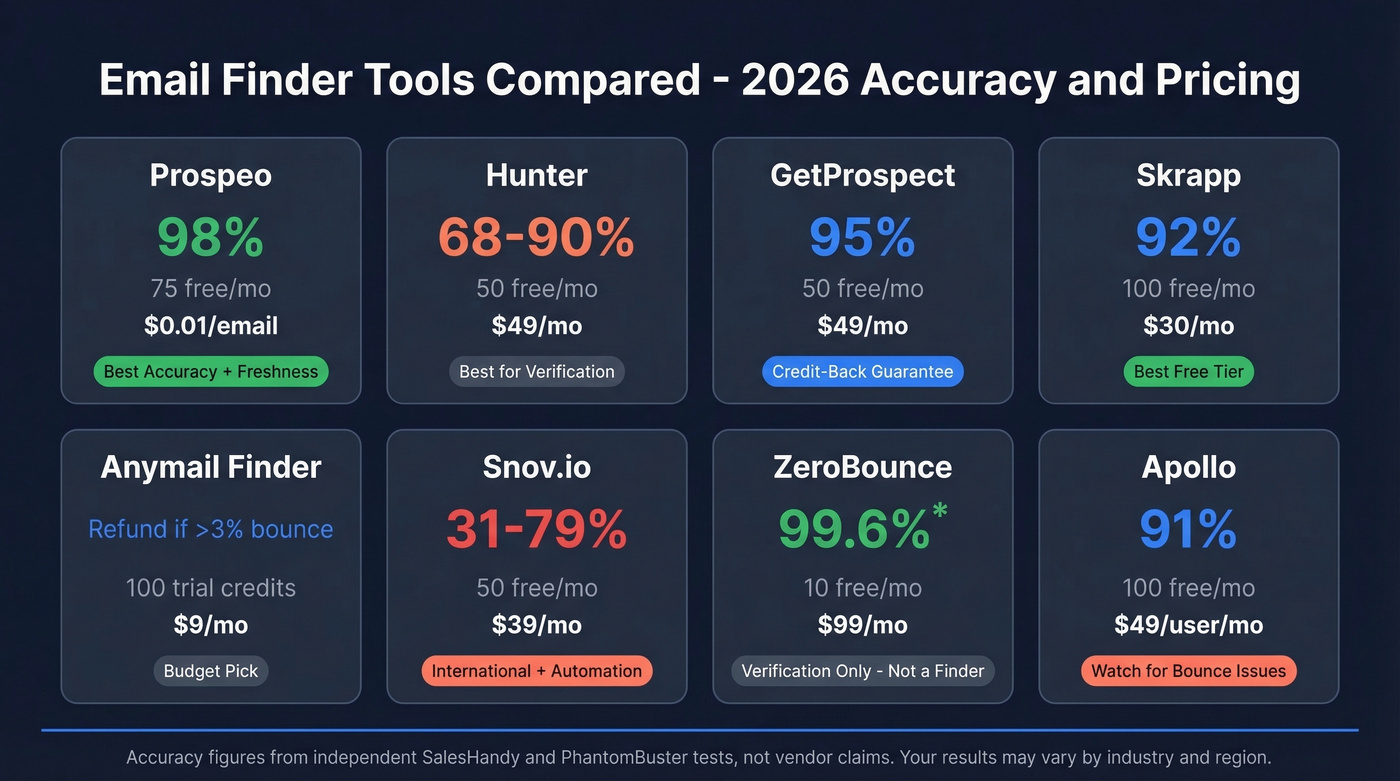
| Tool | Accuracy | Free Tier | Paid From | Best For |
|---|---|---|---|---|
| Prospeo | 98% | 75/mo | ~$0.01/email | Accuracy + freshness at scale |
| Hunter | 68-90% (test-dependent) | 50/mo | $49/mo | Verification layer for small teams |
| GetProspect | 95% (guaranteed) | 50/mo | $49/mo | Credit-back accuracy guarantee |
| Skrapp | 92% | 100/mo | $30/mo | Top free-tier volume |
| Anymail Finder | Refund >3% bounce | 100-credit trial | $9/mo | Budget teams, low volume |
| Snov.io | 31-79% (test-dependent) | 50/mo | ~$39/mo | International leads + automation |
| ZeroBounce | 99.6% (verification) | 10 finder/mo | $99/mo | List validation, not finding |
| Apollo | 91% (SalesHandy test) | 100/mo | ~$49/user/mo | Database size + sequencing |

You just read that 28% of emails come back invalid. Prospeo's 5-step verification - with catch-all handling, spam-trap removal, and honeypot filtering - delivers 98% accuracy on 143M+ verified emails. Search by name, get a verified email, pay $0.01. No guessing patterns. No torched domains.
75 free emails per month. Test the accuracy yourself.
Manual methods work for a handful of lookups. But when you need hundreds of verified emails from names and companies, Prospeo's 300M+ profile database with a 7-day refresh cycle replaces pattern guessing with certainty. Stack Optimize built to $1M ARR on this data with bounce rates under 3%.
Stop guessing firstname.lastname - get the verified address in one click.
How Accurate Are Email Finders, Really?
Every tool on this list claims 90%+ accuracy. Independent benchmarks tell a different story.
The most rigorous test we've found comes from Dropcontact's 20,000-contact benchmark, which tested 15 email finders using only first name, last name, and company name - no domains, no profile URLs. They verified results by actually sending emails, not just running SMTP pings, and manually checked for wrong-domain matches.
The results are sobering:
| Tool | Real Enrichment | Hard Bounce | Wrong Domain | Total Error |
|---|---|---|---|---|
| Dropcontact | 54.9% | 0.9% | 1.0% | 1.9% |
| Fullenrich | 48.3% | 3.6% | 11.7% | 15.3% |
| Enrow | 40.9% | 2.3% | 5.8% | 8.1% |
| Findymail | 39.9% | 1.1% | 5.2% | 6.2% |
| Icypeas | 31.6% | 1.0% | 5.8% | 6.8% |

This benchmark tested tools not all covered in our comparison above - the point isn't which specific tool won, but how far vendor claims diverge from reality.
The wrong-domain problem is particularly insidious. Tools return an email at the right company's parent domain, a subsidiary, or a completely unrelated organization. Wrong-domain rates around 5-12% showed up for several tools in the benchmark. Let's be honest: if you're selling deals under $15k, a 5% wrong-domain rate can silently destroy your ROI before you even notice.
Here's the distinction that matters: the "accuracy" number vendors quote usually means "of the emails we returned, this percentage didn't hard bounce." That's very different from "of the contacts you searched for, this percentage got a correct, deliverable email." The first number is always higher. The second is what actually matters for your campaign.
Understanding Verification Results
When an email finder returns a result, it comes with a status. Knowing what these mean saves you from sending to addresses that'll wreck your deliverability.
Valid means the email server confirmed the address exists and accepts mail. Green light.
Risky usually means the domain is a catch-all - it accepts mail sent to any address, so the verification tool can't confirm whether your specific contact actually uses that address. Catch-all domains are common at mid-size companies and represent a real accuracy blind spot for most tools. Dedicated catch-all handling is the single biggest differentiator in real-world deliverability.
Not Found means the tool couldn't locate or verify an email for that person. Better an honest "not found" than a fabricated guess that bounces.
One important best practice: if a high-quality finder marks an email as valid, don't re-verify it through a weaker tool. Weaker verifiers can incorrectly flag catch-all deliverable emails as invalid, costing you real contacts. Trust the strongest verification in your stack. If you're diagnosing bounces, use this email bounce rate guide.
Waterfall Enrichment: Why One Tool Isn't Enough
No single email finder catches every contact. The data proves it.
In PhantomBuster's 1,000-contact test, Hunter alone found 68% of emails. Dropcontact alone found 72%. Running both tools in sequence - a waterfall - pushed the combined rate to 73%. That's a modest gain per tool, but at scale, an extra 5 percentage points means hundreds of additional contacts per campaign.
The concept is simple: run your list through Tool A, take the "not found" results, and pass them to Tool B. Repeat with Tool C if needed. Each tool uses slightly different data sources and methods, so they catch different contacts. Tools with proprietary email infrastructure make the best first step in any waterfall, since they return unique results that database-dependent tools miss entirely. If you're building lists in automation tools, this Clay list building workflow is a solid starting point.
Which Tool Should You Use?
Most teams overthink this decision. Here's the framework we use.
A few emails per month? Stick with free methods plus Hunter's free tier. You'll cover most one-off lookups without spending a dollar.
Agency running campaigns at scale? Build a waterfall stack with 2-3 tools to maximize coverage. Start with the highest-accuracy source, then backfill gaps with secondary tools. (For the outreach side, pair it with a proven B2B cold email sequence.)
Selling into the EU and need compliance? Cognism or Dropcontact are purpose-built for GDPR-first workflows, though both carry enterprise-level pricing - roughly $1,000-3,000/mo for Cognism.
For teams that need phone numbers alongside emails, look for platforms that bundle verified mobile numbers with email data. Stitching together multiple subscriptions for separate data types gets expensive and messy fast.
FAQ
Is email ID search by name legal?
Yes, for B2B purposes. GDPR, CCPA, and CAN-SPAM all permit business contact lookups when you have a legitimate business interest and honor opt-out requests promptly. Always check local regulations when prospecting internationally.
What's the most accurate name-to-email finder in 2026?
Independent benchmarks show most tools deliver 30-55% real enrichment rates on raw name + company inputs. Prospeo delivers 98% verified email accuracy using 5-step verification with catch-all handling - among the highest deliverability rates available. Always distinguish "claimed accuracy" from "real enrichment rate."
Can I find personal email addresses by name?
Most B2B email finders return professional corporate emails only. Personal email lookup raises significant privacy concerns and is restricted under most data protection laws. If someone's given you their personal email directly, that's different - but scraping for it isn't advisable.
How many free email lookups can I get per month?
Stack free tiers across tools: Skrapp offers 100/month, Prospeo 75/month, Hunter and GetProspect 50/month each. That's roughly 275 free lookups per month - enough for early-stage prospecting without spending anything.
What does "catch-all" mean in verification?
A catch-all domain accepts every email sent to it, regardless of whether the specific address exists. Verification tools can't confirm a particular contact's address on these domains, which inflates apparent accuracy across the industry. Look for tools with dedicated catch-all handling - it's the single biggest differentiator in real-world deliverability.