

How to Warm Up Your Email List (Without Wrecking Your Domain)
You set up three new Google Workspace accounts, load 500 contacts, hit send, and by Thursday half your emails land in spam. The domain you bought two weeks ago now has the reputation of a Nigerian prince.
Most email list warm up guides tell you to "go slow" without giving you actual numbers. This one gives you the numbers.
What "Warm Up" Actually Means
Two distinct things hide behind this phrase, and confusing them will get you in trouble.
The first is mailbox/domain warmup for cold outreach. You've got a new sending domain or a fresh Google Workspace account, and you need to build sender reputation from zero by gradually increasing volume so Gmail, Microsoft, and Yahoo learn to trust you. For a new mailbox on an existing domain, expect 2-3 weeks. For a brand-new domain, 3-6 weeks is more realistic.
The second is re-engaging a dormant opt-in list - subscribers who haven't opened in months. Blasting them all at once will tank your deliverability. Same word, very different playbook.
The consensus on r/coldemail is split on warmup tools - some call tools like Instantly a "silver bullet," others insist they "do more damage than good." The truth is simpler: warmup works, but only on authenticated, verified infrastructure. Skip either piece and no tool saves you.
Quick Version
- Verify your list first. Bad data kills warmup before it starts. Run contacts through a verification tool to strip invalid addresses, spam traps, and honeypots. (If you need a deeper playbook, see our guide to spam traps.)
- Authenticate your domain. SPF, DKIM, and DMARC must be configured before you send a single email. If you’re unsure where to start, use these SPF record examples.
- Follow a ramp schedule and monitor weekly. Start low, increase gradually, watch your bounce rate like a hawk. Track your email velocity so you don’t spike volume accidentally.
Verify Before You Warm
US email lists decay 25-30% per year, and 39% of senders rarely or never clean their lists. That means a huge chunk of people running warmup are doing it on top of rotten data - which is like waxing a car with a cracked engine block.
Here's the thing: a verified list on a brand-new domain will outperform a warmed-up domain blasting unverified contacts every single time. We've seen this play out dozens of times with teams who come to us after torching a domain. Prospeo's 5-step verification catches invalid addresses, spam traps, and honeypots at 98% accuracy, with a free tier of 75 emails per month. There's no reason to skip this step. (More on list hygiene and root causes in our email deliverability guide.)


Warming up a list full of invalid addresses is like running laps on a broken leg. Prospeo's 5-step verification catches spam traps, honeypots, and dead emails at 98% accuracy - so every warmup send builds real reputation, not spam complaints.
Strip the bad data before you burn the domain.
Authentication Checklist
Lock down these three DNS records before you send anything:
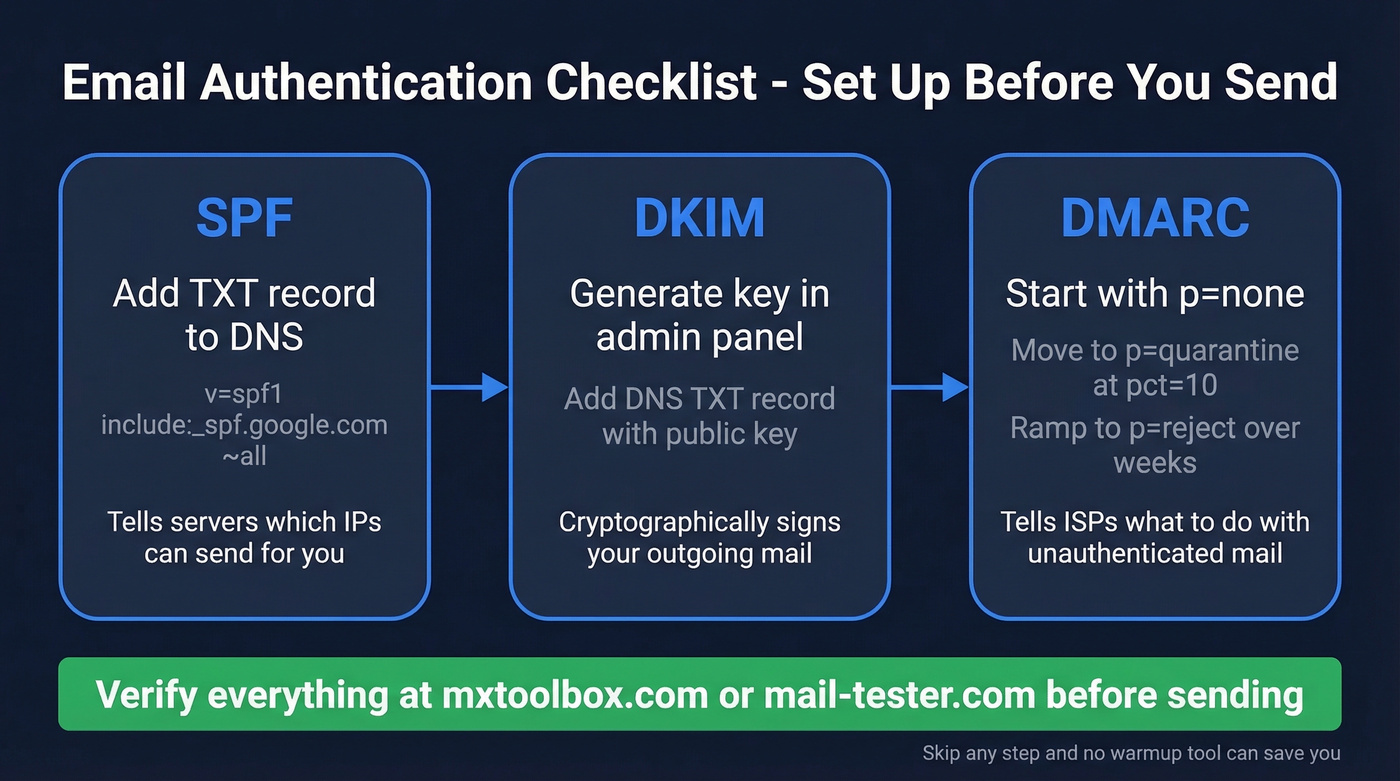
SPF - Add a TXT record. For Google Workspace: v=spf1 include:_spf.google.com ~all. This tells receiving servers which IPs can send on your behalf.
DKIM - Generate your key in your email admin panel, then add the corresponding DNS TXT record. This cryptographically signs outgoing mail so recipients know it hasn't been tampered with. (If you want to double-check setup, follow how to verify DKIM is working.)
DMARC - Start with p=none for monitoring. After 1-2 weeks of clean reports, move to p=quarantine at pct=10, then ramp to p=reject over several weeks. For the nuance that trips teams up, read about DMARC alignment.
Verify everything with mxtoolbox.com or mail-tester.com before proceeding.
2026 Warmup Schedule
Cold Email Mailbox Ramp (14 Days)
Days 1-7 are warmup-only: replies from colleagues, seed lists, or a warmup tool. Cold sends begin on Day 8.
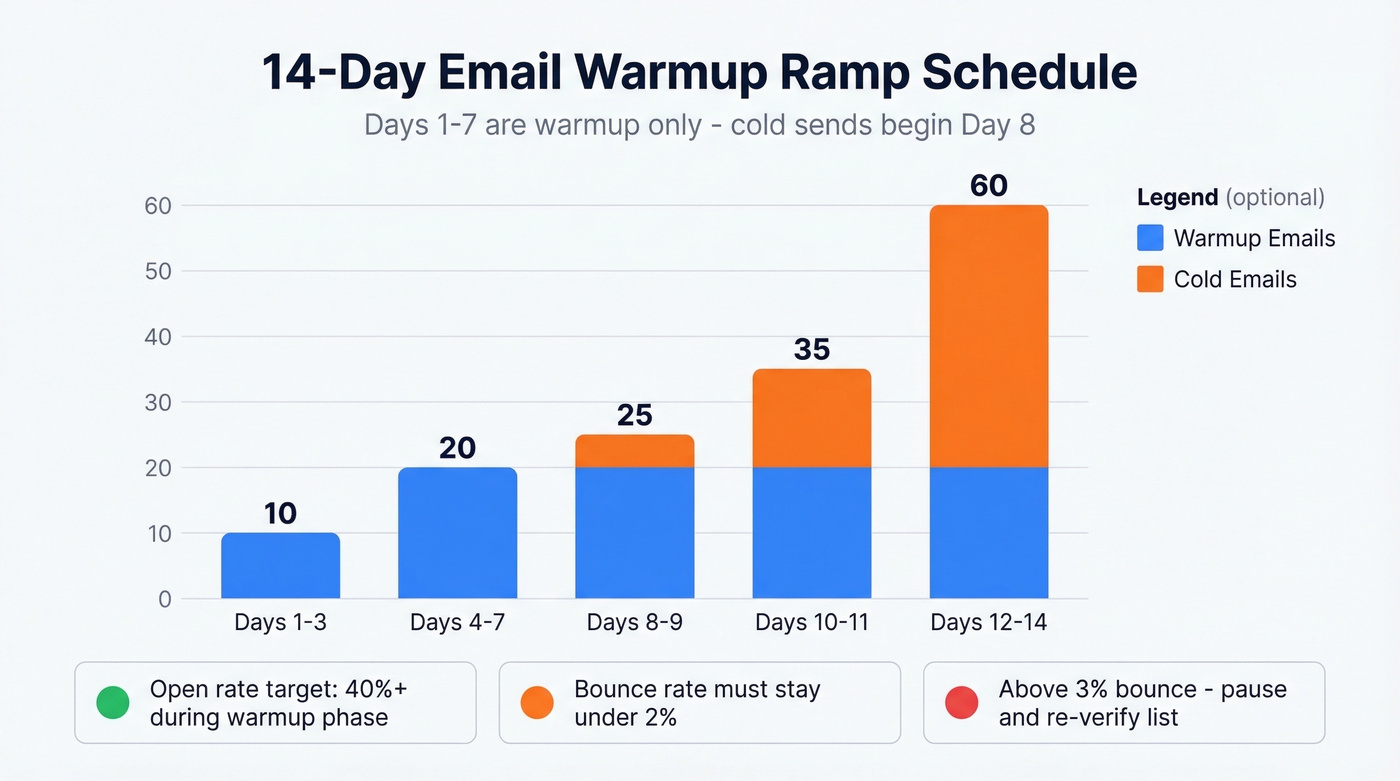
| Day | Warmup Emails | Cold Emails | Total |
|---|---|---|---|
| 1-3 | 5-10 | 0 | 5-10 |
| 4-7 | 15-20 | 0 | 15-20 |
| 8-9 | 15-20 | 5 | 20-25 |
| 10-11 | 15-20 | 10-15 | 25-35 |
| 12-14 | 15-20 | 20-40 | 35-60 |
Randomize daily volume by 10-15% and shift send times so you don't look like a bot. On weekends, reduce volume 50-70% - don't stop entirely, but don't blast either.
An alternative ramp runs more aggressively at 30-50/day in Week 1, scaling to 120-150/day by Week 4. We've seen more teams get burned by going fast than by going slow. Stick with the conservative schedule unless your metrics are pristine.
If you'd rather automate, tools like Instantly at $30/mo or TrulyInbox (starts at $29/month, supports unlimited mailboxes on paid plans) handle the warmup side. But at low volume - roughly under 50/day - manual warmup is usually enough. If you’re comparing options, see our roundup of unlimited email warmup tools.
Re-Engaging a Dormant Opt-In List
Different problem, different approach.
If you're warming up subscribers who haven't opened in months, start by segmenting by inactivity. Three to six months of no opens or clicks means inactive - separate them from your engaged subscribers immediately.
Send to your most engaged contacts first. This builds positive engagement signals before you touch the dormant segment, which is exactly what ISPs want to see from your domain. Then run a re-engagement series: email one is a friendly reminder, email two carries a stronger offer like a discount or exclusive content, and email three is a survey asking what they actually want. No response to all three? Suppress them. Don't be sentimental about it.
Benchmarks to Monitor
Here's what inbox placement looks like by provider right now:
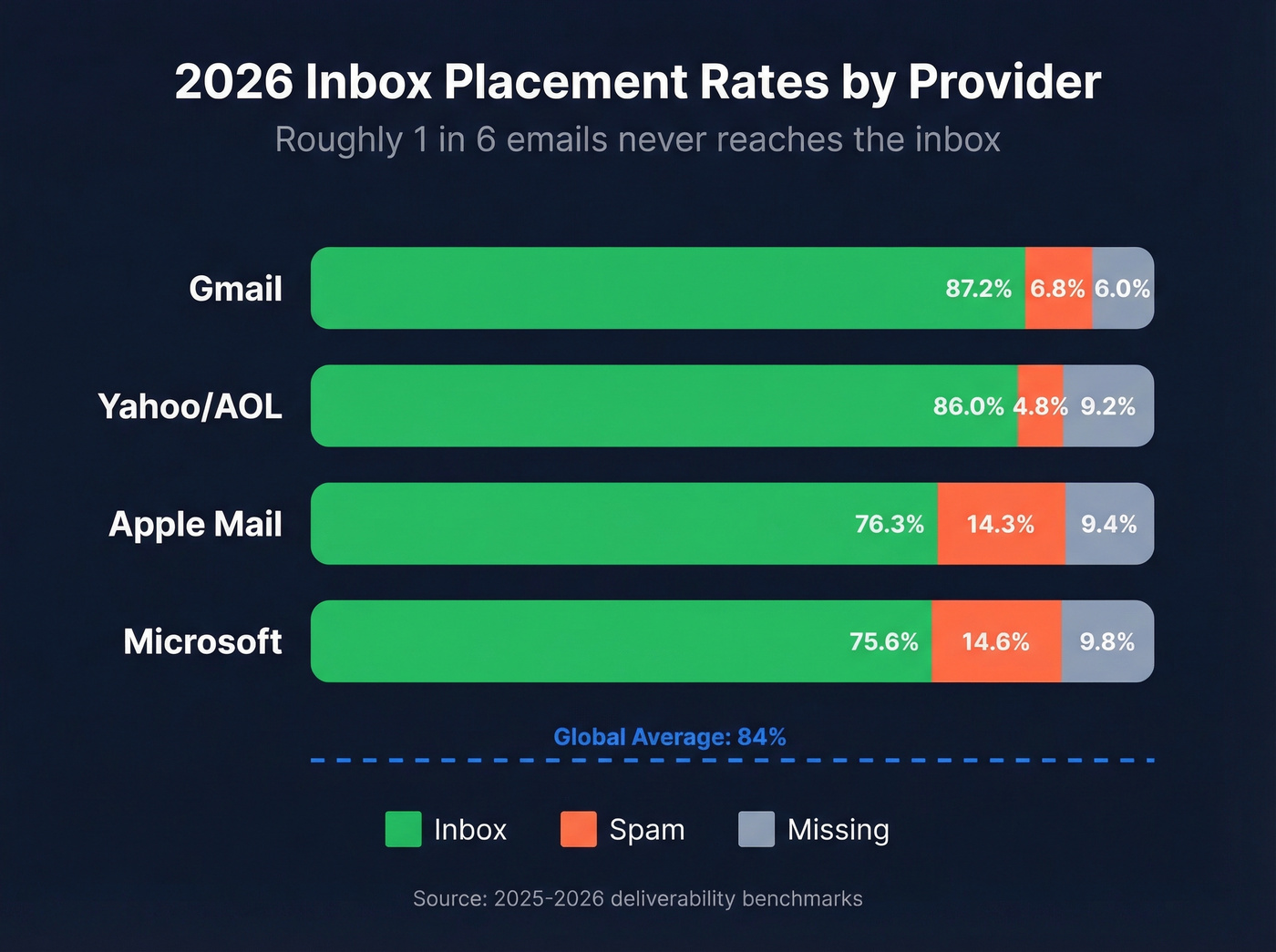
| Provider | Inbox | Spam | Missing |
|---|---|---|---|
| Gmail | 87.2% | 6.8% | 6.0% |
| Microsoft | 75.6% | 14.6% | 9.8% |
| Yahoo/AOL | 86.0% | 4.8% | 9.2% |
| Apple Mail | 76.3% | 14.3% | 9.4% |
The global average sits around 84%. Roughly one in six emails never reaches the inbox.
During warmup, aim for open rates above 40% in the warmup-only phase and above 35% once cold sends begin. Bounce rate must stay under 2%. If it crosses 3%, pause cold sends immediately and re-verify your list before continuing. In our experience, bounce rates above 2% during warmup almost always trace back to list quality, not sending volume. Spam complaints should be zero in weeks 1-2 and stay below 0.3% ongoing. For reference, average hard bounce rates across industries run about 0.21%. (If you want a deeper breakdown, see email bounce rate.)
Five Mistakes That Tank Your Reputation
Sending 2,000+ emails on day one. Nothing screams "spam" to an ISP faster than a brand-new domain blasting at volume. This is the single most common mistake we see, and it's the hardest to recover from because the damage is immediate and the recovery takes weeks.
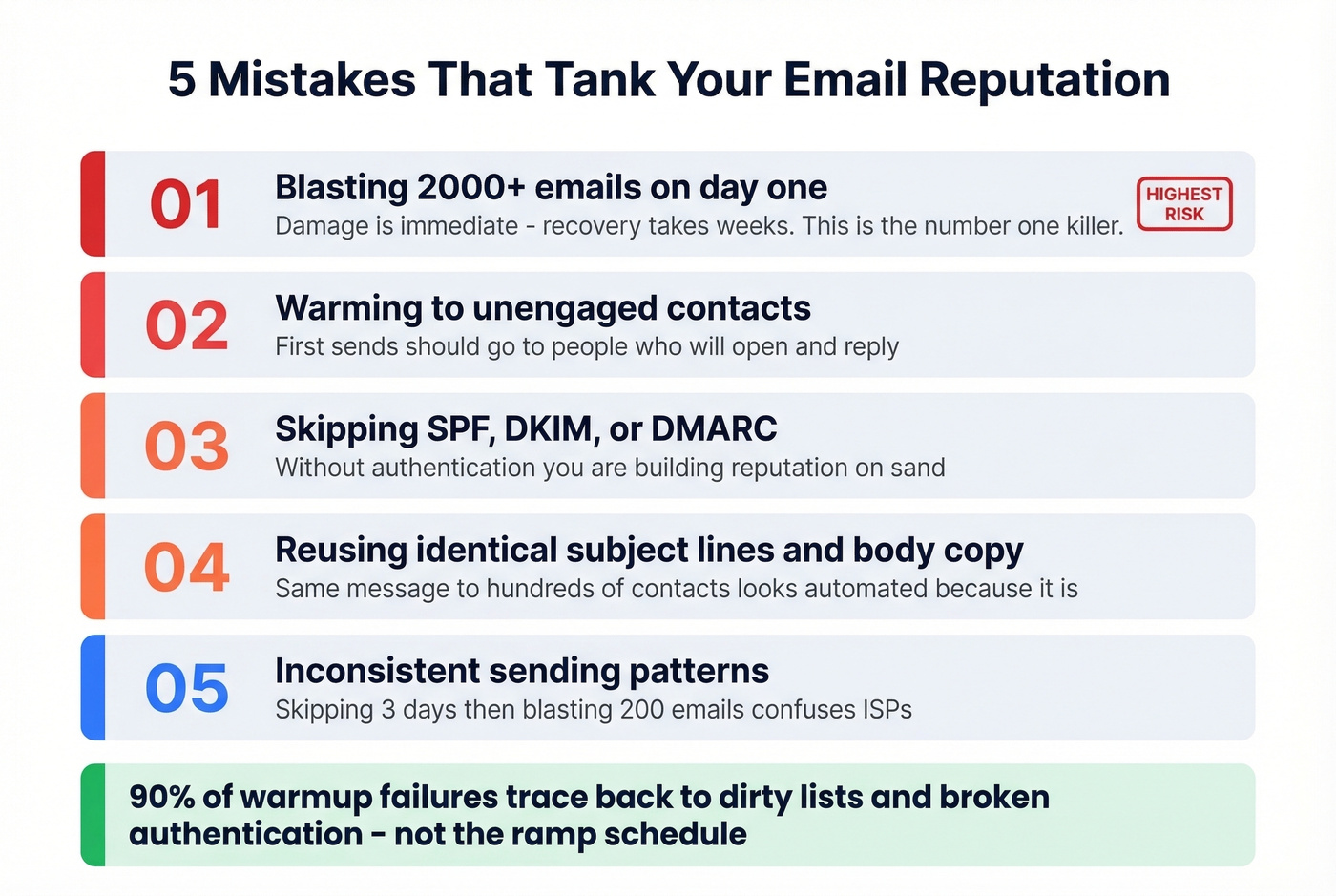
Warming to unengaged contacts. Your first sends should go to people who'll open and reply. Save the cold list for later.
Skipping SPF/DKIM/DMARC. Authentication isn't optional. Without it, you're building reputation on sand.
Reusing identical creative. Sending the same subject line and body to hundreds of contacts looks automated because it is. Vary your copy, even if it's just swapping a few lines per batch. (If you need ideas, pull from these cold email subject line examples.)
Inconsistent sending patterns. Skipping three days then blasting 200 emails confuses ISPs. Consistency beats volume every time.
Let's be honest about something: the warmup tool market wants you to believe the ramp is the hard part. It isn't. Ninety percent of warmup failures we see trace back to dirty lists and broken authentication - problems no warmup tool can fix. Get those two right and the ramp is almost boring.
Bounce rates above 2% during warmup almost always mean bad data. Prospeo verifies emails through a proprietary 5-step process - catch-all handling, spam-trap removal, honeypot filtering - refreshed every 7 days. Start with 75 free verifications, no credit card required.
Clean list in, clean warmup out. It starts at $0.01 per email.
FAQ
How long does email list warm up take?
Two to three weeks for a new mailbox on an existing domain. Three to six weeks for a brand-new domain. Low-volume senders (under 50/day) often reach stable deliverability closer to the two-week mark if authentication and list quality are solid.
Do I need a paid warmup tool?
At low volume (under 50 emails a day), manual warmup works fine. Paid tools like Instantly or TrulyInbox help when you're managing multiple mailboxes or need automated engagement signals at scale. Budget $29-$30/month per tool. Skip this if you're only running one or two mailboxes - the manual approach takes maybe 10 minutes a day.
What's the fastest way to ruin a warmup?
Sending to an unverified list. If your bounce rate crosses 3% during warmup, pause cold sends immediately and re-verify before continuing. Spam traps and invalid addresses will torch your sender reputation faster than anything else.
Can I warm up a domain that's already been flagged?
Recovery is possible but slow - expect 4-8 weeks of low-volume, high-engagement sending. Set up a subdomain (e.g., outreach.yourdomain.com), authenticate it separately, and start the ramp from scratch. Monitor Google Postmaster Tools daily and keep bounce rates under 1% until reputation stabilizes.