

Email Marketing Measurement in 2026 (When Half Your Metrics Are Lying)
Your CMO just pinged the Slack channel: "Open rates are up 40% this quarter - great work, team." Meanwhile, revenue from email is flat. Pipeline hasn't moved. The dashboard looks fantastic and means almost nothing.
That disconnect isn't a fluke. It's the new normal, and most teams are still reporting metrics that stopped being reliable years ago. If you want accurate email marketing measurement in 2026, you need a different framework - one built around metrics SaaS teams and ecommerce brands can actually trust.
The Short Version
Three metrics you can't fake:
- Click-through rate (CTR) - real humans clicking real links
- Conversion rate - actions taken after the click
- Revenue per recipient (RPR) - the only metric your CFO cares about
One metric to stop obsessing over:
- Open rate - inflated by Apple's privacy proxies since 2021, now essentially a vanity number
The prerequisite nobody talks about: clean contact data. If 20% of your list is invalid, every metric downstream is corrupted. Measurement starts with data quality (and email bounce rate control).
Why Email Metrics Broke
Apple broke it.
The longer version is more nuanced, but Apple still broke it. In September 2021, Apple launched Mail Privacy Protection (MPP), which preloads tracking pixels and images via proxy servers - firing your open-rate pixel even when nobody read the email. Dotdigital estimates MPP is enabled on roughly 97% of Apple iPhone devices, and it affects anyone using the Apple Mail app regardless of whether their actual mailbox is Gmail, Outlook, or anything else.
Open rates that used to sit at 15-25% jumped to 40-60% overnight. Not because more people were reading your emails. Because machines were.

Then in 2023, Apple introduced Link Tracking Protection, which strips UTM parameters from links in Apple Mail and Safari. So now your attribution is degraded too.
Here's what breaks in practice:
- Open-based automations fire for people who never read anything
- Segmentation between "engaged" and "unengaged" subscribers becomes meaningless
- Subject-line A/B tests using opens as the success metric measure machine behavior, not human preference (use email tracking pixels knowledge to understand what’s actually being measured)
- UTM-based attribution loses fidelity as tracking parameters get stripped
In email marketing communities on Reddit, the most common question post-MPP is whether open rates are worth tracking at all. The consensus: barely. The tools didn't get worse. The measurement layer underneath them eroded.
Metrics That Actually Matter
Let's rebuild from the ground up. We organize email marketing measurement into three tiers based on how trustworthy each metric is in a post-MPP world.
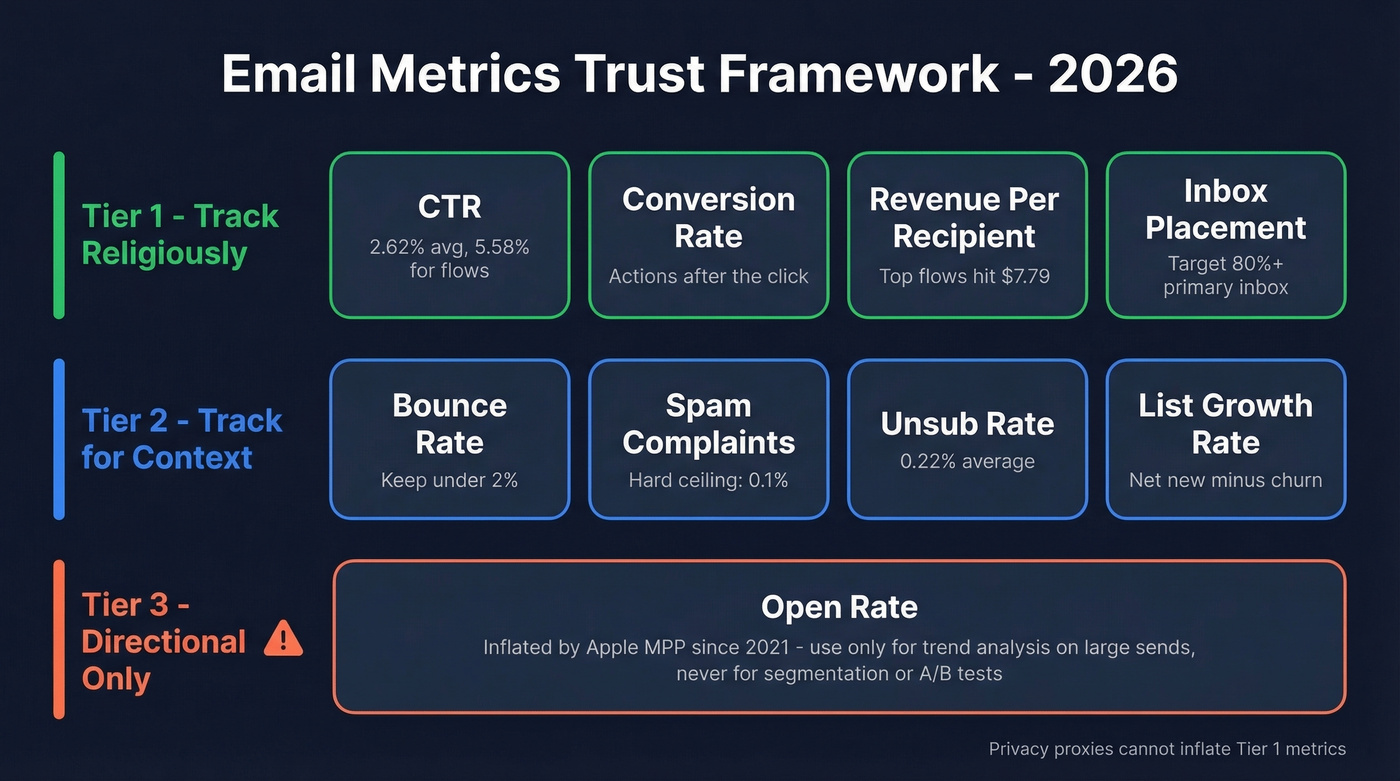
Tier 1 - Track Religiously
These are your source of truth. Privacy proxies can't inflate them.
Click-through rate (CTR) measures unique clicks divided by delivered emails, multiplied by 100. The all-users benchmark sits at 2.62% according to Mailchimp's dataset. If you're running automated flows like welcome series, abandoned cart, and post-purchase sequences, Klaviyo data shows those hit 5.58% CTR - roughly 3x higher than broadcast campaigns. CTR is the single most reliable engagement signal you have right now (and you can sanity-check your math with a click rate formula refresher).
Conversion rate tracks the percentage of email recipients who complete a desired action - a purchase, a demo booking, a form fill. The formula: conversions divided by delivered emails, times 100. This is where email marketing measurement connects to business outcomes. Without proper UTM tagging, you can't calculate this accurately, which we'll get into later.
Revenue per recipient (RPR) is total email-attributed revenue divided by the number of recipients. For ecommerce teams, this is the north star. Klaviyo's top 10% of automated flows reach RPR up to $7.79. If you're not tracking RPR, you can't justify your email program's budget to anyone who controls it.
Inbox placement rate tells you what percentage of delivered emails actually land in the primary inbox versus spam or promotions tabs. Target 80%+ as a baseline; top performers hit 90%+. This requires dedicated testing tools like Validity (Everest) or GlockApps, typically $100-300/month. A free proxy: compare open rates by receiving domain in your ESP. If Gmail opens are 15% but Yahoo is 35%, you likely have a Gmail-specific deliverability problem (see an email deliverability guide if you need a full checklist).
We've found that tracking post-click behavior alongside CTR - time on site, pages viewed, cart activity - helps distinguish between curiosity clicks and genuine buying intent. If your ESP integrates with your analytics platform, set this up before your next campaign.
Tier 2 - Track for Context
These metrics don't tell the whole story alone, but they're essential guardrails.
Bounce rate should stay under 2%. Google's bulk sender requirements are explicit about this - exceed that threshold consistently and you're risking deliverability penalties. Email lists decay at roughly 22.71% annually, which means bounce rates creep up unless you're actively cleaning.
Spam complaint rate has a hard ceiling: keep it under 0.1%. At 0.3%, Google can block your domain. This isn't a soft guideline. It's an enforcement threshold (and if you’re already in trouble, spam trap removal is often the missing step).
Unsubscribe rate across all industries averages 0.22%. A spike after a specific campaign is useful diagnostic information. A gradual climb means your content or frequency needs attention.
List growth rate is net new subscribers minus unsubscribes and bounces, divided by total list size. If this number is negative, you're shrinking - and no amount of optimization will save a dying list.
Click-to-open rate (CTOR) divides unique clicks by unique opens, then multiplies by 100. Pre-MPP, this was the gold standard for measuring content quality. Post-MPP, the denominator is inflated, so CTOR trends downward even when content improves. Some teams still track it for internal benchmarking across campaigns, but don't use it for strategic decisions.
Tier 3 - Directional Only
Open rate still has one use: trend analysis across large sends over time. If your open rate drops 15 points month-over-month across 500K+ recipients, something changed - deliverability, inbox placement, send time. But at the individual level, open tracking is unreliable for segmentation, automation triggers, or A/B test decisions.
Treat it as a weather vane, not a compass.
Delivery Rate vs. Inbox Placement
Here's a distinction most teams get wrong, and it's one that quietly kills campaign performance: a 98% delivery rate means nothing if 30% of those delivered emails land in spam.
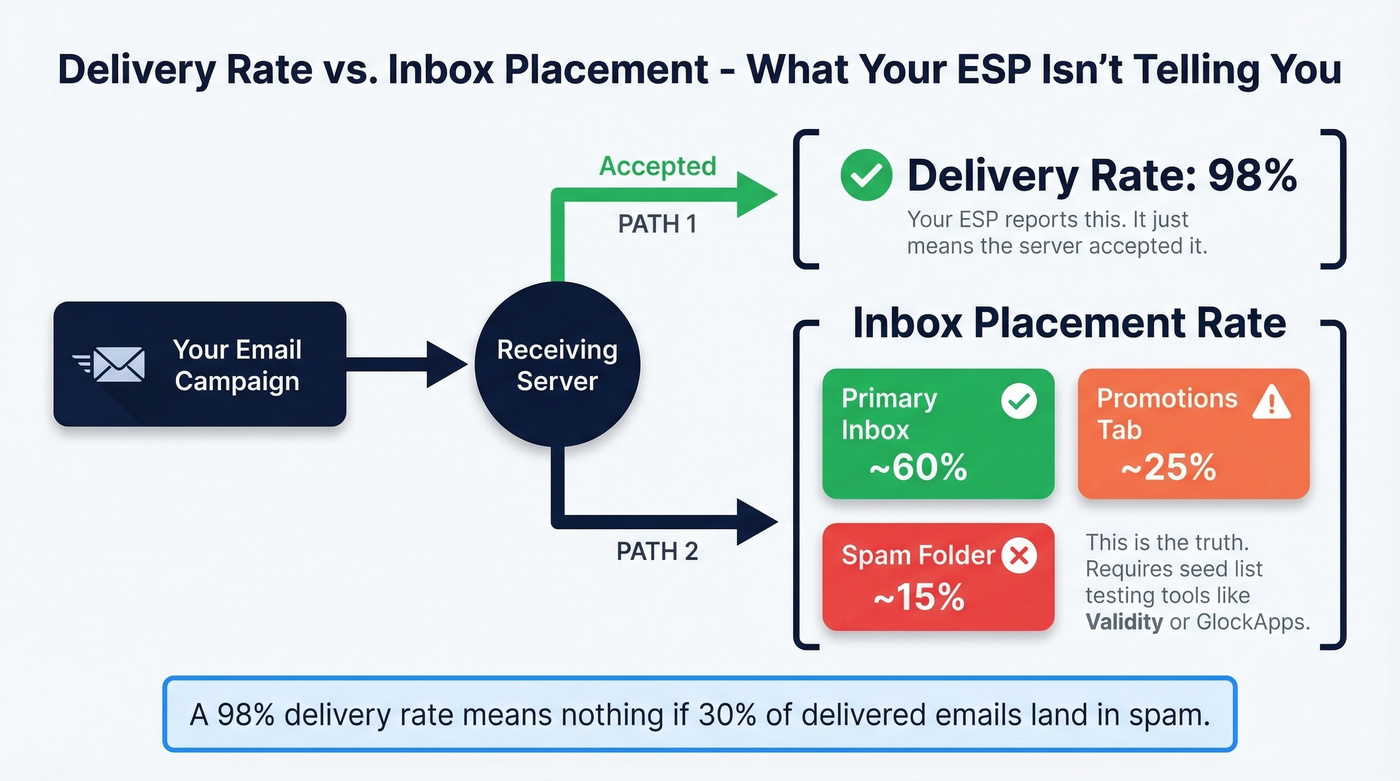
Delivery rate tells you the email was accepted by the receiving server. It doesn't tell you where it went after that. Your ESP reports "delivered" - but that could mean primary inbox, promotions tab, or spam folder.
Inbox placement tells you the truth. Testing it requires seed list tools like Validity (Everest) or GlockApps, which send to test inboxes across Gmail, Yahoo, Outlook, and corporate filters, then report where each email actually landed.
Before you think about inbox placement testing, get your authentication in order. SPF, DKIM, and DMARC are non-negotiable. Since February 2024, Google and Yahoo require DMARC with at least p=none for bulk senders. Skip this and you're not even in the game (use this SPF record example and DMARC alignment guide to validate setup).

Every metric in this article - CTR, conversion rate, RPR - is corrupted the moment invalid emails enter your list. Prospeo's 5-step verification and 7-day data refresh keep bounce rates under 2% so your measurement framework actually works.
Stop measuring campaigns built on bad data. Fix the foundation first.
2026 Benchmarks by Industry
Benchmarks are useful as sanity checks, not targets. Here's where the major industries land based on Mailchimp and Moosend data.
| Industry | Open Rate* | CTR | Unsub Rate | Bounce Rate |
|---|---|---|---|---|
| Business & Finance | 31.35% | 2.78% | 0.15% | 0.40% |
| E-commerce | 29.81% | 1.74% | 0.19% | 0.33% |
| IT/Tech/Software | 31.42% | 1.86% | 0.23% | 0.66% |
| Nonprofit | 40.04% | 3.27% | 0.18% | 0.41% |
| Retail | 29.10% | 2.04% | 0.18% | 0.31% |
| All Users | 35.63% | 2.62% | 0.22% | 0.40% |
\Open rates inflated by Apple MPP - treat as directional ceiling, not actual readership.*
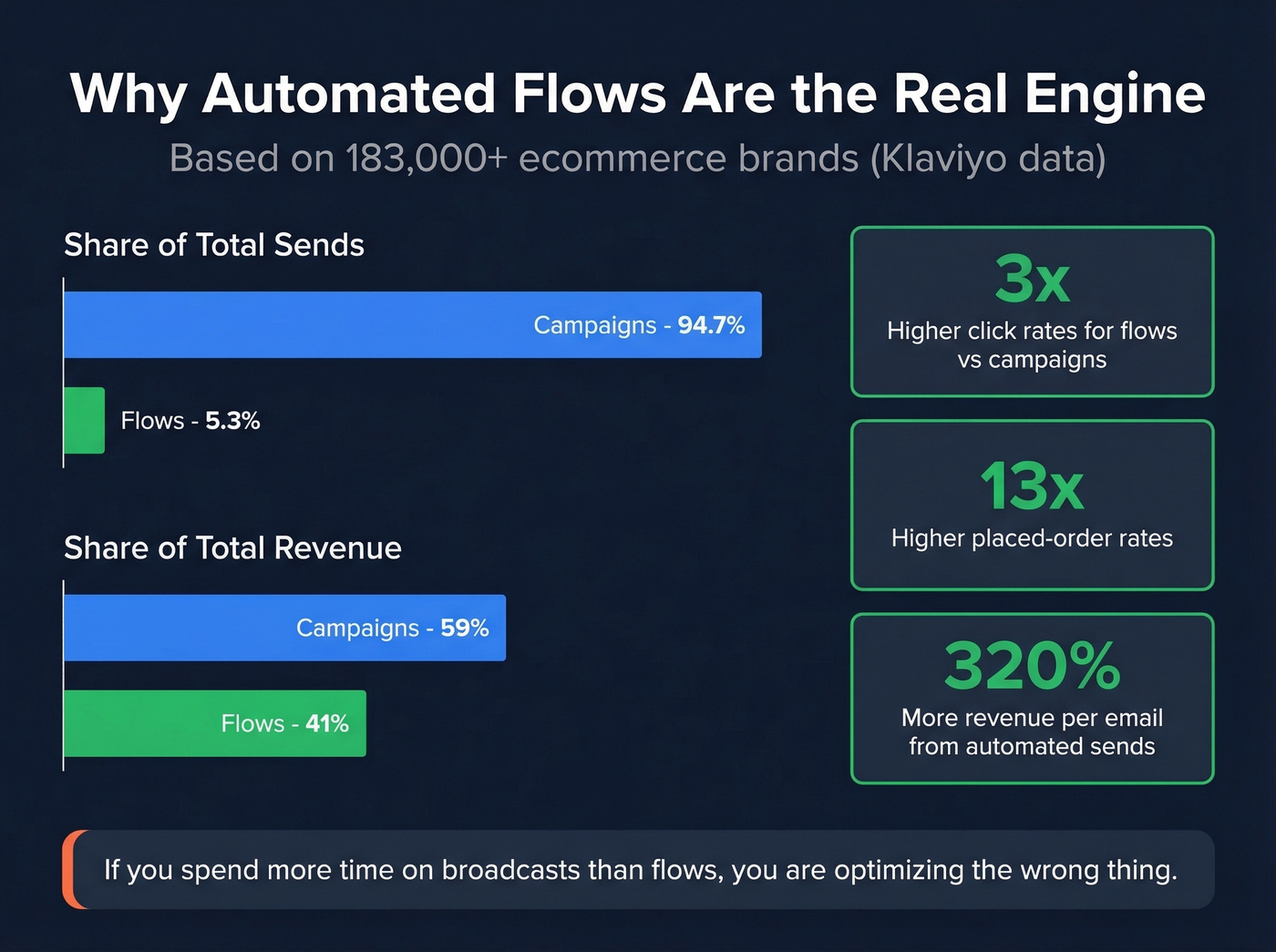
The more interesting story is in the Klaviyo data on campaigns versus automated flows. Across 183,000+ ecommerce brands, automated flows represent just 5.3% of total email sends but generate roughly 41% of total email revenue. Flows deliver 3x higher click rates and 13x higher placed-order rates than broadcast campaigns.
Look, if you're selling deals under $10K and spending more time on broadcast campaigns than automated flows, you're optimizing the wrong thing. Flows are the engine. Campaigns are the megaphone. Most teams have this backwards.
ROI and Cost Efficiency
The formula is simple:
ROI = (Revenue - Cost) / Cost x 100
The industry average is $36 returned per $1 spent, and 18% of companies exceed $70 per $1. Those numbers are only accurate if you're honest about costs.
Most teams undercount what email actually costs. Your cost calculation should include ESP/platform fees, sending infrastructure and deliverability tools, design and copywriting time (internal or agency), developer hours for templates and integrations, and analytics platforms. Tracking cost efficiency means accounting for every dollar in that denominator - not just your ESP subscription.
Automated emails deliver 320% more revenue per email than broadcast sends. If your ROI calculation doesn't separate automated from manual campaigns, you're averaging away the insight that matters most.
Setting Up Attribution
Without proper UTM tagging, GA4 lumps your email traffic into "direct" - which means your email program gets zero credit for the revenue it drives. Given that 89%+ of websites run Google Analytics, GA4 is likely your attribution backbone, and getting this right is non-negotiable.
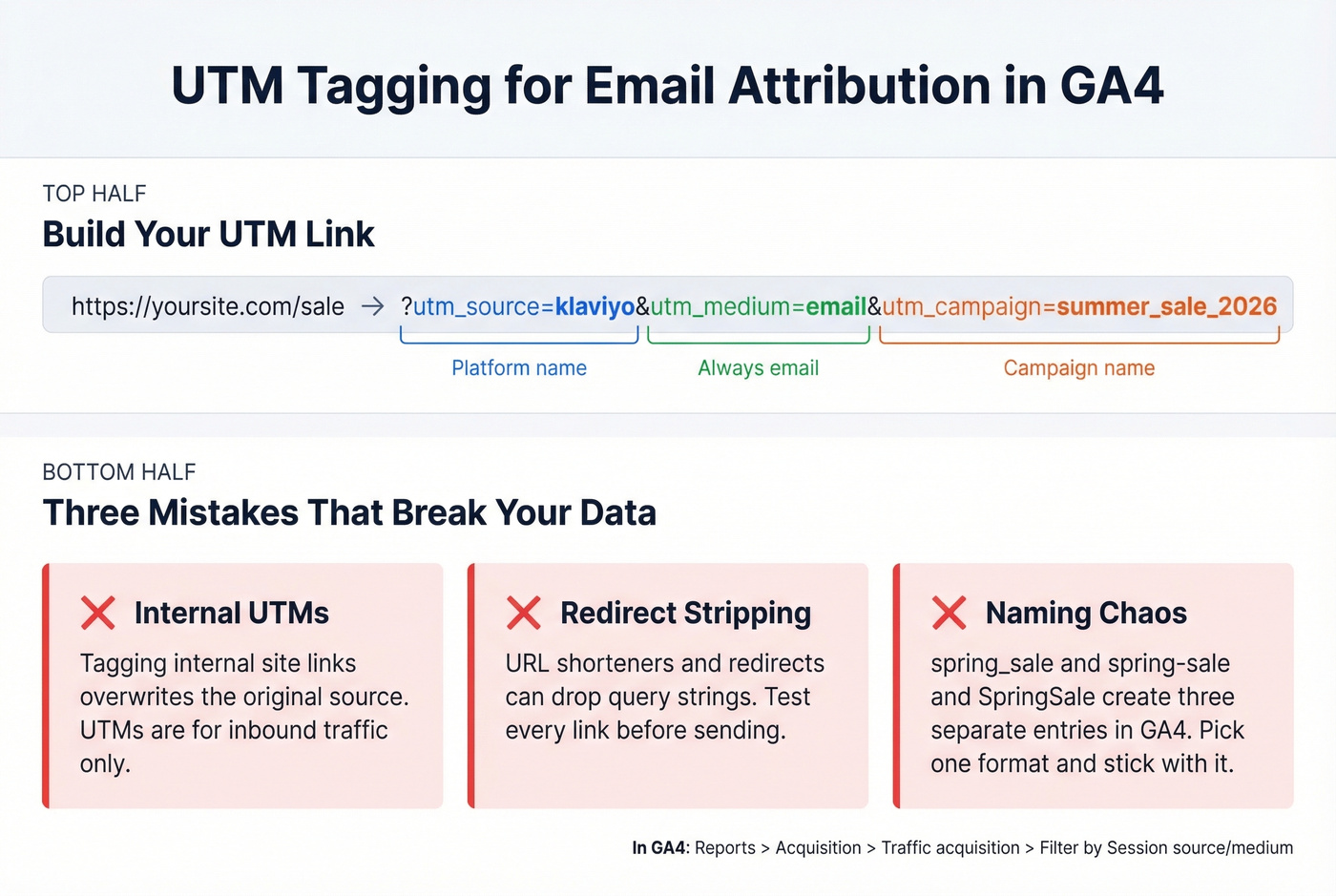
Every email link needs three UTM parameters:
utm_source- the platform, such asklaviyoorhubspotutm_medium- alwaysemailutm_campaign- the specific campaign name, likesummer_sale_2026
In GA4, navigate to Reports > Acquisition > Traffic acquisition, then filter by Session source/medium to see email performance alongside other channels. Google's UTM documentation covers the full parameter set.
Common mistakes that silently break your data:
- Internal UTMs overwriting source. If you tag internal site links with UTMs, you overwrite the original attribution. UTMs are for inbound traffic only.
- Redirects stripping parameters. URL shorteners and certain redirect chains can drop query strings. Test every link before sending.
- Naming inconsistency.
spring_saleandspring-saleandSpringSalecreate three separate line items in GA4. Pick a convention and enforce it.
For Apple's Link Tracking Protection, the workaround is server-side redirects and first-party tracking domains (see what a tracking domain is and how to set it up). Most modern ESPs handle this, but verify with yours.
Your Measurement Schedule
Not every metric needs daily attention. Here's a cadence that keeps you informed without drowning in dashboards.
| Daily | Weekly | Monthly |
|---|---|---|
| Bounce rate spikes | CTR by campaign | Inbox placement test |
| Soft-bounce trends | Conversion rate | List growth rate |
| Delivery rate | RPR | Revenue per customer |
| - | Spam complaints | Email client share |
| - | Unsubscribe rate | Spam score check |
| - | Active audience trend | Stakeholder report |
Daily checks are quick - you're watching for anomalies, not doing deep analysis. Weekly is where you do real performance work, including template performance across different flows and campaign types. Monthly is strategic: are we growing, are we landing in inboxes, and what's the story for leadership?
For the monthly stakeholder report, structure it as objectives, key findings, month-over-month comparisons, and recommendations. Skip the metric dump. Tell the story.
The Data Quality Foundation
Bad email addresses cause high bounce rates. High bounce rates damage your sender reputation. Damaged reputation tanks inbox placement. Poor inbox placement means fewer people see your emails. And suddenly every metric downstream - CTR, conversions, RPR - is corrupted.
You're not measuring email performance anymore. You're measuring the consequences of dirty data.
Remember that 22.71% annual list decay stat? Roughly one in five contacts on your list goes stale every year. If you're not verifying before you send, you're burning sender reputation on every campaign. In our experience, teams that skip verification and then wonder why their "engagement" metrics look off are solving the wrong problem entirely.
This is where tools like Prospeo fit into the measurement stack - it's step zero, the prerequisite before any of these metrics mean anything. Prospeo's 5-step email verification runs at 98% accuracy, including catch-all domain verification that most tools skip or mark as "unknown." Real results: Meritt dropped bounce rates from 35% to under 4%, and Snyk went from 35-40% bounces down to under 5% across 50 AEs.
Lists decay 22.71% per year. Prospeo refreshes every 7 days - not the 6-week industry average - so your segments stay clean and your inbox placement stays above 90%. At $0.01 per verified email, data hygiene costs less than one spam complaint.
Your CFO wants revenue per recipient, not excuses about stale data.
FAQ
What's the most important email metric in 2026?
Click-through rate. It can't be inflated by Apple's privacy proxies and directly measures real human engagement. Every click represents a deliberate action, unlike opens which machines trigger automatically. Pair CTR with conversion rate and revenue per recipient for the complete picture.
Are open rates still useful?
Only as directional trend data across large sends with 500K+ recipients. Apple MPP inflates opens on roughly 97% of iPhones by preloading tracking pixels via proxy servers. For segmentation or automation triggers, open rate is unreliable - use click-based signals instead.
What's a good email marketing ROI?
The industry average is $36 per $1 spent; about 18% of companies exceed $70 per $1. Include all costs in the denominator: ESP fees, design, dev time, deliverability tools, and analytics platforms. Automated flows deliver 320% more revenue per email than broadcasts - separate them in your calculations or you'll miss the insight.
How does data quality affect email marketing measurement?
Invalid emails inflate bounce rates, damage sender reputation, and corrupt every downstream metric from inbox placement to conversion rate. Lists decay at roughly 22.71% per year. Verifying contacts before sending ensures your metrics reflect real engagement, not stale data bouncing off dead inboxes.
How often should I review email metrics?
Check bounce rate and delivery rate daily for anomalies. Analyze CTR, conversions, and revenue per recipient weekly. Run inbox placement tests, assess list health, and build strategic reports monthly. This cadence catches problems early without creating dashboard fatigue.