

Email Sender Score: What It Is & How to Fix It (2026)
Your marketing team just blasted 50,000 contacts. 8% bounced. Your email sender score dropped 15 points overnight, and now your next perfectly clean campaign is landing in spam. Most teams don't even know their score exists until the damage is already done.
Quick Answer
Your Sender Score is one signal, not the whole picture - check Google Postmaster Tools and Microsoft SNDS too. If your score is below 70, the cause is almost always bad data, missing authentication, or spam complaints. Fix authentication first, verify your list before every campaign, then monitor across all three tools.
What Is a Sender Score?
Sender Score is a reputation rating for your email-sending IP address on a 0-100 scale - think credit score, but for email. Originally built by Return Path, it's now part of Validity.
The score runs on a rolling 30-day average and represents a percentile-like ranking of your IP against other sending IPs. It pulls from data across 60 million+ mailboxes and factors in complaint behavior, unknown users, spam-trap activity, and sending patterns. To see yours, you'll need to fill out a lead-capture form at senderscore.org. It's free.
Here's the thing: there's no single universal reputation metric that every mailbox provider uses. Gmail, Microsoft, and Yahoo each run their own internal reputation models. Sender Score is one external benchmark, not the master switch.
Why Your Sending Reputation Matters
Return Path's research found that 83% of the time an email misses the inbox, it's due to poor sender reputation - not content, not subject lines, not send time. The global average inbox placement rate sits around 84%, but that hides massive variation:
| Provider | Inbox | Spam | Missing |
|---|---|---|---|
| Gmail | 87.2% | 6.8% | 6.0% |
| Microsoft | 75.6% | 14.6% | 9.8% |
| Yahoo/AOL | 86.0% | 4.8% | 9.2% |
| Apple Mail | 76.3% | 14.3% | 9.4% |
Microsoft and Apple Mail are notably harsher. If a big chunk of your list sits on Outlook domains, your sending reputation matters even more than you'd expect.
What's a Good Score?
| Score Range | What It Means |
|---|---|
| 90-100 | Excellent - you're in great shape |
| 80-89 | Good - no action needed |
| 70-79 | Fair - investigate and fix |
| Below 70 | Problematic - you're getting filtered |
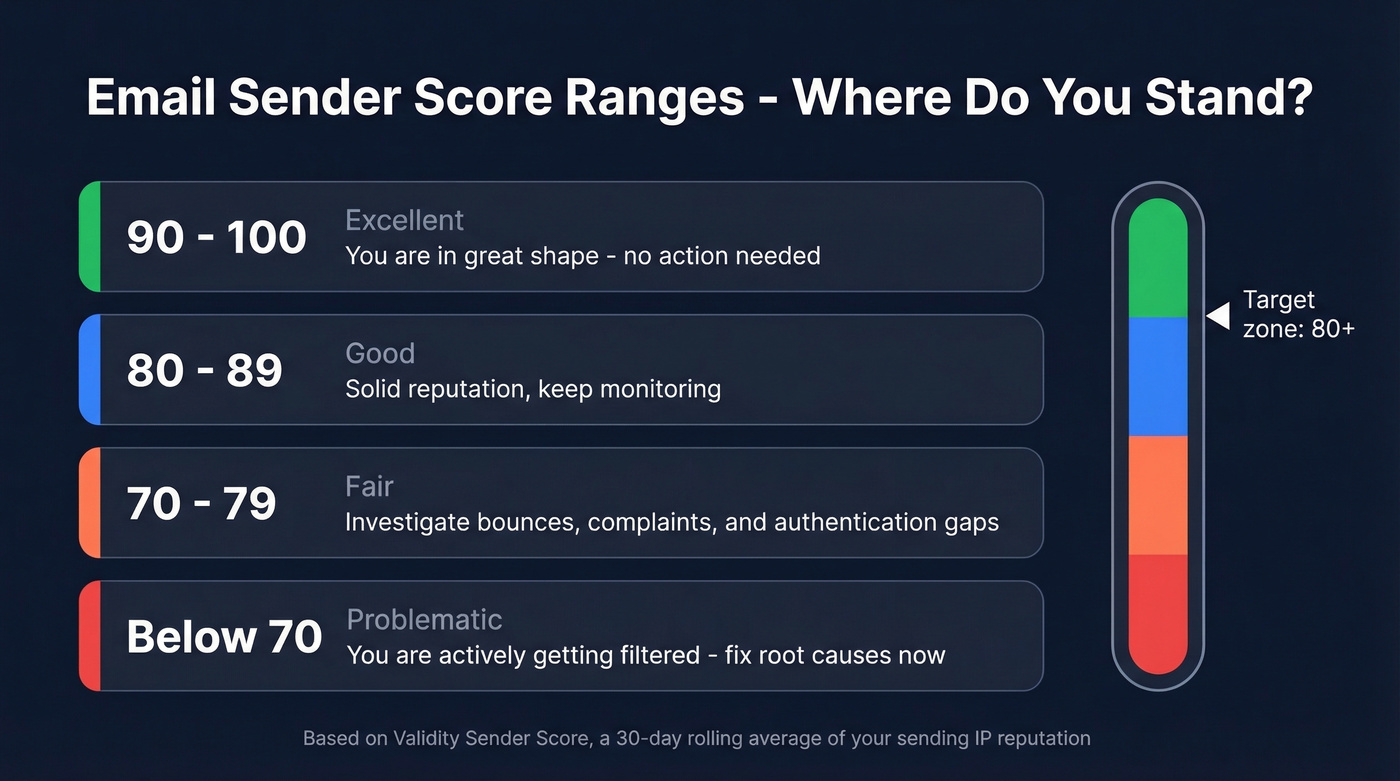
Above 80 means you're solid. Below 70, you're actively getting blocked.
But let's be honest: a high score doesn't guarantee inbox placement. We've seen accounts with scores around 98-99 that still had inbox placement issues. Gmail will route you to Promotions based on content signals even if your score is 95. The score is necessary but not sufficient.

An 8% bounce rate doesn't just hurt one campaign - it tanks your sender score for the next 30 days. Prospeo's 5-step email verification and 7-day data refresh cycle keep bounce rates under 4%, so your sending reputation stays above 80 where it belongs.
Stop fixing your score. Start preventing the damage at the source.
How to Check Your Score
- Go to senderscore.org
- Enter your sending IP or domain
- Fill out the lead-capture form
- Get your report
The report covers complaints, volume, unknown user rates, and accepted vs. rejected ratios. Genuinely useful data.
What Sender Score Doesn't Tell You
Sender Score has real blind spots, and they matter more than most guides admit.
It's not universal. Gmail, Microsoft, and Yahoo primarily rely on their own telemetry - engagement data, complaint rates, and spam-trap signals from their own networks. Your score could be 90 while Gmail quietly routes you to spam based on low engagement from your subscribers.
It's unreliable for low-volume senders. Practitioners on r/emailmarketing regularly report watching their score decline while other deliverability checks come back clean. The consensus? There isn't enough volume for the score to move in a meaningful way. If you send fewer than a few thousand emails per month, the score can be noisy and disconnected from what's actually happening in inboxes.
The "pay-to-fix" dynamic is real. Validity's IP Certification program runs around $12,000/year. When your free score drops and the solution is a five-figure contract, the incentive structure feels off. We've seen teams panic over a score dip that had zero actual impact on inbox placement. Treat the free score as directional, not gospel.
The Full Reputation Toolkit
Sender Score is one lens. You need at least three.
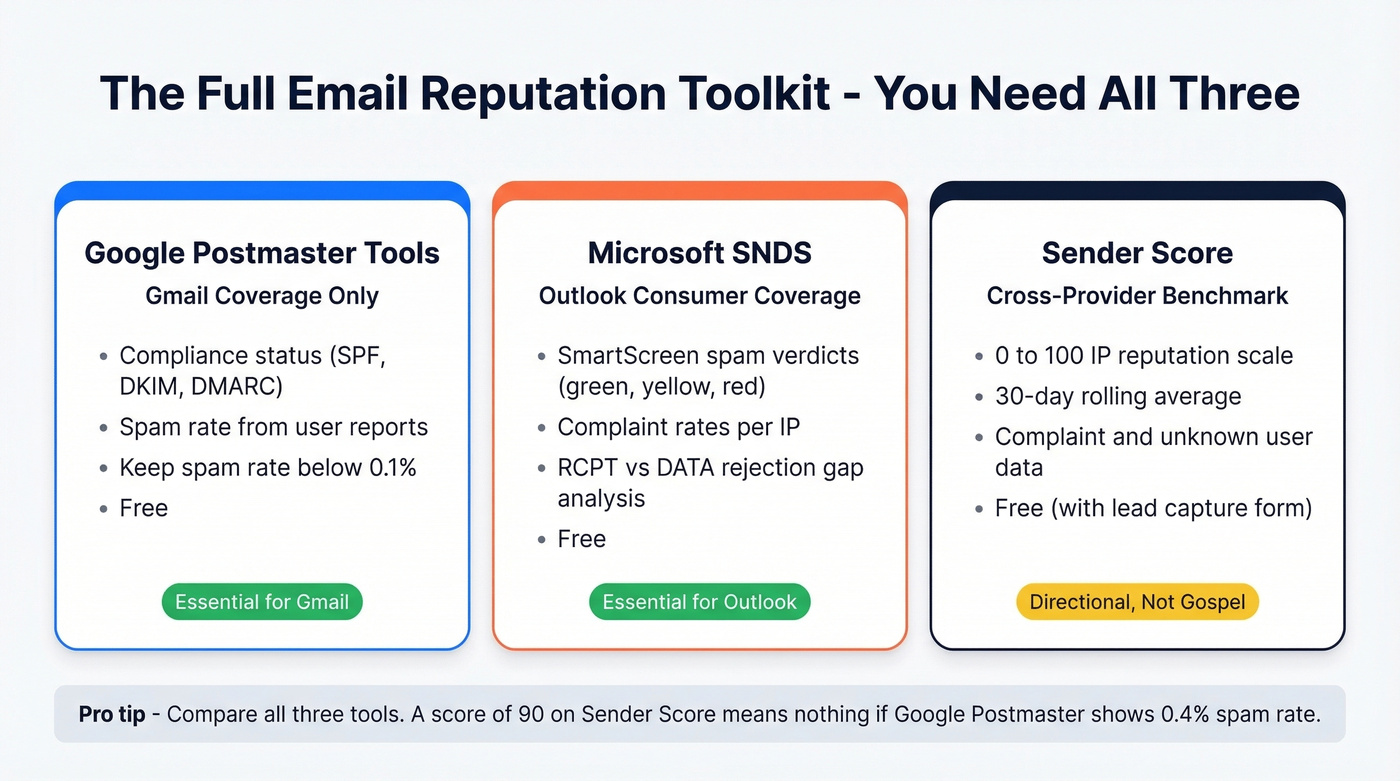
Google Postmaster Tools
Google Postmaster Tools is the only direct window into how Gmail views your sending. Free and non-negotiable if you send any volume to Gmail addresses.
GPT shifted hard toward "compliance" in 2025. The v2 interface removed the IP Reputation and Domain Reputation dashboards many teams relied on. What remains centers on Compliance Status - pass/fail checks around SPF/DKIM/DMARC alignment, TLS, and one-click unsubscribe - and Spam Rate.
Keep spam rate below 0.1% for healthy delivery. Above 0.3% consistently, and you'll hit blocks. One gotcha worth knowing: on zero-sending days, delayed complaints can produce a 100% spam rate reading. Ignore single-day spikes and focus on 30-day trends. The bigger limitation is that GPT's spam rate only reflects manual user reports, not automated spam filtering, so you can have a 0.02% GPT spam rate while a huge share of your mail gets routed to spam automatically.
Microsoft SNDS
Microsoft SNDS is the Outlook equivalent - free, IP-based, and surprisingly granular. Microsoft's consumer mailbox network spans 350 million active accounts, so if even 15% of your list is on Outlook domains, this data is essential.
Setup requires requesting access for your sending IPs and verifying ownership through the WHOIS abuse contact. The dashboard needs at least 100 daily messages to Outlook.com, Hotmail.com, Live.com, and MSN.com domains before showing data. SmartScreen results use a traffic-light system: green means under 10% spam verdicts, yellow is 10-90%, red is over 90%. For complaints, below 0.1% is healthy, above 0.5% is serious.
A diagnostic trick we use regularly: compare RCPT (recipients attempted) against DATA (messages transmitted). A big gap means Microsoft is rejecting messages before delivery - usually list quality problems or blocklist hits. Note that SNDS covers consumer domains only, not Microsoft 365 business mailboxes.
Blocklist Checkers
For quick blocklist lookups: MxToolbox checks dozens of blocklists in one query, Spamhaus is one of the most influential blocklists globally, Barracuda Central maintains its own widely-used list, and Talos Intelligence provides IP and domain reputation data.
| Tool | What It Checks | Coverage | Cost |
|---|---|---|---|
| SenderScore.org | IP/domain reputation | Cross-provider | Free |
| Google Postmaster | Compliance + spam rate | Gmail only | Free |
| Microsoft SNDS | IP spam/complaint data | Outlook consumer | Free |
| MxToolbox | Multi-blocklist lookup | Cross-provider | Free |
| Spamhaus | Blocklist status | Cross-provider | Free |
What Destroys Your Score
The factors that tank your reputation are predictable and mostly preventable:
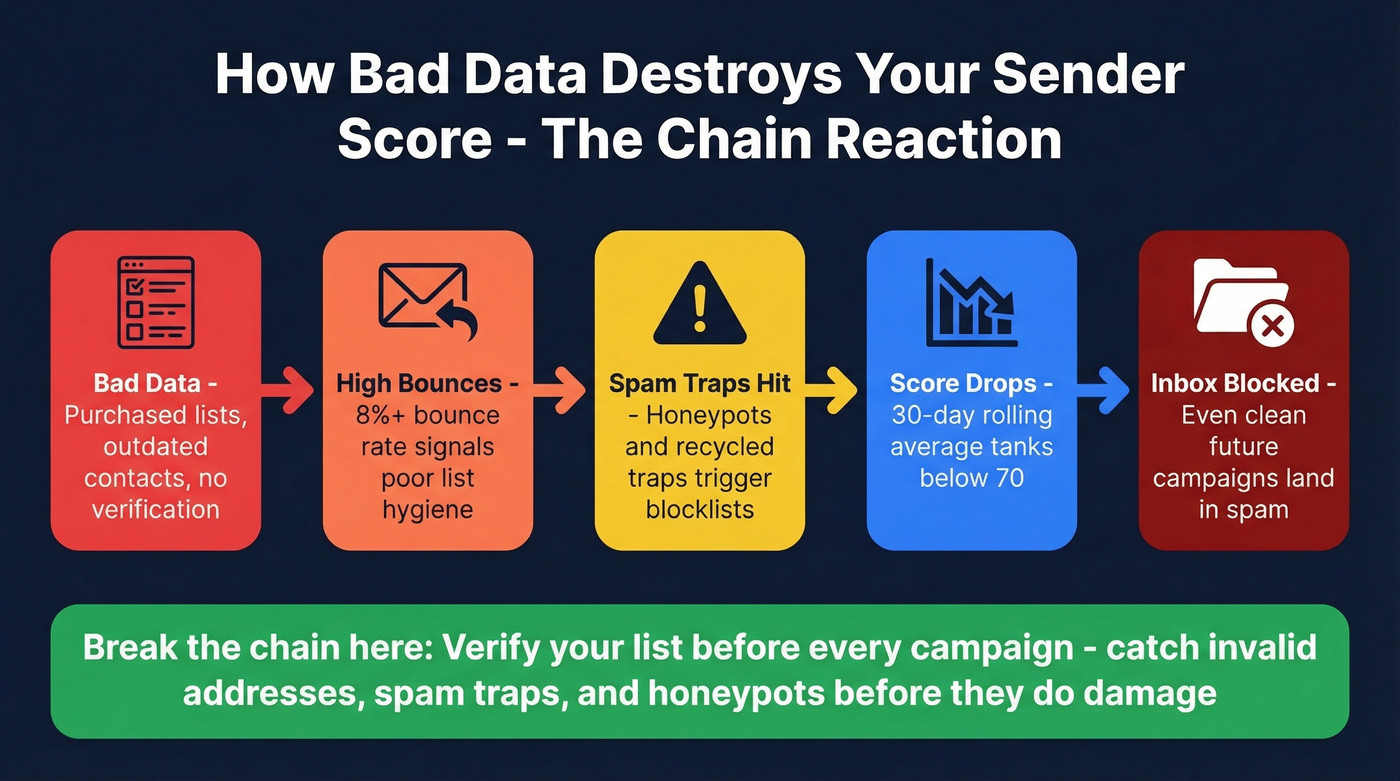
- Spam complaints - the fastest killer. Even 0.3% sustained over a few weeks craters your reputation.
- Bounces from bad data - the #1 upstream cause we see across client accounts. You can't control spam reports, but you can control whether you're sending to valid addresses. (If you want bounce benchmarks and fixes, start with bounce rate.)
- Spam traps and honeypots - addresses designed to catch senders using purchased or scraped lists. Hit enough and you'll land on blocklists within days. If you suspect this, follow a proper spam trap removal process.
- Inconsistent volume - jumping from 500 emails/week to 50,000 triggers ISP suspicion. Keep your email velocity stable.
- Missing authentication - no SPF, DKIM, or DMARC is a deliverability death sentence after the 2024-2025 enforcement changes. Use a clean SPF record example and confirm how to verify DKIM is working.
- Purchased or scraped lists - combine nearly all of the above into one catastrophic package. If you're considering it, read Is It Illegal to Buy Email Lists? first.
The pattern is almost always the same: bad data leads to bounces, bounces lead to score damage, score damage leads to filtering, and your next campaign tanks even if that list is clean.
How to Improve Your Email Sender Score
Improving a damaged reputation takes 2-4 weeks of clean sending since it's a 30-day rolling average. But you need to fix the root cause first. The score follows behavior; it doesn't lead it. (For a deeper walkthrough, see how to improve sender reputation.)
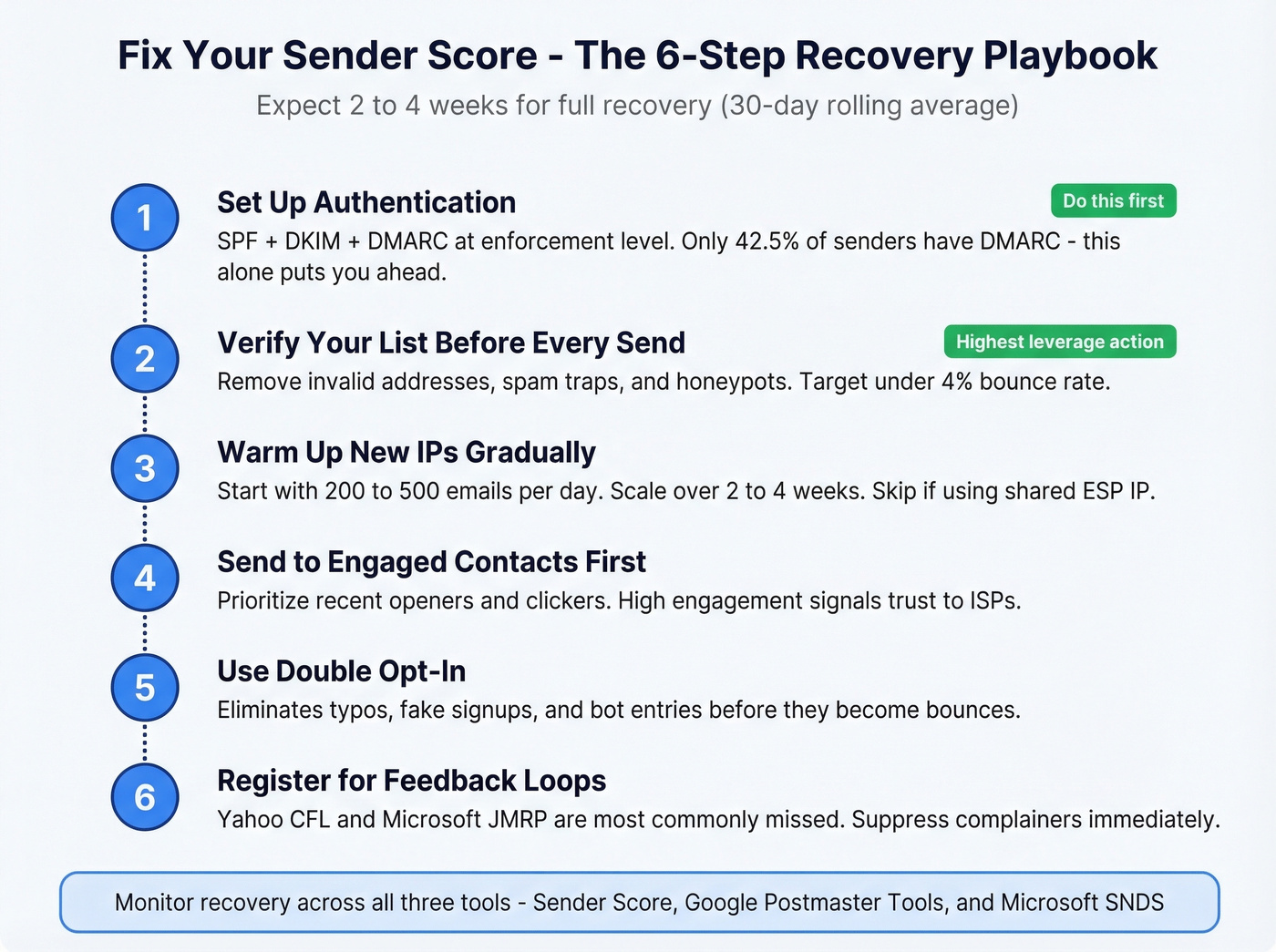
Set Up Authentication
SPF defines which servers can send on your behalf. DKIM adds a cryptographic signature. DMARC ties them together. Adoption is still shockingly low: only 55.4% use SPF, 58.5% use DKIM, and just 42.5% have DMARC. Since Google and Yahoo began enforcing requirements in 2024 - and Microsoft introduced high-volume sender requirements in 2025 for senders exceeding 5,000 messages/day - this isn't optional anymore. Once you're running DMARC at enforcement level, BIMI lets you display a verified brand logo in the inbox.
Verify Your List Before Every Campaign
This is the single highest-leverage action. That 8% bounce rate from the opening? Completely preventable.
Before any campaign, run your list through a verification tool. Prospeo's 5-step email verification catches invalid addresses, spam traps, and honeypots before they hit your sender reputation - 98% accuracy across 143M+ verified emails, with a 7-day data refresh cycle. One of our customers, Stack Optimize, maintains 94%+ deliverability and under 3% bounce rates across all their client campaigns using this approach. Zero domain flags. If you're comparing vendors, start with email verification.
Warm Up New IPs Gradually
Start with your most engaged segments - 200-500 emails/day - and scale over 2-4 weeks. ISPs want consistent, positive signals before they trust volume. Skip this if you're on a shared IP through your ESP; warmup only applies to dedicated IPs.
Send to Engaged Contacts First
Prioritize recipients who've opened or clicked recently. High engagement tells ISPs your mail is wanted. This is especially critical during a recovery period - your best subscribers are the ones who'll pull your reputation back up.
Use Double Opt-In
It adds friction, but eliminates typos, fake signups, and bot entries before they become bounces.
Register for Feedback Loops
Most major ISPs notify you when recipients mark your email as spam. Suppress complainers immediately - every prevented complaint is one that doesn't hit your score. Yahoo's Complaint Feedback Loop and Microsoft's Junk Mail Reporting Program are the two most commonly missed.
We've tested this playbook across dozens of accounts. Verification before sending is the single highest-ROI action for protecting sender reputation. Everything else is maintenance.
83% of inbox misses come from poor sender reputation, and the #1 driver is bad list data. Prospeo delivers 98% email accuracy across 143M+ verified addresses - no catch-all guessing, no spam traps, no honeypots hitting your IP.
Clean data is the fastest sender score fix that money can buy - starting at $0.01 per email.
FAQ
How often should I check my email sender score?
Check weekly. It's a 30-day rolling average, so daily lookups are noise. Pair with Google Postmaster Tools for Gmail-specific spam rates and Microsoft SNDS for Outlook data - together they cover 70%+ of most B2B lists.
How long does it take to recover a low score?
Two to four weeks of clean sending, since the metric recalculates on a rolling 30-day window. Fix the root cause first - bounces, complaints, or missing authentication - and the score follows. There's no shortcut.
Does my email sender score affect cold outreach differently than marketing emails?
Yes, and it's worse. Cold outreach typically hits lower engagement rates and higher complaint rates than opt-in marketing email, which means your score is more fragile. For cold campaigns, list verification isn't just best practice - it's survival. One bad batch can set you back a month.
What's the difference between IP reputation and domain reputation?
Sender Score tracks IP reputation. But ISPs increasingly weigh domain reputation too, especially Gmail. You can switch IPs, but your domain follows you. That's why authentication (SPF, DKIM, DMARC) matters so much - it ties your domain to your sending behavior permanently.