

Email Spam Filters: How They Actually Work (And Why Yours Might Be Failing)
160 billion spam emails hit inboxes every day. That's 46% of all email traffic - and while that percentage has dropped from 56.63% in 2017, the raw volume keeps climbing because the world just sends more email every year. The U.S. alone accounts for roughly 8 billion spam messages daily, with China close behind at 7.6 billion.
But here's the part that doesn't get enough attention: spam filters aren't just failing to catch junk. They're catching too much of the good stuff. Roughly one in six legitimate emails never reaches the inbox. Your carefully crafted outbound sequence, your transactional receipts, your proposal follow-ups - a meaningful chunk of them are vanishing into spam folders and quarantine queues. The filtering problem cuts both ways.
What You Need (Quick Version)
Drowning in spam and phishing? Gmail's native filtering outperforms Microsoft 365 by 11.6 percentage points on inbox placement. Google's AI-driven filter is the strongest built-in option available today. If you're on Microsoft, add a third-party layer - Proofpoint or Avanan for enterprise, SpamHero for SMB.
Choosing a filter for your org? Enterprise with 500+ seats: Proofpoint or Mimecast. Mid-market or MSP: Avanan (Check Point) for API-based deployment. Budget SMB: SpamTitan or SpamHero at $1-5/mo per user or domain.
Your outbound emails landing in spam? The problem probably isn't your content - it's your data. Sending to invalid addresses, spam traps, and dead mailboxes destroys sender reputation faster than any subject line trigger. Bad bounces are the silent killer of deliverability, and we've seen teams fix their inbox placement overnight just by cleaning their lists.
What Is a Spam Filter?
An email spam filter is software that evaluates inbound (and sometimes outbound) messages and makes a three-way decision: deliver to inbox, quarantine for review, or block entirely. Most email you receive has passed through at least one filter, and often several.
The technology has changed fundamentally since its early days. In the early 2000s, filters relied on simple keyword matching - flag anything with "Viagra" or "Nigerian prince" and call it a day. Paul Graham's influential essay on Bayesian filtering shifted the field toward statistical analysis of word probabilities. By the mid-2000s, sender authentication moved from DomainKeys to DKIM, adding a cryptographic identity layer. DMARC followed later, giving domain owners tools to declare which servers could send on their behalf.
Today's filters combine all of these approaches with deep learning models that analyze hundreds of signals simultaneously - message metadata, sender behavior patterns, URL reputation, attachment fingerprints, and linguistic patterns that humans would never catch. The latest challenge is polymorphic phishing that changes with every send, forcing filters to move beyond pattern matching entirely. The DMARCbis draft is still working its way through standardization and is intended to replace RFC 7489/9091.
How Spam Filtering Works
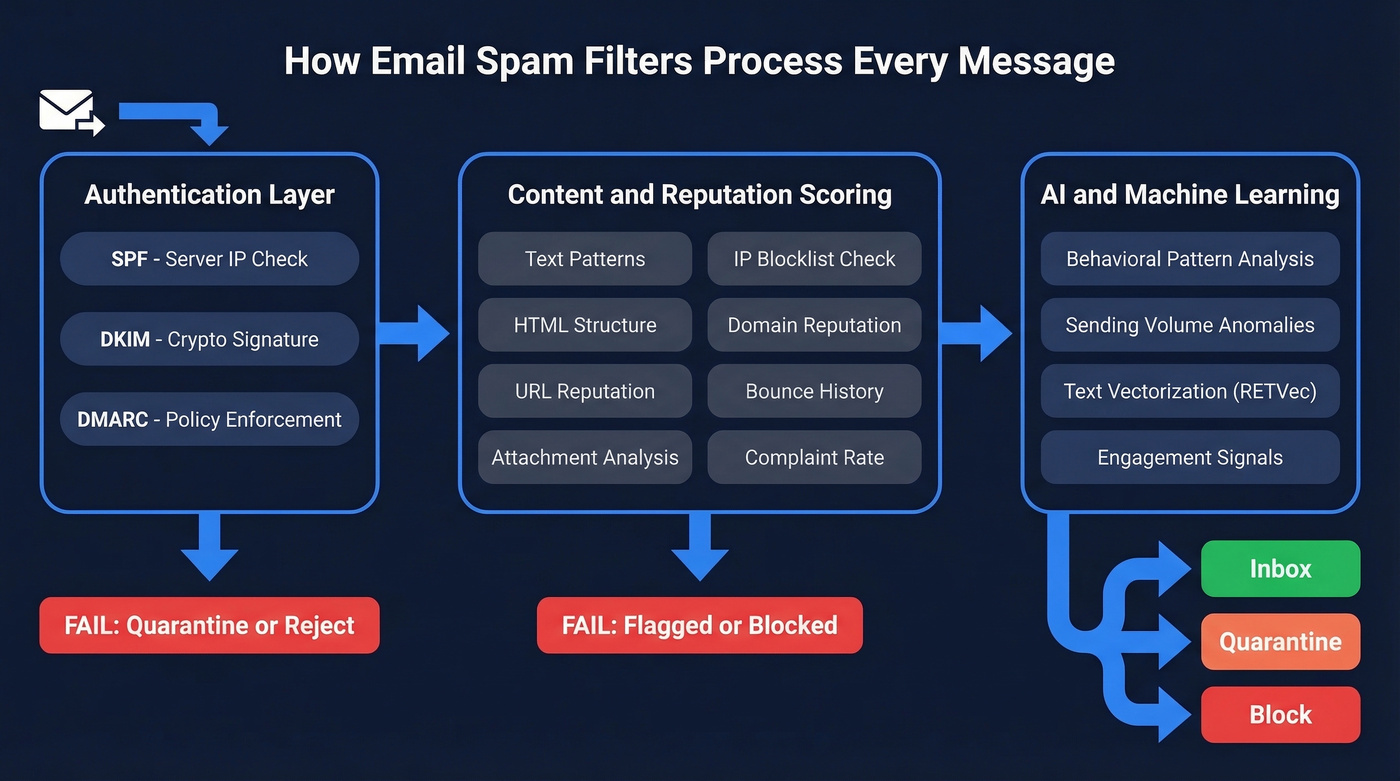
Modern spam filtering isn't a single check - it's a pipeline. Every message passes through multiple layers, each adding confidence to the final deliver/quarantine/block decision. Understanding how these layers interact matters whether you're defending an inbox or trying to reach one.
Authentication Layer
Before a filter even reads your email's content, it checks whether you are who you claim to be. Three protocols do the heavy lifting.
SPF (Sender Policy Framework) verifies that the sending server's IP is authorized by the domain's DNS records. DKIM (DomainKeys Identified Mail) attaches a cryptographic signature to the message header, proving it wasn't tampered with in transit. DMARC ties SPF and DKIM together with a policy that tells receiving servers what to do when checks fail - nothing, quarantine, or reject outright.
Fail any of these, and your email starts with a deficit before content analysis even begins. Missing authentication is still one of the most common reasons legitimate emails land in spam.
Content and Reputation Scoring
Once authentication passes, the filter examines the message itself. Content analysis looks at text patterns, HTML structure, image-to-text ratio, URL destinations, and attachment types. HTML-focused filters specifically evaluate whether the code is clean or bloated with hidden elements, suspicious redirects, and broken tags - hallmarks of mass-produced phishing templates.
Reputation scoring evaluates the sending IP and domain against blocklists, historical complaint rates, and bounce patterns. ISP-level filters at Gmail, Yahoo, and Outlook weigh these reputation signals heavily. A clean IP with slightly aggressive copy might still deliver, while a flagged IP with perfect content probably won't. Most senders misunderstand this. They obsess over word choice when their IP reputation is already in the gutter.
If you're trying to diagnose why that happens, start with an email deliverability baseline and then track sender reputation like a KPI.
AI and Machine Learning
The top layer is where modern filters separate from legacy ones. AI-powered filters analyze behavioral patterns across billions of messages, spotting anomalies that no rule-based system could catch - like a sender who's been dormant for six months suddenly blasting 50,000 messages from a new IP.
Google's RETVec text vectorizer improved spam detection by 38% while reducing false positives by 19.4% compared to its predecessor. This technology is specifically designed to resist obfuscation tricks: character substitution, invisible Unicode, zero-width spaces - the stuff that used to fool keyword-based filters easily.
Gmail processes roughly 15 billion unwanted messages daily and blocks 99.9%+ of spam, phishing, and malware. That's the benchmark everyone else is chasing.
Types of Spam Filters
Not all filters use the same approach. Most modern solutions combine several techniques, but understanding each one helps you evaluate what you're actually paying for.

| Filter Type | How It Works | Strength | Weakness |
|---|---|---|---|
| Content/Keyword | Scans text for spam phrases | Simple, fast | Easily evaded |
| Blocklist | Checks sender IP/domain against known-bad lists | Stops repeat offenders | Misses new threats |
| Bayesian | Statistical word-probability analysis | Adapts to patterns | Needs training data |
| Rule-Based | Admin-defined if/then conditions | Precise control | Manual, doesn't scale |
| AI/ML | Deep learning across hundreds of signals | Catches novel attacks | Opaque, hard to tune |
| Reputation | Scores sender history over time | Rewards good behavior | Slow to update |
| Authentication | Validates SPF/DKIM/DMARC | Prevents spoofing | Doesn't analyze content |
Bayesian filtering deserves a closer look because it's the foundation many modern systems build on. A Bayesian filter calculates the probability that a message is spam based on the frequency of specific words across known-spam and known-legitimate corpora. Over time, it learns from user feedback - every time you mark something as spam or rescue it from junk, you're training the model. It's elegant, but it needs volume to work well.
Engagement-based filtering is a newer approach that major mailbox providers now use heavily. Instead of just analyzing the message itself, these filters track how recipients interact with emails from a given sender - opens, clicks, replies, deletes-without-reading, and spam complaints. If most recipients ignore or delete your emails, the filter learns to deprioritize future messages from you, even if the content looks clean.
The best filters layer multiple types together. A message might pass authentication checks but get flagged by the ML model because the sending pattern looks anomalous. Or it might have clean content but come from a blocklisted IP. Single-method filters are essentially obsolete.
SEG vs API vs Client-Side
How a filter deploys matters as much as what it detects. There are three models, and picking the wrong one creates problems you can't detect your way out of.
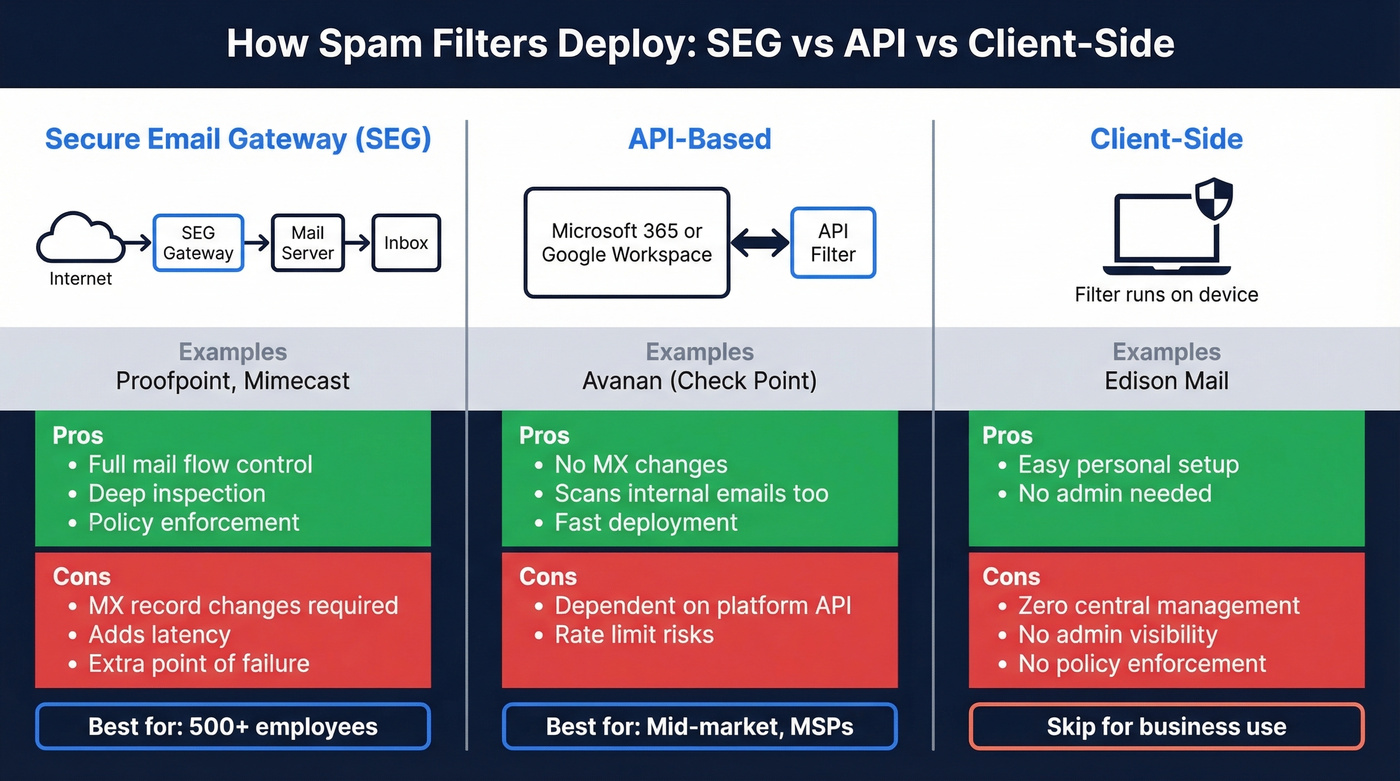
Secure Email Gateways (SEGs) sit in front of your mail server via MX record changes. All email routes through the gateway before reaching your environment. Proofpoint and Mimecast are the classic examples. SEGs give you full control over mail flow, but they add latency, require MX changes that can break during migration, and create an additional point of failure.
API-based filters connect directly to your email platform - Microsoft 365 or Google Workspace - via API. No MX changes, no mail rerouting. Avanan (Check Point) is the well-known example. The advantage is faster deployment and the ability to scan internal emails, not just inbound. The tradeoff: you're dependent on the email platform's API reliability and rate limits.
Client-side filters run on the end user's device or email client. Edison Mail is the consumer example. These are fine for personal use but offer zero central management, no admin visibility, and no policy enforcement. Skip this if you're running anything beyond a one-person operation.
Our rule of thumb: under 50 employees on Google Workspace, the built-in filtering is sufficient. On Microsoft 365, add an API-based layer. Over 500 employees with complex routing, a SEG still makes sense despite the operational overhead.

Spam filters destroy sender reputation when you hit invalid addresses, spam traps, and dead mailboxes. Prospeo's 5-step verification with catch-all handling, spam-trap removal, and honeypot filtering delivers 98% email accuracy - so your outbound actually reaches inboxes instead of quarantine folders.
Stop feeding spam filters bad data. Start with emails that land.
Gmail vs Microsoft 365 Filtering
Let's be honest about this one. Gmail and Microsoft 365 are the two biggest business email platforms, and their built-in filtering isn't equal.
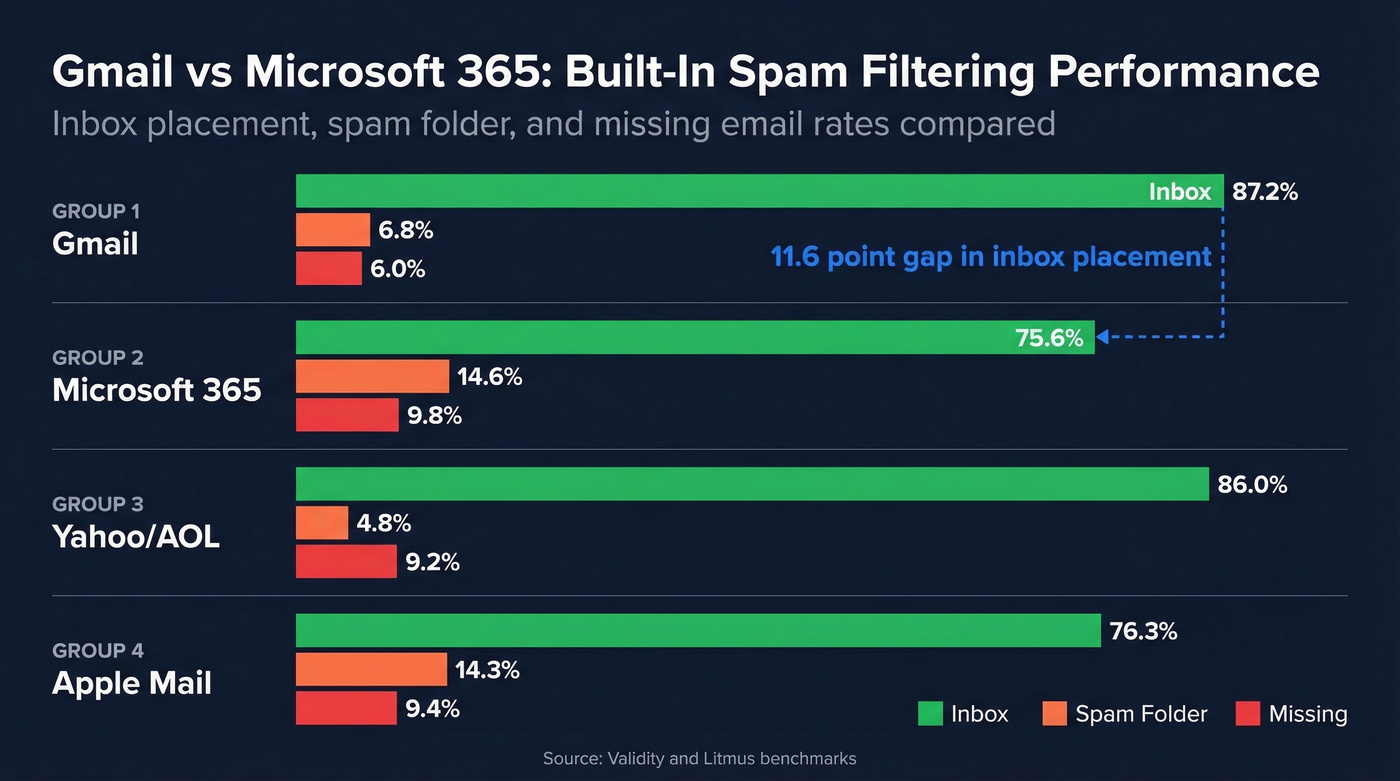
| Provider | Inbox Rate | Spam Rate | Missing |
|---|---|---|---|
| Gmail | 87.2% | 6.8% | 6.0% |
| Microsoft | 75.6% | 14.6% | 9.8% |
| Yahoo/AOL | 86.0% | 4.8% | 9.2% |
| Apple Mail | 76.3% | 14.3% | 9.4% |
Data: Validity + Litmus benchmarks
That 11.6-point gap between Gmail and Microsoft isn't a rounding error - it's structural. Google blocks 99.9%+ of phishing, spam, and malware using cloud-native ML models that update continuously across its entire user base. Microsoft's Defender for Office 365 has weaker detection for targeted social engineering, particularly the personalized phishing that's exploding right now.
One MSP on r/msp reported a roughly 30% increase in phishing and malware emails after migrating clients from Google to Office 365. That's one data point, but it matches the pattern we see consistently. If you're on Microsoft 365, you need a third-party layer. Period.
Google Workspace isn't perfect either - enterprise teams sometimes find it lacks the investigation tooling and automation depth they need. But as a baseline spam and phishing filter, Gmail is the clear winner.
Why Popular Filters Fail
Every vendor claims 99%+ detection. None publish independent, comparable benchmarks. You're expected to trust marketing pages and run your own bake-off. Here's what actually happens when you do.
SpamExperts: Bank Fraud Getting Through
An MSP who'd used SpamExperts for over a decade posted on r/msp that filtering had gotten measurably worse over the last 1-2 years. The specifics are alarming: two successful bank-fraud incidents in 12 months where phishing emails passed straight through the filter and customers were "robbed." That's not a missed newsletter - that's real financial damage from a product that's supposed to prevent exactly this.
SpamTitan: The v8 to v9 Regression
SpamTitan users reported a quality regression when the product upgraded from version 8 to version 9. The phrase "went downhill" keeps appearing in MSP forums. Software updates are supposed to improve detection, not degrade it.
Barracuda: Rising Bypass Rates
Barracuda's cloud filter drew similar complaints - admins reporting increasing volumes of spam getting through where it hadn't before. The pattern across all three vendors is the same: filters degrade over time, vendor updates sometimes break things, and admins don't find out until something bad happens.
The frustrating part? There's no independent, apples-to-apples benchmark you can reference. You're flying blind until you run your own test.
AI-Powered Phishing Kits
While defenders argue about filter configurations, attackers are shipping products. The phishing kit market in 2026 looks more like a SaaS ecosystem than a criminal underground.
BlackForce sells on Telegram for EUR 200-300. For that price, buyers get man-in-the-browser capabilities that capture one-time passwords in real time, bypassing MFA entirely. It impersonates 11+ brands out of the box and includes blocklists to filter out security vendor crawlers - meaning it actively evades the tools designed to detect it.
GhostFrame loads a benign outer HTML page, then swaps in phishing content via an embedded iframe. Anti-debugging scripts detect analysis tools and serve clean content to researchers while showing the real payload to victims. Random subdomains per visit make URL blocklisting nearly useless.
InboxPrime AI is the most alarming. Marketed as a $1,000 MaaS (Malware-as-a-Service) platform, it uses AI to generate phishing emails with spintax variation, includes "spam diagnostic" suggestions to help attackers avoid filter triggers, and mimics human emailing behavior to evade pattern detection.
Here's the thing: AI phishing kits costing EUR 200 on Telegram are advancing faster than legacy, rule-heavy filters. If your filter hasn't shipped meaningful ML upgrades in the last 18 months, it's already behind.
Best Filters by Category
| Category | Tool | Pricing | Best For |
|---|---|---|---|
| Enterprise | Proofpoint | ~$3-6/user/mo | 500+ seats, complex routing |
| Enterprise | Mimecast | ~$3-5/user/mo | Mid-to-large, archiving built in |
| Mid-Market/MSP | Avanan (Check Point) | ~$4-6/user/mo | API-based, no MX change |
| Mid-Market/MSP | Barracuda | ~$3-5/user/mo | SEG with appliance option |
| SMB | SpamTitan | ~$1-2/user/mo | Budget MSP/SMB |
| SMB | SpamHero | ~$5/mo per domain | Simplest domain-level filter |
| Microsoft Add-On | Defender for O365 | ~$2-5/user/mo | Already in M365 ecosystem |
| Built-In | Google Workspace | Included ($7-25/user/mo) | Strongest native filtering |
| Client-Side | Edison Mail | Free | Personal/consumer use |
Enterprise picks are straightforward. Proofpoint is widely used in large, complex environments where you need granular policy control and deep integration with security stacks. Mimecast is the pick when you also need archiving and continuity in one platform - and it backs its filtering with an SLA that stops 99% of spam with a 0.0001% false positive rate, which gives you something concrete to hold them to. Both require operational investment. Don't expect plug-and-play.
Mid-market and MSP teams should look at Avanan first. The API-based deployment means no MX changes, which is a massive operational win when you're managing dozens of client tenants. Barracuda still works but the rising bypass complaints give us pause - test thoroughly before committing.
SMB is where budget matters most. SpamTitan at $1-2/user/mo is hard to beat on price, though the v9 regression is worth monitoring. SpamHero at $5/mo per domain is the simplest option for small businesses that just need basic filtering without complexity. For context, MSPs on r/msp are actively hunting for solutions under EUR 0.50/mailbox/month - that's the budget reality for high-volume managed environments.
Google Workspace users get the strongest built-in filtering on the market. Unless you have specific compliance or investigation requirements, the native filtering is genuinely good enough.
Stop Your Emails Landing in Spam
Most guides focus on the inbound side - catching junk. But if you're in sales, marketing, or ops, the problem you actually have is your own emails landing in other people's spam folders. You don't need a better filter. You need better sending practices and cleaner data.
If you're running cold outbound, it also helps to align your process with a modern B2B cold email sequence and keep your email velocity within safe limits.
Fix Authentication First
Roll out SPF, DKIM, and DMARC in order. Start with a DMARC policy of p=none to monitor without blocking, then move to p=quarantine once your legitimate sending sources are aligned, and finally p=reject when you're ready to enforce fully. This isn't optional anymore - major mailbox providers increasingly require SPF/DKIM/DMARC for bulk senders.
If you want to go deeper on the technical side, DMARC alignment is where most teams get tripped up.
Warm Your IPs
New sending IPs need a 2-4 week warmup period. Start with small volumes to engaged recipients and gradually increase. Blasting 10,000 emails from a cold IP is the fastest way to land on a blocklist.
If you're building a repeatable process, use a dedicated email warmup plan rather than guessing.
Monitor Continuously
Use Google Postmaster Tools and Microsoft SNDS to track your domain and IP reputation. Gmail's complaint rate threshold is 0.3% - exceed that and your inbox placement drops fast.
To make this measurable, track your email bounce rate alongside complaints and blocks.
Verify Your List
This is where most outbound teams fail. We've seen it over and over: an SDR team's emails are landing in spam and nobody knows why, and it turns out 15% of the prospect list is invalid addresses. Every bounce chips away at sender reputation, and spam traps mixed into purchased or scraped lists can blacklist your domain overnight.
Verify every address before sending. Prospeo catches spam traps, catch-all domains, and dead addresses before they damage your reputation - with 98% accuracy on a 7-day data refresh cycle versus the 6-week industry average. Upload a CSV, get results in minutes, push clean lists to your sequencer.
If you suspect traps are already in your data, follow a proper spam trap removal workflow before scaling volume.
Watch Your Content
ALL CAPS subject lines, excessive exclamation marks, too many links to different domains, and suspicious HTML all trigger content filters. Fix them once and move on. Content triggers are rarely the root cause - bad data and poor authentication do far more damage.
If you need a fast sanity check, run your copy through an email spam checker and compare against proven cold email subject line examples.
One in six legitimate emails never reaches the inbox - and bad bounce rates are the fastest way to tank your IP reputation. Teams using Prospeo's data cut bounce rates from 35%+ to under 4% and book 26% more meetings. At $0.01 per email with a 7-day data refresh cycle, stale contacts stop poisoning your sender score.
Clean data is the best spam filter workaround money can buy.
How to Choose the Right Filter
If you're evaluating email spam filters for your organization, here's the checklist that actually matters.
Detection rate vs false positive rate. These are inversely correlated. A filter that catches 99.9% of spam but quarantines 5% of legitimate email creates more work than one that catches 98% with near-zero false positives. Ask vendors for both numbers, not just detection rate.
Deployment model. SEG if you need full mail-flow control. API-based if you want fast deployment and internal email scanning. Match the model to your email platform and your IT team's capacity.
Authentication support. The filter should enforce SPF/DKIM/DMARC and give you clear reporting on failures. If it doesn't surface authentication data in its dashboard, that's a gap.
Quarantine UX. Admins and end users both interact with quarantine. If the interface is clunky, users will either ignore it or release everything - both defeat the purpose.
Pricing transparency. Per-user/month is standard. Watch for hidden costs: archiving add-ons, advanced threat protection tiers, and minimum seat counts that inflate the real price.
Let's break down the operational side too, because the best filter in the world fails if nobody's maintaining it. Review quarantine daily - five minutes each morning catches false positives before they become missed deals. Retire custom rules monthly, since stale rules create blind spots as attack patterns shift. And track your false positive rate as a KPI alongside detection rate. In our experience, teams that treat filter maintenance as a recurring task rather than a one-time setup see measurably better results within 90 days.
FAQ
What percentage of email is spam?
Roughly 46% of all email is spam - about 160 billion of the 347 billion daily emails sent worldwide. Spam's share has decreased from 56.63% in 2017, but absolute volume keeps rising because total email traffic grows every year.
Can spam filters block phishing?
Modern AI-powered filters catch most phishing attempts - Gmail blocks 99.9%+ using deep learning trained on billions of messages. But no filter is 100% effective. AI-generated phishing kits now use spintax, MFA bypass, and anti-analysis techniques that evade legacy rule-based systems.
Why do my emails go to spam?
Usually it's missing authentication (SPF/DKIM/DMARC), high bounce rates from unverified lists, or poor sender reputation. The fastest fix is verifying your email list before sending - catching spam traps and invalid addresses before they destroy your deliverability.
What's the difference between a spam filter and a security gateway?
A spam filter is one function - sorting unwanted email from wanted. An email security gateway is a full platform that includes spam filtering plus malware scanning, URL sandboxing, data loss prevention, and encryption. Think of spam filtering as one feature inside the broader SEG product category.
Do I need a third-party filter with Microsoft 365?
For most organizations, yes. Microsoft 365's inbox placement rate is 75.6% compared to Gmail's 87.2%, and admins consistently report more phishing getting through on O365. Adding Avanan or Proofpoint on top of M365 is the standard recommendation for security-conscious teams.