

Best Email Trackers in 2026: What Works, What's Broken, and What to Use
You sent a cold sequence to 500 prospects last Tuesday. Your email tracker says a bunch of opens. You're feeling good - until you remember how many of those "opens" are Apple Mail Privacy Protection prefetches or cached image loads that happened without a human ever reading the message.
Roughly 1 in 6 emails never even reach the inbox in the first place, with global inbox placement hovering around 84%. Your open data isn't just noisy. It's lying to you.
That doesn't mean tracking is useless. It means you need to know what these tools can and can't tell you, which ones are worth installing, and where to shift your attention when open data falls apart.
Quick Recommendations
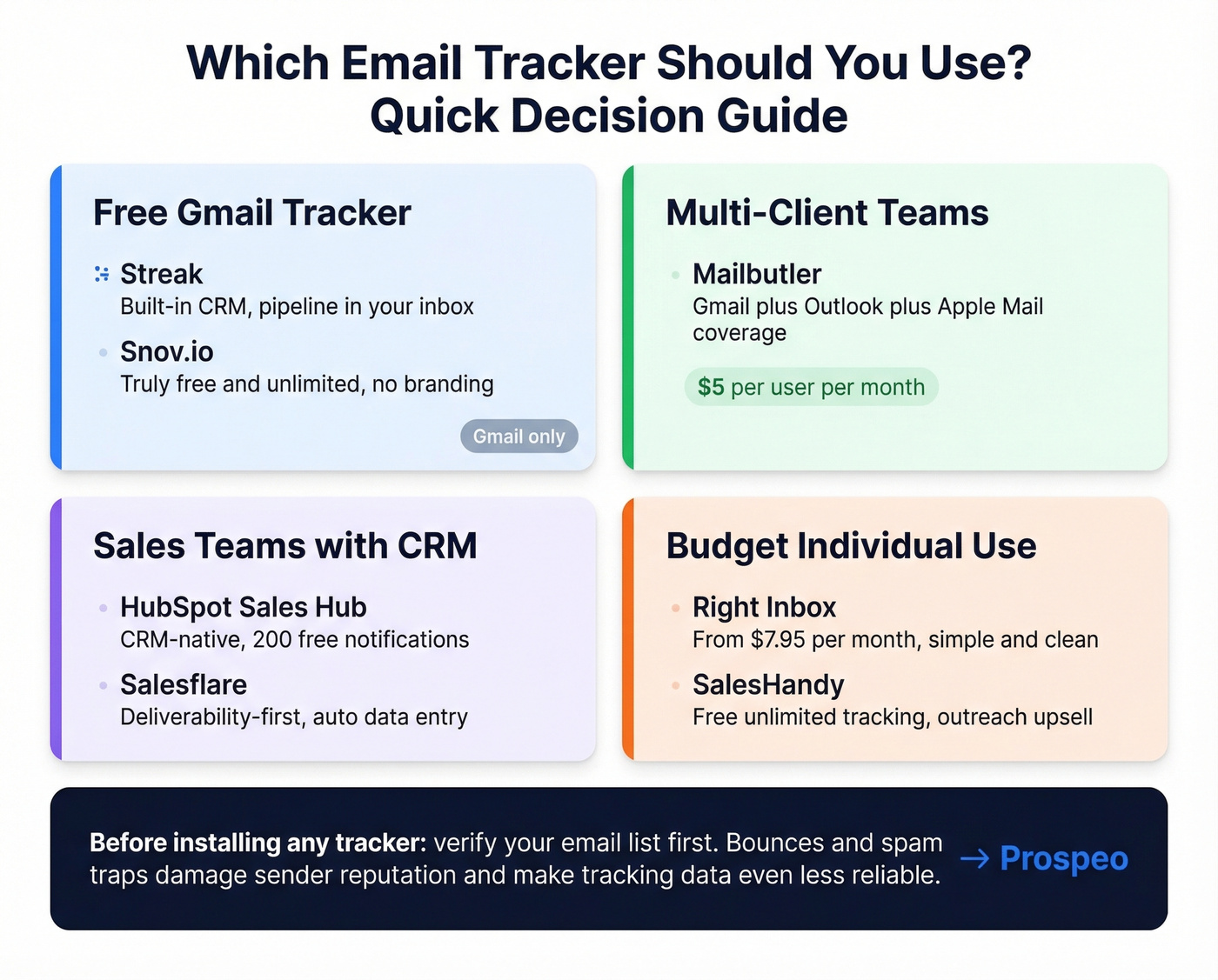
Before you read 3,000 words, here's the short answer:
- Free Gmail tracker: Streak or Snov.io Email Tracker
- Gmail + Outlook + Apple Mail: Mailbutler
- Sales team with a CRM: HubSpot Sales Hub or Salesflare
- Before any tracker: Verify your list - Prospeo catches bounces, spam traps, and catch-all domains before they tank your sender reputation.
Now let's get into the details.
What Is an Email Tracker?
An email tracker is a lightweight tool - usually a browser extension or CRM feature - that tells you when someone opens your email, clicks a link, or both. It works by embedding invisible elements in your outgoing messages that phone home when the recipient interacts.
SDRs use trackers to time follow-ups (and better follow-ups usually come down to sales follow-ups, not faster pings). Recruiters use them to see if a candidate opened a job description. Freelancers use them to know if a proposal was read before chasing payment. Marketers use them to measure campaign engagement at the individual level. In short, anyone who needs to track emails at scale eventually reaches for one of these tools.
What trackers typically measure: open timestamps, click events, device type, approximate location via IP, and frequency of opens. Some tools layer on scheduling, reminders, and CRM logging. The tracking itself is the commodity - the differentiator is what the tool does with the data and whether it hurts your deliverability in the process (if you want the technical deep dive, see email tracking pixels).
How Email Tracking Works
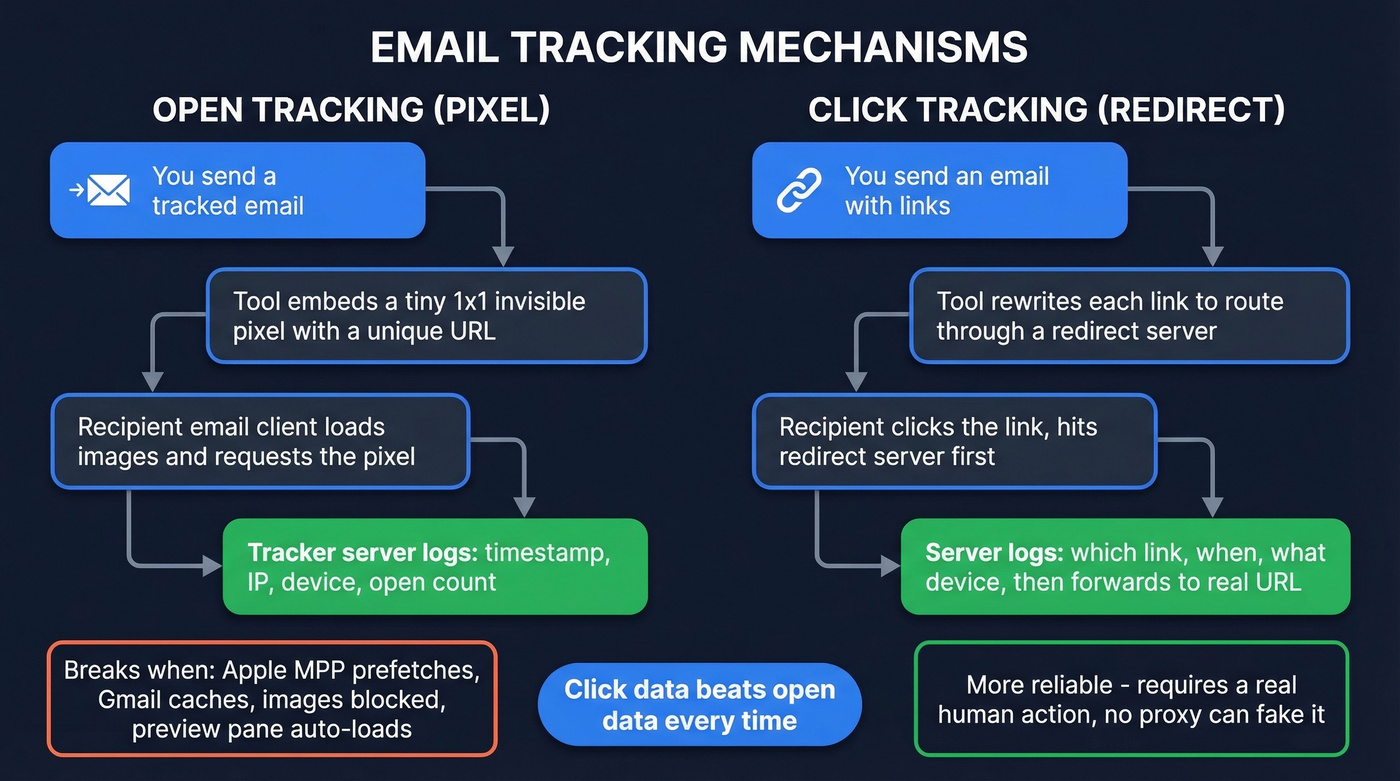
Understanding the mechanics matters because it explains exactly where tracking breaks down. There are two core methods, and both have failure modes most users never think about.
Open Tracking (The Pixel)
When you send a tracked email, your tool embeds a tiny 1x1 transparent image - a tracking pixel - in the email's HTML. The pixel's URL is unique to that specific email and recipient. When the recipient's email client loads images, it requests that pixel from the tracker's server, which logs the event with a timestamp, the recipient's IP address, device info, and how many times the image was loaded.
The recipient sees nothing. But the whole system depends on the email client loading images automatically - and that assumption is increasingly wrong.
Click Tracking (The Redirect)
Click tracking works differently. The tool rewrites every link in your email to route through a redirect server. When the recipient clicks, the redirect server logs the click - which link, when, from what device - and then forwards them to the actual destination URL.
Click tracking is fundamentally more reliable than open tracking because it requires a deliberate action. No proxy, no cache, no preview pane can fake a click.
When Tracking Fails
This is where open data starts to crumble:
- Gmail image proxy caching: Gmail routes images through its own proxy servers and caches them. Repeat opens don't fire the pixel again, understating engagement.
- Image blocking / plain text: If a recipient disables image loading or reads in plain text, the pixel never fires. They read it, but your tool says they didn't.
- Preview pane auto-loads: Many desktop clients load images when an email appears in the preview pane. The recipient scrolled past it, but the system logged an "open."
- Tracking blockers: Extensions like Ghostery detect and strip tracking pixels before they fire. Privacy-conscious recipients - especially in tech - use these routinely.
- Corporate firewalls: Enterprise security tools sometimes block external image requests or interfere with tracking links. Your tracked email arrives as an effectively untracked one.
- Group email ambiguity: If you send to a shared inbox or distribution list, you know someone opened it but not who.
Some of these inflate opens, some suppress them. The net result is noise that pushes your data in unpredictable directions.
Why Open Tracking Is Unreliable in 2026
The single biggest reason open rates can't be trusted anymore has a name: Apple Mail Privacy Protection.
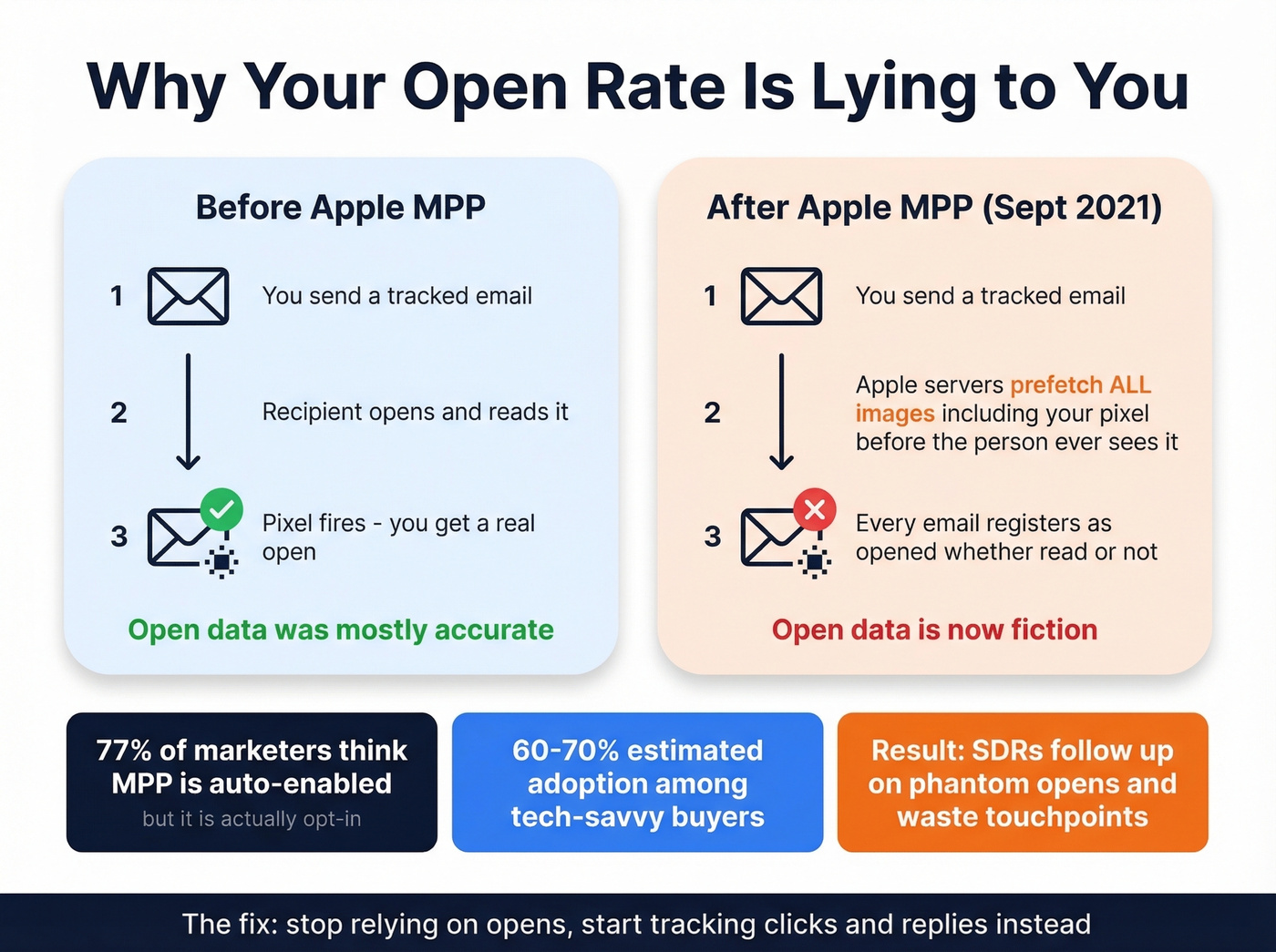
MPP launched on September 20, 2021, as an opt-in feature in iOS 15 and macOS Monterey. Once activated, Apple's servers pre-fetch all remote content in an email - including tracking pixels - before the recipient ever sees it. This masks the recipient's IP address and generates what the industry calls "machine opens." Every email sent to an MPP-enabled Apple Mail user registers as "opened," regardless of whether the person actually read it. Your open rate inflates. Your follow-up triggers fire on phantom engagement. Your email tracking data becomes fiction.
What makes it worse: 77% of marketers believe MPP is automatically activated, but it's actually opt-in. That means the adoption rate is uncertain and varies wildly by audience. Selling to tech-savvy buyers? MPP adoption is probably north of 60-70%. Selling to small business owners on Android? Much lower. You can't know for sure, and that uncertainty poisons your data.
Apple's Link Tracking Protection adds another layer. It strips tracking parameters - including UTMs - from URLs in Mail and Safari, complicating campaign attribution even when clicks do happen.
We've seen the fallout firsthand. An SDR sees a "just opened" notification, fires off a follow-up within 10 minutes, and the prospect hasn't actually touched the email. It was a machine open. The follow-up feels stalkerish, the prospect is confused, and the SDR wasted a touchpoint. This happens constantly.
How Trackers Affect Deliverability
Tracking only works if your emails reach the inbox. And ironically, the tool itself can be the thing that prevents that.
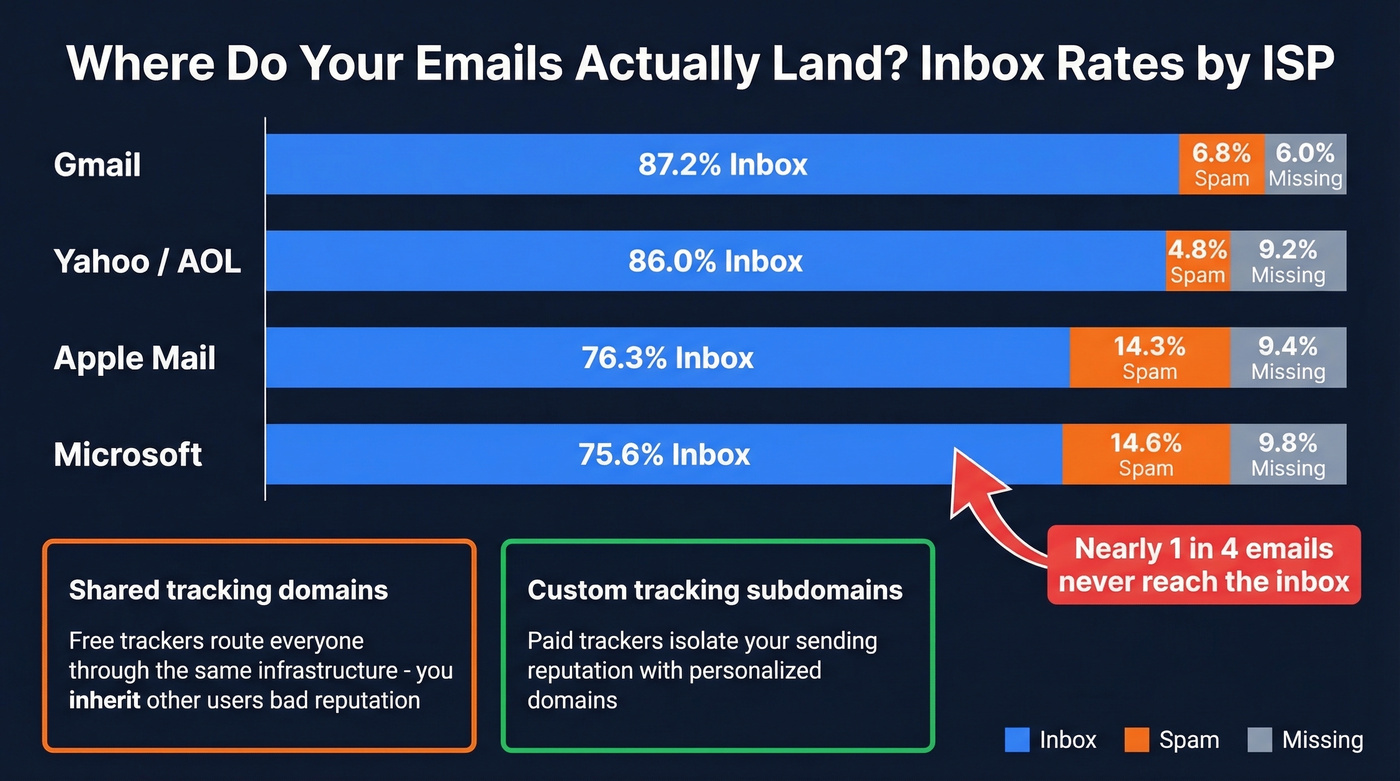
Every tracked email contains redirect URLs and pixel requests that point to a tracking domain. If that domain has a poor reputation - because thousands of other users are sending spam through the same shared tracking infrastructure - ISPs flag your emails. You inherit someone else's bad behavior (more on setup and pitfalls in tracking domain).
Inbox placement varies dramatically by ISP:
| ISP | Inbox Rate | Spam Rate | Missing |
|---|---|---|---|
| Gmail | 87.2% | 6.8% | 6.0% |
| Microsoft | 75.6% | 14.6% | 9.8% |
| Yahoo/AOL | 86.0% | 4.8% | 9.2% |
| Apple Mail | 76.3% | 14.3% | 9.4% |
Microsoft is brutal - nearly 1 in 4 emails don't make the inbox. And once your complaint rate crosses 0.3%, Gmail's bulk sender rules start throttling you aggressively.
The deliverability-conscious trackers use personalized tracking subdomains and multiple tracking domains to isolate your reputation. The free ones typically don't - they route everyone through shared infrastructure. That's the hidden cost of "free."
Here's the thing: if your deal sizes sit below five figures, you probably don't need a tracker at all. You need a clean list, a tight sequence (see B2B cold email sequence), and reply-rate tracking from your outreach tool. The obsession with open data is a distraction from the metrics that actually move pipeline.

Open tracking is broken, but bounce tracking isn't optional. Every bounced email damages your sender reputation and makes future tracking even less reliable. Prospeo's 5-step email verification catches spam traps, honeypots, and catch-all domains before they tank your deliverability - with 98% accuracy across 143M+ verified emails.
Fix your list before you fix your tracking. Start free with 75 verified emails.
Best Email Trackers in 2026
The table below gives you the quick scan. The reviews below it give you the nuance.
| Tool | Free Tier | Paid From | Platforms | Best For |
|---|---|---|---|---|
| Streak | Yes | ~$49/user/mo | Gmail | Inbox-first CRM + tracking |
| Snov.io | Yes (unlimited) | Separate plans | Gmail | Free forever tracking |
| Mailbutler | Limited | ~$5/user/mo | Gmail, Outlook, Apple Mail | Multi-client teams |
| Mailsuite | Yes (branded) | $11.99/user/mo | Gmail | Branded free tracking |
| HubSpot | Yes (200 notifications) | $15/seat/mo | Gmail, Outlook | CRM-native tracking |
| Salesflare | No | $29/user/mo | Gmail, Outlook | Deliverability-first CRM |
| Right Inbox | Limited | ~$7.95/mo | Gmail | Budget individual use |
| Hunter | Yes (branded) | ~$20/mo | Gmail | Hunter ecosystem users |
| SalesHandy | Yes (unlimited) | $36/mo | Gmail | Free tracking + outreach upsell |

Streak - Best Free Gmail Tracker
Streak is a strong pick if you live in Gmail and want open notifications without paying upfront. It provides alerts as soon as a recipient opens an email, using a standard pixel approach.
What makes Streak different from a pure tracker is the built-in CRM. Your Gmail sidebar becomes a lightweight pipeline manager - deals, contacts, stages, all without leaving your inbox. For solo founders or small teams who don't want a separate CRM, this is genuinely useful (if you're comparing options, see examples of a CRM). I've recommended it to three different early-stage founders this year, and all of them stuck with it past the trial.
Paid plans start around $49/user/month and unlock the full CRM experience. The limitation is platform lock-in: Gmail only. If anyone on your team uses Outlook, Streak can't help them.
Snov.io - Free and Unlimited
Snov.io's tracker is a loss leader, and they're transparent about it. The tracking extension is truly free, unlimited, and permanent - no logos added to your emails, and you control your signature.
The extension has 100K+ users and a 4.9 rating with 8K+ five-star reviews. You get real-time desktop notifications, open and click history, reminders, and scheduling up to three months ahead. For a free tool, the feature set is surprisingly complete.
The catch is that Snov.io wants you to upgrade to their paid prospecting and outreach platform. The tracker is the gateway. That's fine. It works well on its own, and you're under no obligation to buy anything else. Gmail only, though.
Who should skip it: Teams that need Outlook support, or anyone who wants CRM features alongside tracking. For that, look at Streak or HubSpot.
Mailbutler - Multi-Client Coverage
If your team is split across Gmail, Outlook, and Apple Mail, Mailbutler is one of the few serious options that covers all three.
Mailbutler shows how many times a sent email has been opened and whether links have been clicked. It also provides device type and approximate location details for tracked opens, and it can send real-time notifications when a recipient opens, clicks, or replies. Under Apple Mail Privacy Protection, location data is unreliable - but that's true of every tracker, not a Mailbutler-specific problem.
Pricing starts around $5/user/month and scales to ~$14/user/month for plans that include notification history. Mailbutler feeds tracking data into HubSpot and Salesforce, and it supports using your own subdomain for tracking to reduce the likelihood of spam filters blocking tracked emails.
Mailsuite - Popular but Branded
Mailsuite (formerly Mailtrack) is trusted by 3M+ users and more than 116,000 paying subscribers.
The free plan is functional, but it's branded - free-tier emails get a promotional signature appended, which is a dealbreaker for outbound sales. The Advanced plan at $11.99/user/month removes the branding and adds link tracking.
HubSpot Sales Hub
HubSpot's free tier tracks opens and limits notifications to 200. That's enough for a solo rep to test the waters, but it runs dry fast on any real volume. Paid plans start at $15/seat/month and can rise to $100/seat/month for Enterprise, plus a required $1,500 onboarding fee.
The real play is CRM integration. If your team already lives in HubSpot, tracking data flows directly into contact records, deal timelines, and workflow triggers. If you're not in HubSpot, this is overkill for tracking alone. HubSpot's own tracking guide walks through the setup.
Salesflare - Deliverability-First
Salesflare isn't a standalone tracker - it's a CRM with tracking baked in. Plans run $29-99/user/month depending on tier.
The differentiator is deliverability. Salesflare uses personalized tracking subdomains and multiple tracking domains per customer, isolating your sender reputation from other users. They scored a 9.4/10 on a MailReach deliverability test. Salesflare published their own comparison using MailReach scores - useful data, but keep in mind they ranked themselves #1.
For teams where deliverability is the priority - and it should be - Salesflare's approach is the most thoughtful in this list. The tradeoff is price and commitment: you're buying a CRM, not just a tracker (if you're building a broader stack, start with SDR tools).
Right Inbox, Hunter, SalesHandy
These three occupy the "good enough" tier. None are bad. None are the best at anything.
Right Inbox is a budget Gmail tracker at ~$7.95/month with a limited free tier. Open tracking, scheduling, reminders - the basics, nothing more.
Hunter MailTracker offers free tracking with branding, paid plans from ~$20/month. The value is ecosystem integration if you're already using Hunter for email workflows. As a standalone tracker, it's unremarkable.
SalesHandy gives you unlimited free Gmail tracking for a lifetime, then upsells you into their outreach platform starting at $36/month. The free tracking is genuinely useful; the outreach platform is the real product.
Email Tracking and the Law
Tracking pixels are increasingly treated like cookies from a legal standpoint - and the regulatory pressure is tightening.
EU and UK
In the UK, the ICO confirms that tracking pixels fall under PECR (Privacy and Electronic Communications Regulations), meaning prior consent is required unless the tracking is "strictly necessary." The EU's ePrivacy Directive Article 5(3) applies similarly. The EDPB's Guidelines 2/2023, adopted October 7, 2024, explicitly clarify that URL and pixel-based tracking falls in scope on a technology-neutral basis - even if personal data isn't ultimately processed.
France
The CNIL published draft recommendations in June 2025 proposing separate consent for marketing emails versus tracking pixels embedded within them. The draft also contemplates retroactive consent withdrawal - meaning if a recipient revokes consent, you'd need to deactivate tracking pixels even in already-sent emails.
United States
There's no single federal statute governing email tracking. Litigation typically relies on ECPA/Wiretap Act and Stored Communications Act theories, but the technical fact patterns make these claims difficult to prosecute consistently. The legal risk is lower than in the EU, but it's trending toward more scrutiny, not less.
Let's be honest: if you're sending tracked emails into the EU without consent mechanisms, you're taking a compliance risk that's getting harder to justify.
Common Mistakes That Waste Your Time
Treating opens as intent. An open isn't interest. It's an image load. It's a proxy, a preview pane, or a bored person scrolling through their inbox at 11pm. Don't build your pipeline on it.
Ignoring clicks in favor of opens. Clicks require deliberate action - they're the signal. Opens are the noise. If your tool reports both, weight clicks 10x higher in your follow-up logic (and if you need a clean way to define the metric, use a standard click rate formula).
Following up instantly after an "open" notification. We've watched SDRs do this and it almost never works. The "open" was probably a machine load, and even if it wasn't, an immediate follow-up feels surveillance-y. Wait for a pattern - multiple opens, a click, a reply - before acting.
Not accounting for MPP and proxy false opens. If 30-50% of your list uses Apple Mail, your open rate is fiction. Segment by email client if you can, and stop using open-based automation triggers for Apple Mail recipients.
Tracking emails you shouldn't be sending. If 10% of your list bounces, your sender reputation tanks and your tracker reports 0% opens - not because nobody cared, but because your email never arrived. Verify the list before you track the list. Prospeo's 5-step verification catches catch-all domains, spam traps, and honeypots before they damage your domain (see email bounce rate).
What to Track Instead of Opens
Open data isn't dead, but it needs to be demoted. Here's what actually tells you something useful.
Click-through rates are the single most reliable engagement signal. If someone clicked your case study link, they're interested. Build your automation triggers around clicks, not opens.
Reply rates are the ultimate engagement signal. Track reply rates by sequence step, subject line, and persona to find what's actually resonating. Most outreach tools surface this natively - if yours doesn't, switch.
Meeting-booked rates are the metric that matters to your pipeline. Everything upstream - opens, clicks, replies - is just a leading indicator for this number.
Engagement patterns beat single events. One open means nothing. Three opens plus a click on your pricing link within 48 hours? That's a signal worth acting on. Train your team to look for patterns, not pings. The consensus on r/sales tends to agree - the threads about open tracking are full of people who stopped trusting the data and started watching for multi-signal engagement instead.
The practical move: rebuild any open-based automations into click-based workflows. If your sequence sends a follow-up when someone "opens email 2," change the trigger to "clicks a link in email 2." You'll send fewer follow-ups, but they'll land with people who actually engaged.
Your email tracker is only as useful as the data underneath it. Machine opens, pixel blockers, and cached images make open rates fiction - but sending to the wrong address makes everything worse. Prospeo refreshes contact data every 7 days (not the 6-week industry average), so your sequences reach real inboxes at $0.01 per email.
Stop tracking phantom opens. Start reaching verified buyers.
Email Tracker FAQ
Is email tracking legal?
In the EU and UK, tracking pixels require prior consent under PECR and the ePrivacy Directive - the EDPB confirmed this in Guidelines 2/2023, adopted October 2024. In the US, no single federal law governs it, though ECPA and Wiretap Act theories appear in litigation. Always check local regulations before deploying tracking at scale.
Can recipients detect a tracking pixel?
Yes, if they inspect the HTML source or use browser extensions like Ghostery that automatically strip pixels. Most recipients won't check, but privacy-conscious contacts in tech and security will notice - and will view it negatively. Assume sophisticated buyers know.
Do email trackers work with Outlook?
Most free trackers are Gmail-only. For Outlook support, your main options are Mailbutler (~$5/user/month), HubSpot Sales Hub (free tier with 200 notifications), or Salesflare ($29/user/month). Each bundles tracking with broader CRM or productivity features.
Does Apple Mail block email tracking?
Apple Mail Privacy Protection pre-fetches remote content - including pixels - making open data unreliable for MPP-enabled recipients. It doesn't block tracking entirely; clicks still register accurately. For Apple Mail segments, ignore open rates and trigger automations on clicks or replies instead.
How do I stop tracked emails from landing in spam?
Use a tracker that supports custom tracking subdomains to isolate your sender reputation from other users on shared infrastructure. More importantly, verify your list before sending - bounces and spam traps destroy deliverability fast.