


EmailAnalytics Review: Pricing, Pros, Cons, and Whether It's Worth It
Your VP of Sales just asked why the team's average email response time is 14 hours. You don't need a BI project - you need a dashboard you can pull up in the next meeting. That's the exact frustration managers describe in r/sales threads, and it's why tools like EmailAnalytics exist.
Let's break this down: what EmailAnalytics actually costs in 2026, what real users say about it, where it falls short, and when you're better off with something else.
30-Second Verdict
EmailAnalytics is a solid email activity dashboard for managers who want response-time visibility without reading anyone's inbox. It costs $19/inbox/month and holds a 4.5/5 on G2 from 8 reviews. Reasonable for small teams under 10 inboxes, but costs stack fast beyond that.
If you're on Microsoft 365 with E3+ licensing, check Viva Insights first - personal insights are already included. If you want a free starting point, Email Meter has a $0 plan.
EmailAnalytics Pricing in 2026
Half the internet still lists EmailAnalytics at $15/month. We've checked - none of those figures are current. The actual price is $19/inbox/month.
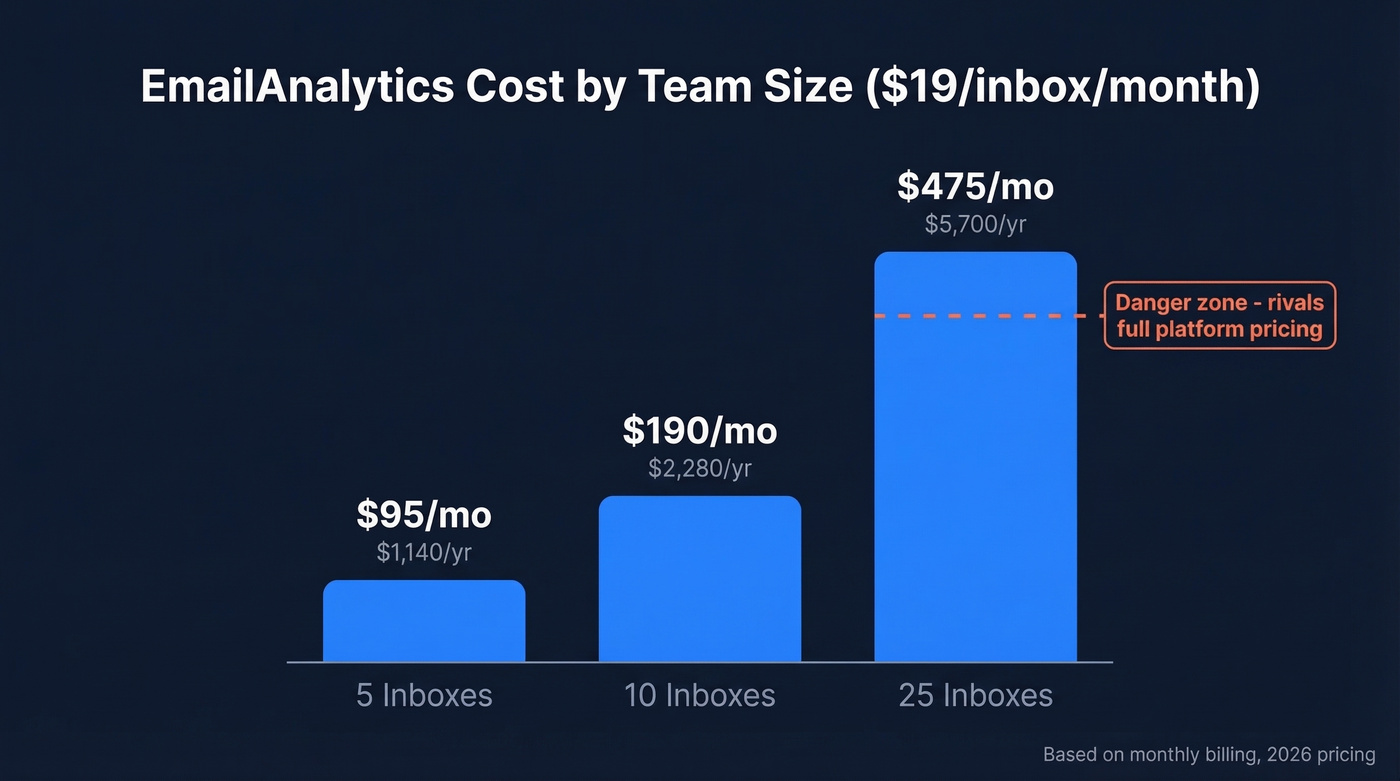
Key figure: $19/inbox/month (monthly) - roughly $17.10/inbox/month on annual billing (10% off) - 14-day free trial included.
Quick team math:
- 5 inboxes = $95/mo ($1,140/yr)
- 10 inboxes = $190/mo ($2,280/yr)
- 25 inboxes = $475/mo ($5,700/yr)
At 25 inboxes, you're approaching the cost of full-featured platforms. That's the inflection point where you should seriously evaluate alternatives - especially if you also care about email deliverability and list quality.
What EmailAnalytics Actually Does
EmailAnalytics connects to Gmail/Google Workspace and Outlook/Microsoft 365 (including shared mailboxes and delegated inboxes), then visualizes your team's email activity using header data - including subject lines. It doesn't read email bodies or attachments.
The dashboard tracks response time, email volume, top senders and recipients, and traffic by hour and day. You also get SLA monitoring with AI-powered real-time alerts, plus a newer AI-powered sentiment analysis feature. Setup takes about 60 seconds, and managers get automatic daily or weekly digest emails. It solves a specific, narrow problem without trying to be a platform, which is both its strength and its ceiling.
If your goal is improving replies (not just measuring them), pair dashboards with better sales follow-up templates and tighter sales communication.

EmailAnalytics shows you response times - but what if the real problem is that 35% of your emails never arrive? Prospeo's 98% verified email accuracy means every metric you track reflects real conversations, not bounces. Teams using Prospeo cut bounce rates from 35% to under 4%.
Fix the data before you optimize the dashboard.
Pros Worth Noting
Dead-simple setup. Connect via OAuth and you're looking at charts in under two minutes. No installs, no IT tickets.
Privacy-first header-data approach. One G2 reviewer (Backend Developer, Nov 2024) praised that "sensitive email cannot be accessed/stored." With 86% of employees believing employers should be legally required to disclose monitoring tools, header-data-only access is a genuine differentiator that makes internal rollout easier.
Third-party security audit. EmailAnalytics passed a Leviathan Security Group audit as part of Google's mandatory app review - a data point most competitors can't match.
Affordable for small teams. A Co-CEO/COO wrote on G2 (Apr 2025) that it's "easy to use and very affordable" and "much cheaper than the alternatives I researched."
Cons to Consider
Only 8 G2 reviews exist, so treat this as a small sample. But the patterns are clear enough.
Price complaints are the top theme. Two reviewers flagged it as "Expensive." One Product/Process Specialist (Dec 2024) cited "Limited support and Pricing" as a dislike. For a tool that only shows email metrics, $19/inbox/month feels steep once you're past 10 seats.
No goal-setting features. You can't set reply-time goals or benchmarks inside the tool - something both Email Meter and timetoreply support out of the box.
No API access. There's no way to pull EmailAnalytics data into your own dashboards or reporting stack. If you need to operationalize metrics, you’ll usually want a broader sales operations metrics view.
Customer support concerns. One reviewer flagged "Poor Customer Support." Small vendor, small team - set expectations accordingly.
How EmailAnalytics Compares
| Tool | Price/User/Mo | Free Tier | Annual Discount | Min Seats |
|---|---|---|---|---|
| EmailAnalytics | $19/inbox | No (14-day trial) | 10% | 1 |
| Email Meter | $19/user (Plus) | Yes | $15/user/mo annual | 1 |
| timetoreply | $38/mailbox (Essentials) | No | $29/mailbox/mo annual | 15 |
| Viva Insights | $6/user (mgmt insights) | Personal insights included with E3+ | N/A | 1 |
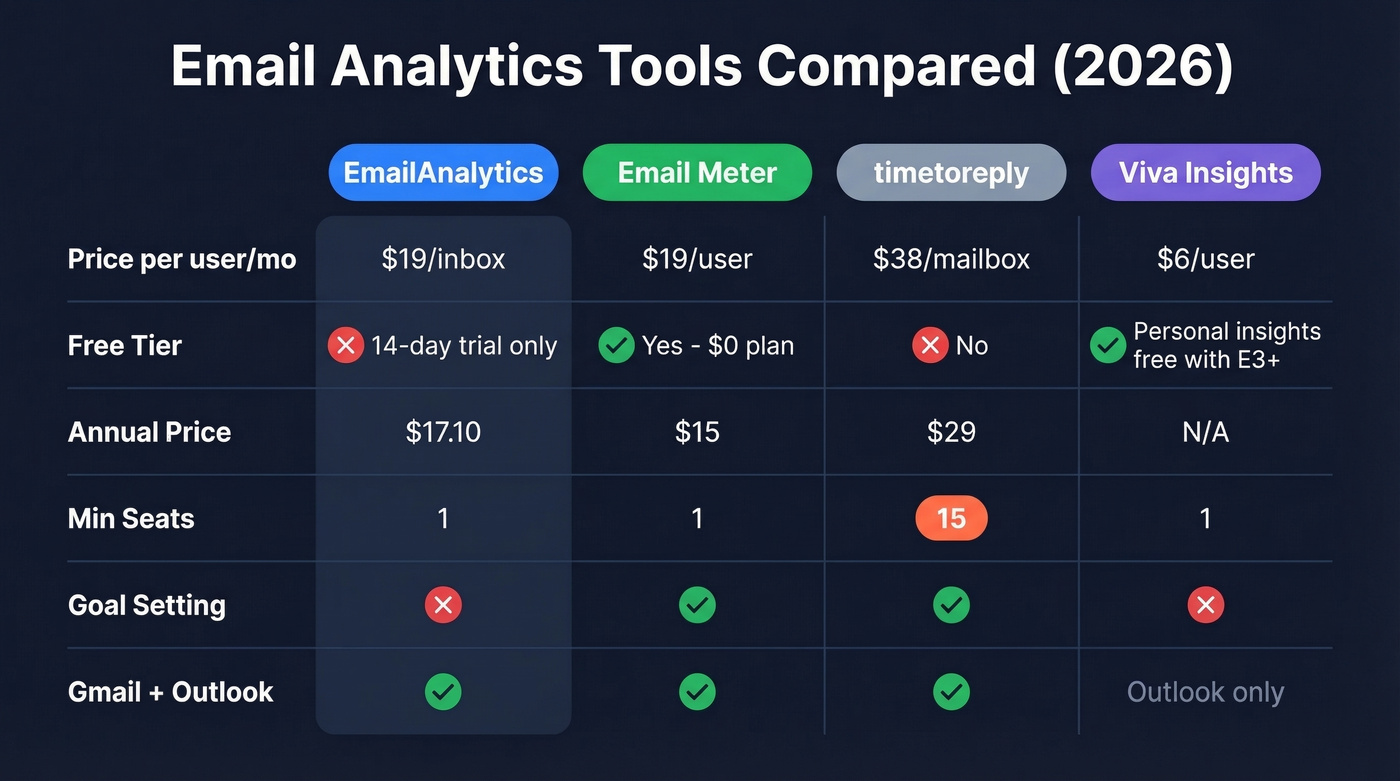
All four tools support Outlook. EmailAnalytics, Email Meter, and timetoreply also support Gmail. Only Email Meter and timetoreply include goal-setting.
Two things jump out. First, timetoreply requires a 15-mailbox minimum - if you've got a 5-person team, it's not an option. Second, if your org already runs Microsoft 365 on E3+ licensing, Viva Insights gives you personal insights at no extra cost, and the $6/user/month management tier adds team-level visibility. That's hard to beat on price alone.
Email Meter is the closest head-to-head competitor: same $19 price point, but with a free plan and goal-setting included.
Our take: EmailAnalytics is the best tool for managers who want only a response-time dashboard and nothing else. But most teams outgrow "only a dashboard" within six months. If you suspect you'll want goals or deeper filtering soon, start with Email Meter and save yourself the migration headache.
Who Should (and Shouldn't) Use It
Use EmailAnalytics if you manage under 10 inboxes, care about header-data-only privacy, use Gmail or Outlook, and want something running in 10 minutes flat.
If you’re building a broader outbound motion, it also helps to standardize sales prospecting techniques and keep your contact management software clean.
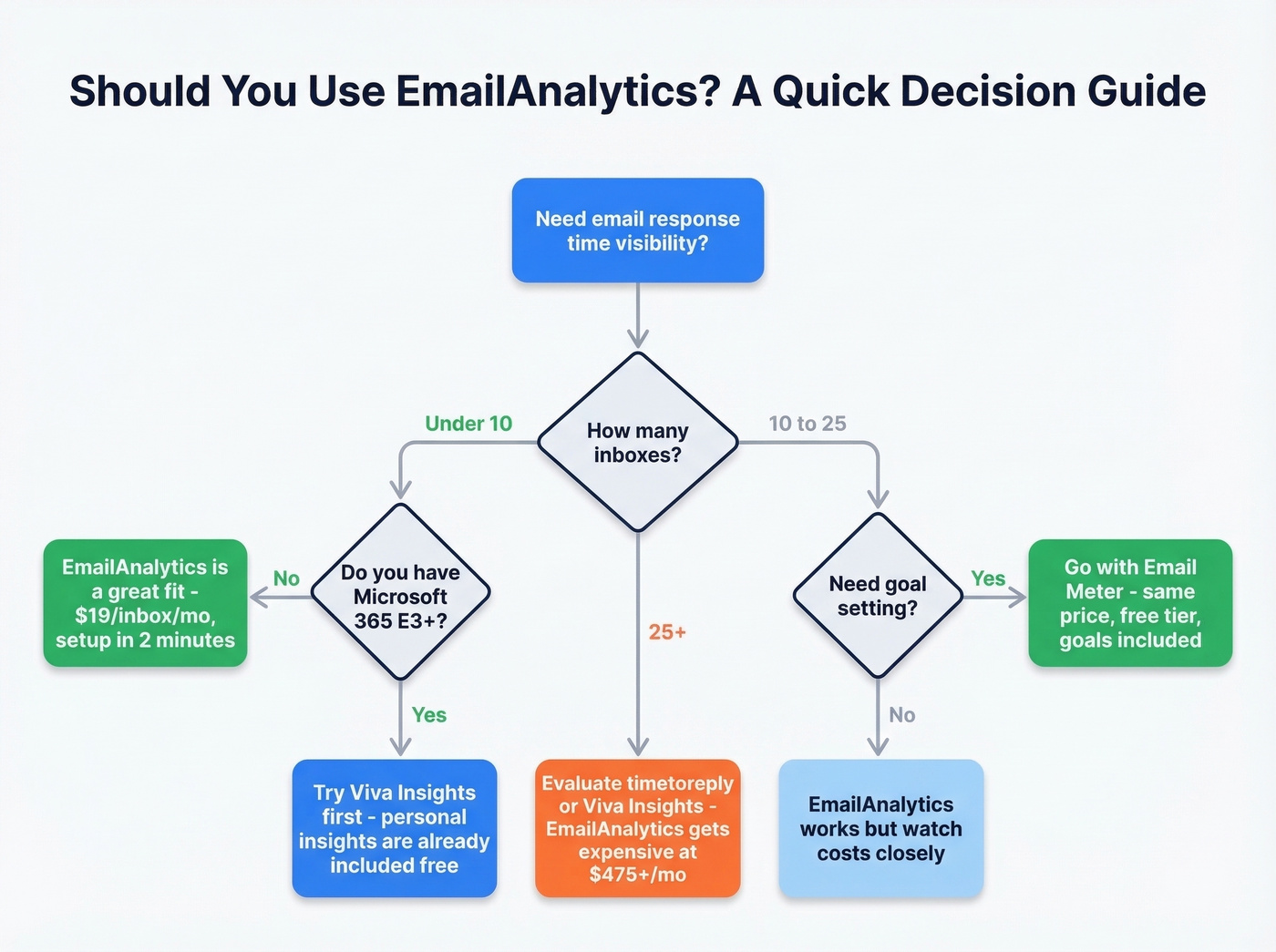
Skip it if you already have Microsoft 365 E3+ (Viva Insights covers the basics), need a free plan (Email Meter's $0 tier is right there), have 25+ inboxes (at $475/mo, evaluate alternatives), or need goal-setting and API integrations.
Here's the thing most email analytics tools won't tell you: if your dashboard shows high email volume but low reply rates, the bottleneck might not be responsiveness - it might be contact data quality. Before optimizing response time, make sure your reps are emailing verified contacts in the first place. We've seen teams at Prospeo customers cut bounce rates from 35% to under 4%, which changes the entire picture when you're measuring reply metrics. (If you’re diagnosing this, start with your email bounce rate and work backward.)
At $19/inbox/month, EmailAnalytics adds up fast for large teams. Prospeo starts at $0 with 75 free email credits monthly - and instead of just measuring email activity, it ensures your reps reach verified decision-makers at $0.01 per email. No contracts, no sales calls.
Stop paying to measure bad data. Start with contacts that connect.
FAQ
Does EmailAnalytics read my emails?
No. It accesses email header data (including subject lines) only - never email bodies or attachments. The app passed a Leviathan Security Group audit as part of Google's verification process, which most competitors in this space haven't completed.
Is there a free plan?
No free plan, but there's a 14-day free trial. For a permanently free option, Email Meter offers a $0 plan with basic stats and weekly reports.
Does EmailAnalytics work with Outlook?
Yes. It supports both Outlook/Microsoft 365 and Gmail/Google Workspace, including shared mailboxes and delegated inboxes. Setup uses OAuth - no plugins or IT tickets required.
Is EmailAnalytics worth it for large teams?
At 25+ inboxes ($475/mo), the cost rivals full-featured platforms. Teams that size should evaluate timetoreply for advanced SLA management or Viva Insights if already on Microsoft 365 E3+ licensing. The per-inbox pricing model makes EmailAnalytics best suited for teams under 10.