

Enrichley vs Tomba: Different Tools for Different Problems
Here's the thing - Enrichley and Tomba only "compete" if you ignore what they're actually built for. Enrichley rescues deliverable emails from catch-all domains inside a list you already have. Tomba finds net-new emails, verifies them, and shows you where they came from. Two different jobs.
If your outbound volume is modest and your deal sizes are under five figures, you don't need a "perfect" data stack. You need one workflow you'll actually run every week.
30-Second Verdict
- Pick Enrichley when your list is full of accept-all domains and you want to resolve deliverability instead of leaving contacts as "unknown."
- Pick Tomba when you need to discover emails by domain or person and you care about source traceability (URLs + dates) for compliance and internal QA.
- Skip both if you want finding, verification, and enrichment in one self-serve platform. Prospeo does all three with 300M+ profiles, 143M+ verified emails, 98% email accuracy, and a 7-day refresh cycle - no contracts required.
What Each Tool Actually Does
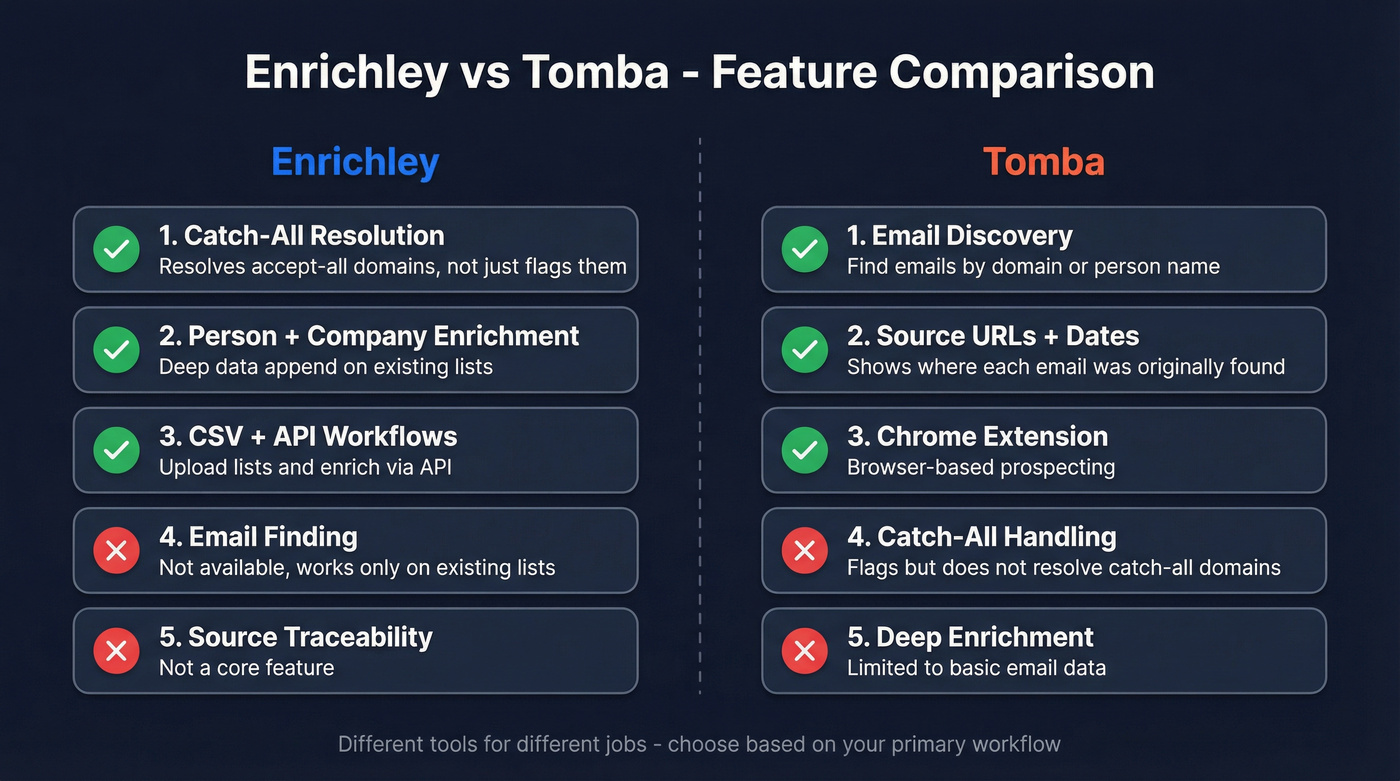
Enrichley is a "fix what you already have" tool. You upload a list, and it focuses on catch-all/accept-all handling - classifying risk levels and recovering valid inboxes so you can turn "risky" into something actionable. It also offers person and company enrichment via CSV and API workflows. But it won't go find new contacts for you. (If you're comparing vendors, see our roundup of data enrichment services.)
Tomba works the other direction. You search by domain or person, get emails back, and Tomba verifies them with standard checks (syntax, DNS/MX, SMTP). The standout feature is Email Sources, which shows the original URLs where an address was found and when it was indexed. That's genuinely useful for audits and keeping your team honest about where data came from.
Feature Comparison
| Feature | Winner | Why |
|---|---|---|
| Email finding | Tomba | Built for discovery |
| Verification | Enrichley | Catch-all/accept-all resolution focus |
| Catch-all handling | Enrichley | Resolves, not just flags |
| Source traceability | Tomba | URLs + dates included |
| Enrichment depth | Enrichley | Person + company enrichment |
| Chrome extension | Tomba | Extension available |
| API rate limit transparency | Tomba | Published per-endpoint limits |
| Team workflows | Tomba | Shared quotas + team use |

Enrichley resolves catch-alls. Tomba discovers emails. Neither does both well. Prospeo handles finding, verification, and catch-all resolution across 300M+ profiles - with 98% email accuracy and a 7-day refresh cycle. No stitching required.
Replace two tools with one that actually covers the full pipeline.
Pricing Breakdown
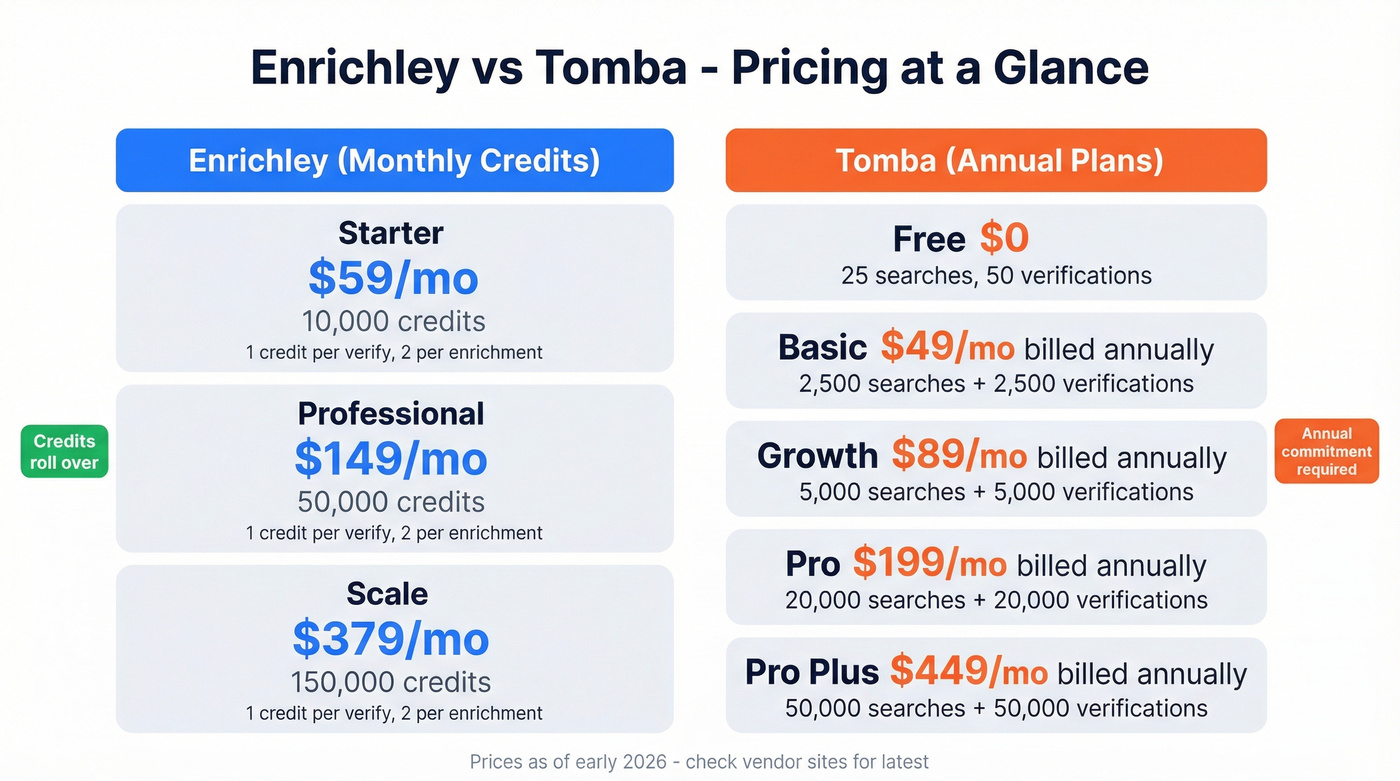
Enrichley runs on monthly credit plans: Starter at $59/mo for 10,000 credits, Professional at $149/mo for 50,000, and Scale at $379/mo for 150,000. Verification costs 1 credit; person and company enrichment each cost 2 credits. Credits roll over, which is a real advantage for teams with uneven list volumes month to month. Full details on Enrichley's pricing page.
Tomba prices annually:
- Free: 25 searches / 50 verifications
- Basic: $588/year (2,500 searches + 2,500 verifications) - roughly $49/mo
- Growth: $1,068/year (5,000 + 5,000) - roughly $89/mo
- Pro: $2,388/year (20,000 + 20,000) - roughly $199/mo
- Pro Plus: $5,388/year (50,000 + 50,000) - roughly $449/mo
- Custom: contact sales
See Tomba's pricing page for current numbers.
Two practical notes we've picked up from teams running these tools. First, you can burn through Tomba's free tier fast - 25 searches and 50 verifications is a smoke test, not a real trial. Second, on Trustpilot (3.8/5 from 23 reviews), one reviewer flagged a $748 minimum payment after signing up expecting a free start. On G2, Tomba scores 4.7/5 from 25 reviews, with praise clustering around ease of use and the API.
Tomba also publishes a vendor benchmark claiming 80.3% accuracy (4,015 valid emails out of 5,000 searches in their February 2026 test) - a useful reality check if you're comparing multiple finders head-to-head. If you're evaluating other options, compare against these email search tools and email ID finder tools too.
API & Scale Limits
If you're building automation, rate limits become product features. They matter more than marketing copy. (For a deeper stack view, see our guide to cold email API choices.)
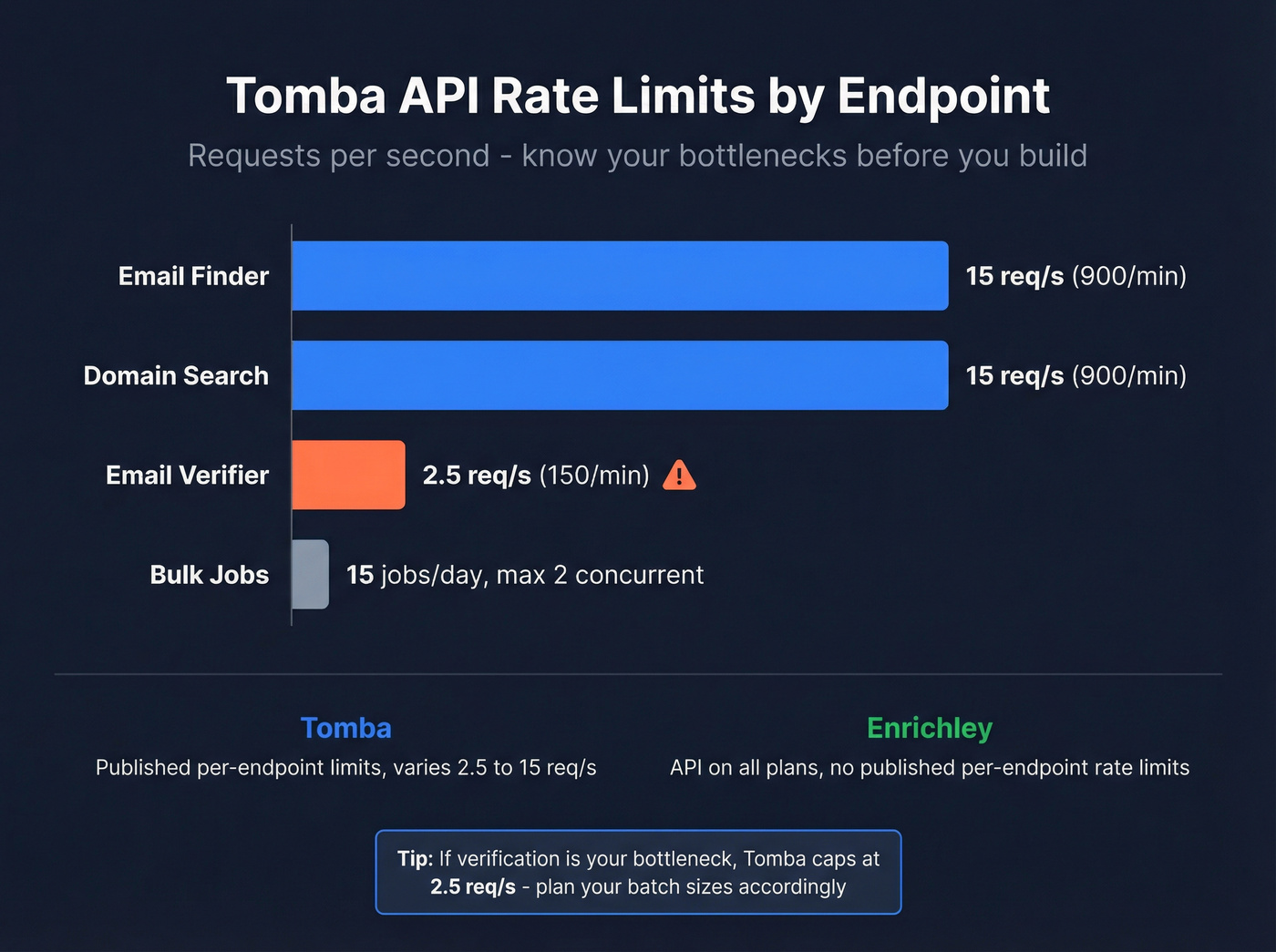
Tomba's rate limits vary by endpoint. The Email Verifier can be as low as 2.5 req/s (150/min), while Email Finder and Domain Search go up to 15 req/s (900/min). Most bulk tools are limited to 15 jobs/day with a max of 2 concurrent jobs. Full documentation lives at Tomba's rate limits page and usage quotas page.
Enrichley includes API access on all plans and is commonly used in CSV + API pipelines for verification and enrichment workflows, though it doesn't publish granular per-endpoint rate limits the way Tomba does. If you're mostly trying to reduce bounces, start with email bounce rate benchmarks and an email deliverability guide before you buy more tools.
When Neither Tool Is Enough
Let's be honest about what happens in practice. When you're weighing Enrichley vs Tomba, you're usually trying to cover three jobs: find, verify, and enrich. Neither tool handles all three well on its own. Enrichley doesn't discover new contacts. Tomba doesn't do deep enrichment or catch-all resolution. (This is where a clean lead generation workflow matters more than any single vendor.)
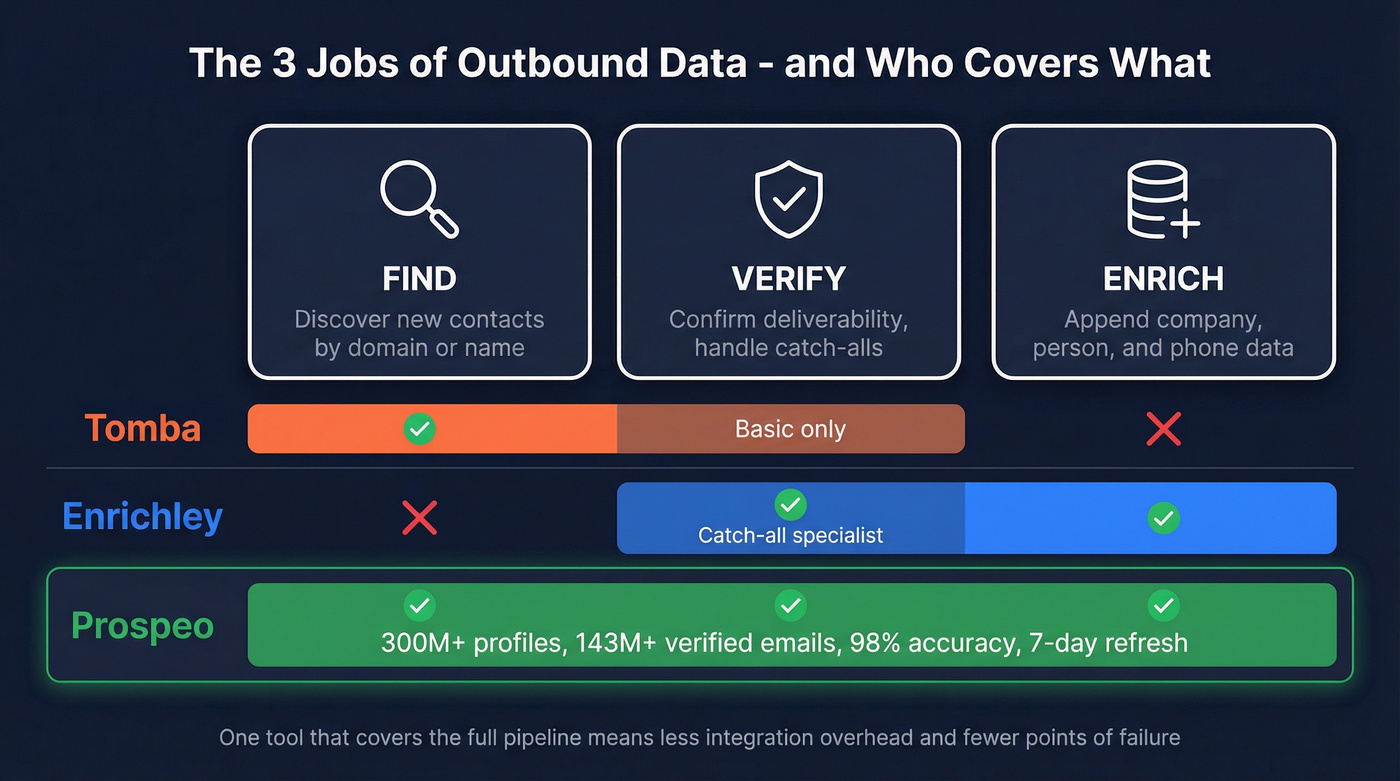
We've seen teams stitch two or three tools together and spend more time managing the pipeline than actually prospecting. Prospeo handles all three jobs in one place - 300M+ profiles, 143M+ verified emails, 125M+ verified mobiles, with a 92% API match rate. Data refreshes every 7 days instead of the 6-week industry average. It's self-serve with no contracts, which makes it a better default than maintaining a fragile multi-tool stack. If you're building a broader outbound stack, start with these SDR tools and sales prospecting techniques.
Real results back this up. Snyk's 50-person AE team dropped bounce rates from 35-40% to under 5% and generated 200+ new opportunities per month after switching. Stack Optimize built to $1M ARR while maintaining 94%+ deliverability and zero domain flags across all clients.
Teams using multi-tool stacks spend more time managing integrations than prospecting. Prospeo delivers 143M+ verified emails, 125M+ mobiles, and 92% API match rates in a single self-serve platform. Snyk's 50 AEs cut bounce rates from 35% to under 5% and added 200+ opportunities per month.
Stop paying for two tools that each do half the job.
FAQ
What's the difference between catch-all and accept-all?
Same problem, different labels. The domain's mail server accepts all recipients, so basic verification can't confirm whether a specific mailbox exists. Tomba labels these as "Catch-All" or "Accept-All." Enrichley is built to resolve deliverability for these domains instead of leaving them as "unknown."
Is waterfall validation worth it?
Yes, but keep it tight. For most teams, two steps is the practical ceiling: a primary verifier, then a catch-all specialist for the unknowns. Adding a third layer rarely improves results enough to justify the cost. The consensus on r/coldemail lines up with this - diminishing returns hit fast after two passes.
What if I need finding, verification, and enrichment together?
Neither tool covers all three well on its own. Enrichley is primarily a list verification and enrichment workflow tool; Tomba is primarily a discovery tool with verification bolted on. For teams that need the full pipeline in one place, that's exactly the gap Prospeo fills - search, verify, and enrich with 98% accuracy, weekly data refreshes, and a free tier of 75 emails per month.