

7 eWay-CRM Alternatives That Won't Slow Down Your Outlook
You open Outlook on Monday morning, and it hangs for 15 seconds while eWay-CRM loads in the background. That lag is the reason most teams start shopping for eWay-CRM alternatives. The Outlook integration is eWay-CRM's whole pitch - but when it slows down the app you live in all day, the tradeoff stops making sense.
Then there's pricing. eWay-CRM advertises $24/user/month for Standard on annual billing. Add the Sales module and you're at $35/user/month annually. Switch to monthly billing and Standard + Sales jumps to $40/user/month. A 5-person team on annual Standard + Sales runs $175/month - not the bargain the pricing page suggests.
Our Picks (TL;DR)
| Scenario | Pick |
|---|---|
| Closest Outlook-native experience | Nimble CRM - $24.90/seat/mo, deep M365 integration |
| Best pure sales pipeline | Pipedrive - $14/seat/mo, universal email-to-deal linking |
| Tightest budget | Bigin by Zoho - $7/user/mo, free plan for 1 user |
What eWay-CRM Actually Costs
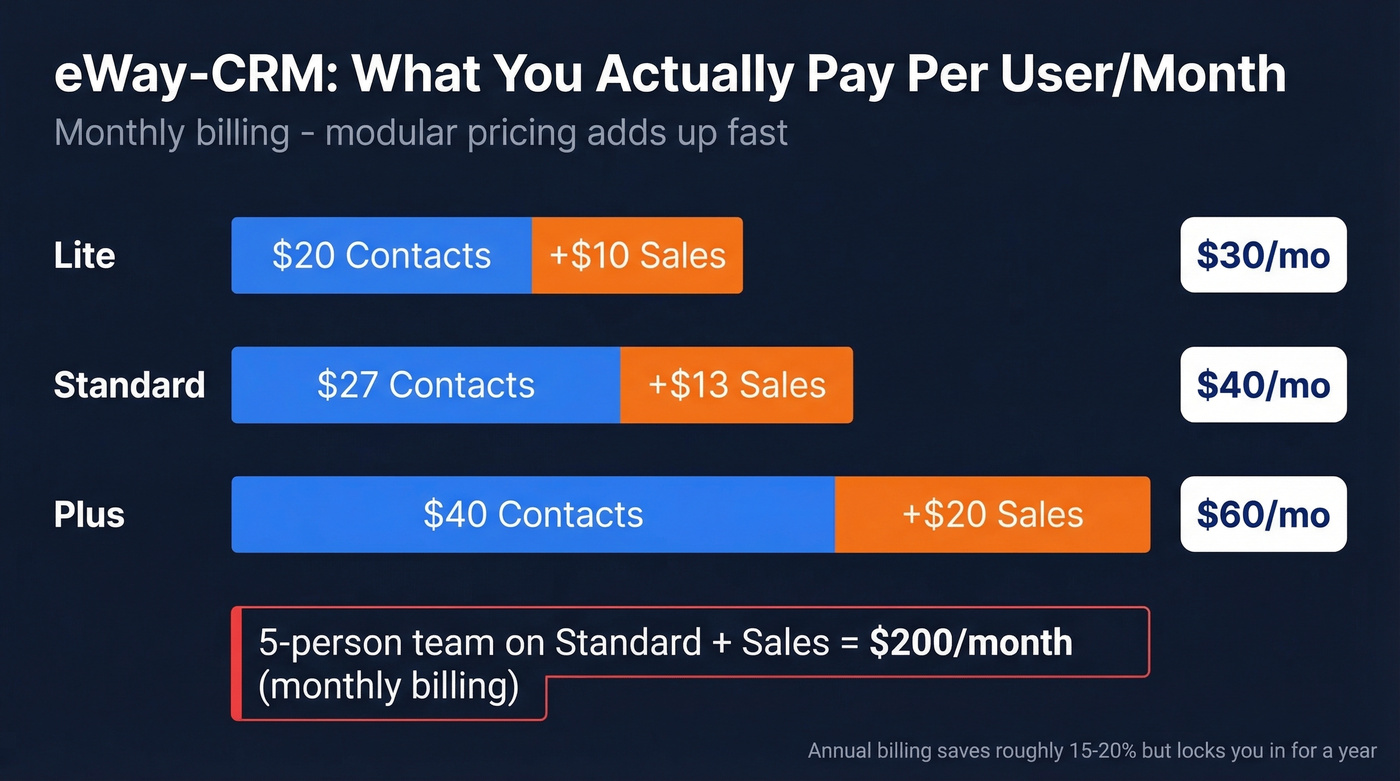
The modular pricing catches people off guard. At monthly billing, here's what you actually pay per user:
| Tier | Contacts & Companies | + Sales Module | Combined |
|---|---|---|---|
| Lite | $20 | $10 | $30 |
| Standard | $27 | $13 | $40 |
| Plus | $40 | $20 | $60 |
The free plan sounds generous until you hit the walls: 1 calendar sync, 10 custom fields, manual-only email saving, and 200 MB storage. Most teams outgrow it within weeks. G2 reviews flag Outlook startup slowdowns and email-saving quirks as recurring complaints.

Migrating from eWay-CRM with dirty data just moves the problem to a new tool. Prospeo's enrichment engine verifies emails at 98% accuracy, returns 50+ data points per contact, and refreshes every 7 days - not every 6 weeks. Meritt cut their bounce rate from 35% to under 4% after cleaning their list before migration.
Start your CRM migration with data you can actually trust.
Best eWay-CRM Alternatives in 2026
Nimble CRM - Best Outlook Replacement
Nimble's Microsoft 365 integration is one of the deepest of any CRM on this list - contacts, calendar, email logging, all living inside your Outlook sidebar. G2 ranks it the #1 eWay-CRM alternative for good reason. One plan at $24.90/seat/month billed annually keeps things simple: 25,000 contact records, 2GB/seat storage, 14-day trial with no credit card required.

Where Nimble falls short is advanced pipeline customization. If you need multi-pipeline views or complex deal workflows, Pipedrive handles that far better.
Pipedrive - Best Sales Pipeline
Pipedrive doesn't try to live inside Outlook - it owns its own UI, and that UI is built around deals. Lite starts at $14/seat/month, though full email sync and tracking for Outlook lives in the Growth tier at $39/seat/month. A thread on r/CRM nailed the key difference: Pipedrive lets you link any email to any deal, contact, or company without assigning that email to a contact first. That flexibility is exactly what eWay-CRM users miss most when they switch to rigid tools.

Prospeo - Clean Data for Your Migration
Here's the thing nobody tells you about switching CRMs: migrating dirty data just moves the problem. Before you export eWay-CRM contacts and dump them into a new tool, run them through Prospeo's enrichment engine. It draws from 143M+ verified emails at 98% accuracy, returns 50+ data points per contact with a 92% API match rate, and refreshes everything on a 7-day cycle. Meritt cut their bounce rate from 35% to under 4% after cleaning their list with Prospeo before launching outreach - and tripled pipeline from $100K to $300K/week.

The free tier gives you 75 email verifications and 100 Chrome extension credits monthly, enough to clean a small migration. It plugs into HubSpot, Salesforce, Zapier, and Make, so whatever CRM you land on, the integration is already there.
If you're comparing vendors, start with a quick scan of data enrichment options and how they handle email deliverability downstream.
Bigin by Zoho - Best Budget Option
Free for 1 user and 500 records. Express at $7/user/month. Premier at $12. Bigin 360 at $18. Built-in telephony comes included on paid tiers - a rare feature at this price point.
The catch: Microsoft 365 integration exists on paid plans, but it's not the embedded-in-Outlook experience eWay-CRM provides. If inbox-native is your priority, Nimble is the better call.
HubSpot CRM - Best Free Starting Point
HubSpot's free tier is genuinely useful for contact management and deal tracking, and it's the default "try before you commit" CRM for a lot of teams. Starter runs around $15/user/month on annual billing. Professional jumps to $90/seat/month annually.
Let's be honest about the upgrade cliff, though. Small teams get hooked on free, then face a brutal price jump when they need workflow automation or custom reporting. We've seen this pattern repeatedly: if your team is under 10 people and your average deal size is below $15k, you'll never need Professional. Stay on Starter or pick a tool that scales more gently.
Vtiger - Best All-in-One Suite
Vtiger starts at $12/user/month on the Growth plan billed annually, and it packs in way more than just sales tracking - marketing automation, help desk, project management, the works. The free plan supports up to 10 users with 3,000 records and includes Google + O365 add-ins, which is genuinely generous for teams that need a single platform instead of stitching together three or four tools.
Capsule CRM - Best for Simplicity
Capsule's free plan covers 2 users, 250 contacts, and includes an Outlook add-in. Paid plans start around $18/user/month. If you want a lightweight CRM with zero bloat and a fast learning curve, Capsule is hard to beat. Skip it if you need anything beyond basic pipeline tracking and contact management - there's no built-in telephony, no marketing automation, and reporting is minimal.
No matter which eWay-CRM alternative you pick - Nimble, Pipedrive, HubSpot - it integrates with Prospeo through Zapier, Make, or native connections. The free tier gives you 75 email verifications and 100 Chrome extension credits monthly. Enough to clean a small export and launch outreach on day one.
Don't import bad data into your new CRM. Verify it at $0.01 per email.
Side-by-Side Comparison
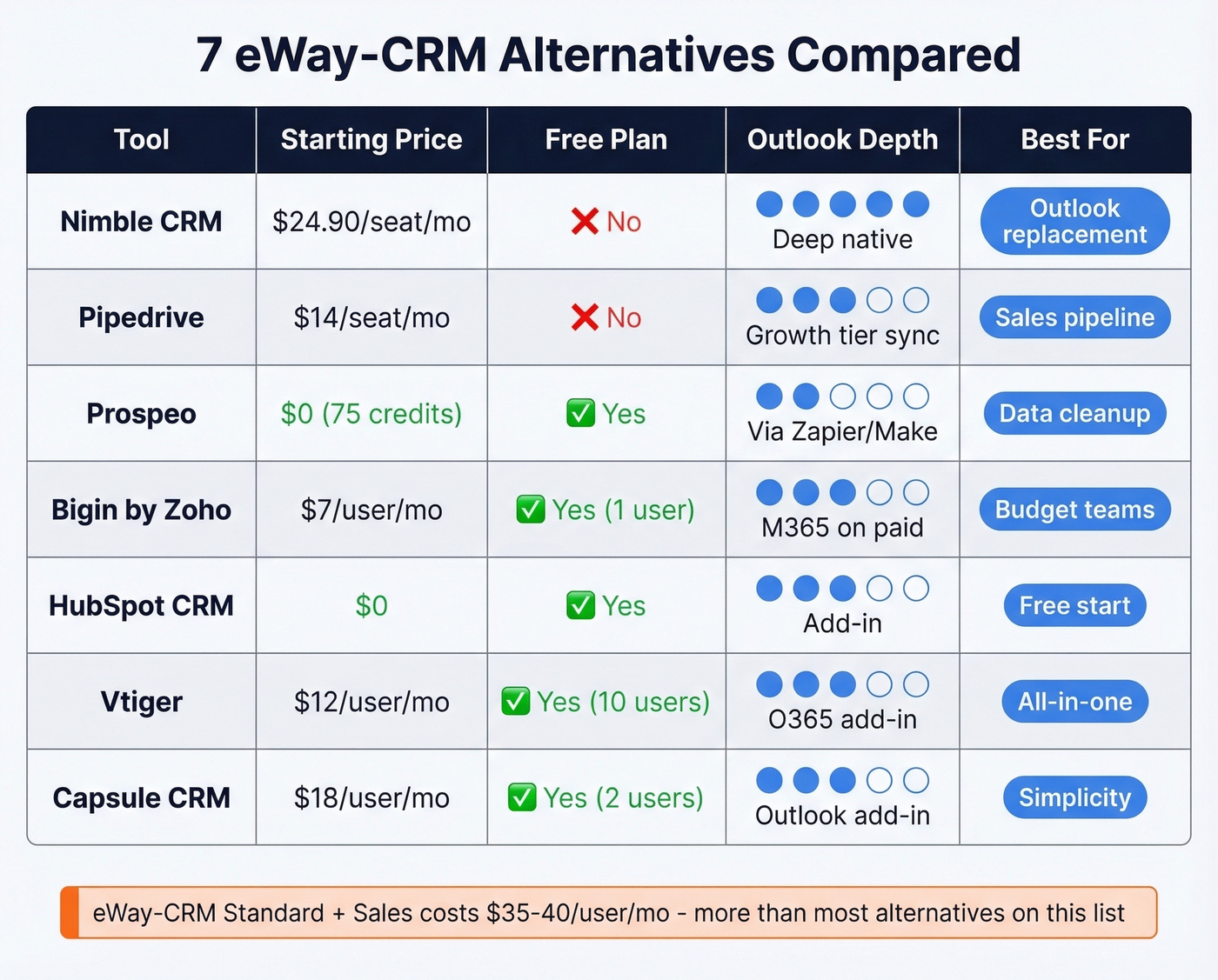
| Tool | Starting Price | Free Plan | Outlook Integration | Best For |
|---|---|---|---|---|
| Nimble CRM | $24.90/seat/mo | No | Deep M365 native | Outlook replacement |
| Pipedrive | $14/seat/mo | No | Sync at Growth tier | Sales pipeline |
| Prospeo | $0 (75 credits) | Yes | Via Zapier/Make | Data cleanup on migration |
| Bigin by Zoho | $7/user/mo | Yes (1 user) | M365 on paid tiers | Budget teams |
| HubSpot CRM | $0 | Yes | Add-in | Free starting point |
| Vtiger | $12/user/mo | Yes (10 users) | O365 add-in | All-in-one suite |
| Capsule CRM | ~$18/user/mo | Yes (2 users) | Outlook add-in | Simplicity |
How to Choose the Right CRM
Three questions cut through the noise.
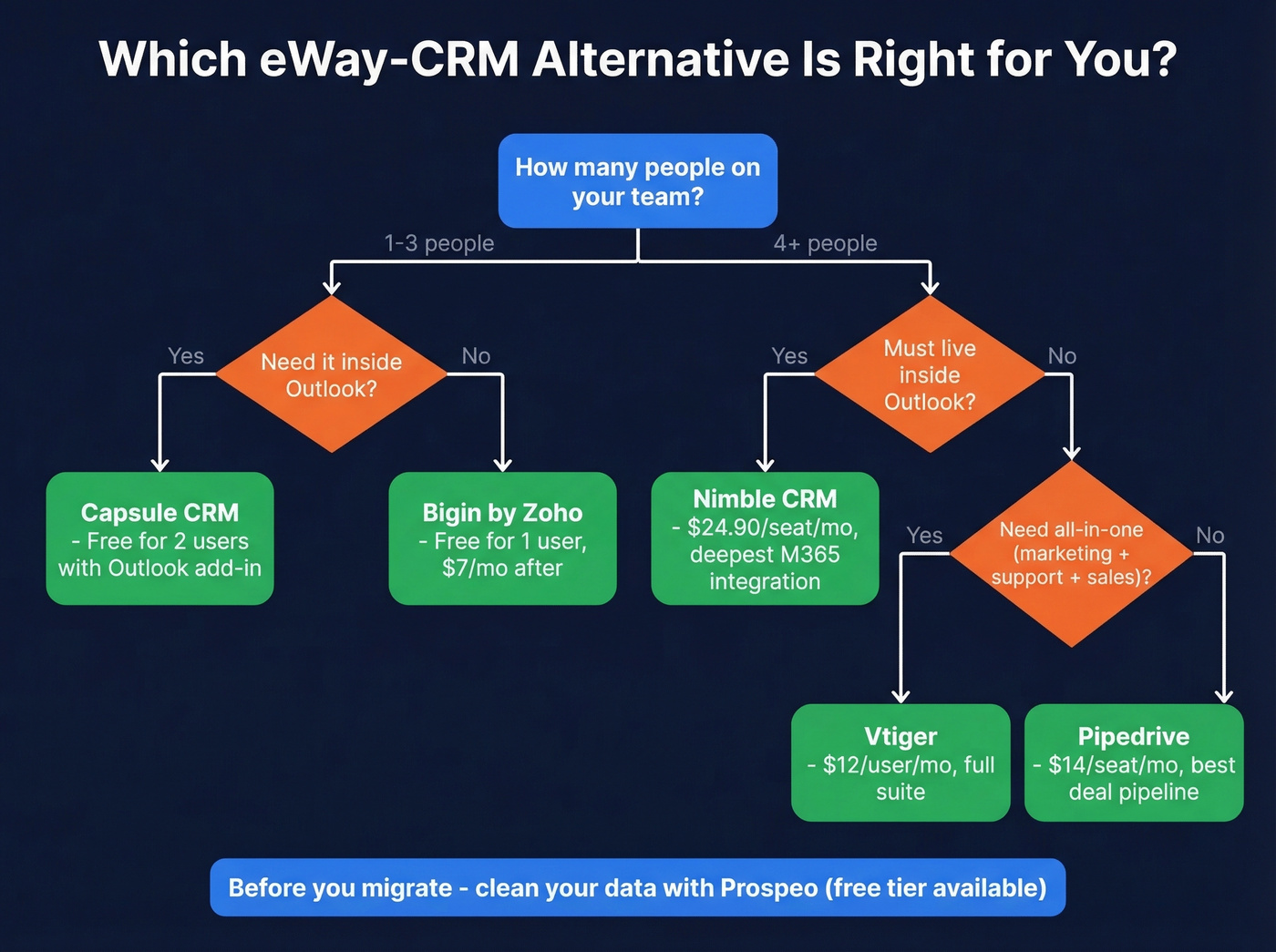
Team size: Solo or under 3 people? Bigin or Capsule's free plans will get you started. Five or more seats? Pipedrive or Nimble give you room to grow without surprise pricing jumps.
Outlook depth: If the CRM must live inside Outlook, Nimble is the clear pick. If a separate browser tab is fine, Pipedrive's pipeline is stronger and its deal-linking flexibility is unmatched at the price.
Data quality: Run your eWay-CRM export through an enrichment tool before importing into anything new. We've watched teams spend weeks manually fixing bad phone numbers and bounced emails that could've been caught in an afternoon. Bad data in a shiny new CRM is still bad data.
If you're doing outbound right after the switch, it also helps to lock in your sales prospecting techniques and keep a few sales follow-up templates ready for day one.
FAQ
Is eWay-CRM really free?
Technically yes, but the free plan caps you at 1 calendar sync, 10 custom fields, and manual-only email saving with 200 MB storage. Most teams hit these limits within weeks and end up paying $35-40/user/month for Standard + Sales.
Which eWay-CRM alternative has the best Outlook integration?
Nimble CRM at $24.90/seat/month billed annually. It's the closest experience to eWay-CRM's Outlook embedding without the startup slowdowns that plague the eWay-CRM add-in.
How do I avoid importing bad data into a new CRM?
Run your eWay-CRM export through an enrichment tool that verifies emails and fills missing fields before you import anything. Starting clean saves weeks of manual cleanup later - and protects your sender reputation from day one.