

How Fake Email Checkers Actually Work - And Why Most Get It Wrong
You just sent 5,000 cold emails. By morning, 1,150 bounced. Your sender reputation is torched, your domain's flagged, and the next campaign - the one that actually matters - will land in spam. That's what happens when you skip a reliable fake email checker before hitting send.
The fake email problem is systematic, fast-moving, and harder to solve than most teams realize. Consumer fraud losses hit $12.5B in 2024, up 25% year-over-year. Roughly 30% of emails used to spam websites are fake, and up to 30% of free-tier signups are bots or disposable addresses. There are [160,000-180,000 active disposable email domains] in the wild, with hundreds of new ones appearing every week. And 90% of fake accounts on digital commerce platforms are created by a small subset of repeat fraudsters - this isn't random noise, it's organized abuse.
We've tested dozens of these tools, and the results are sobering. In Hunter's published benchmark of email verifiers, the top overall accuracy score was 70%. Not 99%. Seventy.
Here's how verification actually works, where it fails, and which tools are worth your money in 2026.
What You Need (Quick Version)
Before we go deep, here's the fast answer based on what you're trying to do:
- Spot-checking a single email? Hunter or Mailmeteor. Hunter's great for B2B lookups; Mailmeteor is a free single-check tool that requires no sign-up.
- Cleaning a list in bulk? ZeroBounce or NeverBounce. Best balance of price-per-verification and accuracy. Expect to pay $8-10 per thousand emails.
- Building B2B prospect lists? Prospeo finds and verifies emails in one step - 98% accuracy across 143M+ verified emails, so you skip the cleaning entirely. 75 free emails per month to test it.
That third path is the one most teams overlook. If your data is verified at the source, you don't need a separate verification tool at all.
What Counts as a "Fake" Email?
"Fake" is a loose term that covers six distinct categories. The first three are straightforward; the last three are where verification tools struggle.
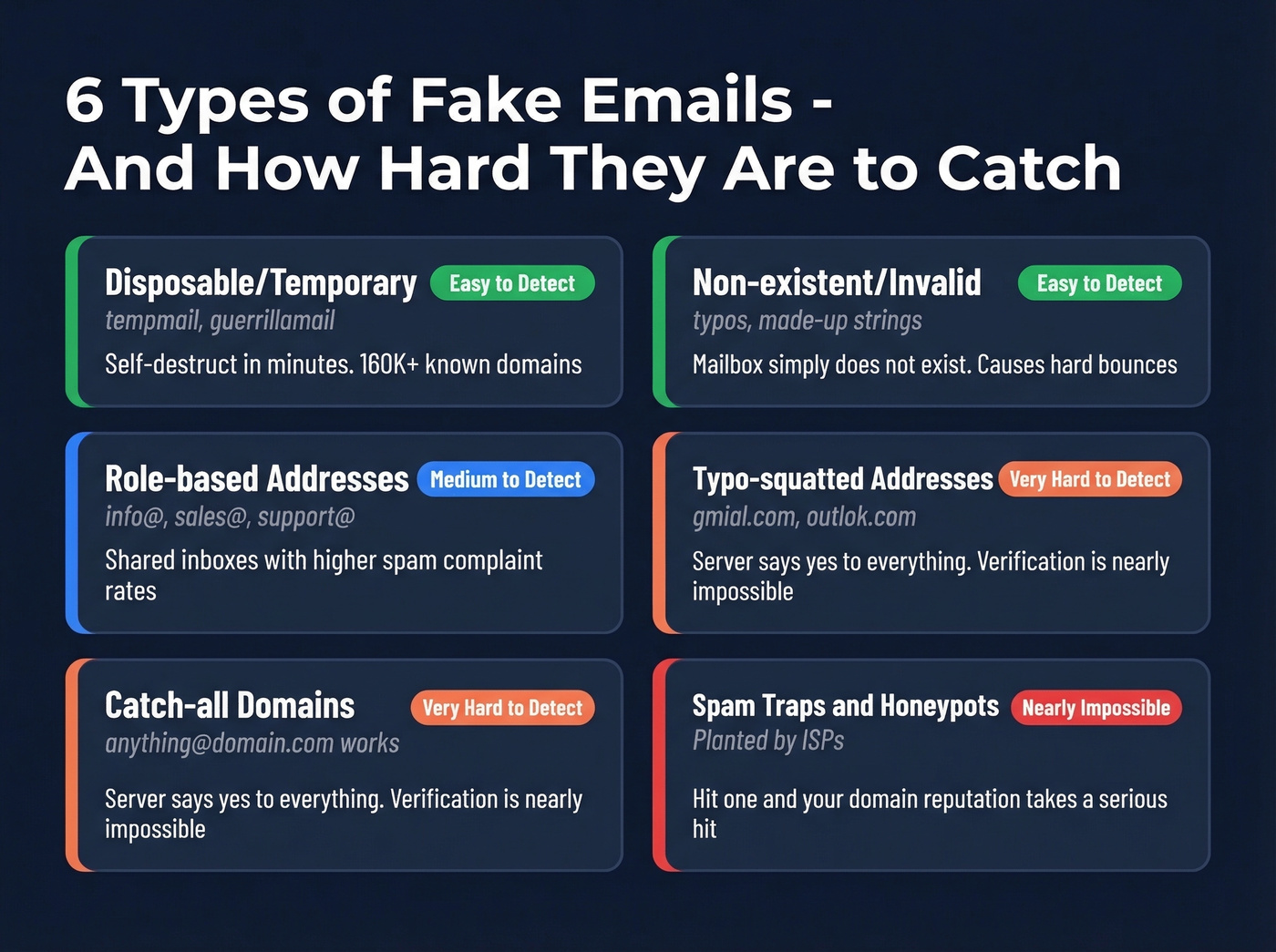
Disposable/temporary addresses are the most obvious. Services like TempMail, Guerrilla Mail, and 10MinuteMail generate inboxes that self-destruct in minutes or hours - roughly ~8M, ~5M, and ~4M monthly visitors respectively. People use them for legitimate reasons like protecting privacy or extending free trials, but they're poison for any sender's list. People actively seek disposable providers that evade detection, turning this into a constant cat-and-mouse game.
Non-existent/invalid addresses are mailboxes that simply don't exist - typos, made-up strings, former employees. Sending to these produces hard bounces. Role-based addresses like info@, sales@, or support@ aren't technically fake, but they're shared inboxes with higher spam complaint rates.
Now the tricky ones. Catch-all/accept-all domains accept mail sent to any address at that domain, real or invented. The server says "yes" to everything, making verification nearly impossible. Typo-squatted addresses look legitimate but contain subtle misspellings - gmial.com, outlok.com - and some are deliberate phishing infrastructure. Spam traps and honeypots are addresses planted by ISPs specifically to catch senders using scraped or purchased lists. Hit one, and your domain reputation takes a serious hit.
How Verification Tools Work
The Detection Pipeline
Every serious verification tool runs emails through a multi-stage pipeline. The order matters - each step filters out a different class of bad addresses before the expensive checks happen.
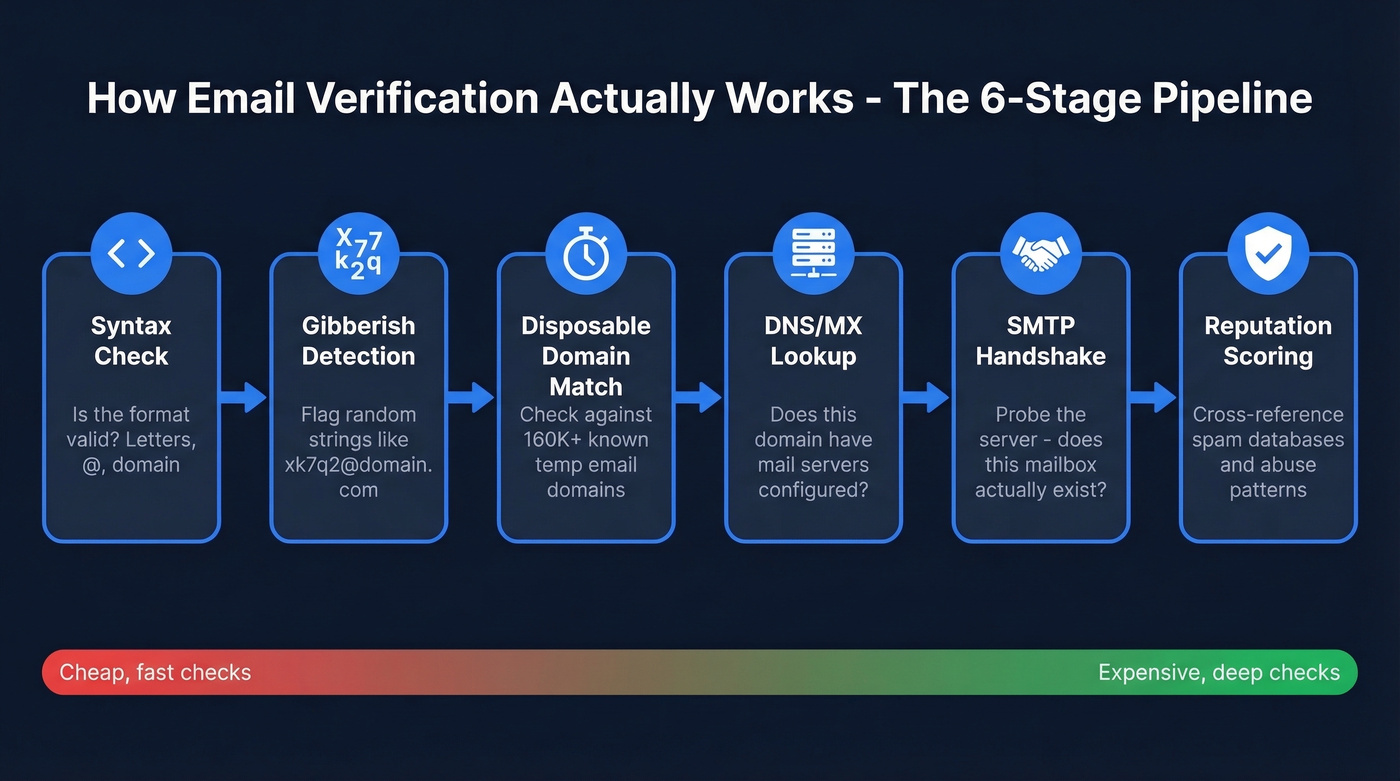
It starts with syntax validation to confirm basic email formatting rules. Then gibberish detection flags random character strings that are technically valid syntax but obviously not real addresses. Disposable domain matching checks against known temporary email providers. From there, a DNS/MX record lookup confirms the domain has mail servers configured to receive email, and if MX records exist, an SMTP handshake connects to the mail server and probes whether the specific mailbox exists - without actually delivering a message. Finally, reputation scoring cross-references the address against spam databases and known abuse patterns.
Hunter's verification page lists these checks explicitly: syntax, domain information, server response, plus their own B2B database lookup. QuickEmailVerification returns detailed JSON fields for each stage - disposable flag, accept_all flag, role-based flag, MX record status, and a safe_to_send boolean. The pipeline's depth matters more than any single check.
How Disposable Domains Get Detected
Static blocklists - the "just maintain a list of known disposable domains" approach - sound simple. They're also inadequate. The top 10 disposable providers account for only ~30% of usage. The remaining 70% is a long tail of thousands of smaller services, many operating 50-100+ alternate domains specifically to evade blocklists.
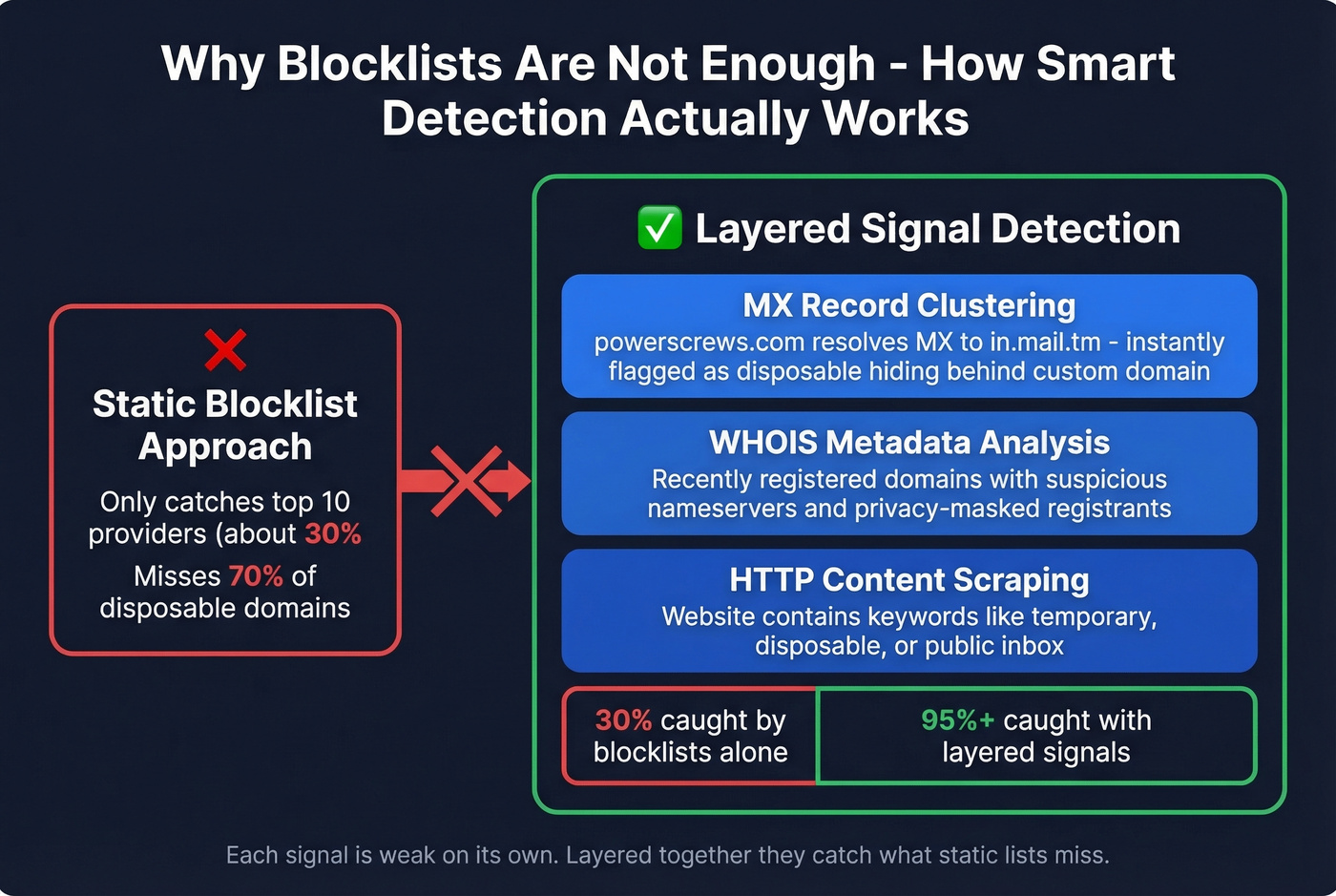
The smarter approach uses infrastructure-level signals. Castle's methodology demonstrates this well: disposable providers often share mail infrastructure, so a domain like powerscrews.com might resolve its MX records to in.mail.tm - instantly revealing it as a disposable service hiding behind a custom domain.
Beyond MX clustering, detection systems look at WHOIS metadata for recently registered domains with suspicious nameservers and HTTP content scraping to check whether the domain's website contains keywords like "temporary," "disposable," or "public inbox." Each signal is weak on its own. Layered together, they catch what static lists miss.

The best fake email checker is never needing one. Prospeo's 5-step verification - catch-all handling, spam-trap removal, honeypot filtering - happens before you ever see the email. 143M+ verified addresses at 98% accuracy. That's 28 points above the best score in Hunter's benchmark.
Stop cleaning bad lists. Start with clean data.
Why Most Tools Only Hit 70% Accuracy
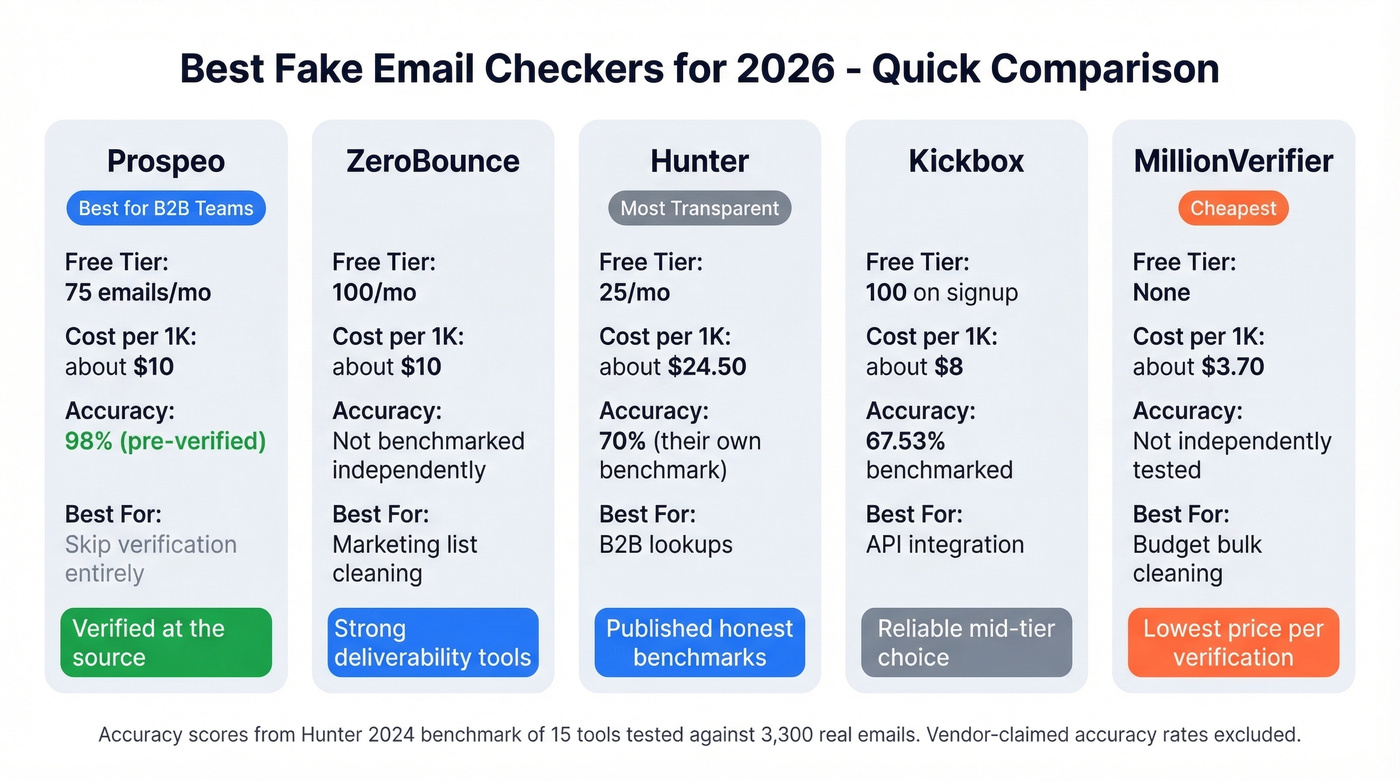
Here's the thing most verification vendors don't want you to know: the best tool in Hunter's published benchmark - testing 15 tools against 3,000 real business emails plus 300 invalid ones - scored 70% overall accuracy. Hunter itself topped the chart. Clearout hit 68.37%. Kickbox came in at 67.53%. Everyone else was lower.
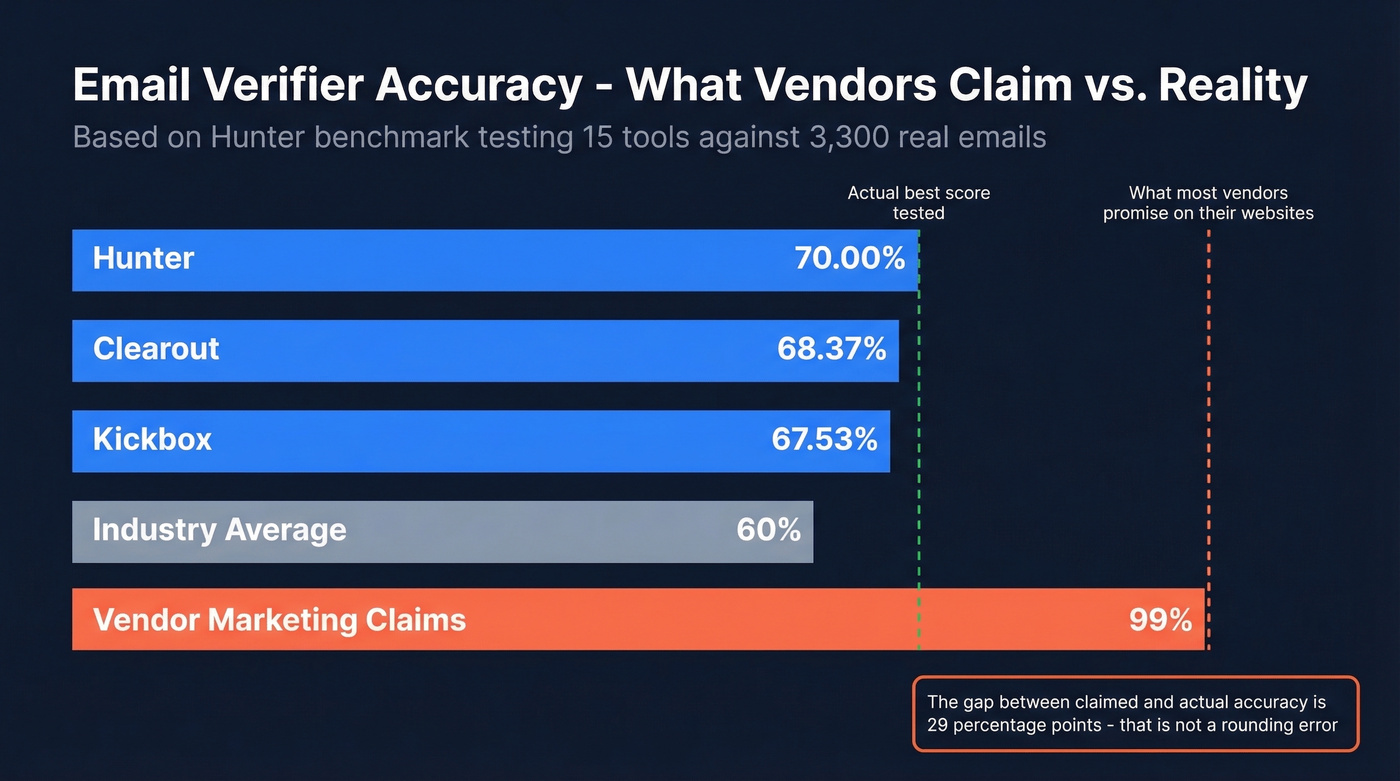
That's a long way from the 99% accuracy plastered across vendor marketing pages.
The gap comes from two places. First, "unknown" results - when a verification tool can't determine whether an address is valid, that counts against accuracy in this benchmark's scoring. Mid-market and enterprise domains with strict server configurations are particularly hard to verify because the server simply refuses to answer. In our testing, the gap between vendor-claimed accuracy and real-world performance is even wider on enterprise domains with aggressive firewalls.
Second, accept-all domains. These servers accept mail for every address, real or fake. No verification tool can distinguish a real mailbox from a made-up one on an accept-all domain. It's the industry's dirty secret.
Let's be honest: if your average deal size is under $15k, you probably don't need 99% verification accuracy. A tool that hits 70% and costs $8 per thousand is fine for most marketing lists. But if you're running targeted outbound where every bounce damages your domain, the math changes completely - and the smarter move is sourcing pre-verified data rather than cleaning bad data after the fact. (If you're trying to reduce bounces systematically, start with email deliverability and how to improve sender reputation.)
Best Tools Compared for 2026
| Tool | Free Tier | ~Cost/1K | Bulk/API | Best For |
|---|---|---|---|---|
| Prospeo | 75 emails/mo | ~$10 | Both | B2B pre-verified data |
| ZeroBounce | 100/mo | ~$10 | Both | Marketer list cleaning |
| Hunter | 25/mo | ~$24.50 | Both | B2B lookups + verification |
| Kickbox | 100 on signup | ~$8 | Both | Mid-volume API use |
| QuickEmailVerification | 3,000/mo | ~$8 | Both | Budget small lists |
| NeverBounce | Varies | ~$8 | Both | Real-time form validation |
| MillionVerifier | None | ~$3.70 | Both | Cheapest bulk option |
| DeBounce | None | ~$1.50-2 | Both | High-volume, low-stakes |
| CleanTalk | Free web tool | Free/paid | API only | Webmaster spam checks |
| Mailmeteor | Free singles | Free/paid | Neither | Gmail quick checks |
Prospeo
Use this if you're a B2B sales team that wants to skip the "find emails, then verify them" two-step entirely. Prospeo's 5-step verification process - including catch-all handling, spam-trap removal, and honeypot filtering - runs before you ever see a contact. With 143M+ verified emails refreshed on a 7-day cycle versus the 6-week industry average, the data arrives clean. Teams like Snyk cut bounce rates from 35-40% to under 5% after switching, and Stack Optimize maintains 94%+ deliverability across all clients with zero domain flags.
Skip this if you already have a list and just need to clean it. Prospeo is a data platform, not a standalone verification utility. But if bad data is a recurring problem, fixing the source beats cleaning the output every time. 75 free emails per month, no contracts. (If you're comparing sources, see data enrichment services and best sales prospecting databases.)
ZeroBounce
Use this if you're a marketing team cleaning subscriber lists or running large email campaigns and want verification plus deliverability tooling. ZeroBounce ONE starts at $99/month and includes 10,000 credits/month; credits roll over and never expire. The free tier gives you 100 verifications per month when you sign up with a business domain - enough for quick spot-checks.
Skip this if you're building prospect lists from scratch. ZeroBounce cleans data you already have; it doesn't help you find it.

Hunter
Hunter deserves credit for something rare in this space: transparency. They published a benchmark of 15 verification tools and openly showed that the top overall accuracy score was 70% - including themselves. That kind of honesty builds trust.
The free tier is limited to 25 verifications per month. At ~$24.50 per thousand verifications, Hunter is expensive if verification is all you need. But the email finder + verifier combination and the 6M+ user base make it a solid choice for quick lookups. Their proprietary accept-all handling with major email providers is a genuine differentiator. (If you're shopping around, compare options in our Hunter alternatives guide.)

Kickbox
A reliable mid-tier choice for teams building verification into a product or workflow. Pricing runs about $200 for 25,000 verifications, roughly $8 per thousand, with credits that expire after one year. You get 100 free verifications on signup. The standout feature is their Sendex score, which predicts engagement likelihood beyond simple valid/invalid classification - useful if you're prioritizing a list, not just cleaning it.
QuickEmailVerification
The best budget option for small lists. 3,000 free credits per month is the most generous free tier in this roundup, and the Starter plan runs just $4 for 500 verifications with no credit expiry. The detailed JSON response includes disposable, accept_all, role, free, and safe_to_send flags, giving you granular control over how you handle edge cases. For developers building email validation into a signup flow, the response schema is one of the most complete available.
NeverBounce
A strong option if your main problem is junk signups rather than outbound list hygiene. NeverBounce is often used for real-time form validation - plug it into your web forms to check emails at the point of entry rather than cleaning them after the fact. Pricing runs around ~$8 per thousand verifications. (If you're doing outbound at scale, also review AI bulk email senders and cold email marketing.)
MillionVerifier and DeBounce
These two compete for the same niche: high-volume verification at rock-bottom prices. MillionVerifier runs around ~$3.70 per thousand. DeBounce comes in around ~$1.50-2 per thousand. Neither is positioned as an advanced catch-all solution, so don't expect miracles on accept-all domains. Pick based on price and workflow fit.
CleanTalk and Mailmeteor
Two free tools for very different users. CleanTalk is a web-based checker that cross-references emails against a global spam database built from signals across millions of websites - best for webmasters checking whether form submissions come from known spam sources. Mailmeteor offers free single email checks with no signup and a Google Sheets add-on with 50 free checks per month, making it the simplest option for Gmail users who want to verify an address without leaving their spreadsheet. Neither is built for scale.

What Verification Results Mean
When a verification tool returns results, the terminology can trip you up. Here's what the key fields actually mean, based on QuickEmailVerification's response schema:
| Field | What It Means |
|---|---|
| result: valid | Mailbox confirmed to exist |
| result: invalid | Mailbox doesn't exist; will hard bounce |
| result: unknown | Tool couldn't determine status |
| disposable: true | Temporary/throwaway address |
| accept_all: true | Server accepts everything; can't confirm |
| role: true | Shared inbox (info@, support@) |
| safe_to_send: false | Risky - proceed with caution |
| did_you_mean | Suggests a typo correction |
The critical distinction: safe_to_send = false doesn't always mean fake. It means the tool identified enough risk signals to flag the address. Accept-all domains, role-based addresses, and recently created mailboxes can all trigger this flag on perfectly real emails. Treat it as a risk indicator, not a verdict. (For bounce mechanics and benchmarks, see email bounce rate.)
Five Mistakes That Ruin Your Results
1. Not re-verifying before sends. Email lists decay. After four weeks, roughly 2% of a verified list will be invalid. That sounds small until you're sending 50,000 emails and 1,000 hard bounce. Re-verify before every major campaign. Your target is a hard bounce rate under 1%. Above 0.3% hard bounces, ESPs start raising flags. Above 2%, you're actively damaging your sender reputation.
2. Treating accept-all as valid. Accept-all servers say "yes" to every address. That's not confirmation - it's a shrug. We've seen teams send confidently to accept-all domains and watch bounce rates spike because half the addresses were invented. Segment accept-all results and send to them cautiously, or skip them entirely.
3. Relying on syntax-only checks. Regex says asdf@gmail.com is valid syntax. It's not a real mailbox. Syntax validation is step one of seven. If your "verification" stops there, you're not verifying anything.
4. Waiting for bounces instead of verifying first. Deliverability damage happens on the first bad send. By the time you see the bounce report, your sender reputation is already hit. This is the most expensive mistake on the list because the cost isn't the bounced emails - it's the next three campaigns that land in spam. (If you're building a safer outbound system, use a cold email API and monitor with email reputation tools.)
5. Cleaning bad data instead of fixing the source. Look, if your bounce rate is above 2%, the problem isn't your verification tool - it's your data source. If your workflow generates emails that need constant verification, the workflow is broken. Teams that source pre-verified data spend far less time on list cleaning and keep bounce rates under 1-2% consistently. (If you're sourcing, start with email list providers or learn how to generate an email list.)
Catch-all domains, disposable addresses, spam traps - every fake email type this article covers is already filtered out of Prospeo's database. Data refreshes every 7 days, not every 6 weeks. At $0.01 per email, you pay less than a bulk verification tool and skip the step entirely.
Replace your verification stack with data that doesn't need verifying.
FAQ
How do I check if an email is fake before replying?
Run the address through a free tool like Hunter or Mailmeteor for a quick single lookup. Check whether the domain matches the sender's claimed organization and look for typo-squatting (gmial.com, outlok.com). If the result shows "disposable: true" or "safe_to_send: false," treat the message with skepticism.
Can any tool catch all disposable emails?
No. There are 180,000+ active disposable domains with hundreds of new ones appearing weekly. The top 10 providers account for only ~30% of usage. Real-time MX clustering and reputation scoring catch more than static blocklists, but 100% detection isn't achievable.
How often should I re-verify my email list?
Before every major send. After four weeks, roughly 2% of a verified list goes invalid. Your target is a hard bounce rate under 1% - above 2% and you're actively damaging your sender reputation.
What's the difference between "invalid" and "risky" results?
Invalid means the mailbox doesn't exist and sending will hard bounce. Risky means the tool can't confirm the address - typically because of accept-all domains or temporary server issues. Risky emails need case-by-case judgment, not blanket sends.
What's a good free option for checking emails in bulk?
QuickEmailVerification offers 3,000 free verifications per month - the most generous free tier available. For B2B prospecting, Prospeo gives you 75 free verified emails monthly with 5-step verification built in, so you get clean data without a separate checking step. Hunter's 25 free monthly checks work for occasional spot-checks.