

How to Find Corporate Email Addresses That Don't Bounce
You built a list of 200 prospects, ran them through a corporate email finder, got the green "verified" checkmark on every single one - and then 47 bounced on your first sequence. Your domain reputation took a hit before you even got a reply. That's not a hypothetical. It's a pattern on r/coldemail that keeps repeating: "verified" emails bouncing at 20%+ because the tool's verification is shallow.
The gap between finding a corporate email and finding one that actually lands is where most prospecting workflows break down. We've watched teams waste entire quarters on this. Here's how to close that gap - with free methods, paid tools, accuracy benchmarks, and the math that tells you which approach is actually cheapest per valid email.
What You Need (Quick Version)
Before you read 2,000 words, here's the shortcut:
- Highest email accuracy and freshest data: Prospeo. 98% email accuracy, 7-day data refresh, ~$0.01/email. Free tier gives you 75 emails/month to test.
- Free verification layer: Hunter. 50 free credits/month, strong confidence scoring, unlimited users on every plan.
- Built-in cold email sequences on a budget: Snov.io. Starts at $29.25/mo with 1,000 credits, includes warm-up and sequencing.
- No tool at all: The manual methods in the next section work for small volumes. They're slow, but they're free and surprisingly effective.
Free Methods That Work
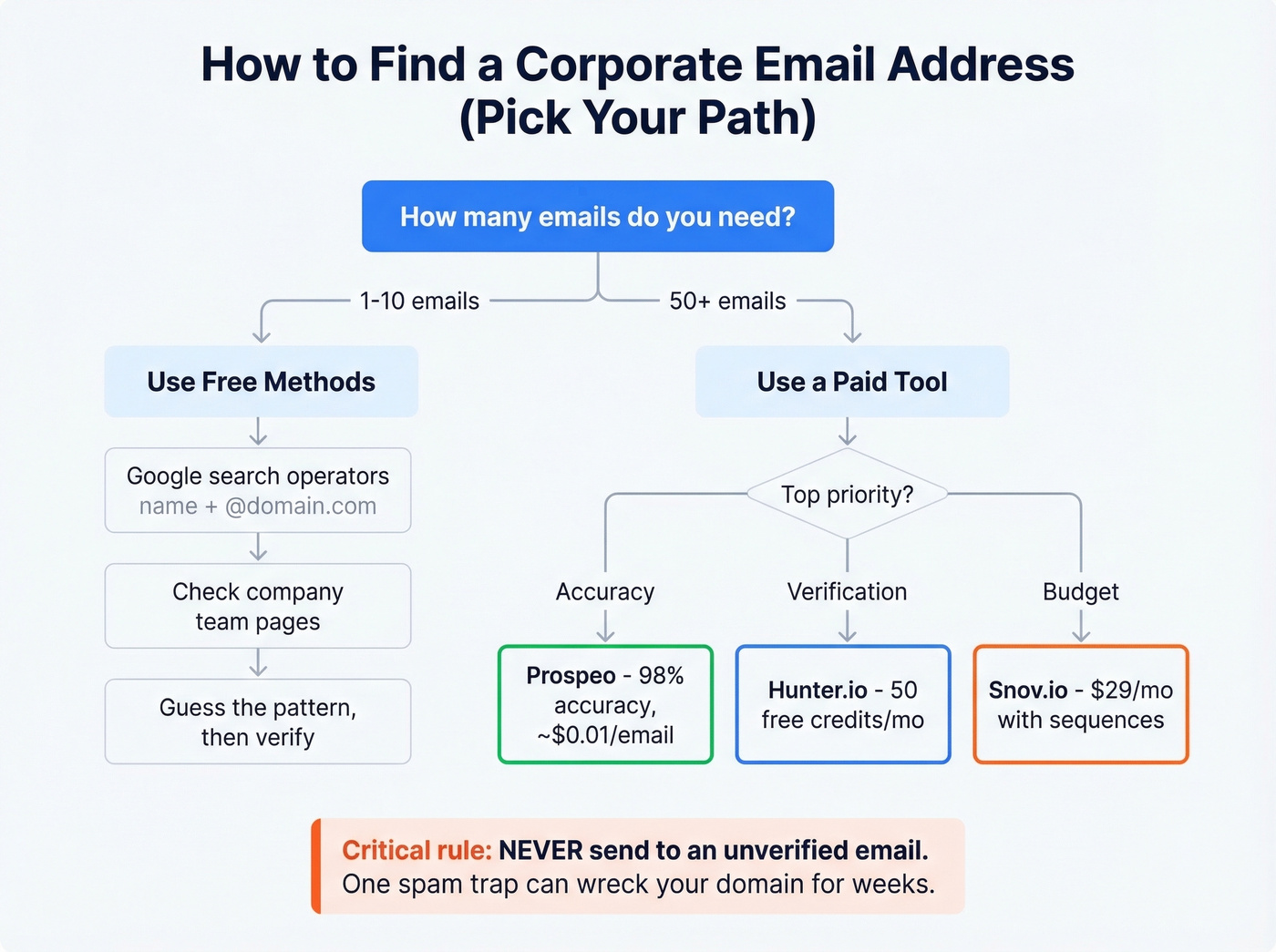
You don't always need a tool. For one-off lookups or small batches, manual methods get the job done.
Google Search Operators
Google Search Operators indexes more email addresses than you'd think. Two operator patterns work consistently:
"John Smith" + "@acme.com" - This surfaces any page where that person's email appears alongside the company domain. Conference speaker bios, press releases, and PDF whitepapers are common hits.
site:acme.com + "email" + "contact" - This restricts results to the company's own domain. Team pages, about pages, and support directories often list emails that aren't linked from the main navigation.
Email Pattern Permutation
Most companies use a predictable format:
- first.last@company.com (most popular)
- flast@company.com
- firstl@company.com
- first@company.com
If you know one person's email at a company, you know the pattern for everyone. But here's the critical part: never send to a guessed email without verifying it first. One bad guess hitting a spam trap or honeypot can tank your sender reputation for weeks. We've seen it happen to teams that thought they were being clever with pattern matching - it's not worth the risk.
Company Websites and Professional Profiles
Check the company's team page, about page, and press/news section. Founders and executives often have their emails listed in press releases or investor materials. Professional profiles sometimes display contact info if the person has made it public - it's worth a quick lookup before firing up a paid tool.
When Free Methods Break Down
These approaches work for 5-10 lookups. They don't scale. Once you're building lists of 50+ contacts, the time cost exceeds the tool cost, and the verification risk multiplies with every unverified guess.
Tool-Assisted Methods
Email finder tools work through a few core mechanisms. Understanding them helps you pick the right workflow.
Domain search lets you enter a company domain and get back every known email address at that organization - useful when you're prospecting into an account but don't have specific names yet (see sales prospecting workflows). Single email finder takes a name + company and returns the most likely email. This is the bread-and-butter lookup for targeted outreach.
Chrome extensions let you pull contact data while browsing company websites or professional profiles. No tab-switching, no copy-pasting into a separate tool.
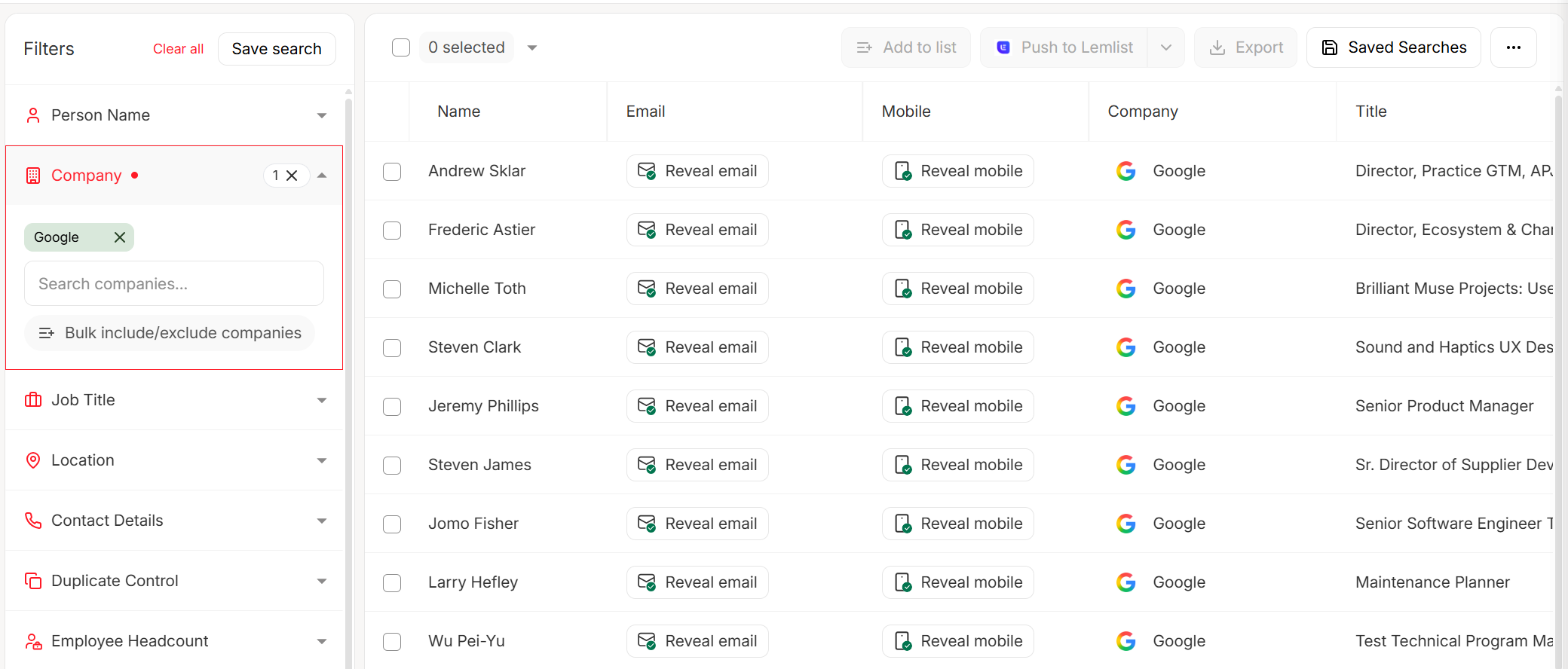
Bulk CSV upload is where the real efficiency lives. Upload a spreadsheet of names and companies, get back verified emails in minutes - this is the workflow for anyone building lists of 100+ contacts at a time.
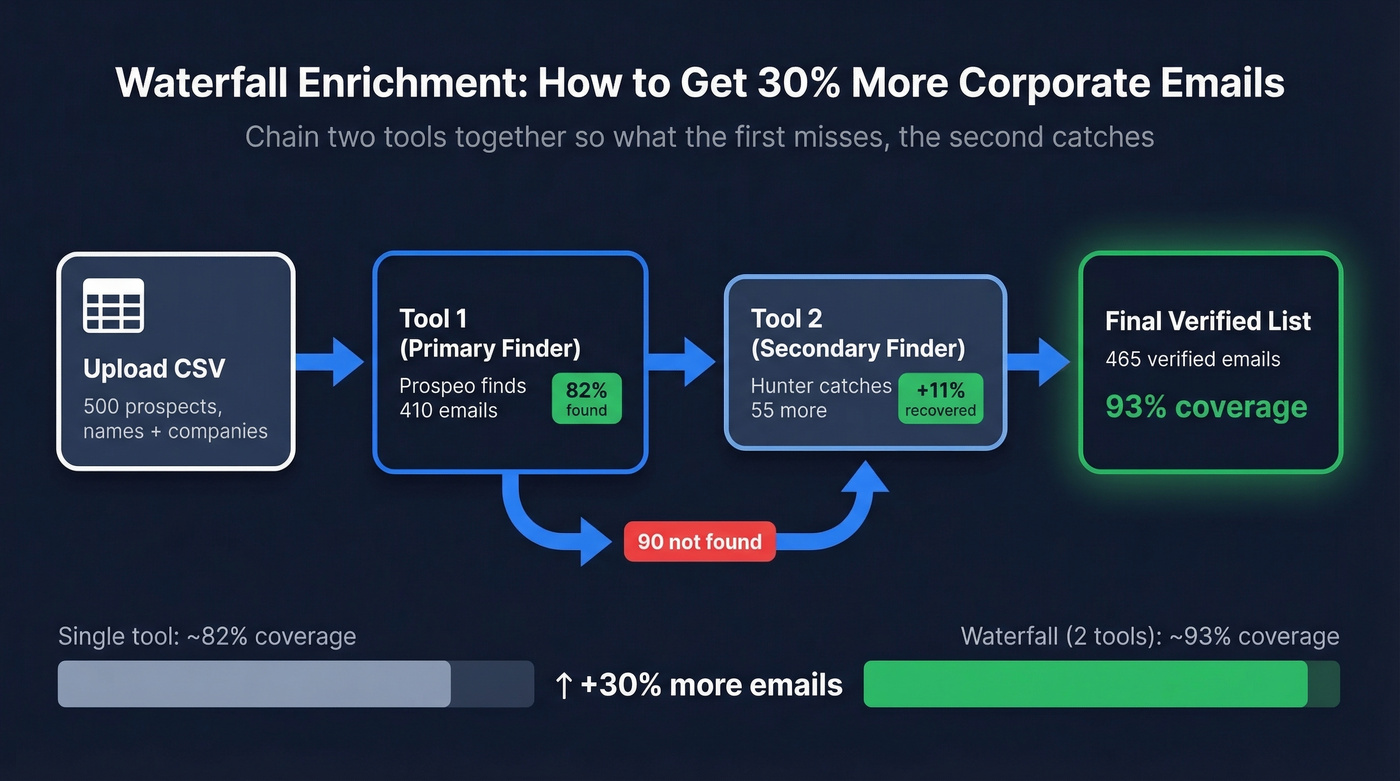
Waterfall enrichment chains two or three tools together so what the first tool misses, the second catches. This approach yields roughly 30% more emails than any single provider alone. Most teams don't need more than two tools in the waterfall, but the lift from adding a second is significant.

Every unverified corporate email is a gamble with your domain reputation. Prospeo's 5-step verification - catch-all handling, spam-trap removal, honeypot filtering - delivers 98% email accuracy across 143M+ verified addresses. Data refreshes every 7 days, not 6 weeks.
Stop bouncing. Start landing. 75 free emails to prove it.
Best Tools for Corporate Email Lookup
Prospeo
Use this if you've been burned by "verified" emails that bounce. Prospeo's 5-step verification process - catch-all domain handling, spam-trap removal, honeypot filtering - is why 98% email accuracy isn't just a marketing number. The database covers 300M+ professional profiles and 143M+ verified emails, refreshed on a 7-day cycle. That refresh cadence matters: the industry average is six weeks, and a lot changes in six weeks. People leave jobs, domains get restructured, mailboxes get deactivated. (If you're comparing vendors, see data enrichment services.)
The results speak for themselves. One agency went from 35% bounce rates to under 4% after switching and tripled their pipeline. Another built to $1M ARR with 94%+ client deliverability and zero domain flags across all accounts.
Pricing is straightforward: ~$0.01 per email, credit-based, no annual contracts. The free tier gives you 75 emails and 100 Chrome extension credits per month - enough to run a real test before committing anything. Native integrations push contacts directly into Salesforce, HubSpot, Lemlist, Instantly, Smartlead, and Clay (more on that workflow in our Clay list building guide).
Skip this if you need a built-in cold email sequencer. Prospeo focuses on data quality - pair it with your sequencing tool of choice (or start with cold email marketing fundamentals).
Teams using Prospeo to find corporate email addresses cut bounce rates from 35% to under 4% and tripled their pipeline. At ~$0.01 per verified email with no contracts, you get enterprise-grade accuracy without enterprise pricing.
15,000+ companies already switched to data that actually delivers.
Hunter.io
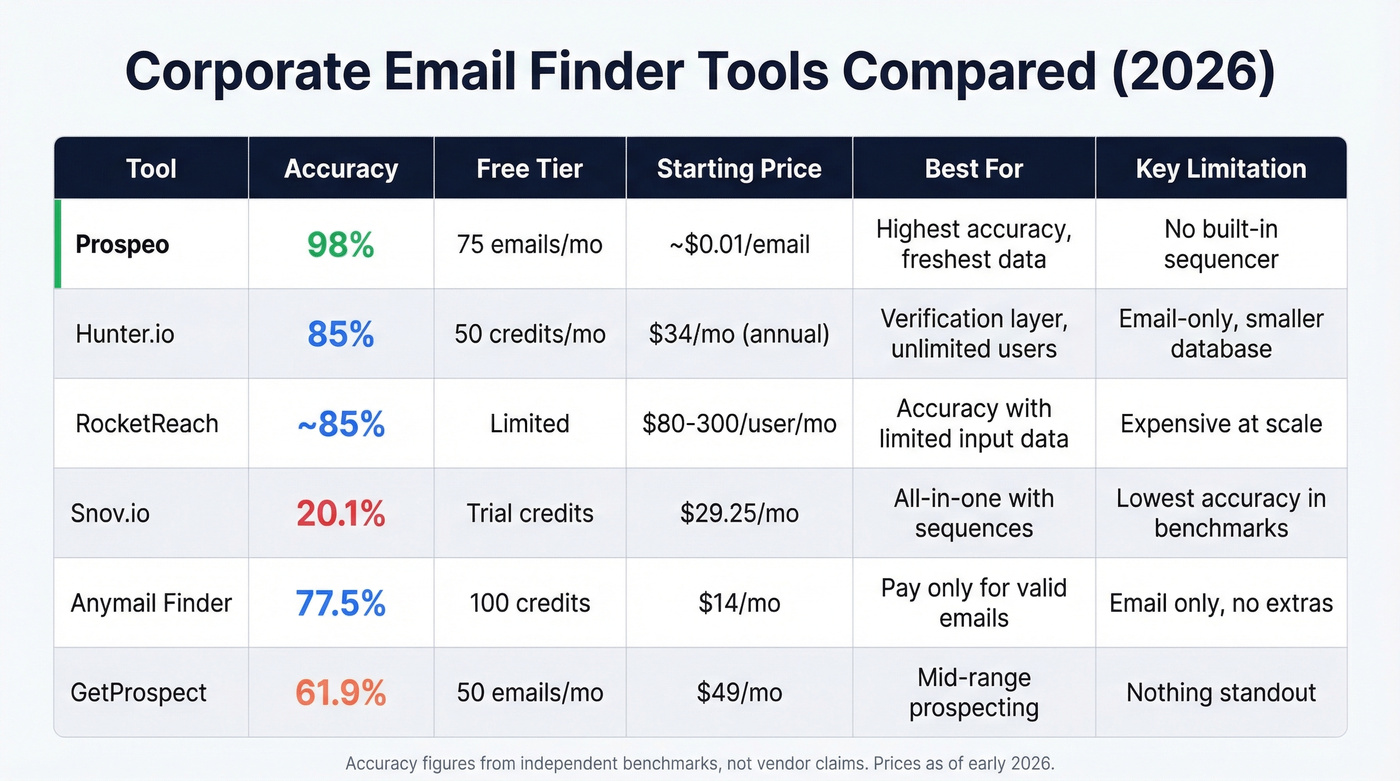
The ContactOut benchmark tells the story: 200 SaaS profiles tested, Hunter returned 170 valid emails - 85% accuracy. That's solid, and it aligns with practitioner sentiment that Hunter works better as a verification layer than a primary database.
Hunter's free plan gives you 50 credits/month with one connected email account and 500 sequence recipients. Paid plans run $49/mo for Starter ($34/mo billed annually) to $299/mo for Scale, with unlimited users on every tier - a genuine advantage for teams where multiple people need access.
Skip this if you need deep phone number coverage or a massive contact database. Hunter is an email-first tool. (If you're shopping alternatives, see our Hunter alternatives breakdown.)
RocketReach
We watched a team switch to RocketReach after months of 20%+ bounce rates with another tool, and their bounces dropped significantly. The tool works well even with limited input data - sometimes just a name and rough company description is enough to surface a valid address. For mid-size SaaS targeting, it's genuinely strong.
The tradeoff is price. Individual plans typically run $80-$300/user/month, with Team Pro at ~$83/user/month billed annually. Extra lookups cost $0.30-$0.45 each. That adds up fast for high-volume prospecting, and mobile numbers only come with higher tiers.
Use this if accuracy is your top priority and budget isn't tight. Skip this if you're cost-sensitive or need more than a few hundred lookups per month.
Snov.io
The pricing looks attractive until you read the fine print. Starter runs $29.25/mo for 1,000 credits with 5,000 recipients and 3 mailbox warm-ups. The Pro plan at $74.25/mo bumps you to 5,000 credits and unlimited warm-ups. But LinkedIn automation is a $69/mo add-on per slot, which can double your effective cost overnight.
The all-in-one pitch - email finding, verification, and cold email sequences in one platform - appeals to teams that hate juggling tools, especially for international leads. But accuracy is the weak link. In a benchmark of 5,000 contacts, Snov.io's verified rate came in at 20.1% - the lowest in the test. You're trading data quality for workflow convenience.
Anymail Finder
The billing model is genuinely unique: you only pay for valid emails. Plans start at $14/mo, and you get 100 free credits to test. In a benchmark of 5,000 contacts, Anymail Finder hit 77.5% verified rate - the highest in that test.
Skip this if you need phone numbers, sequences, or anything beyond email finding. This is a single-purpose tool, and it owns that lane.
GetProspect
Free tier gives you 50 emails/month. Paid plans start at $49/mo. It's a decent mid-range option with a 61.9% verified rate in benchmark testing. Nothing spectacular, nothing terrible. Good enough for light prospecting if you're already in their ecosystem.
Mailmeteor
Free email finder with no sign-up required. It's limited to basic lookups and won't scale, but for a quick one-off search when you don't want to create yet another account, it works.
A Note on Apollo
Readers will wonder why Apollo isn't a top pick here. Apollo has a massive database and a generous free tier, but practitioner threads from outbound agencies consistently flag stale data and high bounce rates on older contacts. The per-seat pricing also adds up quickly for teams. Apollo is fine for initial research, but we wouldn't trust it as your primary source for emails you're actually going to send to.
How Accurate Are Email Finders, Really?
Here's the thing: every email finder tool will tell you they're accurate. The benchmarks tell a different story.
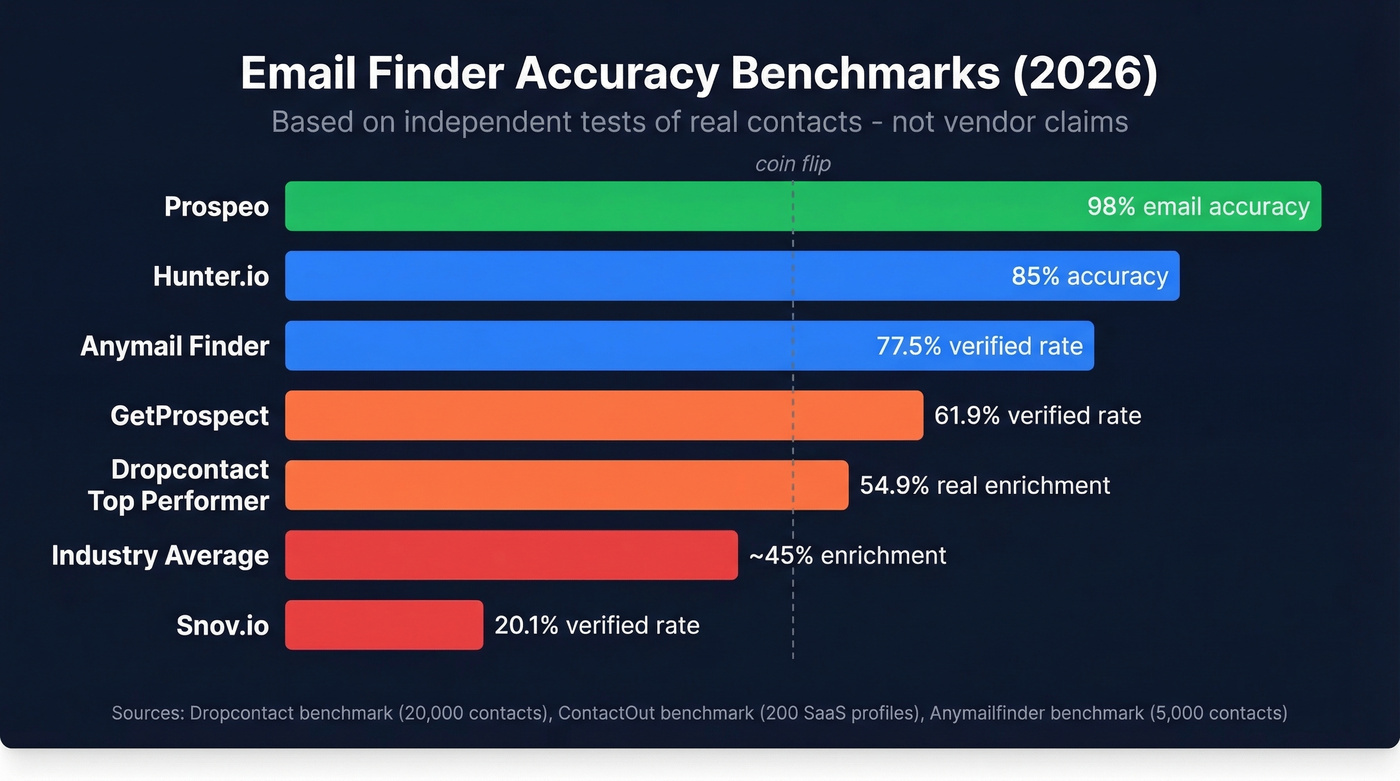
The Dropcontact benchmark tested 15 tools against 20,000 real contacts and actually sent emails to measure hard bounces - not just SMTP pings. The top performer hit 54.9% real enrichment rate. The rest ranged from 31% to 49%. Even the best tool couldn't find a valid email for nearly half the contacts.
The ContactOut benchmark took a different approach: 200 SaaS profiles, testing both find rate and accuracy. Top performers landed in the 82%-90% accuracy range, with Hunter at 85% and several others clustered nearby.
The distinction that matters is coverage vs. deliverability. Coverage measures how many contacts you can successfully match to an email. Accuracy measures how many of those emails actually deliver. A tool can have lower coverage on a specific dataset and still be the best choice for sending, because accuracy is what protects your domain and keeps campaigns alive (see email deliverability for the mechanics).

Let's be honest about what this means in practice. If your deal size is under five figures, you probably don't need the most expensive tool on the market. But you absolutely need the most accurate one. A single bounced email to a VP of Engineering costs you more than the $0.01 you saved by using a cheaper provider - it costs you the deal, and possibly your domain's reputation for weeks.
This is why multi-step verification matters more than raw database size. Catch-all handling, spam-trap removal, and honeypot filtering catch the edge cases that SMTP-only verification misses entirely. "Verified" should mean deliverable, not "the mailbox existed when we pinged it three weeks ago." (If you're troubleshooting, start with email bounce rate and spam trap removal.)
Pricing Comparison
| Tool | Free Tier | Entry Plan | Credits/Mo | ~Cost/Email | Notes |
|---|---|---|---|---|---|
| Prospeo | 75 emails/mo | ~$39/mo | Credit-based | ~$0.01 | No contract |
| Hunter | 50 credits/mo | $49/mo ($34 annual) | 2,000 | ~$0.025/credit | Unlimited users |
| Snov.io | Trial credits | $29.25/mo | 1,000 | ~$0.029 | Includes sequences |
| RocketReach | None | $80/user/mo | 125 lookups | ~$0.64 | Email only at base |
| Anymail Finder | 100 credits | $14/mo | Varies | Pay-per-valid | Unique model |
| GetProspect | 50 emails/mo | $49/mo | ~1,000 | ~$0.05-$0.10 | Mid-range |
| Apollo | Free tier | ~$49/user/mo | Credit-based | ~$0.03-$0.10 | Per-seat pricing |
| Mailmeteor | Free | Free | Limited | $0 | Basic only |
The cost-per-email column tells the real story. At Hunter's Starter plan, $49/mo for 2,000 credits works out to about $0.025 per credit if every search returns a result. But benchmarks show that coverage varies widely by dataset, so your real cost per valid email can climb fast.
RocketReach is the outlier. At $80/mo for 125 lookups, you're paying $0.64 per lookup before accounting for coverage. The accuracy is strong, but the economics only work for low-volume, high-value targeting where each contact is worth hundreds of dollars.
Compliance: GDPR, CAN-SPAM, CCPA
Finding corporate email addresses is legal in most jurisdictions. Sending to them without following the rules isn't.
GDPR (EU/EEA): Email addresses are personal data. For B2B cold outreach, "legitimate interest" is your legal basis - but you need to document it and honor opt-outs immediately. Cumulative fines have hit ~EUR 5.88B across 2,245 enforcement actions, so this isn't theoretical risk.
CAN-SPAM (US): Penalties run up to $51,744 per email. Requirements are straightforward: no deceptive headers or subjects, a working unsubscribe mechanism, and a valid physical mailing address in every email.
CCPA/CPRA (California): Applies to companies with $25M+ revenue or processing data on 100K+ consumers. Penalties are $2,500 per unintentional violation, $7,500 per intentional one.
Your practical checklist:
- Include a one-click unsubscribe in every outbound email
- Add your physical business address to your email footer
- Document your legitimate interest basis for EU prospects
- Honor opt-out requests promptly
- Verify emails before sending - bounces to nonexistent addresses can trigger spam filters and compliance scrutiny
FAQ
Is it legal to find someone's corporate email address?
Yes, in most B2B jurisdictions. Finding the email isn't regulated - sending to it is. Comply with GDPR, CAN-SPAM, and CCPA by including an unsubscribe link, a physical address, and honoring opt-outs within 10 days.
What's the difference between find rate and accuracy?
Find rate measures how many emails a tool returns from your input list. Accuracy measures how many actually deliver without bouncing. A tool with 90% find rate but 70% accuracy will damage your domain faster than one with 60% find rate and 98% accuracy. Always prioritize deliverability.
How many email finder tools should I use?
Start with one accurate tool. If coverage falls below 50%, add a second in a waterfall setup - the second provider typically catches 20-30% of what the first missed. Two tools is the sweet spot for most outbound teams.
Can I find corporate email addresses for free?
Google search operators, email pattern guessing, and company websites work for small volumes at zero cost. Hunter gives 50 free credits/month, Prospeo offers 75 free emails/month, and Mailmeteor requires no sign-up. These methods handle 5-20 lookups well but break down at scale.
Why do "verified" emails still bounce?
Most tools verify via SMTP ping, which checks if a mailbox exists at that moment but can't detect catch-all domains, spam traps, or honeypots. Multi-step verification that handles these edge cases is what separates 98% deliverability from 80%.