

How to Find an Email Address by Name
Most email finder tools claim 95-97% accuracy. Independent benchmarks tell a different story - the best tools top out around 80%, and the worst deliver under 21% valid emails from the same dataset. That gap is the difference between a pipeline-building outbound campaign and a domain reputation disaster.
We've tested most of these tools side by side. The honest truth: no single method to find an email address by name gets you everything. The fastest path from a name to a verified inbox combines manual methods, pattern knowledge, and the right tool for your volume.
What You Need (Quick Version)
Looking up 1-10 emails? Use the free manual methods below. Google operators and pattern guessing will get you there without spending a dime.
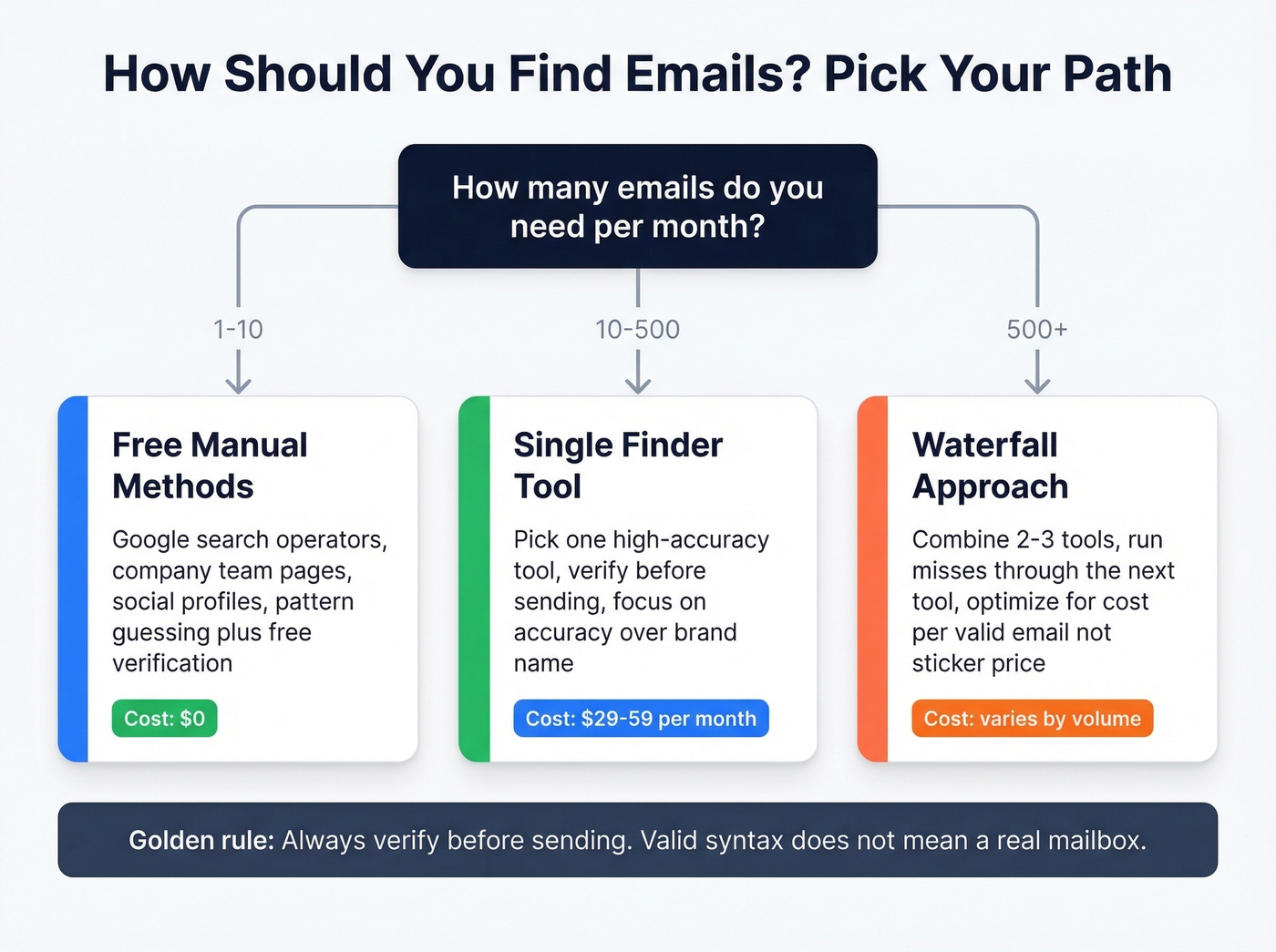
Need 10-500 emails per month? A dedicated finder tool pays for itself immediately. Accuracy and verification quality should drive your choice - not brand recognition.
Scaling past 500 per month? Run a waterfall approach combining two or three tools. At this scale, cost-per-valid-email matters more than sticker price.
Free Methods That Actually Work
Google Search Operators
Google is surprisingly effective when you know the right syntax:
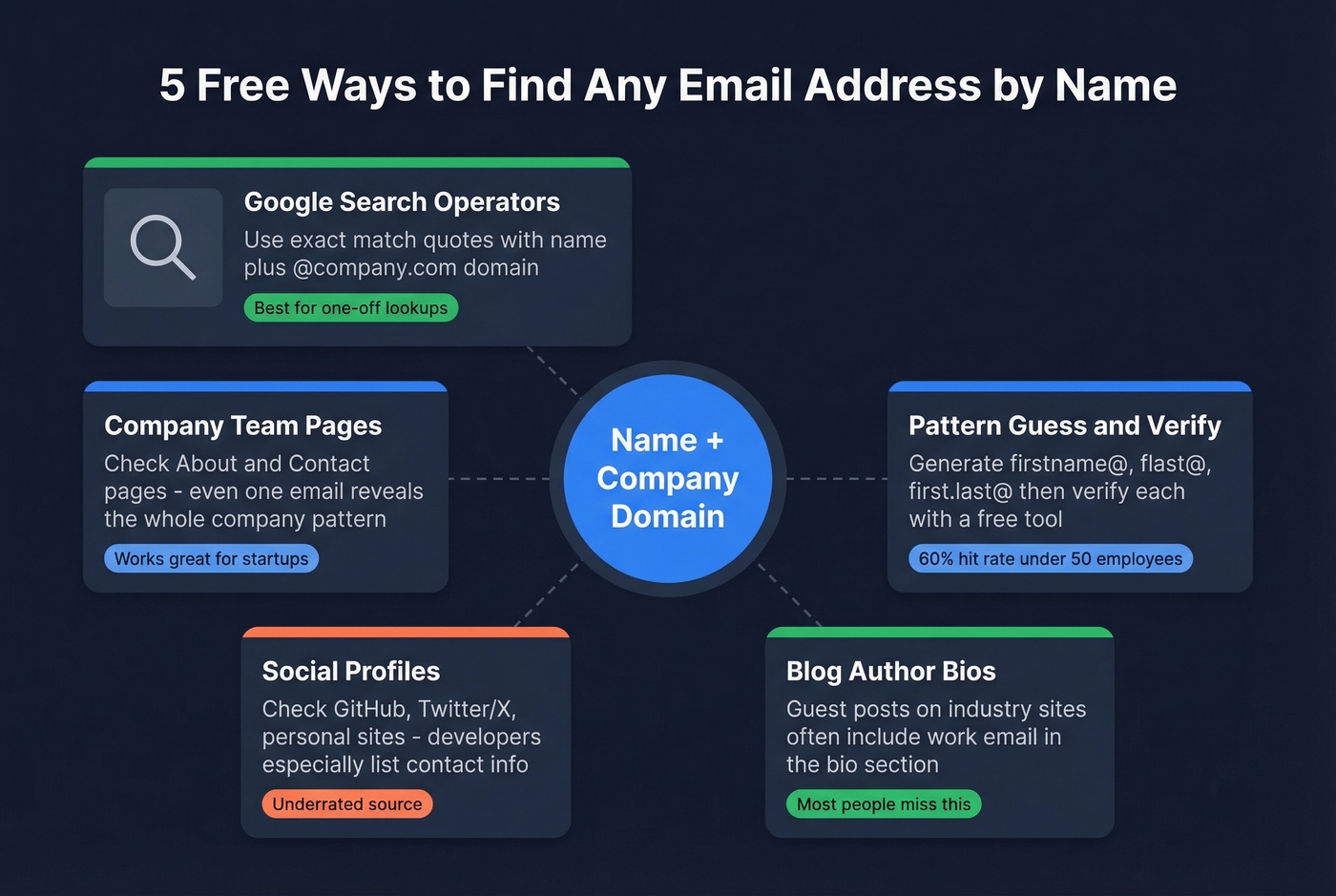
"jane smith" "@company.com"- searches for the name alongside the company's email domain"jane.smith@" site:company.com- looks for the email pattern published anywhere on the company's site"jane smith" email OR contact site:linkedin.com- sometimes surfaces emails listed in public profiles or shared documents
The key is using quotes to force exact-match results. Without them, Google returns too much noise. Combine the person's name with the company domain in quotes, and you'll often find the email published in a press release, conference speaker bio, or indexed PDF.
Company Contact and Team Pages
Many companies list team emails directly on their About, Team, or Contact pages - especially startups and mid-market firms under 200 employees. Even if the specific person isn't listed, finding any employee's email reveals the company's format. If you see jsmith@company.com for one person, the VP you're targeting almost certainly follows the same flast@ pattern.
Social Profiles and Author Bios
Professional profiles on Twitter/X, GitHub, and personal websites often include email addresses. Developers in particular tend to list contact info on GitHub profiles. For executives, check personal sites or portfolios - many include a contact email in the footer.
Here's one that's underrated: blog author bios. If your target has written a guest post on an industry publication, the author bio frequently includes a work email. Search "jane smith" author bio or check the company blog directly.
Guess the Pattern and Verify
If the methods above come up empty, guess the format. You only need the person's name and the company domain. Generate permutations like jane@company.com, jsmith@company.com, jane.smith@company.com, and then verify each one using a free email verification tool.
This is where pattern data becomes your edge.
The Email Pattern Cheat Sheet
| Company Size | Top Format | Second | Third |
|---|---|---|---|
| 1-10 employees | firstname@ 71% |
flast@ 13% |
first.last@ 10% |
| 11-50 | firstname@ 42% |
flast@ 27% |
first.last@ 23% |
| 51-200 | flast@ 42% |
first.last@ 30% |
firstname@ 17% |
| 1,001-5,000 | first.last@ 48% |
flast@ 35% |
firstname@ 4% |
| 10,001+ | first.last@ 56% |
flast@ 22% |
firstname@ 7% |
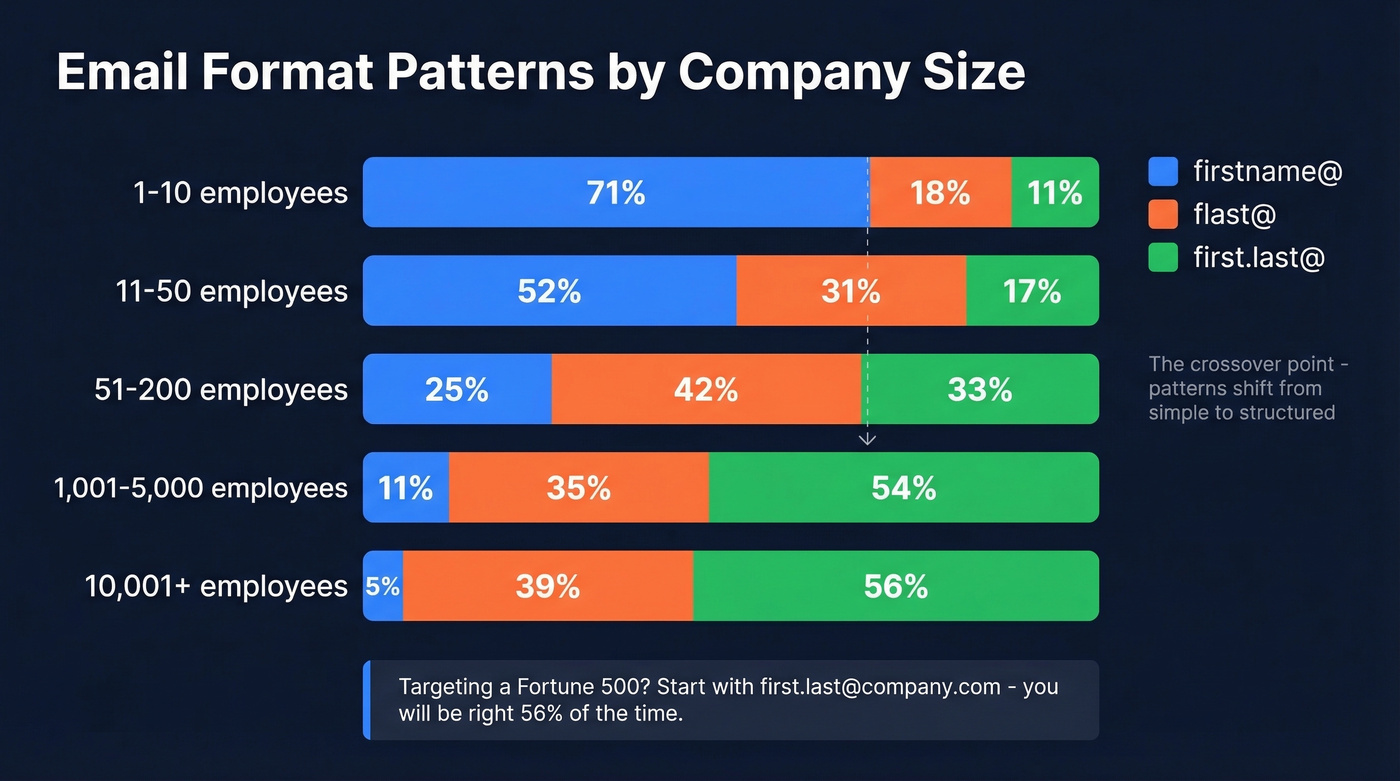
The crossover happens at the 51-200 employee mark. Below that, firstname@ dominates - small companies keep it simple. Above it, flast@ takes over in the mid-market, and first.last@ becomes the clear winner at enterprise scale.
In our experience, the pattern-guessing method works about 60% of the time for companies under 50 employees. Targeting a Fortune 500? Start with jane.smith@company.com and you'll be right more often than not. This alone saves you from wasting verification credits on unlikely permutations.
Once you've guessed a format, run it through a verification tool before sending. Valid syntax doesn't mean a real mailbox.
How Accurate Are Email Finders?
Look - the accuracy numbers on vendor websites are marketing, not benchmarks. Two independent tests paint a more honest picture.
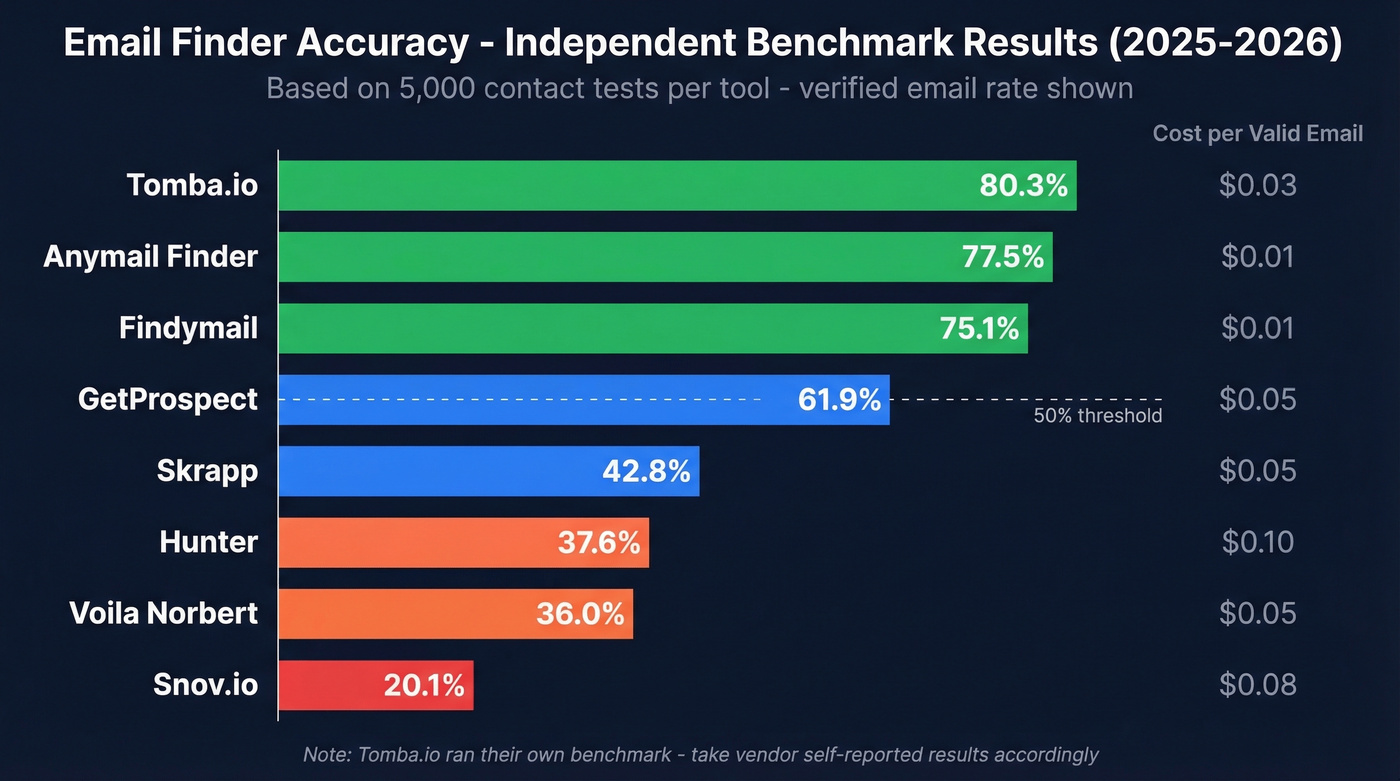
An Anymail Finder benchmark tested 5,000 fresh contacts (re-run September 30, 2025), and a Tomba.io benchmark ran 5,000 identical searches per tool in February 2026, splitting evenly between domain-based and company-name-based lookups.
| Tool | Verified Rate | Billing Model | Free Tier | ~Cost/Valid Email |
|---|---|---|---|---|
| Tomba.io* | 80.3% | Credit-based | 25/month | ~$0.03 |
| Anymail Finder | 77.5% | Pay per verified | None listed | ~$0.01 |
| Findymail | 75.1% | Pay per verified | Limited | ~$0.01 |
| GetProspect | 61.9% | Credit-based | 50/month | ~$0.05 |
| Skrapp | 42.8% | Credit-based | - | ~$0.05 |
| Hunter | 37.6% | Credit-based | 50/month | ~$0.10 |
| Voila Norbert | 36.0% | Credit-based | 50 free searches | ~$0.05 |
| Snov.io | 20.1% | Credit-based | 50/month | ~$0.08 |
*Tomba.io ran this benchmark and reported their own result at 80.3% - take vendor self-benchmarks accordingly.
One critical finding: tools that handle company-name-only lookups without a domain showed dramatically lower accuracy than domain-based searches. If your prospect lists come without clean domains, tool choice matters even more.
A note on these benchmarks and coverage vs. accuracy: These tests measure "how many emails can you find from a cold list of names" - essentially a coverage race. That's useful, but it's a different question from "how many of the emails you return are actually valid." A tool that returns fewer results but verifies each one through a rigorous pipeline will produce lower bounce rates and better deliverability than a tool that guesses aggressively and hopes for the best.

The benchmarks above show most email finders top out at 80% accuracy - meaning 1 in 5 emails bounce. Prospeo's proprietary 5-step verification delivers 98% accuracy across 143M+ verified emails, refreshed every 7 days. At $0.01 per email, one bounced campaign costs more than a month of verified data.
Find any email by name and domain - pay only for verified results.
Best Tools to Find Email Addresses by Name

Prospeo
Use this if: Accuracy is non-negotiable and you need emails that won't bounce. Prospeo's email finder runs on proprietary infrastructure - no third-party email providers - which is why its 98% accuracy holds up in practice. The 5-step verification process handles catch-all domains, strips spam traps, and filters honeypots before returning a result. The database covers 143M+ verified emails across 300M+ professional profiles, refreshed every 7 days. Used by 15,000+ companies, with a Chrome extension that has 40,000+ users pulling verified emails from any website or professional profile in one click.
Real results back this up: Snyk's team of 50 AEs cut their bounce rate from 35-40% down to under 5% and saw AE-sourced pipeline jump 180% after switching. Stack Optimize built to $1M ARR while maintaining 94%+ deliverability and zero domain flags across all clients.
Pricing is dead simple: roughly $0.01 per email, free tier gives you 75 emails per month, no credit card required, no contracts.
Skip this if: You only have a company name without a domain and need the tool to resolve it for you. Prospeo works best when you've got a name plus a domain or URL.

Hunter.io
Use this if: You want the most recognized name in the space and need a strong domain search feature. Hunter lets you search by domain to see all known email patterns and addresses at a company - useful for mapping an org before targeting specific people. The Chrome extension is polished and widely adopted.
Skip this if: Raw accuracy is your priority. Hunter's 37.6% verified rate in benchmarks is below the median. Plans start around $39-$49/month, and the free plan includes 50-100 requests per month. The consensus on r/sales and cold email communities is consistent - Hunter is the tool everyone's heard of, but practitioners who've tested alternatives rarely go back. The domain search feature partially compensates, but for individual email lookups, the numbers speak for themselves.
If you're comparing options, see our breakdown of Hunter alternatives.
Anymail Finder
Use this if: You want top benchmark accuracy and a pay-only-for-verified billing model. Anymail Finder scored 77.5% verified rate, and you're only charged when they return a verified email. Plans start at $14/month, with $49/month for 1,000 verified emails. Their catch-all handling is more aggressive than most - they attempt deeper determination rather than just flagging "risky."
Skip this if: You need a full-featured platform with CRM integrations, sequences, or enrichment beyond email. Anymail Finder does one thing well.
Findymail
Findymail earned the #2 spot in benchmarks at 75.1% - strong performance that deserves attention. It uses a pay-per-verified model similar to Anymail Finder, starting around $49/month for 1,000 credits. Solid choice for teams that want high accuracy without paying for unverified results.
GetProspect
At 61.9% accuracy, GetProspect sits solidly mid-pack. It offers basic data enrichment beyond email and a 50-email free tier, priced at $49/month for 1,000 emails. Nothing stands out as best-in-class, but nothing is broken either. A reasonable pick for teams that want a single tool for prospecting and light enrichment without needing top-tier accuracy.
Snov.io
Snov.io's 20.1% benchmark rate is the lowest in both tests, and the platform's attempt to be everything - finder, verifier, outreach tool, CRM - means nothing gets the deep investment it needs. At $39/month for 1,000 credits, the sticker price looks competitive until you calculate cost per valid email. Community sentiment in cold email forums is consistently negative, with practitioners pointing to high bounce rates and stale data. If you're already locked into Snov.io for outreach sequences, verify every email through a separate tool before sending.
Skrapp.io
Skrapp scored 42.8% in benchmarks. At $49/month for 1,000 emails, it's average pricing for below-average accuracy. Hard to recommend over higher-performing alternatives at the same price point.
Voila Norbert
Voila Norbert hit 36.0% verified - similar territory to Hunter but without the domain search feature that makes Hunter useful. $49/month for 1,000 leads. Catch-all handling is a known limitation, meaning risky emails often get flagged without resolution.
Apollo.io
Apollo's $59/month gets you a full GTM platform - database, sequences, dialer, analytics. The email finder is part of the package, not the focus. Practitioners on Reddit consistently report 60-70% valid emails on exports, and the data is largely user-contributed. Use Apollo for workflow, but verify everything separately.

Why Verification Matters More Than Finding
Finding an email and verifying it are two different operations, and most teams conflate them at their own expense.
An email finder returns an address. A verifier confirms the mailbox exists, accepts mail, and won't damage your sender reputation. The industry threshold is clear: keep total bounces below 2%, and target hard bounces under 1%. One bad send to a list with 5%+ bounces can trigger spam filters that take weeks to recover from.
Data decay makes this worse. At least 23% of any email list degrades within a year, and 37.3% of email addresses change annually. That list you built six months ago? A quarter of it is already stale.
Catch-all domains add another layer of complexity. These servers accept mail to any address at the domain, whether the mailbox exists or not. Basic verification tools can't confirm if jane@catchall-company.com is real - the server says "yes" to everything. Emails to nonexistent catch-all addresses often soft-bounce or land in spam.
Let's be honest: if your deals typically close under five figures, you probably don't need the most expensive email finder on the market. But you absolutely need a good verifier. A cheap finder paired with rigorous verification will outperform an expensive finder with no verification every single time. That's where your budget should go.
If you want to go deeper, start with email bounce rate benchmarks and an email deliverability checklist.
Is It Legal to Look Up Someone's Email?
Finding and emailing a business contact is legal in most jurisdictions, but the rules have teeth. GDPR enforcement alone has resulted in EUR 5.88 billion in fines across 2,245 cases since 2018, with email violations averaging EUR 450K-800K per case. You don't need to be paranoid, but you do need a process.
Legal basis under GDPR: You need either explicit consent or legitimate interest. For B2B cold email, legitimate interest works - but only if the email is relevant to the recipient's professional role.
Transparency: Identify yourself and your purpose in the first email. No deception.
Opt-out mechanism: Every email must include a clear, functional unsubscribe link under both GDPR and CAN-SPAM.
Data minimization: Collect only what you need. Scraping entire org charts "just in case" creates unnecessary compliance exposure.
List hygiene: Use reputable data sources and regularly clean your lists. Sending to outdated addresses isn't just a deliverability problem - it's a compliance risk.
For more on compliance, see Is It Illegal to Buy Email Lists?.
The Complete Workflow
The end-to-end process from name to sent email looks like this.
Step 1: Find the email. Start with manual methods for one-off lookups. For anything at scale, use a dedicated finder - paste a name and domain, get a verified email back. For bulk operations, upload a CSV and let the system process in batch.
Step 2: Verify separately. Even if your finder includes verification, we consistently recommend running at least two verifiers for high-stakes sends. Belt and suspenders. One bad campaign can torch a domain you've spent months warming.
Step 3: Send through a dedicated platform. Don't send cold email from your primary domain. Tools like Instantly at around $30/month or Smartlead handle warmup, inbox rotation, and deliverability monitoring. Pair them with verified data and you've got a system that scales without burning domains.
If you're building a repeatable outbound motion, combine this with proven sales prospecting techniques and a solid B2B cold email sequence.
For teams processing 500+ contacts per month, consider a waterfall approach: run your list through two or three finders sequentially, deduplicating and verifying at each step. This pushes overall coverage toward 85-90% valid emails - significantly better than any single tool achieves alone.
Pattern guessing works 60% of the time. For the other 40%, you need infrastructure built for accuracy. Prospeo searches 300M+ profiles with catch-all handling, spam-trap removal, and honeypot filtering - so the email you send actually reaches a real inbox.
Stop burning your domain reputation on unverified guesses.
FAQ
Can I find an email address by name alone, without a company?
Most email finder tools require a company name or domain alongside the person's name - name-only searches are unreliable across every tool we've tested. Personal email lookup through Gmail or Outlook is a different category with stronger privacy concerns and far less reliable tooling. If you need a personal address, checking social profiles or personal websites manually is your best bet - but tread carefully on compliance.
What's a catch-all domain and why does it matter?
A catch-all domain accepts mail sent to any address at that domain, whether the mailbox exists or not. Basic verification tools can't distinguish real inboxes from fake ones because the server says "yes" to everything. Emails to nonexistent catch-all addresses often soft-bounce or land in spam. Tools with advanced catch-all handling - like Prospeo's 5-step verification pipeline - attempt deeper determination to reduce this risk.
How many free email lookups can I get per month?
Free tiers range from 25 to 75 emails per month among top-accuracy finders. Prospeo offers 75 free emails with full verification, Hunter gives 50 searches, and Voila Norbert provides 50. For light prospecting, a free tier with high verification rates delivers more usable results than a larger allowance with lower accuracy.
What's the best approach for bulk email lookups?
Upload a CSV with names and company domains to a dedicated finder tool. A single tool typically covers 50-70% of your list, so running a waterfall across two or three tools maximizes coverage. Always verify the full output before sending - at scale you'll inevitably hit catch-all domains and stale records that need filtering.
How often should I re-verify my email list?
Re-verify quarterly at minimum. With 23% annual list degradation and 37.3% of addresses changing every year, a six-month-old list is dangerously stale. Run a fresh verification pass before every major campaign - the cost is trivial compared to the sender reputation damage from bounced emails.