

How to Find Any Email Address From a Website
You've got 2,000 domains in a spreadsheet and your outreach campaign launches Friday. The contact pages are useless, the generic info@ addresses go nowhere, and you need real people's verified emails - fast. Whether you're hunting down one prospect or thousands, here's what actually works in 2026.
What You Need (Quick Version)
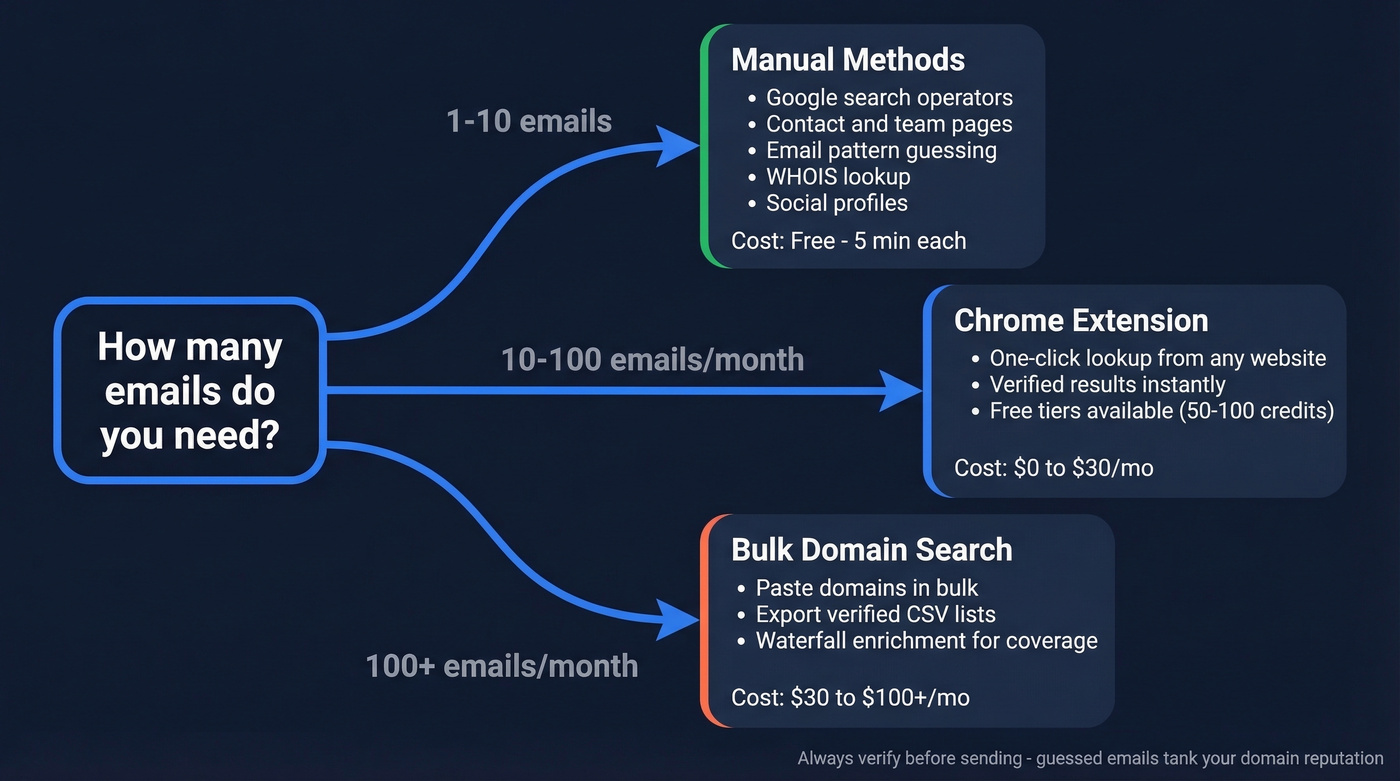
Your approach depends on scale:
- One-off lookup: Manual methods - search operators, contact pages, pattern guessing. Free, takes five minutes.
- Regular prospecting: A Chrome extension that pulls verified emails from any company website in one click. A free tier with 75 emails/month gets you started.
- Bulk list building: Paste domains, get verified emails, export to CSV. A reliable tool like Prospeo or Hunter handles this well.
Free Methods That Actually Work
Before you spend a dollar, these manual tactics can surface emails - especially for one-off lookups or small batches. Knowing how to pull contact details from a site manually is a skill every prospector should have.
Search Operators
Google and DuckDuckGo are underrated email-finding tools. DuckDuckGo handles "@" searches better than Google, so try both.
site:companydomain.com + "email" + "contact" + "full name"
"full name" + "@companydomain.com"
The first finds pages where someone's email appears alongside their name. The second searches for the literal email string anywhere on the indexed web - conference speaker bios, PDF directories, and old press releases are goldmines. We've pulled dozens of hard-to-find addresses this way before ever opening a paid tool.
If you want a deeper list of operators, see Search Operators.
Contact and Team Pages
This sounds obvious, but most people skip it. Go to the company's About, Team, or Contact page. Smaller companies often list individual emails right there. Even if they don't, you'll get naming conventions - if the CEO is listed as jsmith@company.com, you know the format for everyone else.
Email Pattern Guessing
Most companies use one of a handful of formats:
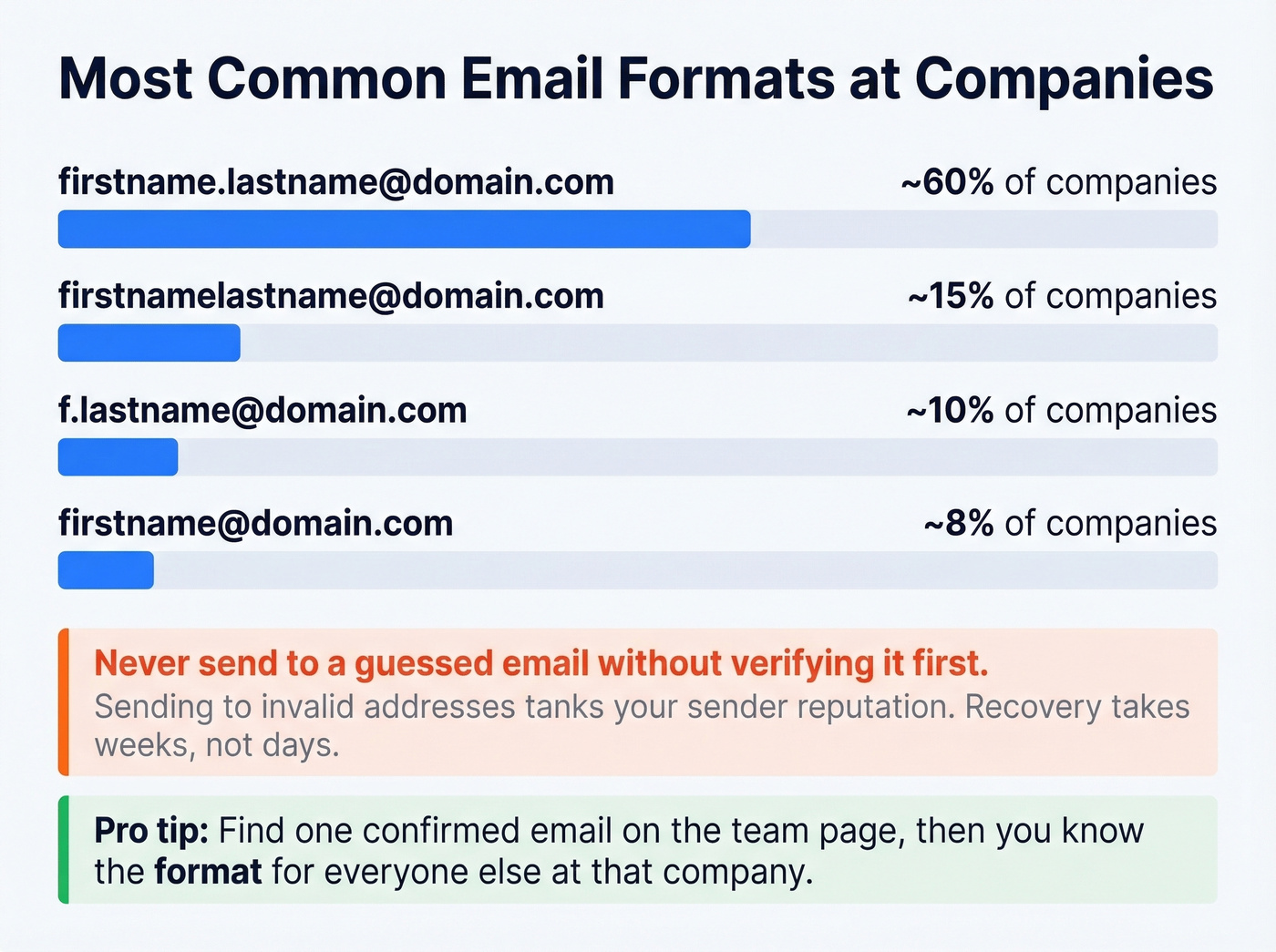
- firstname.lastname@domain.com (the most common)
- firstnamelastname@domain.com
- f.lastname@domain.com
- firstname@domain.com
Once you know the company's format from one confirmed email, you can guess the rest. But here's the critical part: never send to a guessed email without verifying it first. Sending to invalid addresses tanks your domain reputation, and recovering from that takes weeks. (If you're building this into a workflow, email verification matters more than most people think.)
WHOIS Lookup
For small business websites, a WHOIS lookup sometimes reveals the domain registrant's email. Most registrars now offer privacy protection by default, but it's still worth a 30-second check.
Social Profiles
Check X bios and GitHub profiles. Developers especially tend to list their work email on GitHub. Hit-or-miss, but when it hits, you get a verified address without any tools.
Best Website Email Finder Tools
Manual methods work for a handful of lookups. Once you're past 20-30 searches a day, you need a dedicated tool. Here's what's worth your time.
Prospeo
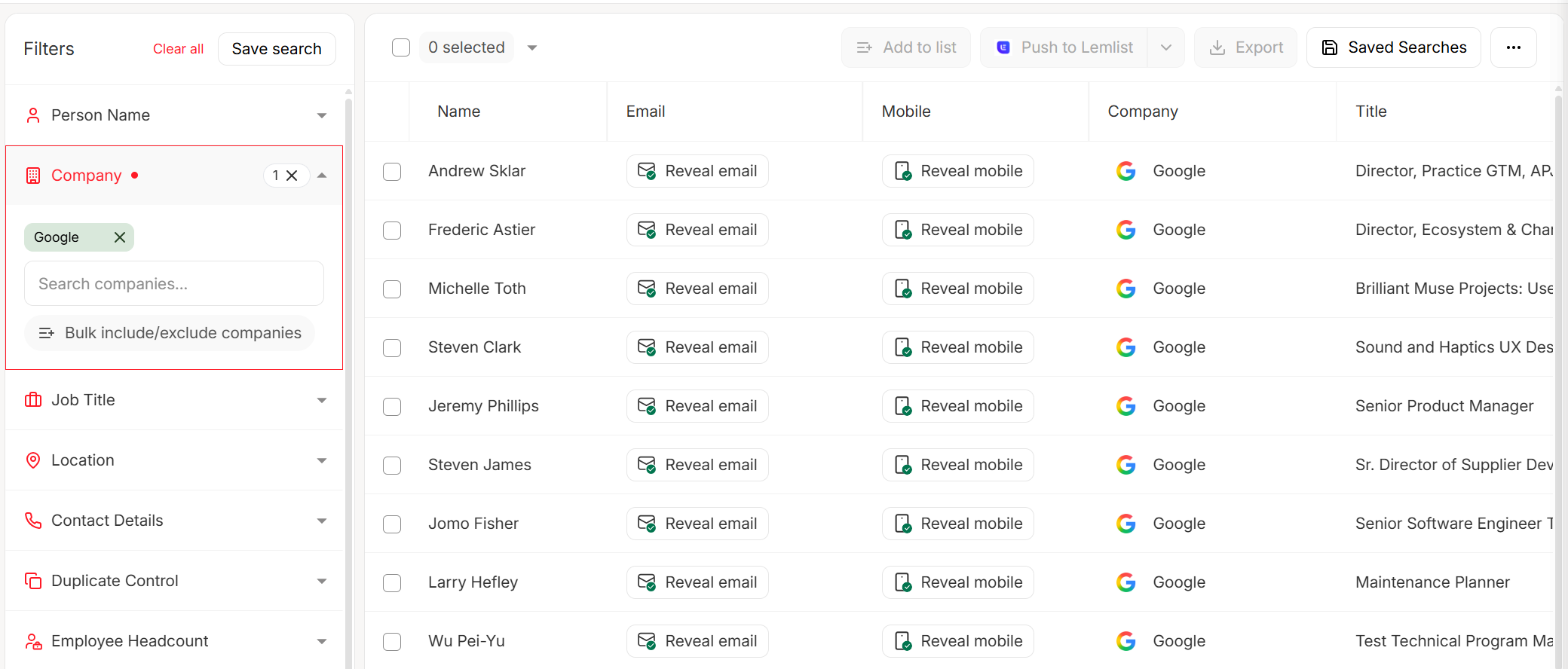
Use this if you care about emails that actually deliver. Prospeo's 98% verified email accuracy comes from proprietary email-finding infrastructure - it doesn't rely on third-party providers. That's also why data stays fresh on a 7-day refresh cycle, while most competitors refresh around every 6 weeks.
The Chrome extension (40,000+ users) lets you pull verified emails from any company website in one click. The domain search returns verified contacts with 50+ data points per contact. At roughly $0.01 per email, it's the cheapest per-lookup cost in this list.
The free tier gives you 75 emails plus 100 Chrome extension credits per month - enough to test whether the accuracy holds up for your ICP before committing. Meritt, an outbound agency, switched to Prospeo and saw bounce rates drop from 35% to under 4%. That's not a marginal improvement; that's the difference between a campaign that works and one that gets your domain blacklisted.
Prospeo focuses purely on data quality - pair it with Lemlist, Instantly, or Smartlead for sequencing. (If you're tightening deliverability, start with an email deliverability baseline.)
Hunter
Hunter is the name everyone knows. It's been around since 2015, and the brand recognition is deserved - the verification engine is solid. Hunter's email finder returns results with confidence scores, and the domain search shows all publicly available emails for a company.
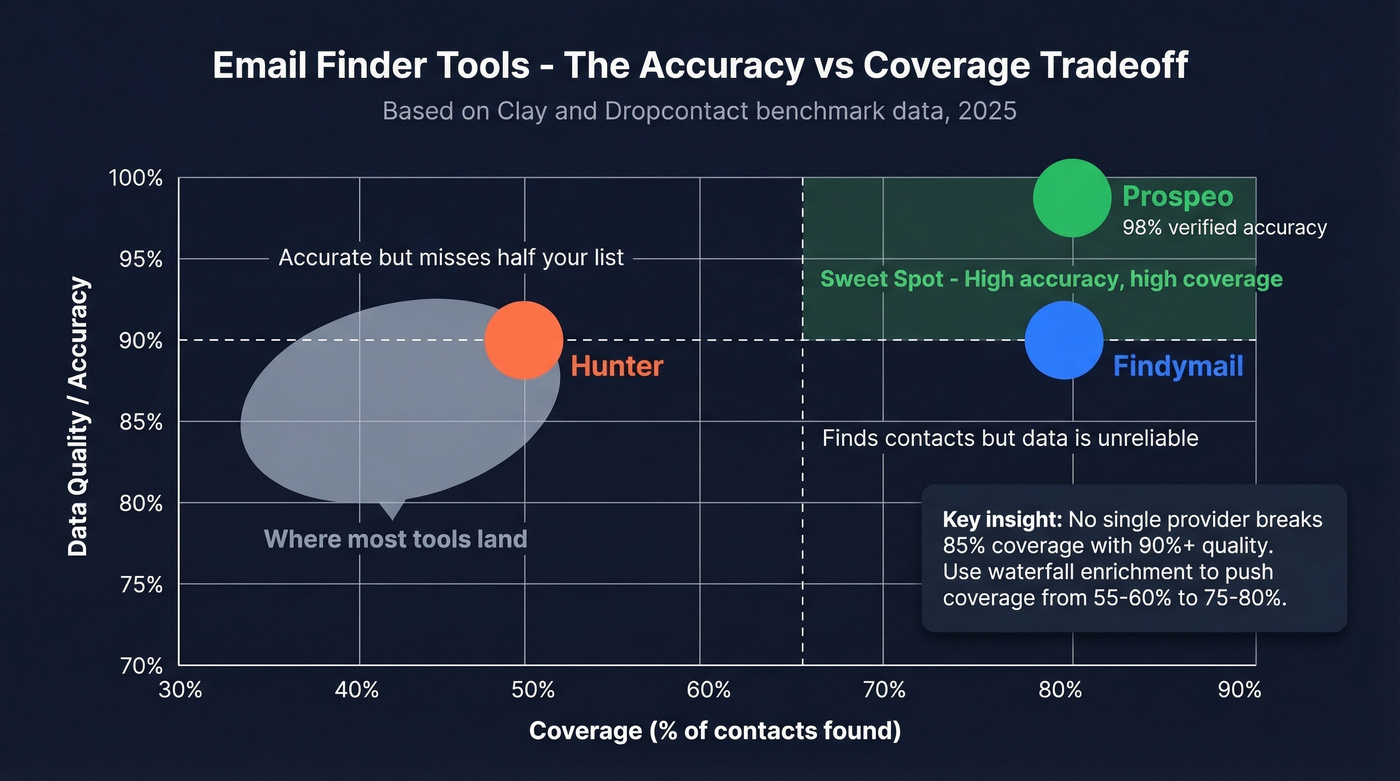
The tradeoff is coverage. In Clay's benchmark data, Hunter scored 89.56% data quality but only 47.62% coverage. It's accurate when it finds something - but it doesn't find something nearly half the time. Practitioners on r/agency echo this: Hunter works better as a verification layer than a primary source.
Free plan gives you 50 credits/month. Starter runs $49/mo ($34/mo billed yearly) for 2,000 credits. Credits are shared across finder, verifier, and domain search, so they go faster than you'd expect.
Snov.io
Budget-friendly with built-in outreach automation. Starter plan runs $29.25/mo (annual) for 1,000 credits and 5,000 recipients, plus 3 mailbox warm-ups and unlimited team seats. One credit per prospect/email search, one per verification - straightforward.
Practitioners on r/agency praise it specifically for international leads. If you're prospecting outside North America, Snov.io's coverage holds up better than US-centric tools. Skip it if you need top-tier accuracy on US data, though - in our experience, bounce rates run higher than Prospeo or Hunter for domestic lists.
Skrapp
The fairest credit policy in the space. You're only charged for "Valid" or "Catch-all" results - invalid and unknown emails don't cost you a credit. Credits also roll over month-to-month, even if you cancel. That's genuinely rare.
Free plan gives you 100 credits/month. Professional starts at $30/mo for 1,000 credits. Skrapp's email finder is solid for straightforward domain-to-email lookups, though the database is smaller than the bigger players.
Anymail Finder and GetProspect
Anymail Finder uses a pay-only-for-valid-emails model starting at $14/mo, and you get 100 free credits to test it. No frills, just email finding. Good for freelancers and solo operators who don't need a full platform.
GetProspect offers 50 free emails/month from a 200M+ database, with paid plans at $49/mo for 1,000 valid emails plus 2,000 verifications. Decent for basic lookups, though accuracy benchmarks put it behind the top-tier tools.

Every method above works better with verified data behind it. Prospeo's Chrome extension pulls verified emails from any company website in one click - 98% accuracy, $0.01 per email, refreshed every 7 days. Start with 75 free emails/month and see why teams using Prospeo cut bounce rates from 35% to under 4%.
Stop guessing email patterns. Start pulling verified ones in one click.
Pricing Comparison
| Tool | Free Tier | Starter Price | Credits | ~Cost/Email | Best For |
|---|---|---|---|---|---|
| Hunter | 50 credits/mo | $49/mo ($34 billed yearly) | 2,000/mo | ~$0.02 | Brand trust |
| Snov.io | 50 free searches/mo | $29.25/mo (annual) | 1,000/mo | ~$0.03 | Budget + outreach |
| Skrapp | 100 credits/mo | $30/mo | 1,000/mo | ~$0.03 | Fair credits |
| Anymail | 100 free credits | $14/mo | Varies | ~$0.03 | Solo operators |
| GetProspect | 50 emails/mo | $49/mo | 1,000/mo | ~$0.05 | Basic lookups |
| Apollo | Free tier available | ~$49/mo/user | Per-seat | ~$0.05+ | All-in-one |
Apollo's included because it comes up in every conversation, but note the per-seat pricing - it gets expensive fast once you're past 2-3 reps. As one r/agency poster put it: "data feels bad sometimes... lots of bounces on older contacts." (If you're comparing options, see our breakdown of Hunter alternatives.)

You've got the domains. Now you need the emails. Prospeo's domain search returns verified contacts with 50+ data points per person - at roughly $0.01 per email. That's 90% cheaper than ZoomInfo with higher accuracy. No contracts, no sales calls, cancel anytime.
Turn your domain list into a verified contact list before Friday.
How Accurate Are Email Finders?
Here's the thing: most "accuracy" claims are meaningless because tools define accuracy differently.
Accuracy means the email address exists and won't hard bounce. Deliverability means it'll actually land in an inbox, not spam. Correctness means it belongs to the right person - not a generic alias or a former employee. Most tools only measure the first one and call it a day. (If you're diagnosing issues, start with email bounce rate and work backward.)
A Dropcontact benchmark tested 15 email finder tools on 20,000 real contacts with messy, real-world data - swapped names, inconsistent capitalization, approximate company names. They actually sent emails to measure hard bounces. The top effective enrichment rate was 54.9%. Most tools landed between 30-45%. Even the best tool missed nearly half the contacts.

Clay's dataset tells a complementary story. Findymail scored 90.05% quality with 83.73% coverage. Hunter hit 89.56% quality but only 47.62% coverage. In our testing, the accuracy-coverage tradeoff is real - no single provider breaks 85% coverage with 90%+ quality from one source alone. (For a broader view, compare email search tools and data enrichment services.)
Let's be honest: if your average deal size is under $10k, you probably don't need the most expensive data tool on the market. A $30/mo finder with 90%+ accuracy will outperform a $500/mo platform you're only using for email lookups.
When Email Finders Fail
No tool works 100% of the time. Knowing when they fail saves you from wasting credits.
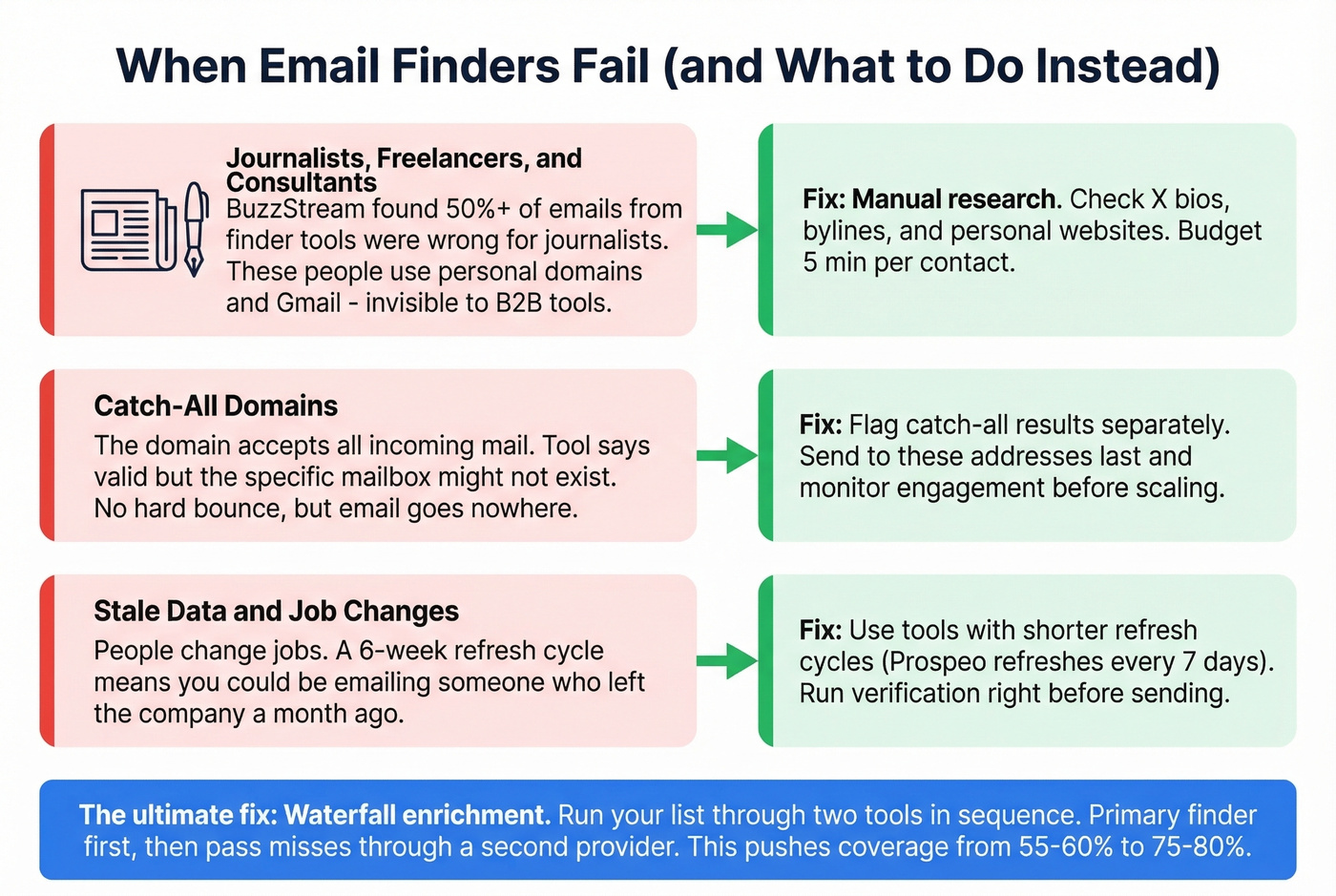
A BuzzStream study found that more than 50% of emails found by finder tools were incorrect for journalists. These tools are built for B2B corporate domains - freelancers, journalists, and consultants using personal domains or Gmail addresses are largely invisible to them. If your target list is heavy on media contacts, expect to supplement with manual research.
Catch-all domains are another blind spot. When a domain accepts all incoming mail regardless of the specific address, the tool reports "valid" - but it can't confirm whether that specific mailbox exists. You won't get a hard bounce, but the email might go nowhere.
The fix is waterfall enrichment: run your list through two tools in sequence. Use your primary finder first, then pass the misses through a second provider. We've seen this approach push coverage from 55-60% to 75-80% without sacrificing accuracy. Layering a verification-first tool on top catches stale records before they damage your sender reputation. (If you're scaling outbound, this pairs well with sales prospecting techniques and a clean lead generation workflow.)
Quick Compliance Checklist
Finding emails is legal. Spamming people isn't. Here's the minimum:
- GDPR legitimate interest (Article 6(1)(f)) covers B2B prospecting in most cases.
- Always include a clear opt-out mechanism. CAN-SPAM requires it, and GDPR expects it. No exceptions.
- Document your collection method. If someone asks how you got their email, you need an answer. "Email finder domain search on March 15" is a valid record.
- Maintain a suppression list. When someone opts out, they stay out - across all campaigns, forever.
- Don't store more data than you need. GDPR enforcement has hit billions in fines, with thousands of individual penalties since 2018.
FAQ
Can email finder tools locate personal Gmail or Yahoo addresses?
No. These tools are built for B2B professional emails tied to company domains. Personal addresses on Gmail, Yahoo, or Outlook.com aren't indexed in business email databases. For personal addresses, try manual methods like checking social profiles or reaching out through direct channels.
Is it legal to find someone's email from their website?
Yes, provided you follow GDPR and CAN-SPAM rules. B2B prospecting typically falls under GDPR's legitimate interest basis (Article 6(1)(f)). You must include an opt-out link in every email, honor unsubscribes immediately, and document how you collected each address.
What's the most accurate free email finder in 2026?
Prospeo's free tier delivers 75 verified emails/month at 98% accuracy - the highest among tools with a free plan. Hunter offers 50 credits/month and is another solid option, though Clay's benchmarks show its coverage drops to 47.62%. Every bounce chips away at sender reputation, so accuracy compounds fast.
How do I find email addresses from a website at scale?
Use a domain search tool that supports bulk uploads. Paste your list of domains and the tool returns verified contacts for each. For lists over 1,000 domains, waterfall enrichment through two providers maximizes coverage to 75-80% while keeping bounce rates low.
What's the difference between website email finders and profile scrapers?
Website-based finders search company domains and public web sources to match contacts. Profile scrapers pull data from social platforms instead. The key difference is compliance risk - website-based tools typically carry lower legal exposure since they rely on publicly indexed information rather than scraping platforms with strict terms of service.