


FindThatLead vs GMass: They Don't Actually Compete
FindThatLead finds leads. GMass sends emails. The FindThatLead vs GMass comparison keeps coming up, but these tools barely overlap - comparing them is like comparing a fishing rod to a frying pan. Both involve fish. Different jobs entirely.
If you're trying to decide between them, you're probably asking the wrong question. Here's the 30-second verdict:
- Need to find leads? FindThatLead gives you a built-in database and email finder, but watch the fair-use caps on that "unlimited" plan.
- Need to send cold emails from Gmail? GMass is the best Gmail-native mail merge tool out there, though you're still bound by Gmail's sending limits (and email velocity still matters).
- Need accurate data and high-volume sending? Skip both. Pair a dedicated data provider with a purpose-built sender like Instantly or Smartlead.
What Each Tool Actually Does
FindThatLead is a lead generation platform. You search for prospects by role, company, or location, pull their emails and phone numbers, verify emails, and send basic cold email sequences from one dashboard. It runs on a credit system where each search costs one credit, though repeated searches for the same lead within a month don't cost extra. If you're drawn to their "unlimited" positioning, know that FindThatLead's sender is constrained by fair-use limits including a 150 emails/day cap. It's a prospecting tool with light sending, not a high-volume sending platform.
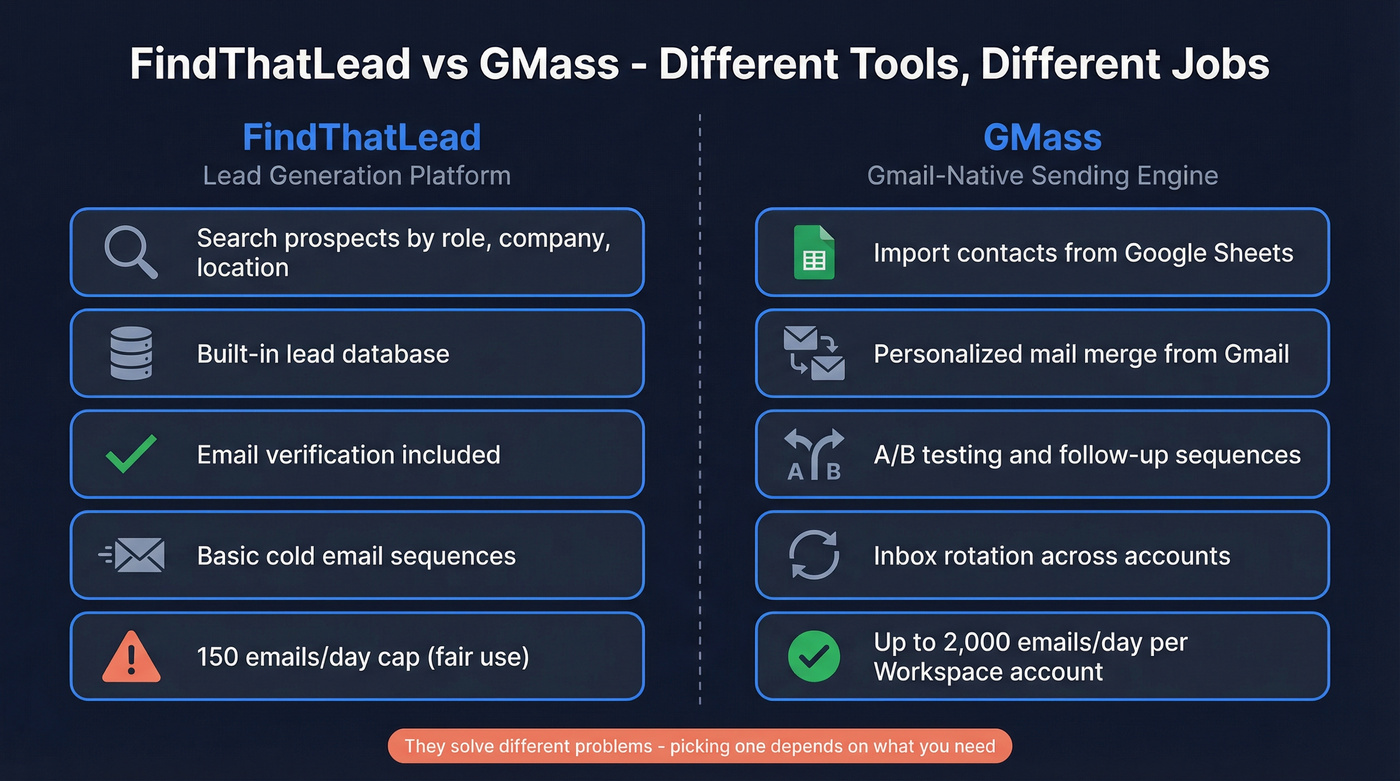
GMass is the opposite. There's no lead database. You bring your own contacts via Google Sheets, and GMass turns Gmail into a mail merge and sequencing engine - handling follow-ups, A/B testing, tracking, and inbox rotation. One underrated feature: GMass can build email lists directly from Gmail search results, so if your prospects are already in your inbox, you can turn past conversations into a campaign list fast. GMass users have collectively sent over 9 billion emails, which tells you it's built for volume, not lead discovery.
Side-by-Side Comparison
| Feature | FindThatLead | GMass | Edge |
|---|---|---|---|
| Primary function | Lead finding + light sending | Gmail-native sending | Depends on need |
| Lead database | Yes | No | FindThatLead |
| Email verification | Built-in | Built-in | Tie |
| Sending limit | 150/day (fair use) | Gmail limits (500-2,000/day per account) | GMass |
| Starting price | $37/mo (billed yearly) | $29.95/mo ($249/yr, ~$20/mo) | GMass |
| Top tier | $75/mo (billed yearly) | $59.95/mo ($599/yr, ~$49/mo) | GMass |
| G2 rating | 4.0/5 (93 reviews) | 4.8/5 (1,274 reviews) | GMass |
| Best for | Lead finding + light outreach | Gmail-native mass sending | - |
GMass's review volume dwarfs FindThatLead's by about 14x. That gap reflects market adoption - GMass is one of the most widely used Gmail mail merge tools, while FindThatLead competes in a much more crowded lead-finder space (see other outbound lead generation tools).

FindThatLead's "unlimited" plan caps at 15,000 credits/month. GMass gives you zero leads. Prospeo gives you 300M+ profiles with 98% email accuracy on a 7-day refresh cycle - then plugs directly into Instantly, Smartlead, or Lemlist so your data and sending actually work together.
Stop forcing one tool to do two jobs badly.
The Fine Print They Don't Advertise
Let's be honest - both tools bury important details.
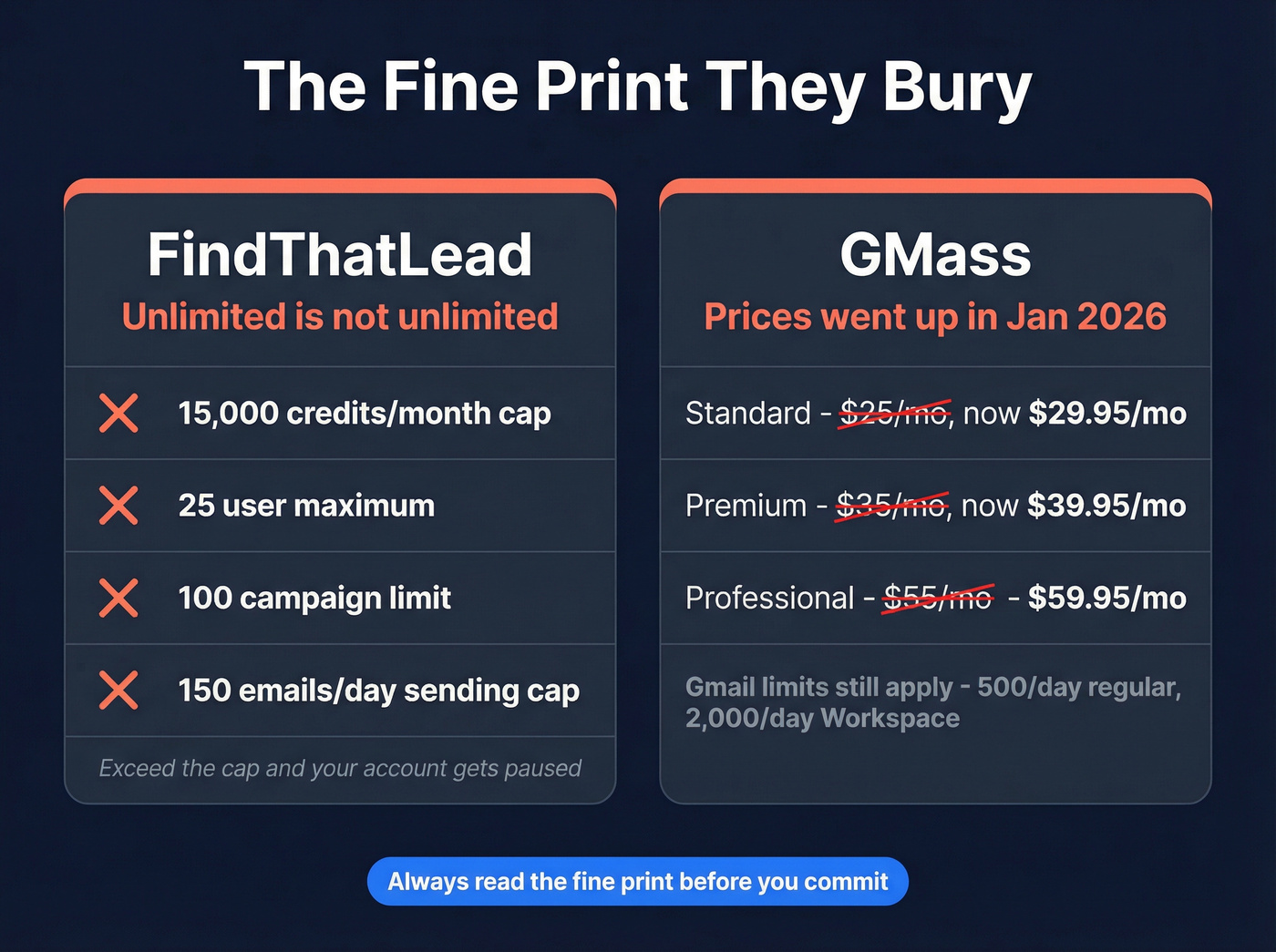
FindThatLead's "unlimited" isn't unlimited. Their Ultimate plan ($75/mo billed yearly) advertises unlimited credits, users, campaigns, and sending. Read the fair-use policy and you'll find hard caps: 15,000 credits/month, 25 users, 100 campaigns, and 150 emails/day. Exceed the credit cap and your account gets paused until a CSM manually unpauses it. That's not unlimited. That's generous-with-a-leash.
GMass raised prices in January 2026. If you're seeing $12.95 or $25/mo quoted elsewhere, that's outdated. The Standard plan jumped from $25 to $29.95/mo, Premium went to $39.95, and Professional hit $59.95. Annual pricing helps - Standard drops to about $20/mo if you pay upfront at $249/year.
GMass doesn't remove Gmail's limits - it manages them. Regular Gmail accounts cap at 500 emails/day. Google Workspace accounts cap at 2,000/day. GMass spreads larger campaigns across multiple days automatically, so a 10,000-recipient campaign goes out over five days on a Workspace account. Google Workspace users can also configure Gmail's SMTP relay for up to 10,000 emails/day per account, but that requires admin setup most small teams won't bother with. If you connect an external SMTP server, GMass charges $5 per 10,000 sent after the first 10,000 free. One myth worth killing: GMass used to cap follow-ups at 8 stages, but that limit's been gone since July 2025. You can now run unlimited follow-up stages.
When to Pick Which
Use FindThatLead if you're a solo prospector or small team that wants one tool for finding and sending light outreach. The built-in database means you don't need a separate lead source. Just know that contact data goes stale at roughly 33% per year across the industry, so verify before you send - even if the email was verified months ago. G2 reviewers consistently flag FindThatLead's data freshness as a weak spot, which tracks with that obsolescence rate (more on lead generation metrics that actually matter).
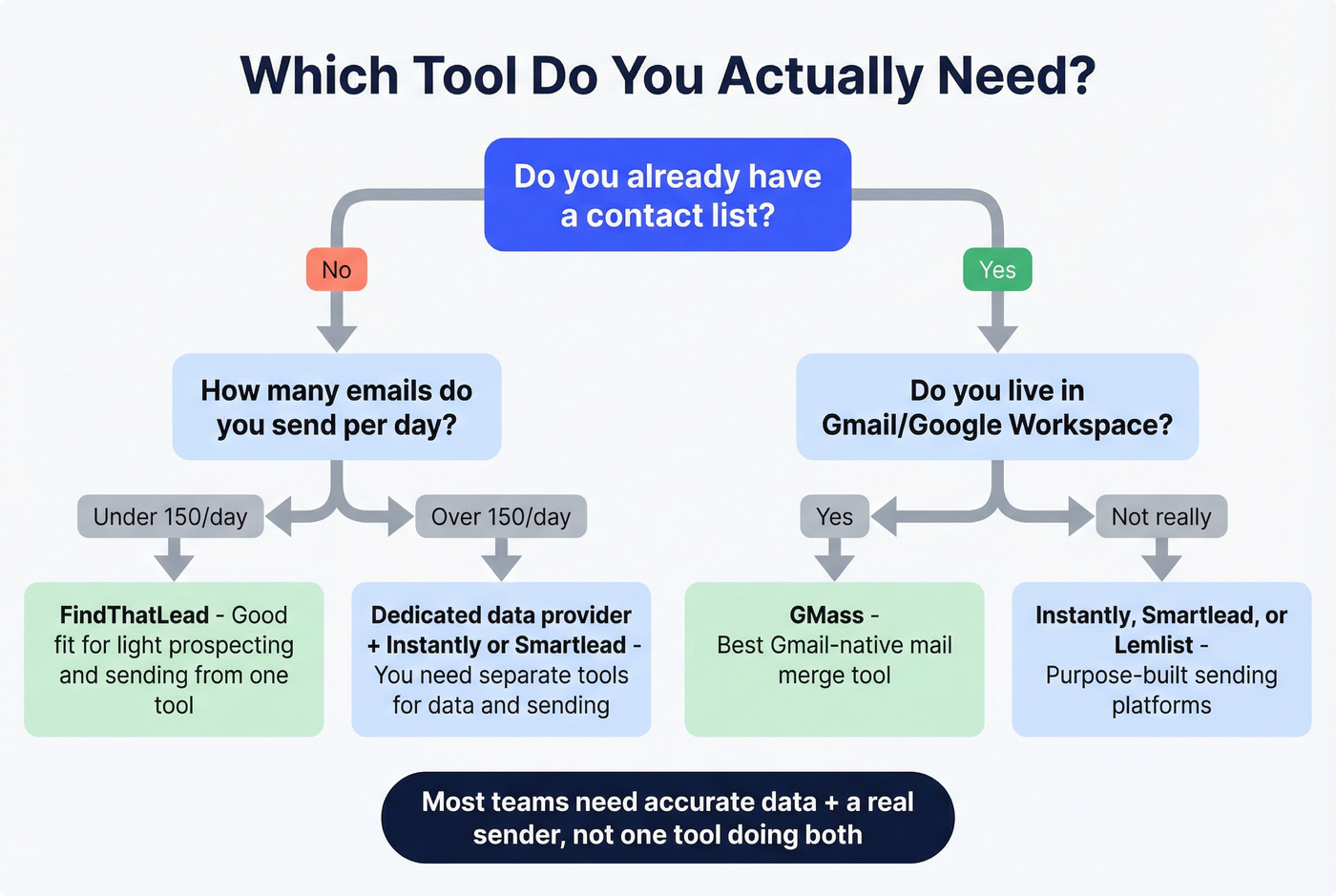
Use GMass if you already have contact lists and want the simplest way to run personalized sequences from Gmail. It's ideal for marketers, recruiters, or salespeople who live in Google Workspace and don't want another platform to learn. Skip it if you need to send more than 2,000 emails/day per Workspace account, or if you don't have a reliable source of contacts to begin with.
Here's the thing: most teams weighing FindThatLead against GMass actually need neither tool on its own. They need accurate data flowing into a real sending platform. Trying to force one tool to handle both finding and sending is how you end up with high bounce rates and a torched domain (see email bounce rate). We've seen it happen to teams running 500+ emails a day on tools that weren't built for that volume - the bounce rates creep up, deliverability tanks, and suddenly your whole domain is flagged (use an email deliverability guide before scaling).
Start With Better Data Instead
We've tested dozens of data-plus-sending combinations, and the pattern is always the same: the quality of your contact data matters more than which sending tool you pick. A 98% accurate email list will outperform a low-accuracy list on any sender.

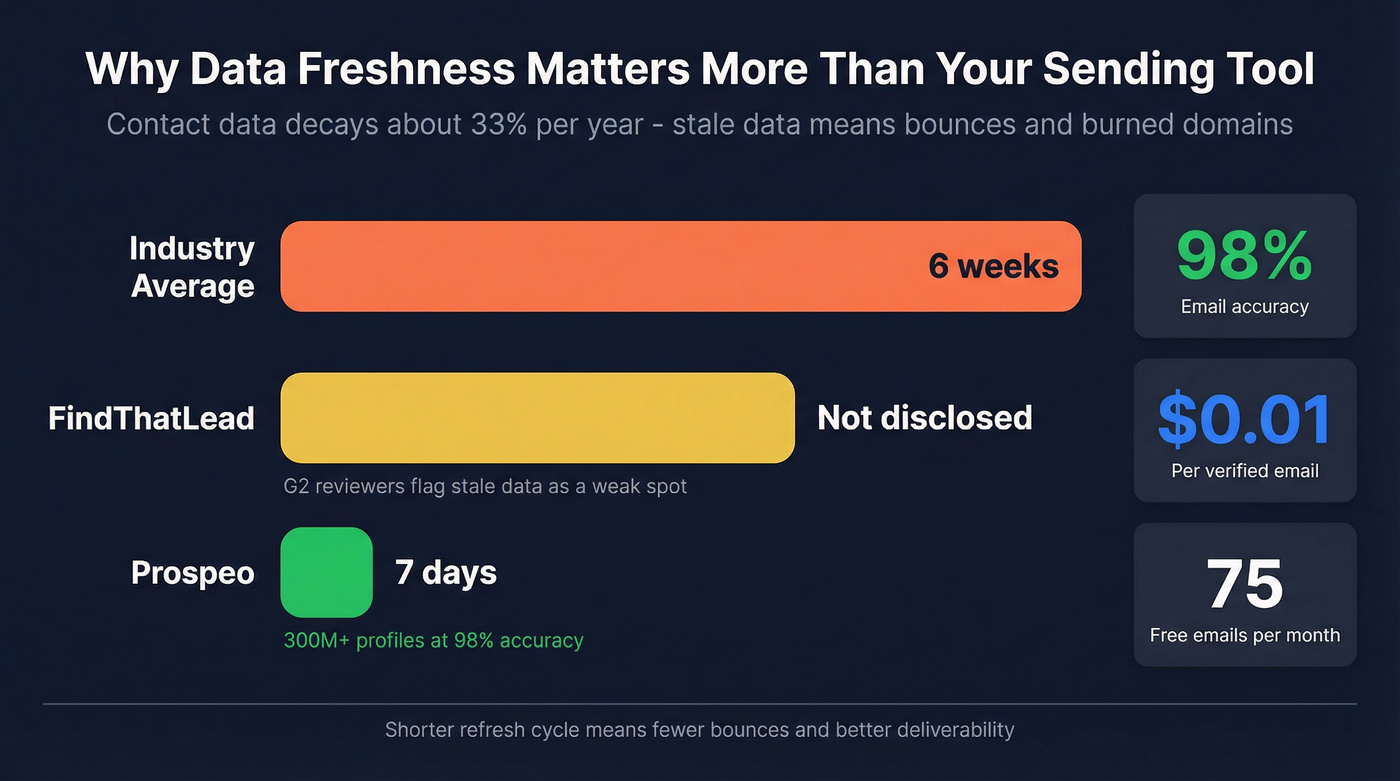
Prospeo covers 300M+ professional profiles with 98% email accuracy and a 7-day data refresh cycle compared to the industry average of six weeks. It plugs natively into Instantly, Smartlead, and Lemlist, so you get high-accuracy data flowing directly into a dedicated sending platform. The free tier gives you 75 emails and 100 Chrome extension credits per month, and paid plans run about $0.01 per email. No contracts, no fair-use gotchas.
If you're outgrowing FindThatLead's caps or need contacts that GMass can't provide, that data gap is the real problem to solve - and you can pair any verified data source with the best sender for your workflow (including email list providers if you need a starting point).
Contact data decays 33% per year - and FindThatLead users flag stale data constantly. Prospeo refreshes every 7 days vs the 6-week industry average, so the emails you pull today are still valid when you hit send. At $0.01 per email, bad data costs more than good data.
75 free emails per month. No credit card, no fair-use leash.
FAQ
Can I use FindThatLead and GMass together?
Yes - find emails in FindThatLead, export to Google Sheets, then send via GMass. It works, but FindThatLead's "unlimited credits" are capped at 15,000/month under fair-use, and data goes stale fast. Verify your list before hitting send, or you'll burn your domain on bounces.
Is GMass still $12.95/month?
No. GMass raised prices effective January 1, 2026. Standard is now $29.95/month ($249/year). Most comparison sites still show old pricing - check GMass's pricing page directly.
What's a good alternative if I need lead finding and high-volume sending?
Pair a dedicated data provider with a sending platform like Instantly or Smartlead. Neither FindThatLead nor GMass handles both at scale - you'll hit caps or quality issues trying to force one tool to do everything.