

FindThatLead vs LeadLeaper: Which Email Finder Is Worth Your Money?
Two email finders with sub-$100/month plans, Chrome extensions, and built-in outreach features. On paper, FindThatLead vs LeadLeaper looks like a coin flip. It's not - and the differences matter more than the spec sheets suggest.
30-Second Verdict
Pick LeadLeaper if you live inside Sales Navigator and want sequences baked into the same tool. Pick FindThatLead if you want broader email discovery without paying for LinkedIn Premium on top. Skip both if data accuracy and deliverability are what actually keep you up at night - Prospeo verifies emails at 98% accuracy on a 7-day refresh cycle for roughly a penny per email.
For context, FindThatLead sits at 4.0/5 on G2 from 93 reviews. LeadLeaper scores higher at 4.5/5 on G2 from 45 reviews, though that's a much smaller sample.
What Each Tool Does
FindThatLead is a Barcelona-based platform (founded 2014) that bundles email finding, verification, cold email campaigns, and an internal sales CRM. It works independently and via Chrome extension - no separate platform subscription required.
LeadLeaper is social-media-first, built around LinkedIn. It captures leads from LinkedIn Premium and Sales Navigator, enriches them with verified business emails and phone numbers, and layers on lead scoring, email sequences, and a basic CRM. Sales Navigator is essentially required for full functionality, and LinkedIn free accounts aren't recommended for its Virtual Assistant feature.
Side-by-Side Feature Comparison
| Feature | FindThatLead | LeadLeaper |
|---|---|---|
| G2 Rating | 4.0/5 (93 reviews) | 4.5/5 (45 reviews) |
| Free Tier | 7-day trial, 50 email credits/month | $0/mo, 100 email credits |
| Starter/Basic | $49/mo (2,000 credits) | $49/mo (Basic) |
| Mid Tier | $99/mo (unlimited* credits/users) | $69/mo (Professional) |
| Top Tier | Suite up to $399/mo | Custom (25-user min) |
| Chrome Extension | Yes | Yes |
| Email Sequences | Yes | Yes (unlimited follow-ups) |
| Built-in CRM | Yes | Yes (basic) |
| Email Verification | Included | Included |
| LinkedIn Required | No | Yes (Premium/Sales Nav) |
| Integrations | Google Sheets add-on, CRM integrations | O365, Google Workspace, CRM auto-sync |
| Data Refresh | Not public | Not public |
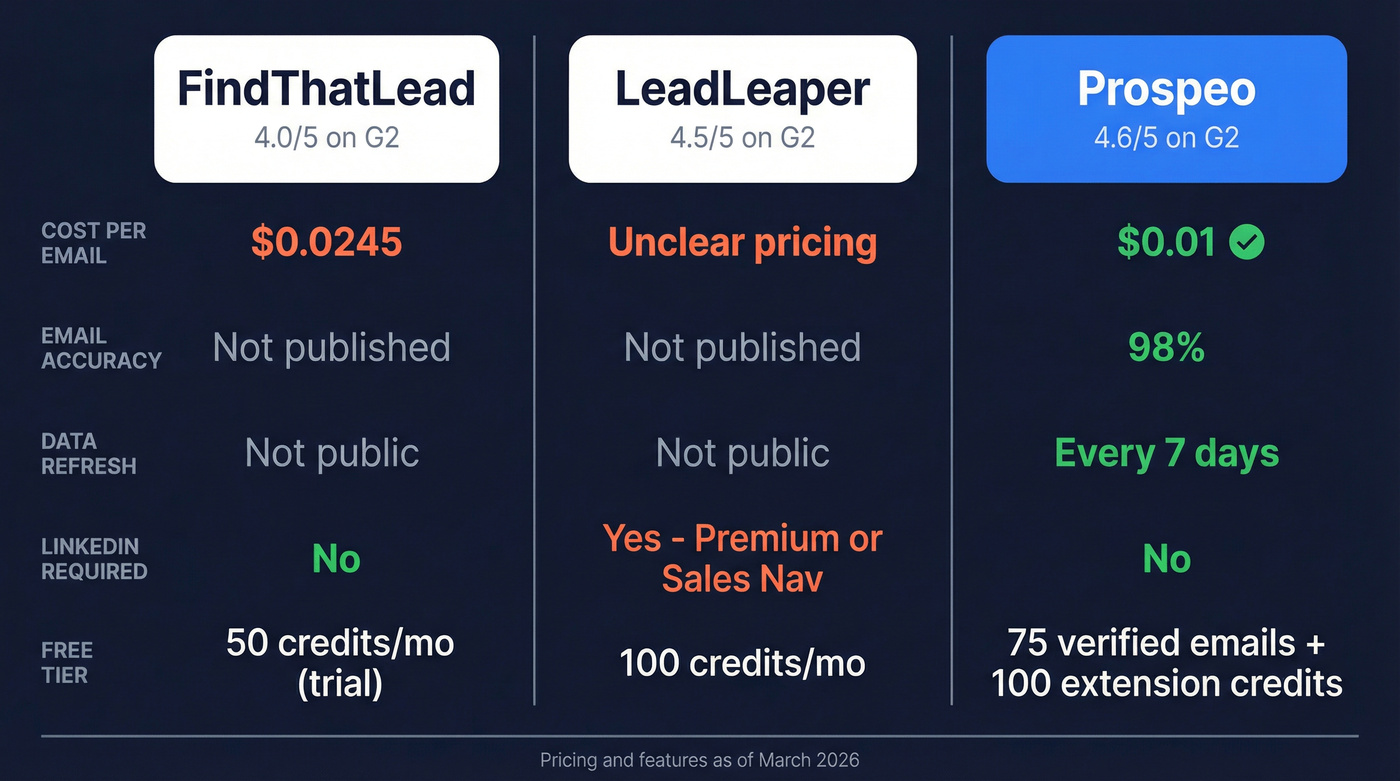
*FindThatLead's Ultimate plan is "unlimited" subject to fair use policy.
Pricing Breakdown
FindThatLead's pricing is straightforward: $49/mo gets you 2,000 email credits (about $0.0245 per credit). The $99/mo Ultimate plan removes credit caps under fair use and adds 15 email accounts plus onboarding support.
If you're comparing more tools in this price band, it's worth scanning a broader list of email finder tools before you commit.
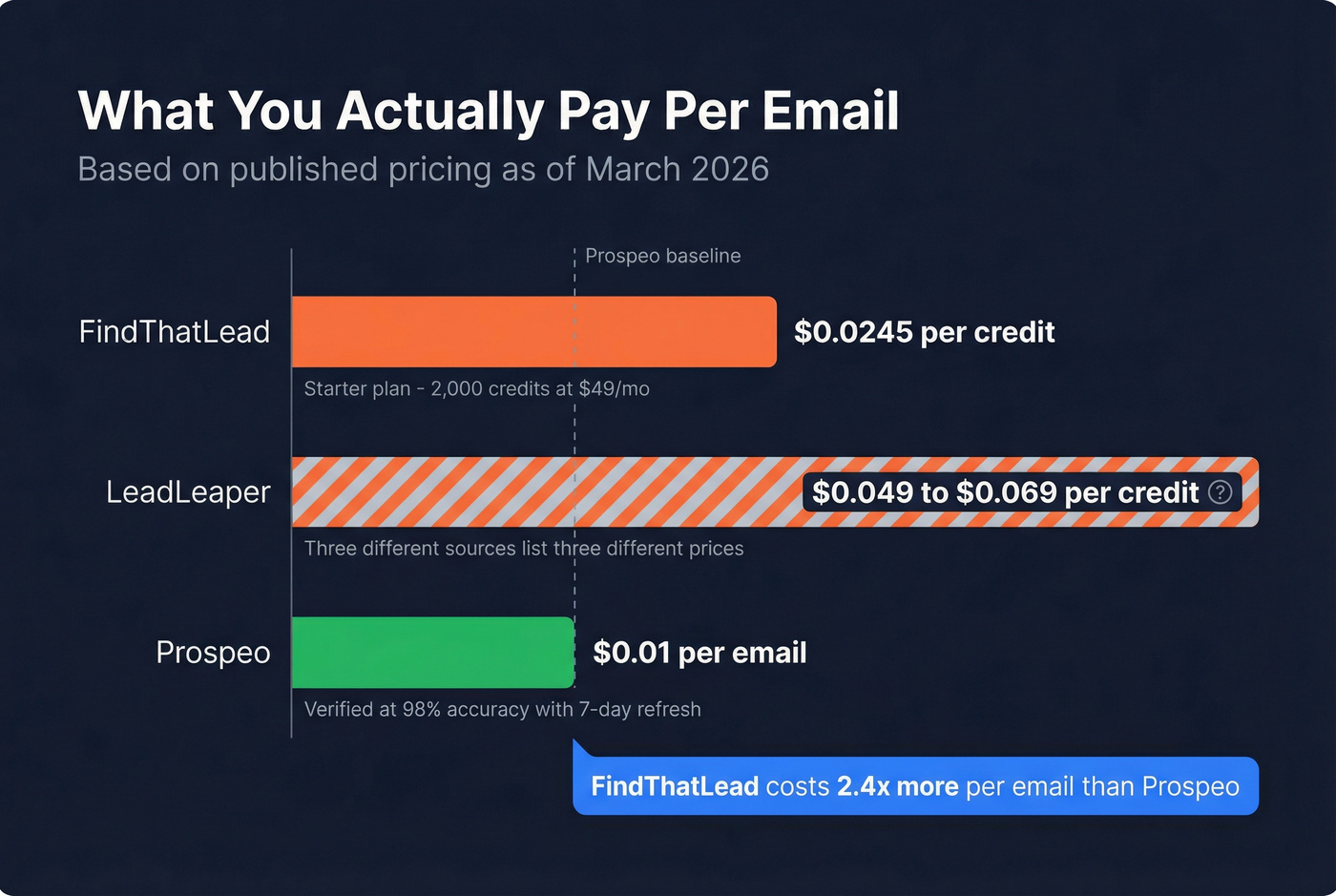
LeadLeaper's pricing is messier. Their official pricing page lists $49/mo (Basic) and $69/mo (Professional). But G2 lists tiers at $110-$125/user/month under different plan names, and a third-party review from Woodpecker cites yet another set: $39-$59/mo. Three sources, three different pricing structures. Frustrating. The official page ($49/$69) should be treated as current; the discrepancies likely reflect outdated third-party data or legacy plan names.

FindThatLead charges ~$0.0245/credit. LeadLeaper's pricing is a moving target. Prospeo costs $0.01/email with 98% accuracy and a 7-day refresh cycle - no LinkedIn dependency, no outdated contacts, no guessing what you'll actually pay.
Stop paying more for emails that bounce. Start with 75 free verified emails.
Pros and Cons
FindThatLead
Pros:
- Simple interface - G2 reviewers consistently highlight ease of use
- Built-in verification reduces bounces
- No platform dependency; works independently or via Chrome extension
Cons:
- G2 reviewers flag outdated contact data
- G2's value indicator rates it at the highest cost tier
LeadLeaper
Pros:
- Intuitive LinkedIn integration that works out of the box
- Accurate email extraction - 77% of G2 reviews are five-star
- Unlimited follow-up emails and sequences, even on the Free plan
Cons:
- Reported glitches and freezing during use
- LinkedIn account restriction risk with heavy scraping - documented by third-party reviewers
- Customer support described as lacking by multiple G2 reviewers
The LinkedIn Problem
Here's the thing: both tools depend on LinkedIn to varying degrees. LeadLeaper is built entirely around capturing leads from LinkedIn Premium and Sales Navigator. FindThatLead's extension can pull from LinkedIn profiles, but the platform itself doesn't require a LinkedIn subscription.
If you're building a repeatable outbound motion, it helps to pair any LinkedIn workflow with proven sales prospecting techniques so you're not relying on one channel.
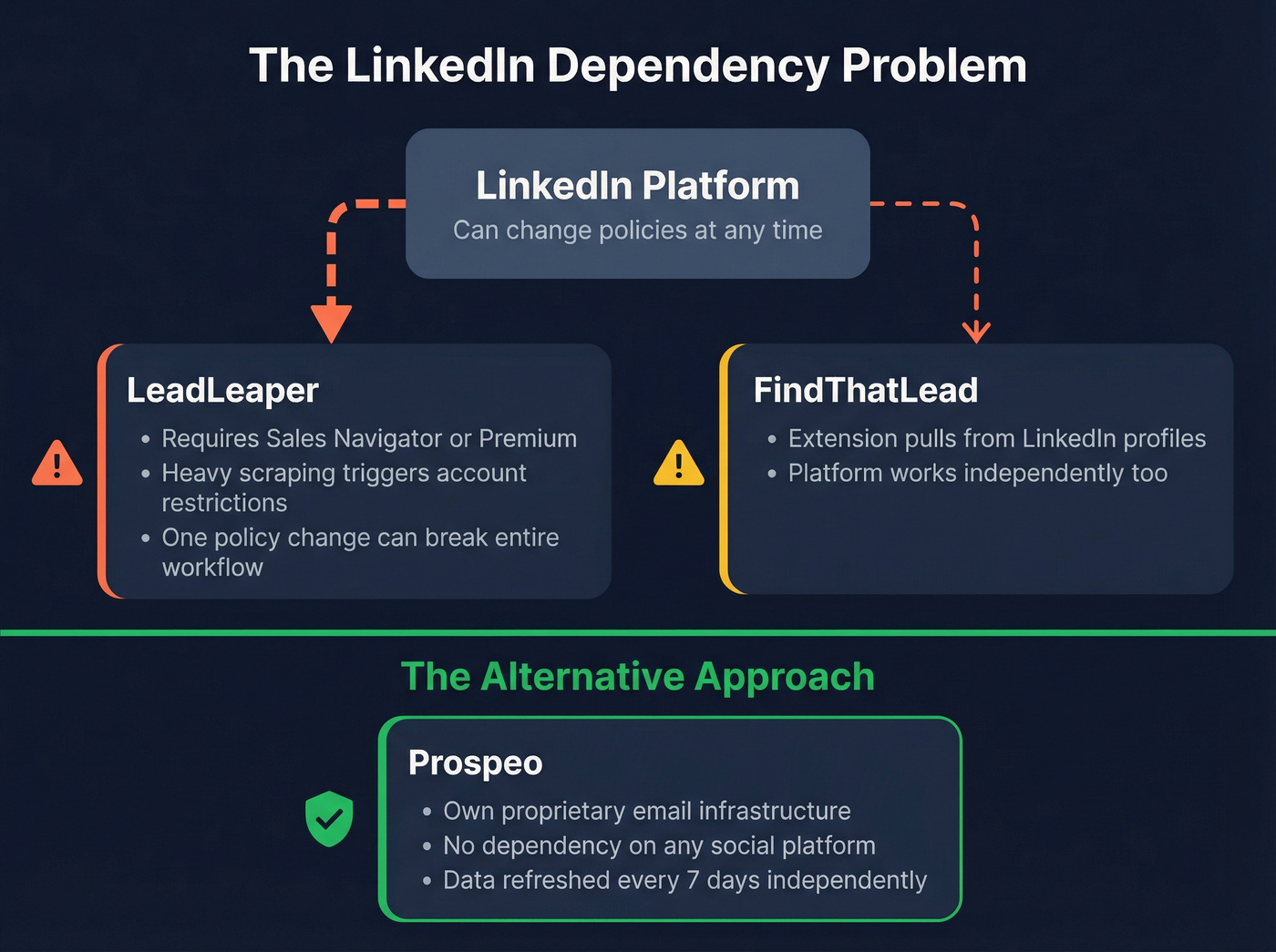
That dependency is a structural risk. Heavy scraping can trigger account restrictions or suspensions, and if LinkedIn tightens policies further in 2026, tools built entirely on that ecosystem become vulnerable overnight. We've seen this pattern before with other scraping-dependent tools - one policy change and entire workflows break.
Real-world feedback on both tools is sparse on Reddit. Most of the useful signal lives on G2, where LeadLeaper's five-star rate and FindThatLead's "outdated data" complaints tell the clearest story.
A Stronger Third Option
The core complaints here are outdated data (FindThatLead) and platform dependency plus glitches (LeadLeaper). Prospeo addresses both at the root: 300M+ professional profiles with 98% email accuracy, refreshed on a 7-day cycle. No dependency on any specific social platform - it runs its own proprietary email-finding infrastructure.
If you're evaluating vendors primarily on enrichment quality, compare against dedicated data enrichment services rather than just "email finders."

The free tier gives you 75 verified emails and 100 Chrome extension credits per month, which is enough to run a real test before committing anything. Paid plans work out to roughly $0.01 per email, undercutting FindThatLead's ~$0.0245/credit by more than half.
Let's be honest: most teams comparing sub-$100 email finders don't actually have a tool problem. They have a data freshness problem. If your emails are bouncing at 10%+, swapping one budget finder for another won't fix anything. You need a provider that refreshes weekly, not one that refreshes "whenever." (If you're diagnosing bounce issues, start with email bounce rate benchmarks and root causes.)
G2 reviewers flag FindThatLead for outdated data and LeadLeaper for glitches and LinkedIn risk. Prospeo runs its own proprietary email infrastructure - 300M+ profiles, 7-day refresh, zero platform lock-in. That's why 15,000+ companies trust it.
Ditch the LinkedIn dependency. Find verified emails from any source.
Who Should Pick What
LeadLeaper makes sense if you're an SDR who lives in Sales Navigator and wants sequences built into the same workflow. Just watch your LinkedIn activity limits closely. If you're building your stack, a broader list of SDR tools can help you sanity-check the category.
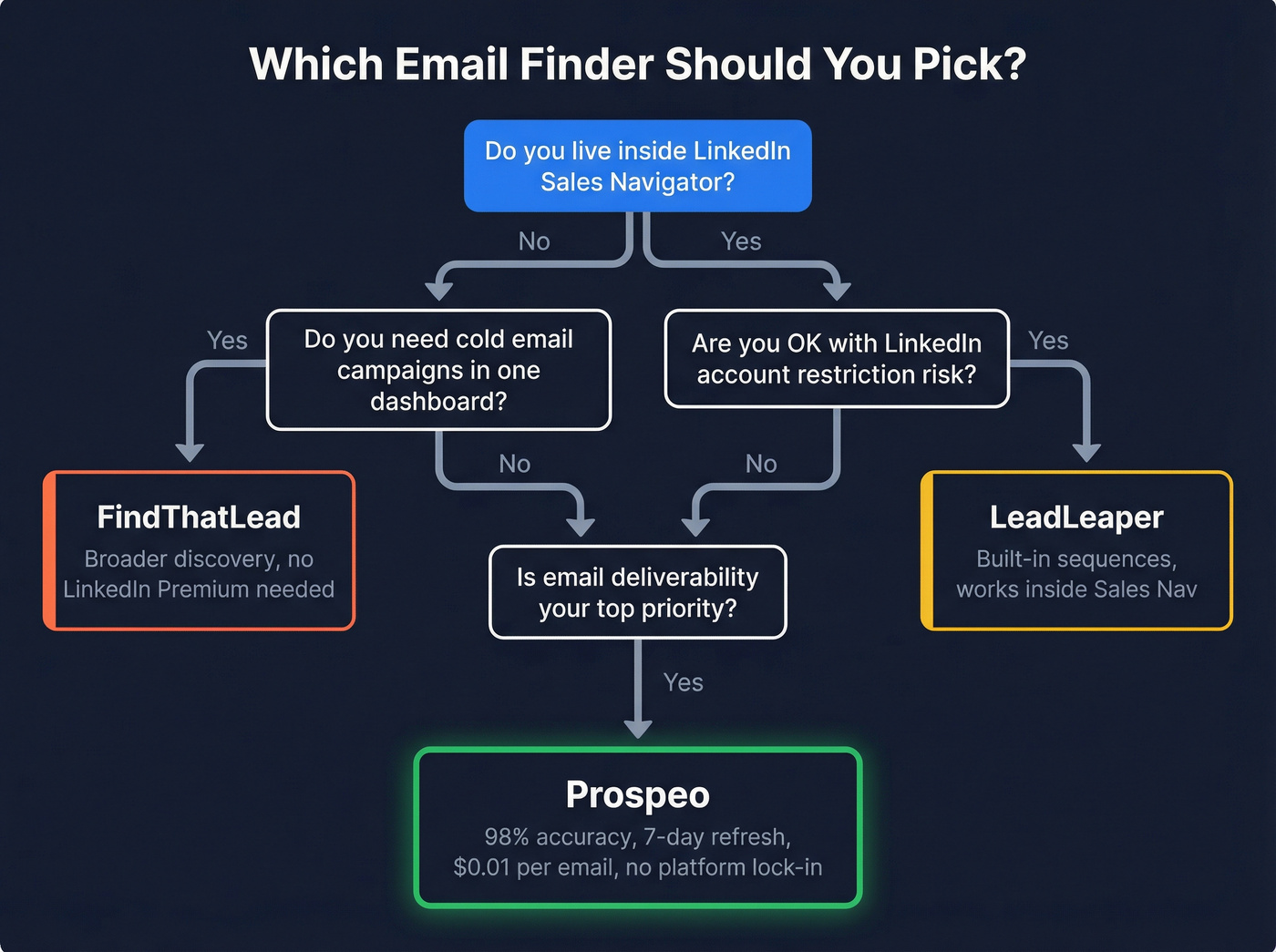
FindThatLead is the better pick if you want broader email discovery with cold email campaigns in one dashboard and don't want to pay for LinkedIn Premium on top.
Skip both if deliverability matters most. G2 users comparing LeadLeaper also evaluate Lead411, Apollo, and Lusha - all of which face the same data freshness limitations. When choosing between FindThatLead and LeadLeaper, the real question isn't which one is slightly better. It's whether either one gives you data fresh enough to protect your sender reputation. (For a deeper fix, use an email deliverability guide to address the root causes.)
FAQ
Is LeadLeaper safe to use with LinkedIn?
LeadLeaper doesn't modify your LinkedIn account, but third-party reviews document account restriction and suspension risk with heavy use. Monitor your daily activity limits closely and avoid aggressive scraping sessions - LinkedIn's enforcement has tightened steadily through 2026.
Does FindThatLead verify emails automatically?
Yes, built-in verification is included with every plan. That said, G2 reviewers note some contacts are outdated, so running a secondary verification pass before launching sequences is smart practice.