

How to Write a Follow-Up Email After a Meeting to Recap What Was Decided
It's Thursday afternoon. You had four meetings today. You remember the gist of the first one, fragments of the second, and nothing useful from the third. Your boss pings you: "What did we decide about the Q3 timeline?" You have no email trail.
A follow-up email after a meeting to recap decisions is the simplest way to prevent that moment. A well-timed recap can boost reply rates by over 200% compared to not following up at all - and yet most people either skip it or send something so vague it's useless. Whether you're a sales engineer rewriting notes into emails after every demo or a PM juggling four syncs a day, the problem is the same: no repeatable process.
Here's the short version. Send within 2 hours for sales calls. For internal meetings, send the same day or next morning. Use the 5-part structure below and keep it under 200 words. If you just want to copy-paste, jump to the templates.
When to Send Your Recap
Timing isn't a nice-to-have - it's the difference between a useful email and one that gets ignored. 80% of sales require five or more follow-up touches, and 44% of salespeople give up after just one attempt. In our experience, the 2-hour window for sales calls isn't aggressive. It's the minimum.
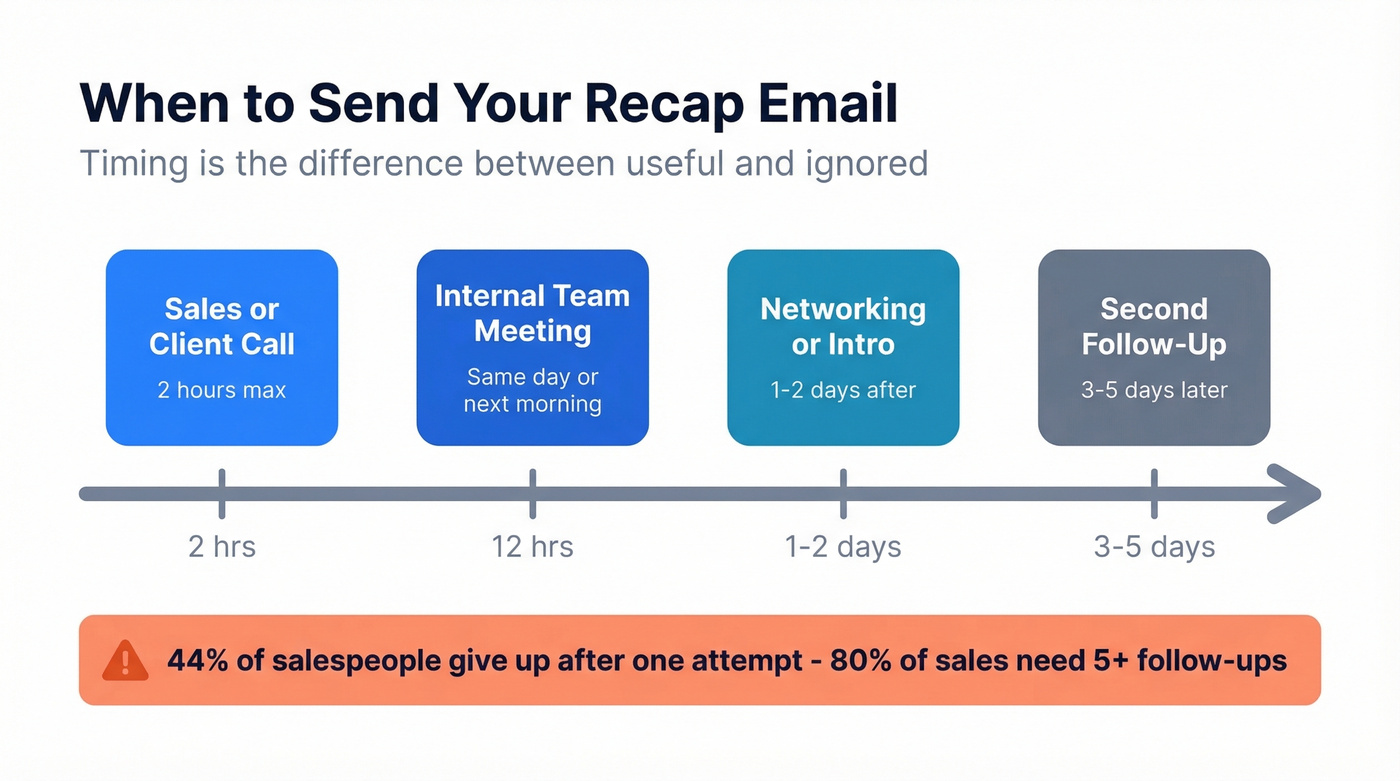
| Scenario | Send Within |
|---|---|
| Sales / client call | 2 hours |
| Internal team meeting | Same day or next morning |
| Networking / intro | 1-2 days |
| Second follow-up | 3-5 days later |
If the meeting was purely informational, keep the recap lightweight: 2-3 bullets, a link to the doc, and any next step - even if it's just "no action needed."
The 5-Part Recap Structure
Every good recap follows this framework:
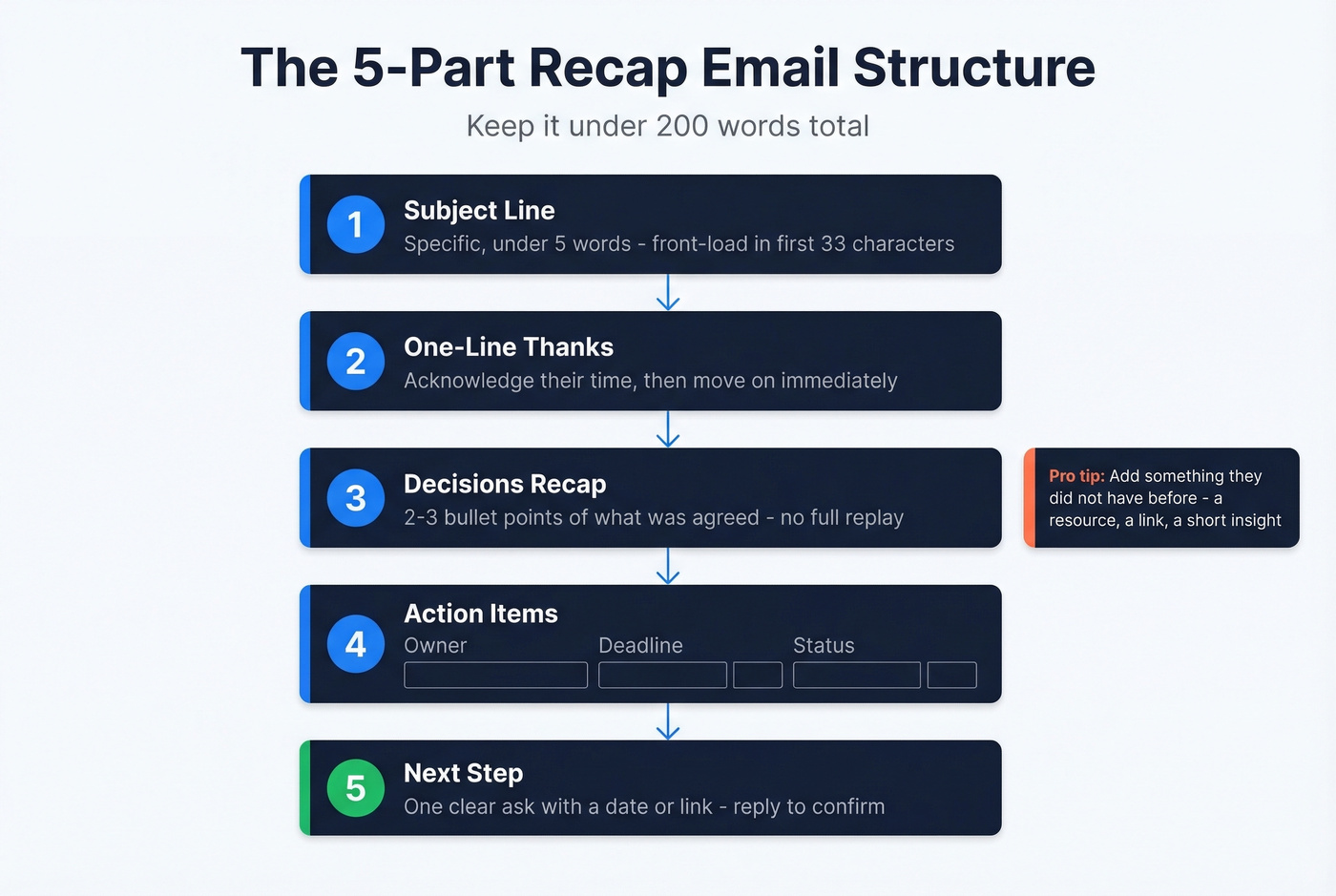
- Subject line - specific, under 5 words (see more subject lines)
- One-line thanks - acknowledge their time, move on
- Decisions recap - 2-3 bullet points of what was agreed
- Action items - table with Owner / Deadline / Status columns
- Next step - one clear ask, ideally with a date or link
Total email length: under 200 words. If you're writing more, you're drafting meeting minutes, not a recap. The whole point is to pin down decisions and assignments - not transcribe the entire conversation.
For action items, a simple table beats a paragraph every time:
| Action Item | Owner | Deadline | Status |
|---|---|---|---|
| Send revised SOW | Jamie | Jan 17 | Pending |
| Confirm budget | Alex | Jan 15 | In progress |
| Schedule pilot kick-off | Sarah | Jan 20 | Not started |
Here's the thing most guides miss: add something the recipient didn't have before. A relevant resource, a link to the doc you referenced, a short insight. HubSpot's recap email guidance explicitly recommends adding value via tips or resources - it positions you as someone worth replying to, not someone checking a box. End with "reply to confirm these are accurate" to force engagement.
If it's unclear who owns the recap, volunteer. The person who sends it controls the narrative.
Subject Lines That Get Opened
A Belkins analysis of 5.5 million cold emails found that personalized subject lines hit 46% open rates and 7% reply rates. The sweet spot for length? Two to four words - also 46% open. While this data comes from cold outreach, the patterns hold for any professional email: personalization and brevity win.
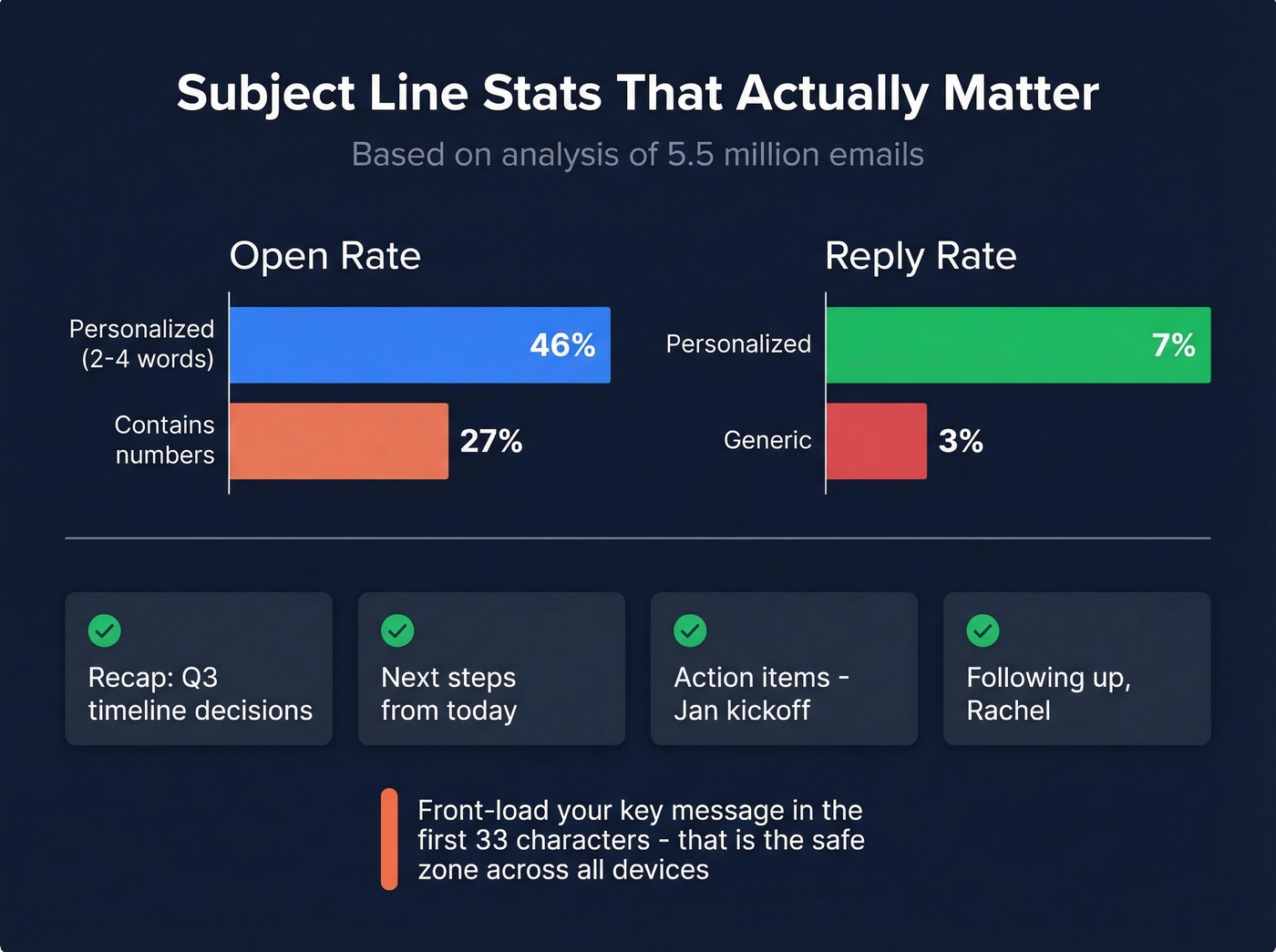
Subject lines with numbers dropped to 27% opens. Keep numbers to the action items inside, not the subject line itself.
Front-load your key message in the first 33 characters. That's the safe zone across devices and email clients. Four subject lines that work (or borrow more email subject line examples):
- Recap: Q3 timeline decisions
- Next steps from today
- Action items - Jan kickoff
- Following up, [First Name]
Now, about measuring whether they work - stop obsessing over open rates. Apple Mail Privacy Protection preloads tracking pixels, inflating open rates by roughly 18 points. With Apple Mail commanding around 46% of email clients, reply rate is the metric that actually tells you something.

A perfect recap email means nothing if it bounces. Prospeo gives you 98% verified emails so every follow-up lands in the right inbox - not spam, not a dead address. At $0.01 per email with 143M+ verified contacts, your recap actually reaches the person who was in the room.
Stop crafting great recaps that bounce. Verify every email first.
Recap Email Templates You'll Actually Use
Most guides give you 10+ templates. You need three. (If you want more variations, see these sales follow-up templates.)
Internal Team Recap
Subject: Recap - product sync Jan 14
Hi team,
Thanks for a productive session. Here's what we locked in:
- We're moving the beta launch to March 3 to accommodate the API redesign.
- Design will own the onboarding flow refresh; engineering handles the backend migration.
| Action Item | Owner | Deadline | Status |
|---|---|---|---|
| Finalize API spec | Priya | Jan 21 | In progress |
| Share updated wireframes | Marco | Jan 24 | Not started |
| Update roadmap doc | Lena | Jan 17 | Pending |
Next sync is Tuesday the 21st at 10 AM. Reply if anything above looks off.
Best, Jordan
Sales / Client Follow-Up
Subject: Next steps, [Company Name]
Hi Rachel,
Great conversation today. A few things I took away:
- Your team's biggest bottleneck is lead routing between SDRs and AEs - you're losing 2-3 days per handoff.
- You want to see a live demo with your actual CRM data before making a decision.
- Timeline: decision by end of Q1, implementation starting April.
I've attached the case study we mentioned about reducing handoff time by 60%. Here's my [scheduling link] to book the demo - I've got slots open next Tuesday and Thursday.
Talk soon, Alex
Mirror the prospect's language. If they said "bottleneck," you say "bottleneck," not "operational inefficiency." Keep sales recaps under 125 words. If you're building a repeatable process, follow up email software can help automate the reminders without bloating your message.
Performance / Sensitive Meeting
Subject: Follow-up - our conversation today
Hi Taylor,
Thank you for the candid discussion today. I want to document what we covered so we're aligned going forward.
Topic discussed: Missed deadlines on the Horizon project (three deliverables past due in December).
Your perspective: Shifting priorities from leadership created competing demands, and you didn't feel comfortable pushing back on the added scope.
Agreed expectations: All Horizon deliverables will be completed by January 31. We'll have a weekly 15-minute check-in each Monday to flag blockers early. If priorities shift again, you'll escalate to me before adjusting timelines.
Please reply to confirm this reflects our conversation accurately.
Best, Morgan
This one matters more than the others. Document what was said, what was agreed, and what happens next - this email protects both parties.
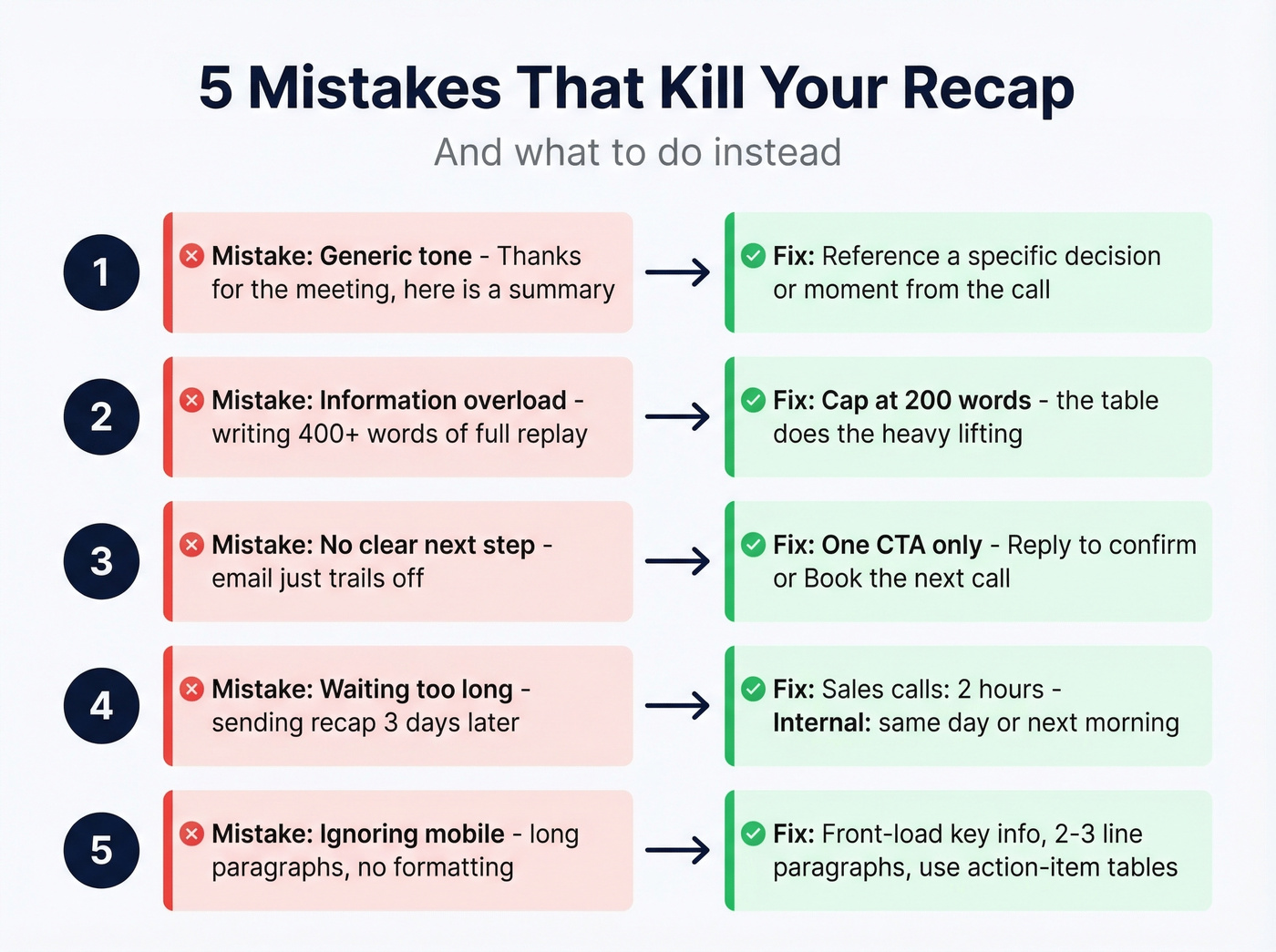
Five Mistakes That Kill Your Recap
- Generic tone. "Thanks for the meeting, here's a summary" tells the reader nothing. Reference a specific decision or moment from the call.
- Information overload. Recap the highlights, not the full replay. Longer than 200 words? You're writing meeting minutes.
- No clear next step. Every recap needs exactly one CTA. "Reply to confirm" or "Book the next call" - pick one. (More on writing a strong email call to action.)
- Waiting too long. 24 hours is the ceiling, not the target. For sales calls, two hours is the standard.
- Ignoring mobile. Front-load key info, keep paragraphs to 2-3 lines, and use the action-item table - it scans better than prose on a small screen.
Tools to Speed This Up
If you're writing recaps manually after every call, you're doing it the hard way. We've seen three tools come up consistently in Reddit discussions about meeting notes, and they map well to the most common recap workflows.
Fathom offers unlimited free recordings and transcripts - it's the obvious starting point if you just want auto-generated notes without paying anything. Great for solo reps or founders who don't need team features yet.
Fellow runs $7/user/mo on its Team plan and includes SOC 2/GDPR/HIPAA support plus 50+ integrations. If your team needs audit trails or you're in a regulated industry, this is the one. Fireflies costs $10/user/mo annually and lets you build custom summary templates, which is useful when your recaps follow a consistent format across dozens of calls per week.
Skip Fireflies if you only take a few calls a week - the custom template builder isn't worth the cost at low volume.
Let's be honest about one thing, though: the recap itself doesn't matter if it bounces. For sales follow-ups specifically, verify the email address before you hit send. Prospeo checks addresses in real time with 98% accuracy, and the free tier covers 75 verifications per month - enough to validate every prospect follow-up without paying a dime. If you want the deeper mechanics, start with this email deliverability guide and keep an eye on your email bounce rate.
Send the Recap
A follow-up email after a meeting to recap decisions isn't a courtesy - it's a paper trail. Use the 5-part structure, send it fast, and keep it short. Every sentence should earn its place.
The person who sends the recap owns the story. Be that person. If you're sending a second nudge, use a clear timeline (see: when should i follow up on an email).
You nailed the sales recap - mirrored their language, attached the case study, added a scheduling link. But your prospect changed roles last month and that email is dead. Prospeo refreshes contact data every 7 days, so the email you send your follow-up to is always current.
Stale data kills follow-ups. Get contacts refreshed every 7 days.
FAQ
How is a recap email different from formal meeting minutes?
A recap email highlights decisions, action items, and next steps - sent to attendees within hours. Meeting minutes are a formal record including attendees, full agenda, discussion notes, and motions. For most business meetings, a recap email is sufficient. Save minutes for board meetings and compliance-heavy contexts.
How long should a meeting recap email be?
For sales follow-ups, stay under 125 words. For internal recaps with action items, 150-200 words is the ceiling. The action-item table does the heavy lifting, so your prose can stay lean.
Should I send a recap for every meeting?
Send one whenever decisions were made, tasks were assigned, or next steps were agreed upon. For purely social catch-ups or quick informational sessions, keep it minimal: a couple bullets and a link to the doc. A 60-second email saves hours of confusion later.
How do I make sure my sales recap actually reaches the prospect?
Verify the recipient's address before sending. Bounced recaps waste your effort and hurt your domain's sender reputation over time - and once your domain gets flagged, every email you send suffers. Tools like Prospeo's email finder let you check addresses in real time before hitting send.