

Salesforce Forecasting: What Actually Works (and What Doesn't)
Only 25% of companies forecast within 5% accuracy. Nearly half miss by more than 10%. Fewer than 20% of B2B sales orgs can predict revenue within 5%, and B2B orgs with accurate forecasts are 10% more likely to grow year-over-year - which makes that accuracy gap expensive.
Forecasting in Salesforce through Collaborative Forecasting gives your pipeline structure, not truth. And doing it without clean data is just organized guessing.
What You Need First
Before you blame the platform:
- Clean your CRM data. AI and humans can't work with bad inputs. Stale contacts, wrong titles, and dead emails poison every forecast downstream. If you’re evaluating vendors, start with a quick scan of data enrichment services.
- Configure forecast types. Map stages to categories, set up your hierarchy, remove the Forecast Category field from page layouts.
- Layer third-party tools only when you've outgrown native reporting. Most teams under 200 reps don't need Clari. They need discipline. (If you are shopping, compare sales forecasting solutions first.)
How Salesforce Forecasting Works
Salesforce uses six forecast categories to bucket every opportunity: Pipeline, Best Case, Most Likely, Commit, Closed, and Omitted. Each stage maps to one of these categories, and amounts roll up through your hierarchy - rep to manager to VP to CRO.
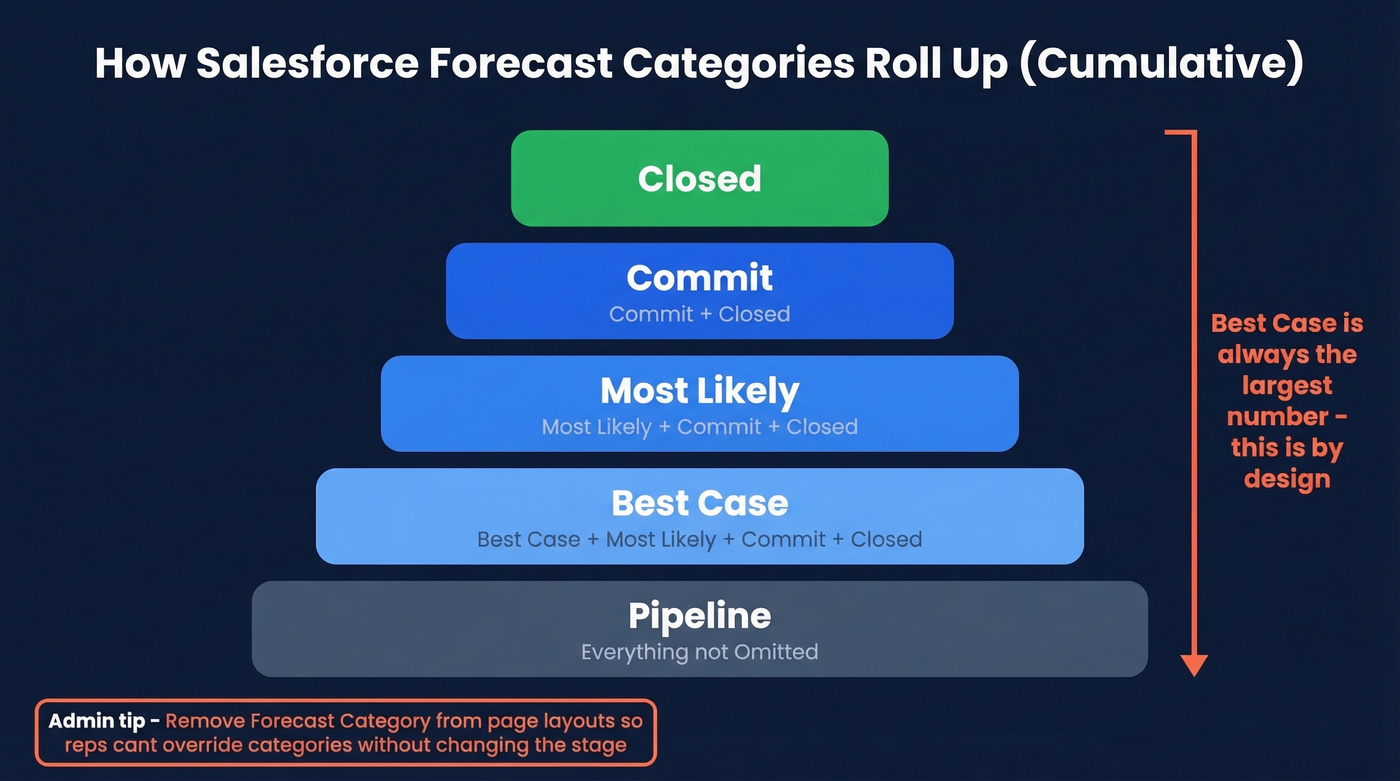
The rollups are cumulative, which trips people up. "Commit" includes Commit plus Closed. "Most Likely" includes Most Likely plus Commit plus Closed. "Best Case" includes everything from Best Case down. Your Best Case number is always the largest, by design.
Here's the admin tip that saves the most headaches: remove the Forecast Category field from your Opportunity page layout. Reps can otherwise override the mapped category without changing the stage, breaking your rollup logic silently. If a rep wants to signal confidence, they should advance the stage - not hack the category field. Enable the feature at Setup > Forecast Settings, then create your forecast types and map stages to categories.
You can create up to four Forecast Types by default, letting you predict revenue, product families, or new vs. existing business separately. Forecast Types can be based on opportunity, opportunity product, opportunity splits, product splits, and line item schedules - but start with standard revenue first. Get it right. Then expand.
Forecast Accuracy Benchmarks
An Optifai benchmark of 287 B2B companies breaks forecast accuracy into quartiles:
| Quartile | Variance from Actuals |
|---|---|
| Top (elite) | ±5-10% |
| Median | ±15-25% |
| Bottom | ±30%+ |
Most teams live in that median band. Getting to top quartile requires clean data, consistent stage definitions, and a regular inspection cadence - not a fancier tool.
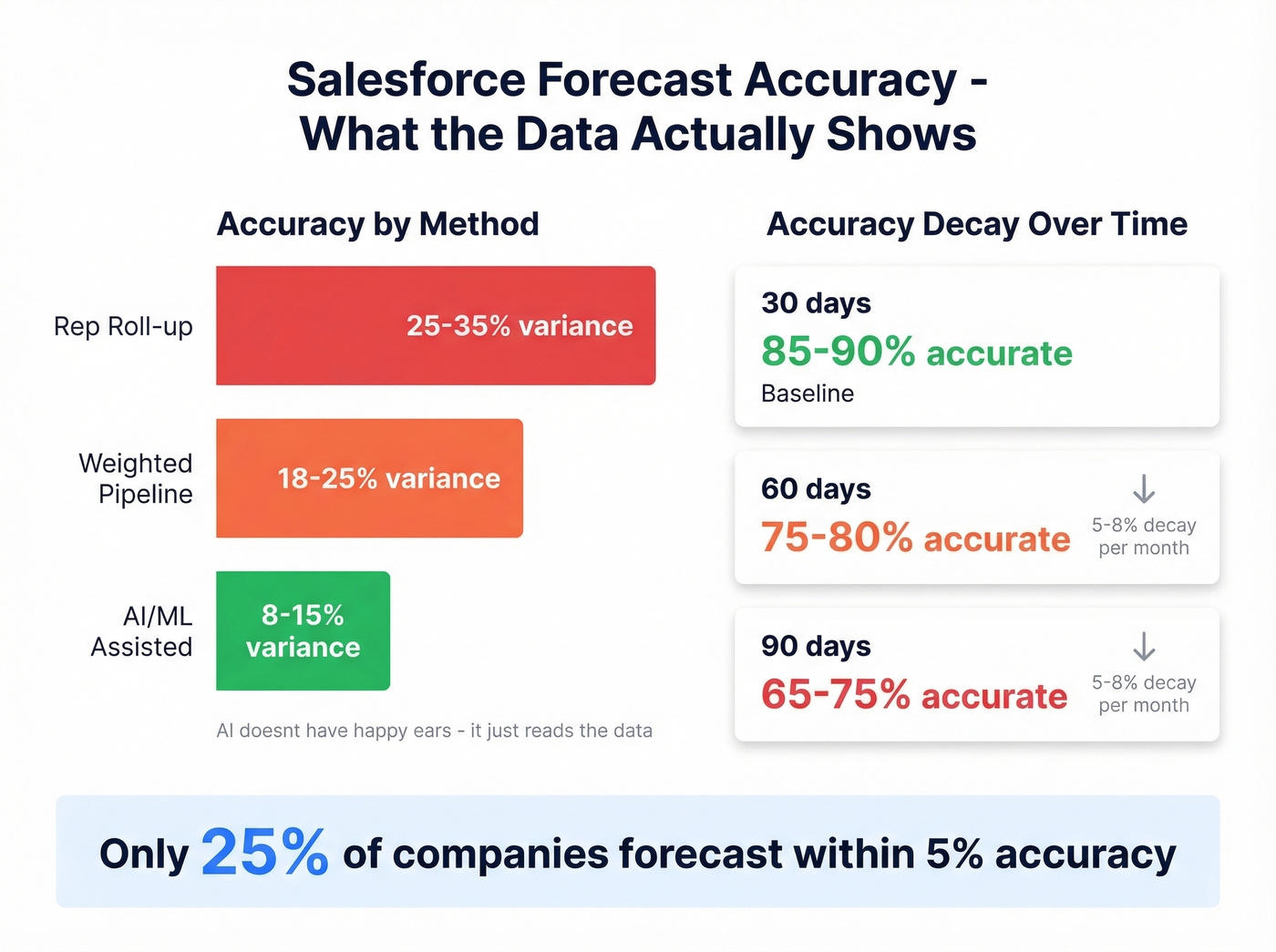
Accuracy also decays fast with longer horizons:
| Horizon | Accuracy | Decay Rate |
|---|---|---|
| 30-day | 85-90% | Baseline |
| 60-day | 75-80% | ~5-8%/month |
| 90-day | 65-75% | ~5-8%/month |
Method matters too. Rep roll-up - the default in most orgs - is the least accurate approach:
| Method | Typical Variance |
|---|---|
| Rep roll-up | ±25-35% |
| Weighted pipeline | ±18-25% |
| AI/ML-assisted | ±8-15% |
The gap between rep roll-up and AI-assisted isn't magic. It's that AI doesn't have "happy ears." Weighted pipeline multiplies each deal's value by its stage probability, and Salesforce uses that probability-driven view as a risk-adjusted lens on your pipeline. If you're only looking at Commit numbers, you're ignoring this built-in layer entirely. To pressure-test your process, use a simple pipeline health checklist.

Rep roll-up forecasts miss by 25-35% - mostly because reps are working stale data. Prospeo's Salesforce integration refreshes contact data every 7 days (not the 6-week industry average), flags job changes, and returns 50+ data points per record at a 92% match rate. Clean inputs mean accurate stages, tighter rollups, and forecasts that actually hold.
Stop forecasting on top of dirty data. Fix the source.
Einstein AI Predictions
Einstein Forecasting layers AI predictions on top of your pipeline data. Aberdeen research pegs it at 79% accuracy with a 20% reduction in forecasting time. Across the broader market, AI-assisted methods improve accuracy by 15-25% - but only with clean historical data.
Use Einstein if you've got 12+ months of clean history, consistent stage definitions, and budget for the add-on ($50-100/user/month on top of Sales Cloud).
Skip Einstein if your CRM data is messy, your team has fewer than 50 reps, or you don't have the right licensing for your Sales Cloud setup. Revenue leaders in practice report 67-72% accuracy - below the Aberdeen benchmark - because real-world data quality rarely matches lab conditions. Einstein can't fix what your reps won't enter. If you’re considering alternatives, see Oliv alternatives.
Mistakes That Kill Accuracy
We've seen the same four anti-patterns tank predictions across dozens of Salesforce orgs:
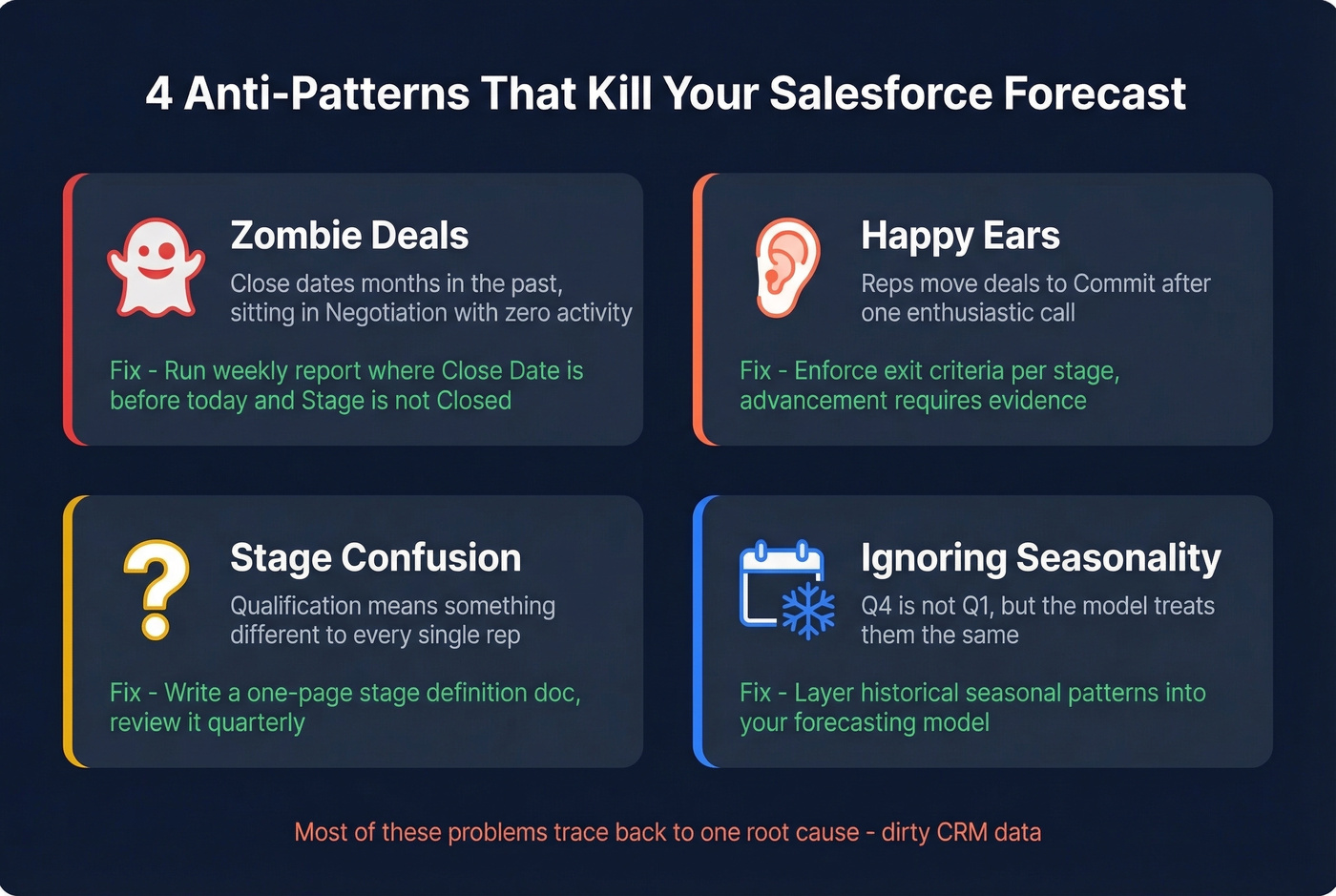
Zombie deals. Opportunities with close dates months in the past, sitting in "Negotiation" with no activity. Run a weekly report filtering opps where Close Date < TODAY and Stage ≠ Closed - kill or push them.
Happy ears. Reps moving deals to Commit after one enthusiastic call. Enforce exit criteria per stage so advancement requires evidence, not optimism.
Stage confusion. "Qualification" means something different to every rep without documentation. Write a one-page stage definition doc and review it quarterly.
Ignoring seasonality. Q4 isn't Q1. If your forecasting model doesn't account for historical seasonal patterns, you're building on sand.
Zombie deals persist because the underlying contact data is stale. The industry average for data refresh is six weeks - Prospeo's native Salesforce integration refreshes every seven days, surfacing dead deals faster by flagging job changes and outdated information. This is also where basic contact management software hygiene pays off.
Fix the Data Before the Forecast
Every improvement starts upstream. Here's the thing: AI and humans can't work with bad data. That's the #1 finding from every best-practices guide on forecasting in Salesforce. When reps trust the data in their opportunities, they stage deals more accurately, and your pipeline predictions stop drifting. If you want a framework for this, start with lead enrichment.

We've tested this ourselves. Prospeo's CRM enrichment returns 50+ data points per contact at a 92% match rate, and its 98% email accuracy means reps aren't chasing bounced addresses. Clean inputs compound: better contact data leads to more accurate stage progression, which tightens rollups, which gives you a forecast your CFO can actually trust. (Related: reducing sales pipeline challenges often starts with data quality.)
Zombie deals survive because nobody catches stale contacts. Prospeo's CRM enrichment surfaces job changes, bounced emails, and outdated titles automatically - so your pipeline reflects reality, not last quarter's optimism. 98% email accuracy. $0.01 per lead. No contract.
Kill zombie deals before they kill your forecast accuracy.
When to Add a Third-Party Tool
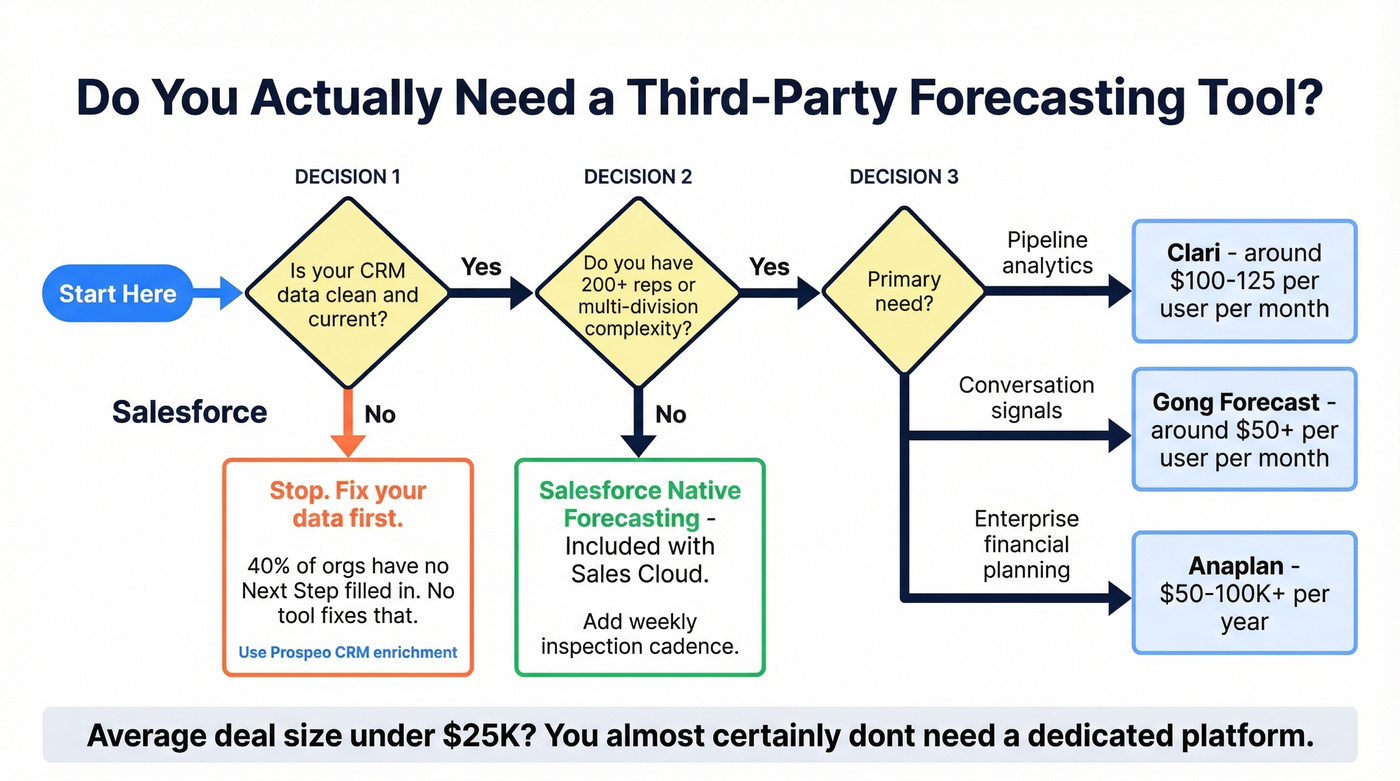
Let's be honest - most teams don't need Clari. They need clean data and a weekly inspection cadence. But if you've nailed the basics and still hit walls, here's the lineup:
| Tool | Best For | Pricing |
|---|---|---|
| Native Forecasting | Standard rollups | Included with Sales Cloud (Enterprise $165/user/mo; Unlimited $330/user/mo) |
| Clari | Pipeline analytics | ~$100-125/user/mo |
| Gong Forecast | Conversation signals | ~$50+/user/mo |
| Aviso | AI deal scoring | ~$50K+/year |
| Anaplan | Enterprise planning | $50-100K+/year |
If you need conversation intelligence feeding into deal health scores, Gong's your play. Global, multi-division orgs often find native Salesforce reporting can't slice historical trends the way they need - that's where Clari fills the gap. Anaplan is the heavy iron for enterprise financial planning with headcount models.
I've watched teams spend $150K on Clari when their actual problem was that 40% of opportunities had no Next Step filled in. If your average deal size is under $25K, you almost certainly don't need a dedicated platform. Fix the boring stuff first. If you’re trying to operationalize the cadence, borrow a simple 30-60-90 day plan for sales reps.
FAQ
Is Salesforce forecasting included in all Sales Cloud editions?
Collaborative Forecasting is included with Sales Cloud at no extra cost. Einstein Forecasting requires add-on licensing, typically $50-100/user/month depending on your edition.
How often should we review forecasts?
Weekly at minimum. Teams that inspect only at month-end miss pipeline coverage gaps that compound into quarter-end surprises. High-performing orgs run a 15-minute Monday pipeline scrub plus a Thursday commit review.
What's the fastest way to improve forecast accuracy?
Fix your CRM data, enforce documented stage definitions, and remove the Forecast Category field from page layouts. These three changes move most teams from bottom quartile to median within one quarter.
Can Salesforce forecasting handle multiple business units?
Yes. You can create up to four Forecast Types to segment by revenue stream, product family, or territory. For orgs needing more granularity, Clari or Anaplan layer on top of native rollups.