


GetProspect vs Rebump: Different Tools, Different Jobs
Comparing GetProspect and Rebump is like comparing a fishing rod to a tackle box. One finds email addresses. The other automates follow-ups inside Gmail. They don't compete - they solve entirely different problems in the outbound workflow.
30-second verdict: If you need to find prospect emails, GetProspect is a decent starting point, but its 18M-contact database is much smaller than 300M+ profile alternatives, and accuracy can be inconsistent. If you need automated follow-ups, Rebump works well for Gmail users. If you need both - and most outbound teams do - skip the "either/or" framing and pair a larger-database email finder with a proper sequencer. You'll get better data and better workflow control.
What Is GetProspect?
GetProspect is a B2B email finder with built-in verification. Its own database covers 18M contacts with business emails, though its comparison page also references access to 900M professional profiles used for email prediction. The tool uses machine learning to predict addresses, and reviewers note occasional bounces - which is why verification and list hygiene still matter.
Every plan includes the same features. You're just paying for volume.
Use this if: You're a solo founder or small team that wants a free tier (50 valid emails/month) without committing to a bigger platform.
Skip this if: You need reliable accuracy at scale. G2 reviewers (4.0/5 from 41 reviews) often mention inconsistent email accuracy and occasional bounces. Compared to tools with 300M+ profiles, an 18M database can mean thin coverage in niche segments.
Pricing runs $0 (free) to $49/mo (1,000 emails) to $99/mo (5,000 emails), up to $399/mo. You only pay for valid emails, credits roll over one month, and unlimited teammates come standard. Standalone verification packs start at $29/10K if you bring your own lists.
What Is Rebump?
Rebump is a Gmail extension that automatically sends follow-up emails - "bumps" - to people who haven't replied. It doesn't find emails or build prospect lists. It sits inside your Gmail compose window and handles the "nudge them again" step that most reps forget about.
Use this if: You run outreach from Gmail and want dead-simple follow-up automation without learning a full sequencer.
Skip this if: You use Outlook, need branched sequences, or want to customize follow-up subject lines - a recurring complaint on G2 (4.9/5 from 55 reviews, 4.8/5 on AppSumo from 44 reviews). The Chrome-on-desktop requirement limits flexibility. There's a BCC workaround for mobile, but it's manual and clunky.
Pricing starts at $9.99/mo for 4 bumps per message, $24.99/mo for open/read tracking plus multiple sequences and personalized bumps, and $44.99/mo for AI-generated bumps, link tracking, and Zapier integration with API access. Annual billing drops those to $7.99-$35.99/mo.

GetProspect's 18M-contact database leaves gaps in niche segments. Prospeo covers 300M+ profiles with 98% email accuracy, refreshed every 7 days - not weeks. At $0.01/email, you get 16x the database at a fraction of the cost.
Find the emails first. Follow up with confidence second.
Feature Comparison: Side-by-Side
| GetProspect | Rebump | |
|---|---|---|
| Category | Email finder | Follow-up automation |
| Finds emails? | Yes | No |
| Sends follow-ups? | No | Yes (Gmail only) |
| Starting price | Free ($49/mo paid) | $9.99/mo |
| Rating | 4.0/5 (41 reviews) | 4.9/5 (55 reviews) |
| Best for | Finding B2B emails | Automating Gmail bumps |
| Key limitation | Smaller database vs 300M+ alternatives; occasional bounces | Gmail-only, no branching |
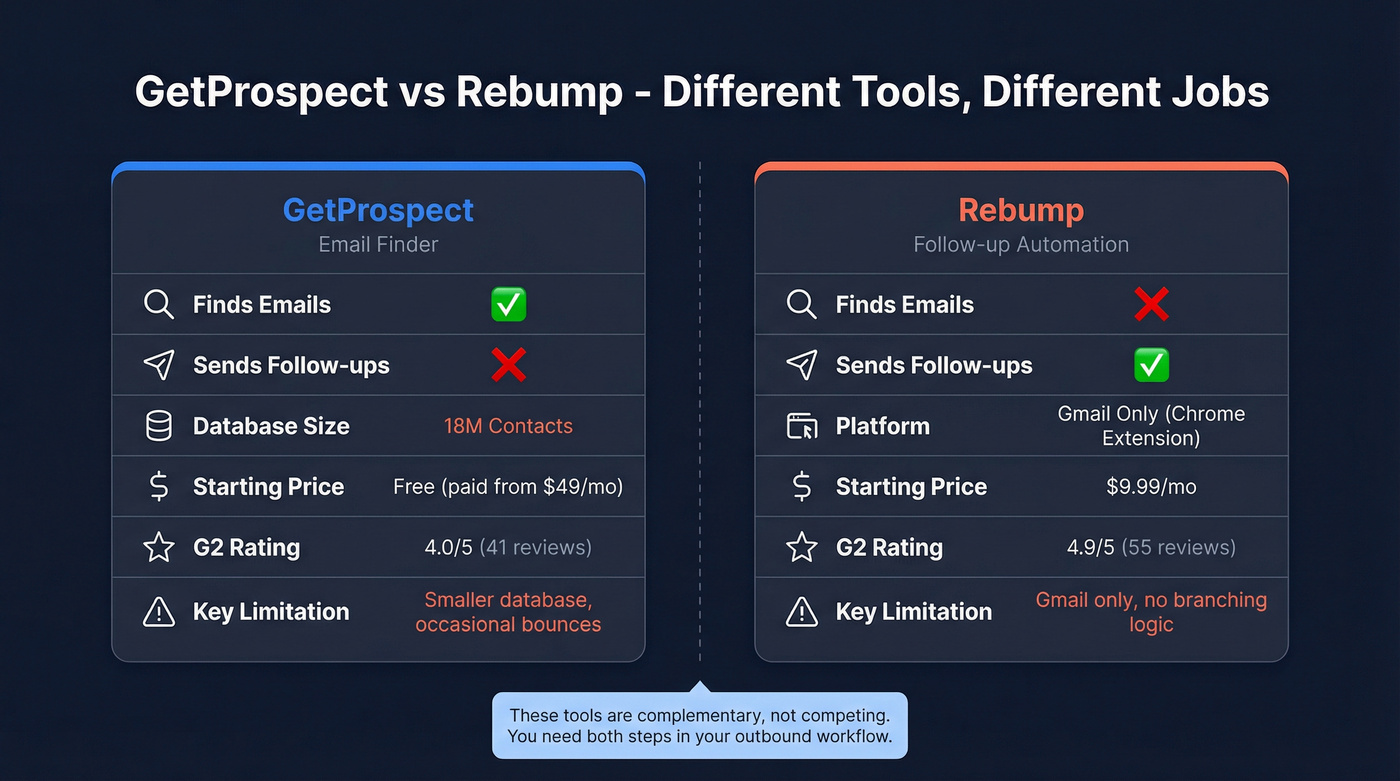
These tools are complementary, not competing. You can't follow up with people you haven't found yet, and an email finder doesn't help you stay persistent after the first send. The real question isn't "which one" - it's "which one do I need first?"
Which Tool Do You Actually Need?
Here's the thing: most teams agonizing over this comparison are stuck on the wrong question entirely. The email-finding step is where 80% of outbound campaigns succeed or fail. Bad data means bounces, bounces mean domain reputation damage, and no amount of clever follow-ups can fix emails that never land.
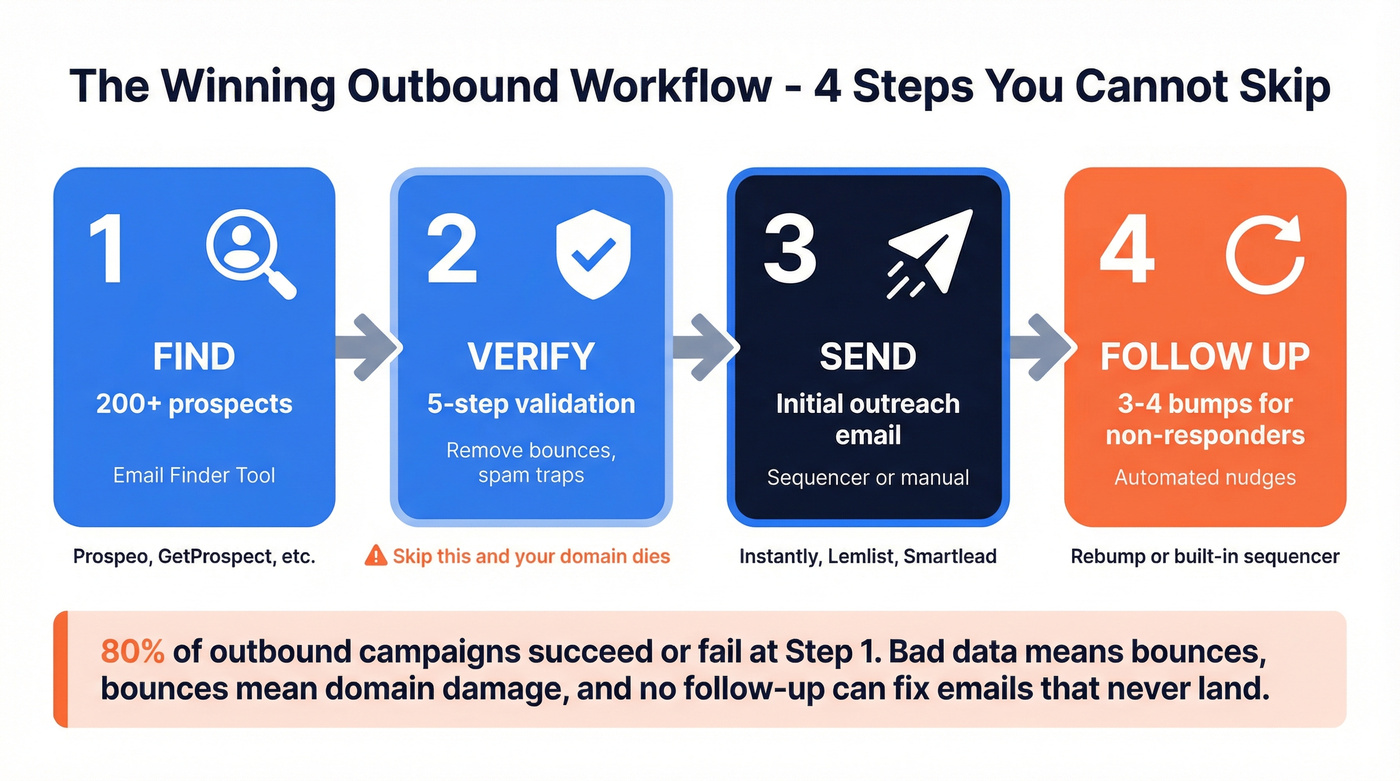
You need an email finder first if your pipeline is empty and you need contacts. Without verified emails, follow-up automation is useless.
You need follow-up automation first if your list is built but replies are low. Rebump adds automated nudges inside Gmail without switching tools.
A typical winning workflow looks like this: find 200 prospects with an email finder, verify the list, send initial outreach via your sequencer, then let Rebump or your sequencer's built-in follow-ups handle 3-4 bumps for non-responders. That sequence - find, verify, send, follow up - is non-negotiable. We've seen teams burn their sending domains in a week by skipping verification, and rebuilding domain reputation takes months. Don't learn that lesson the hard way.
A Stronger Email-Finding Alternative
If you're weighing GetProspect vs Rebump and leaning toward the email-finding side, GetProspect's 18M-contact database and inconsistent accuracy aren't your strongest option. In our testing, Prospeo's 300M+ professional profiles at 98% email accuracy with a 7-day data refresh cycle made a noticeable difference in both coverage and deliverability - more contacts found, fewer bounces on send.
If you're comparing options, start with a shortlist of email finder tools and sales prospecting databases that match your ICP and volume needs.
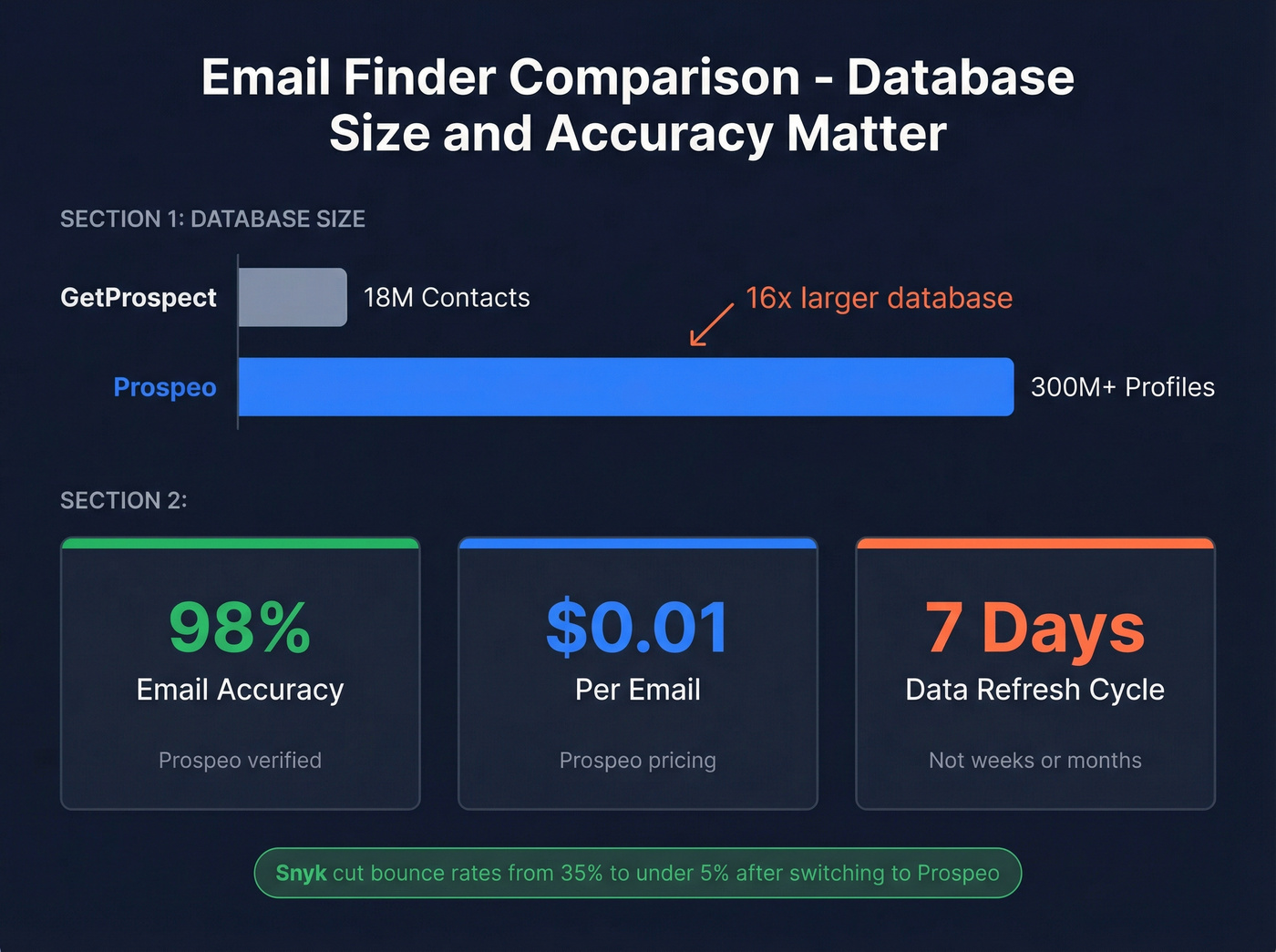
Prospeo's 5-step verification process includes catch-all handling, spam-trap removal, and honeypot filtering, all running on proprietary infrastructure rather than third-party email providers. That's the kind of backend work that shows up in results: teams like Snyk cut bounce rates from 35-40% to under 5% after switching, while generating 200+ new opportunities per month.
If you want to go deeper on deliverability, use an email deliverability checklist and track your email bounce rate as you scale.

The free tier gives you 75 emails/month to test. Paid plans work out to roughly $0.01/email - a fraction of what you'd spend scaling GetProspect's credit packs. Pair that with Rebump or a dedicated sequencer like Instantly or Lemlist for follow-ups, and you've got a complete outbound stack without overpaying for either half. The consensus on r/sales tends to agree: separate best-in-class tools usually outperform all-in-one platforms that do everything at 70%.
If you need copy help for the bump sequence itself, keep a set of sales follow-up templates and test different email subject lines to lift replies.
Bounces kill domain reputation faster than bad follow-ups kill deals. Prospeo's 5-step verification - with catch-all handling, spam-trap removal, and honeypot filtering - dropped Snyk's bounce rate from 35% to under 5% across 50 AEs.
Stop burning your domain on unverified data.
FAQ
Can Rebump find email addresses?
No. Rebump only automates follow-up emails to people you've already contacted through Gmail. You need a separate email finder to build your prospect list before Rebump can do anything useful.
Does GetProspect send follow-up emails?
No. GetProspect finds and verifies B2B email addresses - it doesn't send emails or automate sequences. You'd pair it with a sequencer like Instantly, Lemlist, or Smartlead, or a follow-up tool like Rebump to handle outreach after you've built your list.
Can I use GetProspect and Rebump together?
Yes, they're complementary. Use an email finder to get prospect emails, then Rebump to automate Gmail follow-ups. That said, for the email-finding step, tools with larger databases and higher accuracy will give you significantly better coverage than GetProspect's 18M contacts. Let's be honest - in 2026, 18M profiles is a small pond.