

The 8 Best Gmail CRM Integrations in 2026 - Tested and Compared
Every Gmail CRM integration comparison you'll find is written by a CRM vendor that ranks itself #1. Copper's blog picks Copper. NetHunt's blog picks NetHunt. We don't sell a CRM - we sell data accuracy. So here's an honest ranking based on what actually matters: how well these tools work inside your inbox, what they really cost, and where the hidden limits are.
The biggest problem isn't picking the wrong CRM. It's the sales rep who spends 20 minutes manually copying a contact from Gmail into a spreadsheet, creates a duplicate, misspells the company name, and then wonders why the pipeline report looks wrong. A solid Gmail CRM integration eliminates that entire failure mode. A bad one just moves the mess to a different screen.
Our Picks (TL;DR)
| Tool | Best For | Starting Price | Free Tier |
|---|---|---|---|
| Streak | Solos & small teams | $49/user/mo (annual) | Yes - email tools forever |
| NetHunt | Automation + multichannel | $24/user/mo (annual) | No |
| Copper | Google Workspace teams | $9/seat/mo (annual) | No |
Already have a CRM? Skip the list - jump to the data quality section to make sure what's inside it actually works.
What Makes a Good Integration
Not every tool that "integrates with Gmail" deserves the label. There's a real architectural difference between three approaches, and it changes how your team actually uses the tool day to day.
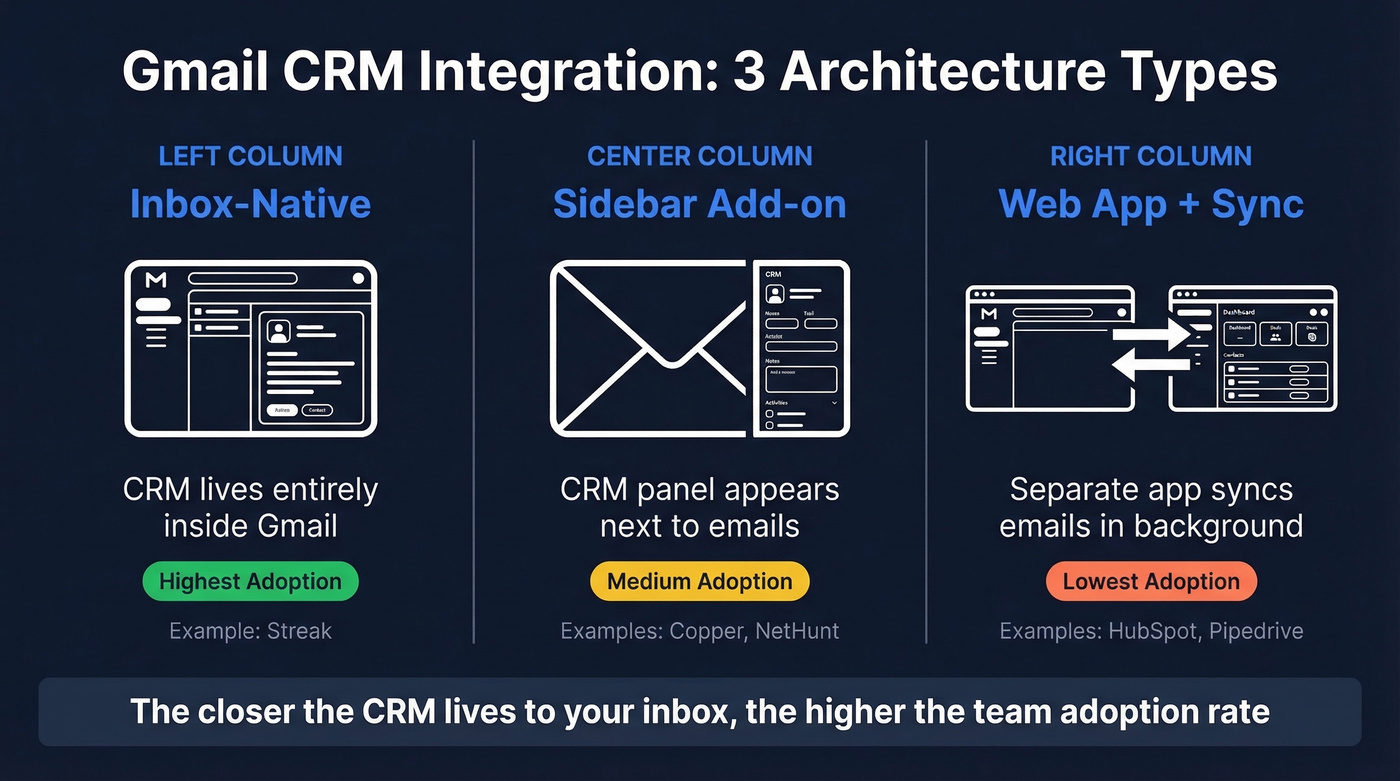
Inbox-native CRMs like Streak live entirely inside Gmail - you never leave your inbox. Sidebar CRMs like Copper and NetHunt add a panel next to your emails, so you're still in Gmail but with a visible add-on. Web-app CRMs like HubSpot and Pipedrive are standalone platforms that sync emails in the background; you work in a separate tab.
The closer a CRM lives to your inbox, the higher the adoption rate. That's the single biggest predictor of whether a CRM rollout succeeds or fails. Reddit's r/CRM is full of "which Gmail CRM?" posts, and most go unanswered - which tells you how fragmented this space really is.
Beyond architecture, we evaluated two-way email sync, in-Gmail actions like creating deals and updating stages without switching tabs, pipeline visibility from within your inbox, contact limits that nobody discloses until you hit them, pricing transparency including hidden onboarding fees and automation overages, and data quality - because a CRM full of bounced emails and wrong phone numbers is worse than no CRM at all. We adapted the CRM.org testing framework for evaluation criteria, then added the pricing and data quality dimensions their review skips entirely.

A Gmail CRM integration solves workflow - but not data quality. If your CRM is full of bounced emails and outdated contacts, no integration fixes that. Prospeo enriches your CRM with 98% verified emails and 50+ data points per contact, refreshed every 7 days. Native integrations with HubSpot and Salesforce mean clean data flows in automatically.
Stop syncing garbage data into your CRM. Start with contacts that actually connect.
The 8 Best Options Compared
Here's every tool compared on price and fit before we dig into individual reviews.
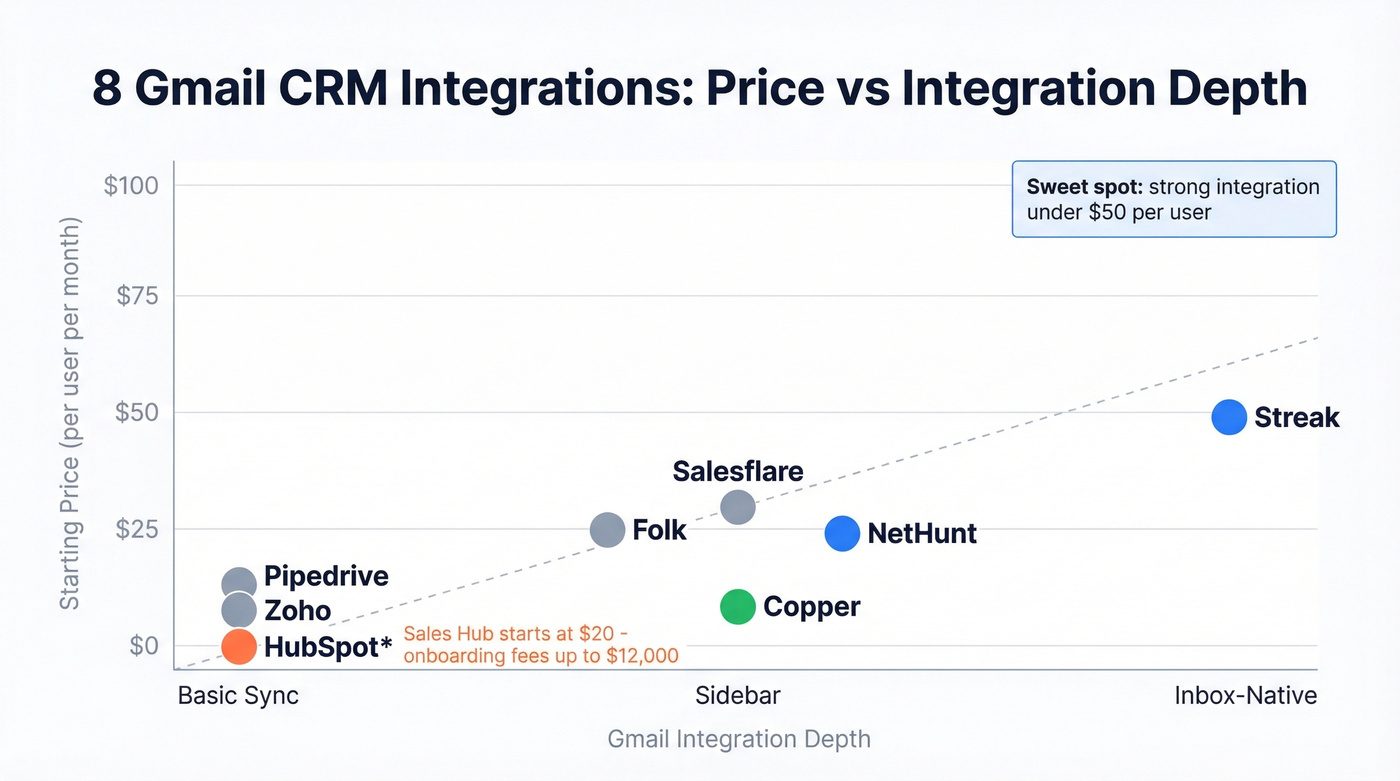
| Tool | Price (Annual / Monthly) | Free Tier | Best For | Hidden Cost |
|---|---|---|---|---|
| Streak | $49 / $59 per user/mo | Yes | Zero-setup inbox CRM | AI credits capped |
| NetHunt | $24 / $30 per user/mo | No | Gmail automation | Overages: $20-$720/mo |
| Copper | $9 / $12 per seat/mo | No | Google Workspace | Contact cap upgrades |
| Salesflare | $29 / $39 per user/mo | No | Auto data entry | Lead credit add-ons |
| HubSpot | Free (CRM) / $20+ per month | Yes (CRM) | Scaling to enterprise | Onboarding $4,500+ on higher tiers |
| Pipedrive | ~$10-$100 per user/mo | No | Standalone pipeline UI | Add-on features |
| Zoho CRM | Free / ~$14-$52 per user/mo | Yes | Budget teams | Module upgrades |
| Folk | $25 / ~$30 per user/mo | No | Relationship tracking | Limited integrations |
Hot take: Most teams under 10 people don't need a CRM that costs more than $30/user/month. The expensive tiers exist for enterprise reporting and compliance features that small teams never touch. Start cheap, upgrade when you actually hit the wall - not when a sales rep tells you that you will.
Streak
Use this if you want a CRM that lives 100% inside Gmail with zero onboarding. Streak renders pipelines, deal stages, and records directly in Gmail's interface. The free tier gives you email tracking, snippets, and mail merge at 50 sends/day forever, which is genuinely useful even if you never pay a cent.
Skip this if you need multichannel automation or heavy reporting. Streak is a pipeline tool, not a marketing platform.
Streak's Pro plan runs $49/user/mo on annual billing ($59 monthly). Pro+ is $69 ($89 monthly). Enterprise is $129 ($159 monthly). Each tier includes AI credits - 10, 50, and 500 per user per month respectively. One thing we noticed in testing: Google Calendar sync is less smooth than email sync and sometimes requires manual meeting logging, which creates friction for teams that live in Calendar as much as Gmail.

In our experience, Streak is the fastest CRM to go from "I just signed up" to "I'm tracking real deals." No other tool on this list matches that zero-to-productive speed.
NetHunt CRM
Use this if you want serious automation running directly inside Gmail - drip sequences, multichannel outreach, and workflow triggers without leaving your inbox.
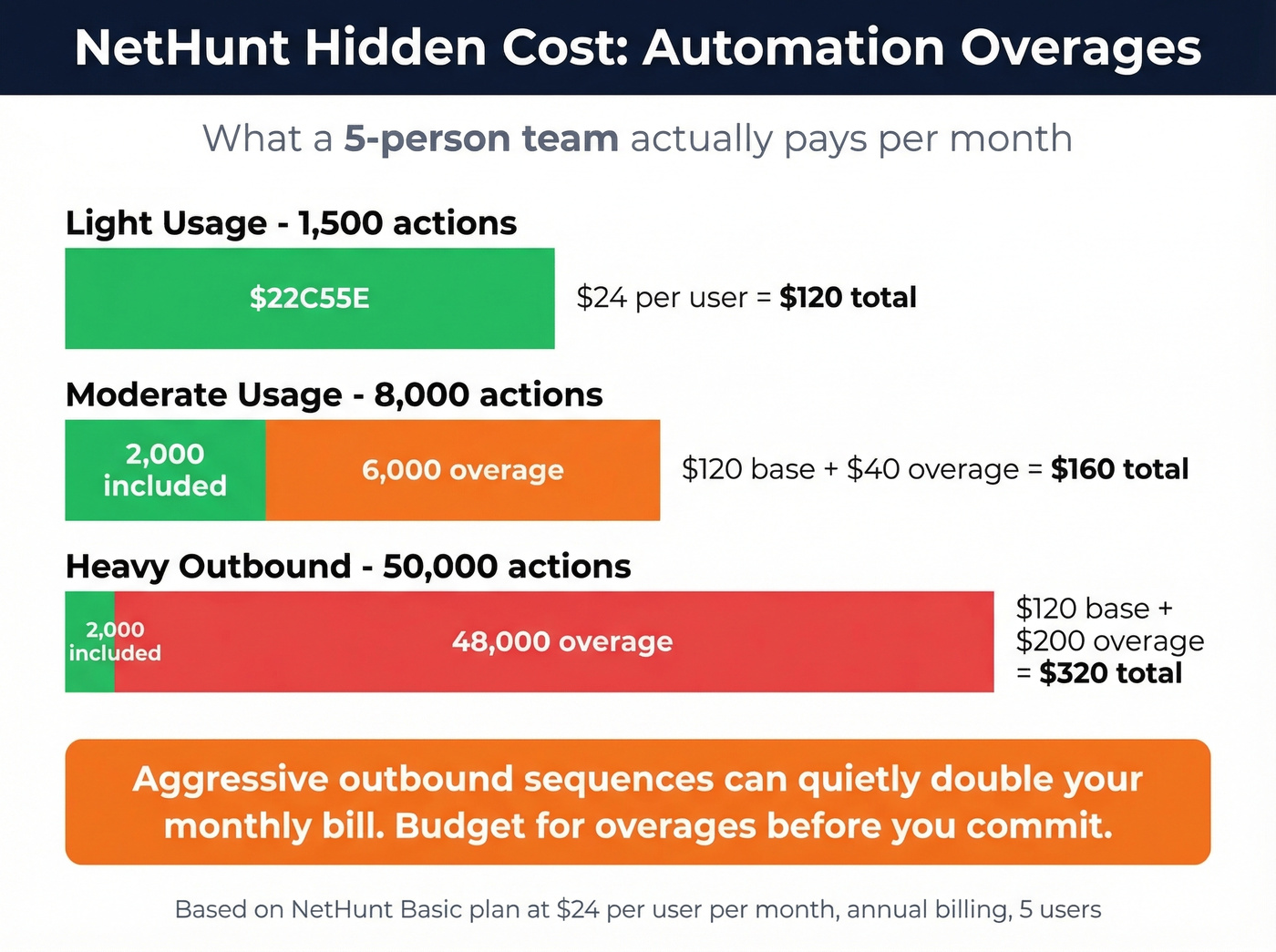
Skip this if you can't budget for automation overages. This is the hidden cost nobody mentions.
NetHunt's Basic plan starts at $24 / $30 per user/mo annually ($30 monthly), with Basic Plus at $34 annually ($42 monthly). Business runs $60/user/mo and Business Plus hits $84/user/mo. The automation engine is the real draw - but it runs on action quotas. Basic includes 2,000 actions/month, Business includes 5,000. Blow past those limits and you're paying overages: $20/mo for an extra 5,000 actions, scaling up to $720/mo for 1M actions.
Let's be honest about what that means in practice. For a 5-person team running aggressive outbound sequences, automation overages can quietly double your monthly bill. Budget for them before you commit.
Copper
Use this if your entire company already runs on Google Workspace - Calendar, Drive, Sheets, Looker Studio, the whole stack. Copper's Google Workspace integration is the deepest on this list, covering Gmail, Calendar, Contacts, Drive, Sheets, and Looker Studio natively.
Skip this if you're price-sensitive and growing fast. Copper's Starter plan is $9 / $12 per seat/mo annually ($12 monthly), which looks great until you realize it caps you at 1,000 contacts. Hit 1,001 and you're upgrading to Basic at $23/seat/mo annually ($29 monthly) for 2,500 contacts. Professional is $59 annually ($69 monthly) for 15,000 contacts. Business is $99 annually ($134 monthly) for unlimited contacts.

On G2, Copper scores 4.5/5 across 1,152 reviews. The top praise tags are "Gmail Integration" and "Ease of Use." The top complaints? "Expensive" and "Limited Features." That tracks - Copper does the Google Workspace integration better than anyone, but you pay for it as you scale. If you're deciding between these two specifically, see Copper vs Pipedrive.
Salesflare
Salesflare's entire pitch is "zero-input CRM" - it automatically pulls contact info, company data, and social profiles from your emails and calendar, then logs interactions without you lifting a finger. If you hate manual data entry, this is the tool that actually delivers on that promise.
Growth starts at $29/user/mo annual ($39 monthly). Pro is $49 annual ($64 monthly). Enterprise is $99 annual ($124 monthly) with a 5-user minimum. Each tier includes lead credits - 5 on Growth, 100 on Pro, 250 on Enterprise. Extra credits run $39 for 250 or $129 for 1,000. Solo operators should stick with Growth or Pro since Enterprise requires at least 5 users.
HubSpot
Here's the thing about HubSpot: the "free CRM" marketing is straight-up misleading. The CRM is free. The sales features you actually need aren't.
Sales Hub Starter begins at $20/month. Professional jumps to $500/month and Enterprise hits $1,200/month. On higher-tier bundles, onboarding fees are a real line item - $4,500+ on Professional and $12,000 on Enterprise. That said, if you're building for scale and want a CRM that grows into marketing automation, service ticketing, and content management, HubSpot is the platform to beat. On G2, HubSpot Sales Hub scores 4.4/5 across 13,564 reviews. Nonprofits get 40% off, and startups can get 30-90% off the first year.
Pipedrive
Great CRM, mediocre Gmail integration. Expect to pay roughly $10-$100/user/month depending on plan and billing. If you live in your inbox, look elsewhere - Pipedrive's strength is its standalone pipeline UI, not its email sidebar. Teams that spend more time in Pipedrive's web app than in Gmail love it. Everyone else finds the Gmail add-on underwhelming.
Zoho CRM
Free plan available, paid tiers from roughly $~$14-$52 per user/mo depending on edition and billing. The Gmail integration feels like an afterthought - functional for basic email logging, but nowhere near the depth of Streak or NetHunt's inbox-native experience. Best for teams already deep in the Zoho ecosystem who need a CRM checkbox ticked.
Folk
Starting at $25/user/mo, Folk is a lightweight, relationship-focused CRM gaining traction with small teams who want simplicity over power. Think of it as a modern Rolodex with Gmail sync - not a pipeline management tool. If your sales process is more about nurturing relationships than tracking deal stages, Folk is worth a look. But don't expect deep automation or reporting.
Why CRM Rollouts Fail
We've seen teams pick the perfect CRM, nail the demo, get executive buy-in - and still end up with a mess 90 days later. The failures are almost never technical.

No system-of-record decision. If nobody decides whether Gmail or the CRM is the source of truth for contact data, you'll end up with thousands of duplicate records fast. Every rep will have their own version of reality. Pick one system of record on day one and enforce it.
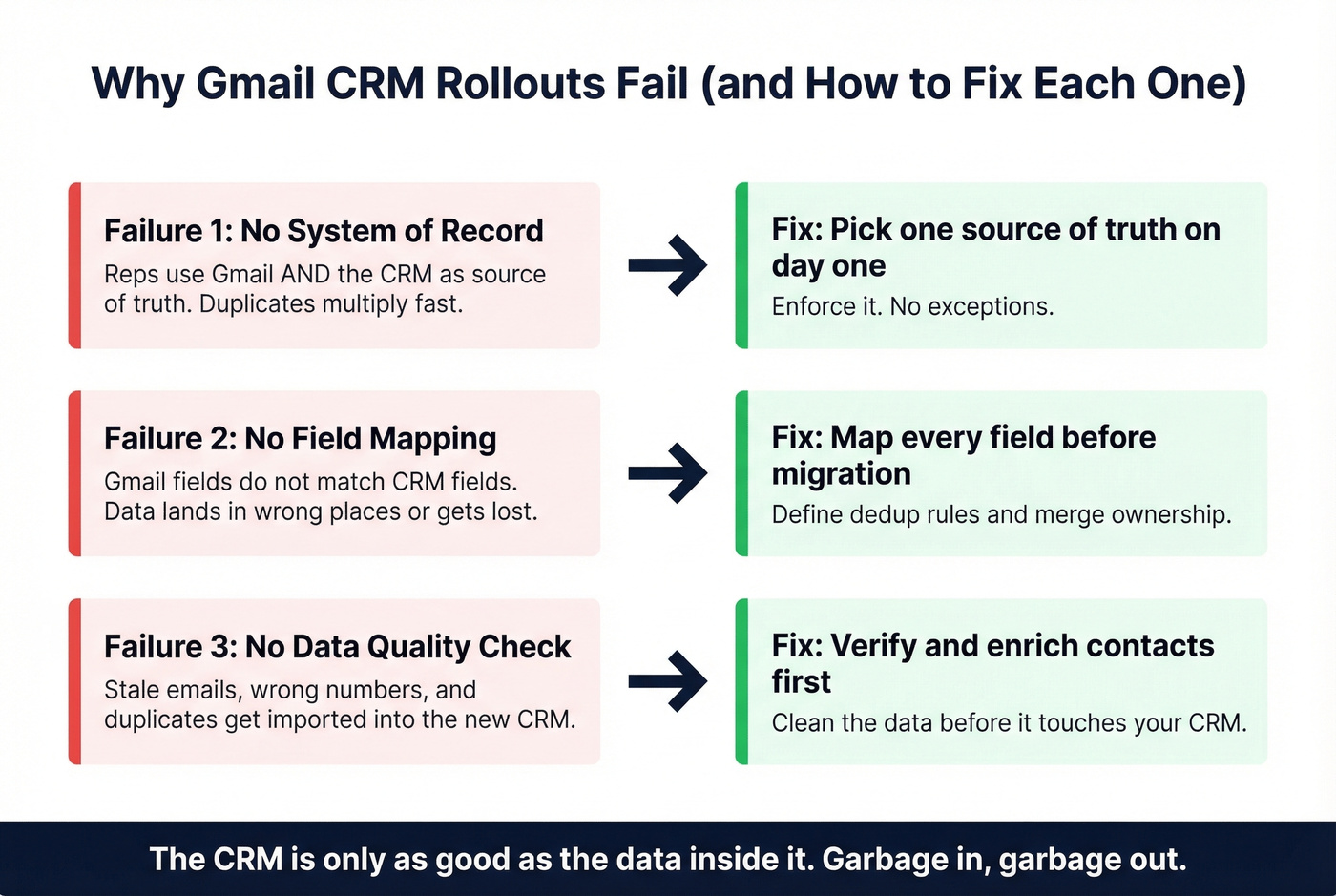
No field mapping or deduplication rules. Before you migrate a single contact, map every Gmail field to a CRM field. Define what happens when a duplicate is detected. Define who owns the merge. Skip this step and you'll spend more time cleaning data than selling.
No data quality check before migration. This is the one everyone skips, and it's the one that hurts the most. You export contacts from Gmail, import them into your shiny new CRM, and discover a chunk of the database is stale: bounced emails, disconnected numbers, duplicates everywhere. Verify and enrich your contact database before migration - catch stale emails and fill in missing phone numbers before they pollute your new system. (If you need a broader view of vendors, see data enrichment services.)
On the technical side, watch for sync failures, API throttling, authentication errors after password changes, and automations that silently stop firing after a schema update. Check your integration error logs weekly for the first month. After that, monthly is fine.
The Data Problem Nobody Talks About
Here's the uncomfortable truth that no Gmail CRM comparison addresses: your CRM is only as good as the data inside it. B2B contact data decays roughly 30% per year. People change jobs, companies rebrand, phone numbers rotate. Six months after your CRM rollout, nearly a third of your records are stale.
We've run enrichment tests where teams discovered 25-35% of their CRM contacts had invalid emails. That's not a data problem - that's a revenue problem. Every bounced email is a missed conversation, and enough bounces will tank your domain reputation entirely. If you're seeing this, start with email deliverability and track your email bounce rate.
Prospeo fits into this stack as the data quality layer that makes any CRM on this list actually work. The enrichment engine covers 300M+ professional profiles, 143M+ verified emails, and 125M+ verified mobile numbers, returning 50+ data points per contact with an 83% match rate. Email accuracy sits at 98%, verified through a proprietary 5-step process. Data refreshes every 7 days, compared to the 6-week industry average.
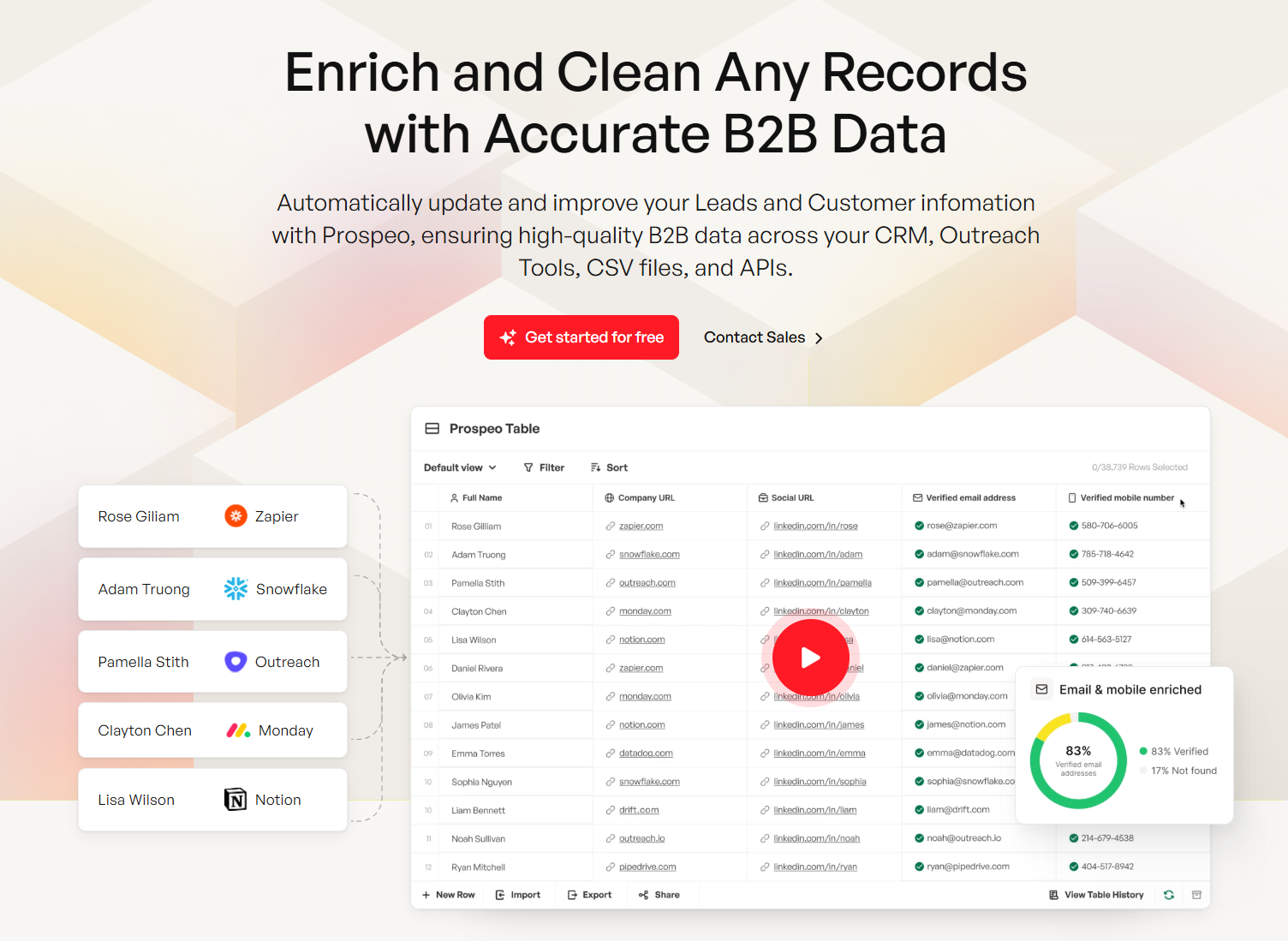
Native integrations with HubSpot and Salesforce mean enriched data flows directly into your CRM without CSV gymnastics. For teams on Copper or Streak, the Chrome extension (40,000+ users) lets you verify and enrich contacts from any website, then push them into your pipeline. The free tier gives you 75 verified emails and 100 Chrome extension credits per month - enough to test the workflow before committing. If you're building lists from scratch, pair this with a lead generation workflow and a few sales prospecting techniques.
You just picked a Gmail CRM - now fill it with data that won't bounce. Prospeo's CRM enrichment returns verified contact data for 83% of leads at $0.01 per email. That's 90% cheaper than ZoomInfo with higher accuracy. No contracts, no sales calls.
Every CRM on this list integrates with Prospeo. Your pipeline deserves real data.
FAQ
Is there a free Gmail CRM?
Streak offers free email tracking, snippets, and mail merge (50 sends/day) forever - no credit card required. HubSpot's CRM is also free, but useful sales features start at $20/month. For a truly zero-cost inbox CRM experience, Streak is the clear winner.
What's the best Gmail CRM for small teams?
Streak for zero-setup simplicity, NetHunt for automation, Copper if your whole company runs Google Workspace. All three embed directly inside Gmail, which drives higher adoption than tools in a separate tab. For teams under 5 people, Streak's free tier is hard to beat.
How do I keep CRM data accurate after setup?
B2B contact data decays roughly 30% per year as people change roles and companies merge. Use a data enrichment tool to verify emails, fill in missing phone numbers, and refresh records on a weekly cycle. At 98% email accuracy and a 7-day refresh, Prospeo catches decay before it tanks your deliverability.
What's the difference between an inbox-native CRM and a regular CRM with Gmail sync?
An inbox-native CRM like Streak or NetHunt renders pipelines and deal stages directly inside Gmail's interface. A regular CRM with Gmail sync - like Pipedrive or Zoho - lives in a separate browser tab and logs emails in the background. Inbox-native tools consistently see higher rep adoption because nobody has to leave the app they already use 4+ hours a day.