

Gmail Email Deliverability: What Changed, What to Fix, and How to Monitor It
You're authenticated, your domain's warmed, your copy is clean - and Gmail just bounced 12% of your last campaign at the SMTP level. Not spam-foldered. Rejected. That's the new reality of Gmail email deliverability in 2026: inbox placement dropped from 89.8% to 87.2% after enforcement tightened in 2024, and Google has been ramping up rejections on non-compliant bulk-sender traffic since late 2025. If your deliverability just fell off a cliff, skip straight to the diagnostic playbook below.
What You Need (Quick Version)
Three things move the needle more than anything else:
- Verified email data. Bounces from bad addresses destroy domain reputation faster than any other single factor.
- Proper SPF/DKIM/DMARC authentication. Under stricter bulk-sender enforcement, non-compliant mail gets deferred (4xx) or rejected (5xx) instead of merely landing in Spam.
- Engagement-driven sending. Replies are the strongest positive signal. Volume without engagement is a reputation killer.
If you're only going to do three things today, do those three. Everything below explains the why and the how - including how to improve inbox placement step by step.
How Gmail Decides Where Email Lands
Gmail's filtering isn't a single spam score. It's a layered ML model that evaluates authentication first, then domain reputation, then engagement signals, then content patterns. Fail early in the chain and the later stages never matter.
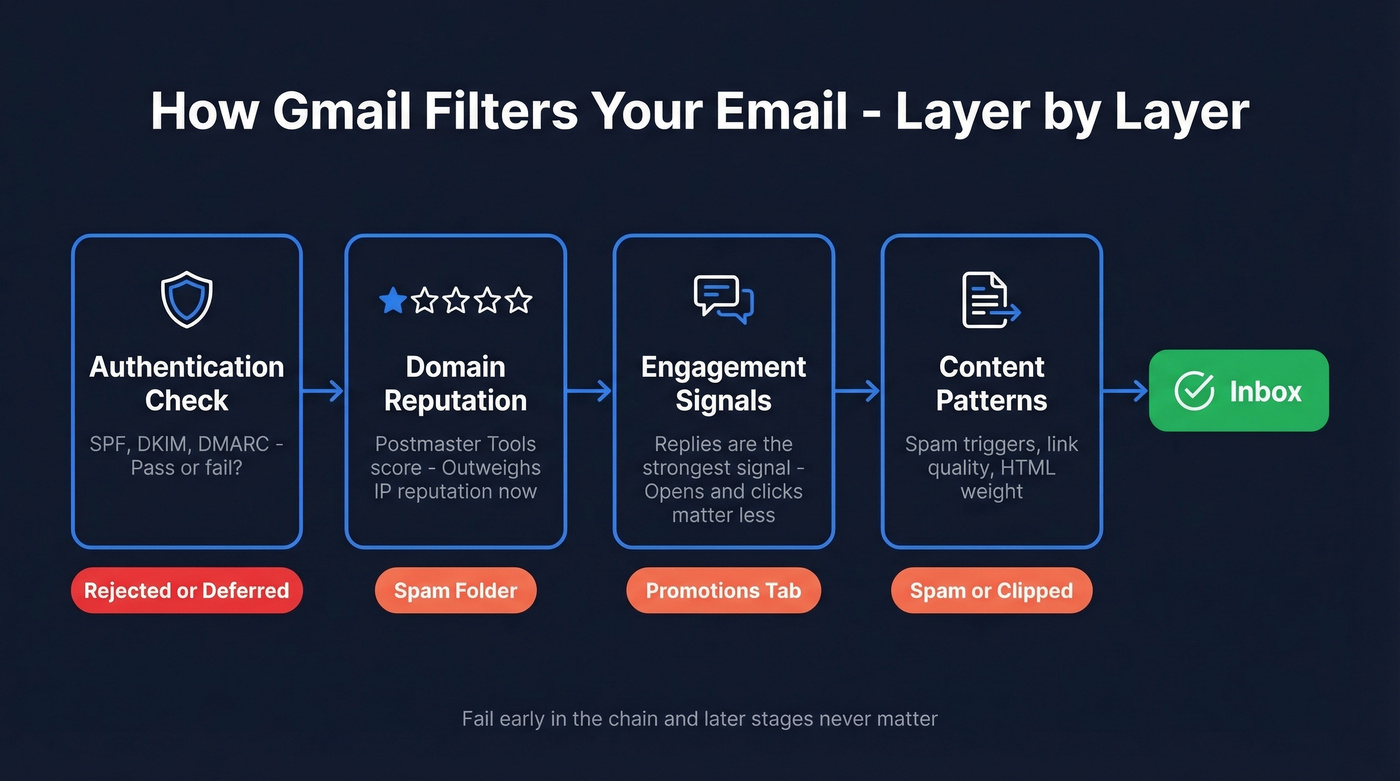
Domain reputation now outweighs IP reputation. That's a shift from the old days when shared IPs were the main concern - Gmail adapted because senders rotate IPs constantly. What hasn't changed: replies remain the strongest positive signal. A recipient replying to your email tells Gmail "this is wanted mail" more powerfully than any open or click.
Here's the frustrating part: 70% of senders don't even use [Google Postmaster Tools](https://gmail.com/postmaster/) to monitor their reputation. They're flying blind when the data is free.
Bulk Sender Compliance Checklist
These requirements apply to anyone sending 5,000+ messages per day to Gmail addresses. Even under that threshold, treat this as your baseline - Gmail's enforcement doesn't have a clean cutoff.
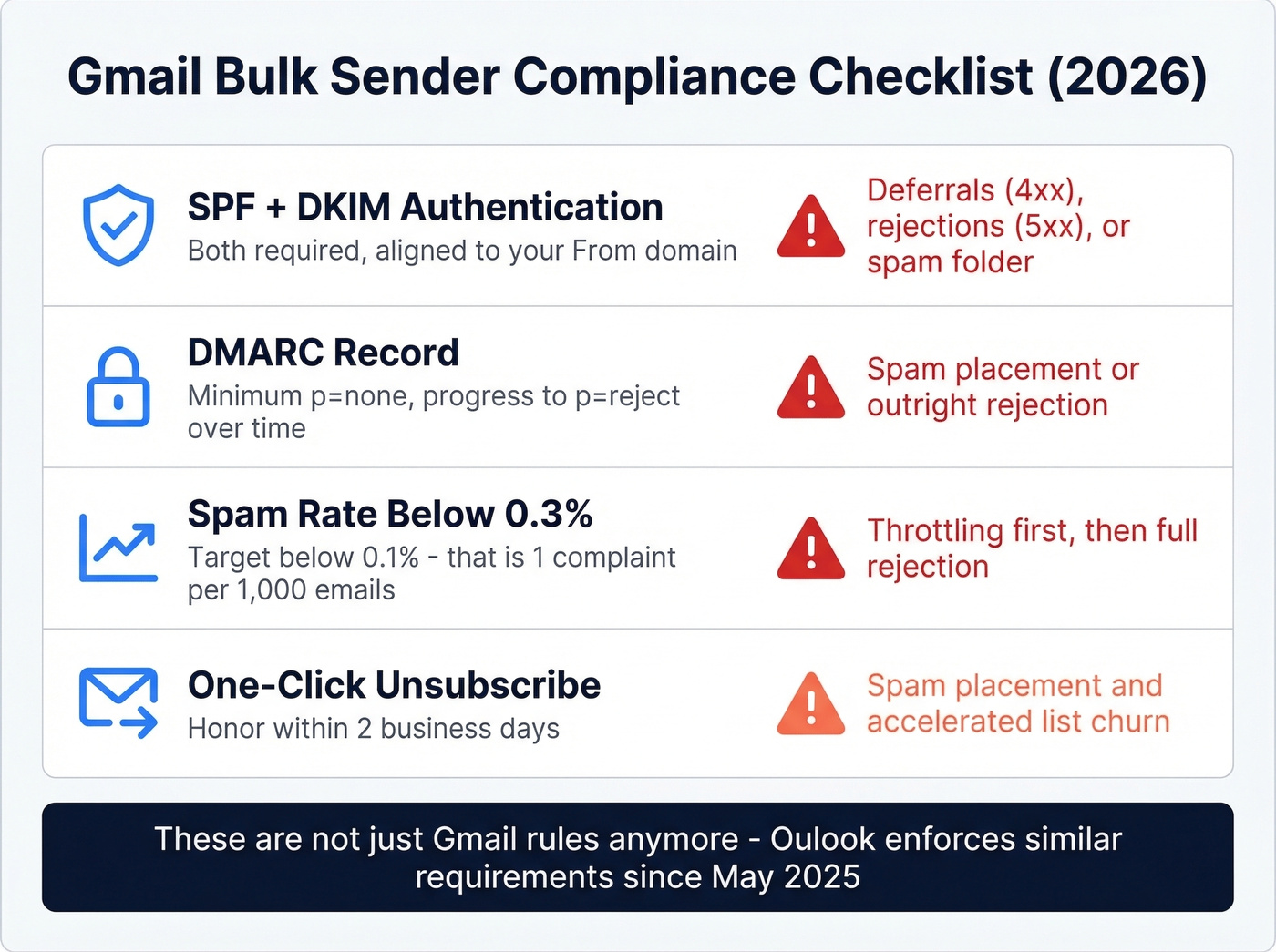
| Requirement | Standard | Consequence if Failed |
|---|---|---|
| SPF + DKIM | Authenticate with both; ensure alignment to the From domain | Spam placement, deferrals (4xx), or rejection (5xx) |
| DMARC | DMARC record required (p=none minimum) | Spam placement or rejection |
| Spam rate | Below 0.3% (target below 0.1%) | Throttling, then rejection |
| One-click unsub | Provide one-click unsubscribe; honor within 2 business days | Spam placement |
Two details most guides miss. First, Gmail can prompt users to unsubscribe from promotional emails they haven't opened in 30+ days, which accelerates list churn whether you like it or not. Second, Google began deleting personal accounts inactive for more than two years starting in December 2023 - sending to those addresses generates hard bounces that damage your reputation silently.
Outlook also tightened authentication and sender requirements for high-volume mail starting May 5, 2025, so these aren't Gmail-specific best practices anymore. They're table stakes.
Checks That Still Cause Issues
These aren't the headline bulk-sender rules everyone quotes, but they still show up as deliverability problems - throttling, failures, or trust issues:
- Reverse DNS (PTR) issues on your sending infrastructure
- TLS encryption problems in transit
Authentication Setup
Most deliverability problems we've diagnosed trace back to one of these DNS records being misconfigured.
SPF - publish a single TXT record on your domain:
v=spf1 include:_spf.google.com include:mailgun.org -all
The critical constraint: SPF allows a maximum of 10 DNS lookups. Every include: counts as one. Exceed 10 and you'll get a PermError, which breaks authentication entirely.
DKIM - your ESP generates the key pair. Use 2048-bit keys; anything shorter is considered weak:
selector._domainkey.yourdomain.com TXT "v=DKIM1; k=rsa; p=MIGf..."
DMARC - start with monitoring, then tighten:
_dmarc.yourdomain.com TXT "v=DMARC1; p=none; rua=mailto:dmarc@yourdomain.com"
The progression is p=none to p=quarantine to p=reject. Don't jump straight to reject - you'll block legitimate mail from services you forgot about. We've seen teams accidentally kill their own transactional emails this way.
Common pitfall: publishing two SPF records on the same domain. This silently breaks SPF validation. One record per hostname, always. To verify everything's working, open any delivered email in Gmail, click the three dots, and select "Show original" - SPF, DKIM, and DMARC should all show PASS.

You just read that bounces from bad addresses destroy domain reputation faster than any other factor. Prospeo's 5-step email verification - with catch-all handling, spam-trap removal, and honeypot filtering - delivers 98% accuracy. That's how teams like Snyk cut bounce rates from 35% to under 5%.
Stop feeding Gmail reasons to reject your emails.
How to Read Google Postmaster Tools
Head to postmaster.google.com, add your domain, and verify ownership with a DNS TXT record. Data won't populate until you're sending roughly 1,000+ messages per day to Gmail addresses.
DMARC adoption hit ~54% in 2024, up from 43% in 2023 - so if you're just getting this set up, you're joining the majority, not catching up.
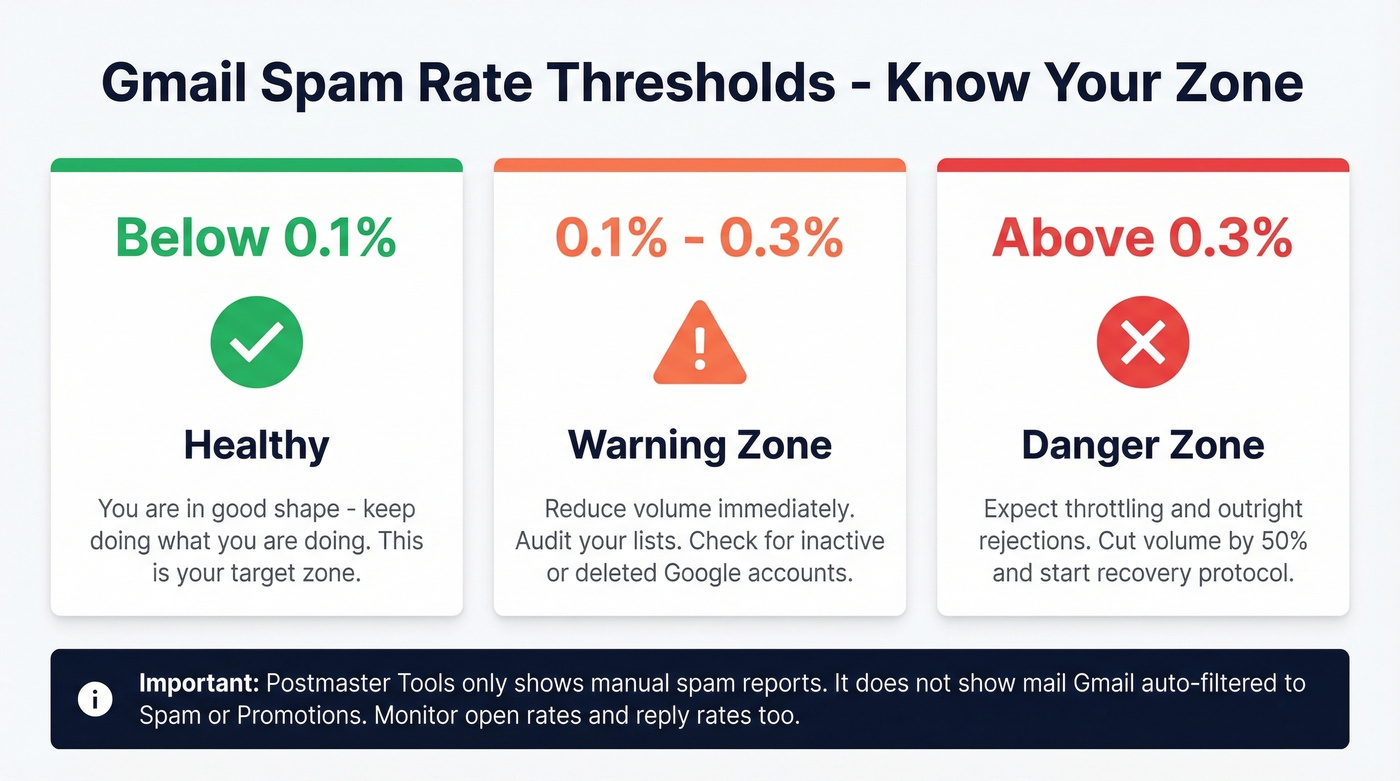
In late 2025, Postmaster Tools changed in ways that made a lot of older guides misleading. If you're following a walkthrough that fixates on legacy reputation panels, it's probably outdated. The two panels you should watch most closely are Compliance Status and Spam Rate. A "Fail" on compliance can correlate with SMTP-level deferrals or rejections, not just spam placement.
| Spam Rate | Status | What It Means |
|---|---|---|
| Below 0.1% | Healthy | You're in good shape |
| 0.1-0.3% | Warning | Reduce volume, check lists |
| Above 0.3% | Danger | Expect rejections |
One critical limitation: the spam rate in Postmaster Tools only measures manual user reports - the "Report spam" button. It doesn't show how much mail Gmail automatically filters to Spam or Promotions. You can have a 0.05% reported spam rate and still have half your emails landing in spam. Monitor open rates and reply rates alongside Postmaster Tools to get the full picture.
When Deliverability Tanks - Diagnostic Playbook
Let's be honest: this is the section most people actually need. A common cold email pattern looks like this - inbox placement drops ~50% overnight, replies go from 10 per 1,000 emails to 4-5, and nothing obvious changed. Warmed domains, clean authentication, good copy. Didn't matter.
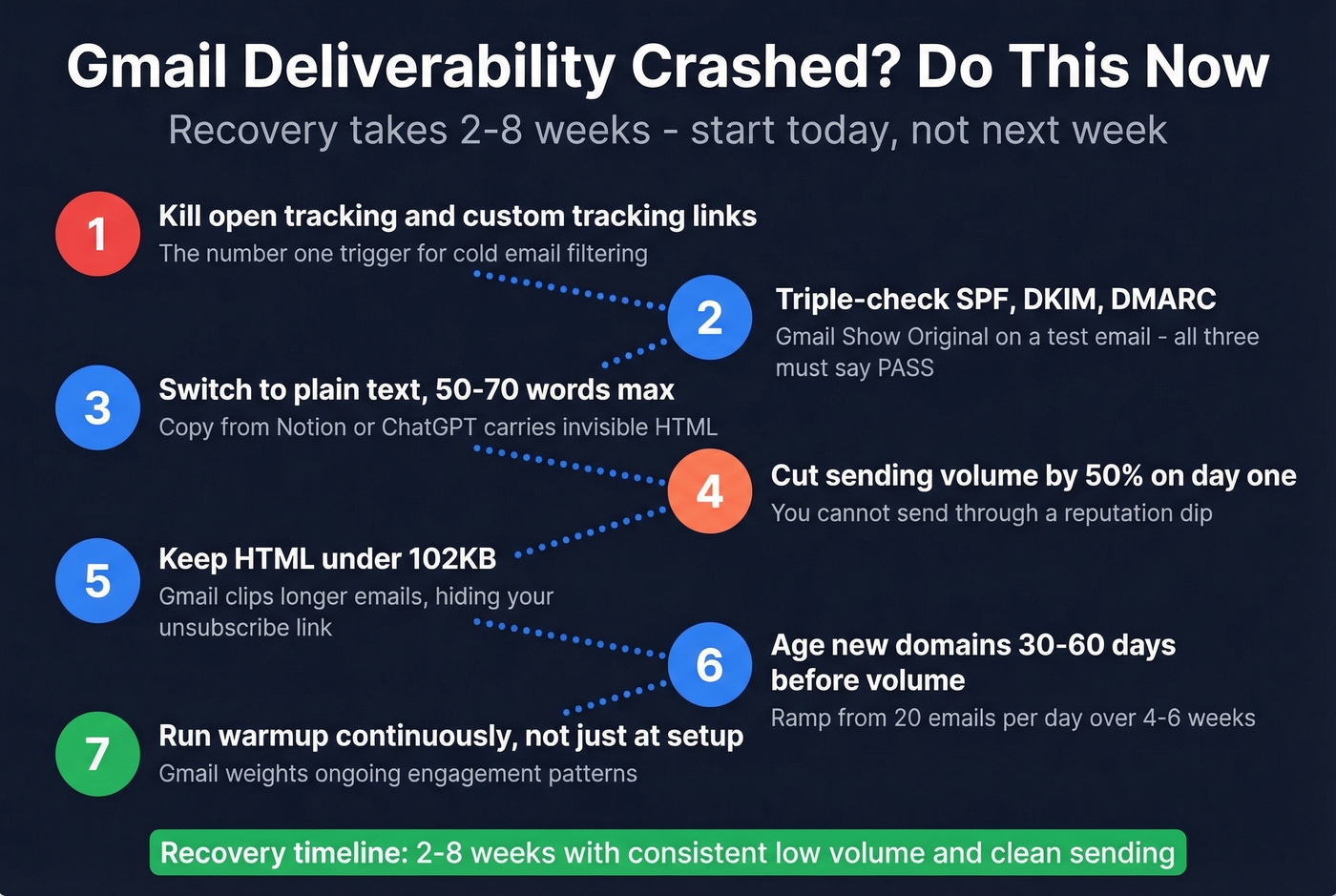
If that's you right now, here's the recovery checklist before the damage compounds:
- Remove open tracking and custom tracking links immediately. These are the #1 trigger for cold email filtering. (If you need the technical why, see tracking links and email tracking pixels.)
- Triple-check SPF/DKIM/DMARC. Use Gmail's "Show original" on a test email. (If you're unsure, follow a quick verify DKIM check.)
- Switch to plain text. Keep emails to 50-70 words. Copy pasted from Notion or ChatGPT can carry invisible HTML that triggers filters.
- Keep HTML under 102KB - Gmail clips longer emails, which can hide your unsubscribe link and trigger compliance failures.
- Age new domains 30-60 days before sending any volume. Ramp from 20 emails/day to your target over 4-6 weeks. (Use an email velocity plan, not vibes.)
- Reduce volume per inbox when health signals degrade. In our experience, the senders who recover fastest cut volume by 50% on day one.
- Run warmup continuously, not just during initial setup. Gmail weights ongoing engagement patterns. (Compare tools in our email warmup guide.)
Recovery typically takes 2-8 weeks. Even fully compliant senders saw dips after the February 2024 enforcement wave - if your numbers dropped but you're authenticated and clean, patience and lower volume are the fix. The consensus on r/coldemail is the same: you can't "send through" a reputation dip. You have to wait it out.
IMAP-Based Sending Considerations
If you're sending cold email through a Gmail or Google Workspace account using IMAP-based tools like Instantly, Smartlead, or Woodpecker, the same reputation rules apply - but the failure modes differ. Deliverability through IMAP depends heavily on per-account sending limits and warmup consistency, since each mailbox builds its own reputation independently.
Exceeding Google's daily sending limits on an IMAP-connected account triggers throttling faster than ESP-based sending, and recovery requires warming the specific mailbox back up from scratch. Skip this approach entirely if you can't commit to managing individual mailbox health.
Clean Your List to Protect Sender Reputation
Every tactic above assumes you're sending to real addresses. If you're not, none of it matters.
Bounces from invalid emails damage domain reputation faster than spam complaints, and the damage compounds - a few bad sends can put you in a hole that takes weeks to climb out of. Here's my honest take: most teams obsess over subject lines and copy when their real problem is data quality. Fix your list before you A/B test anything. The benchmark is straightforward - keep bounce rates under 2%. (If you want the deeper breakdown, see email bounce rate.)
Prospeo's verification runs every address through a 5-step process with catch-all domain handling, spam-trap removal, and honeypot filtering, delivering 98% email accuracy on a 7-day data refresh cycle. That refresh matters because email addresses decay constantly; a list that was clean last month isn't clean today. Stack Optimize built their agency to $1M ARR running client deliverability at 94%+ with bounce rates under 3% and zero domain flags - verified data was the foundation.

Every hard bounce chips away at the domain reputation Gmail now weighs most heavily. Prospeo refreshes its 300M+ profiles every 7 days - not the 6-week industry average - so you're never sending to stale, deleted, or inactive addresses that trigger silent reputation damage.
Clean data is the deliverability fix no DNS record can replace.
FAQ
What's a good spam complaint rate for Gmail?
Below 0.1% is healthy - that's 1 complaint per 1,000 emails. Between 0.1% and 0.3% is a warning zone where you should reduce volume and investigate. Above 0.3%, expect filtering to escalate and rejections to spike.
Does Gmail weigh content or sender reputation more?
Sender reputation and authentication matter far more than subject lines or copy. Gmail's filtering evaluates your domain reputation and DNS records before it ever looks at content. Fix your SPF/DKIM/DMARC and clean your list before you A/B test anything.
How long does recovery take after a reputation hit?
Plan for 2-8 weeks. Cut sending volume by at least 50% immediately, verify your entire list to eliminate bounces, and confirm all authentication records pass. The biggest mistake is trying to "send through" a reputation dip - lower volume and higher engagement is the only path back.
What free tools help diagnose Gmail deliverability issues?
Google Postmaster Tools is the most important - it shows domain reputation, spam rate, and compliance status for free. Pair it with Prospeo's free tier (75 email verifications/month) to catch invalid addresses before they generate bounces. Also use Gmail's "Show original" on test emails to confirm SPF, DKIM, and DMARC all pass.