

Gmail Maximum Number of Recipients: Every Limit for 2026
You tried to send a holiday promo to 200 customers from your personal Gmail and got blocked after the 15th email. The help page says 500 per day. So what happened?
Google's published limits on the Gmail maximum number of recipients are ceilings, not guarantees - and the actual enforcement depends on signals they don't document. We've watched teams get throttled at a fraction of the stated cap, scratching their heads at error messages that don't explain anything useful. Let's clear this up once and for all.
The Quick Version
- Free Gmail: 100 recipients per email, 500 emails/day
- Google Workspace (paid): up to 2,000 recipients per email, 2,000 emails/day
- The catch: Gmail can block you far below these numbers based on sending behavior, bounce rate, and account age
- If you're sending bulk: verify your list first, pace your sends, and consider Workspace or a dedicated platform
Complete Gmail Recipient Limits for 2026
Here's the practical breakdown based on Google's published Workspace and Gmail documentation. The maximum number of recipients in Gmail depends on your account type and sending method - and the gap between the two tiers is massive.
Core daily limits
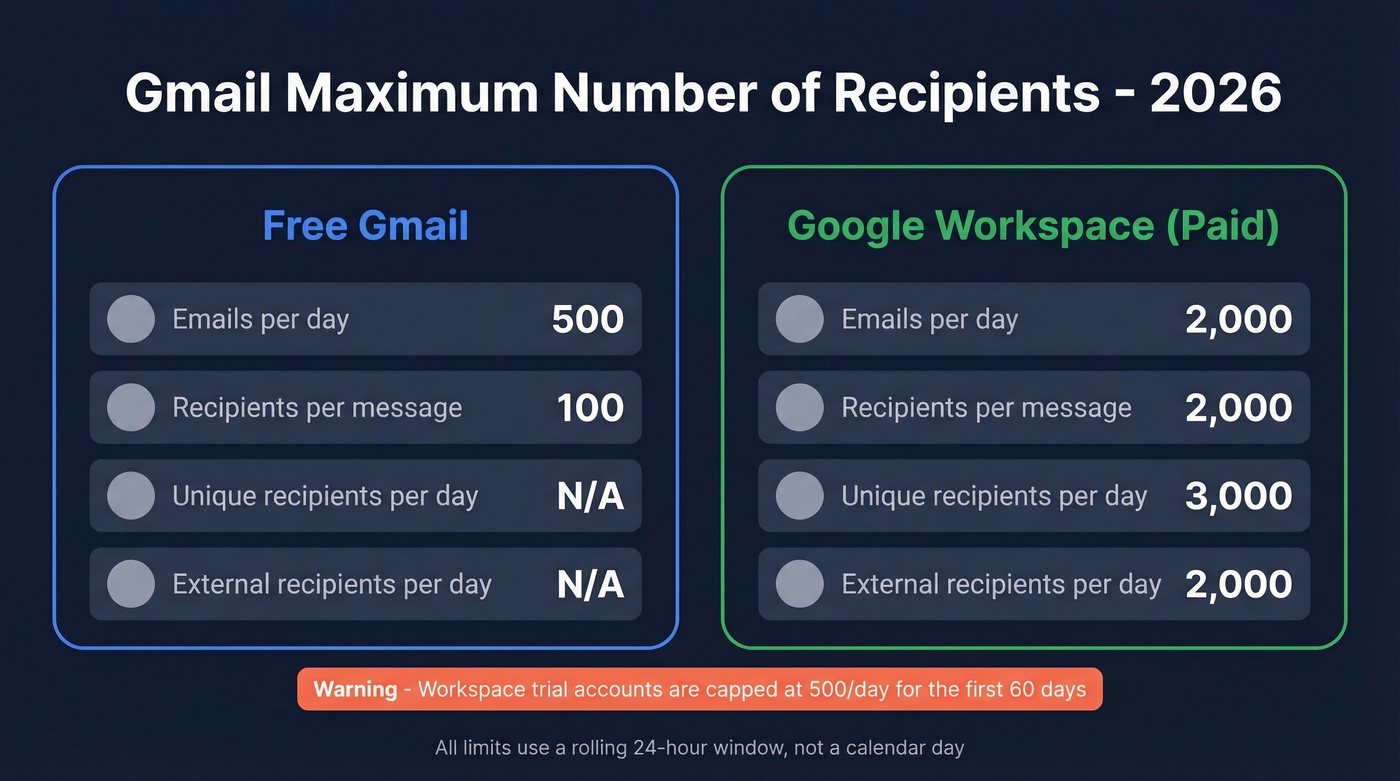
Free Gmail tops out at 500 emails per rolling 24-hour period. Google Workspace (paid) pushes that to 2,000 emails per rolling 24-hour period. Workspace trial accounts? They're stuck at 500/day until you convert to paid and complete a 60-day waiting period.
All daily limits run on a rolling 24-hour window, not a calendar day. Your quota doesn't reset at midnight - it resets 24 hours after each email was sent.
Per-message recipient caps
- Free Gmail: 100 total recipients per message (To + CC + BCC combined)
- Google Workspace (paid): up to 2,000 total recipients per message
If you're trying to send one email to 200 people from a free Gmail account, you'll hit the per-email cap long before you reach the 500/day ceiling.
Workspace caps beyond messages/day
Google Workspace enforces several recipient-based caps on top of the 2,000 messages/day limit:
- 10,000 total recipients/day
- 3,000 unique recipients/day - this is the one that catches teams off guard
- 2,000 external unique recipients/day - only addresses outside your organization
- Mail merge (multi-send) limit: 1,500/day
Attachment size
Gmail's attachment limit is 25 MB. Larger files get converted to a Drive link automatically.
How Gmail Counts Recipients
Every address in To, CC, and BCC counts equally. There's no trick to hiding volume in BCC - those addresses count toward the same per-message and daily caps as every other field.
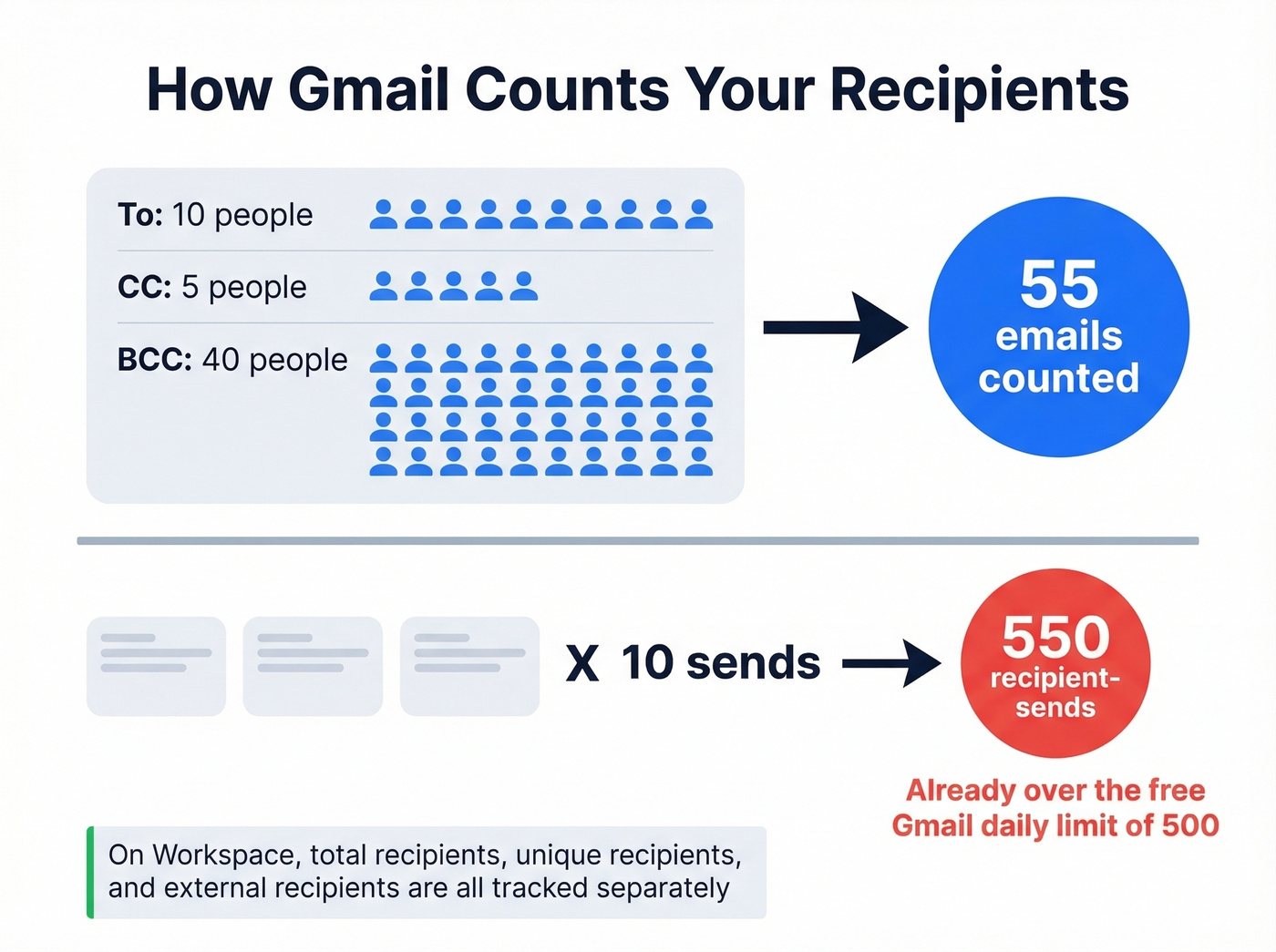
Google also counts each recipient as a separate email for quota purposes. One message to 5 recipients equals 5 emails counted against your daily limit.
Here's where the math gets people: one email sent to 10 people in To and 40 in BCC equals 50 recipient-sends. Send that same email 10 times and you've burned through 500 recipient-sends, which is why people feel like they "hit the limit" fast even when they only clicked Send a handful of times.
On Workspace, total recipients, unique recipients, and external unique recipients are tracked separately. Emailing the same 100 people repeatedly is treated very differently than emailing thousands of unique people once. Internal messages within your Workspace domain don't count against the external cap - that 2,000 external ceiling is the one that matters most for outreach teams.

Most Gmail blocks happen because of bounces, not volume. Prospeo's 5-step email verification catches invalid addresses, spam traps, and catch-all domains before they torch your sending reputation - at 98% accuracy and $0.01 per email.
Clean your list before Gmail cleans it for you.
Limits by Sending Method
This is where the "100 vs 500" confusion comes from. The recipient cap you run into depends heavily on how you send.
| Sending Method | Recipients/Message |
|---|---|
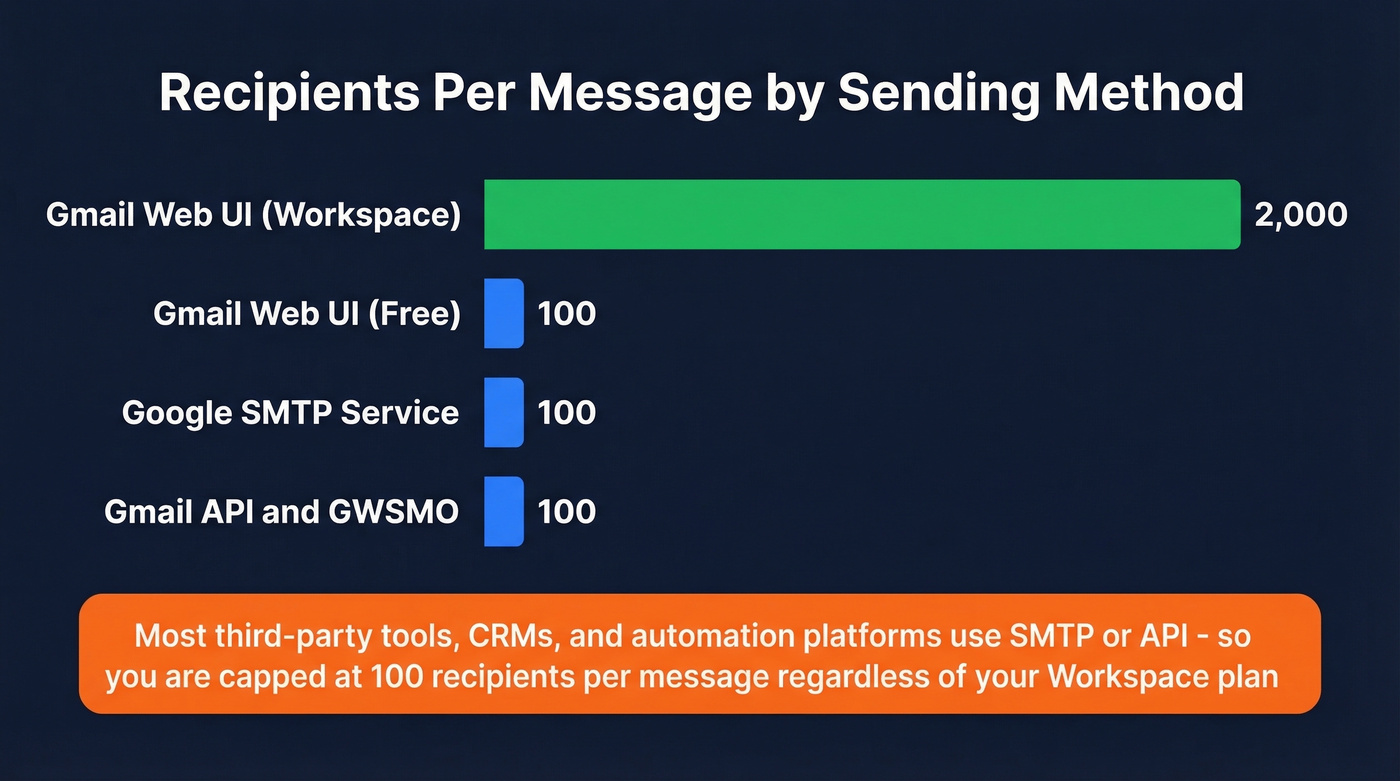
| Gmail compose (web UI) | 100 (free) / up to 2,000 (Workspace) |
| Google SMTP service | 100 |
| Gmail API | 100 |
| GWSMO (Outlook) | 100 |
If you're sending through SMTP or the Gmail API - which includes most third-party tools, CRMs, and automation platforms - the per-message cap is 100 recipients regardless of your account tier. This trips up a lot of teams running automated workflows.
If you're building automated outreach, it helps to understand email velocity and how it interacts with throttling.
Why You Get Blocked Below the Limits
Here's the thing: the numbers above are theoretical maximums. Gmail's anti-spam system evaluates your sending behavior in real time, and it can throttle you well before you hit the published cap.
One Reddit user reported getting blocked after sending about a dozen work emails from a personal Gmail account. Another using Boomerang to schedule daily reminders to roughly 15 people got the "reached daily limit" warning on random, non-consecutive days. Neither was anywhere near 500/day.
The behavioral triggers that cause early throttling:
- Identical content across multiple messages (template detection)
- New account age - fresh accounts get much shorter leashes
- High bounce rates - sending to invalid addresses is a major red flag (see email bounce rate)
- Suspicious link patterns, especially shortened URLs or known tracking domains
- Automation detection - scheduling tools and API sends get extra scrutiny
- The ~20/hour undocumented throttle - GMass has documented an observed rate limit of roughly 20 outgoing emails per hour, and exceeding it can trigger a sending suspension
In our experience, teams with perfectly legitimate Workspace accounts get throttled well before 2,000/day when their list quality drops. The published limits assume you're a well-behaved sender. Gmail decides in real time whether you qualify.
Most people who hit Gmail's limits don't have a sending limit problem. They have a list quality problem. Fix your data and the limits rarely matter. If you want a deeper playbook, use an email deliverability guide and a process to improve sender reputation.
What Happens When You Hit the Limit
The sequence is predictable:
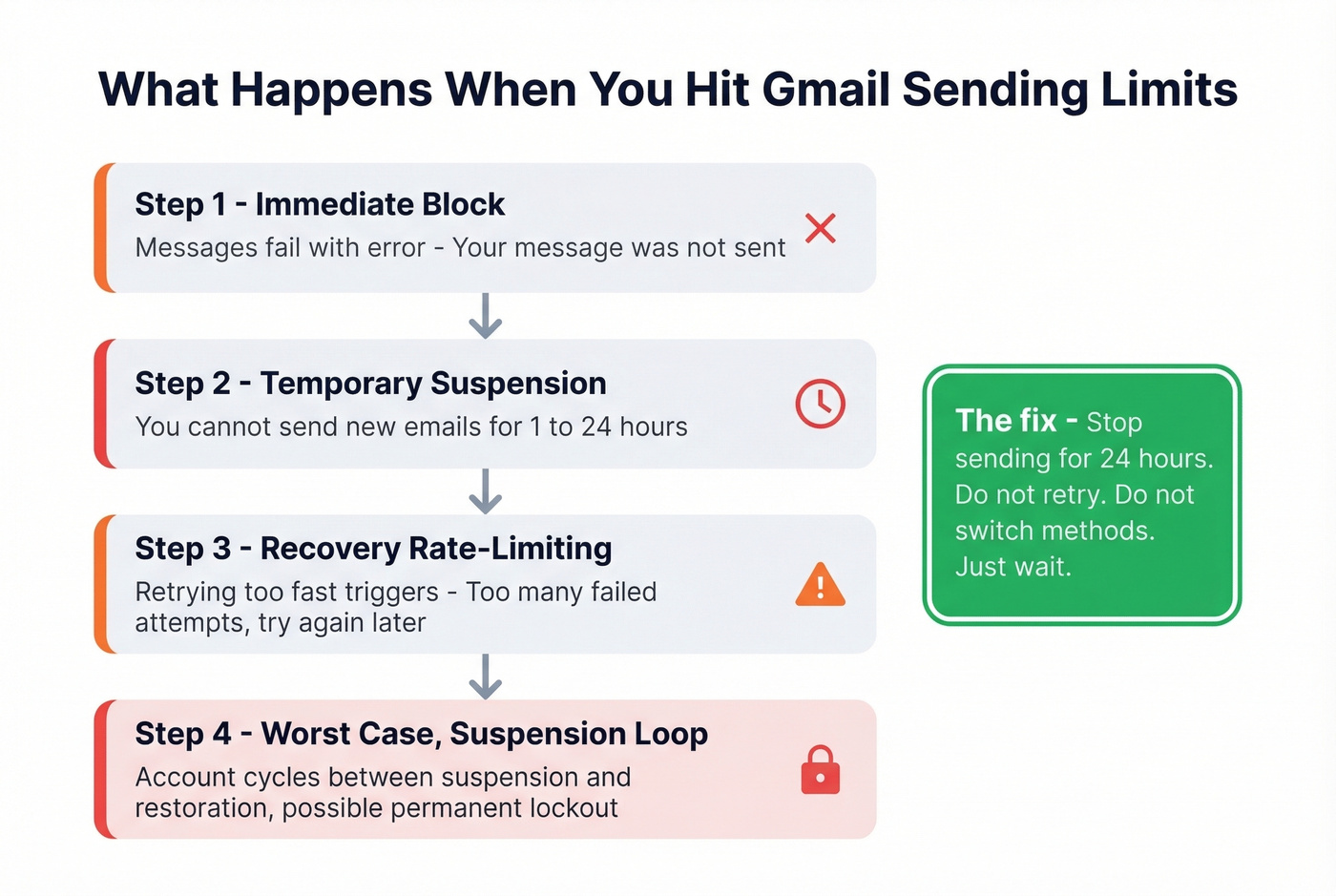
- Immediate block. Outgoing messages fail with: "You have reached a limit for sending mail. Your message was not sent."
- Temporary suspension. You can't send new emails for 1 to 24 hours.
- Recovery rate-limiting. Retrying too aggressively triggers: "Unavailable because of too many failed attempts. Try again in a few hours."
- Worst case: suspension loop. In rare cases, accounts get stuck cycling between suspension and restoration, especially new accounts. One Reddit user created a Gmail for job applications, got banned after a week, appealed successfully, then got trapped in a suspension-restoration loop that eventually locked them out entirely.
If you get blocked, stop sending for 24 hours. Don't retry repeatedly. Don't switch to a different sending method from the same account. Just wait.
How to Send More Without Getting Blocked
Knowing the Gmail maximum number of recipients at each tier is only half the battle. Staying under the behavioral thresholds is what actually keeps your account healthy.
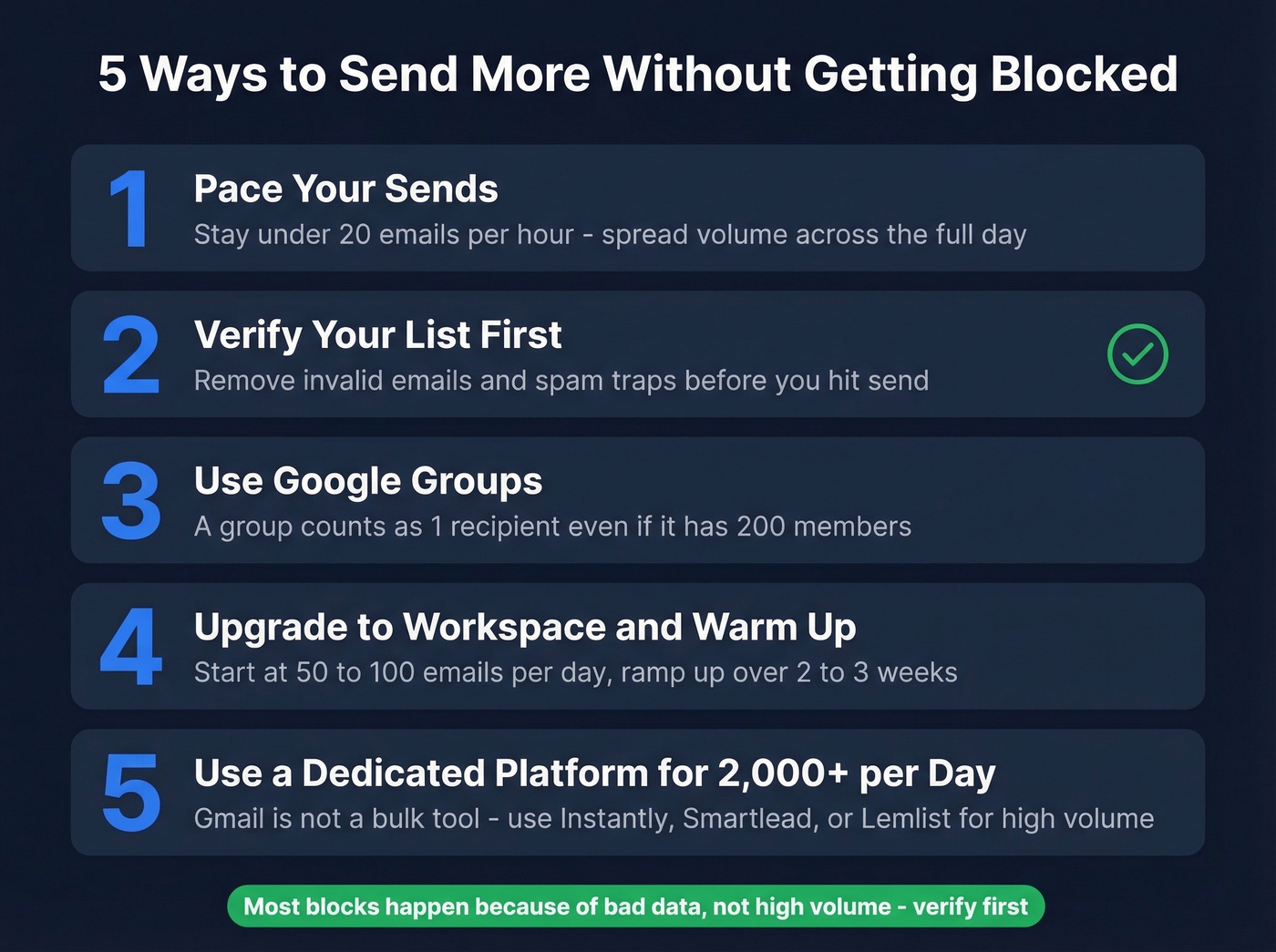
1. Pace your sends. Don't blast your full quota in one burst. Staying under 20 emails per hour is the single most effective way to avoid throttling. A Workspace account can technically send 2,000/day, but sending steadily across the day is far safer than dumping everything in one shot.
2. Verify your list before sending. Invalid emails are one of the fastest ways to trigger throttling and damage deliverability. We've seen teams go from constant blocks to zero issues just by cleaning their list first. Run yours through Prospeo's email verification before you hit send - 98% email accuracy means you're not wasting sends on dead addresses, and the free tier covers 75 verifications per month. If you need alternatives, compare options in our guide to email verification.

3. Use Google Groups for distribution. A Google Group counts as a single recipient even though the message goes to all members. Sending an update to 200 people? A group turns 200 recipients into 1 for counting purposes - a simple workaround for per-message caps. Google's Groups documentation walks through setup.
4. Upgrade to Workspace and warm up. The jump from 500 to 2,000 emails/day is significant. Business Starter is the cheapest way to increase your ceiling. But new Workspace accounts should ramp up gradually - start at 50-100/day and increase over 2-3 weeks. If you're doing cold outreach, pair this with a B2B cold email sequence and strong email copywriting.
5. Move to a dedicated platform for 2,000+/day. Skip this section if you're sending under a few hundred emails a day - Gmail handles that fine. But for teams regularly sending thousands of messages, use a platform built for it (Instantly, Smartlead, Lemlist) and keep Gmail for 1:1 conversations. Gmail wasn't designed to be a bulk email tool, and treating it like one will eventually burn your domain. For more context, see our guide on the best way to send bulk email without getting blacklisted.
Hitting Gmail's 500/day ceiling with unverified contacts is a fast track to suspension. Teams using Prospeo's 143M+ verified emails cut bounce rates below 4% and never worry about recipient limits again.
Stop sending to dead addresses - start with verified data.
FAQ
Do CC and BCC count toward the recipient limit?
Yes. Every address in To, CC, and BCC counts equally toward both per-message and daily caps. An email sent to 10 people in To plus 40 in BCC equals 50 recipients counted. There's no workaround for hiding volume in BCC.
How many recipients per message does Gmail allow?
Free Gmail accounts support up to 100 recipients per message, while paid Google Workspace accounts allow up to 2,000. Sending through SMTP or the Gmail API caps you at 100 regardless of account type - a detail that trips up teams using third-party automation tools.
How long until my sending limit resets?
Gmail uses a rolling 24-hour window, not a calendar day. Your capacity frees up exactly 24 hours after each individual email was sent. If you sent a batch between 2-4 PM yesterday, those slots open between 2-4 PM today.
Can I send 10,000 emails per day from Gmail?
Not from a single account. Google Workspace allows up to 2,000 messages/day and 10,000 total recipients/day, with 3,000 unique recipients/day and 2,000 external unique recipients/day. For true bulk sending, use a dedicated email platform and verify your list first to keep bounce rates low and protect your domain reputation.