

Gmail Open Tracking Changes: What Actually Happened and How to Adapt
A cold email operator on r/coldemail shared their numbers from a 500k-email campaign: 85% open rate, under 1% actual human engagement. They stopped tracking opens six months ago and nothing changed operationally.
The conversation around Gmail open tracking changes usually starts with panic. It shouldn't. Gmail didn't kill open tracking - bad data killed it years ago. Gmail just made the corpse harder to ignore.
The Short Version
- Roughly 75-84% of opens are structurally unreliable. Apple Mail drives 48-53% of opens globally and its Privacy Protection pre-fetches images. Gmail accounts for about 27-30% and its proxy plus caching behavior strips useful metadata while breaking repeat-open tracking. Add bots and security scanners, and your open rate becomes mostly machine noise.
- If you're doing cold outbound, disable open tracking. It hurts deliverability and the data is meaningless. Measure reply rate instead.
- The "suspicious message" banner is a sender reputation problem, not a tracking problem. Fix your authentication and data quality, not your pixel setup.
The Timeline of Changes
Most guides treat this as a single event. It wasn't.
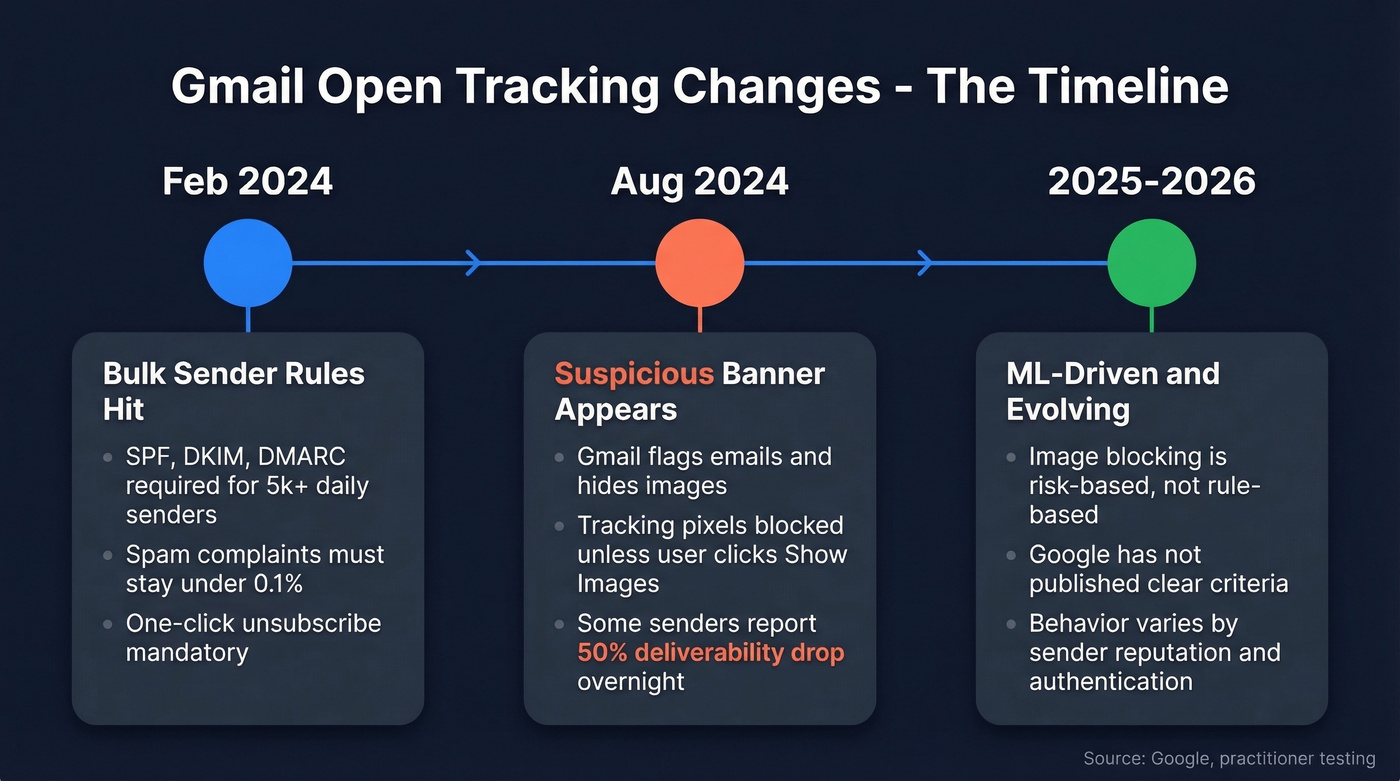
February 2024 brought Gmail's bulk sender requirements. Anyone sending 5,000+ emails per day to free Gmail accounts now needs SPF, DKIM, and DMARC alignment. Spam complaint rates must stay below 0.1%, with a hard ceiling at 0.3%. One-click unsubscribe became mandatory.
Around August 2024 is when things got visible. Gmail started flagging more emails with the "suspicious message" banner: "Images in this message are hidden. This message might be suspicious or spam." When that banner fires, your tracking pixel is dead unless the recipient manually clicks "Show images." One practitioner on Reddit reported deliverability tanking by roughly 50% almost overnight.
2025-2026 and ongoing is the part nobody talks about. Gmail's behavior here is risk-based and ML-driven, and Google hasn't published clear criteria for when images get hidden behind the banner versus loaded through the proxy. We're all operating on testing, patterns, and reverse-engineering.
How Gmail Changed Image Serving
Gmail doesn't simply block tracking pixels. It runs them through a proxy that creates a different kind of distortion.
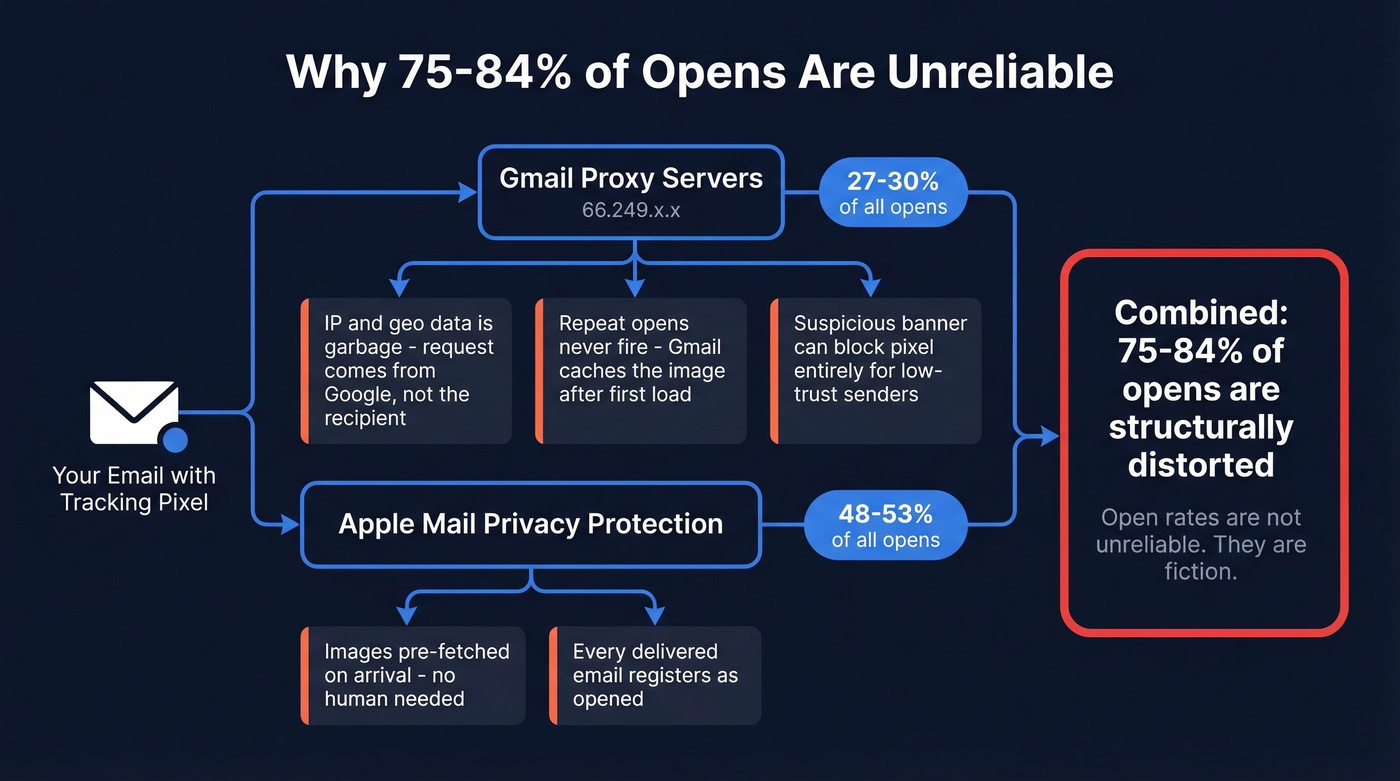
When a Gmail user opens your email, images load through Google's proxy servers. The pixel fires, but the request comes from Google infrastructure - IP ranges like 66.249.x.x - not the recipient. Your geo and device data is garbage. Repeat opens are even worse: Gmail caches the image after the first load, so subsequent opens often never fire the pixel at all. You end up undercounting repeat engagement while overcounting "unique opens" that are really proxy loads, bots, and scanners. Because Gmail altered image serving at the infrastructure level, no pixel workaround can restore the metadata you've lost.
Now layer in Apple Mail Privacy Protection, which pre-fetches images on arrival regardless of whether anyone reads the email. Apple Mail accounts for roughly 48-53% of email opens globally. Gmail sits at about 27-30%. Combined, that's around 75-84% of opens happening inside environments that structurally distort the metric.
Open rates aren't unreliable. They're fiction.

How to Spot False Opens
If you're not ready to abandon open tracking entirely, at least learn to identify the noise.
Check User-Agent strings. GMass analyzed roughly 307 million opens and identified a specific bot UA generating false opens - incidence rose from about 2.5% to 6.5% in their sampled windows. Look for Google Image Proxy signatures too: UA strings containing "(via ggpht.com GoogleImageProxy)" indicate proxy-served opens stripped of useful metadata.
Flag sub-second open timestamps. An email "opened" within seconds of delivery is automated scanning, not a human. And apply the opens-to-clicks ratio test: 60%+ opens with sub-2% clicks means most of those opens aren't real. We've run this check on dozens of campaigns and it's the fastest way to separate signal from noise.

False opens start with bad data. When 22.7% of your list decays every year, bounces tank your sender reputation and trigger Gmail's suspicious banner. Prospeo's 5-step verification and 7-day data refresh cycle keep bounce rates under 4% - so Gmail never has a reason to hide your emails.
Stop debugging pixels. Fix the data that got you flagged.
Should You Disable Open Tracking?
For cold outbound: yes. Disable it.
The data is unreliable, and the tracking pixel's HTML footprint increases your risk of triggering Gmail's "suspicious" treatment when your sender reputation is weak. The field consensus on r/coldemail is clear - remove open tracking, strip custom links, send plain text, and lock down SPF/DKIM/DMARC (including DMARC alignment).
For opted-in marketing lists, the math is different. Keep open tracking as a directional health metric - a sudden drop signals deliverability issues - but don't use it as a primary KPI. If your SDR manager is celebrating 65% open rates while pipeline is empty, the data is lying to everyone.
Here's the thing: some guides suggest replacing email tracking with website visitor deanonymization tools. That's a $30-100k+/year intent platform commitment. For most teams, fixing your data and measuring replies is the practical answer, and it costs almost nothing.
What to Track Instead of Opens
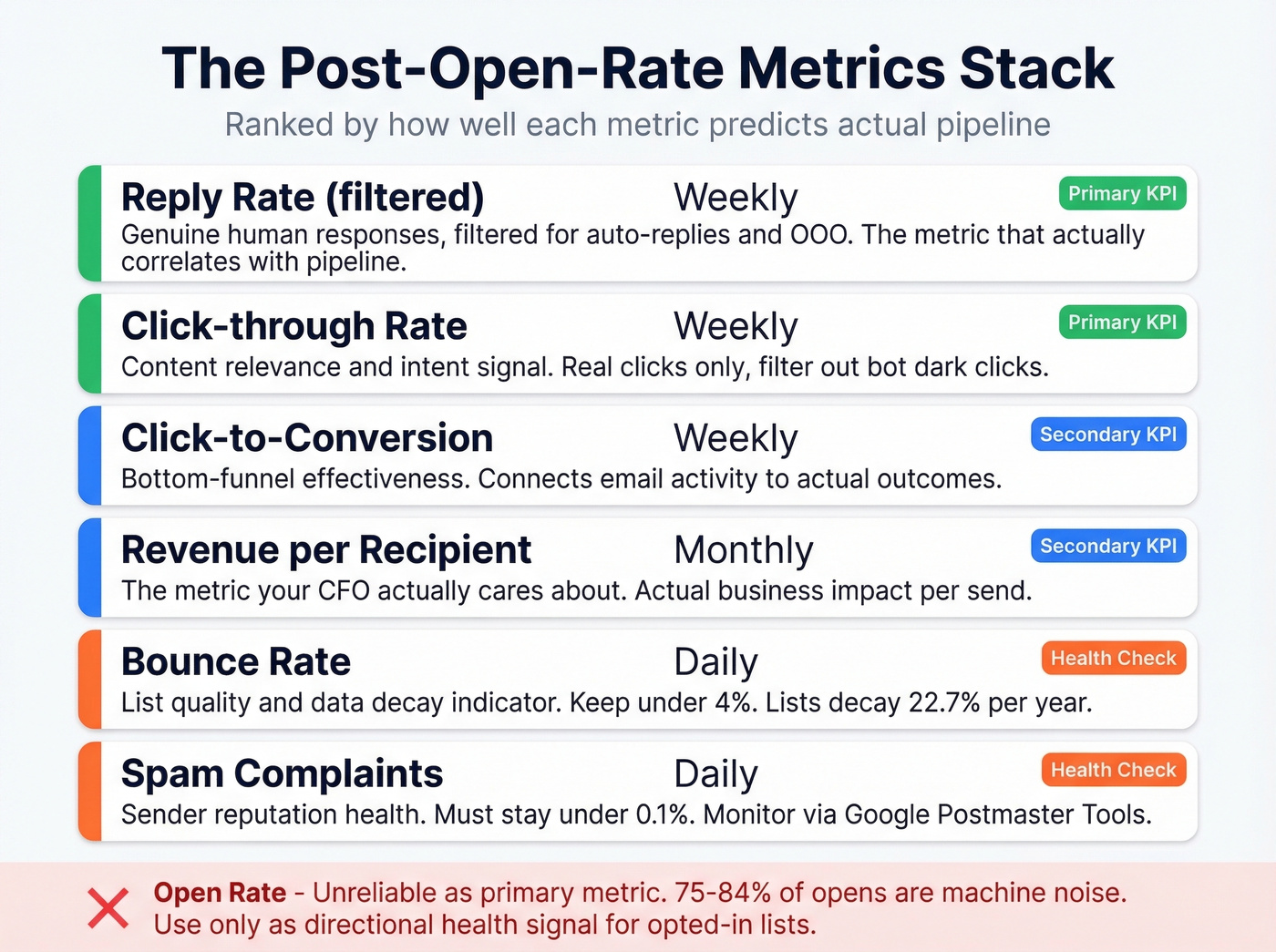
| Metric | What It Measures | Cadence |
|---|---|---|
| Reply rate (filtered) | Genuine human responses | Weekly |
| Click-through rate | Content relevance + intent | Weekly |
| Click-to-conversion | Bottom-funnel effectiveness | Weekly |
| Revenue per recipient | Actual business impact | Monthly |
| Bounce rate | List quality + data decay | Daily |
| Spam complaints | Sender reputation health | Daily |
Two terms worth knowing. "Dark opens" are image pre-fetches that inflate your numbers. "Dark clicks" are security scanners crawling your URLs - at peak, bots can generate 3M+ false clicks per day. Neither represents a human interested in what you're selling.
Reply rate - filtered for auto-replies and OOO messages - is the metric that actually correlates with pipeline. Let's be honest: if you can't measure it with a reply or a click, you probably can't act on it either. (If you want benchmarks and fixes, see follow-up email reply rate.)
Fix the Upstream Problem
Most guides end with "disable tracking and measure replies." That's half the answer. The other half is why Gmail flagged you in the first place.
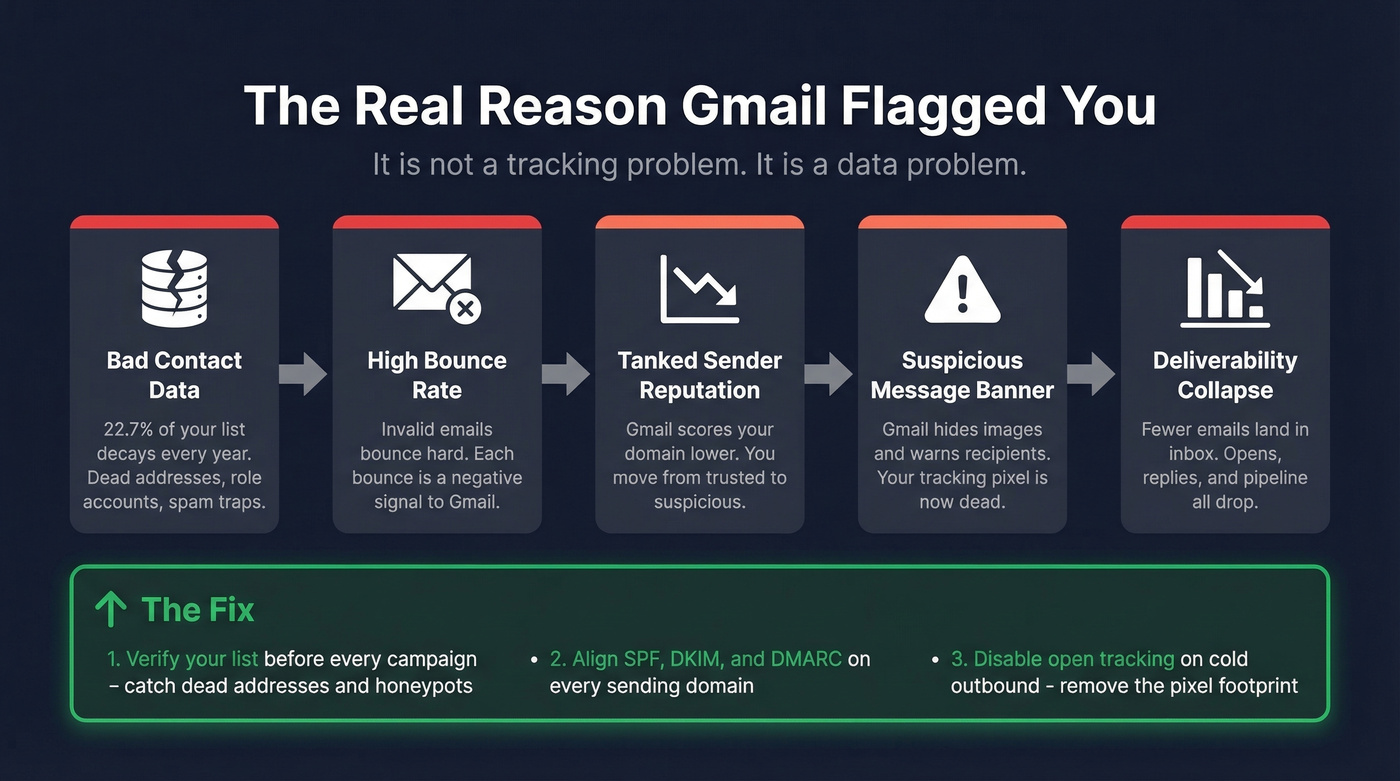
The causal chain looks like this: bad contact data leads to bounces, bounces tank sender reputation, low reputation triggers the "suspicious message" banner, and the banner blocks pixels while reducing deliverability across the board. The banner isn't Gmail being unfair. It's Gmail telling you your list quality needs work.
Email lists decay at roughly 22.7% annually - nearly a quarter of your list goes stale every year. We've seen teams recover deliverability within weeks just by disabling open tracking and running their lists through proper verification before every campaign. Prospeo's 5-step verification process, which includes catch-all handling and spam-trap removal, catches the dead addresses and honeypots that silently destroy your reputation. At 98% email accuracy on a 7-day refresh cycle, you're sending to contacts that actually exist at addresses that are currently active. That's the upstream fix most teams skip while obsessing over pixel placement.
If you want a deeper playbook, start with an email deliverability guide, then tighten list hygiene with spam trap removal and monitor your email bounce rate.
Remediation Checklist
- Align SPF, DKIM, and DMARC for every sending domain (use an SPF record example if you’re troubleshooting syntax)
- Keep spam complaint rate below 0.1% - monitor daily via Google Postmaster Tools
- Host images on branded domains, not shared CDNs or ESP defaults
- Disable open tracking for all cold outbound sequences
- Verify your contact list before every campaign to catch invalid addresses, spam traps, and honeypots before they tank your reputation
- Monitor sender reputation weekly - slow declines are harder to spot than sudden drops (see how to improve sender reputation)
- Audit your list quarterly against that 22.7% annual decay rate
Skip the checklist if your domain is brand new and you haven't warmed it yet. Warm first, then worry about tracking hygiene. Trying to fix tracking on an unwarmed domain is like rearranging deck chairs. (If you’re scaling volume, also watch email velocity.)
You're measuring replies now - good. But replies only happen when emails land in real inboxes. Prospeo delivers 98% email accuracy across 143M+ verified addresses, with catch-all handling and spam-trap removal built in. Teams using Prospeo see bounce rates drop from 35%+ to under 4%.
Reply rates mean nothing if half your emails bounce. Start with clean data.
FAQ
Did Gmail officially announce these tracking changes?
No. Google hasn't published documentation laying out clear image-blocking criteria. What we know comes from practitioner testing, the February 2024 bulk sender requirements, and observable behavior like the "suspicious message" banner - which is ML-driven, not a single policy switch.
Does Gmail block all tracking pixels now?
It doesn't. Gmail blocks images selectively based on sender reputation, authentication, and content signals. If your SPF/DKIM/DMARC are aligned and your reputation is strong, pixels still fire through the proxy. The banner targets low-trust senders specifically. Clean data and proper authentication go a long way.
Should I stop tracking opens entirely?
For cold outbound, yes - disable it. The pixel footprint hurts deliverability and the data isn't reliable. For opted-in marketing lists, keep it as a directional health metric but shift primary KPIs to reply rate and click-through rate.
How do I fix deliverability after Gmail flags my domain?
Start by verifying your entire contact list to cut bounce rates below 4%. Then align SPF/DKIM/DMARC, disable open tracking on cold sequences, and monitor Google Postmaster Tools daily. Most teams see recovery within 2-4 weeks once the upstream data problem is solved.