

GMass vs Mailmeteor: The Honest 2026 Comparison
If you're weighing GMass against Mailmeteor, you're really choosing between a cold-email workhorse and a lightweight mail merge tool. Many comparison pages still show the old GMass pricing, so this one starts with the numbers that actually matter - then tells you which tool to buy.
30-Second Verdict
Pick GMass if you're doing cold outreach with follow-up sequences, A/B testing, and deliverability diagnostics. It's built for performance, not just personalization.
Pick Mailmeteor if you're sending simple personalized emails - event invites, internal updates, one-off blasts - and you want the easiest setup at the lowest cost.
Skip both if your real issue is data quality. Neither tool fixes a messy list. If your spreadsheet is full of outdated or guessed emails, clean it first with a verification tool like Prospeo before you send so you don't wreck your domain.
2026 Pricing Compared
GMass pricing changed on January 1, 2026. Here are the current individual plan numbers.
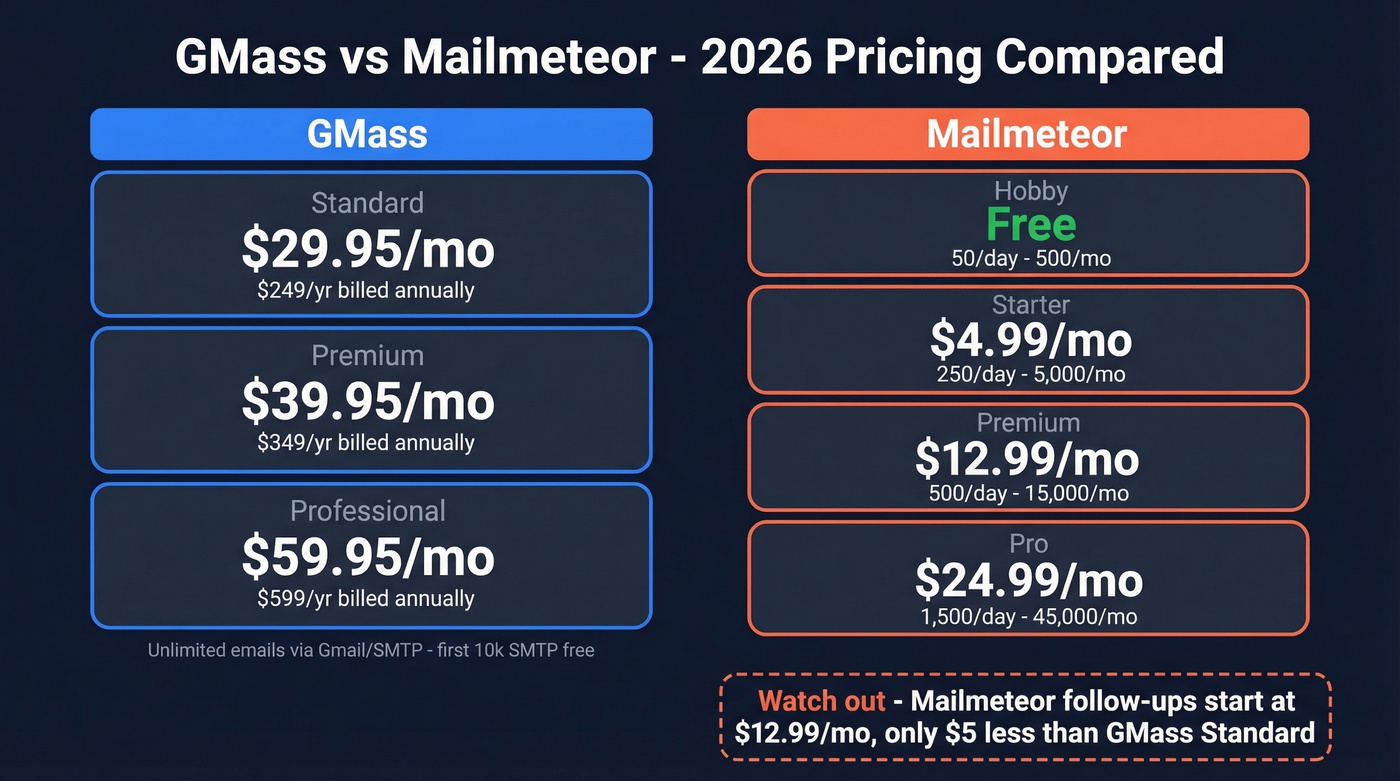
GMass (Individual Plans)
| Plan | Old Price | 2026 Price | Annual |
|---|---|---|---|
| Standard | $25/mo | $29.95/mo | $249/yr (~$20.75/mo) |
| Premium | $35/mo | $39.95/mo | $349/yr (~$29.08/mo) |
| Professional | $55/mo | $59.95/mo | $599/yr (~$49.92/mo) |
GMass plans include "unlimited emails" through GMass, but you're still constrained by Gmail/Workspace sending limits (more on that below). GMass also offers SMTP rerouting, with the first 10,000 emails free and $5 per additional 10,000.
GMass sells Team plans too. They match closely to Professional features and add team-grade extras like inbox rotation (MultiSend) and high-priority support. Pricing scales per seat, so think of it as "Professional, but built for teams."
Mailmeteor
| Plan | Price | Monthly Cap | Daily Cap | Contacts |
|---|---|---|---|---|
| Hobby | Free | 500 | 50 | 5,000 |
| Starter | $4.99/mo | 5,000 | 250 | 50,000 |
| Premium | $12.99/mo | 15,000 | 500 | 250,000 |
| Pro | $24.99/mo | 45,000 | 1,500 | 500,000 |
Mailmeteor looks cheaper until you price it the way people actually use it. Starter is fine for basic merges, but follow-up sequences start at Premium ($12.99/mo). Want email verification or a custom tracking domain? You're pushed to Pro at $24.99/mo - only about $5/month less than GMass Standard at $29.95/mo.
Feature-by-Feature Breakdown
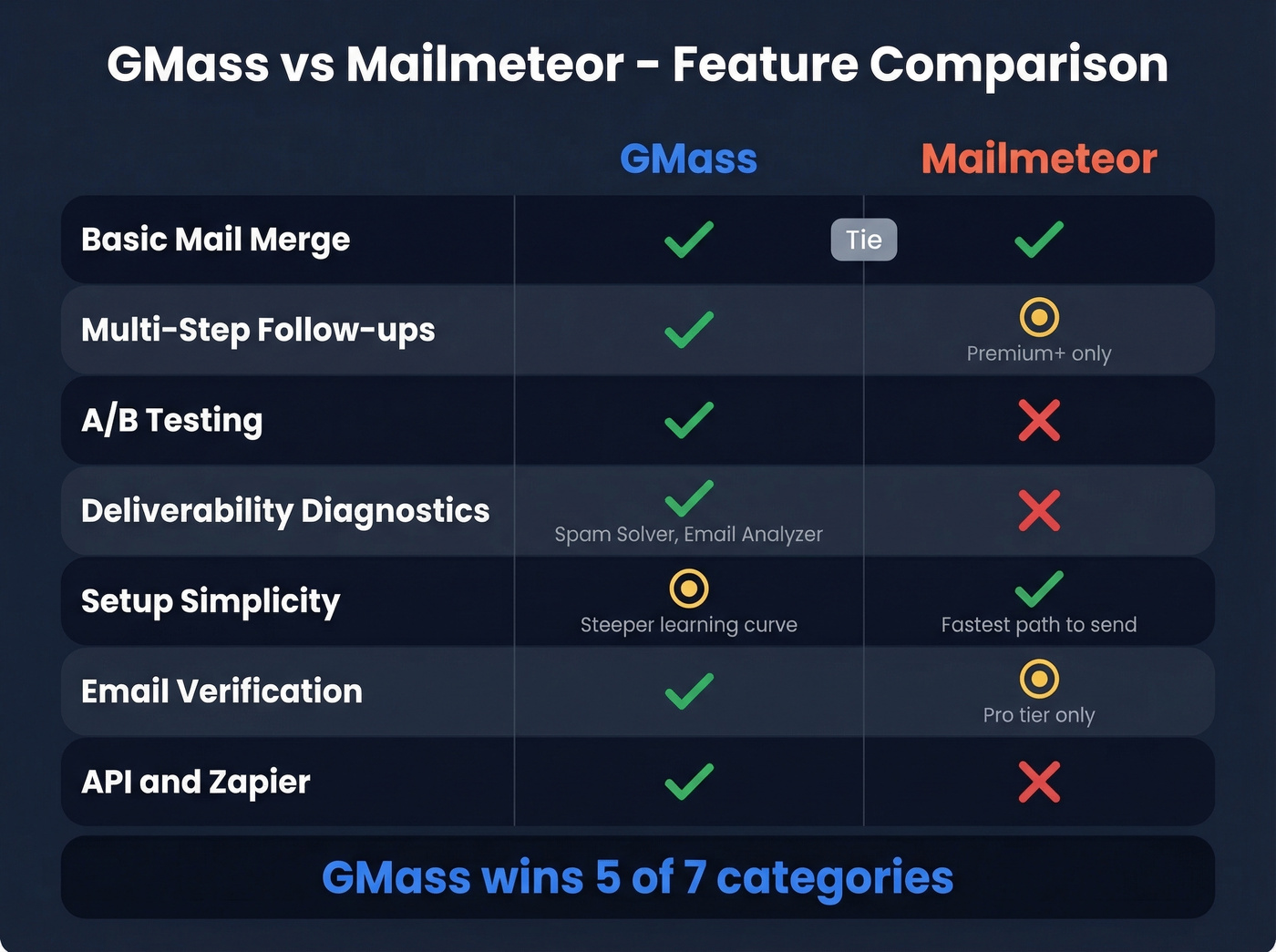
Core Mail Merge (Tie)
For basic personalization, both tools do the job: merge fields from Google Sheets, send from your Gmail account, keep the workflow familiar. If all you need is "Dear {{FirstName}}" plus a few custom columns, you won't feel a meaningful difference. If you're building a repeatable outbound motion, it also helps to tighten your sales prospecting techniques so your merge fields actually map to intent.
Campaign Automation (GMass Wins)
GMass is the better choice the moment you care about multi-step follow-ups. You get automated, threaded sequences, and you can run outreach like an actual system instead of a one-and-done send. If you want a deeper framework for building sequences, use a B2B cold email sequence structure.
Mailmeteor can do follow-ups too, but it's gated behind Premium and capped by automation limits. Fine for light nurturing. Annoying for serious outbound.
A/B Testing and Reporting (GMass Wins)
If you want to improve results week over week, GMass is in a different class. It supports A/B testing with spintax and automated winner selection, plus campaign reporting that's built for iteration. Pair that with better prospecting email subject lines and you’ll usually see faster gains than tweaking send volume.
Mailmeteor's analytics are functional, but they don't push you toward optimization. On review sites, the recurring theme is the same: people like the simplicity and then hit a ceiling when they want deeper dashboards and trend views. Cold email reply rates often land around 1-5% depending on targeting and sender reputation, so when the baseline is that tight, tooling that helps you test and refine genuinely matters.
Deliverability Tooling (GMass Wins Decisively)
Here's the thing: this is where GMass earns its reputation. Tools like Spam Solver and Email Analyzer are the difference between "we sent emails" and "we landed in inboxes." We've watched teams lose a perfectly good domain in a week by blasting untested copy and ignoring bounce signals - GMass at least gives you the instruments to fly the plane. If you want the broader playbook, see our email deliverability guide.
Mailmeteor keeps deliverability features lighter. If your sends are low-volume and relationship-based, that's fine. If you're doing cold outreach at any scale, GMass is the safer bet.
Setup Simplicity (Mailmeteor Wins)
Mailmeteor's cleanest advantage is how lightweight it feels. Strict IT environment? Just want the fastest path from Sheet to send? Mailmeteor is usually the easier rollout.
Verification and Integrations (GMass Wins)
GMass includes email verification and goes beyond mail merge with triggered emails, API access, and a Zapier integration. If you like building repeatable systems, GMass gives you more levers to pull. If verification is a core need, it’s also worth comparing options in our guide to email reputation tools.

Neither GMass nor Mailmeteor can save a campaign built on bad data. Prospeo's email finder delivers 98% accuracy through 5-step verification - catching spam traps, honeypots, and catch-all domains before they torch your sender reputation. At $0.01 per email, cleaning your list costs less than a single bounced send.
Verify every email before it hits GMass or Mailmeteor.
Sending Limits: What's Actually Enforced
Both tools ultimately send through Gmail, so Google's caps still apply: 500 emails/day on free Gmail and up to 2,000/day on Google Workspace. GMass's "unlimited" positioning works by scheduling across time and optionally rerouting through SMTP, but it's not a loophole that makes Google limits disappear. For a deeper breakdown of safe ramping, see email velocity.
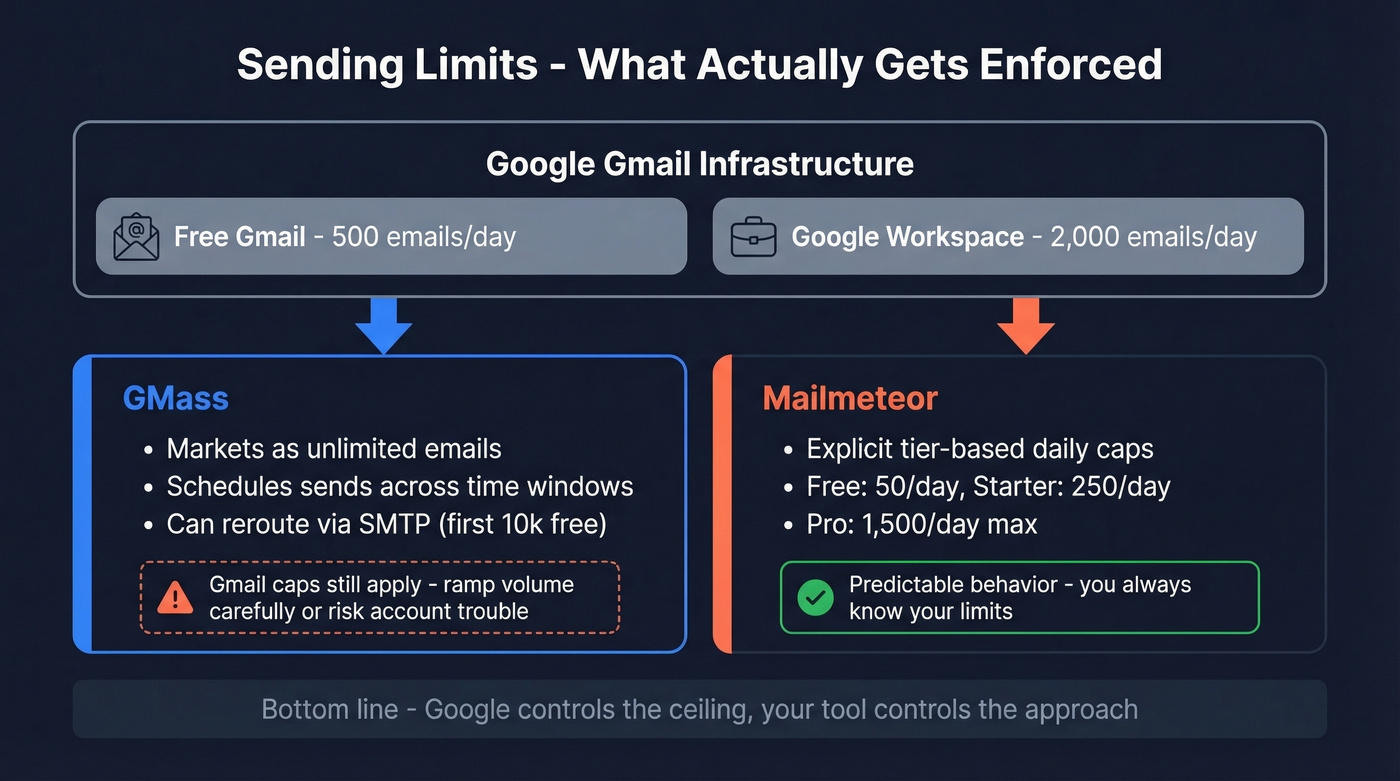
Mailmeteor is more explicit: it enforces tier-based caps from 50/day on free up to 1,500/day on Pro. That clarity is nice, especially if you want predictable behavior and you're not trying to push volume.
There's a Reddit thread where a user describes GMass sending ~480 emails "in one lump" instead of drip-feeding and then running into account trouble. That's not a reason to avoid GMass, but it is a reason to respect Gmail's rules and ramp volume carefully.
What Users Actually Say
GMass sits at 4.8/5 on G2 across 1,274 reviews. People buy it for native Gmail integration and automation depth, then complain about two things: the interface feels dense at first, and the 2026 price bump made it harder to justify for casual senders. G2 users also report a roughly one-month implementation timeline and ROI within about six months, which tracks with what you'd expect from a tool that only pays off once you systematize outreach. If you’re trying to improve outcomes, start with emails that get responses rather than just adding more steps.
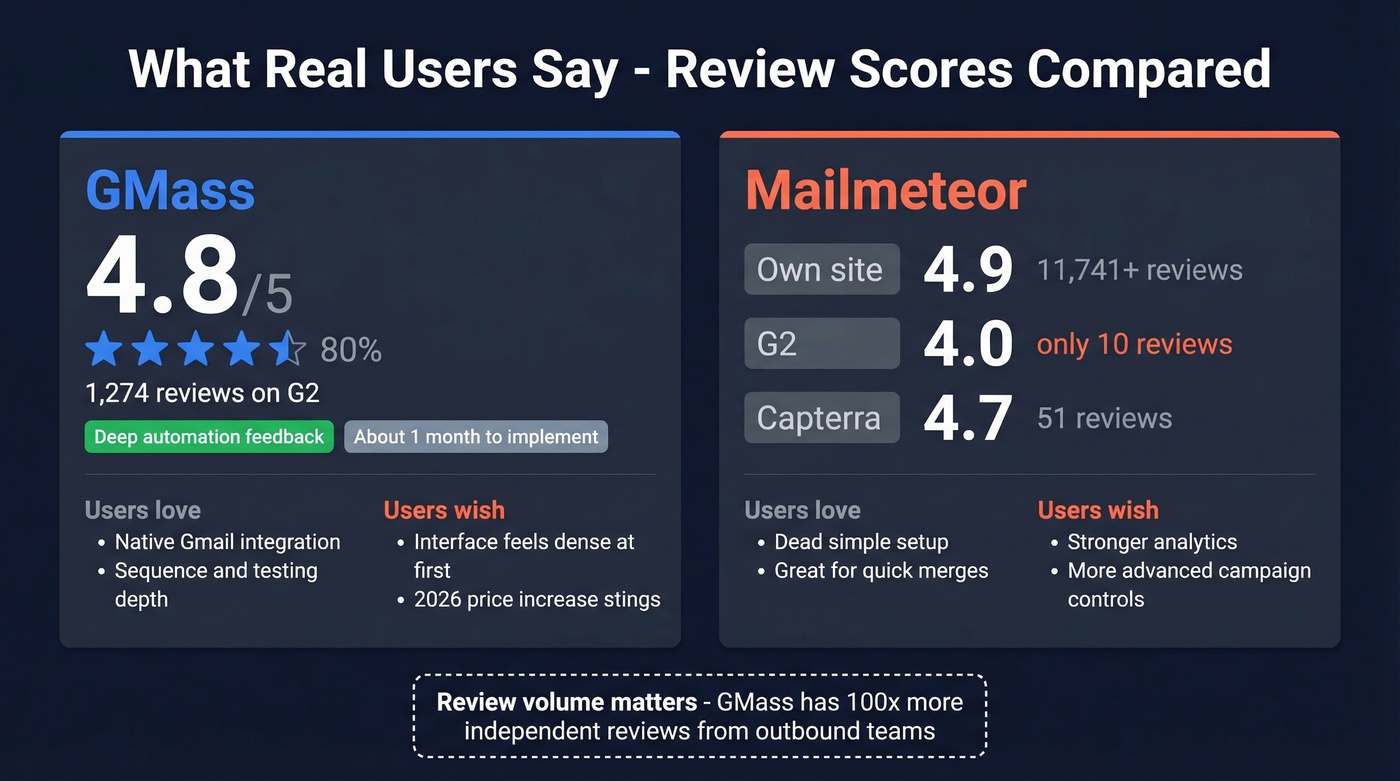
Mailmeteor shows a split that's hard to ignore. The company promotes 4.9/5 from 11,741+ reviews on its own site, but independent platforms tell a different story: 4.0/5 on G2 with just 10 reviews and 4.7/5 on Capterra with 51 reviews. The sentiment is consistent, though - people love how quick it is to start, then ask for stronger analytics and more advanced campaign controls.
The review-volume gap matters. GMass has a much larger footprint among teams running real outbound programs, and it shows in the depth and specificity of feedback.
Who Should Pick Which
Choose GMass if email is a revenue channel for you: outbound sequences, testing, deliverability troubleshooting, and reporting loops. It's the better tool for people who care about outcomes, not just sending. If you’re evaluating broader stacks, compare it against other SDR tools.
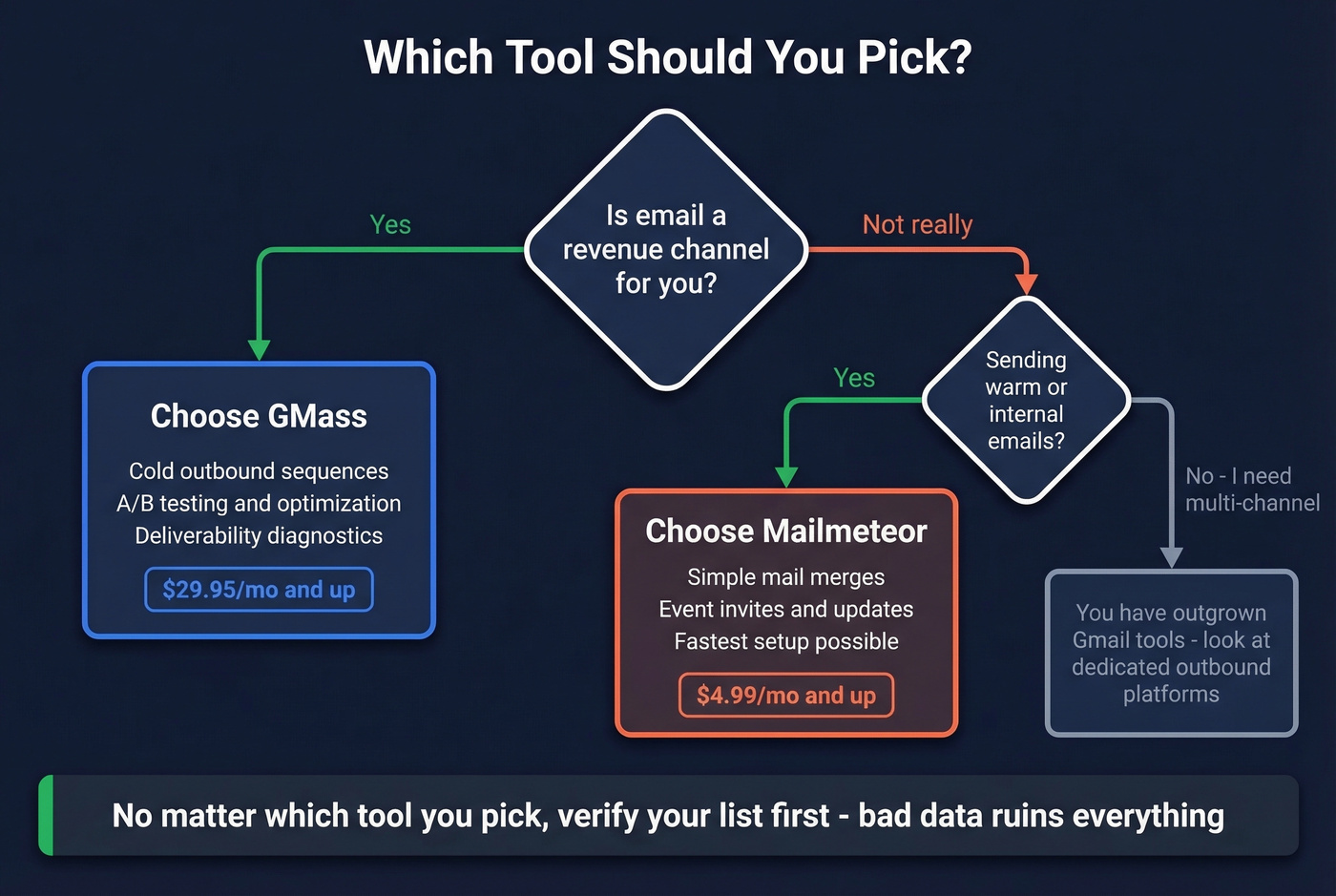
Choose Mailmeteor if you want the simplest mail merge experience and you're mostly sending warm or internal messages. For basic personalized sends, Starter at $4.99/mo is still one of the best deals in the category.
Let's be honest: if your average deal size is modest and you're sending fewer than a few thousand emails a month, GMass is often overkill. You'll pay for power you won't use and complexity you didn't ask for.
One more boundary worth naming. If you've outgrown Gmail-based sending entirely and need multi-channel outreach - email plus calling, task routing, other touchpoints - you're shopping in a different category. Neither GMass nor Mailmeteor is the answer there.
The Step Most People Skip
This head-to-head matters less than your list quality. Both GMass and Mailmeteor assume you already have good emails. If you don't, the tool choice is cosmetic. If you’re still sourcing contacts, start with how to generate an email list.
Bad data is how you get crushed: high bounces, spam placement, and a sender reputation that takes months to recover. We've seen teams go from "we're scaling outbound" to "our domain is cooked" in a single campaign because they trusted an old spreadsheet. It's frustrating to watch, and it's entirely preventable. If you’re diagnosing the damage, use our email bounce rate benchmarks and fixes.
Prospeo handles this before you ever hit send. With 143M+ verified emails at 98% accuracy and a 7-day refresh cycle, you're building on data that's actually current - not six weeks stale like most providers. Build a clean list, export it, then run GMass or Mailmeteor with confidence.

You picked your sending tool. Now feed it data that actually converts. Prospeo gives you 143M+ verified emails refreshed every 7 days - not the stale spreadsheet exports that crater deliverability. Teams using Prospeo-verified lists see bounce rates drop below 4%.
Stop blaming your sending tool for bad data.
FAQ
Is GMass or Mailmeteor better for cold email?
GMass wins for cold outreach. It includes multi-step sequences, A/B testing with automated winner selection, and deliverability diagnostics like Spam Solver - none of which Mailmeteor matches at any tier. Mailmeteor is better suited for simple, one-off mail merges.
Did GMass raise prices in 2026?
Yes. On January 1, 2026, Standard moved to $29.95/mo, Premium to $39.95/mo, and Professional to $59.95/mo. Annual billing is $249, $349, and $599 per year respectively - roughly a 15-20% increase across the board.
Do I need a separate tool to verify emails before sending?
For cold lists, absolutely. GMass and Mailmeteor are sending tools, not list-building platforms. Prospeo verifies emails at 98% accuracy on a 7-day refresh cycle and offers a free tier of 75 emails per month - enough to test before committing.