

GoDaddy Email Going to Spam: The Real Fixes Support Won't Give You
Your GoDaddy email is going to spam. You've set up SPF, DKIM, and DMARC. You called support. They "fixed" something. And your emails still land in junk - killing your ability to respond to leads, close deals, and look like a legitimate business.
The pattern on Reddit is painfully consistent: GoDaddy support tweaks a DMARC record, calls it done, and mail-tester still flags DKIM issues the next day. Here's the thing - support isn't lying to you, they're just not equipped to diagnose the real problem. Let's fix that.
Quick triage:
- New domain (under 30 days)? Jump to warm-up.
- Auth records set up but never tested? Jump to DNS fixes.
- Everything checks out but still spam? Shared IP problem.
- Sending cold outbound too? Your bounce rate is torching reputation.
Why GoDaddy Emails Land in Spam
Five root causes explain almost every case we've seen:
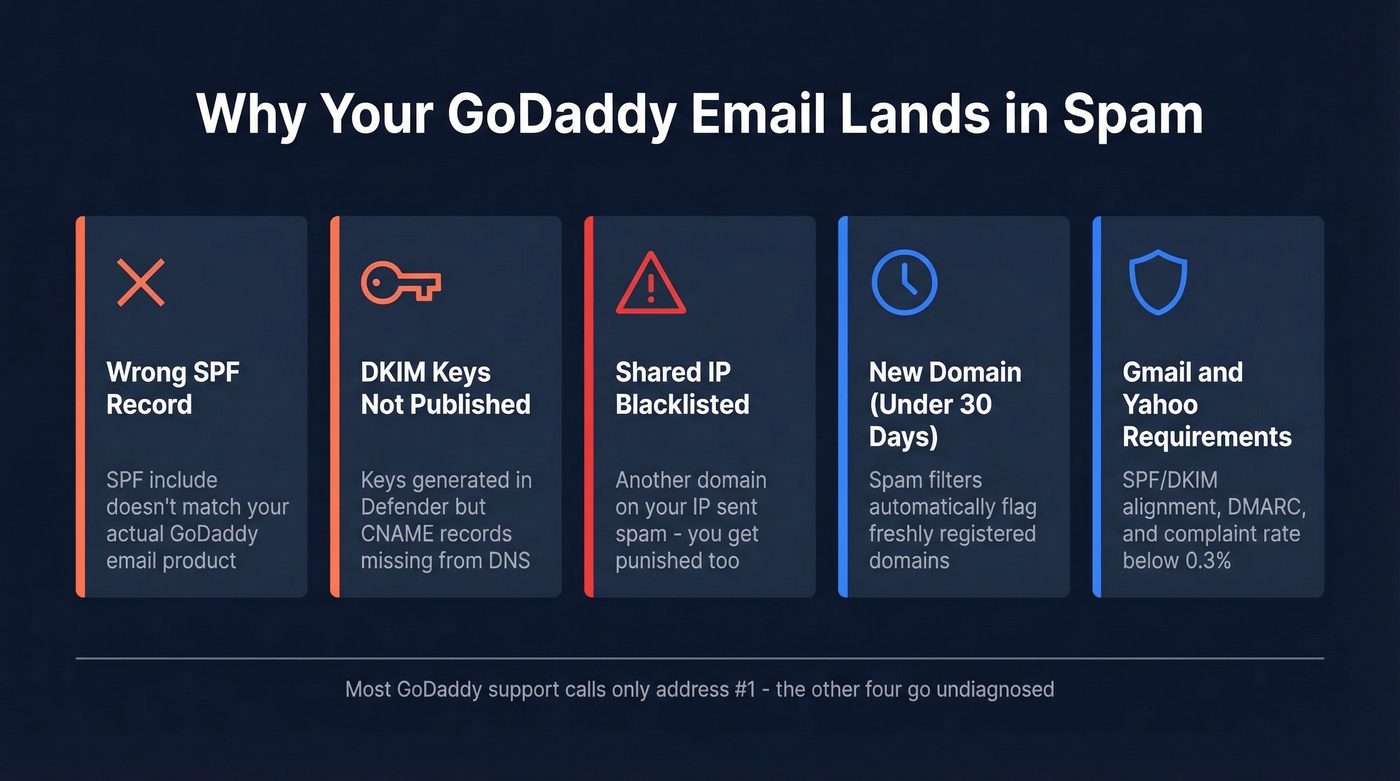
Wrong SPF record for your setup. GoDaddy sells multiple email products, and your SPF needs to match where your mail actually sends from. Using the wrong include - or forgetting a security add-on that also sends mail - breaks authentication silently. (If you want a syntax refresher, see these SPF record examples.)
DKIM keys created but DNS records never published. GoDaddy support will generate DKIM keys in the Microsoft 365 Defender portal and tell you it's done. If the corresponding CNAME records aren't in your DNS zone, DKIM fails on every single message. This is the most common failure we see, and it's maddening because the admin portal shows everything as "enabled." If you’re unsure how to confirm it end-to-end, use this guide on how to verify DKIM is working.
Shared IP blacklisting. Hosting providers route hundreds of domains through the same outbound IPs. One compromised account sends spam, the IP lands on a blocklist, and every domain on that IP gets punished. You did nothing wrong. Doesn't matter.
Brand-new domain reputation. For the first 30 days after registration, most spam protection companies flag newly registered domains. Register a domain and start emailing the same week? Spam filters are doing their job.
Gmail and Yahoo's sender requirements. Rules introduced in February 2024 - SPF/DKIM alignment, a DMARC record, and spam complaint rates below 0.3% - got stricter over time, with enforcement escalating into protocol-level blocking in late 2025. Messages that used to land in spam now get rejected outright. (More context: email deliverability is now a compliance problem, not just a “best practice.”)
Fix Your DNS Records (GoDaddy-Specific Values)
GoDaddy doesn't make it obvious which SPF record you need. It depends on which email product you're actually using.
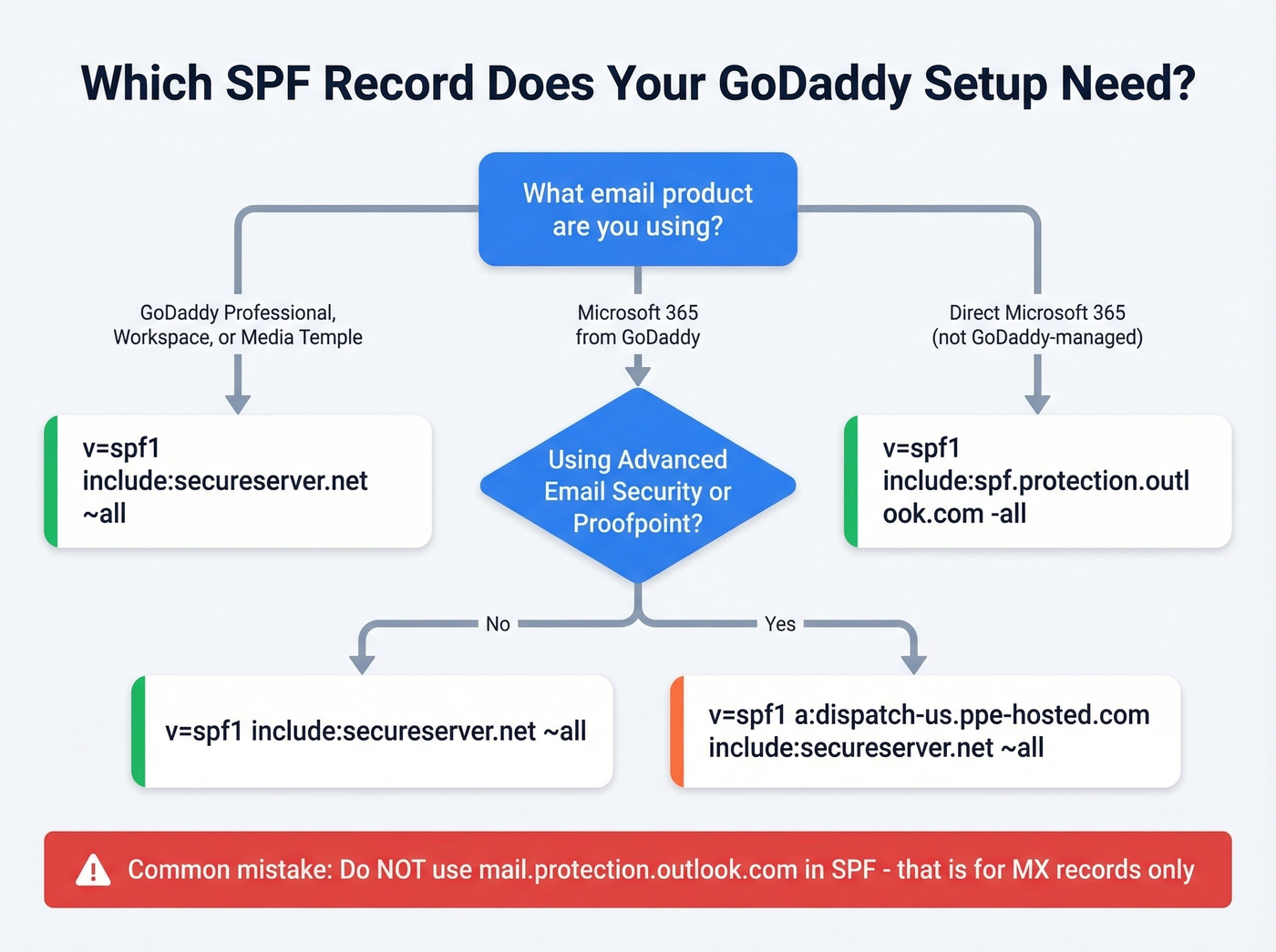
| GoDaddy Email Product | SPF Record |
|---|---|
| Professional / Workspace / Media Temple | v=spf1 include:secureserver.net ~all |
| Microsoft 365 from GoDaddy | v=spf1 include:secureserver.net ~all |
| M365 + Advanced Email Security | v=spf1 a:dispatch-us.ppe-hosted.com include:secureserver.net ~all |
| Direct Microsoft 365 (not GoDaddy-managed) | v=spf1 include:spf.protection.outlook.com -all |
One detail that trips people up constantly: mail.protection.outlook.com and spf.protection.outlook.com are different hostnames. For SPF, Microsoft 365 uses include:spf.protection.outlook.com. Using mail.protection.outlook.com in your SPF record is a common mistake that triggers silent failures.
A sysadmin on r/sysadmin reported dozens of clients getting rejections because GoDaddy enabled Proofpoint Essentials without updating the SPF record. If you're using any security add-on, check that your SPF includes all sending sources.
Set Up DKIM Correctly
- Log into the Microsoft 365 Defender portal and navigate to DKIM settings.
- Select your domain and click "Create DKIM keys."
- Copy the two CNAME records it generates.
- Publish those CNAMEs in your GoDaddy DNS zone.
This is where most setups silently fail. The keys exist in Defender but the DNS records don't exist in GoDaddy. Nobody tells you. Everything looks green in the admin panel.
Add a DMARC Record
Add a TXT record: v=DMARC1; p=none; rua=mailto:dmarc@yourdomain.com. Start with p=none to monitor without blocking legitimate mail, then tighten to p=quarantine once you're confident everything's aligned. If you want the deeper mechanics, start with DMARC alignment.
Verify Your Fix Actually Works
"Configured" doesn't mean "working." Run these after every DNS change:
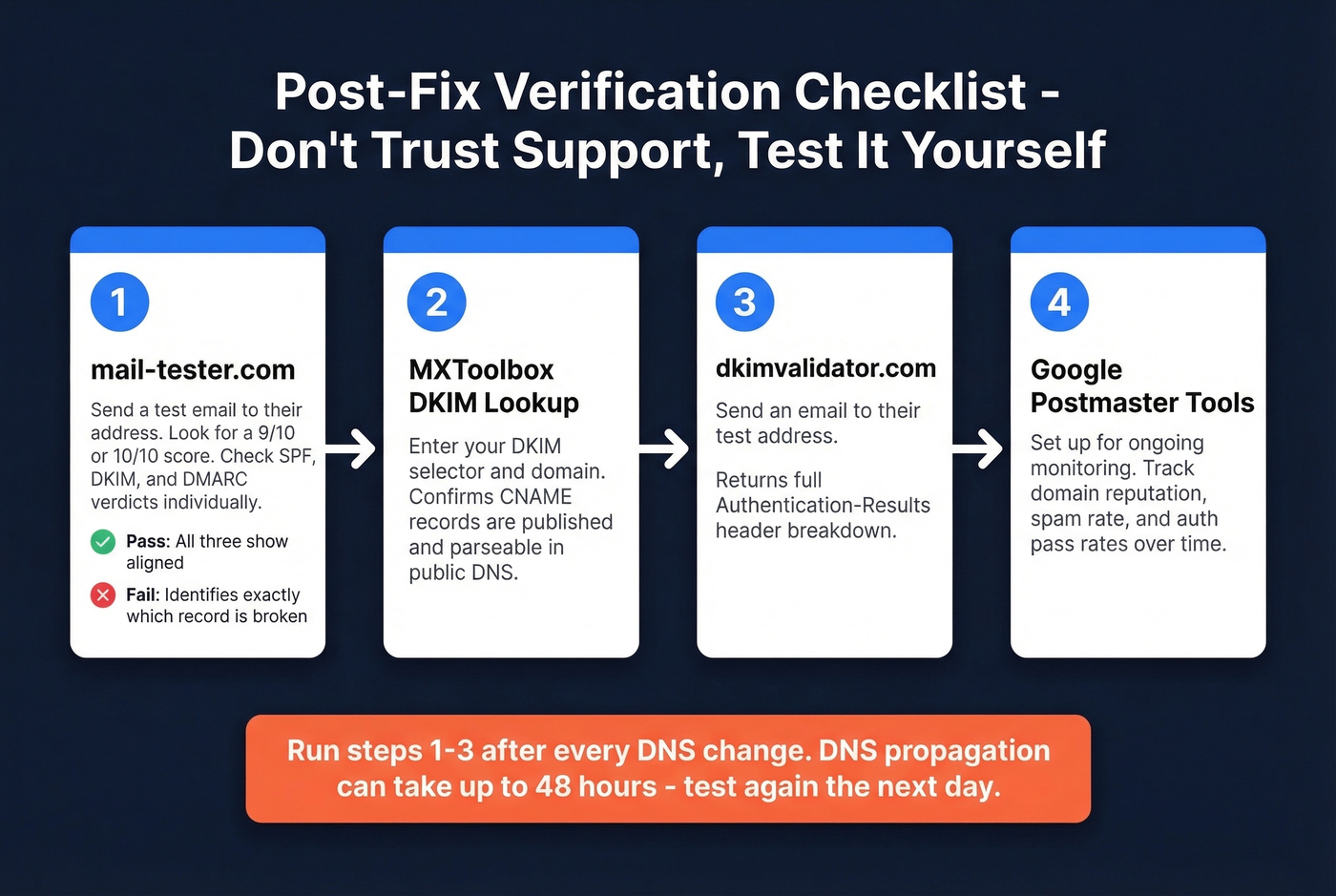
- mail-tester.com - Send a test email to their address and get a full deliverability score with auth verdicts. The single best diagnostic tool for this.
- MXToolbox DKIM Lookup - Enter your selector and domain to verify DKIM keys are actually published and parseable.
- dkimvalidator.com - Send an email to their test address for a detailed Authentication-Results breakdown.
- Google Postmaster Tools - Set this up for ongoing monitoring of domain reputation, spam rate, and authentication pass rates.
Don't trust GoDaddy support's word that it's fixed. We've seen too many cases where support "resolved" the issue and mail-tester still showed failures the next morning. Test it yourself, every time.

Fixing DNS records won't help if you're sending to bad email addresses. Bounces above 2% torch your domain reputation - the exact thing pushing your GoDaddy emails to spam. Prospeo's 5-step verification and 98% email accuracy keep bounce rates under control so your domain stays clean.
Bad data is a deliverability problem. Fix it at the source.
Warm Up a New Domain
If your domain is less than 30 days old, no DNS fix will fully solve the problem.
This pattern is common - one Reddit user had a working GoDaddy domain but found a second, newly registered domain went straight to spam despite identical auth records. The domain itself was the variable, not the configuration. Start with 5-10 emails per day to contacts who know you and will reply. Increase volume by 20-30% daily over 2-4 weeks. For larger lists, aim to seed about 5% of your subscriber base during warm-up. Tools like Lemwarm automate this by sending around 40-50 warm-up emails per day per mailbox, generating real opens and replies that build reputation. (If you’re scaling outbound, keep an eye on email velocity too.)
A user on Microsoft Q&A confirmed that following the warm-up checklist - correct DNS, small-volume sending, encouraging replies - resolved their delivery issues. Don't blast your full contact list on day three.
The Shared IP Problem
If your DNS records are correct, diagnostic tools pass, you've warmed up for 30+ days, and emails still hit spam - the issue is almost certainly shared IP reputation. In our experience, once you've ruled out DNS and warm-up, the shared IP is the culprit 9 times out of 10. If you need a broader troubleshooting flow, use an email spam checker process to isolate the variable.
A dedicated IP runs $5-15/month from most hosts, but GoDaddy doesn't make it easy. And if you're on GoDaddy-managed M365, you're dealing with limited admin capabilities compared to a direct Microsoft tenant.
Look - GoDaddy is a domain registrar that happens to sell email. Google and Microsoft are email companies. If email deliverability matters to your business, stop buying email from your registrar.
When to Migrate Off GoDaddy
Migrate if your records are clean, tools pass, warm-up is done, and spam placement persists beyond 30 days. This isn't a GoDaddy-only problem - HubSpot users regularly report marketing emails hitting junk, and Salesforce teams troubleshoot transactional messages landing in spam. The root causes (misconfigured auth records, shared IPs, new domain reputation) are universal. GoDaddy just makes them harder to fix because of limited admin access and inconsistent support.
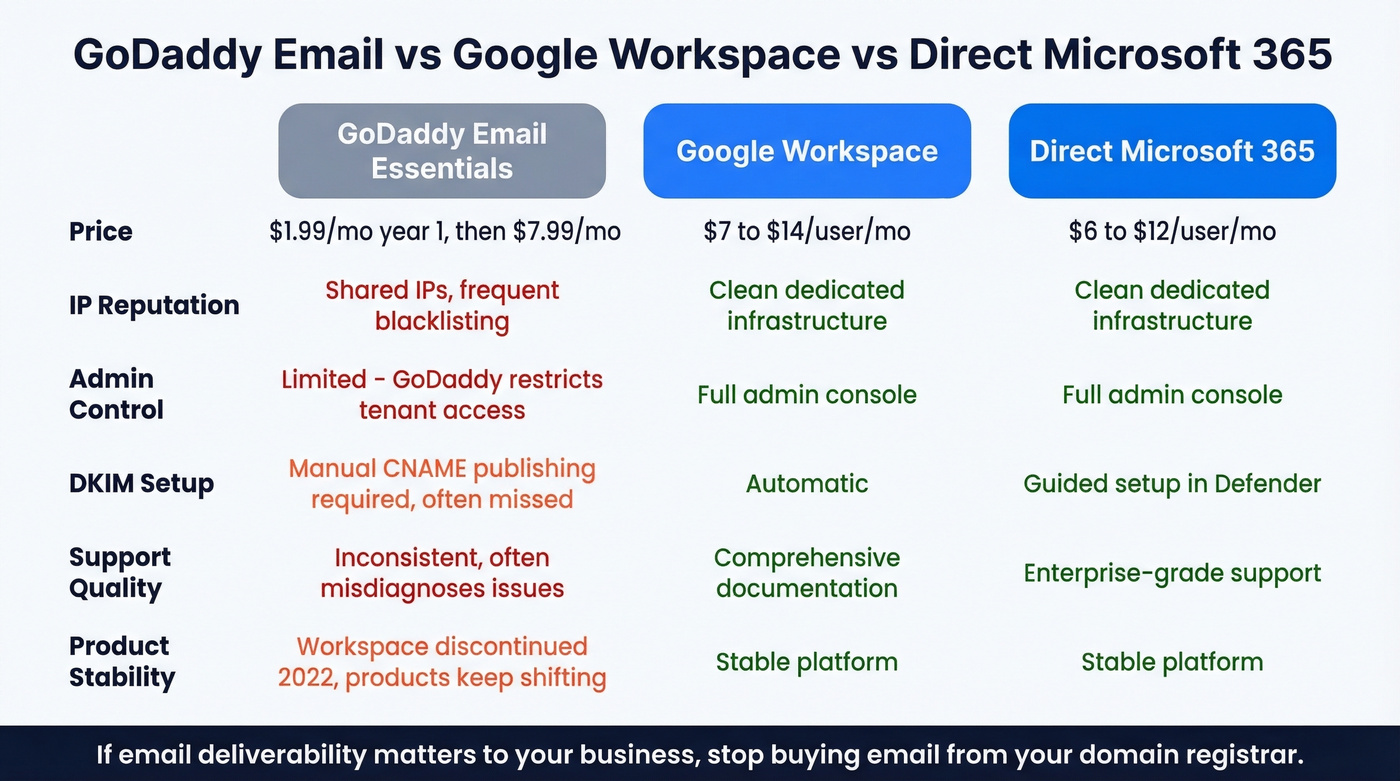
Google Workspace runs about $7-$14/user/month depending on plan. Clean IPs, full admin control, excellent deliverability out of the box. Direct Microsoft 365 is around $6-$12/user/month - the same product GoDaddy resells, minus the admin restrictions. GoDaddy Email Essentials starts at $1.99/month for year one, then jumps to $7.99/month. The promo pricing looks attractive until you realize GoDaddy discontinued Workspace Email back in April 2022 and keeps shuffling products around.
If you're already troubleshooting deliverability on GoDaddy, the monthly cost for Google Workspace is the cheapest fix you'll ever make.
Protect Your Reputation with Clean Outbound Data
You just rebuilt your domain reputation. Don't destroy it by sending cold outreach to invalid addresses from a purchased list. Every bounce chips away at the sender reputation you worked to build, and a 5%+ bounce rate can wreck it fast. (If you’re doing cold outbound at any scale, follow a cold email marketing playbook that treats deliverability as a first-class constraint.)
Prospeo verifies emails in real time with 98% accuracy through a 5-step verification process that catches spam traps, honeypots, and catch-all domains before you hit send. The free tier gives you 75 email verifications per month - enough to gut-check any list before it goes into your sequencer. Paid plans run about $0.01 per email. For a domain you just nursed back to health, that's pennies compared to rebuilding a burned reputation.
You just spent hours fixing SPF, DKIM, and DMARC. Don't waste that clean sender reputation on unverified contact lists. Prospeo delivers 143M+ verified emails refreshed every 7 days - not stale data that bounces and flags your domain all over again.
Protect your freshly repaired reputation with data that's verified weekly.
Frequently Asked Questions
Why do my GoDaddy emails go to spam even with SPF and DKIM?
The most common causes: wrong SPF include for your specific GoDaddy product, DKIM keys generated but CNAME records never published in DNS, or shared IP blacklisting that no DNS record can fix. Send a test to mail-tester.com to see what's actually failing.
How long does a new domain take to stop landing in spam?
Most spam filters flag domains under 30 days old. With correct auth records and a warm-up schedule - 5-10 emails per day, ramping gradually - expect inbox placement to improve within 2-4 weeks.
Should I switch from GoDaddy to Google Workspace or direct Microsoft 365?
If your DNS is correct, diagnostics pass, and emails still hit spam after 30+ days, the issue is shared IP reputation and GoDaddy's managed-email constraints. Google Workspace ($7-$14/user/month) or direct Microsoft 365 ($6-$12/user/month) gives you cleaner infrastructure and full admin control.
Can bad outbound data make my spam problem worse?
Absolutely. Every bounce erodes sender reputation. Keep bounce rates under 2%. Verify emails before sending so outbound doesn't sabotage your inbox placement.
Is this a GoDaddy-specific issue or do other platforms have it too?
It's not unique to GoDaddy. HubSpot users regularly report marketing emails hitting junk, and Salesforce teams troubleshoot transactional messages landing in spam. The root causes - misconfigured auth records, shared IPs, new domain reputation - are universal. GoDaddy just makes them harder to fix because of limited admin access and inconsistent support.