

Google Domain Reputation: 2026 Guide to Check & Fix It
Your domain reputation just dropped - except the dashboard you relied on to see it doesn't exist anymore. Gmail retired the High/Medium/Low/Bad reputation tiers when Postmaster Tools v1 shut down in late 2025, and thousands of senders are now staring at a compliance checklist wondering what happened to the warning light they depended on. Sales emails are landing in spam. There's no clear signal to diagnose why.
What You Need (Quick Version)
Want to check it? Use Google Postmaster Tools for compliance data and spam rate, Talos Intelligence for Cisco's reputation view, and MXToolbox for blocklist checks. All free.
Want to understand what changed? Gmail released the v2 compliance dashboard in March 2024, then retired Postmaster Tools v1 starting September 30, 2025. After October 31, 2025, the old High/Medium/Low/Bad reputation tiers were gone for good.
Want to fix it? Pause sending for at least 14 days, verify your entire list, re-segment to engaged contacts only, and warm back up gradually. Expect 6-12 weeks for full recovery.
What Is Domain Reputation on Google?
Google domain reputation is Gmail's internal assessment of your sending domain's trustworthiness. It determines whether your emails reach the inbox, get filtered to spam, or get blocked entirely. Think of it as a credit score for your domain - built over time through sending behavior, complaint rates, authentication, and engagement signals.
For years, Google Postmaster Tools displayed reputation as four tiers: High, Medium, Low, and Bad. These labels gave senders a simple, directional signal. "High" meant Gmail trusted you. "Bad" meant your emails were going nowhere. That old interface was the go-to way to run a domain reputation check that senders could actually rely on.
Your domain doesn't have a single universal reputation. Each inbox provider - Gmail, Outlook, Yahoo - maintains its own scoring. Within each provider, reputation is assessed across multiple domain surfaces: your From domain, Return-Path domain, and DKIM signing domain. Set up custom DKIM and Return-Path domains so your sending reputation accrues to domains you control, not your ESP's shared infrastructure.
Here's what trips people up: domain reputation is portable. It follows your domain regardless of which ESP you use, which IP you send from, or how many times you switch infrastructure. You can't escape a damaged reputation by moving to a new email service provider. A strong reputation survives platform migrations. A damaged one follows you everywhere.
Domain vs. IP Reputation
These two reputations work together, but they behave differently - and the distinction matters more now than ever.
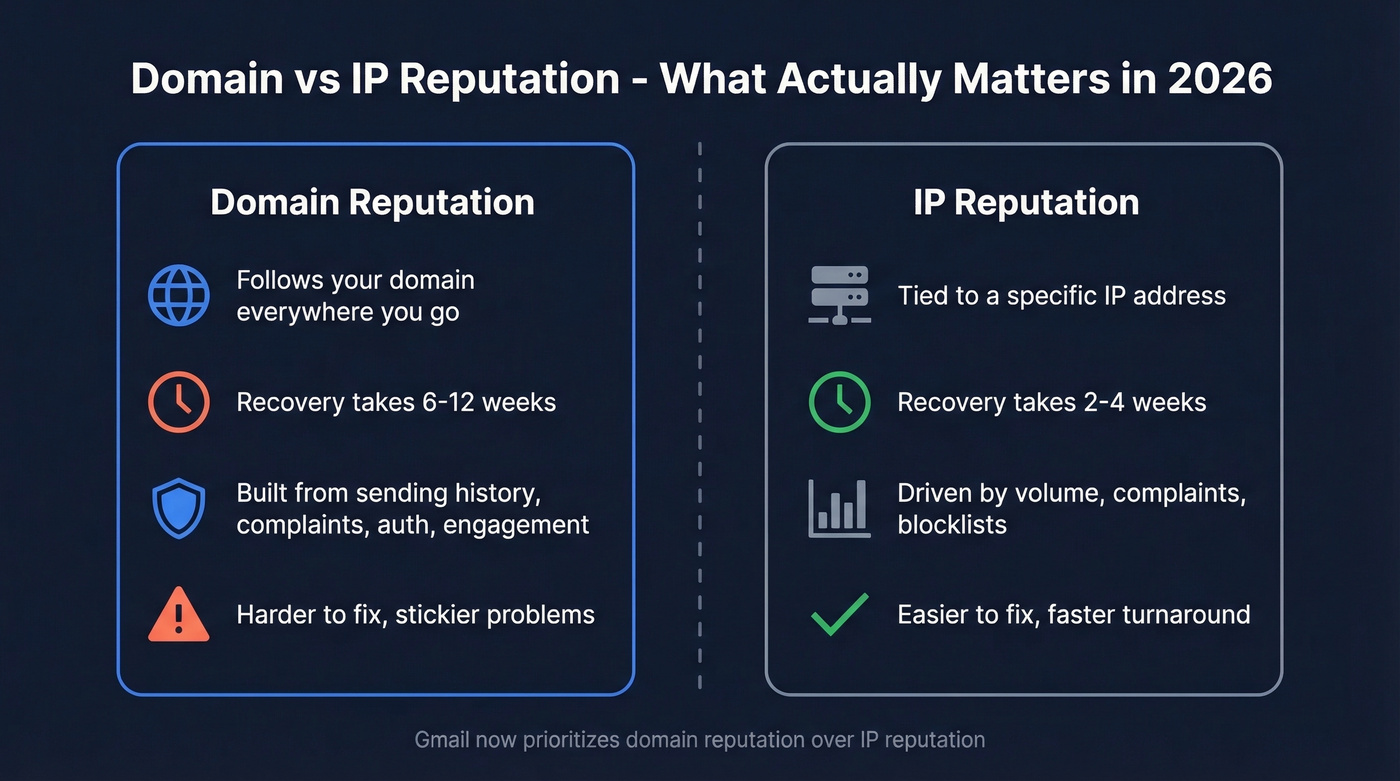
| Attribute | Domain Reputation | IP Reputation |
|---|---|---|
| Portability | Follows your domain everywhere | Tied to specific IP |
| Recovery time | 6-12 weeks | 2-4 weeks |
| What controls it | Sending history, complaints, auth, engagement | Volume, complaints, blocklists |
IP reputation used to be the primary lever. Dedicated IPs meant dedicated reputations, and warming a new IP was the standard playbook. That's shifted. Modern inbox providers - Gmail especially - now put domain reputation in the driver's seat. Shared IP pools on platforms like Mailchimp or SendGrid mean your IP reputation is partially out of your control anyway.
The practical implication: if you're troubleshooting email deliverability, start with domain-level signals. IP issues are easier to fix and faster to recover from. Domain problems are stickier and take real patience. In our experience, recovery almost always takes longer than teams expect - budget for the full 12 weeks.
What Changed in Late 2025
Gmail announced that the old v1 Postmaster Tools would retire on September 30, 2025, and v1 was no longer available after October 31. The High/Medium/Low/Bad reputation tiers - for both domains and IPs - are gone. Not hidden. Not moved. They don't exist anymore.
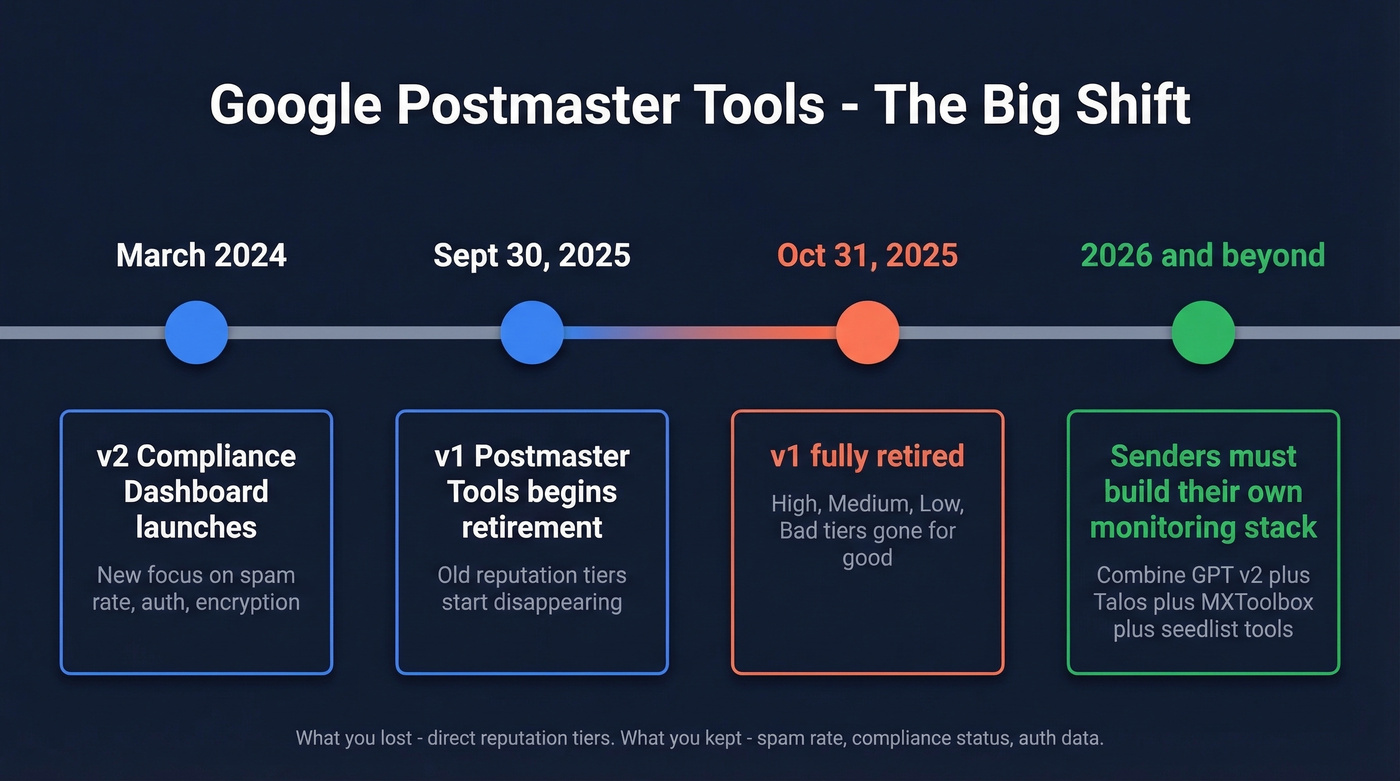
The replacement v2 compliance dashboard focuses on six areas: Compliance Status, Spam Rate, Feedback Loop, Authentication (SPF/DKIM/DMARC), Encryption/TLS, and Delivery Errors. Google teased "new dashboards with more useful and actionable information" by the end of 2025, but didn't provide specifics.
The confusion on Reddit was immediate. People noticed the old UI disappearing and asked whether that meant there'd be no more domain/IP reputation listing. Yes - that's exactly what the v1 retirement changed.
Let's be honest: the retirement of reputation tiers is a net negative for senders. Google framed it as a security improvement, and there's logic to that since detailed reputation visibility can help bad actors game the system. But the practical effect is less visibility for legitimate senders. The warning light is gone, and what replaced it tells you less about how Gmail actually perceives your domain.

Domain reputation takes 6-12 weeks to recover but only days to destroy with bad data. Prospeo's 5-step email verification and spam-trap removal keep bounce rates under 4% - the same threshold Google flags. 98% accuracy means your outbound protects your domain, not tanks it.
Stop guessing why you're landing in spam. Start with verified data.
How to Check Google Domain Reputation in 2026
Without the old tiers, you need to assemble your own monitoring stack. No single tool replaces what GPT v1 gave you, but combining a few free tools gets you close.
Google Postmaster Tools v2 Setup
Verify your domain in Postmaster Tools by adding a TXT record to your DNS (Google also supports CNAME verification as an alternative). Once verified, you'll see the compliance dashboard, which updates once per day for the prior day's data - typically around 12 PM Pacific.
Two volume thresholds matter. The compliance dashboard only shows data for domains that sent more than 5,000 messages to Gmail in a single day since January 1, 2024. For general data visibility like spam rate and authentication pass rates, sending 100+ messages per day to Gmail users tends to produce reliable daily data.
There's a significant B2B blind spot here. GPT tracks delivery to @gmail.com addresses, but Google Workspace mail doesn't accrue in most GPT metrics. If you're selling B2B, you're monitoring only part of your Gmail-ecosystem traffic. Compliance status also applies to the parent/root domain only - there's no subdomain-level view.
Your Post-GPT Monitoring Stack
| Tool | What It Checks | Cost |
|---|---|---|
| Google Postmaster Tools | Compliance, spam rate, auth | Free |
| Talos Intelligence (Cisco) | Domain/IP reputation view | Free |
| Sender Score | 0-100 sender rating | Free |
| MXToolbox | Blocklists, DNS diagnostics | Free; paid plans available |
| Barracuda Central | Corporate filter reputation | Free lookup |
| Spamhaus / MultiRBL | Blocklist status | Free lookup |
| GlockApps | Seedlist inbox placement | Free trial; paid plans available |
| Inbox Monster | Enterprise seedlist testing | Enterprise pricing |
| Valimail | DMARC monitoring | Paid tiers available |
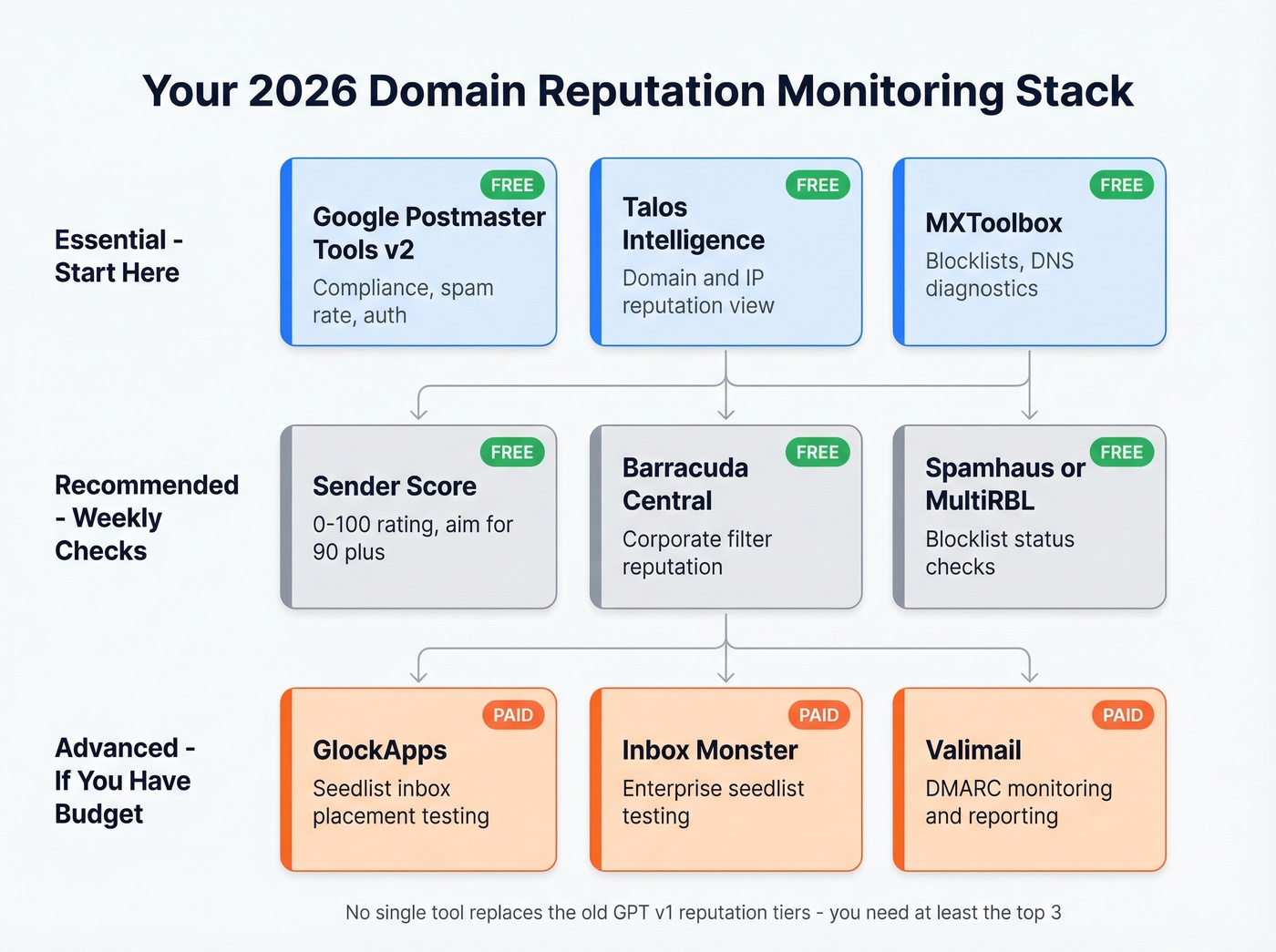
Start with GPT v2 for compliance data, add Talos for a second opinion, and run MXToolbox blocklist checks weekly. If you have budget, add seedlist testing with GlockApps - it's the most direct way to see inbox placement rates across providers. Sender Score gives you a 0-100 rating; aim for 90+ and treat anything below 70 as a red flag. Together, these tools let you approximate the reputation score that the old v1 dashboard used to surface directly.

Gmail's Spam Rate Thresholds
Gmail's spam rate threshold is the single most important number in your deliverability stack.
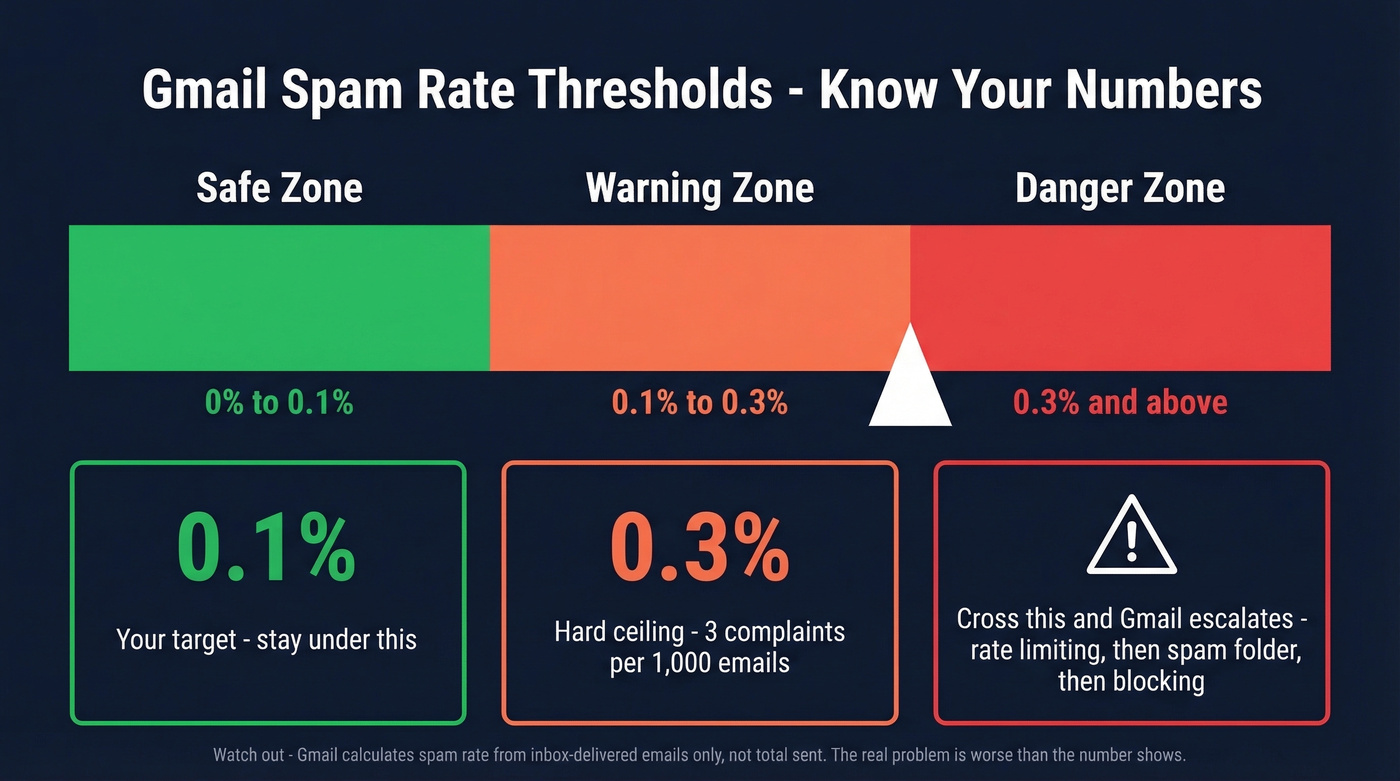
Target: Below 0.1% spam rate. Hard ceiling: 0.3%, which works out to 3 complaints per 1,000 inbox-delivered emails.
Cross 0.3% and Gmail escalates: rate limiting first, then spam placement, then outright blocking. This threshold is lower than most people realize - one bad campaign to an unverified list can cross it in a single send. Google's bulk sender requirements make this non-negotiable.
There's a masking effect that makes this worse than it sounds. Gmail calculates spam rate as complaints divided by emails delivered to the inbox - not total emails sent. If most of your emails are already landing in spam, your reported spam rate looks artificially low because those recipients can't mark as spam what they never saw. By the time your GPT spam rate spikes, the problem is already severe.
For B2B senders, the blind spot compounds this. Since GPT doesn't report spam data for Google Workspace accounts, you can be generating complaints from business recipients that never show up in your dashboard.
Mistakes That Tank Your Sender Reputation
Most domain reputation problems aren't sending problems. They're data problems.
Sending to Unverified Lists
This is the #1 cause of reputation damage, and we've seen it play out the same way dozens of times. A team buys or scrapes a list, loads it into their sequencer, and sends 5,000 emails on day one. Bounce rates hit 15-20%. Spam traps fire. Honeypot addresses trigger blocklists. Within a week, Gmail has downgraded the domain, and recovery takes months.
The fastest way to protect your sending reputation is to verify every email address before sending. Prospeo's 5-step verification - including catch-all domain handling, spam-trap removal, and honeypot filtering - delivers 98% email accuracy at roughly a penny per email. That's dramatically cheaper than recovering from a reputation crash that takes 6-12 weeks.
ESP Switch Without Email Warm-Up
A sender on Reddit shared a textbook cautionary tale: they switched from Klaviyo to Zoho, emailed 12,000 recipients on day one without warming the new IP, and watched open rates collapse from 70% to 10%, then to 1% on the follow-up send. The domain reputation was already portable - it followed them to the new ESP. But the cold IP made everything worse, because Gmail saw a sudden volume spike from an unestablished IP paired with a domain sending from unfamiliar infrastructure.
The lesson: switching ESPs doesn't reset your reputation. It can't. And if you don't warm the new IP, you're compounding the problem. If you need a safer ramp, use a structured email warmup plan and keep your email velocity conservative.
DMARC Misconfiguration
A sysadmin on r/sysadmin traced weeks of Gmail-only bounces to a single setting: DMARC was set to p=reject. Changing it to p=none restored delivery almost immediately. SPF and DKIM were both passing - the issue was purely the DMARC enforcement policy telling Gmail to reject anything that didn't perfectly align.
If you're seeing Gmail-specific rejections with clean SPF/DKIM, check your DMARC policy first. It's the most overlooked cause of sudden deliverability drops. If you want the technical breakdown, start with DMARC alignment and confirm your setup with a quick SPF record review.
How to Recover Domain Reputation
Before you start recovery, diagnose the pattern. A sudden drop usually points to a single bad campaign. A steady decline suggests list decay. Volatility means inconsistent sending practices. Each pattern calls for a different emphasis in the playbook below.
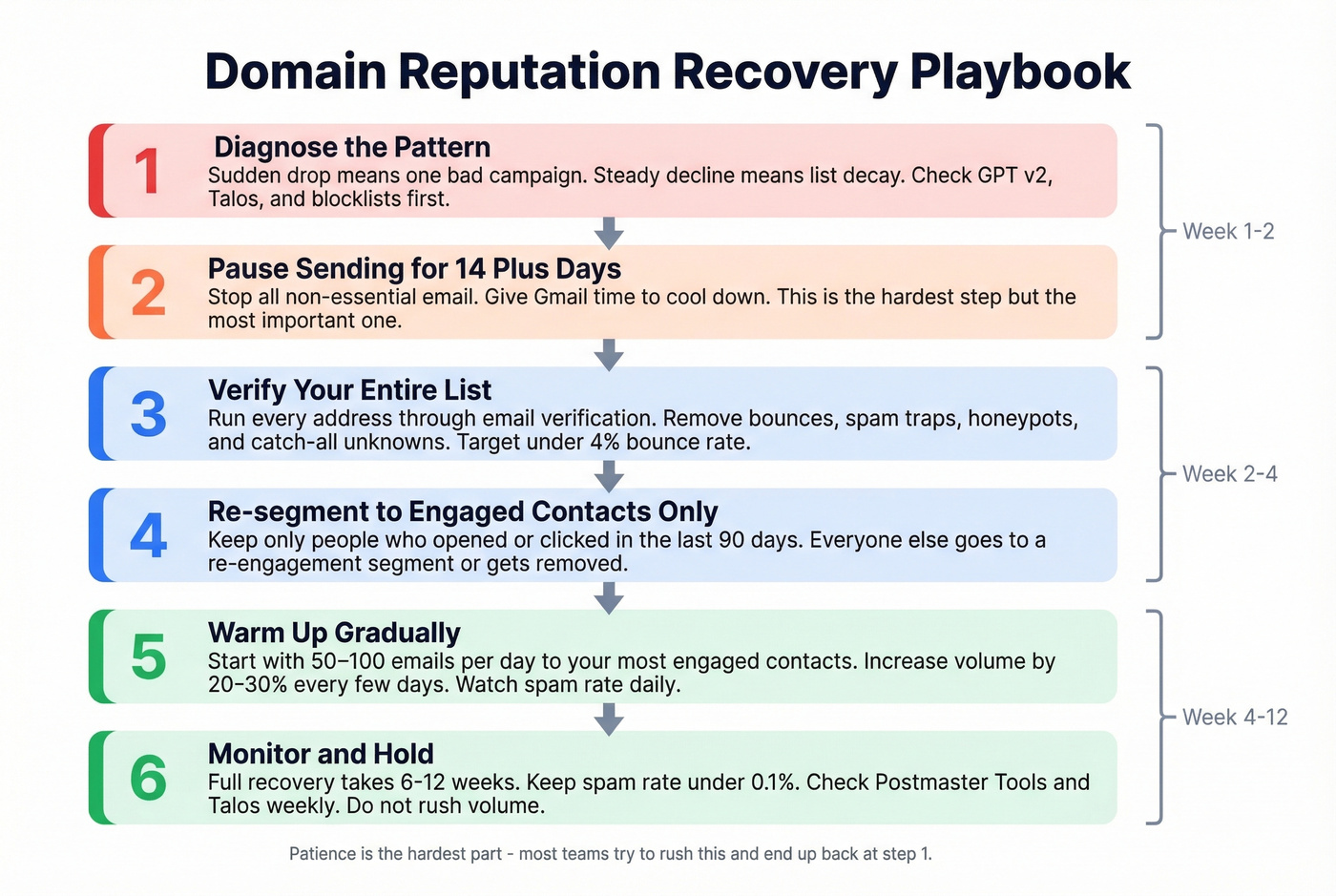
Step 1: Pause all sending for 14 days minimum. Let complaint signals decay. Sending into a damaged reputation just makes it worse.
Step 2: Audit authentication. Confirm SPF, DKIM, and DMARC are correctly configured and aligned. Use MXToolbox to verify. Fix any misalignment before you send a single email.
Step 3: Verify your entire list. Remove any address that doesn't pass verification. Prospeo's data refreshes every 7 days - compared to the 6-week industry average - so you're checking against current data, not stale records. If you're troubleshooting bounces, use an email bounce rate checklist and prioritize spam trap removal.
Step 4: Re-segment to engaged contacts only. Send only to recipients who clicked in the last 30 days. Suppress anyone who received 10+ emails in the past year with zero clicks. Engagement is the fastest signal to Gmail that you're a legitimate sender.
Step 5: Warm up gradually. Start at 50-100 emails per day to your most engaged segment. Increase by 20-30% every 3-4 days. Don't rush this.
Step 6: Monitor daily. Track spam rate in GPT v2, check blocklists via MXToolbox, and watch bounce rates in your ESP. Any spike means you slow down.
Expect 6-12 weeks for full recovery. IP reputation recovers faster at 2-4 weeks, but domain-level reputation is stickier. There's no shortcut - only consistent, clean sending behavior over time. For a broader playbook, see how to improve sender reputation.
Look, if your deals average under $15k, you probably don't need a dedicated IP or enterprise deliverability tooling. A verified list, proper authentication, and disciplined sending cadence will solve 90% of reputation problems. The teams that burn their domains aren't under-tooled - they're sending to garbage data.
Stack Optimize built a $1M agency on Prospeo data with 94%+ deliverability, sub-3% bounce rates, and zero domain flags across every client. When your domain reputation is everything, you can't afford the 79-87% accuracy other providers deliver.
Your domain reputation is only as good as your contact data.
FAQ
How long does recovery take?
Typically 6-12 weeks for domain reputation, compared to 2-4 weeks for IP reputation. A single bad campaign recovers faster than months of accumulated damage from sending to unverified lists.
How do I check domain reputation after the v1 retirement?
Use Google Postmaster Tools v2 for compliance and spam rate data, then supplement with Talos Intelligence and MXToolbox blocklist checks. The old four-tier reputation label is gone, so you need multiple signals to approximate what v1 used to show in a single view.
Does switching ESPs reset my domain reputation?
No. Domain reputation follows your domain regardless of ESP or IP. Switching without warming the new IP actually compounds the problem - Gmail sees unfamiliar infrastructure paired with your existing sending history.
Why does Google Postmaster Tools show no data?
GPT requires 100+ messages per day to Gmail users for reliable daily data. The compliance dashboard needs 5,000+ messages to Gmail in a single day since January 1, 2024. B2B senders hitting mostly Workspace addresses often fall below these thresholds.
How do I prevent reputation damage from bad contact data?
Verify every address before sending. Stack Optimize, a Prospeo customer, maintains 94%+ deliverability and under 3% bounce rates across all client campaigns with zero domain flags - that's the kind of outcome proper verification makes possible.