

Google X-Ray Search: The 2026 Guide to What Actually Works
Every recruiter and sales rep has that moment. You paste your trusty site:linkedin.com/in "VP Engineering" "San Francisco" query into Google, hit enter, and get... almost nothing useful. Names and profile photos, maybe. No headlines, no experience, no skills. Your old Google X-Ray playbook is broken, and it's not your fault.
Things shifted hard over the past two years. Here's what still works, what's dead, and how to actually get contact data from the profiles you find.
What Is X-Ray Search?
Google X-Ray search uses Google's site: operator to search within a specific website - essentially "X-raying" through a site's own search limitations to find pages Google has indexed. The name comes from the idea that you're seeing through a website's walls.
The foundation is simple: site:github.com "python" "machine learning" tells Google to only return results from GitHub matching those terms. Combine site: with other operators - exact match quotes, OR, intitle:, filetype: - and you've got a sourcing engine that bypasses a platform's native search entirely.
Recruiters have used this for over a decade to find candidates. Sales teams use it to build prospect lists, and it's still one of the most cost-effective ways to identify decision-makers without paying for a premium database. The technique itself hasn't changed. What's changed is how much the target websites let Google see.
Why Your X-Ray Queries Stopped Working
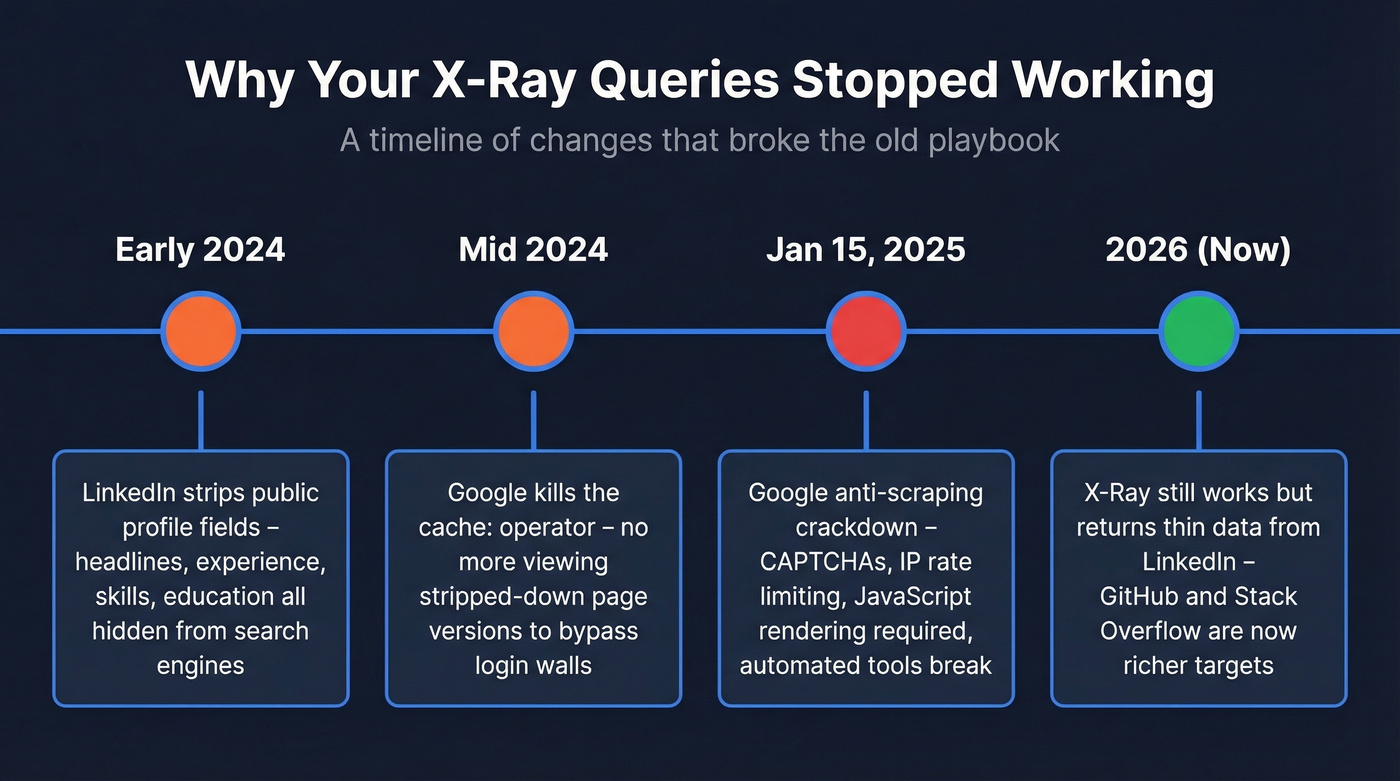
Public Profile Fields Disappeared
In early 2024, LinkedIn removed key fields from public profiles - the version visible to search engines and logged-out visitors. Headline, work experience, volunteering, education, skills, and interests are no longer visible on public profiles, and the About section is mostly hidden except for the first ~90 characters. The timing isn't coincidental. Platforms started restricting public data access partly in response to AI companies scraping profiles for training data.
Want to see for yourself? Open your own profile URL in an incognito window. That skeleton is what Google sees. It's what your X-Ray queries are searching against.
Google's Anti-Scraping Crackdown
On January 15, 2025, Google rolled out aggressive anti-scraping measures: more frequent CAPTCHAs, IP-based rate limiting, and stricter behavioral analysis. Search results now require JavaScript rendering, which broke a lot of automated tools. In our testing, even running 15-20 X-Ray queries in a single session triggers CAPTCHA walls consistently.
The cache: Operator Died
Google officially discontinued the cache: operator in 2024. If you were using cache: to view stripped-down versions of pages without triggering login redirects, that door is closed. Some older guides still show it as working. It's not.
So Is X-Ray Dead?
No. The "death of X-Ray" framing is overstated. The technique still works; it just returns less useful data from professional networks than it used to. X-Ray sourcing is alive and well on GitHub, Stack Overflow, and dozens of other sites with rich public pages.
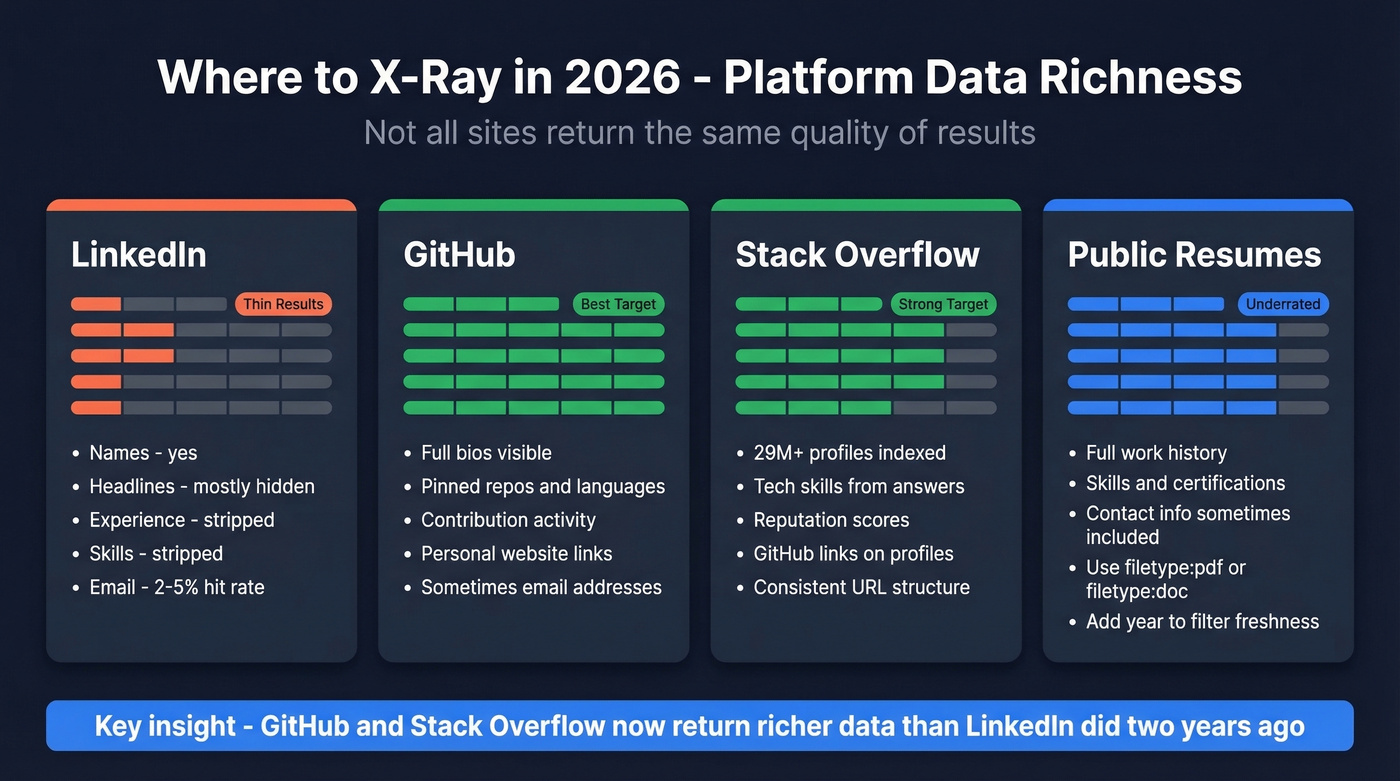
Here's the thing: if you're still spending most of your X-Ray time on professional network searches, you're fighting the wrong battle. GitHub and Stack Overflow return richer data today than professional networks did two years ago.
Operators Cheat Sheet for 2026
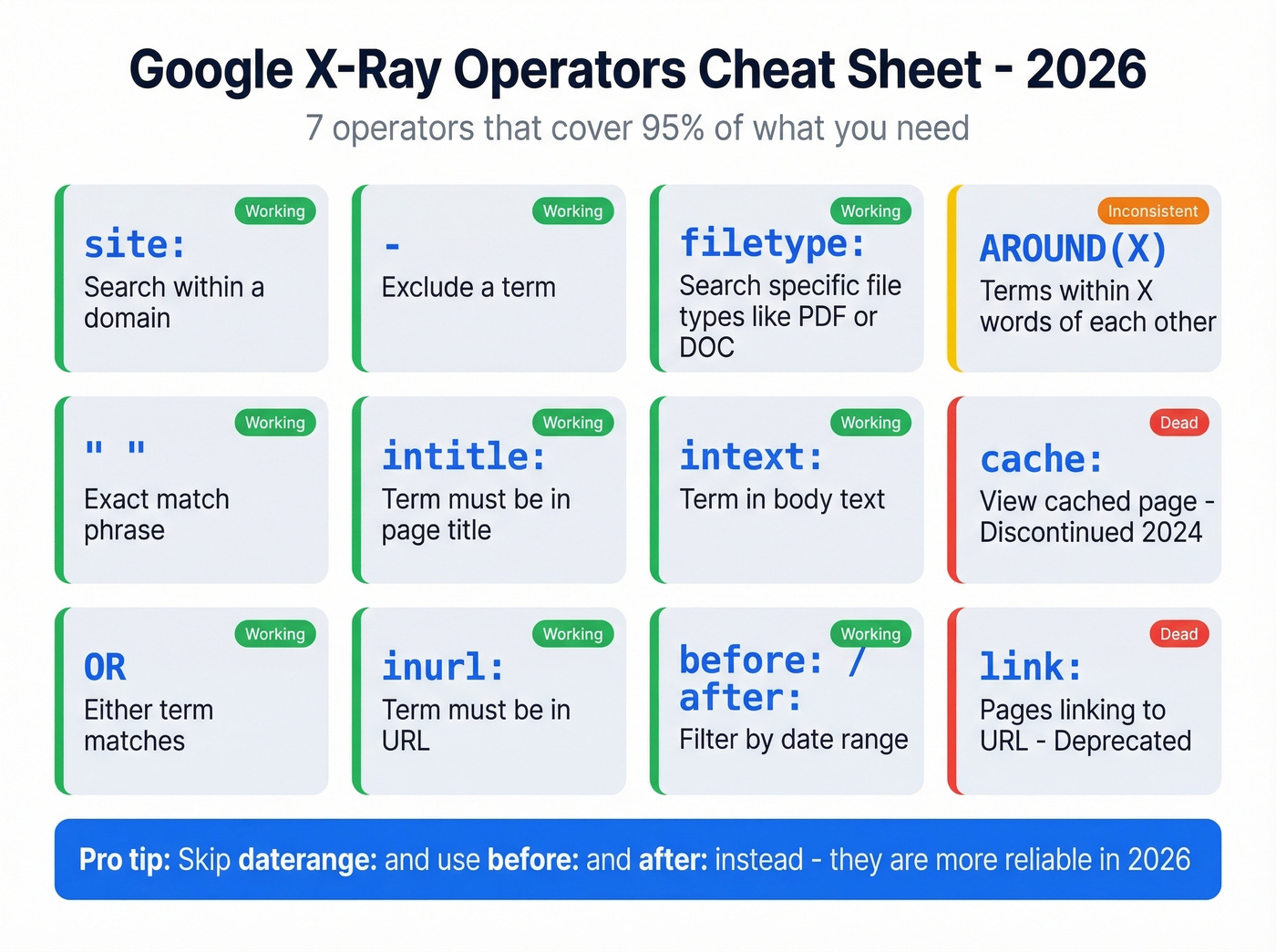
Not all operators are created equal right now. Here's what's verified as of 2026, cross-referenced against Moz's operator reference (updated Apr 23, 2025) and Ahrefs' list.
| Operator | What It Does | Status |
|---|---|---|
site: |
Search within a domain | ✅ Working |
" " |
Exact match phrase | ✅ Working |
OR / \| |
Either term | ✅ Working |
( ) |
Group terms | ✅ Working |
- |
Exclude a term | ✅ Working |
* |
Wildcard | ✅ Working |
intitle: |
Term in page title | ✅ Working |
inurl: |
Term in URL | ✅ Working |
filetype: |
Specific file type | ✅ Working |
intext: |
Term in body text | ✅ Working |
before:` / `after: |
Date filtering | ✅ Working |
AROUND(X) |
Terms within X words | ⚠️ Inconsistent |
daterange: |
Julian date filter | ⚠️ Unreliable |
cache: |
Cached page version | ❌ Discontinued |
link: |
Pages linking to URL | ❌ deprecated |
info: |
Page info | ❌ Deprecated |
~ |
Synonym search | ❌ Deprecated |
The operators that matter most for X-Ray sourcing are site:, exact match quotes, OR, -, intitle:, inurl:, and filetype:. Master those seven and you've got 95% of what you need. Skip daterange: - use before: and after: instead.
Copy-Paste X-Ray Queries
The best X-Ray queries in 2026 aren't targeting professional networks anymore. They're targeting platforms that still expose rich public data.
Professional Profile Searches
These still work, but set your expectations. You'll get names and partial data, not the full profiles you saw two years ago.
site:linkedin.com/in "product manager" "series B" "San Francisco"
site:linkedin.com/in ("VP Sales" OR "Head of Sales") "SaaS" "New York"
site:linkedin.com/in "data engineer" "Python" "AWS" -recruiter
Expect thin results - names and truncated snippets rather than full headlines and experience sections. For many sourcing workflows, the platforms below are now more productive.
GitHub Developer Searches
GitHub profiles are still highly indexable and often include bios, pinned repos, contribution activity, and linked websites. It's one of the best X-Ray targets for technical talent in 2026.
A quick tip: add "followers" to your query to bias results toward active profiles with community engagement. GitHub profiles also frequently link to personal websites and sometimes email addresses - gold for outreach.
site:github.com "machine learning" "San Francisco" "followers"
site:github.com "senior" "rust" "contributions" "Seattle"
site:github.com "DevOps" "Kubernetes" "terraform" -"no contributions"
Stack Overflow Searches
Stack Overflow has 29M+ registered profiles and a consistent URL structure (stackoverflow.com/users/[ID]/[username]) that makes X-Ray reliable. Since Stack Overflow shut down Jobs and Developer Story on March 31, 2022, X-Ray is one of the best ways to source from the platform.
Here's the move most people miss: adding "github.com" to a Stack Overflow X-Ray query surfaces profiles where users have linked their GitHub accounts, giving you a cross-platform view of a candidate's work in a single search.
site:stackoverflow.com/users "python" "san francisco"
site:stackoverflow.com/users "react" "new york" "github.com"
site:stackoverflow.com/users "kubernetes" "senior" "aws"
Resume and CV Searches
Publicly hosted resumes are still fully indexable. These patterns surface PDFs and Word docs that candidates have uploaded to personal sites, university servers, and portfolio platforms.
The standard resume search - filetype:pdf "software engineer" "Python" "React" "2026" - works well, and adding a recent year filters out ancient resumes. For roles with certifiable skills, try filetype:doc "project manager" "PMP" "agile" "Chicago". And for the academic pipeline, combine filetype:pdf intitle:"resume" "data scientist" "TensorFlow" "PhD" with site:edu to target university-hosted CVs specifically.
Conference and Event Searches
Skip Facebook and Twitter/X for X-Ray. The profiles are too unstructured and the signal-to-noise ratio is terrible.
A more productive social X-Ray targets conference attendee lists. Try intitle:"attendee list" "DevOps Days" 2026 or inurl:"speakers" site:meetup.com "machine learning" to find people who are actively engaged in their field. These are warmer leads by default - someone who spoke at a conference is far more reachable than a random profile.
For more ways to turn searches into pipeline, see sales prospecting techniques that work alongside X-Ray.

X-Ray search finds profiles. But with public fields stripped away, you're left with names and no way to reach them. Prospeo turns those names into 98% accurate emails and verified mobile numbers from a database of 300M+ professionals - no scraping, no CAPTCHAs, no guesswork.
Stop X-Raying for data you can search directly.
B2B Prospecting with X-Ray
Every X-Ray guide focuses on recruiting. Sales teams have been quietly using the same technique to build prospect lists, and it deserves its own playbook. Instead of searching for skills and experience, you're searching for job titles and company signals.
site:linkedin.com/in "Head of Marketing" "B2B SaaS" ("Series A" OR "Series B")
site:ca.linkedin.com/in "Account Executive" (Toronto OR Vancouver)
Country subdomain targeting (ca.linkedin.com, uk.linkedin.com) is a useful way to narrow results by geography without overloading your query with location keywords. It's a trick from the SalesBread playbook that still works.
The hit rate on visible emails in professional profiles is low - around 2-5%. But when you find them, they're self-selected as open to contact, which makes them higher-quality leads than a random cold list. For teams serious about search-based prospecting at scale, pairing X-Ray with a data enrichment tool turns a discovery workflow into a full pipeline builder.
If you’re building a repeatable outbound motion, it also helps to map this into a broader lead generation workflow.
When X-Ray Isn't Enough
Here's the gap every X-Ray user hits: you find the page, but you can't find the contact data. No email. No phone number. Just a name and a URL.
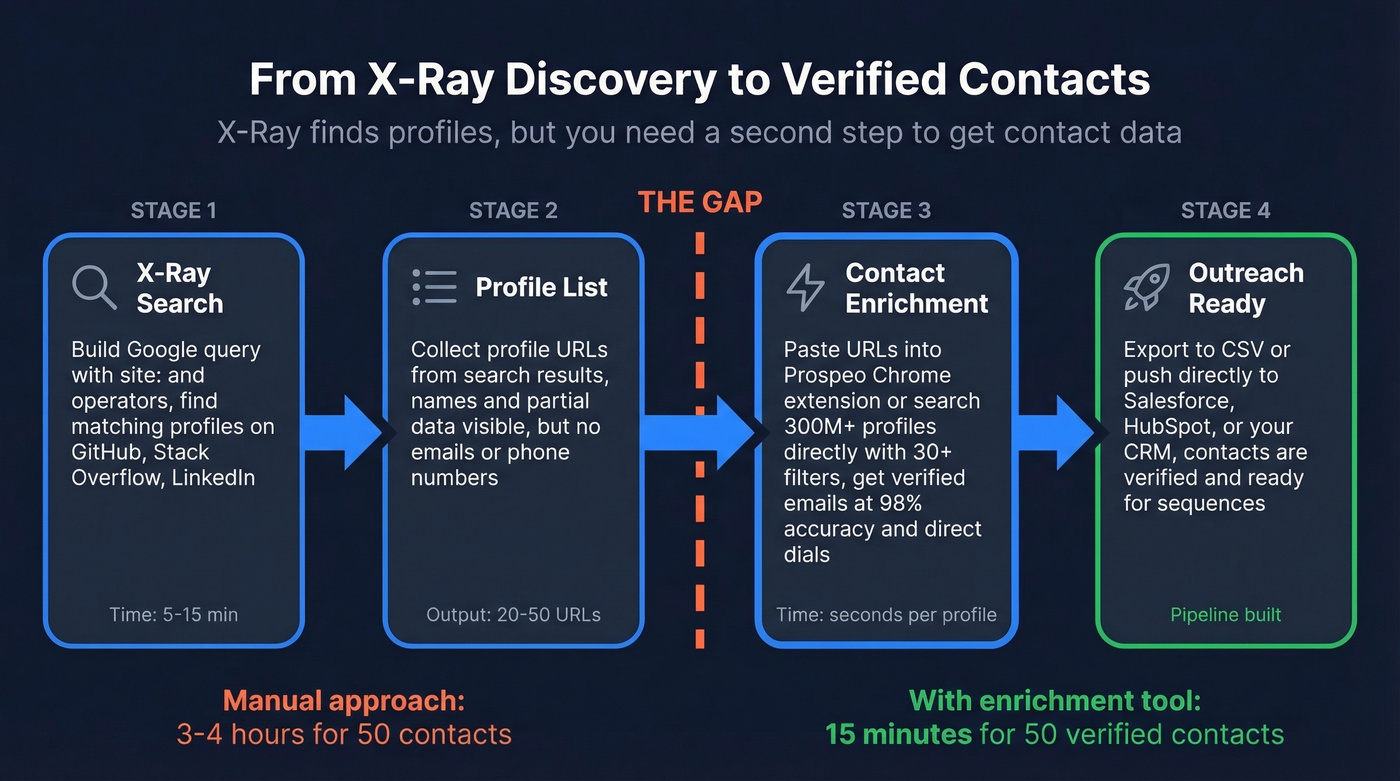
X-Ray is a discovery tool, not a contact tool.
This is where you need to decide whether to keep fighting Google or switch to a purpose-built data platform. The economics are straightforward: LinkedIn Sales Navigator runs ~$99/month, Recruiter Lite ~$170/month, and neither provides verified email addresses or direct dials. Kaspr starts at $49/user/month and is strong for European contacts. Prospeo's free tier covers 75 emails and 100 Chrome extension credits per month - enough to test the workflow without a credit card.
We've found that the biggest time sink in X-Ray sourcing isn't the searching - it's the manual work of turning a list of profile URLs into actionable contact data. Prospeo's Chrome extension handles that in seconds: paste a URL, get a verified email (98% accuracy across 143M+ addresses) and direct dial. Or skip X-Ray entirely and search 300M+ professional profiles directly using 30+ filters - job title, company size, technographics, intent signals - then export verified contacts to CSV or push them into your CRM via native integrations with Salesforce, HubSpot, and others.
If you need a deeper breakdown of enrichment mechanics, see our guide to lead enrichment and name to email workflows.
You just spent 30 minutes crafting the perfect X-Ray query. Now what? Prospeo's Chrome extension lets you grab verified emails and direct dials from any profile you find - at $0.01 per email with 98% accuracy. 40,000+ users already skipped the manual step.
Turn every X-Ray result into a verified contact in one click.
Troubleshooting X-Ray Failures
CAPTCHAs after a few queries. Slow down. Google's January 2025 anti-scraping update means running 15+ X-Ray queries in quick succession will almost certainly trigger a CAPTCHA. Space queries out, rotate between normal and incognito windows, and try different devices on the same network.
Incognito mode triggers CAPTCHAs too. This catches people off guard. The consensus on r/recruiting is that Chrome incognito searches can trigger "unusual activity" warnings even on first use. Incognito isn't a reliable workaround - it's just another signal Google tracks.
Professional profile results are thin or useless. Expected behavior in 2026. The public profile field removal means Google simply has less to index. Shift your X-Ray efforts to GitHub and Stack Overflow, where public data is still rich.
Login redirects when clicking results. This has been happening since at least 2016 and it's gotten worse. Some profiles redirect to a login wall regardless of your account status. There's no clean fix - it's a platform-level restriction. If you're hitting this constantly, skip the click-through entirely and use the name + company from the Google snippet to find contact data through an enrichment tool instead.
Free X-Ray Query Generators
RecruitEm is the go-to free query generator. No registration, no login - select a platform, enter your search criteria, and it builds the Google query string for you. It's been around for years and still works for basic sourcing queries.
SignalHire offers a similar query builder plus its own contact data layer. It auto-generates X-Ray strings and can surface emails and phone numbers from the pages you find.
One caveat worth noting: these tools just build the Google query string for you. They don't bypass any of the indexing limitations or CAPTCHA issues discussed above.
If you want more options beyond generators, compare other free lead generation tools that can complement X-Ray.
Compliance and Ethics
X-Ray gives you access to publicly indexed data. That's legal. But the moment you store that data or use it to contact someone, you've got obligations.
GDPR applies to EU residents' data regardless of where you're located. If you X-Ray a developer in Berlin, you're processing EU personal data - full stop. Workable's compliance framework is a solid model to follow. For California residents, CCPA imposes similar transparency requirements around data collection and opt-out rights.
A practical checklist: include a recruitment privacy notice in your first outreach message, auto-delete sourced profiles you haven't contacted within 30 days, enable right-to-erasure requests promptly, and never scrape and bulk-store profiles "just in case." That's where compliance risk escalates fast.
Let's be honest - most sourcing teams don't think about compliance until something goes wrong. The framing to remember is simple: X-Ray gives you public data, but contacting people with it creates obligations. Treat sourced contacts the way you'd want to be treated - with transparency about how you found them and why you're reaching out.
If you’re formalizing this internally, it’s worth aligning with a clear ethics in sales policy too.
Google X-Ray search isn't dead - it just moved. Point your queries at GitHub and Stack Overflow, pair them with a contact data tool, and you'll source faster than you did when professional networks were wide open.
FAQ
Is Google X-Ray search still legal?
Yes. X-Ray search queries publicly indexed information through standard Google operators - nothing illegal about that. Legal obligations begin when you store or contact people using the data you find. GDPR and CCPA require transparency and proper data handling from that point forward.
What's the best site to X-Ray in 2026?
GitHub. It has a massive user base with rich public pages - bios, repos, contribution history - and remains highly indexable compared to professional networks. Stack Overflow (29M+ profiles) is a strong second for developers. For non-technical roles, resume searches using filetype:pdf often yield better results than any single platform.
How do I get emails from X-Ray results?
X-Ray finds pages, not contact data. You'll need a verification tool to extract emails and phone numbers from the profiles you surface. Prospeo's Chrome extension returns 98%-accurate emails from any profile URL in seconds, with a free tier of 75 emails and 100 extension credits per month - no credit card required.
What Google operators work for X-Ray in 2026?
The core operators all still work: site:, exact match quotes (" "), OR, - (exclude), intitle:, inurl:, and filetype:. Dead or deprecated operators include cache:, link:, info:, and ~ (synonym). See the full cheat sheet above for every operator's current status.
Can I use X-Ray search for sales prospecting?
Absolutely. Use site: queries targeting professional networks, company blogs, and press pages to identify decision-makers by title, industry, and funding stage. Pair those results with a contact enrichment tool to turn profile URLs into verified emails and direct dials you can actually use for outreach.