

Email Guesser: How It Works, When It Fails, and What to Use Instead
It's 9:47 AM. An SDR has a name, a company, and a domain. They type john.smith@acme.com into Gmail, hover over it, and pray for a profile picture to appear. Twenty minutes and six permutations later, they still aren't sure they've got the right address.
This is the email guesser workflow in its most painful form - and it should've died in 2015.
The real problem isn't the time waste. It's that 30-40% of B2B email addresses sit on catch-all domains, meaning standard verification can't even tell you if a mailbox exists. Guessing into that void isn't prospecting. It's gambling with your sender reputation (and a fast way to spike your email bounce rate).
What You Need (Quick Version)
Here's the shortcut:
- One email, right now, for free? Use a permutator like Mailmeteor plus the Gmail hover trick. Works for one-off lookups, not at scale.
- Verified emails at scale? Use a dedicated email finder - Hunter, Snov.io, or Prospeo. These skip the guessing entirely and return verified addresses (more options in our roundup of email search tools).
- Guessing without verifying? Stop. Practitioners on r/agency target under 5% bounce rates - blind guessing blows past that in a single campaign.
What Is an Email Guesser?
An email guesser - sometimes called a permutator or guessing tool - takes a person's name and company domain, then generates every plausible email combination. Give it "Jane Doe" and "acme.com," and it spits out 15+ variations: jane.doe@acme.com, jdoe@acme.com, jane@acme.com, j.doe@acme.com, janedoe@acme.com, and so on.
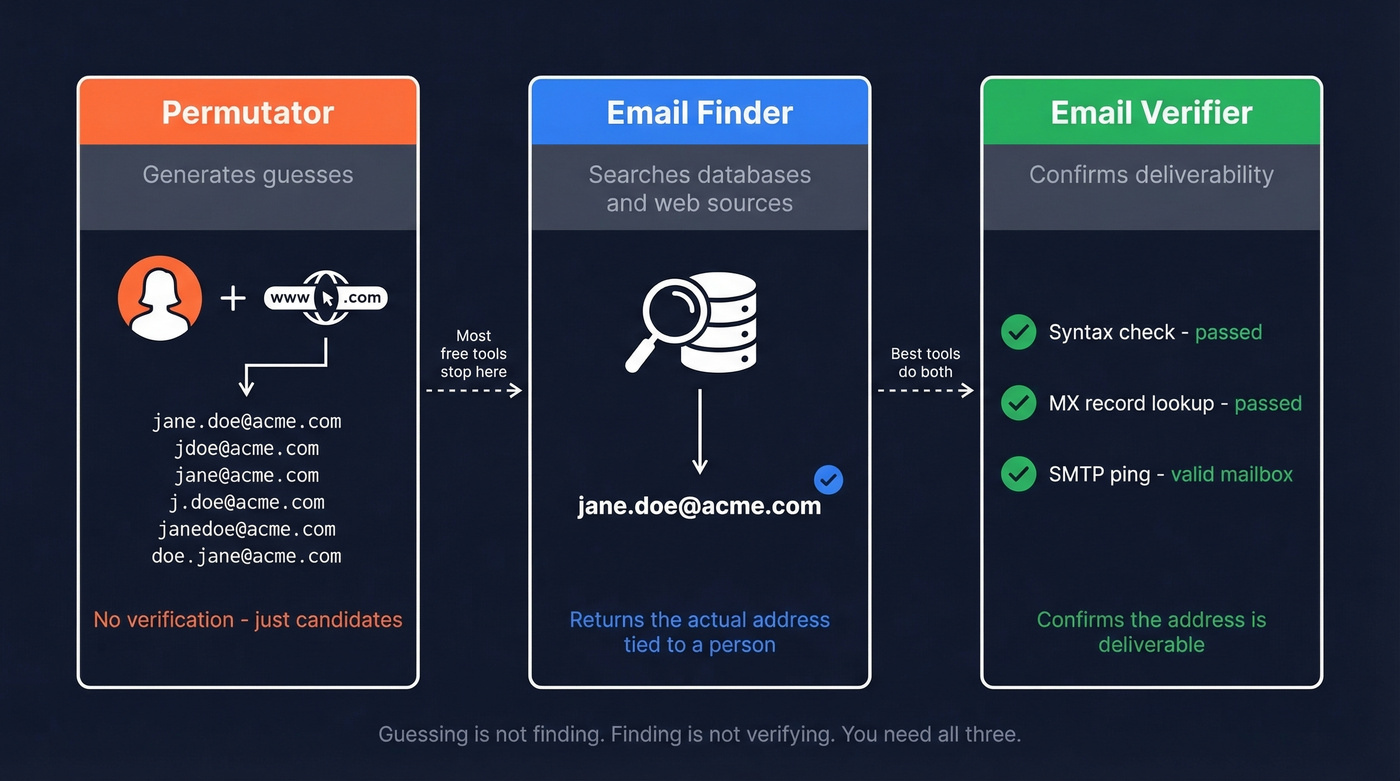
Here's the critical distinction most people miss:
- Permutators generate possible addresses. They don't check anything.
- Email finders search databases and web sources to locate the actual address tied to a person.
- Email verifiers confirm whether a known address is deliverable via syntax checks, MX records, and SMTP pings (see also: how to check if an email exists).
Most free guessing tools are just permutators. They produce candidates. They don't tell you which one is real.
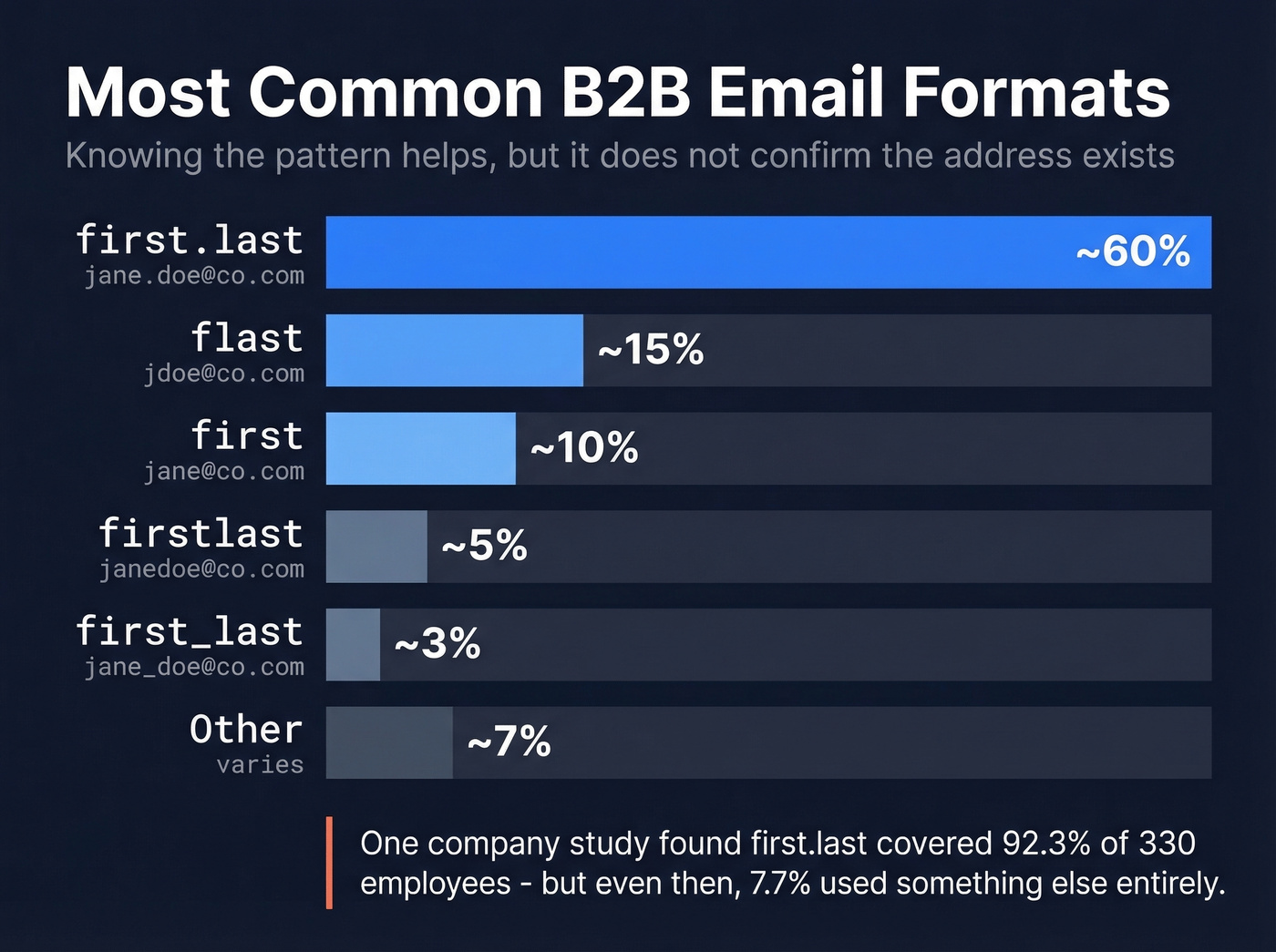
Most Common B2B Email Formats
Even if you're guessing, knowing the dominant patterns narrows the field fast:
| Pattern | Example | Estimated Frequency |
|---|---|---|
| first.last | jane.doe@co.com | ~60% |
| flast | jdoe@co.com | ~15% |
| first | jane@co.com | ~10% |
| firstlast | janedoe@co.com | ~5% |
| first_last | jane_doe@co.com | ~3% |
| Other | varies | ~7% |
Mailmo's analysis of total.com found that first.last accounted for 92.3% of 330 tested employees. The remaining formats were {first} at 3.6%, {f}{last} at 3.1%, {last} at 0.6%, and {first}{last} at 0.4%.
But knowing a company uses first.last doesn't confirm that jane.doe@acme.com exists. Jane might go by a middle name internally, she might have left the company, or the mailbox might be deactivated. Pattern knowledge gets you to a hypothesis - not a verified address.
How to Guess Someone's Email (Step-by-Step)
If you're doing a one-off lookup and don't want to pay for a tool, here's the manual workflow:
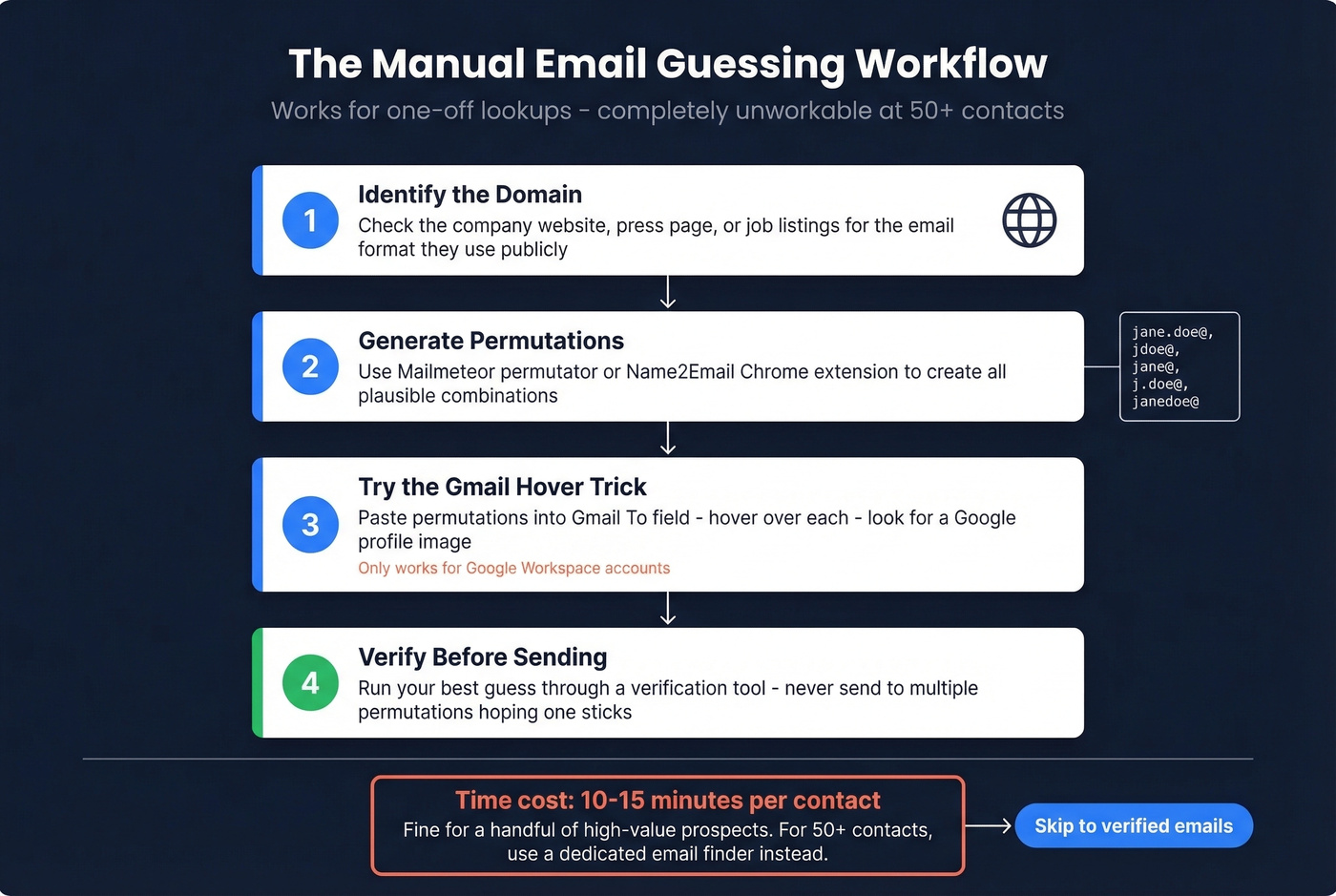
- Identify the domain. Check the company's website, press page, or job listings for the email format they use publicly.
- Generate permutations. Use Mailmeteor's free permutator or the Name2Email Chrome extension to create all plausible combinations.
- Try the Gmail hover trick. Paste your permutations into the "To" field in Gmail. Hover over each address - if one shows a Google profile image, that's likely the valid address. This works best for Google Workspace accounts.
- Verify before sending. If the hover trick doesn't work, run your best guess through a verification tool. Never send to multiple permutations hoping one sticks (use an AI email checker if you also want copy + risk checks in one place).
In our experience, this workflow takes 10-15 minutes per contact. Fine for a handful of high-value prospects. Completely unworkable if you're building lists of 50+ people.
A practical hybrid: use free methods for your first 70-80% of lookups, then invest in paid tools for the high-value contacts that remain.

You just read why guessing emails wastes time and wrecks deliverability. Prospeo skips the permutations entirely - 300M+ profiles, 98% email accuracy, and 5-step verification that handles catch-all domains.
Get verified emails at $0.01 each instead of gambling your sender reputation.
Why Guessing Alone Fails
The manual workflow has a ceiling, and it's lower than most people think.
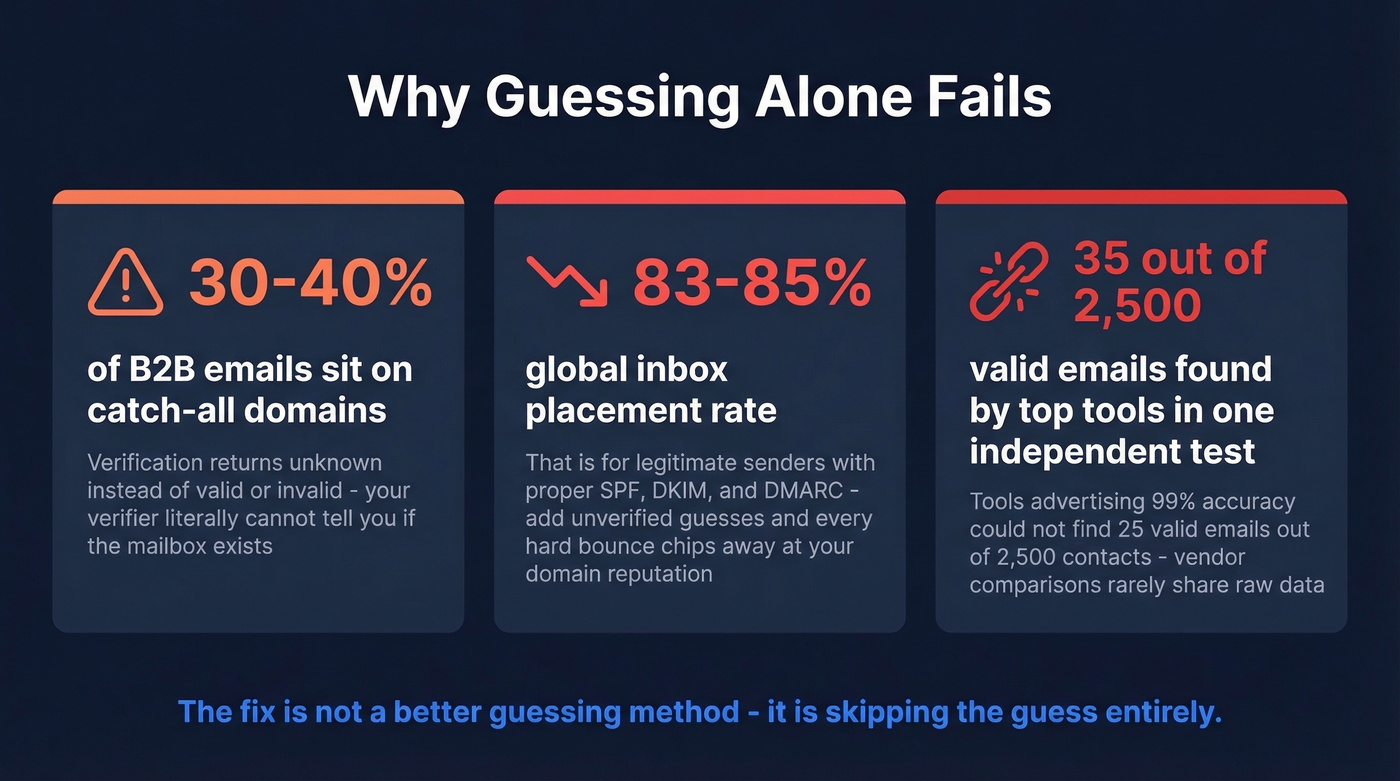
The catch-all problem. Between 30-40% of B2B email addresses sit on catch-all domains. These servers accept mail sent to any address at the domain - anything@company.com gets delivered somewhere. SMTP-level verification returns "unknown" instead of "valid" or "invalid." Your verifier literally can't tell you if the mailbox exists, and enterprise security gateways from Proofpoint, Mimecast, and Barracuda make this worse by actively blocking verification probes.
The deliverability math. Global inbox placement runs roughly 83-85% even for legitimate senders with proper SPF, DKIM, and DMARC records. Litmus found that 70% of emails show at least one spam-related issue. Add unverified guessed addresses to that equation, and every hard bounce chips away at your domain reputation. Once you're flagged, even your verified emails start landing in spam (more on the mechanics in our email deliverability guide).
The accuracy illusion. In one independent test of 2,500 contacts, tools advertising "99% accuracy" couldn't find 25 valid emails out of 2,500. The consensus on r/coldemail is blunt: vendor-run comparisons that never share raw data are the norm, not the exception.
One counterintuitive risk worth knowing: running a separate verifier on emails already verified by your finder can actually reduce your usable list. Verifiers flag catch-all addresses as risky that your finder already confirmed through deeper checks.
We've seen teams burn through sender domains in weeks because they treated guessed emails as verified ones. The fix isn't a better guessing method. It's skipping the guess entirely (and protecting your domain with a plan to improve sender reputation).
Here's the thing: if your average deal size is under five figures, you probably don't need to guess someone's email address at all. The time you spend on manual permutations costs more than a month of any email finder on this list.
Best Email Finding Tools in 2026
We've run these tools against the same prospect lists. Here's what actually performs - tools that find and verify emails, rather than just generating permutations (if you want a broader list, see our guide to the best SDR tools).
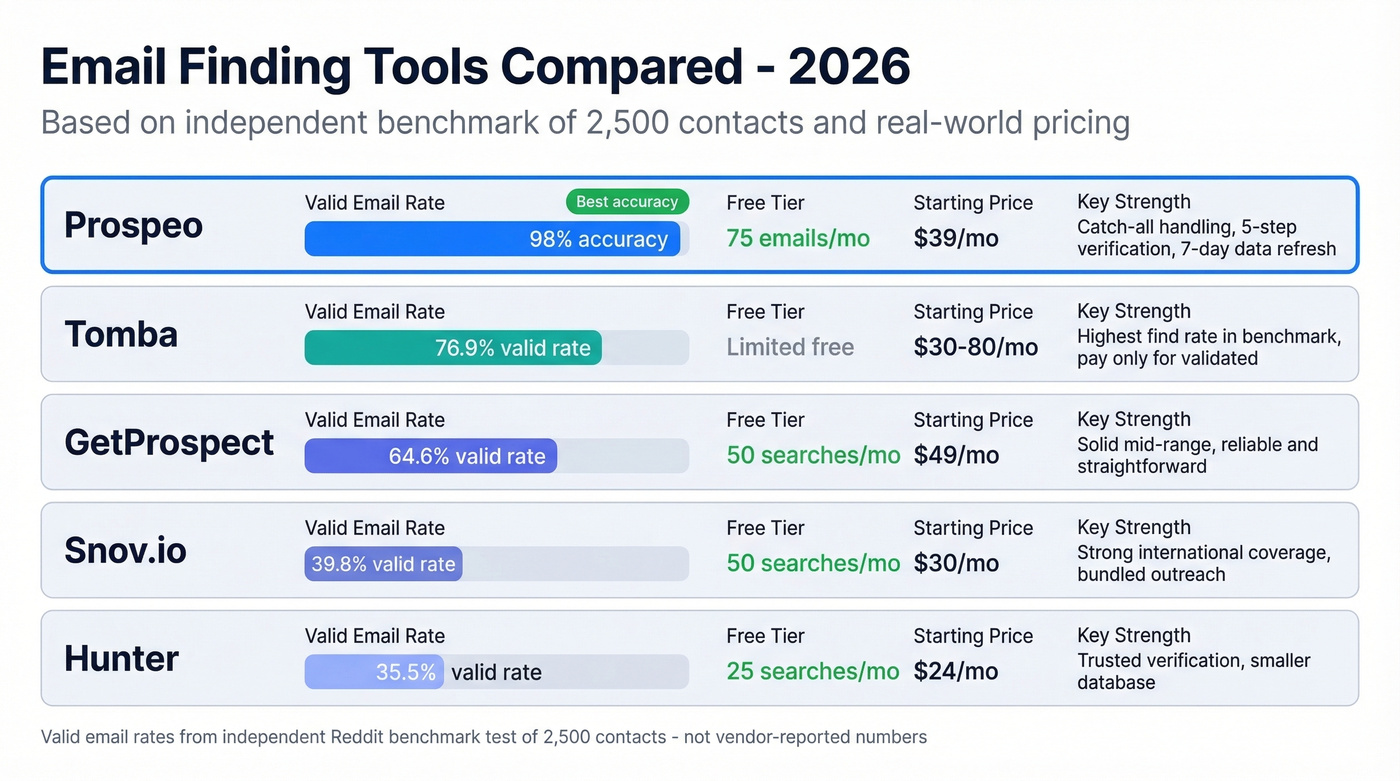
| Tool | Free Tier | Starting Price | Key Strength | Verification? |
|---|---|---|---|---|
| Prospeo | 75 emails/mo | ~$39/mo | 98% accuracy, catch-all handling | Yes (5-step) |
| Hunter | 25 searches/mo | $24/mo | Trusted verification | Yes |
| Snov.io | 50 searches/mo | $30/mo | International coverage | Yes |
| Tomba | Limited free | ~$30-$80/mo | Highest find rate | Pay only for validated |
| GetProspect | 50 searches/mo | $49/mo | Solid mid-range | Yes |
Prospeo
Use this if you need verified emails without the guess-and-verify dance. Paste a name and company, get one verified email back. Prospeo draws from 300M+ professional profiles and runs every result through a 5-step verification process that includes catch-all handling, spam-trap removal, and honeypot filtering - delivering 98% email accuracy. Teams like Snyk saw their bounce rate drop from 35-40% to under 5% after switching, with AE-sourced pipeline up 180% and 200+ new opportunities per month.
Pricing is straightforward: ~$0.01 per email, free tier at 75 emails/month, no contracts. Data refreshes every 7 days, which matters more than most people realize - the industry average is 6 weeks, and stale data is the fastest path to bounces.

Skip this if you only need one email per quarter and don't mind spending 15 minutes on the manual workflow.
Hunter
Reddit users consistently note that Hunter's database is "pretty small", and the numbers back that up. In the 2,500-contact benchmark test, Hunter found valid emails for just 35.5% of contacts. That's a lower find rate than competitors, but the emails it returns are reliable.
Free tier gives you 25 searches/month. Paid plans start at $24/mo for 500 searches. Best used as a verification complement to a larger database, not as your primary finder (or compare options in our Hunter alternatives guide).

Snov.io
Snov.io returned a 39.8% valid rate in the same benchmark - middle of the pack, but competitive for the price. Where it stands out is international prospecting. Reddit consistently praises its handling of non-US leads and affordable credit packages.
Free tier includes 50 searches/month. Paid plans start at $30/mo for 1,000 searches. The platform also bundles basic outreach sequences, making it a decent all-in-one for small teams that don't need maximum coverage.
Tomba
Tomba posted the highest valid-email rate in the independent 2,500-contact test: 76.9%, finding 1,922 valid addresses. The differentiator is that you only pay for validated emails - you don't burn credits on searches that return nothing. For teams running a single large batch where maximizing find rate matters most, Tomba is worth testing. Pricing starts around $30-$80/mo depending on volume.
GetProspect
A solid mid-range option. GetProspect returned a 64.6% valid rate in the benchmark - second only to Tomba. Free tier gives you 50 searches/month, paid plans from $49/mo for 1,000 searches. Reliable, straightforward, no surprises.
Free Permutation Tools
Mailmeteor Permutator generates email permutations from a name and domain. Free, no signup. It doesn't verify anything - treat it as step one in a guess-and-verify workflow.
Name2Email is a Chrome extension that does the same inside Gmail. Useful for quick one-off lookups when paired with the hover trick, but don't mistake permutation generation for email finding.
That 10-15 minutes per contact adds up fast. Prospeo's email finder returns verified addresses in seconds - with catch-all handling, spam-trap removal, and a 7-day data refresh cycle so you never email someone who left the company last month.
Replace your permutator with 143M+ verified emails that actually land.
Is Email Guessing Legal?
Guessing someone's email isn't inherently illegal, but what you do with it can be:
- GDPR (EU/UK): You need legitimate interest to email someone unsolicited. Fines run up to EUR 20M or 4% of global revenue.
- CAN-SPAM (US): Requires accurate sender info, a physical address, and a working unsubscribe link. Penalties can reach about $50k per email.
- CCPA (California): Focuses on data rights and notice requirements. Penalties range from $2,500-$7,500 per violation.
The practical takeaway: document how you obtained each address, include an unsubscribe mechanism in every email, and verify the address exists before sending. "I guessed it" is a terrible answer to a compliance inquiry.
Beyond Guessing: Waterfall Enrichment
Once you're past one-off lookups, the scaling strategy is waterfall enrichment - running your contact list through multiple data providers in sequence so each tool fills gaps the others miss. This approach yields roughly 30% more valid emails than relying on any single tool (a common tactic inside modern data enrichment services).
Instantly Lead Finder now markets waterfall enrichment as a core feature, which signals how mainstream the approach has become. For teams still wondering how to guess email addresses at scale, this replaces guesswork with layered verification.
The workflow is straightforward for teams doing 500+ emails per day: upload a CSV to your primary email finder, get verified addresses back, then run remaining gaps through a secondary provider. The whole process takes minutes, not hours.
FAQ
Can you use an email guesser for free?
Yes. Free permutators like Mailmeteor or Name2Email generate format variations from a name and domain, then you verify with the Gmail hover trick. This works for one-off lookups on Google Workspace domains but doesn't scale.
How accurate are email guessing tools?
Pure permutators don't verify anything - accuracy depends entirely on the verification step you add afterward. In a 2,500-contact independent test, dedicated email finders ranged from 30% to 77% valid-email rates. Tools with built-in verification consistently outperform the guess-and-check approach.
Is it legal to email someone using a guessed address?
Legality depends on jurisdiction. Under GDPR, you need legitimate interest and must document how you obtained the address - fines reach EUR 20M. Under CAN-SPAM, you need accurate sender info and a working unsubscribe link, with penalties up to ~$50k per email. Always verify the address exists before sending.