

Hard Bounce vs Soft Bounce in Email Marketing: What They Mean and What to Do
A RevOps lead posted on r/SalesOperations with a problem that'll sound familiar: 8-9% hard bounces on cold outreach despite clean SPF/DKIM/DMARC, proper warmup, and reasonable volume. The culprit wasn't authentication or sending behavior - it was the contact data itself. That's the story for most bounce problems. With roughly 1 in 6 emails never reaching the inbox globally, understanding hard bounces and soft bounces isn't optional anymore.
The Short Version
- Hard bounce - remove the contact immediately. No exceptions.
- Soft bounce - deactivate after 3 consecutive failures.
- Bounce rate above 2% - your list quality needs work.
- Bounce rate above 5% - stop sending and fix your data before you tank your domain.
If you're consistently above 2%, the problem isn't your ESP or your content. It's your data.
Hard Bounce vs Soft Bounce Explained
A hard bounce is a permanent delivery failure. The email address doesn't exist, the domain is dead, or the receiving server has explicitly rejected your message due to authentication failures. No point retrying - the address is bad and will stay bad.
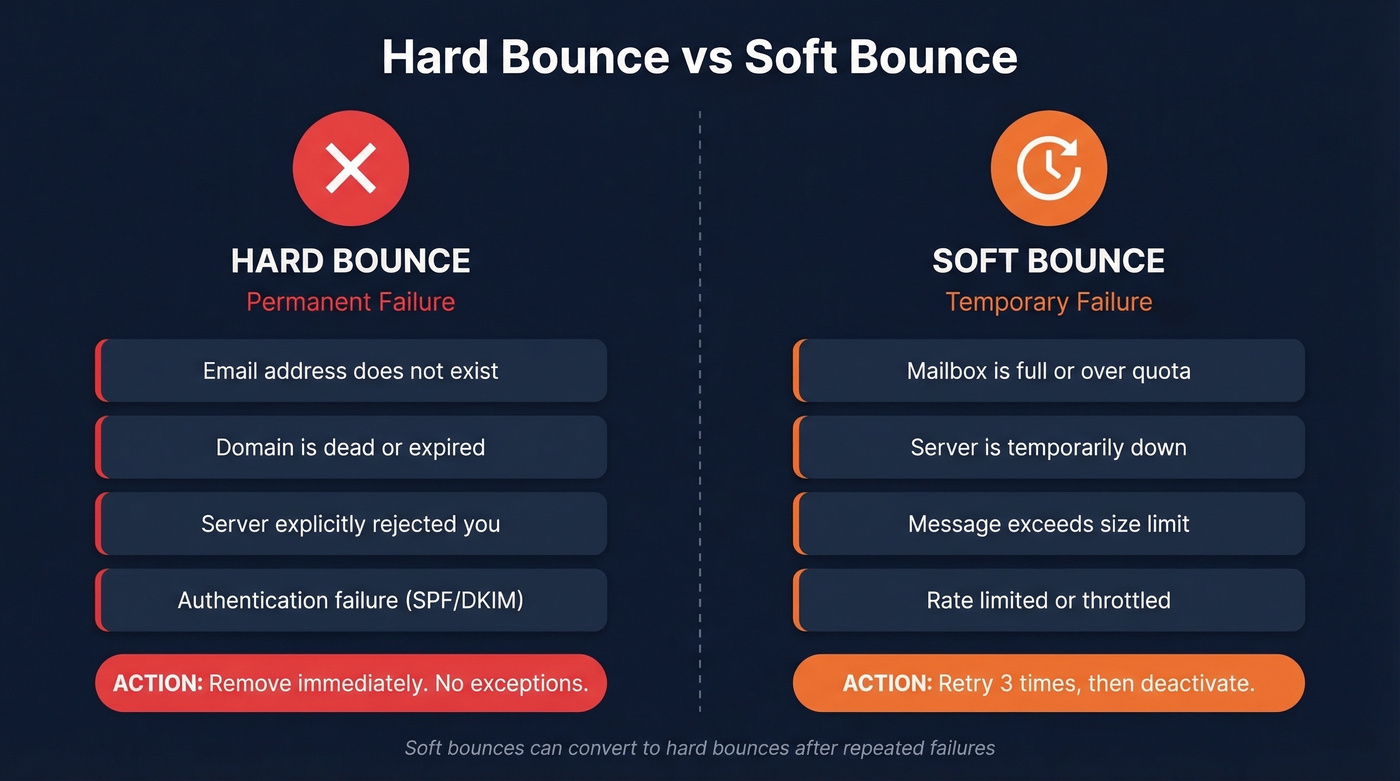
A soft bounce is temporary. The recipient's mailbox is full, the server is overloaded, or your message tripped a size limit. The address itself is likely valid, and your ESP will retry delivery over 24-72 hours.
Here's the nuance most guides skip: soft bounces convert to hard bounces over time. Mailchimp and HubSpot both reclassify a temporary failure as permanent after repeated attempts. Mailchimp specifically retries 7 times for inactive subscribers and up to 15 for active ones before reclassifying. One edge case worth knowing - if a domain doesn't exist at all, some ESPs classify it as a soft bounce because there's no server to return a hard failure code in the first place.
| Type | Definition | Common Causes | What to Do | ESP Behavior |
|---|---|---|---|---|
| Hard | Permanent failure | Invalid address, dead domain, auth failure | Remove immediately | Suppressed forever |
| Soft | Temporary failure | Full inbox, server down, message too large | Retry; deactivate after 3 | Retried 24-72h |

How to Read Bounce Codes
Every bounce comes with an SMTP code. The first digit tells you the category: 4xx codes are temporary (soft), 5xx codes are permanent (hard). Enhanced status codes add a three-part structure like 5.1.1 - the second digit indicates the subject area (addressing, mailbox, or mail system), and the third gives the specific detail.
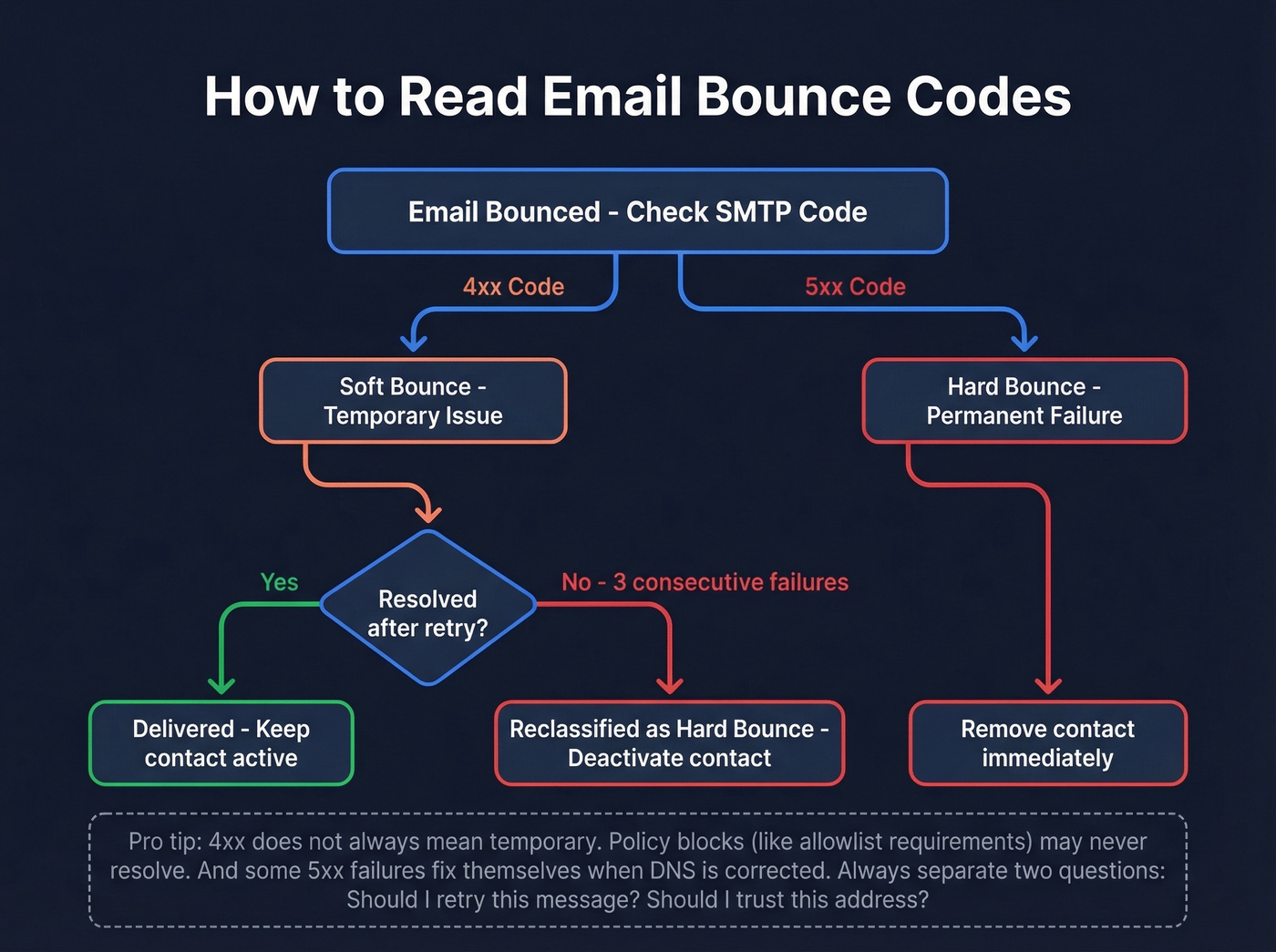
But 4xx vs 5xx isn't law. Some 4xx failures never resolve - a policy block requiring allowlisting, for example. Some 5xx failures do resolve when DNS gets fixed. The smarter framework is to separate two decisions: should I retry this message? And should I trust this address going forward?
| Code | Enhanced | Meaning | Category | Action |
|---|---|---|---|---|
| 421 | 4.3.0 | Temp system problem | Soft | Retry later |
| 422 | 4.2.2 | Mailbox over quota | Soft | Retry; monitor |
| 450 | 4.2.1 | Rate limited | Soft | Slow down sends |
| 421 | 4.7.0 | Suspicious mail rate | Soft | Check reputation |
| 550 | 5.1.1 | Bad mailbox address | Hard | Remove contact |
| 550 | 5.1.0 | Address rejected | Hard | Remove contact |
| 553 | 5.1.3 | Invalid address syntax | Hard | Remove contact |
In B2B outreach specifically, content-triggered spam filtering can show up as soft bounces even when the address is perfectly valid. Corporate mail servers are aggressive about flagging unfamiliar senders.

Most bounce problems start with bad data, not bad sending practices. Prospeo's 5-step email verification - including catch-all handling, spam-trap removal, and honeypot filtering - delivers 98% accuracy across 143M+ verified emails. Data refreshes every 7 days, not every 6 weeks, so addresses don't decay between campaigns.
Stop cleaning bad lists. Start with verified data at $0.01 per email.
What's a Good Bounce Rate?
Under 2% is healthy. Between 2-5% means your list needs attention. Above 5% demands immediate action - you're actively damaging your sender reputation with every send.
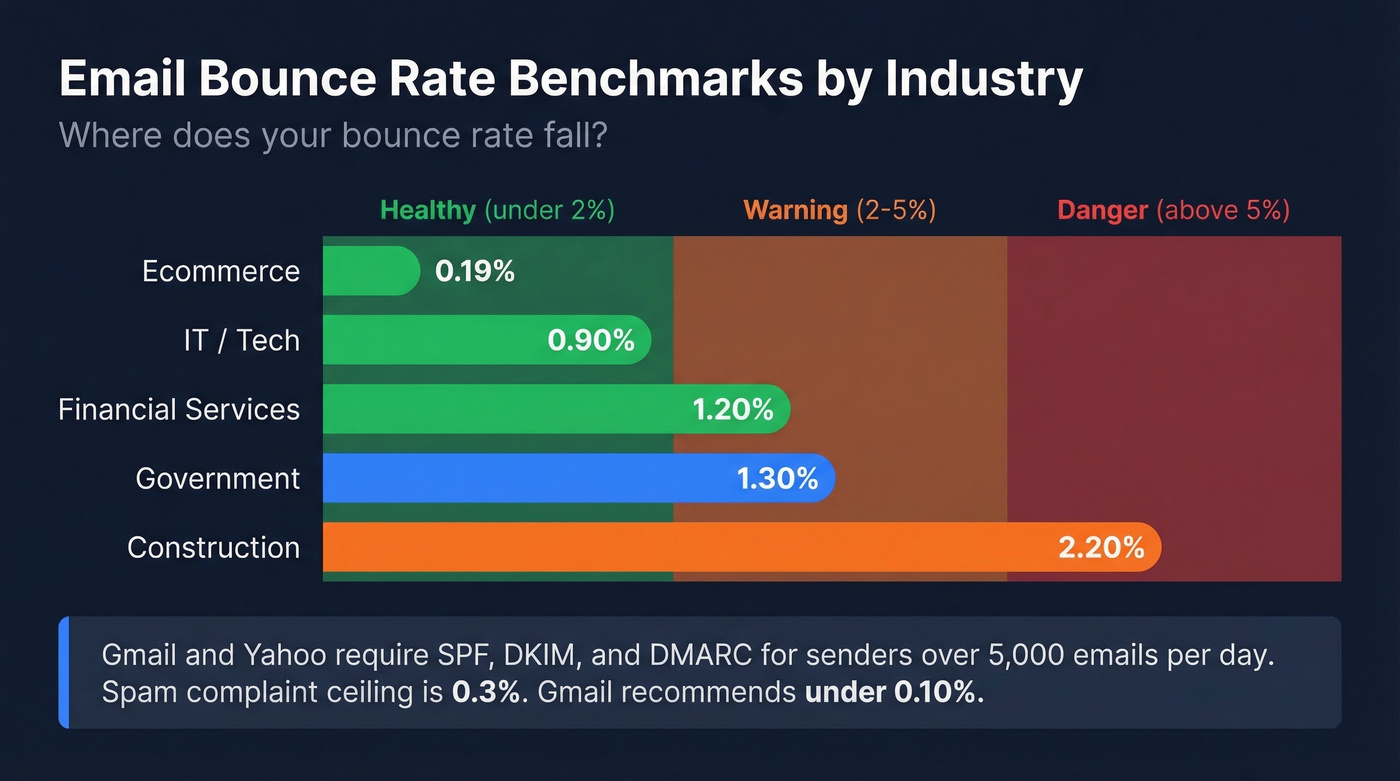
Industry averages vary more than you'd expect. Benchmarks compiled via Listmint show ecommerce averaging just 0.19%, while construction runs as high as 2.20%.
| Industry | Avg Bounce Rate | Status |
|---|---|---|
| Ecommerce | 0.19% | ✓ |
| IT / Tech | 0.90% | ✓ |
| Financial Services | 1.20% | ✓ |
| Government | 1.30% | ⚠ |
| Construction | 2.20% | 🚩 |
With 47% of global email being spam, ISPs are aggressive about filtering and reputation scoring. Gmail and Yahoo's bulk-sender requirements - mandatory SPF/DKIM/DMARC for anyone sending over 5,000 messages per day, a 0.3% spam complaint ceiling, and one-click unsubscribe - have made list hygiene non-negotiable. Gmail recommends staying below 0.10% on complaints.
How ESPs Handle Bounces
Every ESP handles bounces differently, which is why platform-agnostic understanding matters.
| ESP | Retry Window | Hard Bounce Action | Special Rules |
|---|---|---|---|
| HubSpot | Up to 72 hours | Excluded from future marketing emails | Global bounce across accounts |
| Mailchimp | Multiple retries | Cleaned immediately | Account restrictions possible |
| SendGrid | Up to ~72 hours | Added to suppression list | Long deferrals become blocks, not suppressions |
| Marketo | 24-hour suspension | Can be marked Email Invalid | Suspended first, then invalid until manually reset |
Don't assume your ESP's bounce logic matches your expectations. HubSpot's "global bounce" feature means a hard bounce across three or more HubSpot accounts gets that address suppressed everywhere - even if it's valid for your specific use case. We've seen teams lose legitimate contacts to this, and in our experience, it's one of the most common reasons outbound teams think their data is worse than it actually is.
How to Reduce Email Bounces
Let's be honest: most bounce rate advice focuses on what to do after bad data enters your system. That's backwards. The highest-leverage move is preventing bad addresses from getting in at all. If you're running outbound with deal sizes above $5k, investing in verified data upfront will save you more than any amount of email list cleaning after the fact.
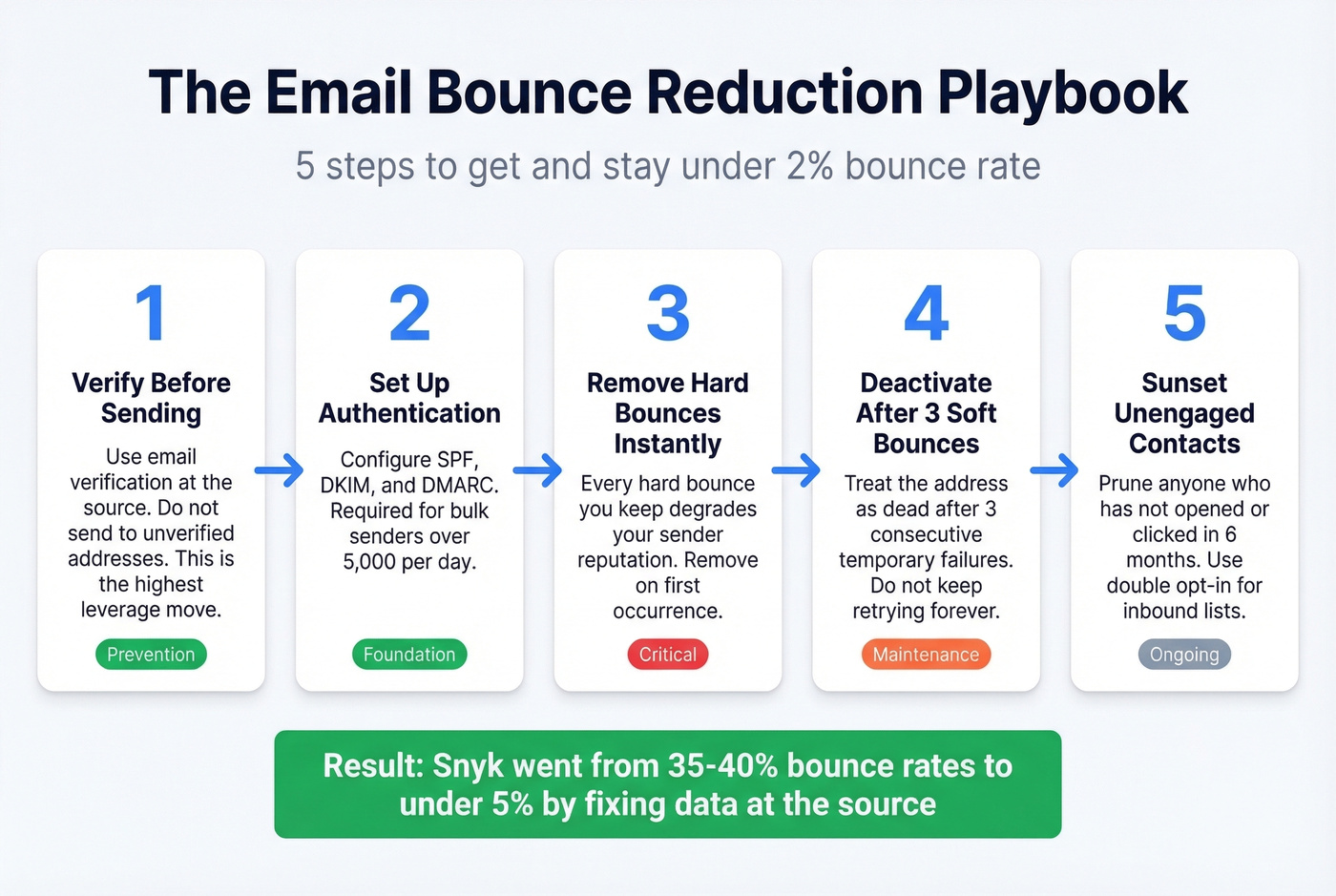
Remove hard bounces immediately. Every one you keep degrades your sender reputation. Deactivate contacts after 3 consecutive soft bounces - treat the address as dead. Implement double opt-in for inbound lists to eliminate typos and fake addresses at the source. Set up SPF, DKIM, and DMARC (required for bulk senders over 5,000 messages per day to Gmail/Yahoo recipients). And sunset unengaged contacts - anyone who hasn't opened or clicked in 6 months should be pruned.
Snyk's sales team was running 35-40% bounce rates before switching to Prospeo for their prospecting data - they got under 5%. That kind of drop happens when you fix the source instead of patching downstream.

For teams that already have lists and need to clean them, here's how the major verification tools compare:
| Tool | Cost per 1,000 | Accuracy |
|---|---|---|
| Prospeo | $10/1,000 | 98% |
| Bouncer | $7/1,000 | Claims 99.5% |
| NeverBounce | $8/1,000 | Claims 99.9% |
| BriteVerify | $10/1,000 | Claims 97% |
| ZeroBounce | ~$7.50/1,000 (minimum purchase) | Claims 96-98% |
Real talk: claimed accuracy numbers from verification vendors are all over the map. Hunter ran their own benchmark - where Hunter scored highest, naturally - testing 15 verifiers against 3,000 real business emails. The top performer hit just 70% overall accuracy. What matters more than a vendor's claimed number is whether your bounce rate actually drops after using the tool. We track this obsessively, and Prospeo's 5-step verification with catch-all handling and spam-trap removal consistently keeps our users' bounce rates under 3%.
Snyk's 50 AEs went from 35-40% bounce rates to under 5% after switching to Prospeo. Stack Optimize built a $1M agency with sub-3% bounce rates and zero domain flags. The pattern is clear - teams that fix data at the source don't fight deliverability problems downstream.
Kill your bounce rate before it kills your domain reputation.
FAQ
What percentage bounce rate is too high?
Under 2% is healthy for most industries. Between 2-5%, start verifying new contacts and pruning unengaged ones. Above 5%, stop sending and fix your data sources immediately - every campaign at that level actively damages your sender reputation.
Can a soft bounce become a hard bounce?
Yes. Most ESPs reclassify soft bounces as hard after repeated failures. Mailchimp retries up to 15 times for active subscribers before converting. HubSpot globally suppresses addresses that hard-bounce across three or more accounts.
Should I verify emails before sending cold outreach?
Always. Unverified lists routinely produce 5-9% hard bounce rates. Verification before sending - not batch cleaning after - is what protects your domain long-term.
What's the difference between a bounce and a block?
A bounce means the server accepted and then rejected your message, returning a 4xx or 5xx code. A block means the server refused the connection entirely, usually due to IP blacklisting or reputation issues. Blocks don't always show up in bounce reports, which makes them harder to diagnose. If your open rates crater but your bounce rate looks fine, check your IP and domain reputation on tools like Google Postmaster Tools, MXToolbox, or Sender Score.