

How Long to Wait Before Sending a Reminder Email
You sent the email. It's been a day. Maybe two. Now you're staring at your sent folder, wondering if following up makes you look pushy - or if staying silent means you'll never hear back.
Here's the short answer: 3 business days is a safe default for most no-response follow-ups. And not following up is the bigger mistake. Professionals receive 120+ business emails daily, so your message didn't get ignored out of spite - it got buried. Meanwhile, 44% of salespeople give up after a single follow-up, which means half your competition removes itself from the race before it even starts.
What the Data Says About Reminder Timing
A Belkins study of 16.5 million cold emails found that the first follow-up increases replies by up to 49% - nearly doubling your chances. An analysis of one million replies breaks down where responses actually come from:
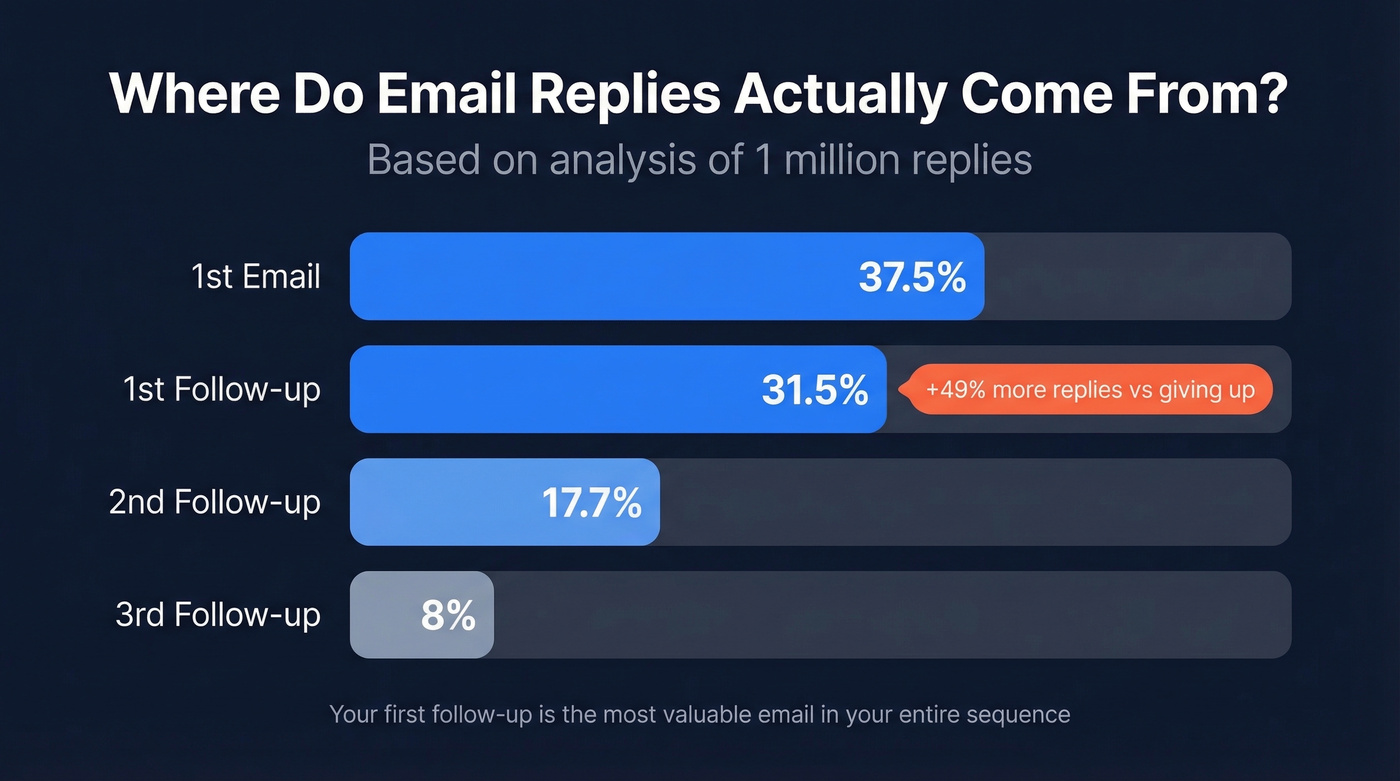
- 1st email: 37.5% of all replies
- 1st follow-up: 31.5%
- 2nd follow-up: 17.7%
- 3rd follow-up: 8%
Your first reminder is the most valuable email in the entire sequence. We've seen teams double their reply rates just by adding a single follow-up at the 3-day mark. If you need plug-and-play copy, use these sales follow-up templates.
Timing by Scenario
Every scenario runs on a different clock. Bookmark this table.
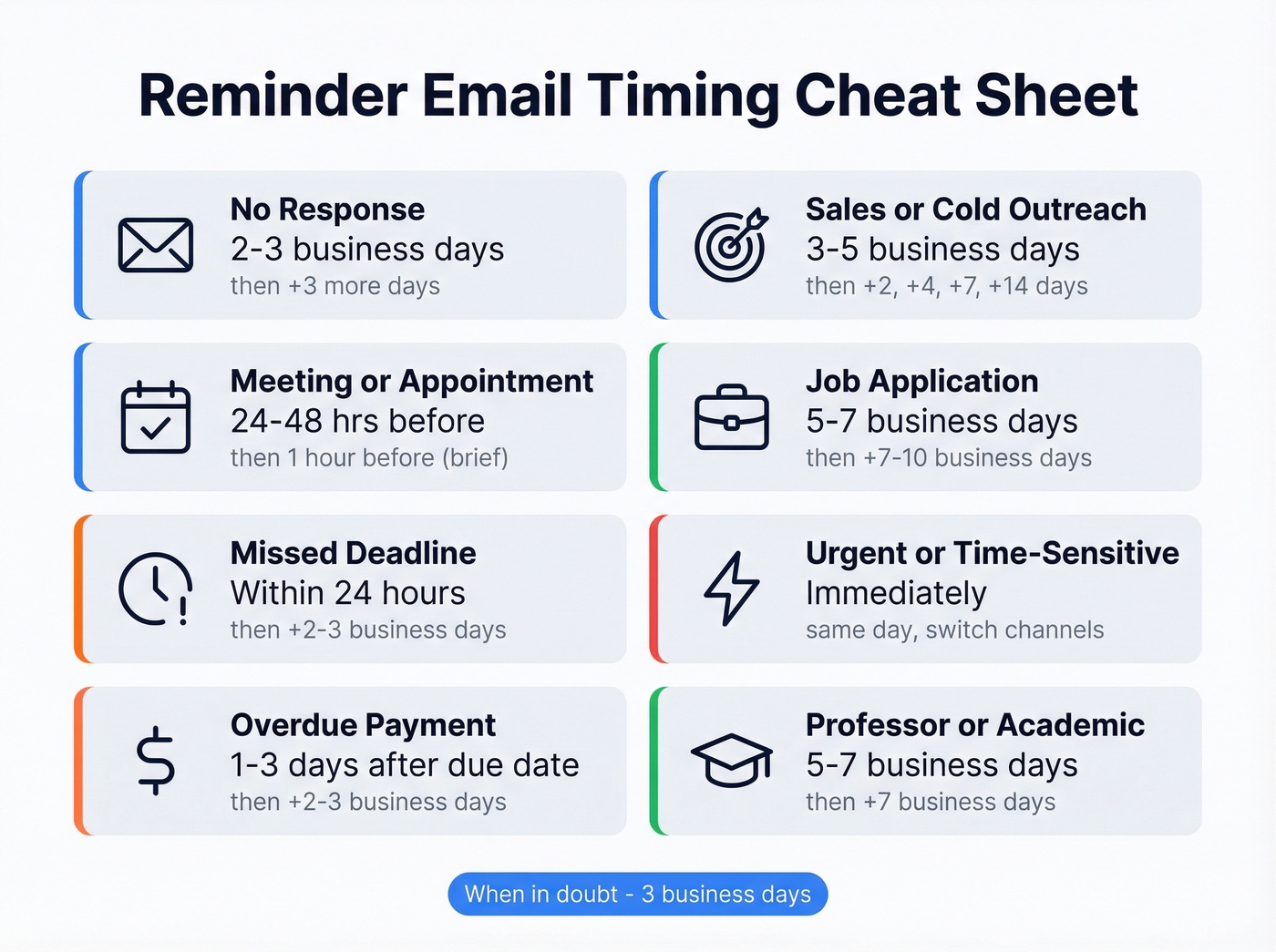
| Scenario | First Reminder | If Still No Response |
|---|---|---|
| General no-response | 2-3 business days | +3 more business days |
| Meeting/appointment | 24-48 hrs before | 1 hour before (brief) |
| Missed deadline | Within 24 hours | +2-3 business days |
| Overdue payment | 1-3 business days after due | +2-3 business days |
| Sales/cold outreach | 3-5 business days | +2/4/7/14 days |
| Job application | 5-7 business days | +7-10 business days |
| Urgent/time-sensitive | Immediately | Same day, different channel |
| Professor/academic | 5-7 business days | +7 business days |
When in doubt, 3 business days. For anything with a hard deadline, 24 hours. For payments, send a courtesy reminder 3-5 days before the due date too - that single email reduces overdue situations dramatically. In academic circles, a week is the norm before following up with a professor; anything sooner can feel impatient.
When to Follow Up After a Meeting
Meetings deserve their own timing rules because the context is completely different from cold outreach.
If you had a productive call and the other person owes you next steps, send a brief recap within 2-4 hours while the conversation is fresh. Waiting until the next day lets momentum die. If you're waiting on a decision or deliverable discussed during the meeting, follow up within 24-48 hours and reference specific action items from the conversation - this gives the recipient a concrete reason to reply rather than letting the thread go stale. For more examples, see our sales meeting follow-up email guide.
Spacing Multiple Follow-Ups
Don't send follow-ups at the same interval. Use graduated spacing - start tight, then back off. The 2/4/7/14-day framework works well as a default:
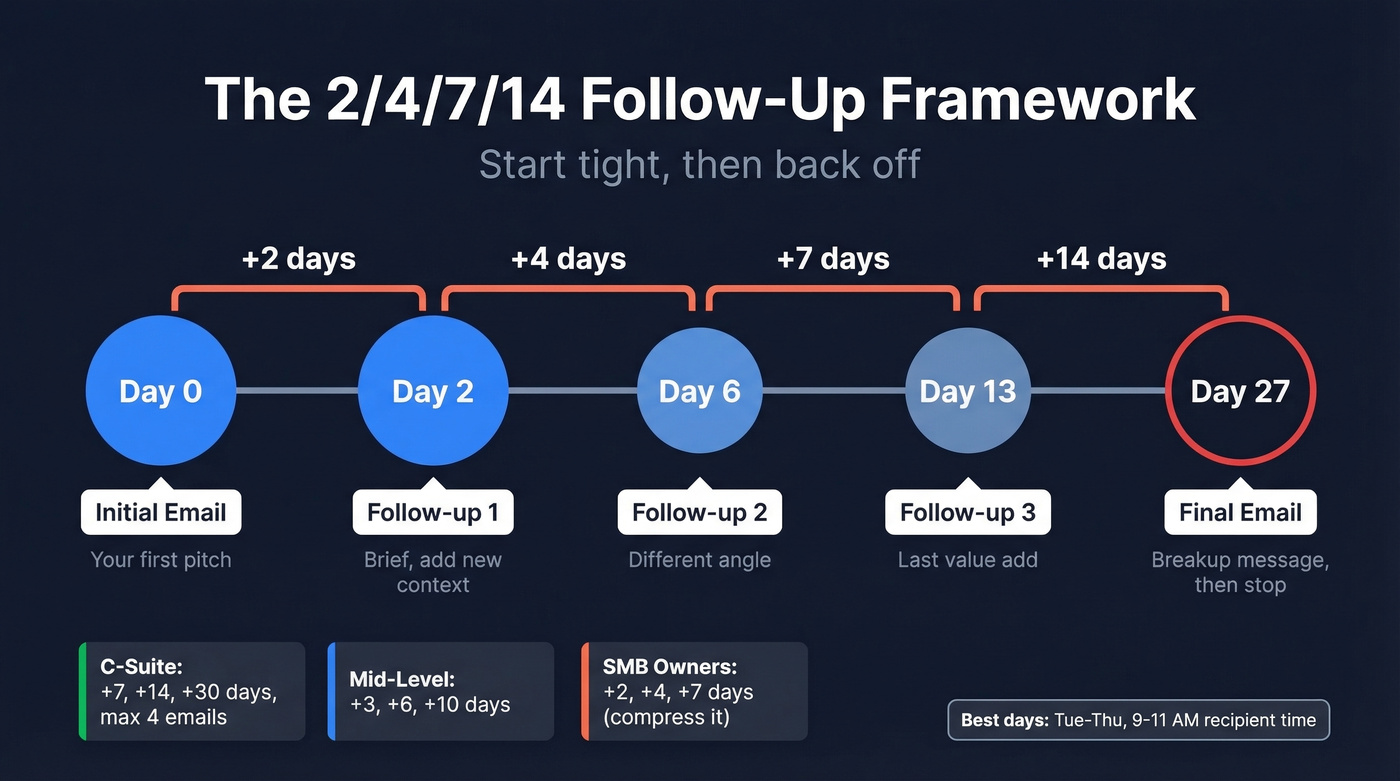
- Follow-up 1: 2 days after initial email
- Follow-up 2: 4 days later
- Follow-up 3: 7 days later
- Follow-up 4 (final): 14 days later
Adjust for seniority. C-suite prospects need more breathing room - space follow-ups at +7, +14, and +30 days, and cap at 4 total emails. Mid-level managers can handle tighter intervals at +3, +6, and +10 days. SMB owners tend to respond faster or not at all, so compress to +2, +4, +7 days.
Best days to send: Tuesday through Thursday. Best window: 9-11 AM in the recipient's time zone. Thursday specifically pulls a 6.87% reply rate - the highest of any weekday. In our experience, timing the follow-up for a Tuesday or Wednesday morning consistently outperforms random sends. If you're optimizing outreach timing, compare this with the best time to send cold emails data.
Let's be honest though: if you're consistently needing 4+ follow-ups, the problem isn't timing. It's your first email.

If you're sending 4+ follow-ups with no reply, timing isn't your problem - bad data is. 25% of emails never arrive because the address is dead. Prospeo's 98% verified emails mean your carefully timed reminders actually land in real inboxes.
Stop perfecting your timing on emails that bounce.
When to Stop Sending Reminders
Stop after 3-4 follow-ups for most scenarios. The Belkins data shows spam complaint rates climb from 0.5% on the first email to 1.6% by the fourth - a 3x increase.
Before you blame timing, check whether your email even arrived. About 25% of emails are opened within an hour, so if days pass with zero engagement, the address might be dead. Prospeo verifies emails in real time with 98% accuracy, and the free tier covers 75 emails per month - worth running your list through before you waste follow-ups on addresses that don't exist. If you're troubleshooting bounces, start with email bounce rate benchmarks and fixes, then review the full email deliverability guide.
If email isn't working, switch channels. Email twice, then call, then move on. Mixing channels signals persistence without crossing into annoyance.
Mistakes That Kill Reminders
Five things that get your reminder ignored or deleted:
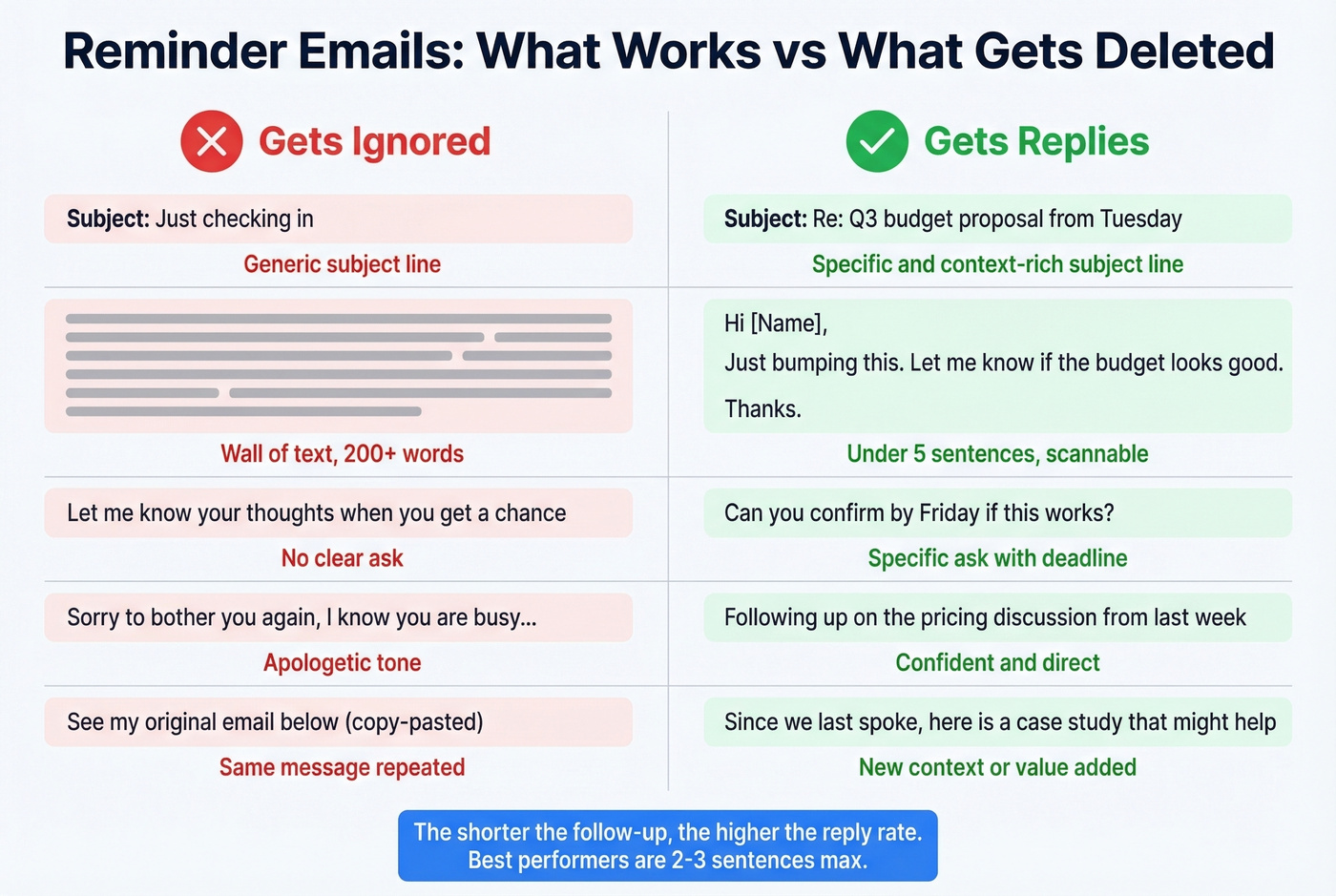
- Vague subject line - "Just checking in" tells the recipient nothing. Reference the original topic. (More ideas: email subject line examples.)
- Wall of text - keep reminders under 5 sentences. Seriously.
- No clear ask - state exactly what you need and by when.
- Apologetic tone - "Sorry to bother you" undermines your message before they've even read it.
- Copy-pasting the original - add new context or a different angle each time.
How to Nudge Without Being Pushy
The best reminders don't feel like reminders - they add value. Instead of asking "Did you see my last email?", reference a specific detail from your original message and give the recipient a low-friction way to respond. A yes-or-no question works far better than an open-ended one. If you want alternatives to “checking in,” use this guide on how to say just checking in professionally.
If the original email was long, distill your ask into a single sentence so the person can reply in under 30 seconds. We've found that the shorter the follow-up, the higher the reply rate - our best-performing reminder templates are 2-3 sentences max.
Quick Templates
No-Response Follow-Up
Subject: Re: [Original subject]
Hi [Name], following up on [specific topic] from [date]. Are you the right person to talk to about this? Just need a quick yes or no.
Overdue Payment
Subject: Invoice #[number] - now past due
Hi [Name], invoice #[number] was due on [date]. Could you confirm when we can expect payment? Happy to resend if needed.
Meeting Reminder
Subject: Confirming tomorrow's call at [time]
Hi [Name], looking forward to our call tomorrow at [time] [timezone]. Here's the agenda: [one line]. Let me know if anything's changed.
Every follow-up you send to a dead address burns your domain reputation and wastes a slot in your sequence. Prospeo verifies emails in real time with 98% accuracy on a 7-day refresh cycle - so your reminder hits a real person, not a spam trap.
Real reminders deserve real email addresses at $0.01 each.
FAQ
How long should you wait to send a reminder email?
Three business days is the standard default for most no-response follow-ups. For deadlines or overdue payments, follow up within 24 hours. Meeting reminders go out 1 day and 1 hour before the event, not after.
Is it rude to send a reminder email after 2 days?
No - two business days is standard professional etiquette. With 120+ emails hitting the average inbox daily, most people expect a nudge and won't consider it pushy. Keep it brief and add new context.
How many follow-up emails is too many?
Cap at 3-4 total reminders. After that, spam complaint risk triples and you should switch to a phone call or another channel. If your emails are bouncing, verify addresses first - bad data wastes follow-ups on inboxes that don't exist.
What's the best day and time to send a reminder?
Tuesday through Thursday between 9-11 AM in the recipient's time zone consistently outperforms other windows. Thursday pulls the highest reply rate at 6.87%. Avoid Monday mornings when inboxes are overloaded and Friday afternoons when people have mentally checked out.