

How Many Emails Can I Send Per Day? 2026 Limits
The fact that you have to piece together sending limits from 15 different help pages is absurd. Every provider buries the number in a different support doc, uses different terminology, and resets on a different clock. Here's every limit in one table, plus the safe limits that actually matter for cold email.
Quick answer: Gmail free caps you at 500/day. Google Workspace allows 2,000. Microsoft 365 caps at 5,000 recipients/day. Outlook.com free stops at 300. Yahoo and AOL sit at 500. But technical limits and safe limits are two very different things - roughly 1 in 6 emails never reach the inbox globally. The numbers below are the ones that actually matter.
Sending Limits by Provider in 2026
Many providers use a rolling 24-hour window, not a midnight reset. Gmail is one of them: if you hit your cap at 3 PM, you're locked out until 3 PM tomorrow. Understanding these provider-specific windows is the first step to planning your outbound volume.
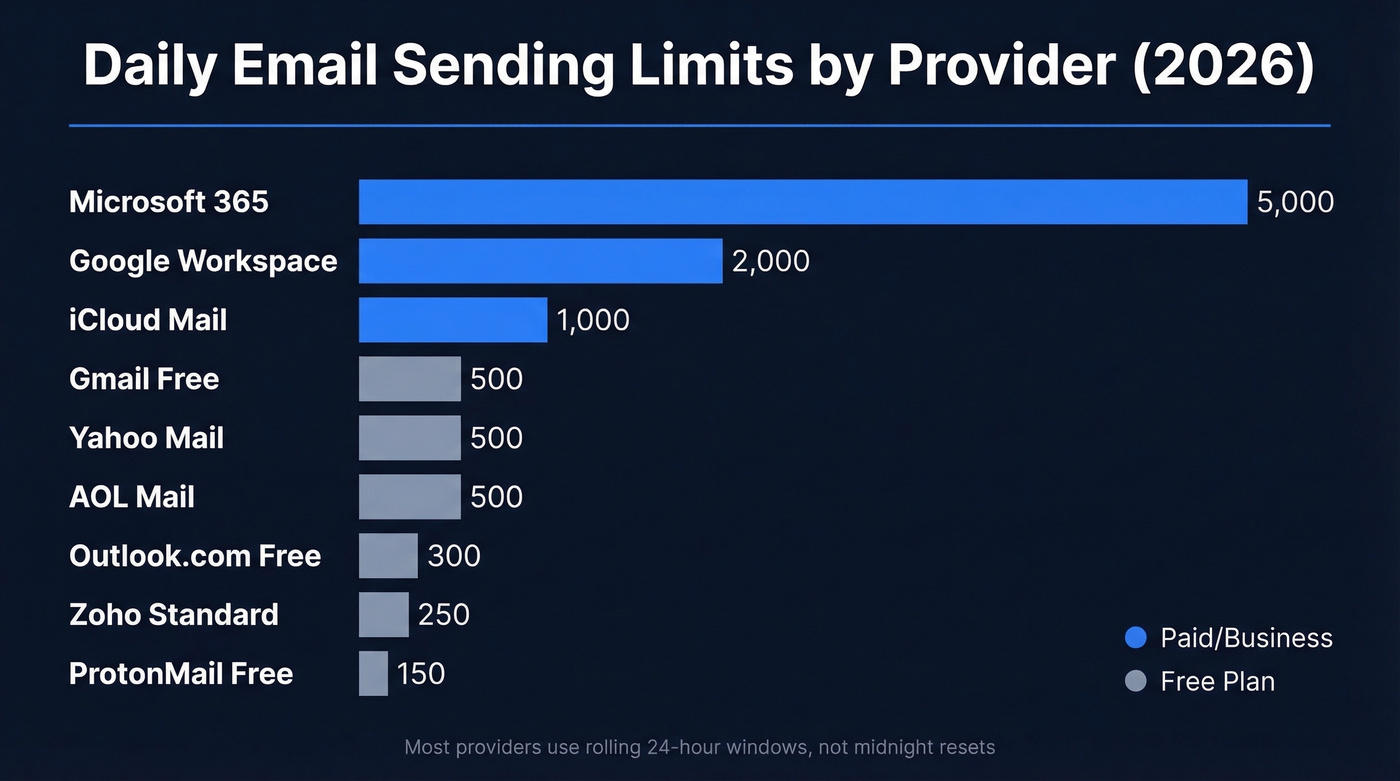
Some providers also distinguish between SMTP and webmail limits. Gmail free allows 500 through the browser but only 100 via SMTP, and GoDaddy is commonly capped at 500/day via SMTP but up to 1,500/day via webmail.
| Provider | Daily Limit | Per Message | Notes |
|---|---|---|---|
| Gmail (free) | 500 | 100 | 100/day via SMTP; 500/day via browser |
| Google Workspace | 2,000 | - | Trial accounts start at 500/day until paid + 60 days |
| Microsoft 365 | 5,000 | 500 | Recipients/day; non-relationship recipients capped at 1,000/day |
| Outlook.com (free) | 300 | 100 | Recipients/day; new accounts start lower until credibility builds |
| Yahoo Mail | 500 | 100 | ~100/hour |
| iCloud Mail | 1,000 | 500 | - |
| ProtonMail (free) | 150 | - | 50/hour cap |
| Zoho (by plan) | 250-2,000 | - | Standard to Ultimate |
| AOL Mail | 500 | 100 | - |
ESP Sending Limits
If you're sending through a dedicated ESP, the caps jump dramatically. These are designed for marketing and transactional volume, not cold outreach from personal inboxes.
| ESP | Daily Limit |
|---|---|
| SendGrid | 100,000 |
| Mailgun | 100,000 |
| Amazon SES | 62,000 |
| Brevo | 10,000 |
| Mailchimp | 10K free / 100K paid |
Technical vs. Safe Cold Email Limits
Here's the thing: Google Workspace lets you send 2,000 emails per day. If you actually send 2,000 cold emails from one inbox, your domain is toast within a week.
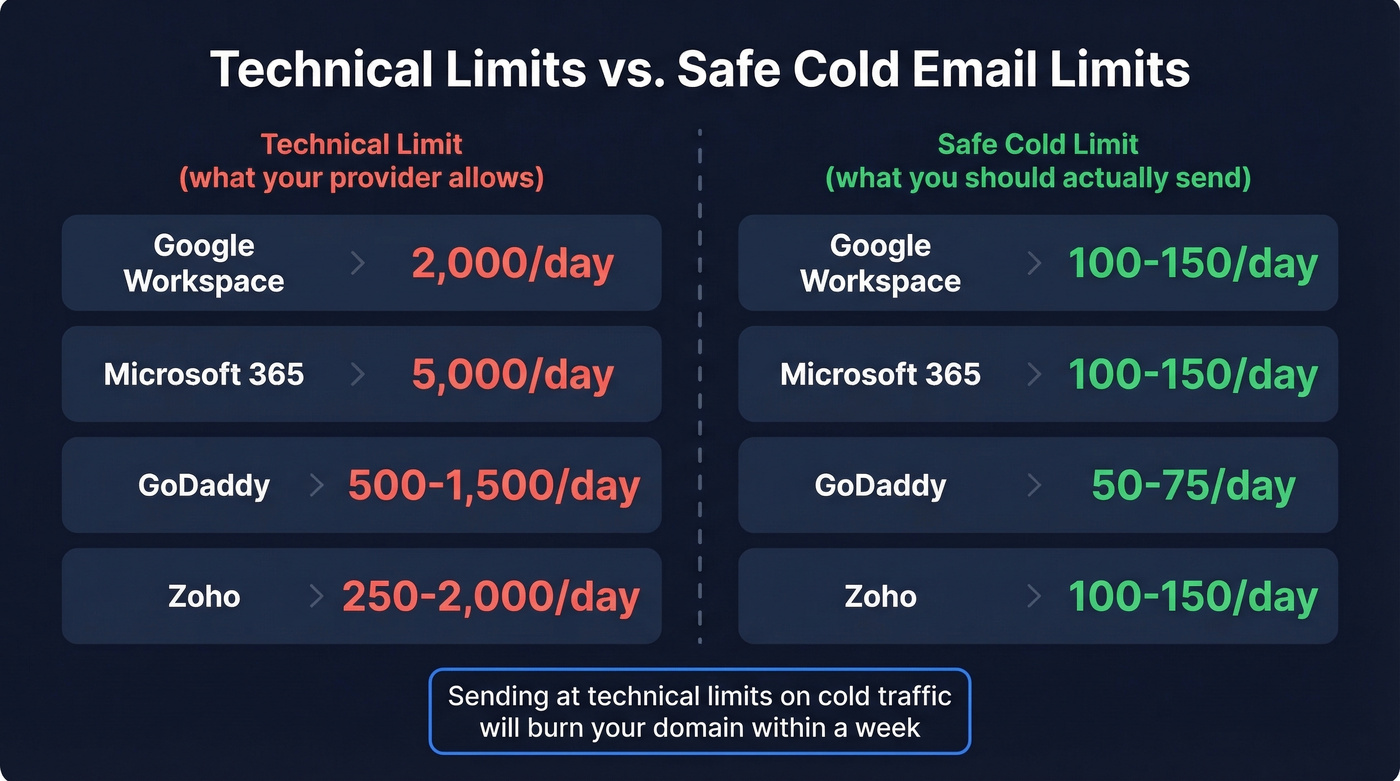
Technical limits exist for normal business communication - not for outbound prospecting at scale. The real question isn't what your provider allows. It's how many you should send.
Google's bulk sender guidelines put the spam complaint threshold at 0.1%. That's one complaint per 1,000 emails. At 2,000/day, you'd need fewer than two complaints to stay safe. Good luck with that on cold traffic.
Most cold email teams we've talked to cap at 50-150 sends per inbox per day regardless of provider limits. The consensus on r/coldemail backs this up - anyone pushing past 150/day from a single inbox is playing with fire. If you want the deeper mechanics behind this, start with email velocity and how it interacts with email deliverability.
| Provider | Technical Limit | Safe Cold Limit |
|---|---|---|
| Google Workspace | 2,000/day | 100-150/day |
| Microsoft 365 | 5,000/day | 100-150/day |
| GoDaddy | 500-1,500/day | 50-75/day |
| Zoho | 250-2,000/day | 100-150/day |

You're capping each inbox at 100-150 sends per day - which means every single email has to count. A 5% bounce rate on 150 sends is 7-8 bounces daily, enough to wreck your domain. Prospeo's 5-step verification delivers 98% email accuracy with catch-all handling and spam-trap removal, so your limited daily sends actually reach real inboxes.
Stop wasting your daily quota on emails that bounce.
What Happens When You Exceed the Limit
Exceeding your cap triggers a sending block lasting 1-24 hours. You can still receive email and access your account - you just can't send. The block itself isn't the real problem, though. Reputation damage persists after the block lifts, and recovery can take days or longer. If you're trying to dig out of a hole, use a structured plan to improve sender reputation.
Watch for hidden limit consumption: overlapping follow-up sequences across campaigns burn through your daily quota faster than you'd expect, especially if multiple campaigns fire follow-ups at the same time. And remember, recipients and messages are counted differently - a single email to 50 people counts as 50 against your recipient limit. This is why sequence management matters more than most teams think.
Warm Up and Scale Safely
Modern warmup is engagement-based. ISPs track opens and replies, not just volume. None of this matters if SPF, DKIM, and DMARC aren't configured first; authentication is table stakes. Postmark's guide to email authentication is a solid reference if you're setting this up for the first time.
| Week | Daily Volume | Focus |
|---|---|---|
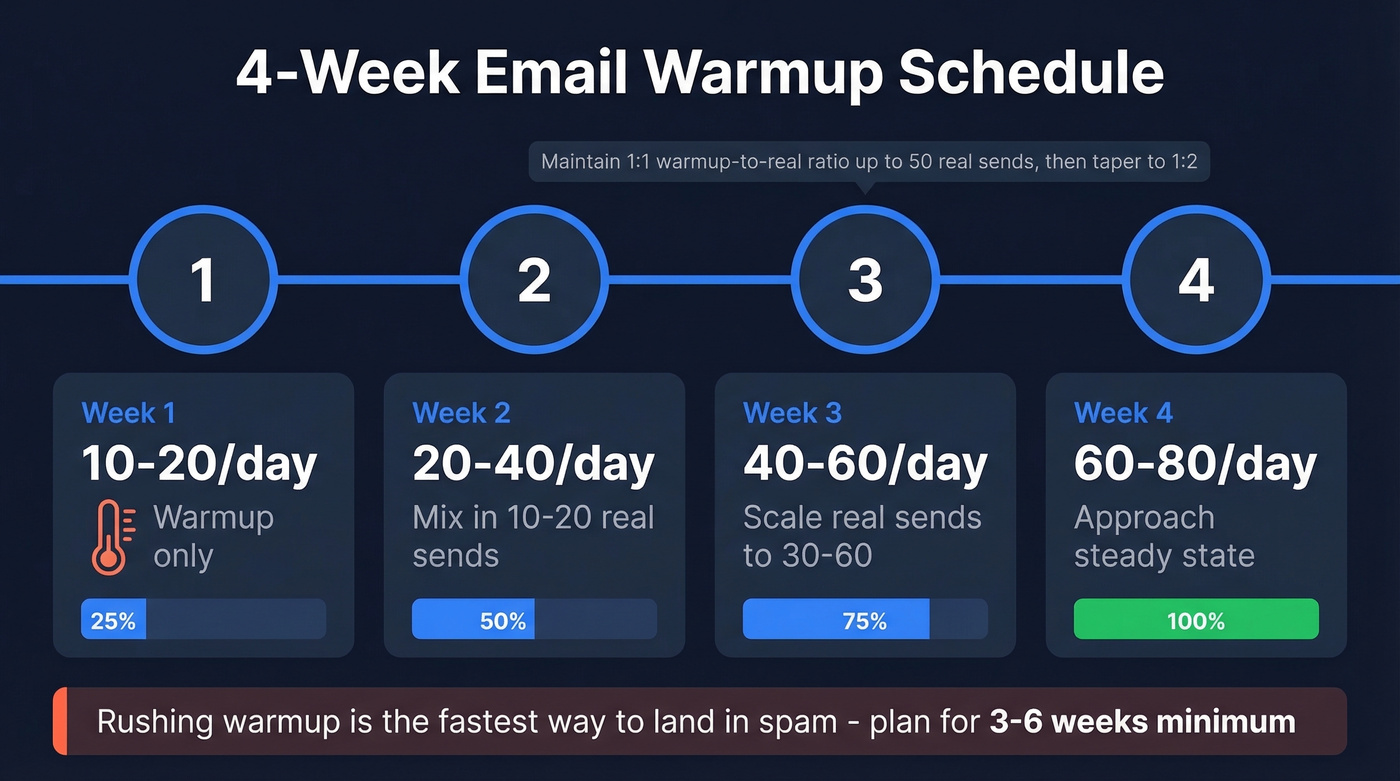
| Week 1 | 10-20/day | Warmup only, seed reputation |
| Week 2 | 20-40/day | Mix in 10-20 real sends |
| Week 3 | 40-60/day | Scale real sends to 30-60 |
| Week 4 | 60-80/day | Approach steady state |
Maintain a 1:1 warmup-to-real-send ratio up to 50 real sends/day, then taper to 1:2 and beyond. Plan for 3-6 weeks before you're sending dependable volume. Rushing this is the single fastest way to land in spam. If you need a tool-based approach, compare options in unlimited email warmup tools.
Scaling With Multiple Domains
Never send cold email from your primary domain. Buy secondary domains and spread volume across them. The math: 2-3 email accounts per domain, 10-15 emails per account, gives you 30-45 sends per day per domain. Want 400 emails per day? You need roughly 10-12 domains. Cap each inbox at 100/day even after warmup, and don't run more than 5 inboxes per domain. If you're also using a separate click/open domain, read up on setting up a tracking domain.
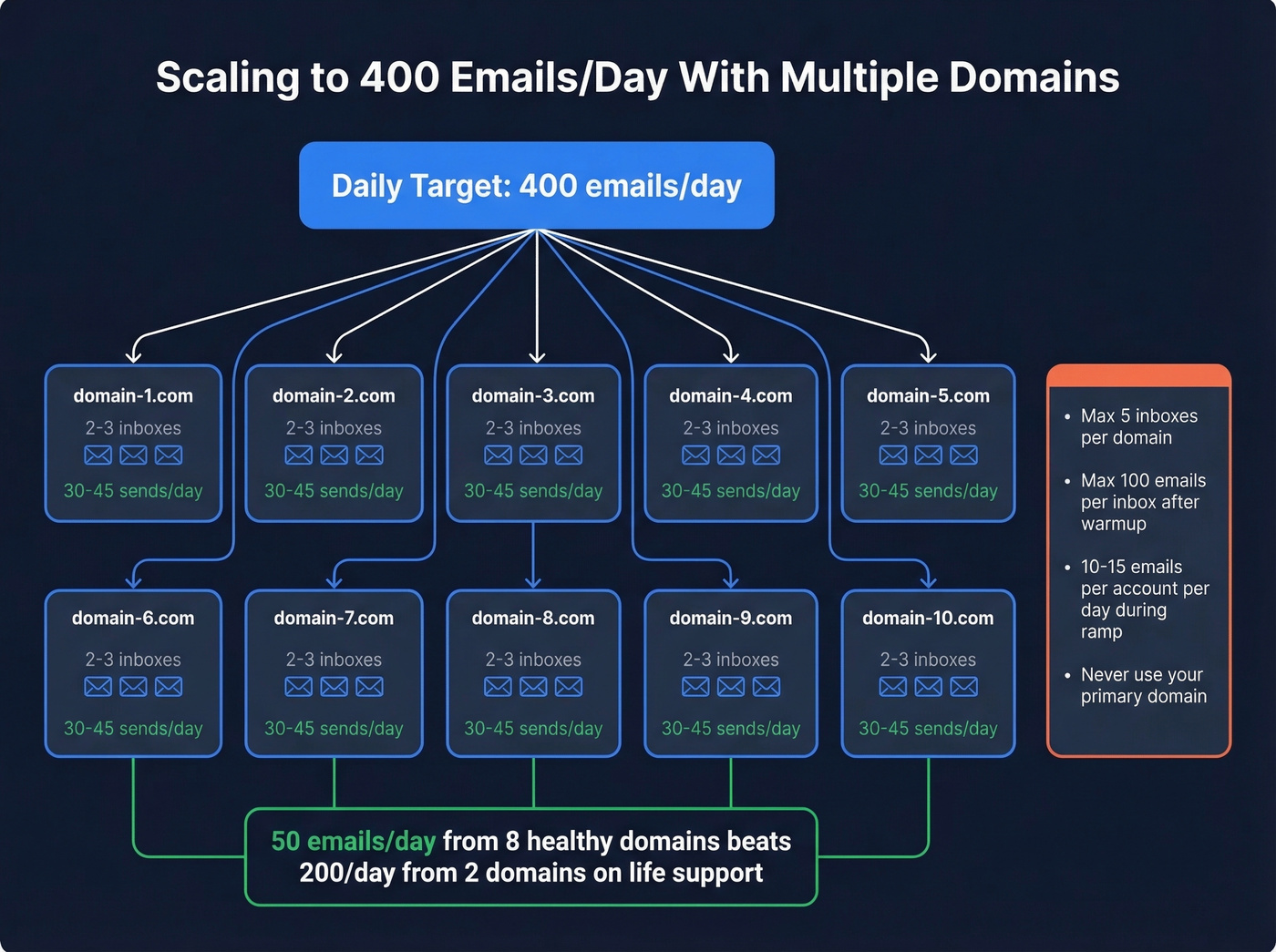
I'll be blunt: most teams don't have a sending limit problem. They have a domain management problem. I'd rather see someone sending 50 emails/day from 8 healthy domains than 200/day from 2 domains on life support.
Data Quality Beats Volume
The real limit isn't what Gmail allows - it's what your data quality supports. Bounces from unverified emails count against your sender reputation just like spam complaints do. A 5% bounce rate on 200 emails means 10 bounces per day, which is enough to trigger reputation damage that takes weeks to recover from. If you want the benchmarks and fixes, start with email bounce rate. And your provider choice compounds the problem: Gmail places 87.2% of emails in the inbox, while Microsoft manages only 75.6%.
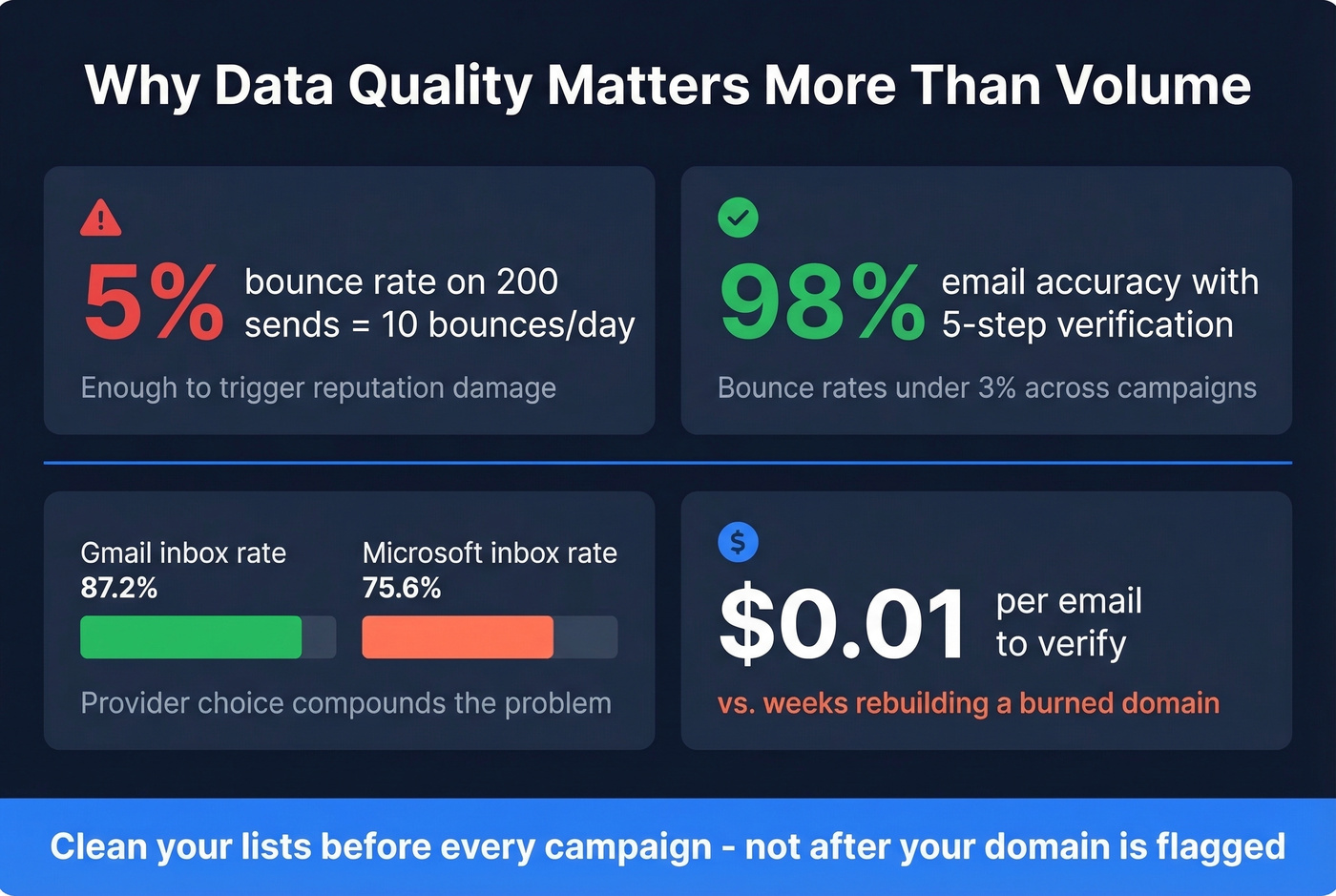
Let's be honest - we've seen teams spend weeks warming up domains only to torch them in a single afternoon with an unverified list. Stack Optimize, one of our customers, ran client campaigns with bounce rates under 3%, deliverability above 94%, and zero domain flags because they verified every email before sending. Prospeo's 5-step verification with catch-all handling, spam-trap removal, and honeypot filtering delivers 98% email accuracy, which means your sends actually land where they're supposed to. If you're building lists from scratch, pair verification with data enrichment services so you’re not guessing at missing fields.
Skip verification if you want to rebuild your domain infrastructure every quarter. Otherwise, clean your lists before every campaign.
Scaling to 400 cold emails per day means 10-12 domains, weeks of warmup, and zero room for bad data. Teams like Stack Optimize run bounce rates under 3% and zero domain flags across all clients because they verify every contact through Prospeo first. At $0.01 per email, verification costs less than one burned domain.
Protect every domain in your rotation - verify before you send.
FAQ
Does Gmail reset sending limits at midnight?
No. Gmail uses a rolling 24-hour window. If you send 500 emails at 3 PM, you can't send again until after 3 PM the next day. Plan your campaigns around this window to avoid unexpected lockouts.
Can I use free Gmail for cold outreach?
Don't. Free Gmail has a 500/day limit, no custom domain, and Google monitors free accounts more aggressively for spam-like behavior. Use Google Workspace or Microsoft 365 on a secondary domain instead.
What's a safe daily send volume for cold email?
Cap each inbox at 100-150 emails per day, even if your provider allows more. Spread volume across multiple inboxes and domains - this protects sender reputation far better than maxing out a single account. Your actual safe ceiling depends on domain health and list quality more than provider caps.
How long does it take to warm up a new email domain?
Plan for 3-6 weeks. Start at 10-20 emails per day in Week 1 and increase by 15-30% every few days. Recovering a burned domain takes far longer than warming one properly from the start.
How do I prevent bounces from killing my sender reputation?
Verify every address before sending. A 5-step verification process that catches invalid addresses, spam traps, and honeypots keeps bounce rates under 3%. At 98% email accuracy, you're protecting the domain reputation you spent weeks building instead of burning it on bad data.