

How to Buy an Email List: The Practitioner's Guide for 2026
Your boss said "buy a list by Friday." You searched for it. Now you're staring at a dozen vendors, half of which look like they were built in 2009, and you're wondering which ones will deliver working email addresses versus a CSV full of bounces and spam traps.
Here's the thing: email still returns $36-$42 for every $1 spent, and B2B open rates sit in the 36.7%-42.35% range. The channel works. The question is whether your purchased list will work with it - or destroy your sender reputation before you send your second campaign.
What You Need (Quick Version)
Three things most guides bury at the bottom:
- You can't upload a purchased list to Mailchimp, Constant Contact, or any traditional ESP. They'll suspend your account. You need a cold email platform - Instantly, Smartlead, or Lemlist.
- Always verify before sending. One bad send can blacklist your domain for months. Not weeks. Months.
Should You Purchase an Email List?
Not every situation calls for a purchased list, and not every purchased list is a disaster. Results depend entirely on execution.
Makes sense when:
- You're running B2B outbound and need specific job titles at specific companies fast
- You're entering a new market or vertical with zero contacts
- You're supplementing event attendee data with verified emails
- You have a cold email platform set up with proper domain warming
Bad idea when:
- You're doing B2C mass marketing - buying lists for email marketing in the B2C space is a compliance minefield and a deliverability death sentence
- You plan to upload the list to an ESP like Mailchimp (they'll ban you)
- You don't have cold email infrastructure in place yet
- You're buying a generic "1 million emails" file from a vendor who can't tell you when the data was last verified
The distinction most people miss: buying a static CSV file is a different animal from querying a live B2B database. A static list starts decaying the second it's exported - people change jobs, companies close, emails get deactivated. A live database lets you pull fresh, verified contacts on demand. That shift is why the blanket "never buy a list" advice is outdated for B2B teams using the right tools.

The Legal Reality
Buying an email list isn't illegal in the US. Sending to it triggers obligations.
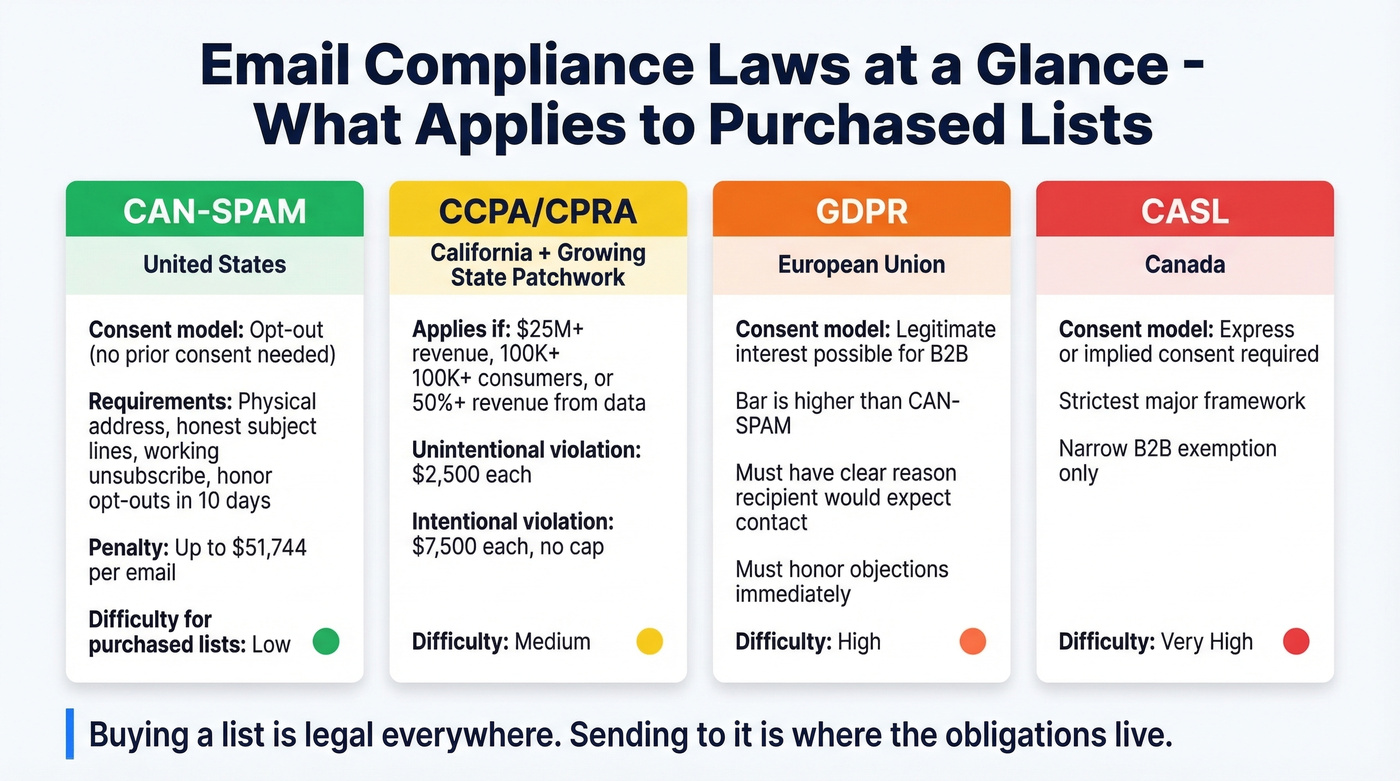
CAN-SPAM is opt-out based - you don't need prior consent to send a commercial email. But you need a valid physical address, honest subject lines, a working unsubscribe link, and you must honor opt-outs within 10 business days. Violations carry fines up to $51,744 per email.
CCPA/CPRA kicks in if your company hits $25M+ annual revenue, processes data on 100K+ consumers, or earns 50%+ of revenue from selling or sharing personal data. Unintentional violations cost $2,500 each; intentional ones hit $7,500, with no cap. The patchwork is growing - Oregon, Texas, and Delaware all have their own privacy laws now.
GDPR doesn't ban B2B outreach outright. Legitimate interest can serve as a lawful basis for business-to-business emails, but the bar is higher than CAN-SPAM. You need a clear reason the recipient would expect to hear from you, and you must honor objections immediately. CASL (Canada) is the strictest - it generally requires express or implied consent before sending, with only a narrow B2B exemption.
The bottom line: purchasing a list is legal. Sending is where the obligations live. Make sure your cold email workflow handles unsubscribes, physical addresses, and opt-outs automatically.
Why Mailchimp Will Suspend You
We've seen this play out dozens of times. Someone buys a list, uploads it to Mailchimp, and gets their account frozen within 48 hours.
Mailchimp is explicit: "purchased lists violate our Terms of Use." They don't just mean shady lists from unknown vendors - they flag trade show attendee lists from event organizers as third-party lists that violate their terms if contacts didn't specifically opt in to hear from your company.
One Reddit user shared their suspension message, which flagged their account as "prospecting in nature" and stated the platform is "not designed for sending out prospective and introductory content to those who may be interested but haven't quite opted-in yet." 10,000 contacts rendered useless overnight.
This isn't Mailchimp-specific. Most traditional ESPs enforce the same policy. Use a cold email platform like Instantly, Smartlead, or Lemlist instead - they handle inbox rotation, domain warming, and throttling, which is the infrastructure you actually need for outbound.

This article exists because static purchased lists are risky. Prospeo eliminates that risk entirely - query 300M+ profiles with 30+ filters, get 98% verified emails on a 7-day refresh cycle, and export directly to Instantly, Smartlead, or Lemlist. No stale CSVs. No bounce-rate roulette. Just fresh contacts at $0.01 per email.
Stop buying lists. Start building them from a live database.
What Happens to Your Deliverability
Even with the right sending platform, a bad list can wreck your domain reputation. And domain reputation affects everything you send - not just the purchased-list campaign.
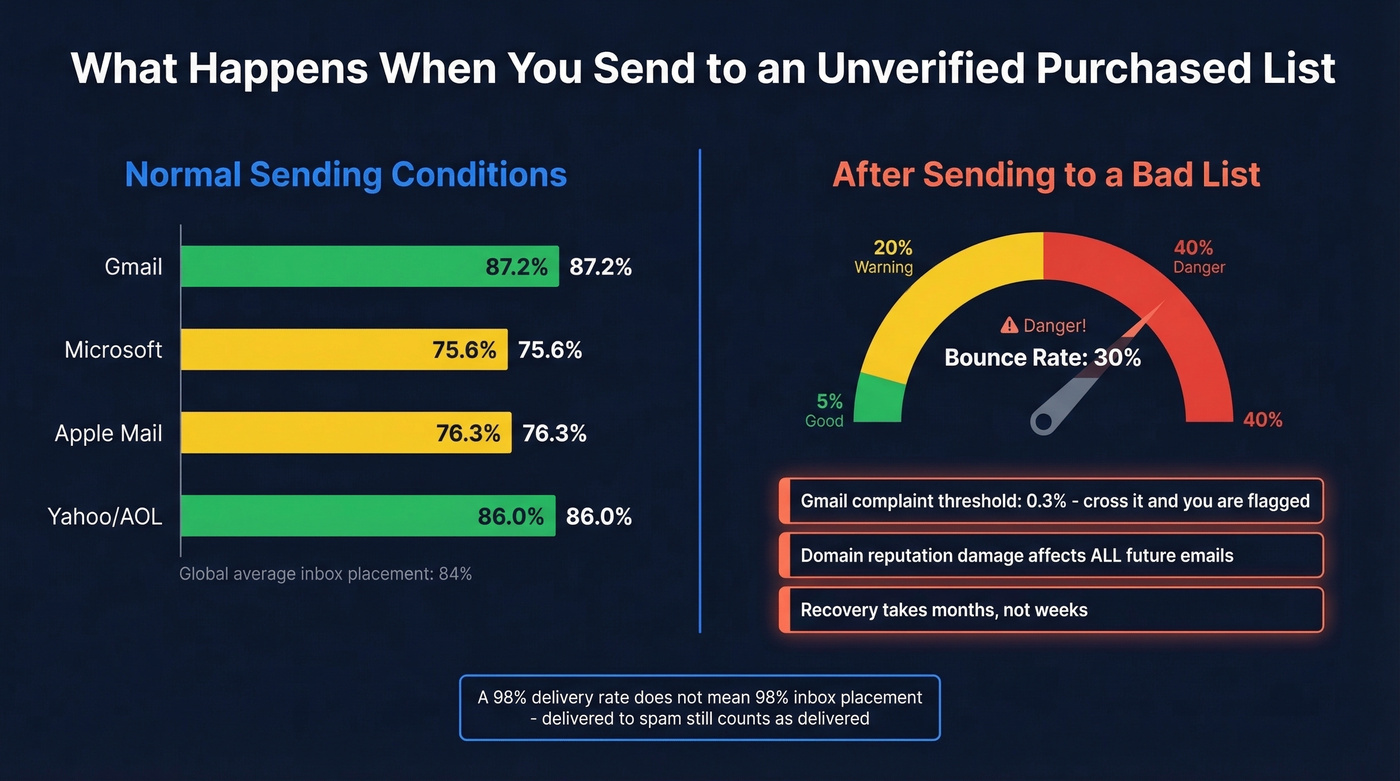
Global inbox placement sits around 84%, meaning roughly 1 in 6 emails never reach the inbox even under normal conditions. Gmail's threshold for complaint rates is 0.3% - cross that line and your inbox placement drops fast. Gmail delivers 87.2% to inbox, Microsoft manages 75.6%, Apple Mail sits at 76.3%, and Yahoo/AOL lands at 86.0%.
Here's what catches people off guard: a 98% delivery rate doesn't mean 98% inbox placement. Your email can be "delivered" to a spam folder. Unverified purchased lists often bounce 20-40%, which immediately signals to ISPs that you're sending to bad data. That reputation damage follows your domain across every future campaign - marketing newsletters, transactional emails, all of it.
If your deal sizes are under $10K and your total addressable market is under 5,000 companies, you probably don't need a purchased list at all. Build it manually from a sales prospecting database tool and you'll get better results with zero deliverability risk.
How to Evaluate a Provider
Before you hand over a credit card, run any provider through these checks.
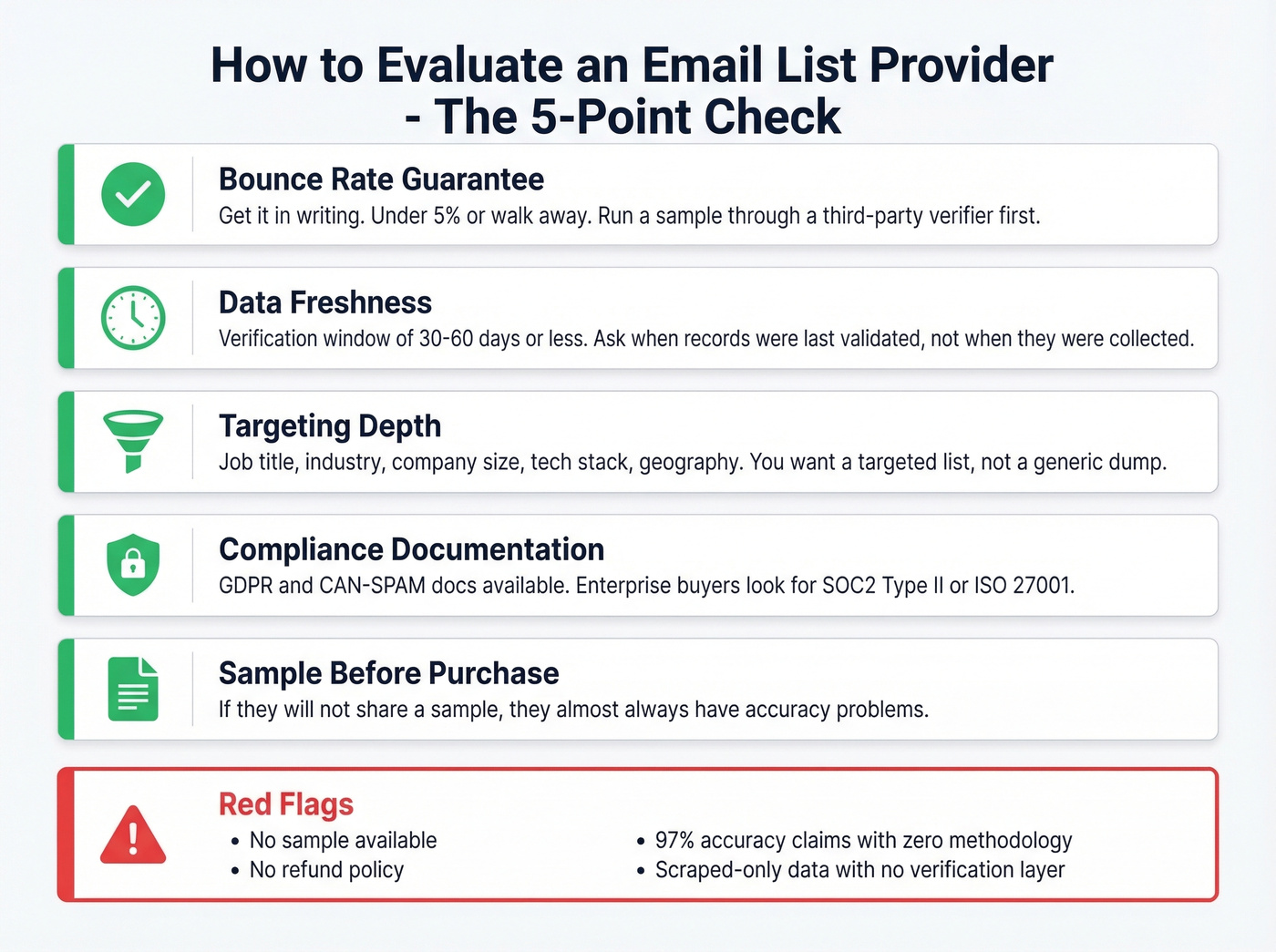
Deliverability guarantees. Ask for a bounce-rate guarantee in writing. If they won't commit to under 5% bounces, walk away. Better providers let you run a sample through a third-party verifier before you buy.
Accuracy proof. How fresh is the data? You want a verification window of 30-60 days or less. Ask when records were last validated - not when they were "collected." A database refreshed weekly is a different animal from one updated quarterly.
Targeting depth. Can you filter by ICP criteria before purchase? Job title, industry, company size, tech stack, geography - you should be building a targeted mailing list, not buying a generic dump.
Compliance documentation. Ask how data was sourced. Can they provide GDPR and CAN-SPAM compliance documentation? Enterprise buyers should also look for SOC2 Type II or ISO 27001/27701 certifications. In our testing, providers who refuse to share a sample before purchase almost always have accuracy problems.
Red flags: no sample available, no refund policy, "97% accuracy" claims with zero methodology, and scraped-only data with no verification layer.
Best Places to Buy an Email List in 2026
The term "buy an email list" covers everything from downloading a static CSV to querying a live database in real time. Here's how the major options stack up.
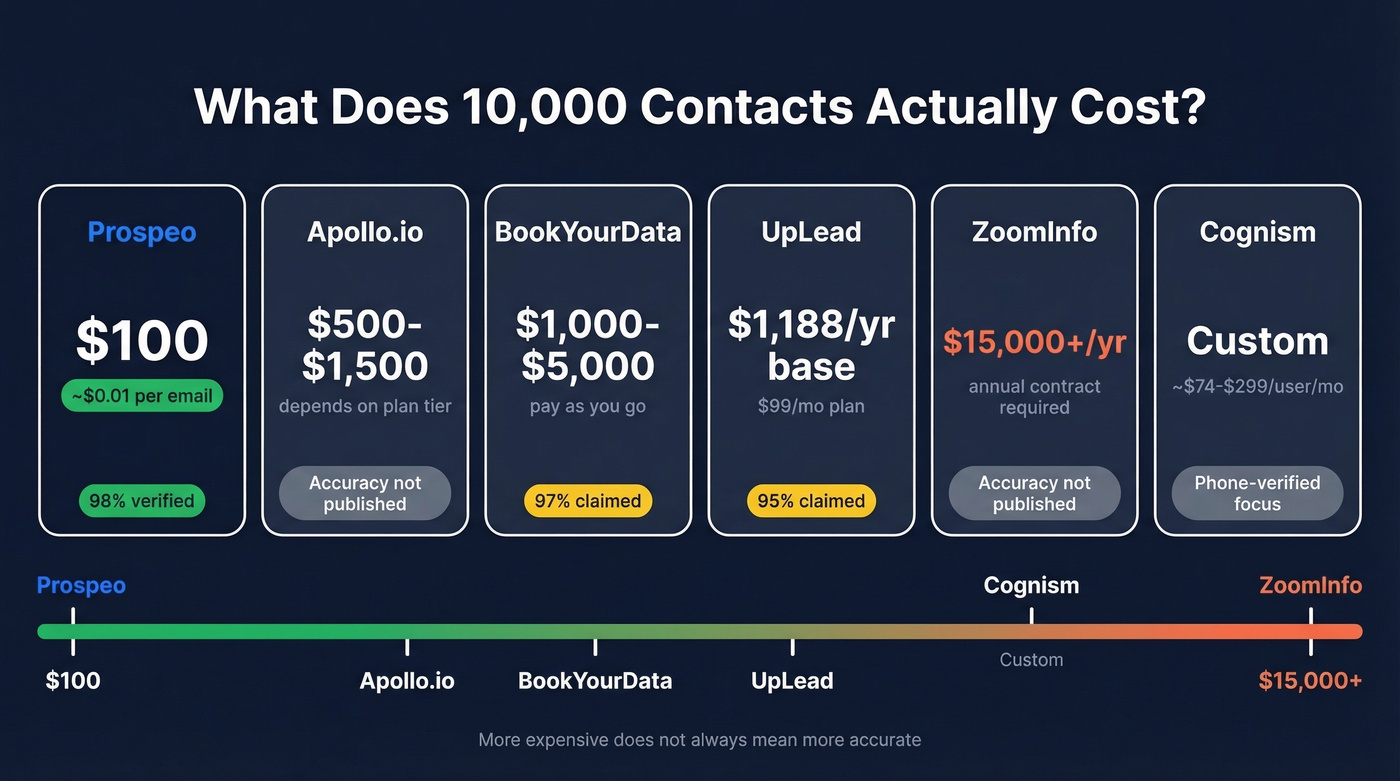
What does a 10,000-contact list actually cost? Roughly $100 with Prospeo, $500-$1,500 with Apollo depending on plan, $1,000-$5,000 with BookYourData, and bundled into ZoomInfo's $15K+ annual contract. More expensive doesn't always mean more accurate.
| Tool | Model | Starting Price | Accuracy Claim | Best For |
|---|---|---|---|---|
| Prospeo | Credits, self-serve | Free (75 emails/mo) | 98% verified | Accuracy-first teams |
| Apollo.io | Freemium + per-user | $49/user/mo (annual) | Not published | SMB outbound teams |
| ZoomInfo | Annual contract | ~$15K/yr | Not published | Large sales orgs |
| Cognism | Custom pricing | ~$74-$299/user/mo | Phone-verified | EU-focused teams |
| Lusha | Freemium | $22.45/mo (up to 3 seats) | Not published | Quick lookups |
| BookYourData | Pay-as-you-go | ~$0.10-$0.50/contact | 97% claimed | One-time purchases |
| UpLead | Monthly plans | $99/mo | 95% claimed | Mid-range budgets |
| Hunter.io | Freemium | £28/user/mo (annual) | Not published | Domain-based search |

Prospeo
Meritt dropped their bounce rate from 35% to under 4% after switching to Prospeo. Stack Optimize maintains 94%+ deliverability across all client campaigns with zero domain flags. Those results come from a live database of 300M+ professional profiles with 143M+ verified emails, refreshed every 7 days - the industry average is 6 weeks.
The 98% email accuracy runs through a 5-step verification process including catch-all handling, spam-trap removal, and honeypot filtering. You get 30+ search filters - buyer intent, technographics, job changes, headcount growth, funding, revenue - so you're building a targeted list, not buying a generic one. Native integrations with Instantly, Smartlead, and Lemlist push verified contacts directly into your cold email platform. Free tier gives you 75 emails per month. Paid plans work out to roughly $0.01 per email. No contracts, no sales calls required.
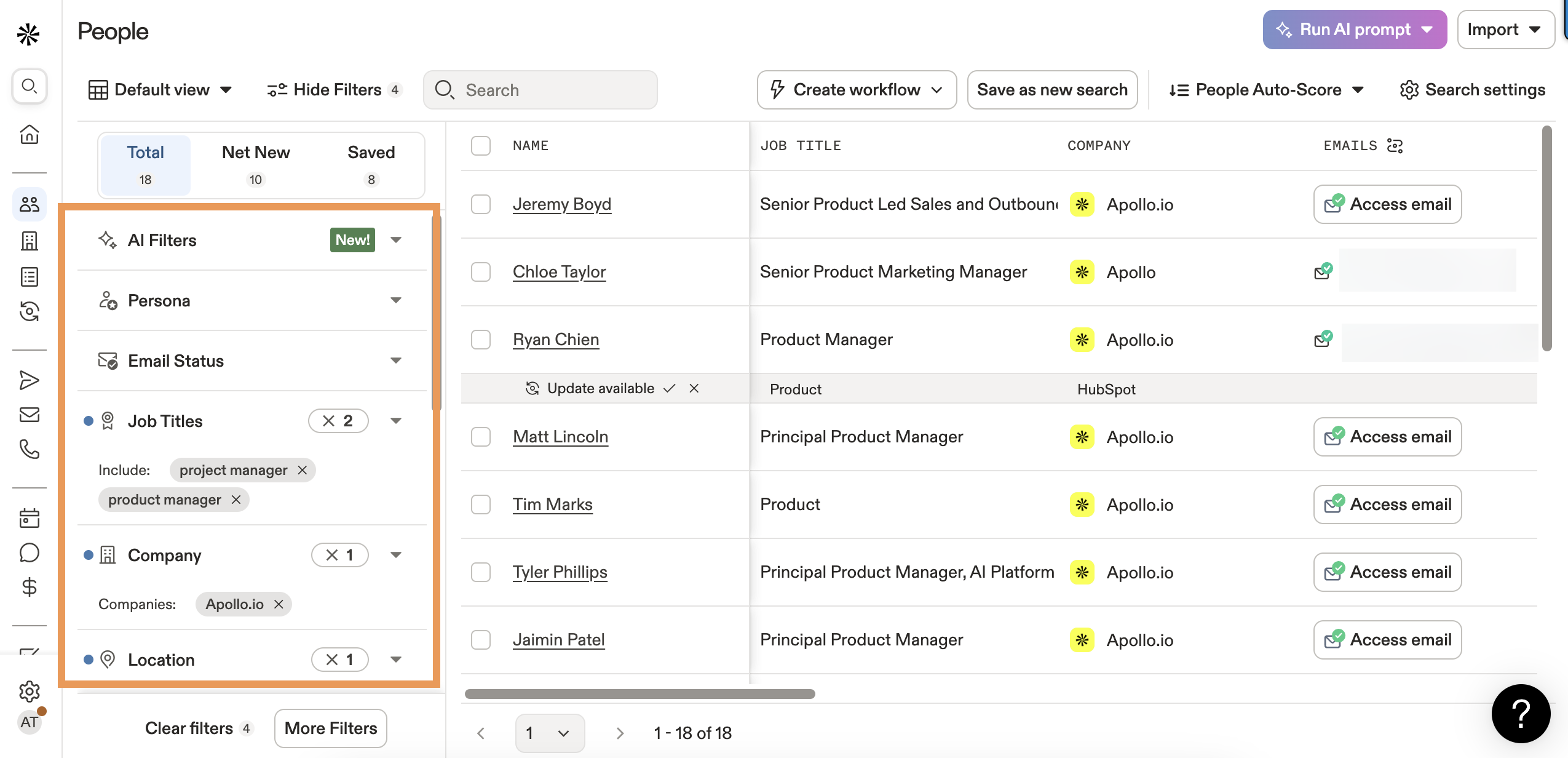
Apollo.io
Apollo is the obvious starting point for SMB teams that want a database and a sequencing tool in one platform. The free tier is genuinely useful for testing. Plans run $49-$149/user/month on annual billing, with email credits technically "unlimited" under a fair-use policy - but mobile numbers and exports are credit-gated.
The catch: you can't reduce seats mid-term, and advanced filters, intent topics, and integrations are locked behind higher tiers. Apollo wins over ZoomInfo on accessibility and price. Where it falls short is email accuracy and data freshness - Apollo doesn't publish a verification SLA or refresh cycle.
ZoomInfo
ZoomInfo is the enterprise incumbent, and it's overkill for most teams looking to purchase a marketing list. Starting prices anchor at $14,995/year for Professional, but most teams end up near $50,000/year after add-ons - Global Data ($9,995), extra credits (~$3,000 per 5,000), NeverBounce verification (~$3,000). Contracts run 2-3 years with 60-90 day auto-renewal windows that are easy to miss.
The North American database depth is unmatched. But at 50x the cost of alternatives, and without a published email accuracy SLA, it's hard to justify unless you need the full GTM suite - intent, chat, workflow automation, and org-chart mapping all in one platform.
Cognism
Use this if you're selling into Europe and GDPR compliance is non-negotiable. Cognism's Diamond Data includes phone-verified mobile numbers, and their compliance infrastructure - ISO 27001, ISO 27701, SOC2 Type II, DNC/TPS screening - is genuinely strong. Custom pricing typically lands at $74-$299/user/month for small teams.
Skip this if your market is primarily North America. The US database doesn't compete with Apollo or ZoomInfo on depth, and you're paying a premium for compliance infrastructure you don't need domestically.
Lusha
The tool you give to reps who need quick contact lookups without training. Free tier available, Pro at $22.45/month for up to 3 seats, Premium at $52.45/month for 5 seats. Dead simple UI, solid for mid-market companies, but thins out at the enterprise and SMB extremes. Good for supplementing another tool, not as a primary database.
BookYourData, UpLead, Hunter.io, and Salesgenie
BookYourData is pay-as-you-go with credits that never expire - roughly $0.10-$0.50 per contact depending on volume and targeting. Good for one-time list purchases when you need a specific segment and don't want a subscription.
UpLead runs $99/month for Essentials, $199/month for Plus. Real-time verification on export is the headline feature and makes it a solid mid-range option with more targeting depth than Hunter but less complexity than Apollo.
Hunter.io starts at £28/user/month on annual billing. It's better known for domain-based email finding and verification than as a full database - useful as a complement to a larger platform, not a replacement.
Salesgenie (Data Axle) runs $99-$299/month. US-focused SMB tool with built-in campaign execution. Solid if you want lists and sending in one platform, though the data skews heavily toward small businesses.
Verify Before You Send
Regardless of where your list comes from, run it through verification before a single email goes out. We've found this five-step process catches problems that cost teams months of domain recovery:
- Syntax and format validation - catches typos, missing @ symbols, and malformed addresses.
- Domain and MX record check - confirms the domain exists and has mail servers configured to receive email.
- Disposable and role-based detection - flags info@, support@, and admin@ addresses plus disposable email services.
- SMTP handshake verification - pings the mail server to check if the specific mailbox exists. Catch-all domains are the main blind spot here.
- Spam-trap and honeypot screening - identifies addresses that exist solely to catch spammers. Hitting even one can blacklist your domain.
If your provider's list doesn't include built-in verification, run it through a standalone verifier before sending. The cost of verification is trivial compared to the cost of a blacklisted domain.
The article above warns that unverified lists bounce 20-40% and torch your domain reputation. Prospeo's 5-step verification with catch-all handling, spam-trap removal, and honeypot filtering keeps bounce rates under 4% - proven across 15,000+ companies. One team went from 35% bounces to under 4% and tripled their pipeline.
Protect your domain. Send only to emails that actually exist.
What to Do After You Buy
Having a verified list is step one. How you send determines whether it actually works.
Warm your sending domain first. New domains or ones that haven't sent cold email before need 2-4 weeks of warmup. Instantly and Smartlead handle this automatically - they gradually increase send volume while generating positive engagement signals. (If you need options, see unlimited email warmup.)
Segment by ICP fit. Don't blast the entire list on day one. Break it into segments by industry, company size, or seniority. Your best-fit segment goes first - in our experience, starting with your highest-fit contacts builds domain reputation faster than any other tactic. If you need a framework, use an Ideal Customer Profile scoring rubric.
Personalize beyond {first_name}. Reference the company, the person's role, a recent funding round, or an industry-specific pain point. Generic personalization is barely better than no personalization at all. For more, see personalized outreach.
Start with small batches. 50-100 emails per day per sending domain, scaling gradually. Jumping straight to 500/day is how domains get flagged. (More on safe sending limits in email velocity.)
Monitor the numbers that matter. Keep complaint rates under 0.3%, bounce rates under 5%, and watch reply rates as your leading indicator of list quality. If bounces spike above 5% on any segment, stop sending and re-verify that segment immediately. If you need deeper troubleshooting, use an email deliverability guide.
FAQ
Is it legal to buy an email list?
Yes, in the US. CAN-SPAM regulates how you send commercial email, not where the addresses come from. You must include an unsubscribe link, a physical address, and honor opt-outs within 10 business days. GDPR and CASL have stricter consent requirements - consult legal counsel if you're targeting the EU or Canada.
How much does a purchased email list cost?
Anywhere from $0.01 per email to $1+ per contact with enterprise platforms after add-ons. Pay-as-you-go models like BookYourData run $0.10-$0.50 per contact. ZoomInfo costs $15K-$50K/year. More expensive doesn't always mean more accurate - verify independently regardless of price.
Can I upload a purchased list to Mailchimp?
No. Mailchimp explicitly bans purchased and third-party lists, and they enforce it aggressively - expect account suspension within 48 hours. Use a cold email platform like Instantly, Smartlead, or Lemlist instead. These tools are built for outbound sending with proper warmup and throttling.
What's the difference between a static list and a B2B database?
A static list is a CSV file that starts decaying the moment you download it - people change jobs, emails deactivate. A live B2B database lets you query fresh, verified data on demand with regular refresh cycles, delivering fresher contacts and lower bounce rates than any static file.
What bounce rate should I expect from a purchased list?
Unverified purchased lists often bounce 20-40%. After proper verification, target under 5%. If a provider can't get you below that threshold, find a different one - your domain reputation isn't worth the savings.