

How to Calculate Email Delivery Rate - And What the Number Actually Hides
Your delivery rate says 96%. Your reply rate says otherwise. That disconnect is the most misunderstood gap in email marketing - 88% of senders can't correctly define what delivery rate actually measures. Here's the formula, what it hides, and how to fix it when the numbers don't add up.
The Quick Formula
(Emails Delivered / Emails Sent) x 100 = Delivery Rate
Target 95%+. Below 90%: investigate bounces. Below 80%: stop sending until you fix your list.
The Formula With a Worked Example
You send 10,000 emails. 200 bounce. Your ESP reports 9,800 delivered.
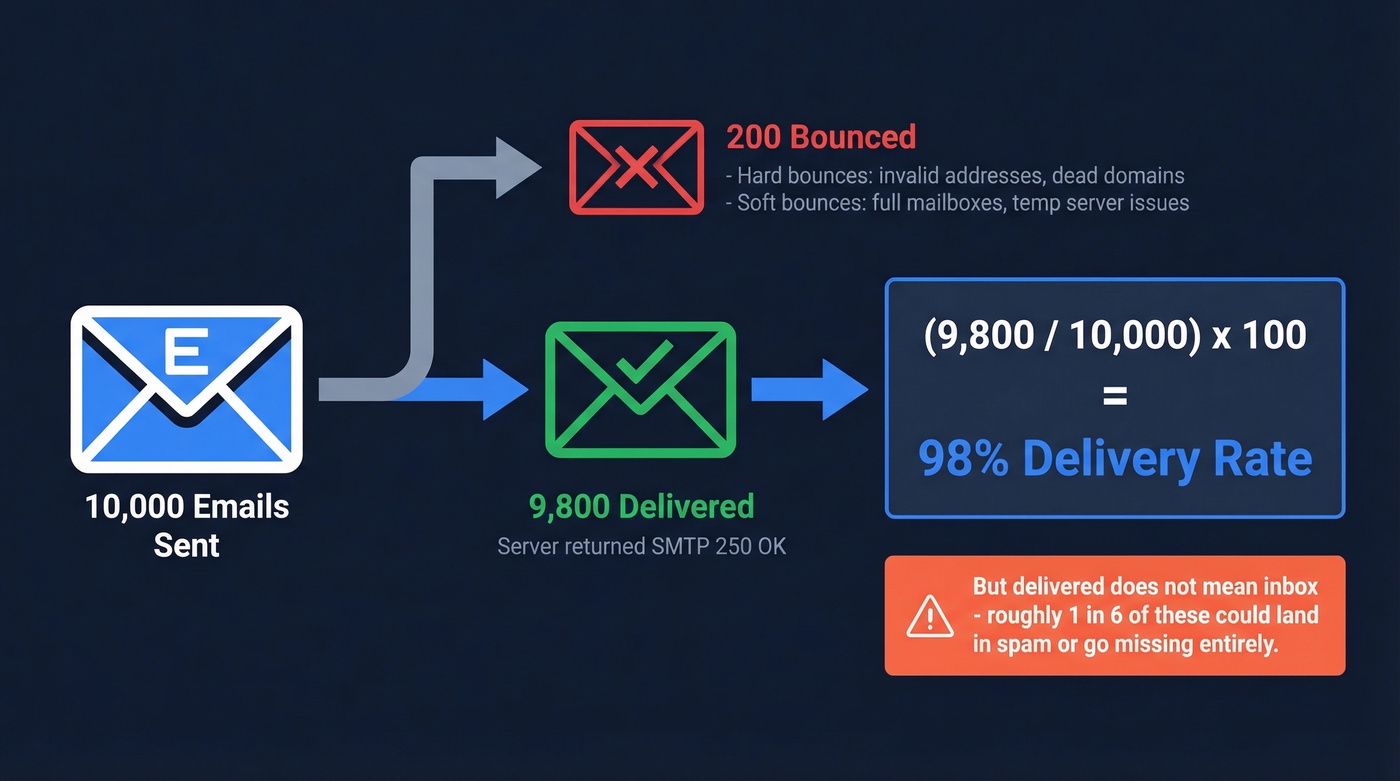
(9,800 / 10,000) x 100 = 98% delivery rate
That 98% looks great - but "delivered" only means the receiving server returned an [SMTP 250 OK response](https://www.ietf.org/rfc/rfc5321.txt). It accepted the message. It didn't promise to put it in the inbox. Your 98% delivery rate can still mean roughly 1 in 6 of those emails landed in spam or went missing entirely, which is a gap that catches a lot of teams off guard when they're trying to figure out why nobody's replying.
Of those 200 bounces, the split matters. Hard bounces are permanent failures - invalid addresses, dead domains - and you should remove those contacts immediately. Soft bounces from full mailboxes or temporary server issues usually resolve on retry. Your ESP typically retries deferred failures over 48 hours before recording a final status.
What a Good Rate Looks Like
A healthy delivery rate sits at 95% or above. Many SaaS programs run 95-98%, while ecommerce senders often land around 92-96% due to higher list churn. Keep total bounce rate under 2%, and hard bounces specifically under 0.5%.
If you're seeing bounce spikes, start with your bounce rate breakdown before you touch copy or cadence.
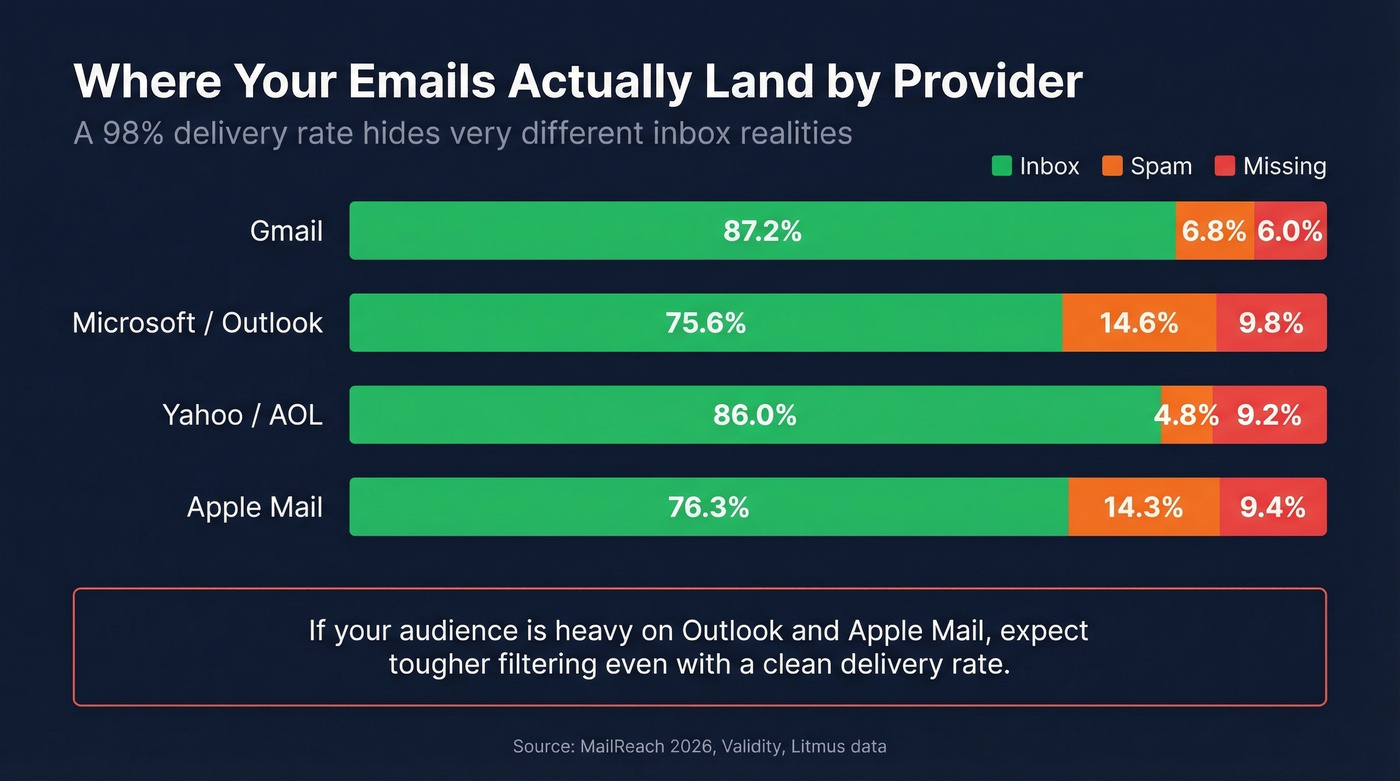
Here's what most people miss: a 97% delivery rate doesn't mean 97% inbox placement. Global inbox placement averages around 84%. Litmus found that 70% of emails show at least one spam-related issue, even when delivery rate looks clean. The gap varies dramatically by provider:
| Provider | Inbox | Spam | Missing |
|---|---|---|---|
| Gmail | 87.2% | 6.8% | 6.0% |
| Microsoft | 75.6% | 14.6% | 9.8% |
| Yahoo/AOL | 86.0% | 4.8% | 9.2% |
| Apple Mail | 76.3% | 14.3% | 9.4% |
MailReach 2026 deliverability statistics, compiled from Validity and Litmus data.
Microsoft and Apple Mail are noticeably harder on senders. If your audience skews corporate and Outlook-heavy, expect tighter filtering even with a clean delivery rate.
If you're trying to isolate whether it's filtering or list quality, use an email spam checker alongside verification.

A 98% delivery rate means nothing if 2% are hard bounces tanking your sender reputation. Prospeo's 5-step verification catches invalid addresses, spam traps, and honeypots before they ever touch your sending infrastructure - delivering 98% email accuracy at ~$0.01 per verified address.
Fix your delivery rate at the source - not after the damage is done.
Delivery Rate vs Deliverability vs Inbox Placement
These three terms get used interchangeably. They shouldn't.
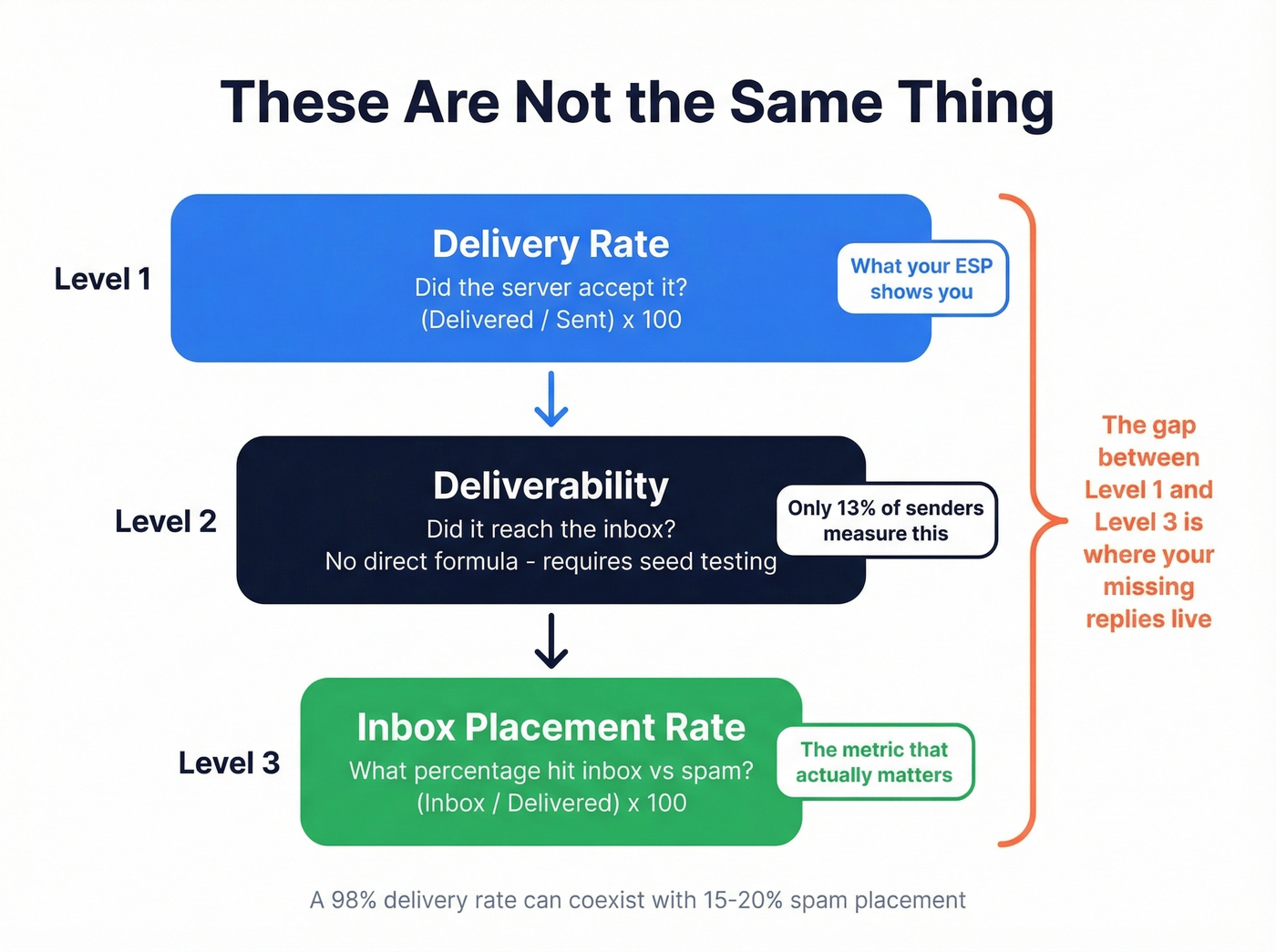
| Metric | What It Measures | Formula |
|---|---|---|
| Delivery rate | Server accepted it | (Delivered / Sent) x 100 |
| Deliverability | Reached the inbox | No direct formula - requires seed testing |
| Inbox placement | % in inbox vs spam | (Inbox / Delivered) x 100 |
Most ESPs can't show you inbox placement. They only know whether the receiving server returned a 250 OK - not whether the message ended up in Primary, Promotions, or Spam. Only about 13% of senders use inbox placement reports. The rest are guessing.
For the full picture, pair this with a broader email deliverability guide so you’re not optimizing one metric in isolation.
The consensus on r/emailmarketing is that delivery rate is "deceptive but useful for catching major issues" - which is exactly right. It's a smoke detector, not a thermometer. The complete picture combines pre-send testing (authentication and content checks) with post-send monitoring through seed-list tools like GlockApps (free-$129/mo) or MailReach ($25 per inbox per month).
If you're sending cold outbound, also watch email velocity so you don’t create deliverability problems with volume alone.
Diagnosing Bounces With SMTP Codes
When an email bounces, the receiving server sends back a code. These codes tell you exactly what went wrong.
| Type | Codes | Meaning |
|---|---|---|
| Hard bounce | 550, 551, 553 | Address invalid or doesn't exist |
| Soft bounce | 421, 450, 451, 452 | Temporary failure - server retries |
| Block bounce | 554, 550 5.7.1 | Policy rejection: blocklist or auth failure |
In our experience, block bounces are the ones most teams miss. They often mean your domain or IP hit a blocklist, or your SPF/DKIM/DMARC records are misconfigured. These aren't data quality issues - they're infrastructure issues. If you see a deferred status in your ESP, that means the server couldn't accept the message right now and your ESP is retrying before recording a final bounce.
If you're getting policy rejections, start by learning what 550 5.7.1 actually indicates before you change your sending strategy.
How to Fix a Low Delivery Rate
Priority order matters here. Don't skip to step 3 if you haven't done step 1.
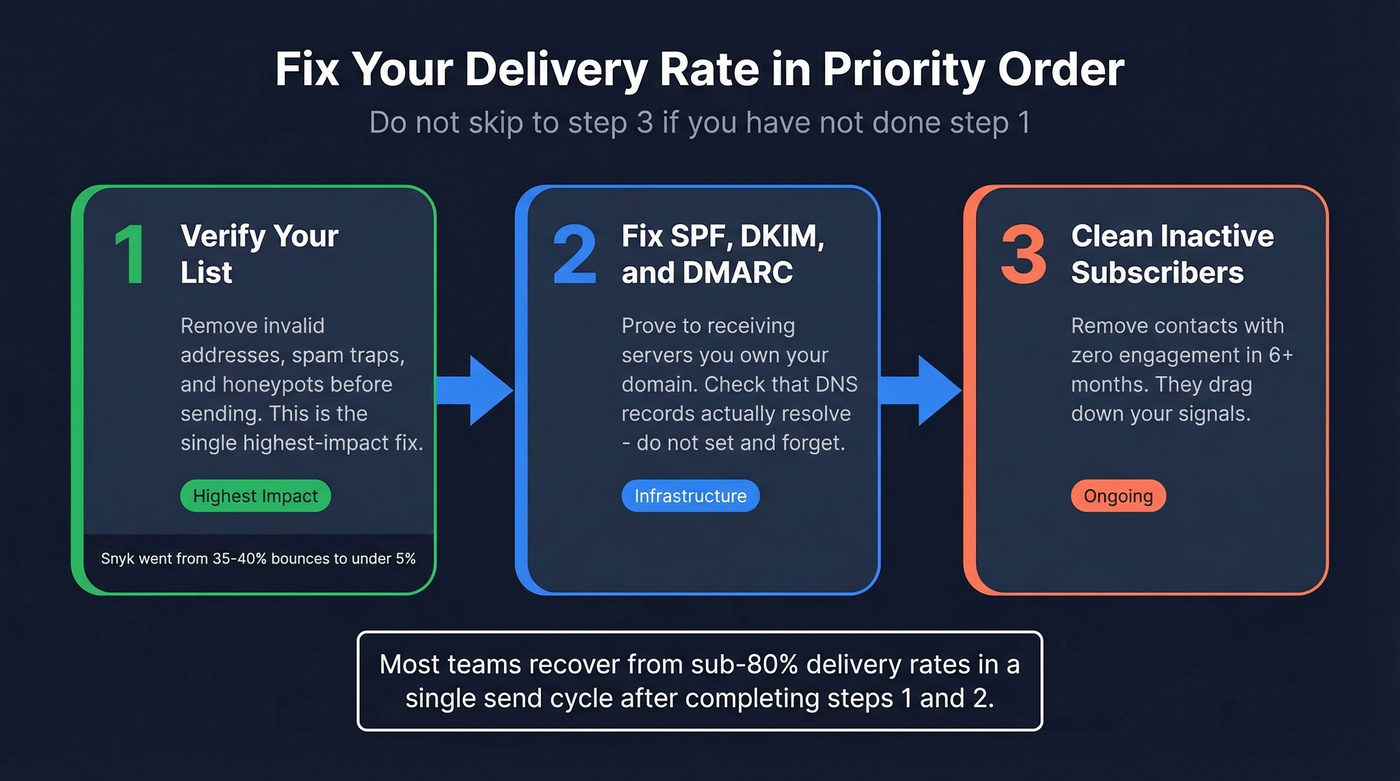
1. Verify your list before sending. This is the single highest-impact fix. Bad addresses cause hard bounces, which tank your sender reputation, which causes more emails to get blocked - a vicious cycle that accelerates fast if you ignore it.
Prospeo's 5-step verification catches invalid addresses, flags catch-all domains, and strips out spam traps and honeypots before you send. At 98% email accuracy, you're removing the #1 controllable cause of bounces. Snyk cut their bounce rate from 35-40% to under 5% after switching to verified data.
If you need alternatives to compare, see our roundup of email verification tools.
2. Set up SPF, DKIM, and DMARC. These authentication records prove to receiving servers that you're allowed to send from your domain. Without them, you're more likely to trigger block bounces. Verify the records are actually resolving correctly - we've seen teams set them up once and never check again, only to discover a DNS change broke everything months ago.
To go deeper on auth, read about DMARC alignment and how to verify DKIM is working.
3. Clean inactive subscribers. If someone hasn't engaged in 6+ months, they're dragging down your engagement signals. One caveat: stop obsessing over open rate as your engagement metric. Apple Mail Privacy Protection pre-loads tracking pixels, inflating opens. Delivery rate and click rate still tell the truth.
If you’re measuring performance beyond delivery, use a consistent click rate formula to track real engagement.
We've seen teams recover from sub-80% delivery rates in a single send cycle after cleaning their list and fixing authentication. The fix is almost always boring: remove bad data, prove you own your domain, stop emailing ghosts.

Let's be honest about something: if your delivery rate is above 95% and you're still not getting replies, stop blaming deliverability. Your emails are reaching inboxes. Your copy or targeting is the problem. Most teams over-invest in infrastructure fixes when the real issue is they're emailing the wrong people with the wrong message.
If you want a fast way to improve replies without changing infrastructure, start with proven sales follow-up templates.
Snyk's 50 AEs went from 35-40% bounce rates to under 5% by switching to Prospeo-verified data. That's the difference between a delivery rate that looks good and one that actually drives replies. Every email in Prospeo's 143M+ database is refreshed every 7 days - not the 6-week industry average.
Stop diagnosing SMTP codes for emails that should never have been sent.
FAQ
Is 95% a good email delivery rate?
Yes. 95%+ is healthy for most senders. Below 90% signals a list hygiene or authentication problem that needs immediate attention. Consistently hitting 97-99% means your infrastructure and data quality are solid.
Why is my delivery rate high but emails go to spam?
"Delivered" means the server accepted the email, not that it reached the inbox. A 98% delivery rate can coexist with 15-20% spam-folder placement. You need seed-list inbox placement testing (GlockApps, MailReach) to measure actual spam rates.
How do I fix a low delivery rate quickly?
Verify your list before sending to eliminate hard bounces - Prospeo's 5-step verification catches invalid addresses, catch-all traps, and honeypots at 98% accuracy. Then confirm your SPF/DKIM/DMARC records resolve correctly. Most teams see bounce rates drop below 2% within one send cycle.
What's the difference between bounce rate and delivery rate?
They're inverse metrics: bounce rate = (Bounced / Sent) x 100, while delivery rate = (Delivered / Sent) x 100. A 3% bounce rate means a 97% delivery rate. Keep hard bounces under 0.5% and total bounces under 2% to protect sender reputation.