

How to Check Company Email: 5 Methods That Actually Work in 2026
You've got 200 names from a webinar and zero working email addresses. That's the gap between a productive afternoon and a week of domain reputation damage. The average B2B email bounce rate sits around 2.33%, but poorly maintained lists blow past 5% fast - and that's where inbox providers start flagging you. We've processed thousands of conference lead lists, and the pattern is always the same: most guides give you nine methods when you really only need two or three done well.
What You Need (Quick Version)
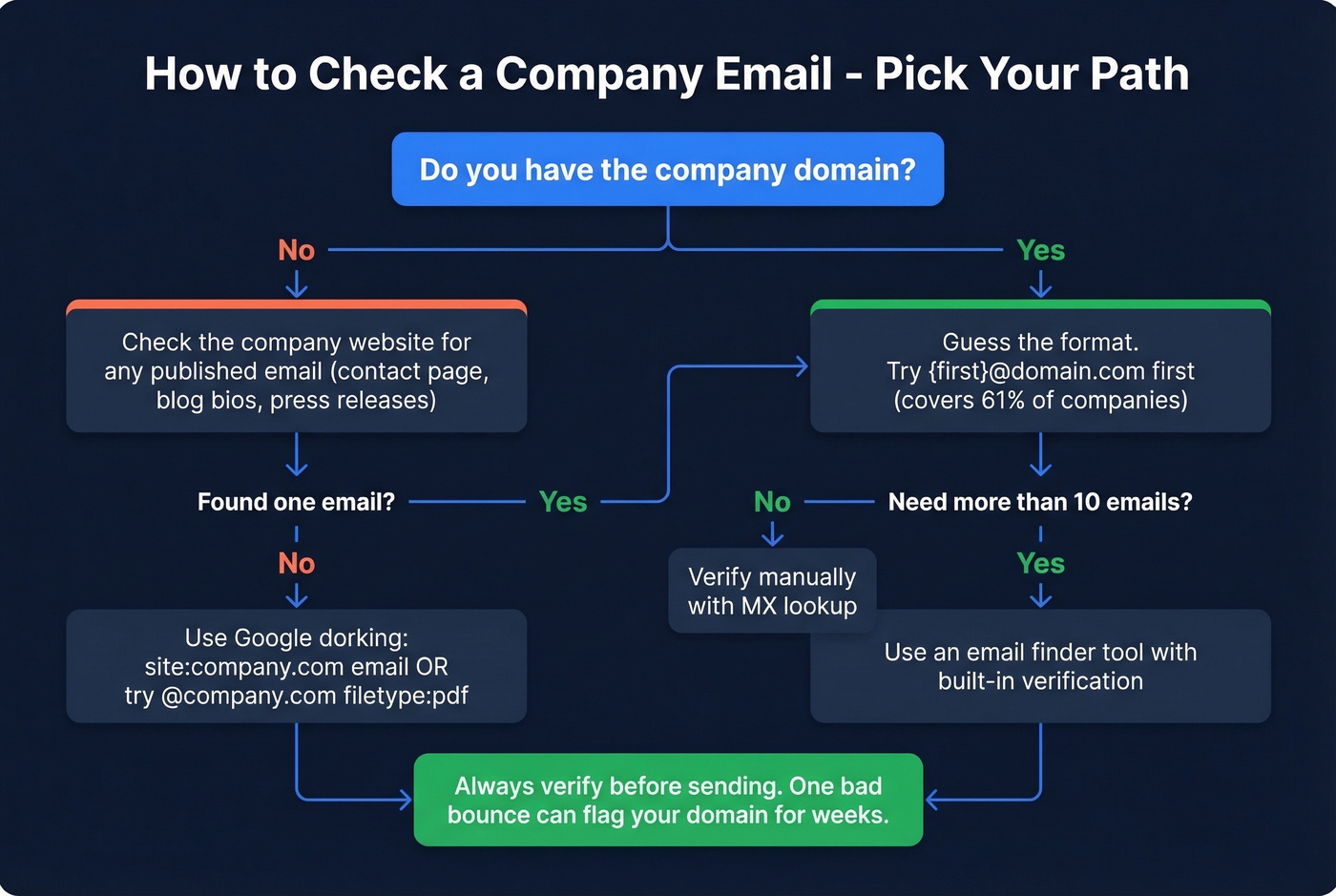
- If you have a company domain, guess the email format.
firstname@domain.comcovers 61% of companies. - Verify before sending - one bad bounce can flag your domain for weeks.
- If you need more than 10 emails, use a finder tool with built-in verification.
Check the Company Website First
Before you touch any tool, spend two minutes on the company's site. Look at the contact page, the about page, blog author bios, and press releases. Writers often list their work email at the bottom of posts, and media contacts are almost always published with a direct line.
Here's the thing: find even one email on a company's site and you've cracked their format. If the marketing manager's email is sarah.jones@company.com, you now know the company uses first.last@domain. Apply that pattern to every other name on your list.
If you’re doing this at scale, it helps to treat it like name to email mapping: confirm one known-good address, then generate the rest.
Guess the Email Format
Pattern-guessing works better than most people expect. An Interseller analysis of 5M+ companies broke down the most common formats:
| Pattern | Example | Overall Share |
|---|---|---|
{first} |
sarah@co.com | 61% |
{f}{last} |
sjones@co.com | 14.5% |
{first}.{last} |
sarah.jones@co.com | 13.5% |
{first}{last} |
sarahjones@co.com | 4% |
{last} |
jones@co.com | 3.6% |
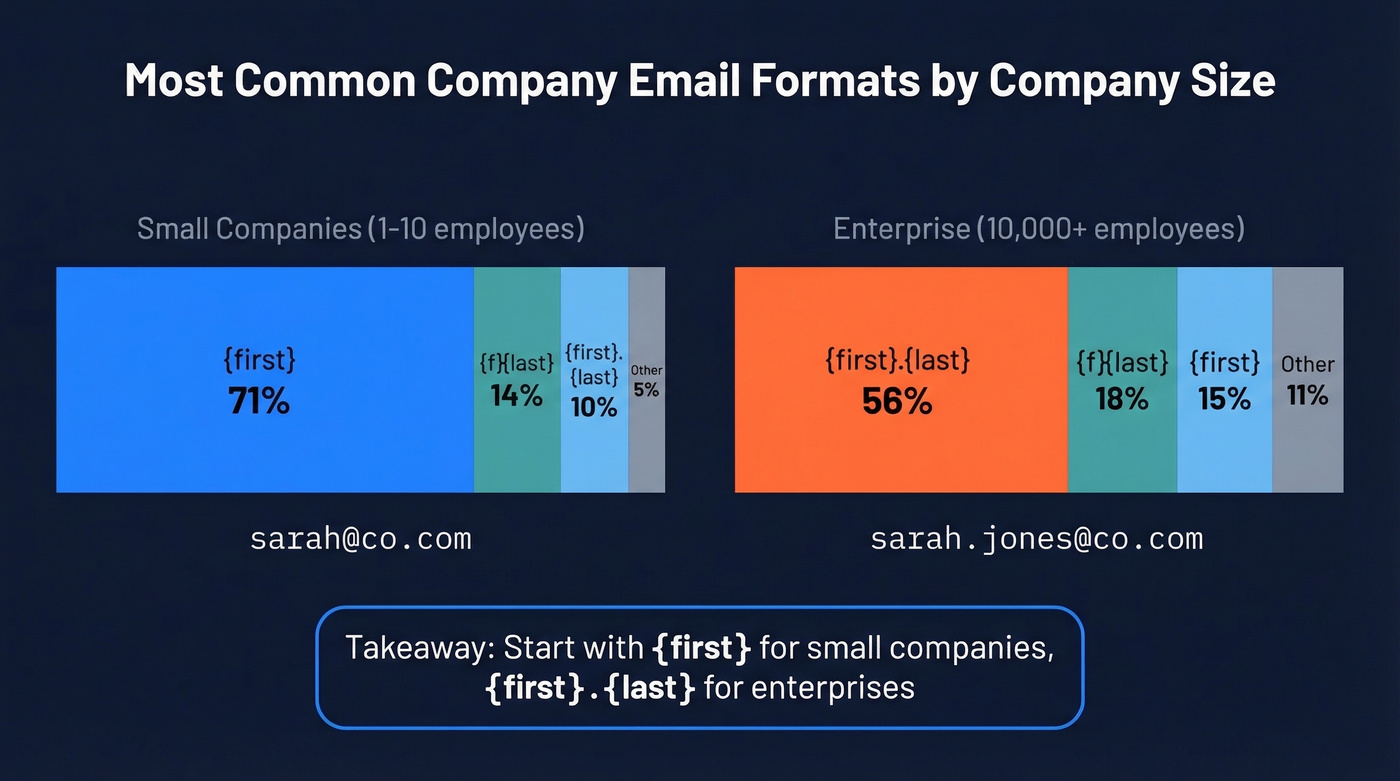
Company size changes the math significantly. Small companies (1-10 employees) use {first} 71% of the time. Enterprises with 10,000+ employees flip to {first}.{last} at 56%, because disambiguation matters when you've got 12 people named Sarah.

Guessing email formats gets you 61% of the way there. Prospeo's 5-step verification - syntax, MX, SMTP, catch-all handling, and spam-trap removal - gets you to 98% accuracy across 300M+ profiles. No more silent bounces from stale data: every record refreshes every 7 days, not the 6-week industry average.
75 free verified emails per month. No credit card, no contract.
Use Google to Find Published Emails
Google dorking is free and surprisingly effective. Copy-paste these search strings, swapping in your target domain:
site:company.com "email" OR "contact"
"@company.com" filetype:pdf
The PDF search is the hidden gem. Companies publish whitepapers, speaker bios, and event programs with email addresses buried inside - we've pulled dozens of valid addresses from a single conference PDF. For Gmail addresses specifically, you can check if an account exists by starting Google's account recovery flow. If it recognizes the address, it's real (here’s a deeper walkthrough on how to check if a Gmail account exists).
Use an Email Finder Tool
When you need more than a handful of emails, manual methods stop scaling. Let's be honest - nobody's running Google dorks for a 500-person prospect list.
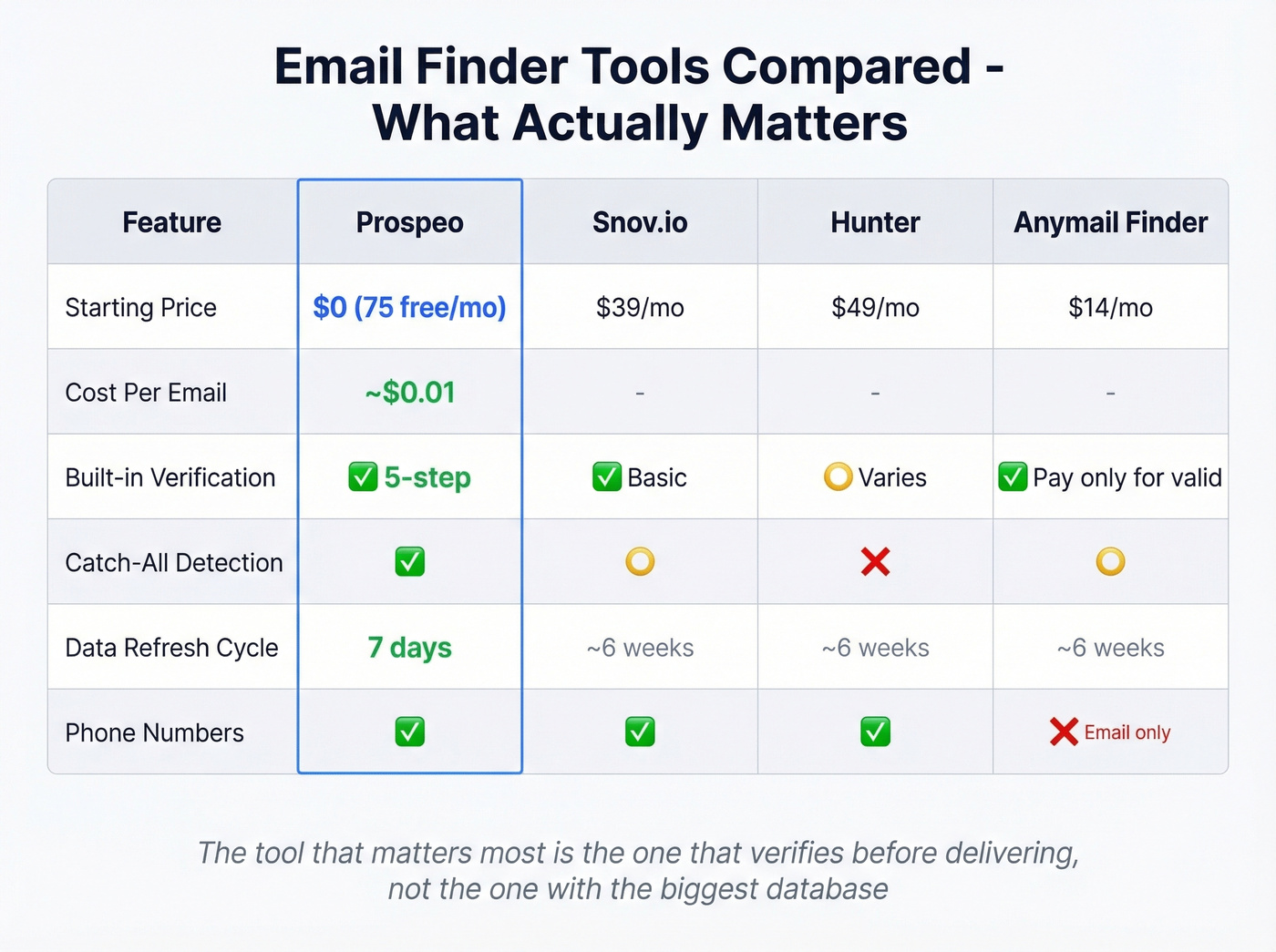
Prospeo handles this well. It runs every result through a 5-step verification process - syntax checks, MX validation, SMTP callbacks, catch-all handling, and spam-trap removal - delivering 98% verified-email accuracy. The free tier gives you 75 verified emails per month, paid plans run about $0.01 per email, and there's no contract. With a 7-day data refresh cycle (the industry average is 6 weeks), you're far less likely to hit stale addresses that silently bounce.
If you’re comparing options, it’s worth scanning a broader list of email search tools and email ID finder platforms to see which ones match your workflow.
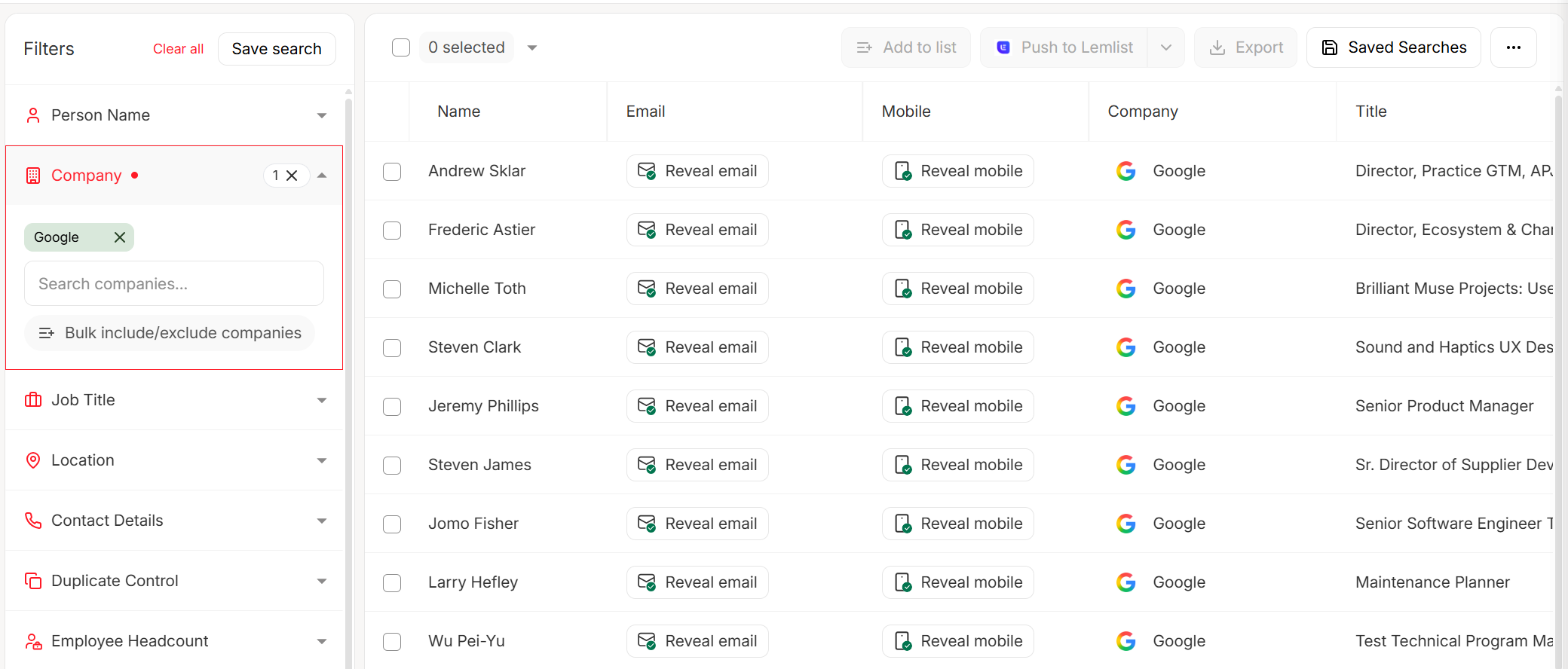
If you want outreach bundled in, Snov.io starts around $39/mo and includes basic email sequences - decent for solo founders who don't want to stitch together three tools. Hunter is the name most people know and starts around $49/mo, though in our experience its accuracy varies on individual contacts. Anymail Finder takes a different angle: plans start at $14/mo, and you only pay for valid emails, which makes it low-risk if you're testing the waters. Skip Anymail if you need phone numbers too - it's email-only.
If Hunter is on your shortlist, you’ll probably also want to compare it against other options in our Hunter alternatives roundup.
One thing we keep seeing: big databases with weak verification are how teams rack up bounces on older contacts. The tool that matters most isn't the one with the biggest database. It's the one that verifies before delivering. Every vendor-run benchmark conveniently ranks the vendor first; what actually protects your domain is the verification layer, not the marketing claim.
Verify Before You Send
Finding an email and verifying it are two different steps. Skipping verification is how domains get blacklisted, and reputation recovery takes 15-45 days. In our testing, catch-all domains are the #1 source of silent bounces - they accept everything at the server level, then quietly reject or discard the message later.
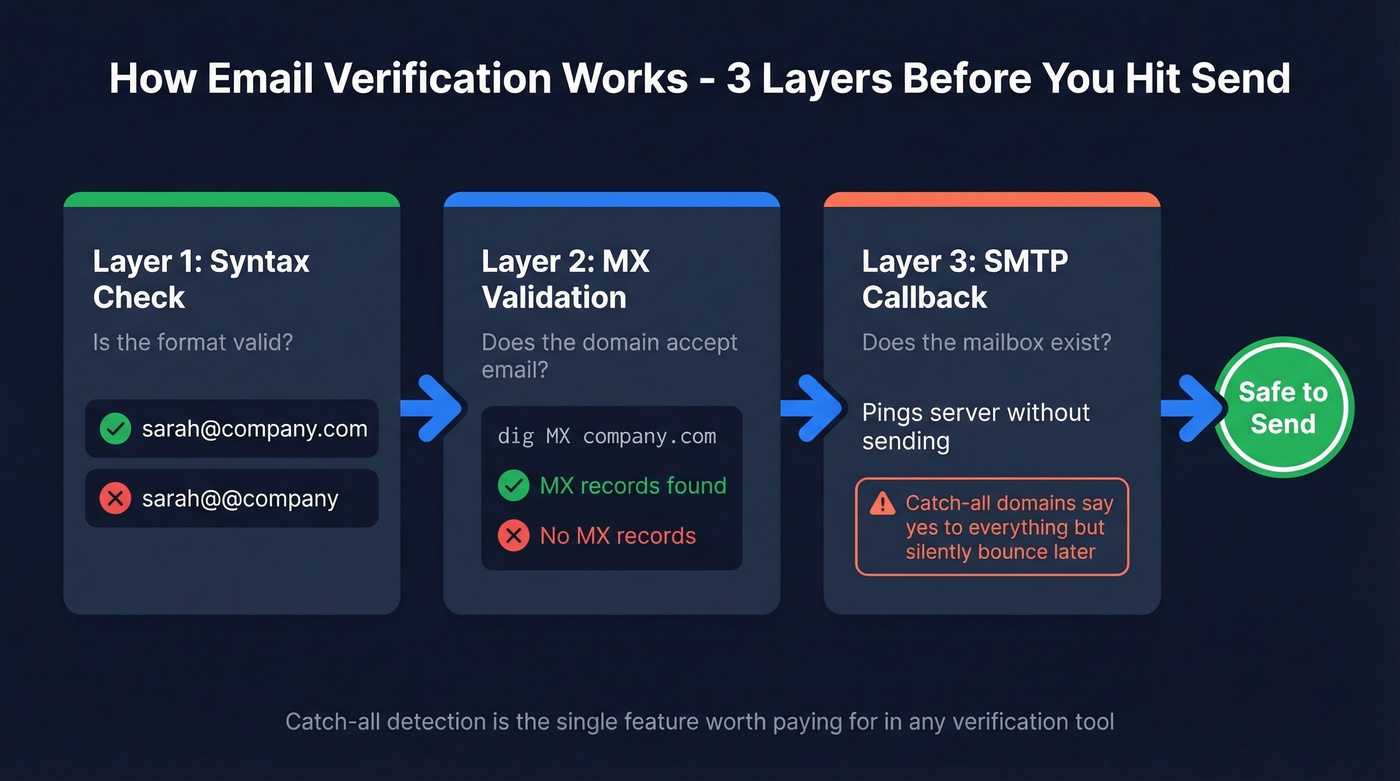
Verification works in three layers: syntax check (is the format valid?), domain/MX validation (does the domain accept email?), and SMTP callback (does the mailbox exist, without sending a message?). You can run the MX check manually:
nslookup -type=MX company.com
dig MX company.com
If MX records come back, the domain accepts email. But that doesn't confirm the specific address exists. Catch-all domains will accept anything you throw at them, then silently bounce later. A tool with built-in catch-all detection closes that gap - and it's the single feature worth paying for if you're choosing between free and paid verification.
If you want to go deeper on bounce prevention, see our guide on email bounce rate and how to check if an email will bounce.
Catch-all domains are the #1 source of silent bounces, and manual MX lookups can't detect them. Prospeo's built-in catch-all verification closes that gap automatically - delivering 98% email accuracy at roughly $0.01 per verified address. Your domain reputation stays clean.
Stop risking your sender reputation on unverified addresses.
Is It Legal?
Finding and emailing a business address is legal, but penalties for violations are steep: up to $53,088 per email under CAN-SPAM and EUR 20M under GDPR. Use reputable tools, honor opt-outs immediately, and you're on solid ground.
If you’re building lists from third parties, read our breakdown on Is It Illegal to Buy Email Lists? before you scale.
FAQ
Can I verify a business email without sending a message?
Yes. Run a manual MX lookup to confirm the domain accepts email, or use a verification tool that performs SMTP callbacks without delivering a message. Tools with catch-all detection prevent the silent bounces that damage your sender reputation over time.
What's the most common company email format?
firstname@company.com accounts for 61% of business email patterns. At enterprises with 10,000+ employees, first.last@company.com dominates at 56%. Start with {first} for small companies and {first}.{last} for large organizations.
Are free email finder tools accurate enough?
Free tiers work for small lookups under 25 emails per month. For campaigns at any real scale, the cost of a few dollars monthly is nothing compared to weeks recovering a damaged sender reputation. The r/sales consensus lines up with this - cheap data costs more in the long run when your domain gets flagged.