

How to Check If an Email ID Is Correct or Not (5 Proven Methods)
Roughly 1 in 6 emails never reaches the inbox. That's not a deliverability problem - it's a data problem. Whether you're cleaning a prospect list before outreach or wondering if that invoice email from "your bank" is legit, knowing how to check if an email ID is correct or not starts with verification.
Quick answers:
- A whole list - Upload a CSV to a bulk verifier like ZeroBounce or Verifalia.
- Suspicious email you received - Inspect the sender address, headers, and domain age (Method 5 below).
Why Email Verification Matters
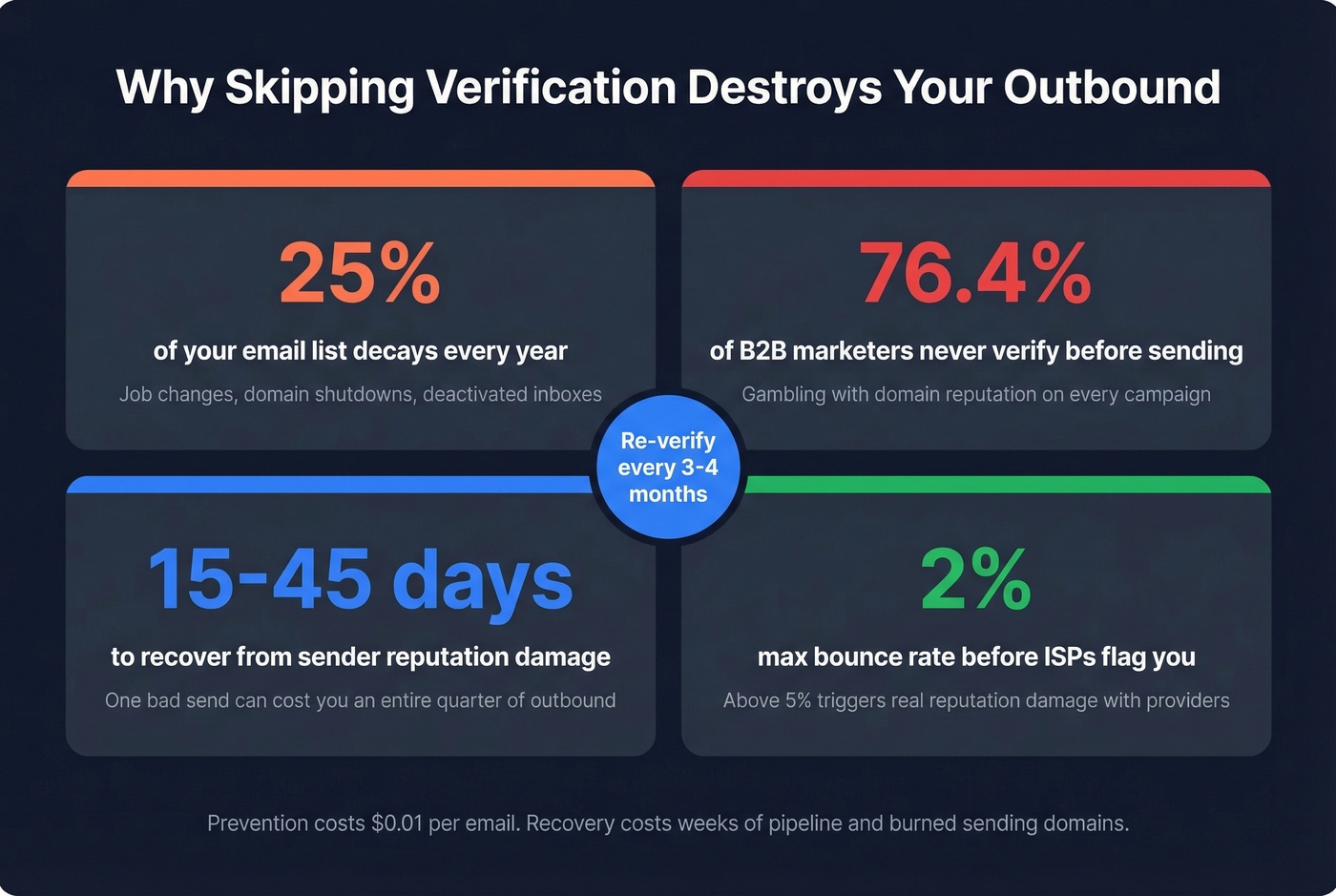
Global inbox placement sits at about 84%. The remaining 16% represents millions of emails bouncing or landing in spam. For outbound teams, bounce rates above 2% hurt your sender score, and anything north of 5% triggers real reputation damage with ISPs.
Here's the thing: email databases decay at least 25% per year. People change jobs, companies shut down domains, inboxes get deactivated. Another 15% of addresses collected through forms contain typos. Yet only 23.6% of B2B marketers verify their lists before campaigns - the other 76.4% are gambling with their domain reputation every time they hit send.

How Verification Works (5 Layers)
Every decent verification tool runs a multi-layer pipeline. Here's what happens in the 100-500 milliseconds between pasting an email and getting a result:
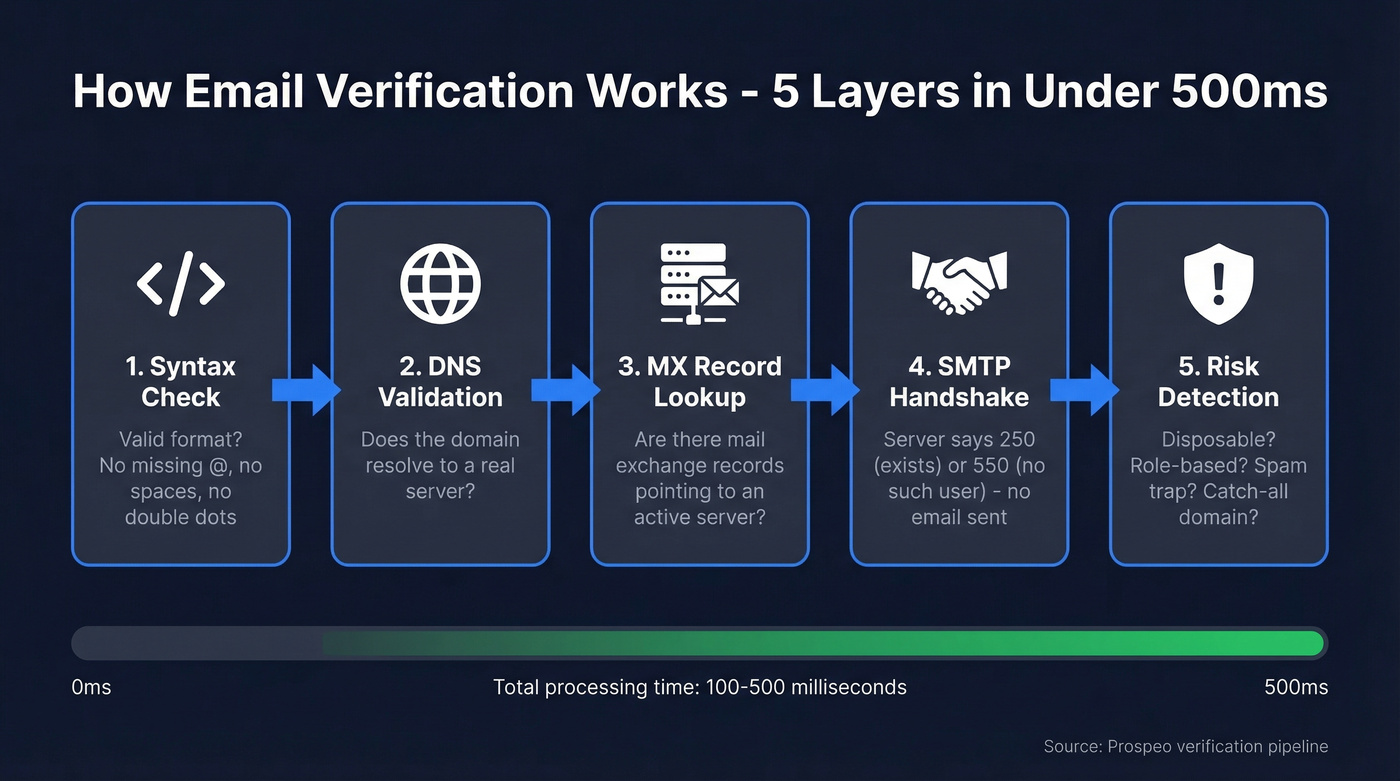
- Syntax check - Valid formatting? No missing
@, no spaces, no consecutive dots. - Domain/DNS validation - Does the domain resolve?
- MX record lookup - Does the domain have mail exchange records pointing to an active server?
- SMTP handshake - The tool connects to the mail server and asks "would you accept mail for this address?" without sending anything. A
250response means yes;550means the mailbox doesn't exist. - Risk checks - Disposable address? Role-based inbox like info@? Known spam trap? Catch-all domain that accepts everything?
That last layer is where tools differentiate. Catch-all domains are the hardest problem in verification - if a server returns 250 for every random address, you can't confirm any individual mailbox actually exists.
5 Methods to Verify an Email Address
Method 1: Use a Free Verification Tool
This is the fastest path for most people. Paste an email into a real-time verifier and get a result in seconds - no technical knowledge required.
Prospeo's Email Finder is a strong starting point: 75 free verifications per month, 98% email-finding accuracy, and it runs a full 5-step verification process in real time. Hunter's verifier and ZeroBounce's free checker are solid alternatives if you want a second opinion on results.
If you're building lists for outbound, pair verification with sales prospecting techniques and a repeatable lead generation workflow so list quality doesn't depend on heroics.
Method 2: Check Format Manually
Before reaching for any tool, eyeball the address for obvious syntax failures. Missing @ symbol, spaces, consecutive dots like john..doe@company.com, invalid characters, or misspelled domains (gmial.com, outlok.com). This catches the 15% of addresses that are just typos, though it won't tell you if the mailbox actually exists.
When you're writing outreach, clean data is only half the battle - your email copywriting and cold email subject line examples still determine whether verified emails actually engage.
Method 3: Look Up MX Records
MX records tell you whether a domain can receive email at all. No MX records means the address is dead regardless of what it looks like.
Windows: nslookup -type=MX domain.com
macOS/Linux: dig MX domain.com
If the command returns MX hosts with priority values, the domain can receive mail. No results? The domain either doesn't exist or isn't configured for email. This is the most reliable manual method when you need to validate an email at the infrastructure level.
If you're troubleshooting bounces at scale, use an email bounce rate breakdown to separate hard bounces from temporary failures.
Method 4: SMTP Handshake (Advanced)
This is what verification tools do under the hood. You connect to the mail server and simulate a delivery attempt without sending a message. The server's response tells you what you need:
| Code | Meaning |
|---|---|
| 250 | Valid - mailbox exists |
| 550 | Invalid - no such user |
| 450 | Temporary - retry later |
Greylisting servers return 450 on the first attempt and only accept on retry - wait 15-30 minutes before trying again. Catch-all domains return 250 for everything, so a "valid" response doesn't guarantee the mailbox is real. And aggressive SMTP probing can get your IP blacklisted; developer communities regularly warn that some RBLs treat it as abusive scanning.
Skip this method unless you're comfortable with command-line tools and understand the risks. For anything beyond a handful of one-off checks, use a tool instead.
If you're sending cold outreach, also watch your email velocity so verification gains don't get erased by throttling or spam placement.
Method 5: Spot Phishing Emails
Different problem, different checklist. If you're wondering whether an email you received is real:
- Hover over the sender name to reveal the actual address behind the display name
- Watch for lookalike characters -
rnlooks likem,llooks like1,.coisn't.com - Inspect headers for mismatched Return-Path or Reply-To addresses (in Outlook: File, then Properties, then Internet Headers)
- Check domain age via WHOIS - domains registered less than 90 days ago are suspicious
- Call the sender using a number you already have on file, not the one in the email

You just learned the 5 layers every verification tool runs. Prospeo runs all of them - syntax, DNS, MX, SMTP, and risk detection - through a proprietary 5-step pipeline that catches spam traps, honeypots, and catch-all domains. 98% email accuracy, 7-day data refresh, $0.01 per email.
Check any email ID right now - 75 free verifications, no credit card.
Best Free Verifiers Compared
| Tool | Free Tier | Cost per 1K | Best For |
|---|---|---|---|
| Prospeo | 75/mo | ~$0.01/email | Overall accuracy (98% email-finding) |
| ZeroBounce | 100/mo | $10/1K | Bulk list cleaning |
| Hunter | 100/mo | ~$24.50/1K | Transparent benchmarking |
| NeverBounce | 10 free | $8/1K | Budget bulk jobs |
| Verifalia | Free singles | ~$10-20/1K est. | Quick one-off checks |
| Mailmeteor | 50/mo | Free tier only | Google Sheets users |
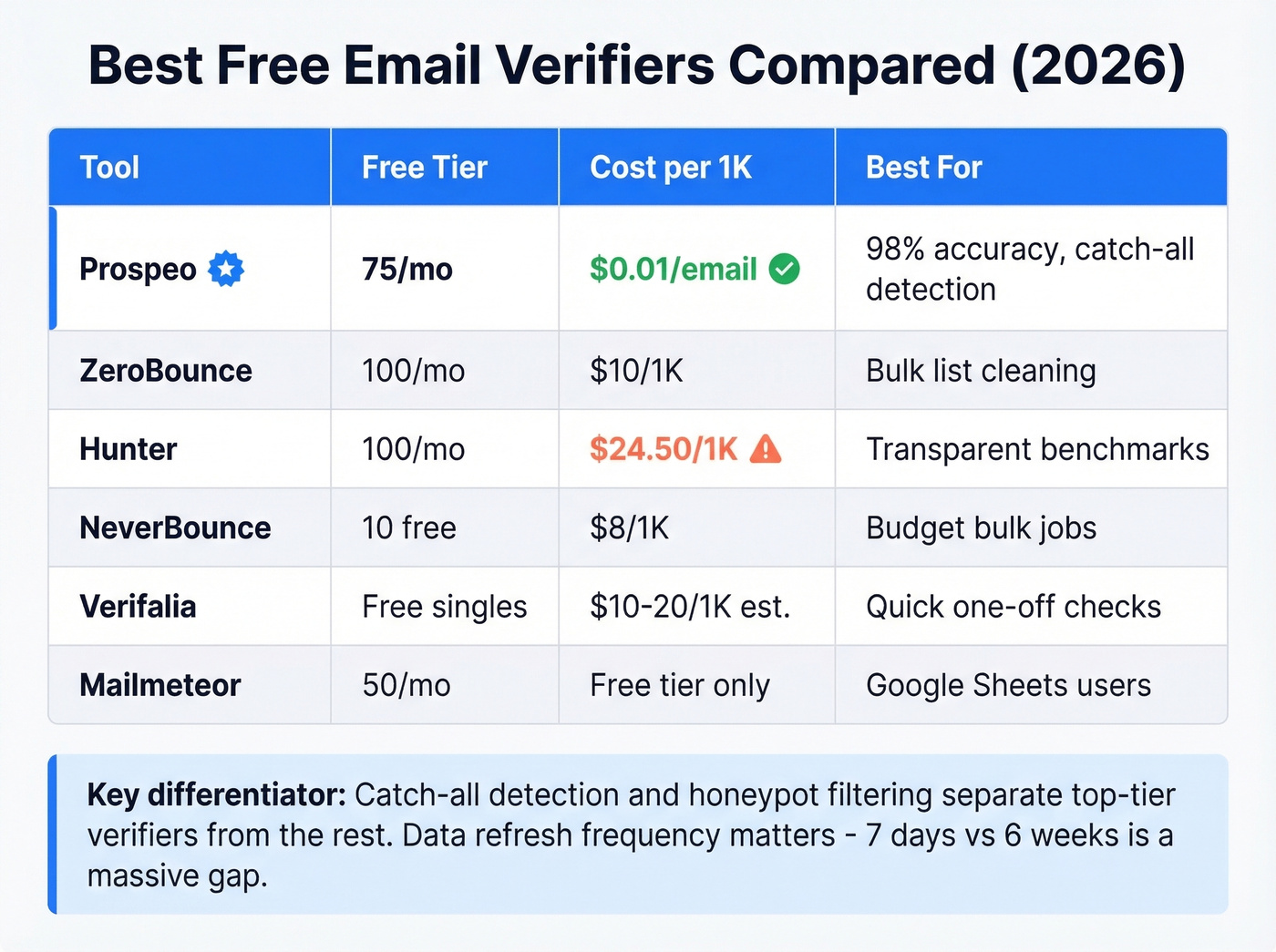
We've tested most of these across real outbound campaigns, and the differences show up fast on catch-all-heavy lists. Prospeo's 5-step verification pipeline handles catch-all detection and honeypot filtering - the two edge cases that trip up most verifiers - and its data refreshes every 7 days versus a 6-week average at many competitors. ZeroBounce is the best pure-bulk alternative at $10/1K. Hunter's free tier is smaller and pricier at scale, but they publish the most transparent verification benchmarks in the space, which we respect.
If you're comparing tools, this list also pairs well with our breakdown of Bouncer alternatives and broader free lead generation tools for building + cleaning lists end-to-end.
Your email list decays 25% per year. Manual MX lookups and SMTP handshakes don't scale, and most verifiers choke on catch-all domains. Prospeo's verification pipeline handles catch-all detection, honeypot filtering, and spam-trap removal - refreshed every 7 days, not every 6 weeks.
Stop sending to dead inboxes. Verify your list before your bounce rate kills your domain.
The "99% Accuracy" Lie
Let's be honest: most accuracy claims in this space are marketing fiction. Hunter ran a 2026 benchmark testing 15 verifiers against 3,000 real emails - the top performer hit 70% accuracy. Not 99%. Not 95%. Seventy percent.
If you're trying to protect deliverability, treat verification as one part of a bigger email deliverability guide (authentication, content, sending patterns, and list hygiene).
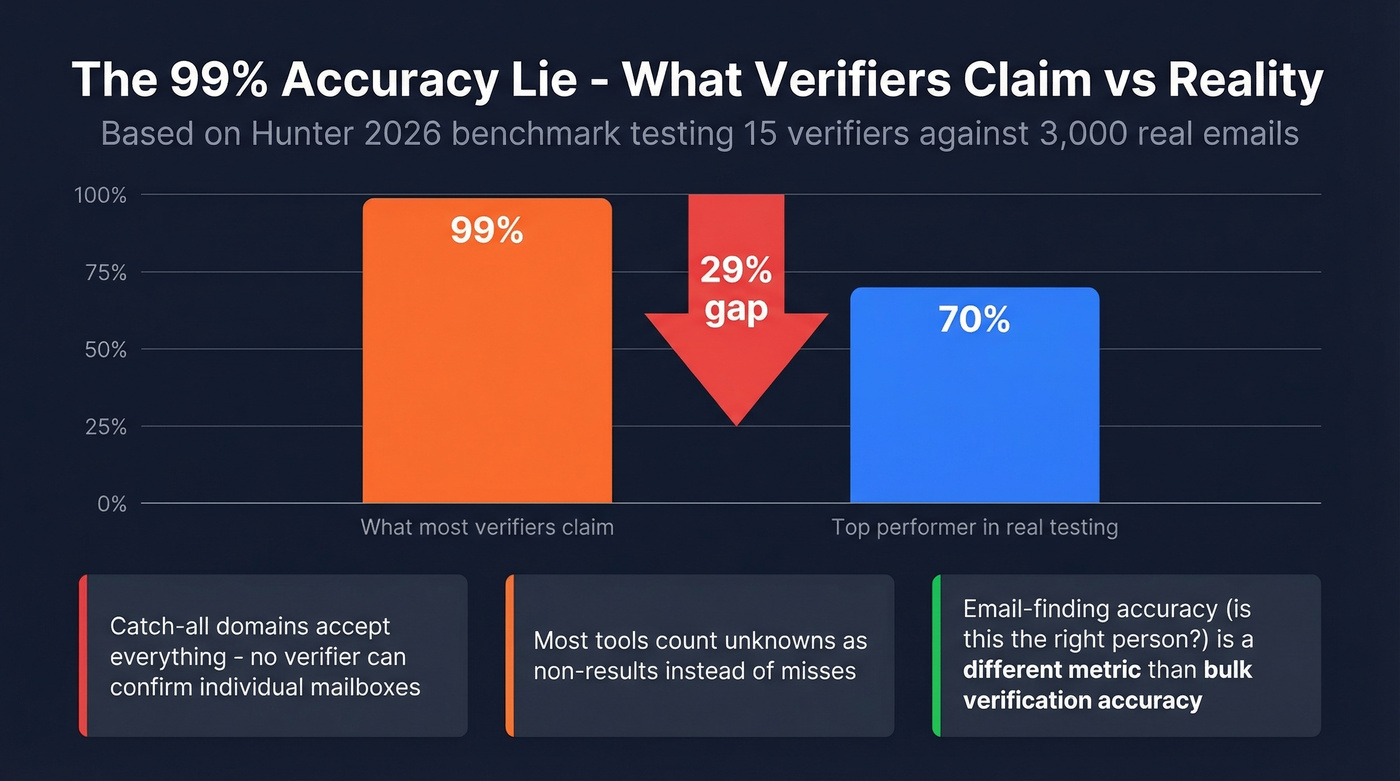
The gap comes from catch-all domains and unknowns. When a mail server accepts everything, no verifier can confirm a specific mailbox is real. Tools claiming 99% are testing against easy datasets or counting "unknown" as a non-result rather than a miss.
Worth noting: that benchmark tested bulk verification accuracy, which is a different metric from email-finding accuracy, where tools measure whether the email they return for a specific person is correct. In our testing, the gap between claimed and actual accuracy is even wider for catch-all-heavy lists.
Mistakes That Kill Deliverability
Treating verification as a one-time event is the most common mistake I see. With 41% average professional turnover and 25% annual list decay, a list verified in January is already degrading by April. Re-verify every 3-4 months minimum.
If your domain is already struggling, follow a structured plan to improve sender reputation before scaling volume again.
Role-based and disposable addresses are the second killer. Inboxes like info@, sales@, and anything on a disposable domain tank your engagement metrics and attract spam complaints. Strip them ruthlessly.
Then there's the recovery trap. Once your sender reputation takes a hit, recovery takes 15-45 days of careful warm-up. We've watched teams lose weeks of pipeline because they skipped a $10 verification step - one team at a mid-stage SaaS company burned through three sending domains before they started verifying, and rebuilding those domains cost them an entire quarter of outbound. Prevention is dramatically cheaper than repair.
FAQ
How do I know if an email ID is valid or not?
Use a free verification tool like Prospeo, which checks syntax, DNS, MX records, and SMTP responses in under a second. For a manual approach, run an MX record lookup or SMTP handshake to confirm the mailbox exists - all without sending a single message.
How often should I re-verify my email list?
Every 3-4 months. Email databases decay roughly 25% per year due to job changes and deactivated accounts. Waiting longer means rising bounce rates and sender reputation damage that takes weeks to repair.
What's the most accurate free email verifier in 2026?
Prospeo offers 75 free verifications per month with 98% email-finding accuracy and a 5-step pipeline including catch-all detection. ZeroBounce (100 free/month) and Hunter (100 free/month) are strong alternatives for higher-volume single checks.
Can I check if an email ID is correct without sending a message?
Yes. Verification tools check syntax, DNS, MX records, and SMTP responses without delivering any email. Manual methods like MX lookups and SMTP handshakes also confirm mailbox existence silently - the mail server never forwards anything to the recipient.