

How to Check If an Email Domain Is Valid: 6 Methods From Quick to Advanced
You just exported 5,000 contacts from a trade show badge scanner, a purchased list, or a CRM you inherited from the last sales hire - and you have no idea how many of those email domains are even real. Knowing how to check if an email domain is valid isn't optional: bounce rates under 2% are considered safe, but anything above 5% triggers reputation damage with major ESPs. Once your sending domain gets flagged, every email you send suffers. Industry averages sit surprisingly low - e-commerce at 0.29%, software at 0.93% - so even a small spike from invalid domains stands out fast.
Here are six methods, from a 10-second browser check to Python scripts, so you can pick the one that matches your situation. The same techniques apply whether you're cleaning an outbound list or preventing fake signups on a registration form.
What You Need (Quick Version)
Check one domain right now? Punch it into MXToolbox. Free, browser-based, takes 10 seconds. You'll see MX records, blacklist status, and DNS health in one shot.
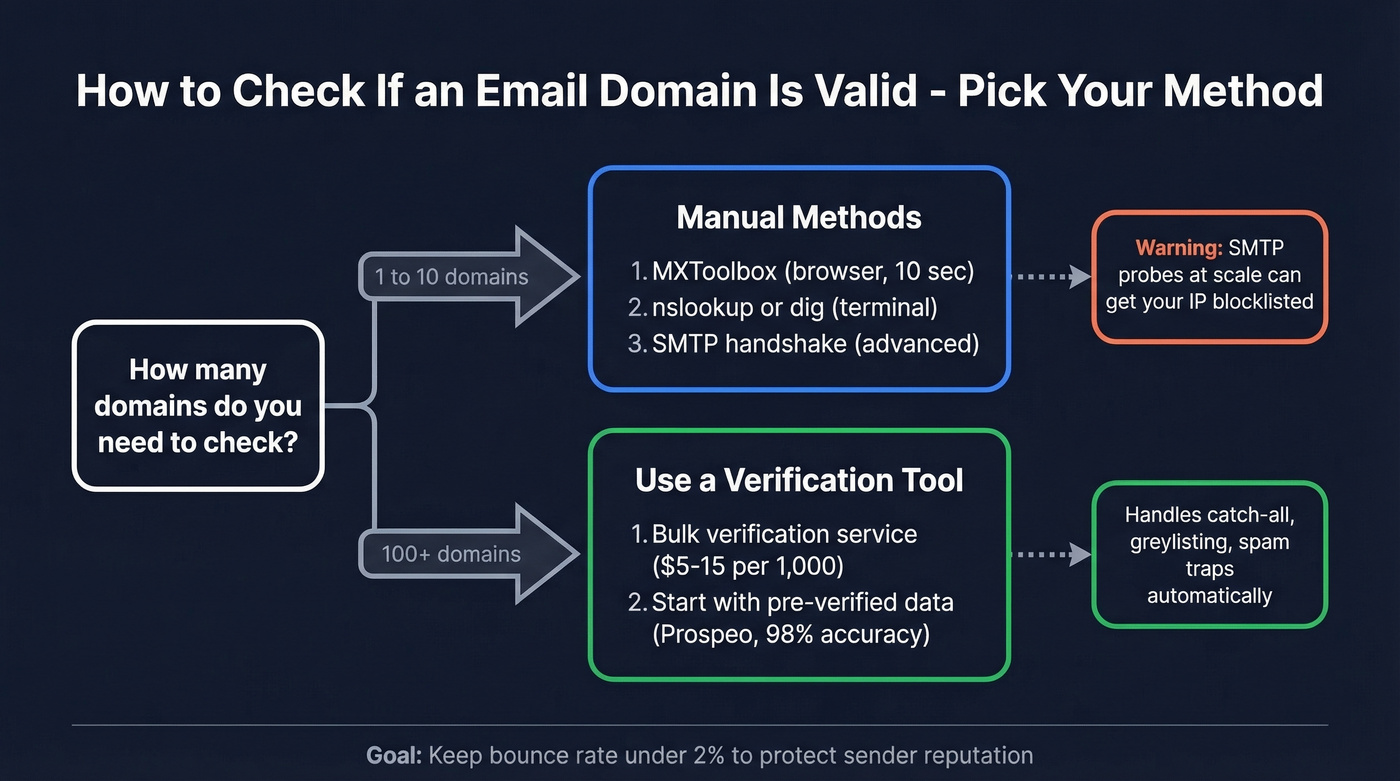
Validate a list of hundreds or thousands? Use a verification tool. Expect to pay ~$5-$15 per 1,000 emails depending on the provider. We compare the best options below.
Confirm the Domain Exists (A Record + WHOIS)
Before you check whether a domain can receive email, confirm it exists at all. This is Step 0.
On Windows, open Command Prompt and run:
[nslookup domain.com](https://learn.microsoft.com/en-us/windows-server/administration/windows-commands/nslookup)
On Mac/Linux, use:
dig A domain.com
If you get an IP address back, the domain resolves. If you get NXDOMAIN or ** server can't find domain.com, the domain doesn't exist - full stop. Any email address at that domain is dead.
For more context, run a WHOIS lookup to see when the domain was registered, whether it's expired, and who owns it. A domain created yesterday with a privacy-masked registrant sending you "partnership inquiries" is a red flag worth investigating.
How to Verify Email Domain MX Records
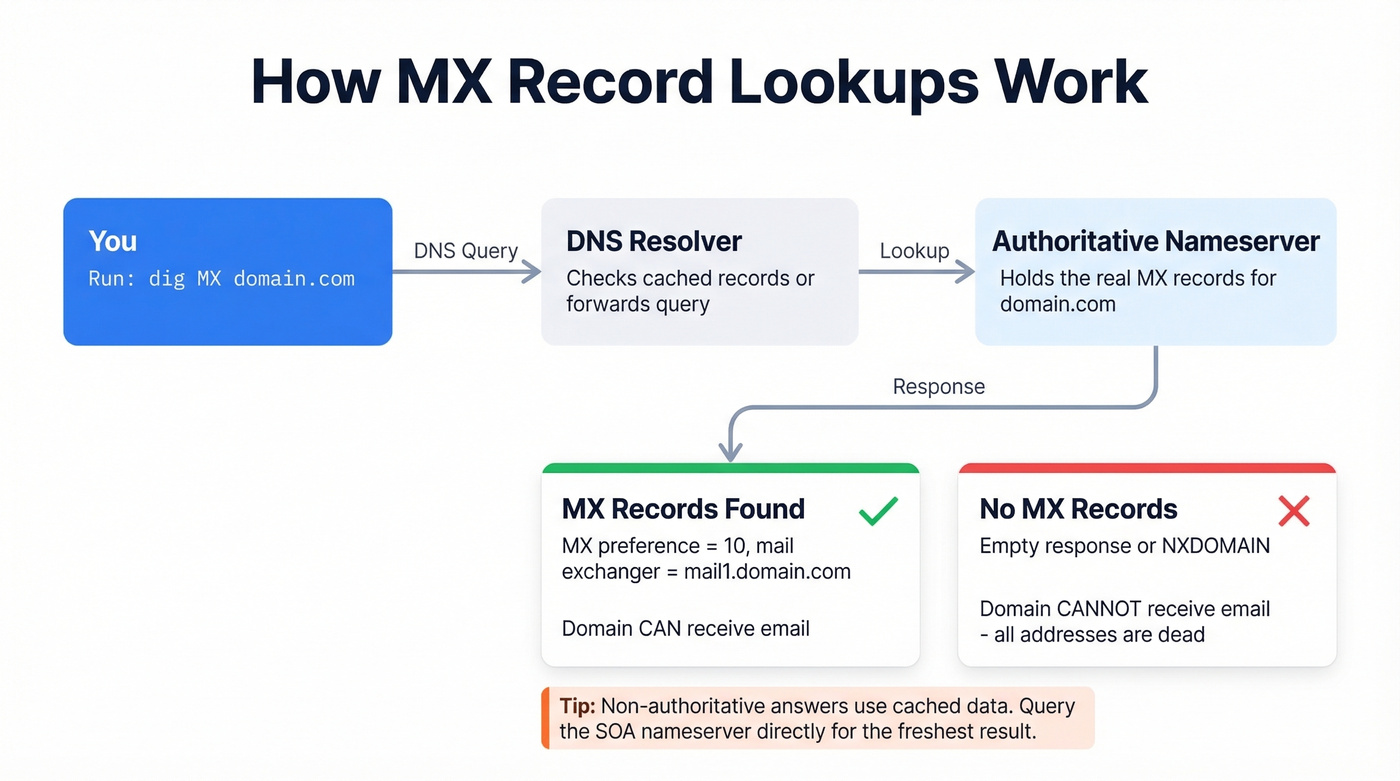
This is the single most definitive check you can run. MX (Mail Exchange) records tell the internet which servers handle email for a domain. No MX records means the domain can't receive email. The address is dead.
Windows: nslookup
Open Command Prompt and enter interactive mode. If nslookup throws an error on launch, your machine's DNS resolver isn't configured - check your network settings first.
nslookup
set q=mx
domain.com
You'll see output like this (using microsoft.com as an example):
microsoft.com   MX preference = 10, mail exchanger = mail1.microsoft.com
microsoft.com   MX preference = 10, mail exchanger = mail2.microsoft.com
mail1.microsoft.com   internet address = 131.107.3.125
The preference value indicates priority - lower numbers get tried first. Multiple MX records with equal preference means load balancing. If you see any MX records, the domain is configured to receive email.
Mac/Linux: dig
dig MX domain.com
Same information, slightly different format, with TTL values and the authoritative nameserver included.
The Authoritative Answer Pitfall
Here's something most tutorials skip. When you run nslookup, you'll often see "Non-authoritative answer" at the top. That means your DNS resolver is returning a cached result, which could be stale.
To get the definitive answer, first find the authoritative nameserver:
nslookup -type=soa domain.com
Look for primary name server = ns.example.com. Then query that server directly:
nslookup -type=mx domain.com ns.example.com
This matters when you're troubleshooting a domain that recently changed its email setup. Cached DNS records can persist for hours or days depending on TTL. Running nslookup -debug domain.com shows the TTL in seconds so you know exactly how fresh your result is.
Check SPF, DKIM, and DMARC Records
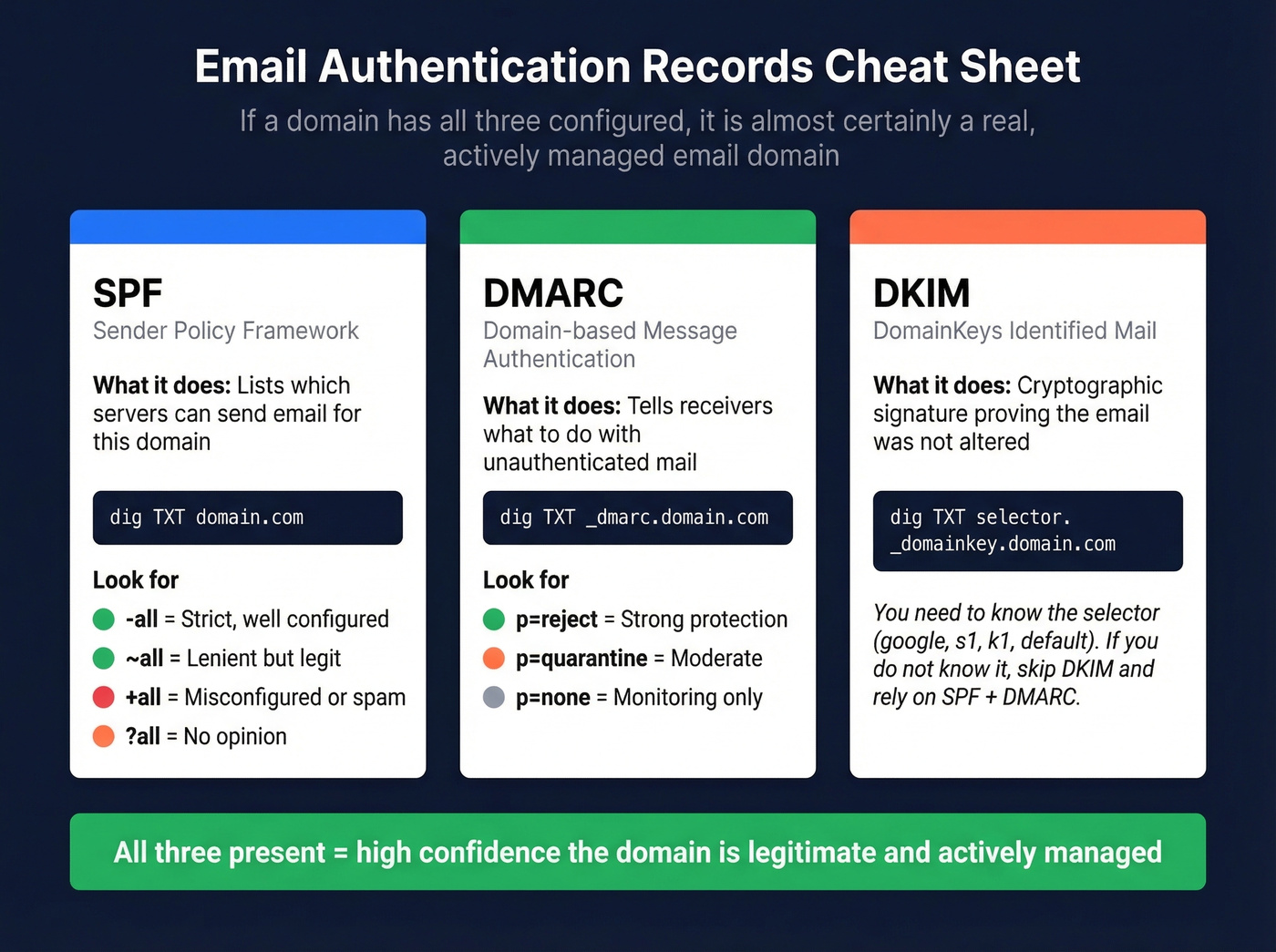
A domain with MX records can receive email. But a domain with SPF, DKIM, and DMARC configured is almost certainly a real, actively managed email domain - someone bothered to set up proper authentication, which is a strong legitimacy signal.
SPF (Sender Policy Framework)
SPF is a DNS TXT record listing which servers are authorized to send email for a domain. Query it with:
dig TXT domain.com
Look for a record starting with v=spf1. A real-world example:
v=spf1 include:_spf.google.com include:sendgrid.net ~all
The qualifiers at the end matter:
| Qualifier | Meaning | Signal |
|---|---|---|
~all |
SoftFail | Legit domain, lenient policy |
-all |
Hard Fail | Strict - well-configured |
+all |
Pass all | Misconfigured or spam |
?all |
Neutral | No opinion |
A domain with -all or ~all and specific include: mechanisms is well-maintained. A domain with +all is either misconfigured or doesn't care about spoofing - both bad signs.
DMARC
dig TXT _dmarc.domain.com
You'll see something like v=DMARC1; p=reject; rua=mailto:.... The p=reject policy means the domain owner actively protects against spoofing - a strong legitimacy signal. (If you want to go deeper, see DMARC alignment.)
DKIM
DKIM is trickier because you need the selector, which varies by ESP. Common selectors include google, s1, k1, or default:
dig TXT google._domainkey.domain.com
If you don't know the selector, skip DKIM and rely on SPF + DMARC. Together, those two give you a reliable picture of whether the domain's email infrastructure is real. For troubleshooting, you can also use this guide on verify DKIM is working.

Running MX lookups and SMTP handshakes one domain at a time? Prospeo's 5-step verification does all of this automatically - catch-all handling, spam-trap removal, and honeypot filtering included. 98% email accuracy at $0.01 per email, across 143M+ verified addresses.
Validate your entire list in minutes, not hours of terminal commands.
SMTP Handshake Verification (Advanced)
Let's be honest: SMTP handshake verification is overrated for most use cases. It's technically interesting, and it's how verification tools work under the hood, but doing it manually is fragile and risky at scale.
The Full SMTP Conversation
First, find the MX server:
dig MX domain.com
Then connect to one of the MX hosts returned on port 25:
telnet <mx-host-from-dns> 25
The conversation looks like this:
220 mail.domain.com ESMTP
HELO myhost.example.com
250 Hello
MAIL FROM:<test@example.com>
250 2.1.0 Ok
RCPT TO:<user@domain.com>
250 2.1.5 Ok          ← mailbox exists
QUIT
221 Bye
If RCPT TO returns 550 5.1.1 No such user, the mailbox doesn't exist. You never send an actual email - you quit before the DATA command.
Response Code Reference
| Code | Meaning | Action |
|---|---|---|
| 250 | Valid/accepted | Mailbox exists |
| 550/551/553 | Invalid | Mailbox doesn't exist |
| 421/450 | Temporary issue | Retry in 15-30 min |
Why This Breaks at Scale
Greylisting returns 450 on the first attempt and only accepts on retry. That 15-30 minute backoff window makes bulk testing painfully slow.
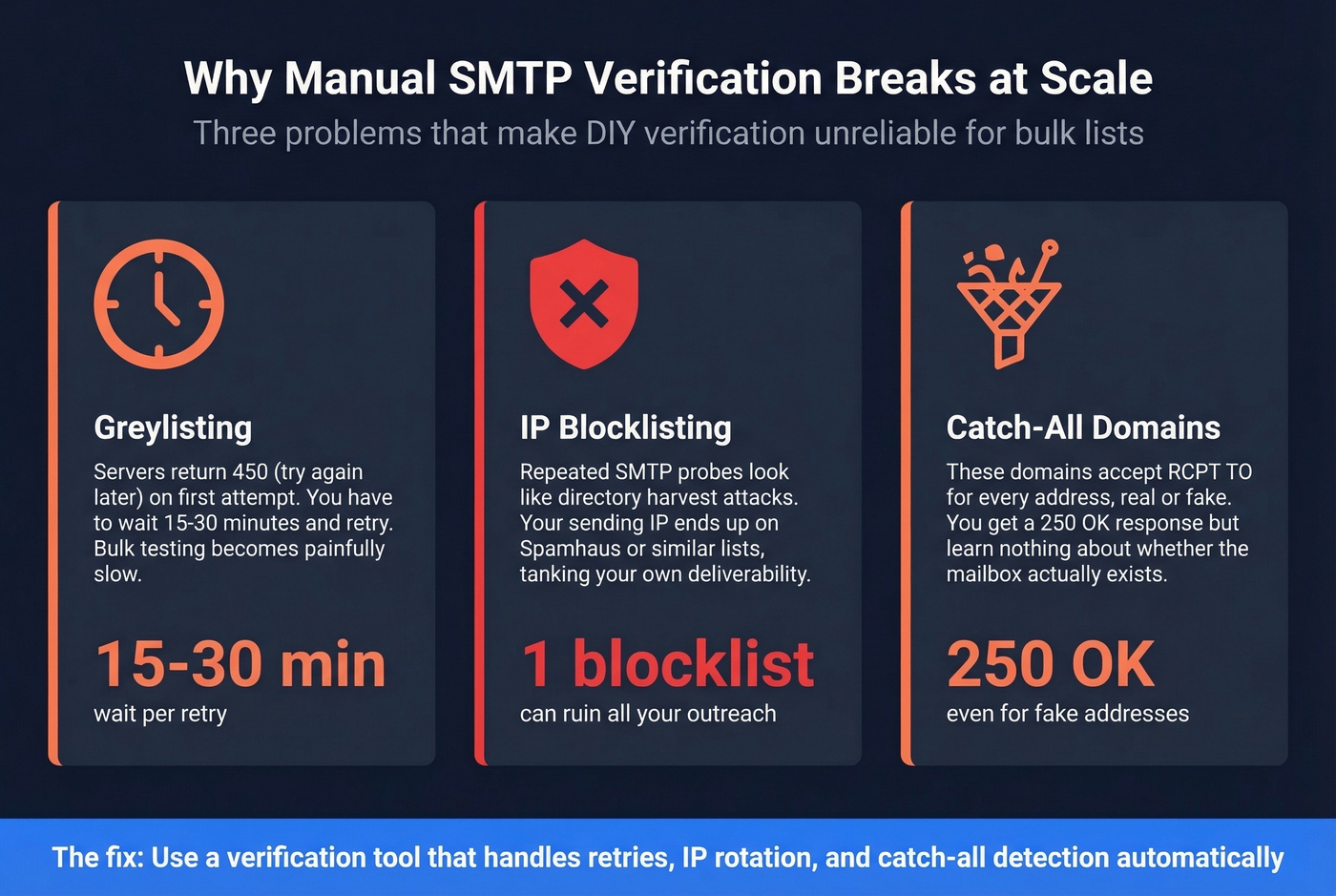
Catch-all domains accept RCPT TO for every address - real or invented. You can detect this by testing a random nonsense address like xyzzy99999@domain.com. If it returns 250, the domain is catch-all and you've learned nothing about the specific mailbox.
Blocklisting risk is the real danger. Many servers treat repeated SMTP probes as directory harvest attacks. Your IP can end up on Spamhaus or similar blocklists, which tanks your own deliverability. The VRFY command, designed for this exact purpose, is disabled on virtually all modern mail servers per RFC 2505 recommendations.
For anything beyond a few spot checks, use a tool. They handle greylisting retries, catch-all detection, and IP rotation so you don't have to.
Use a Verification Tool
When Manual Checks Stop Scaling
The methods above work great for 5 or 50 domains. They don't work for 5,000. At that point, you need a tool that automates MX lookups, SMTP handshakes, catch-all detection, and spam-trap filtering in a single pass.
One frustration we've run into repeatedly: some "free" verification tools cap you at just a handful of checks - like 3 free validations. The table below shows what you actually get for free and what bulk verification costs.
Tool Comparison
| Tool | Free Tier | ~Cost/1,000 | Catch-All Handling | Best For |
|---|---|---|---|---|
| Prospeo | 75 emails/mo | ~$10 | 5-step with resolution | Pre-verified prospect data |
| ZeroBounce | 100/mo | ~$7.50 | Catch-all resolution: 12% | Standalone bulk verification |
| NeverBounce | 1,000 credits | ~$8 | Catch-all resolution: 8% | Pay-as-you-go simplicity |
| Bouncer | 1,000 credits | ~$7 | Standard | Mid-range bulk jobs |
| MillionVerifier | None | ~$0.30 | Basic | Budget bulk verification |
| Hunter | 100/mo | ~$15-20 | Standard | Quick single-email checks |
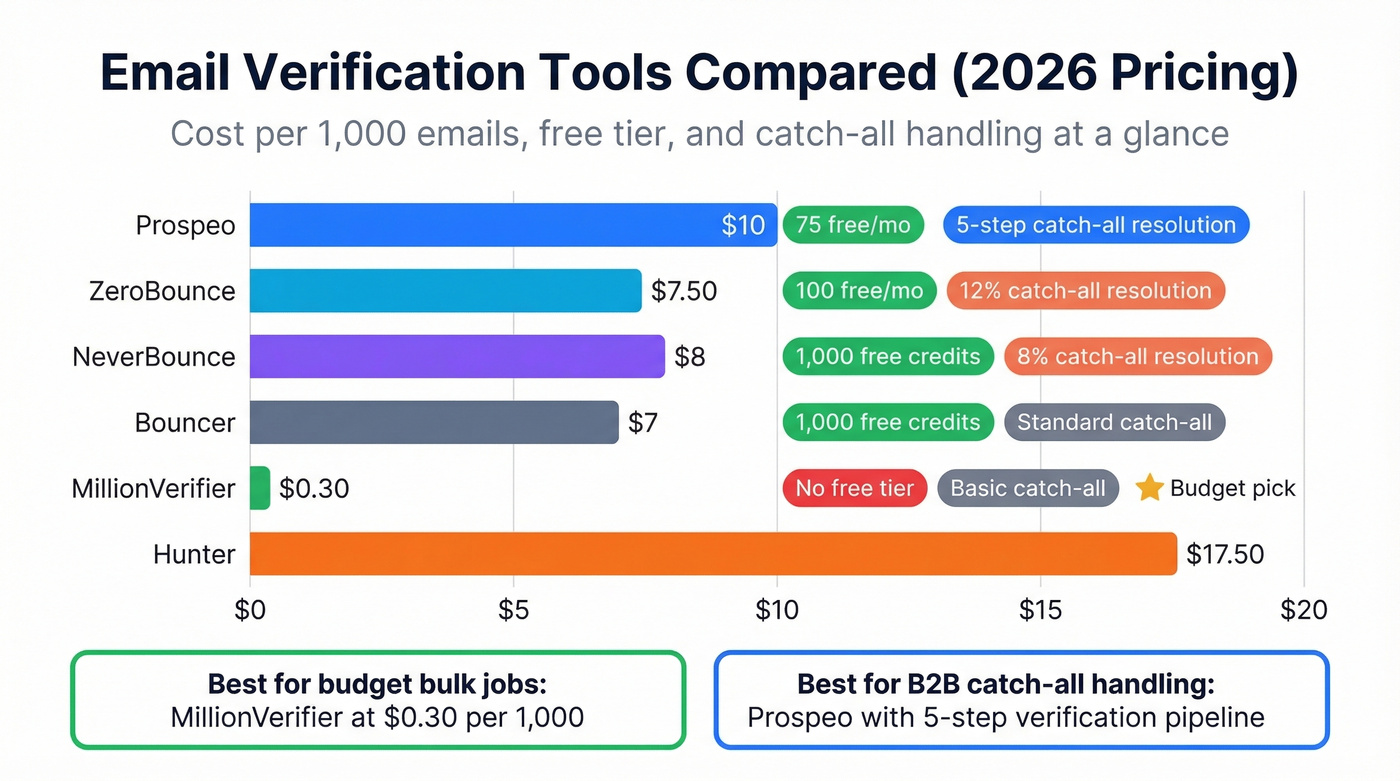
ZeroBounce is the strongest standalone verifier if you already have a list and just need it cleaned. It starts at $15 for 2,000 emails, scales well, and the 100 free monthly credits are enough to test the workflow. The catch: in a 10,000-email benchmark test, ZeroBounce's catch-all resolution was only 12%.
On a budget? MillionVerifier at ~$0.30 per 1,000 is absurdly cheap for bulk jobs where you care more about removing hard bounces than resolving edge cases. Bouncer sits in the middle at ~$7 per 1,000 with a solid free trial. BriteVerify (~$10/1K) and Xverify (~$9.20/1K) also exist but lack free tiers.
We've run lists through NeverBounce and found the 1,000 free credits generous enough for a real test - but its catch-all resolution is 8%, which means a big chunk of your B2B list stays in limbo. If catch-all handling matters to you, and for B2B it absolutely should, pay close attention to that column.
Hunter works best for quick single-email lookups rather than bulk verification. Paid plans start around $50/month depending on volume, making it pricier per check but convenient for one-off spot checks. If you're comparing options, see our breakdown of Hunter alternatives.
The Upstream Fix: Start With Verified Data
Here's the thing: if you're checking domains because you're building a prospect list, you're solving the wrong problem. Instead of exporting questionable contacts and then paying to clean them, start with data that's already verified. (If you're building lists end-to-end, this lead generation workflow is a good reference.)
Prospeo's database covers 300M+ professional profiles with 98% email accuracy on a 7-day refresh cycle. Its 5-step verification pipeline handles catch-all domains, spam traps, and honeypots before you ever see the email. The free tier gives you 75 emails per month to test the workflow, and paid plans start at ~$0.01 per email with no contracts. If you're evaluating providers, you can also compare email list providers and data enrichment services.
SPF, DKIM, DMARC, MX records - you've done the homework. But at scale, manual domain checks break. Prospeo refreshes every record on a 7-day cycle and runs proprietary verification so you never send to a dead domain. Teams using Prospeo cut bounce rates from 35%+ to under 4%.
Keep your bounce rate under 2% without touching a command line.
Programmatic Validation (Python)
For developers who want to build domain validation into a pipeline, here's how to do it in Python. Install the email-validator library:
pip install email-validator
Basic usage:
from email_validator import validate_email, EmailNotValidError

try:
    v = validate_email("user@gnail.com")
    print(v.normalized)
except EmailNotValidError as e:
    print(str(e))
# Output: "The domain name gnail.com does not exist."
The library catches typo domains like gnail.com instead of gmail.com, which is surprisingly useful for cleaning form submissions.
For a quick MX check without the full library:
try:
    answers = dns.resolver.resolve('domain.com', 'MX')
    for rdata in answers:
        print(rdata.exchange, rdata.preference)
except dns.resolver.NXDOMAIN:
    print("Domain does not exist")
For anything beyond a few hundred checks, an API is faster and more reliable than rolling your own. Don't reinvent SMTP handshake logic - the edge cases with greylisting, catch-all, and rate limiting will eat your week. If you're doing this for outbound, pair it with an email deliverability guide so you don't fix one problem and create another.
Why Tools Return "Unknown" (Catch-All Domains)
If you've ever run a list through a verification tool and gotten "unknown" or "risky" for a big chunk of your addresses, catch-all domains are almost certainly the reason.
A catch-all domain accepts email sent to any address - ceo@domain.com, asdfghjkl@domain.com, doesn't matter. The server returns 250 OK for everything, which means SMTP verification can't distinguish real mailboxes from invented ones. Estimates put catch-all prevalence at 10-40% in B2B, depending on the industry. That's a huge slice of your list sitting in verification limbo.
Enterprise security gateways like Proofpoint and Mimecast add another layer of confusion. They greylist or rate-limit verification probes, returning temporary failures that tools interpret as "unknown" even when the mailbox is perfectly valid. The gap between tools is enormous: in one 10,000-email benchmark, catch-all resolution ranged from 8% (NeverBounce) to 94% (LeadMagic). Most mainstream tools land on the low end, labeling a huge chunk of your list as unverifiable.
Common Mistakes
Relying on syntax-only checks. An email can be perfectly formatted - correct @ symbol, valid TLD, no spaces - and point to a domain that hasn't existed in three years. Syntax validation tells you nothing about reality. If you need mailbox-level checks, see how to check if an email exists.
Trusting SMTP results on catch-all domains. If the server accepts everything, a 250 response is meaningless. Always test a random nonsense address first to detect catch-all behavior.
Ignoring SPF/DMARC as legitimacy signals. A domain with no MX records is obviously dead. But a domain with MX records and zero authentication records - no SPF, no DMARC - is suspicious. It could be a parked domain, a spam trap, or an abandoned setup that technically resolves but never gets checked.
Treating "unknown" as "invalid." This is the most expensive mistake. Unknown usually means catch-all or security gateway interference, not a dead mailbox. If you delete every "unknown" result, you're throwing away real contacts. Segment them, send cautiously, and monitor bounces instead. If you're trying to keep bounces down systematically, use an email bounce rate reference and an email reputation tools checklist.
FAQ
Can I verify an email domain without sending an email?
Yes. MX record lookups, SPF/DKIM/DMARC checks, and SMTP handshake tests all validate a domain without delivering a message. The SMTP method connects to the mail server and checks whether it accepts the recipient, then quits before sending content. MXToolbox handles DNS checks in seconds for free.
What's the difference between email validation and verification?
Validation checks format and domain existence - syntax plus DNS lookups. Verification confirms the specific mailbox exists, usually via SMTP probing or a verification tool's API. Validation catches user@fakdomain.com. Verification catches user@realdomain.com where user doesn't have a mailbox.
How often should I re-verify my email list?
Every 30-90 days minimum. For purchased or scraped lists, monthly re-verification is safest. Platforms with shorter refresh cycles keep data current longer - Prospeo, for instance, refreshes on a 7-day cycle, so emails sourced there stay accurate far longer than static lists you verify once and forget.
What free tool is best for checking email domains in bulk?
NeverBounce offers 1,000 free credits - enough for a real test run. ZeroBounce's 100 free monthly credits work well for smaller spot checks. If you're building prospect lists rather than cleaning existing ones, skip the verification step entirely and start with pre-verified data instead.