

How to Check If an Email Is Valid: 5 Methods From Basic to Advanced
You send your first sequence to 500 prospects. By morning, 175 have bounced. Your sender reputation just took a hit that'll haunt you for weeks, and the campaign data is useless.
So how do you actually check if an email is valid before clicking send?
If your data source were doing its job, you wouldn't need to verify every email manually. That's your provider's problem. But here's where things stand: at least 23% of any email list decays every year, and ZeroBounce's analysis found that only 62% of emails submitted for verification were actually valid. Let's fix that with five methods, from dead-simple syntax checks to the SMTP handshake that verification tools run at scale.
What You Need (Quick Version)
Three paths depending on where you are right now:
Check one email right now. Use a free online verifier - Hunter or Mailmeteor both let you check a single address without signing up.
Verify a list of emails. Use a bulk verification tool. Bouncer ($7/1K) and Prospeo (~$0.01/email with catch-all handling) are the best value we've found. Upload a CSV, get results in minutes.
Stop verifying altogether. If you're constantly cleaning bad data, the problem is upstream. Switch to a platform that verifies emails at the point of collection so you never need a separate cleaning step.
The rest of this guide explains what actually happens at each step when you - or a tool - checks an email address.
Validation vs. Verification
These terms get used interchangeably, but they're different steps in the same pipeline.
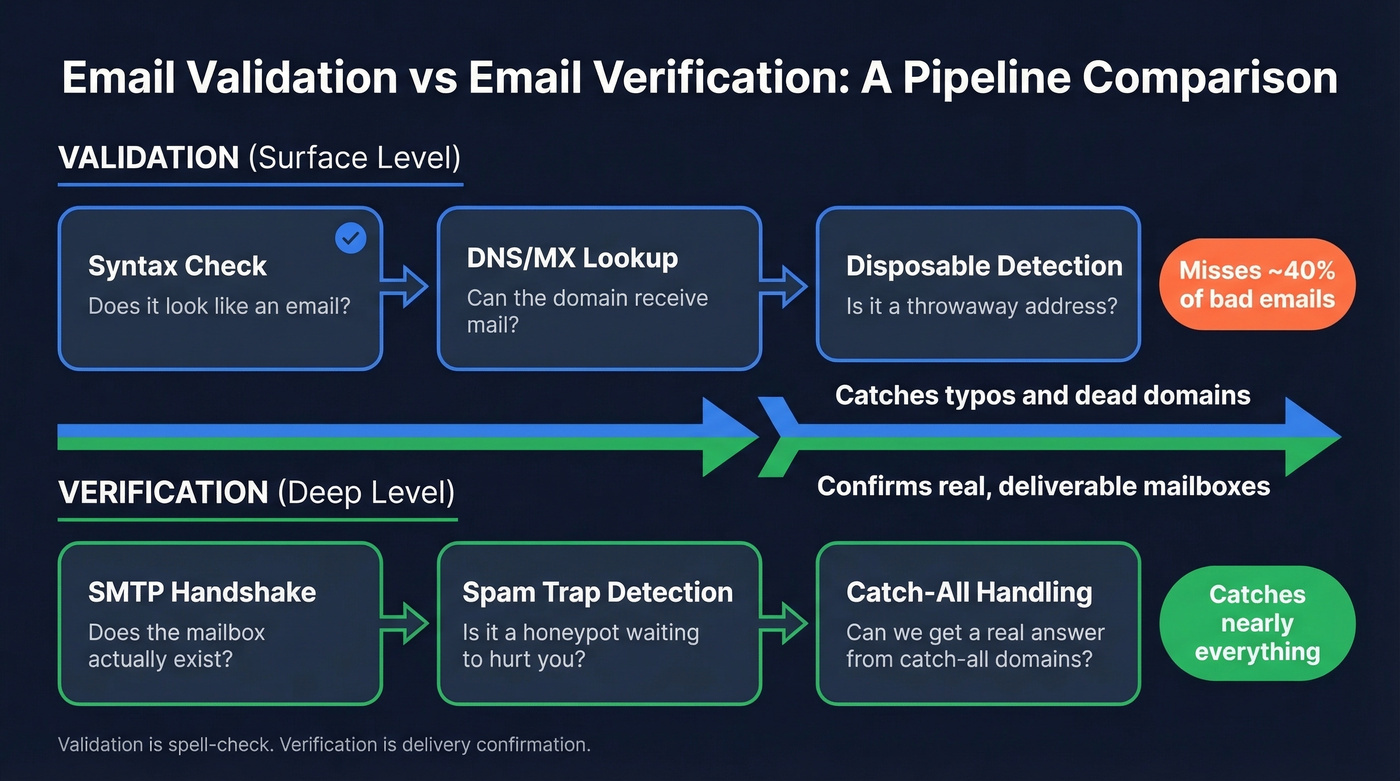
Validation checks structural correctness: does the address follow the right format? Does the domain have MX records? It's a surface-level pass that catches typos and obviously broken addresses. But validation alone misses roughly 40% of undeliverable addresses - the mailbox might not exist, or it could be a spam trap waiting to tank your reputation.
Verification goes deeper. It confirms the mailbox actually exists, flags disposable addresses, detects spam traps, and identifies honeypots. Think of validation as spell-check. Verification is delivery confirmation.
Every method below falls into one of these two categories. Methods 1-3 are validation. Method 4 is verification. Method 5 is "let a tool handle both."
Why Email Verification Matters
The threshold that matters: keep total bounces below 2%, and hard bounces below 1%. Exceed those numbers and ESPs will throttle or outright block your sending domain. That's not a gradual decline - it's a cliff. One bad send to an unverified list can trigger domain reputation damage that takes weeks to recover from. (If you want the deeper breakdown, see our guide to email bounce rate.)
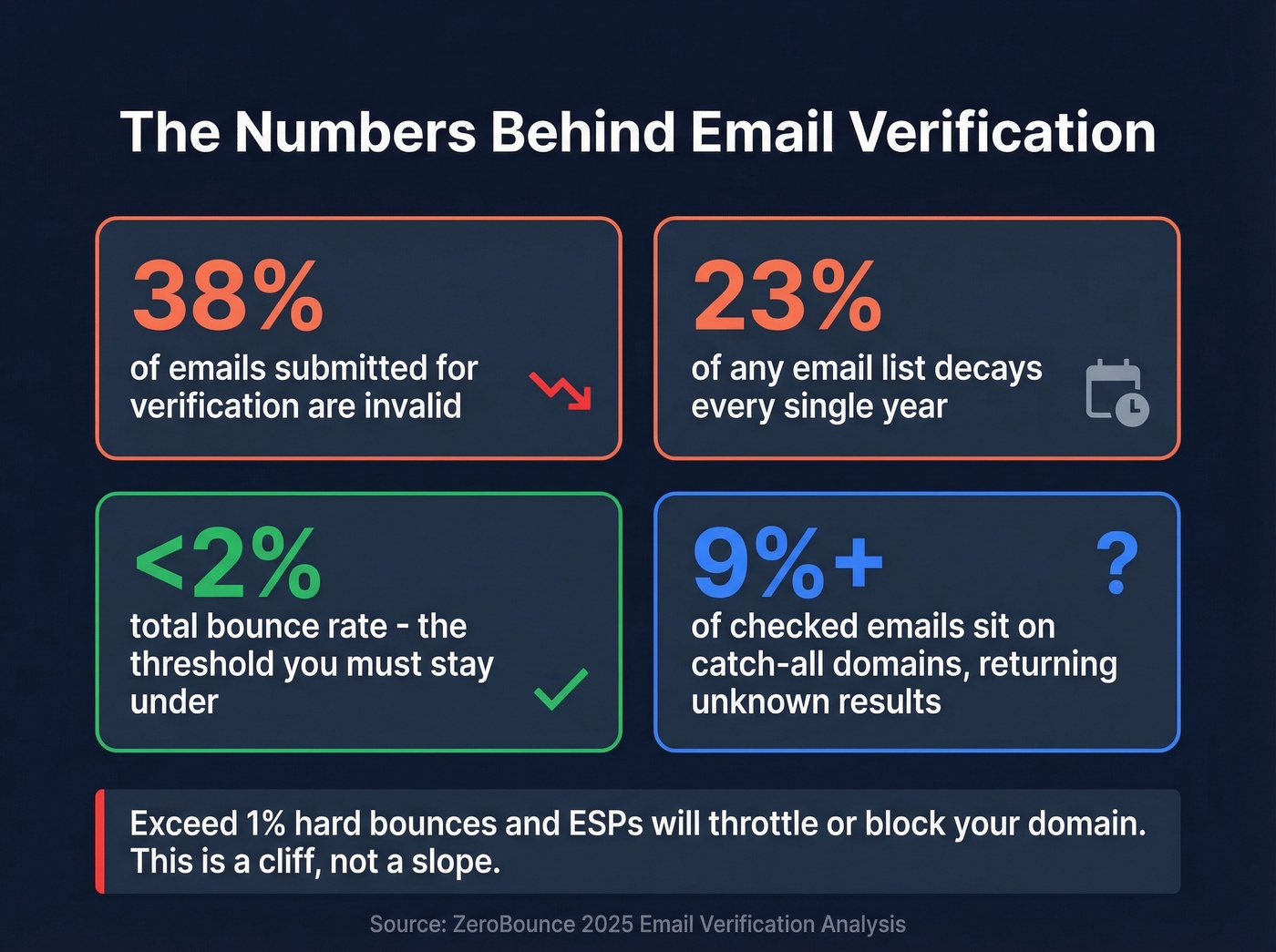
ZeroBounce's analysis of emails verified through 2025 found that list decay runs at least 23% annually. People change jobs, companies rebrand domains, mailboxes get deactivated. Over 9% of all checked emails sat on catch-all domains, meaning standard verification couldn't even give a definitive answer.
The math is simple. If only 62% of submitted emails are valid and you're sending without verification, you're starting with a 38% invalid rate on day one. That's not a deliverability problem - it's a data problem. (More on fixing the root cause in our email deliverability guide.)

You just read that 38% of emails fail verification before they're even sent. That's a data source problem, not a verification problem. Prospeo's 5-step verification - with catch-all handling, spam-trap removal, and honeypot filtering - happens before the email ever reaches you. 98% accuracy. ~$0.01 per email.
Skip the cleanup step. Start with emails that are already verified.
Five Methods to Verify an Email Address
Method 1 - Syntax Validation
The simplest check: does this string look like an email address? You need a local part, an @ symbol, and a domain. john.smith@company.com passes. john.smith@ doesn't.
Sounds trivial, but the RFC 5322 specification that defines email address format is anything but simple. The "canonical" regex for full RFC compliance runs hundreds of characters long, and it still can't handle nested comments - a feature of the spec that makes the grammar context-free rather than regular. RFC 5321 further restricts the domain part to hostnames and address literals, so a 5322-valid address isn't necessarily 5321-valid. In practice, nobody needs that level of pedantry.
Skip the custom regex. Use a library parser instead. Python's email.utils.parseaddr() and Go's net/mail.ParseAddress() both parse per RFC 5322 and handle edge cases you'd never think to test. They'll catch the obvious garbage - missing @ symbols, spaces, double dots - without the maintenance headache of a hand-rolled pattern.
Here's the thing: regex validation is necessary but wildly insufficient. It'll tell you an address is formatted correctly. It won't tell you if anyone's home.
Method 2 - DNS and MX Record Checks
Once syntax passes, check whether the domain can actually receive email. This means looking up MX (Mail Exchange) records - the DNS entries that tell the internet which servers handle mail for a domain.
Three commands you can run right now:
dig @8.8.8.8 MX example.com +short
nslookup -type=MX example.com 8.8.8.8
host -t MX example.com
The dig command with +short gives you the cleanest output. The @8.8.8.8 targets Google's public resolver so you're not relying on potentially stale local DNS cache.
One critical pitfall: don't use A-record lookups (LookupHost in Go, for example) as a proxy for email readiness. We've seen developers make this mistake and silently reject valid addresses for months. A domain with no website can still receive email perfectly fine - it just needs MX records, not a web server.
A Cisco support doc notes that when domains publish multiple TXT records, nslookup can fail to list the SPF record, so dig is the safer choice for TXT queries. If a domain has SPF and DMARC configured, it's almost certainly receiving email. No MX records at all? That address is dead. (If you’re troubleshooting auth, see SPF record examples and DMARC alignment.)
Method 3 - Disposable Email Detection
Disposable email services like Mailinator and Guerrilla Mail let anyone create a throwaway address in seconds. These addresses are technically valid - they pass syntax checks, the domains have MX records, and the mailboxes exist. But sending to them is pointless at best and reputation-damaging at worst.
Detection works through maintained blocklists. The most widely used is an open-source repository on GitHub that catalogs thousands of disposable domains. PyPI uses this list to block disposable addresses during account creation - a solid credibility signal. Implementation is straightforward: extract the domain from the email address, match it against the blocklist at the second-level domain. The repo includes code snippets for Python, Go, Node, PHP, and Ruby, plus an allowlist for domains that get falsely flagged.
Update the list regularly. New disposable services pop up constantly.
Method 4 - SMTP Handshake Verification
This is where verification gets real. An SMTP handshake simulates the beginning of an email delivery without actually sending a message - the most direct way to test mailbox existence. You're knocking on the door to see if anyone answers.
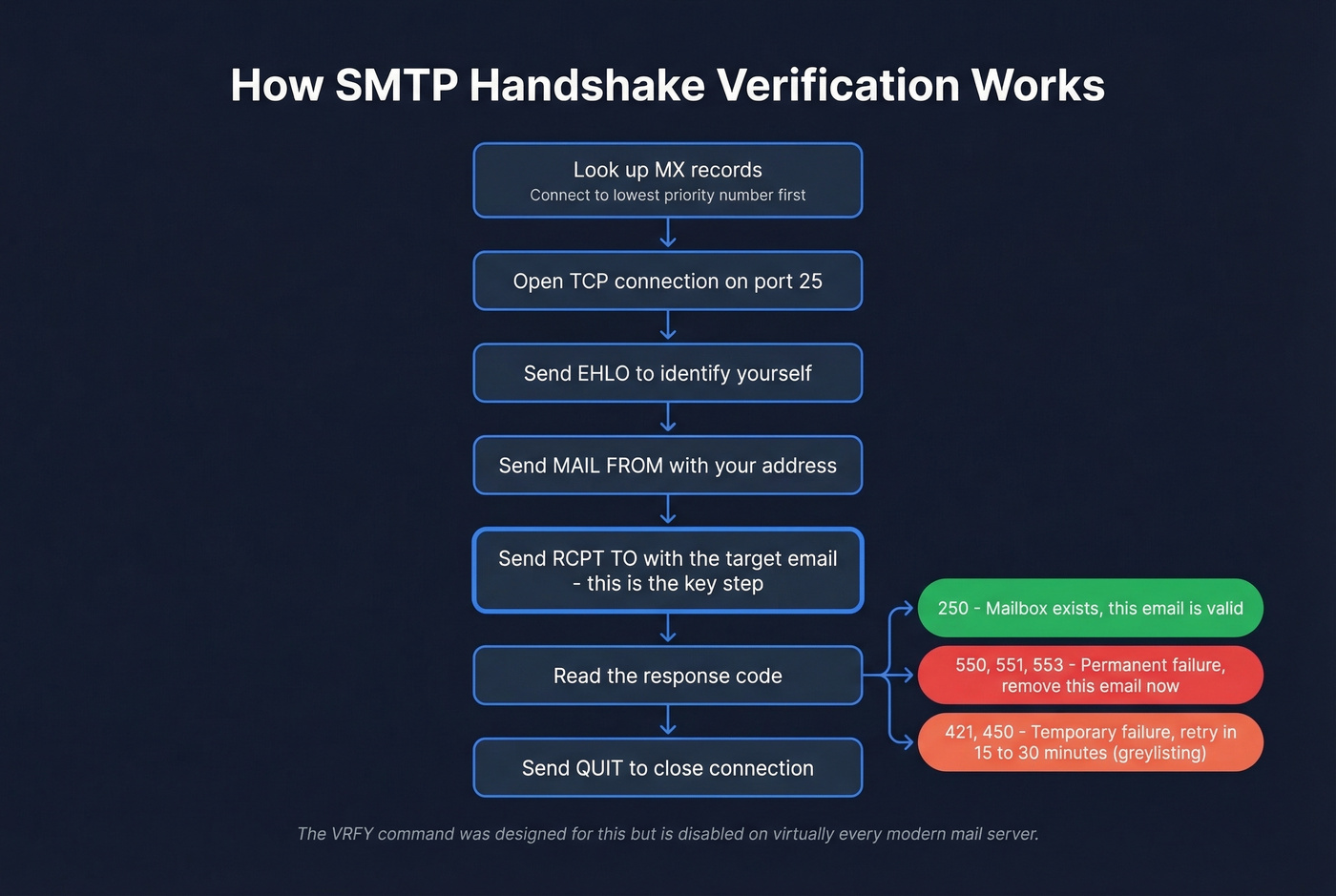
The SMTP conversation follows this sequence:
- Look up the domain's MX records (Method 2). Lower MX priority numbers mean higher priority - connect to the lowest-numbered MX first.
- Open a TCP connection to that server on port 25.
- Send
HELOorEHLOto identify yourself. - Send
MAIL FROM:<test@yourdomain.com>to set a sender. - Send
RCPT TO:<target@theirdomain.com>- this is the key step. - Read the response code.
- Send
QUIT.
The response to RCPT TO tells you what you need to know:
- 250 - mailbox exists (valid)
- 550, 551, 553 - permanent failure (invalid, remove immediately)
- 421, 450 - temporary failure (greylisting or rate limiting)
If you get a 450, the server is likely greylisting - deliberately rejecting the first attempt to filter spam. Retry after 15-30 minutes with backoff. Legitimate senders retry; spammers don't. And forget the VRFY command, which was designed specifically to verify mailboxes. It's disabled on virtually every modern mail server because spammers abused it for address harvesting.
SMTP handshake verification has serious limitations at scale. Catch-all domains return 250 for every address, real or fake. Enterprise security gateways from Proofpoint, Mimecast, and Barracuda often block SMTP probes entirely. Aggressive rate limiting means you can't check thousands of addresses without getting your IP blacklisted. Manual SMTP verification is educational but impractical for anything beyond a handful of addresses - which brings us to the practical answer.
Method 5 - Use a Verification Tool
For anything beyond a handful of addresses, you need a tool that automates the entire pipeline: syntax, DNS, disposable detection, SMTP handshake, catch-all handling, spam-trap identification, and honeypot filtering. No manual method covers all of those, and the difference between a budget bulk verifier and a premium platform comes down to how they handle the ambiguous cases. (If you’re evaluating options, our AI email checker guide breaks down what “smart” verification actually means.)
The Catch-All Problem
Catch-all domains are the single biggest reason verification tools return "unknown" instead of a clean valid/invalid answer. A catch-all server accepts every recipient at the domain - real.person@company.com and asdfghjkl@company.com both get a 250 response. SMTP can't distinguish between them.
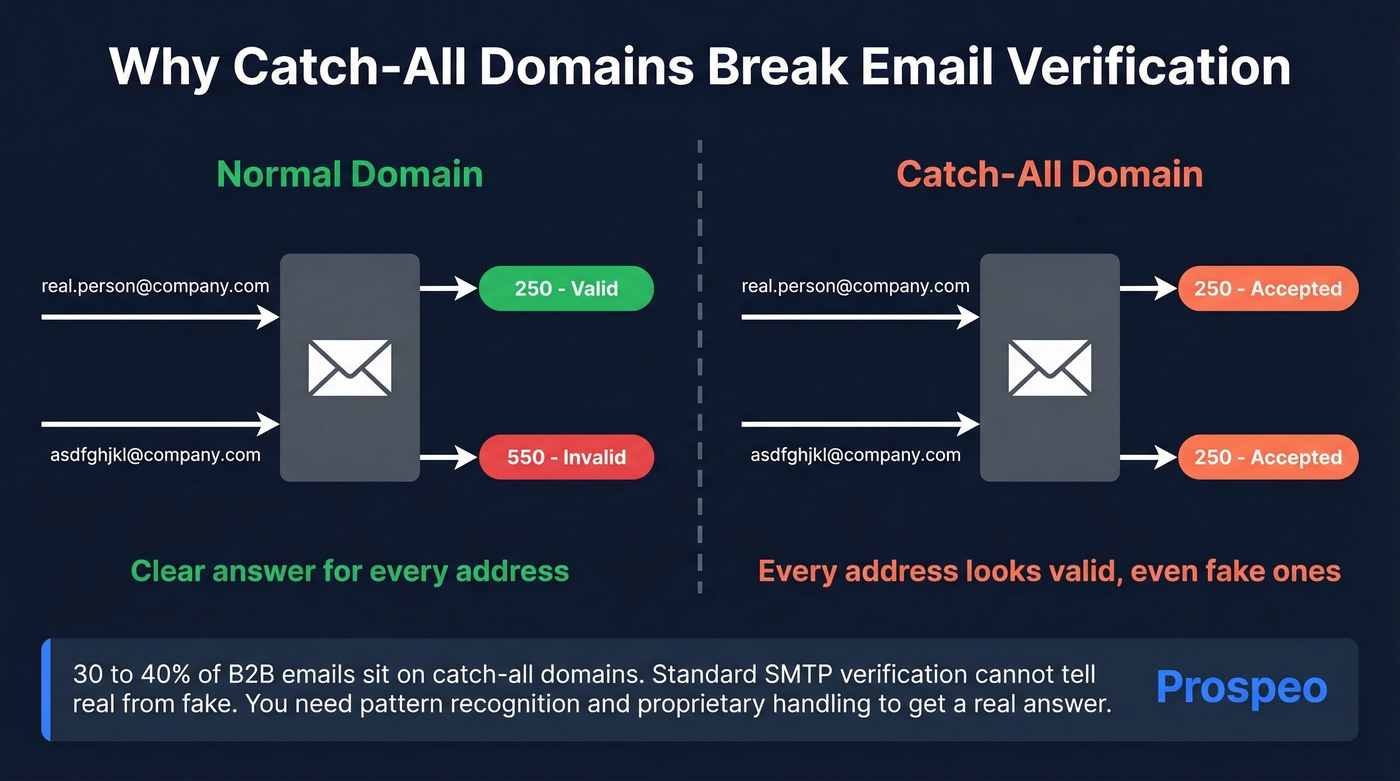
This isn't a niche issue. In our testing, catch-all domains account for the majority of "unknown" results from every verifier we've tried. Roughly 30-40% of B2B email addresses sit on catch-all domains, and the percentage climbs in enterprise environments where Proofpoint and Mimecast gateways block SMTP probes entirely, creating a separate category of unknowns that has nothing to do with catch-all configuration.
You can detect catch-all domains yourself: send a RCPT TO for a random gibberish address at the domain. If the server returns 250, it's catch-all. But detecting the problem doesn't solve it. Prospeo's 5-step verification includes proprietary catch-all handling and pattern recognition to produce a binary verdict where most verifiers just return "unknown" and shrug.
Email Verification Tools Compared
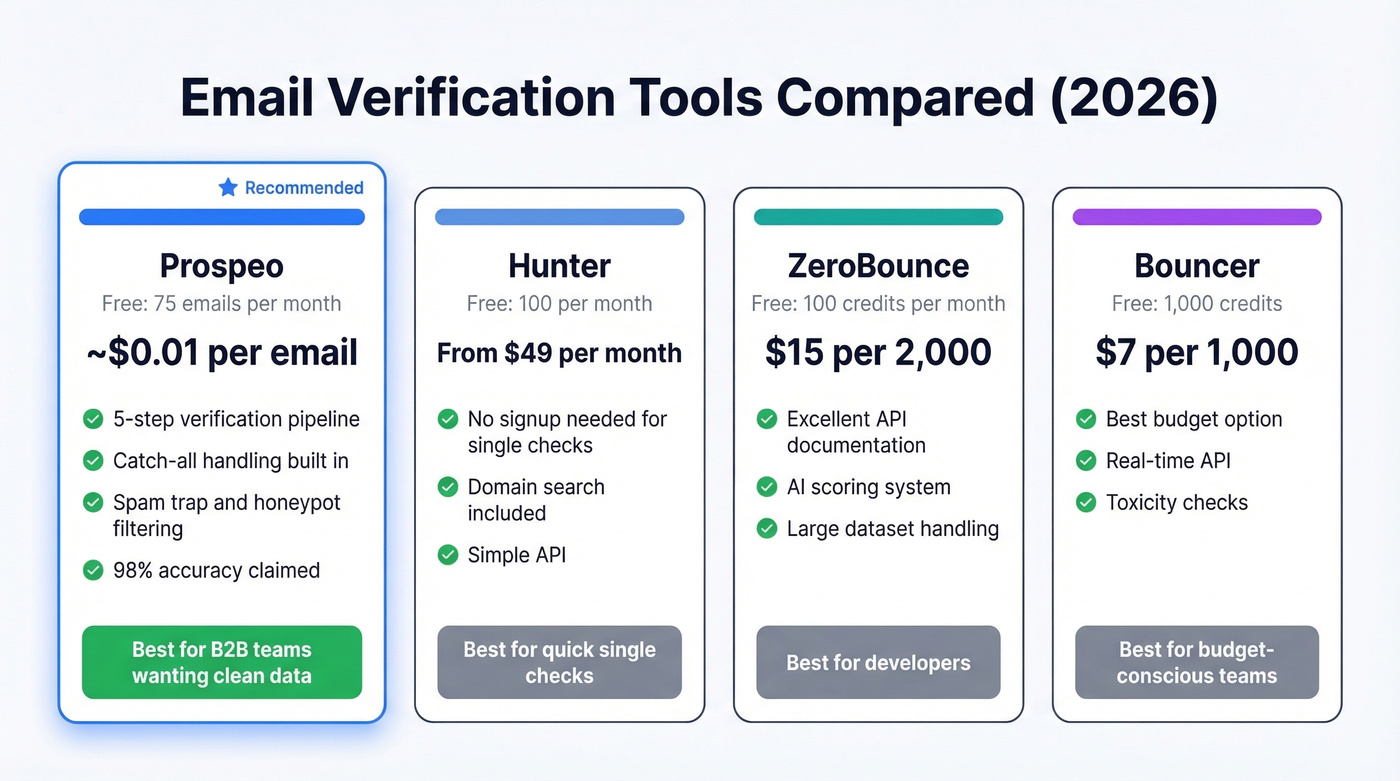
| Tool | Free Tier | Pricing | Key Strength | Best For |
|---|---|---|---|---|
| Prospeo | 75 emails/mo | ~$0.01/email | 5-step + catch-all | B2B teams wanting clean data |
| Hunter | 100/mo | From $49/mo | No-signup checks | Quick single checks |
| ZeroBounce | 100 credits/mo | $15 per 2,000 | API docs, large datasets | Developers |
| Bouncer | 1,000 credits | $7 per 1,000 | Best per-1K price | Budget bulk verification |
| NeverBounce | 1,000 credits | $8 per 1,000 | Integrations | Mid-volume list cleaning |
| Mailmeteor | 50/mo | Free single checks | Google Sheets native | Gmail users |
| Verifalia | Free tier | Paid plans available | 30+ validation steps | Real-time single checks |
Prospeo
Let's be honest: if 38% of your emails are bouncing, your data provider is the problem, not your verification tool. Prospeo solves the upstream issue by finding and verifying emails in a single step. Its 5-step verification pipeline covers syntax, domain, mailbox existence, catch-all handling, spam-trap removal, and honeypot filtering - all before an email ever hits your list.
The numbers back this up. Snyk's team of 50 AEs went from a 35-40% bounce rate to under 5% after switching. That's not a verification improvement - that's a data source improvement. When your emails are verified at the point of collection and refreshed on a 7-day cycle (the industry average is six weeks), you don't need a separate cleaning step.
Free tier gives you 75 emails per month. Paid plans run about $0.01 per email with no contracts and no annual commitment. For teams tired of paying for a database and then paying again to verify the data they just bought, this collapses both steps into one. (Related: best email list providers and data enrichment services.)

Hunter
You've got five emails to check before your 2pm call block. You don't want to create an account, upload a CSV, or read documentation. Hunter is the tool for that moment - paste an address into the website, get a result, move on. No signup required for single checks.
The free plan includes 100 verifications per month. Paid plans start at $49/mo and bundle email finding with verification. Hunter offers proprietary accept-all (catch-all) verification with several major email providers. For a sales rep doing quick spot-checks, it's the fastest path. For high-volume B2B verification where ambiguous results cost you money, you'll want a deeper pipeline.

ZeroBounce
ZeroBounce processes 11B+ emails and publishes some of the most useful industry data on list decay and email validity - the 23% decay stat cited throughout this article comes from their 2026 report. Their annual analyses are genuinely worth reading if you care about deliverability trends.
As a verification tool, ZeroBounce shines for developers. The API documentation is thorough, the response format is clean, and they offer 100 free credits per month. Pricing works out to about $7.50 per 1,000 on the $15/2,000 minimum purchase. For pure verification - especially if you're building it into a product or signup flow - it's a strong choice. For B2B prospecting where you also need to find emails, you'll need to pair it with a separate data source.
Bouncer, NeverBounce, Mailmeteor, and Verifalia
Bouncer is the budget king at $7 per 1,000 emails with 1,000 free credits to start. No frills, no fancy dashboards - just reliable bulk verification at the lowest per-unit cost. Skip this if you need catch-all handling or email finding; at this price point, that's not the ask. (If you’re shopping around, see Bouncer alternatives.)
NeverBounce sits at $8 per 1,000 with a similar 1,000 free credits. Its real edge is integrations - direct connections to Mailchimp, ActiveCampaign, and a long list of ESPs and CRMs mean you can trigger verification inside existing workflows rather than exporting CSVs back and forth. For mid-volume teams already embedded in a CRM workflow, it's the path of least friction.
Mailmeteor offers free single-email checks with no signup, plus a Google Sheets add-on for small-batch verification at 50 free per month. If you live in Gmail and Sheets, it's the path of least resistance.
Verifalia runs over 30 verification steps including DNS/MX checks and SMTP diagnostics, returning real-time deliverability results without sending messages. If you want a detailed report on a single address, it's a strong option.
Running SMTP handshakes, maintaining disposable domain blocklists, checking MX records - that's a lot of infrastructure to compensate for bad data. Prospeo refreshes every record on a 7-day cycle and runs proprietary verification so you don't have to. Teams using Prospeo see bounce rates under 4%, down from 35%+.
Replace your entire verification stack with one data source that gets it right.
How to Read Verification Results
Every tool returns slightly different labels, but they map to six categories:
- Valid - send with confidence. The mailbox exists and accepts mail.
- Invalid - remove immediately. This address will hard bounce and damage your sender reputation.
- Catch-all / Unknown - the server accepts everything, so the tool can't confirm the specific mailbox. Send cautiously, or use a tool with catch-all handling to get a clearer verdict.
- Risky - typically role-based addresses like info@, sales@, or support@. These go to shared inboxes. Send only if the account is high-value enough to justify the risk.
- Spam Trap - remove and investigate. Spam traps are addresses operated by ISPs or blocklist providers specifically to catch senders with poor list hygiene. Hitting one can get your entire domain blacklisted overnight. (If you suspect you’ve hit one, start with spam trap removal.)
- Disposable - remove. These are throwaway addresses that'll be abandoned within hours.
Most free tools cap you at 3-100 checks. That's a demo, not a solution. If you're verifying lists regularly, budget for a paid tier - the cost per email is negligible compared to the domain reputation damage from a single bad send. And if verification has become a recurring chore, the real fix is switching to a data source that doesn't hand you bad emails in the first place.
FAQ
Can I verify an email without sending a message?
Yes. SMTP handshake verification uses the RCPT TO command to confirm mailbox existence without delivering anything. It's unreliable for catch-all domains and gets blocked by many enterprise security gateways, but works for straightforward cases. Dedicated tools use multi-step methods beyond SMTP to handle these edge cases and return a definitive answer.
How often should I re-verify my email list?
At minimum, quarterly. Email lists decay by 23% per year, meaning roughly 6% goes stale every 90 days. High-volume senders should verify monthly - or use a data source with a weekly refresh cycle so the problem never compounds. If your list is older than three months, expect elevated bounces without re-verification.
What's a safe bounce rate for cold email?
Keep total bounces below 2% and hard bounces below 1%. Exceed these thresholds and ESPs will throttle or block your sending domain. If you're consistently above 2%, the problem is your data source, not your verification process - switch providers before adding another verification layer.
How do I check if an email is valid for free?
Hunter provides 100 free verifications with no signup, Bouncer gives 1,000 free credits, and Prospeo offers 75 verified emails per month with full catch-all handling included. For one-off checks, these free tiers are plenty. For ongoing list hygiene at scale, you'll eventually need a paid plan - most start under $10 per 1,000 emails.
What should I do before a campaign launch?
Run your entire list through a bulk verification tool 24-48 hours before sending. Remove all invalid and disposable results, quarantine risky and unknown addresses, and only send to verified-valid contacts. This pre-send sweep is the single most effective way to keep your bounce rate under the 2% threshold that protects your sender reputation.