

How to Check If Your Domain Is Blacklisted - And What to Do About It
Your open rates just cratered. Email verification says everything's clean, but replies have gone silent and bounce notifications are trickling in from domains that worked fine last week. The most likely culprit: a blacklist you didn't know existed.
Over 300 public spam blacklists are operating right now, and your domain or IP could be on any of them without a single alert hitting your inbox. Here's how to find out fast and fix it.
Do This Right Now
Before you read another word, run these three checks:
- MxToolbox Blacklist Check - enter your domain or sending IP for an instant multi-list scan across 100+ DNS-based email blacklists.
- Spamhaus Lookup - Spamhaus is one of the most widely used and highest-impact blocklist providers.
- Google Postmaster Tools - if you send to Gmail recipients, this is the only way to see how Google views your domain reputation.
One distinction upfront: IP blacklists, domain/URI blocklists, and web browser blacklists are three different things. You can be listed on one without the other. And if you are listed, don't panic - most delistings resolve in 24-48 hours once you fix the root cause.
Three Types of Blacklists
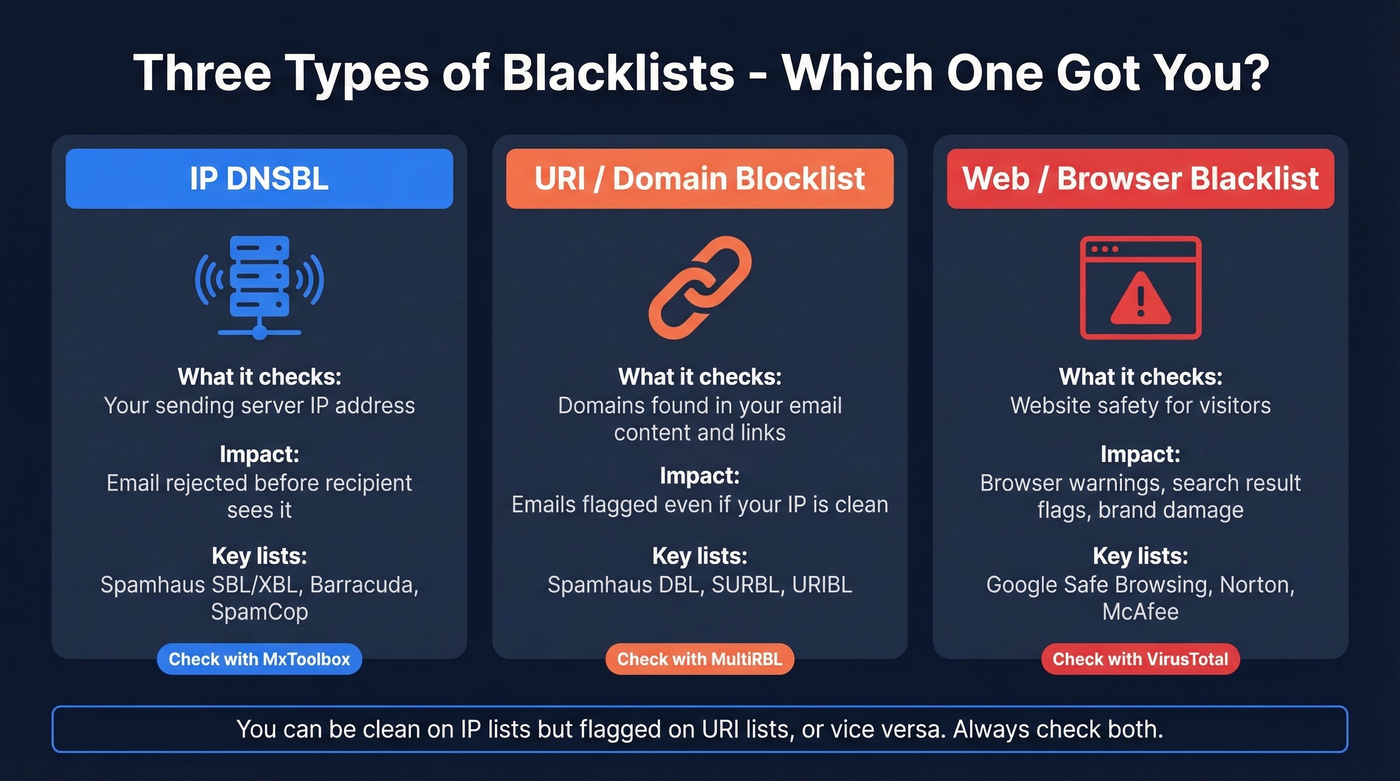
When someone asks "is my domain blacklisted," they could mean three very different things. The fix depends entirely on which type.
| Type | What It Checks | Examples |
|---|---|---|
| IP DNSBL | Sending server's IP | Spamhaus SBL/XBL, Barracuda, SpamCop |
| URI/Domain Blocklist | Domains in email content/links | Spamhaus DBL, SURBL, URIBL |
| Web/Browser Blacklist | Website safety for visitors | Google Safe Browsing, Norton, McAfee |
IP DNSBLs are the classic spam blacklists. When your mail server connects to a recipient's server, that server queries DNS to check whether your sending IP is flagged. If it is, your email gets rejected before the recipient ever sees it.
URI/domain blocklists don't care about your sending IP - they scan email content for domains that appear in known spam. If your domain shows up in links inside spam messages, you'll land on lists like Spamhaus DBL or SURBL. A clean IP scan doesn't guarantee delivery.
Web/browser blacklists like Google Safe Browsing flag your website as dangerous to visitors. This isn't about email - it's about malware, phishing pages, or compromised sites. But it tanks your brand reputation and can drag down email trust too, since spammy backlinks and a compromised site feed into broader domain reputation signals that affect deliverability.
Here's the key insight: you can be clean on IP lists but flagged on URI lists, or vice versa. Always check both. A thread on r/sysadmin captured this perfectly - a user's blacklist scans came back clean, but emails still bounced. The culprit turned out to be a URL in their email signature flagged on a content-based blocklist.
How to Run a Domain Blacklist Check
Scan IP and Domain Lists
Start with MxToolbox. Enter your domain or sending IP address, and it scans against 100+ DNSBLs simultaneously. You'll get a green/red grid showing which lists you're clean on and which ones have flagged you - the fastest way to get a broad picture in seconds.

Next, run a Spamhaus Lookup directly. Spamhaus operates some of the most widely referenced blacklists in the industry - SBL, XBL, DBL, and PBL. Many enterprise mail gateways and MTAs use Spamhaus by default, often alongside Barracuda, so a listing here carries disproportionate impact compared to obscure lists.
For a deeper technical check, use MultiRBL. It's a sysadmin favorite that queries a massive number of DNSBLs and also runs an FCrDNS (forward-confirmed reverse DNS) check. Neutral/blue entries in MultiRBL are informational, not actionable - don't fire off removal requests for those.
Check Gmail Reputation
If you send to Gmail recipients - and you almost certainly do - set up Google Postmaster Tools. It's free and shows Gmail's internal view of your domain reputation, spam rate, IP reputation, and authentication status.
Setup requires publishing a TXT verification record in your DNS. You'll need roughly 100+ daily messages to unique Gmail recipients before data populates consistently, and it updates daily with a 24-48 hour lag, so it's not real-time. Note that V1 was retired in September 2025, and Google tightened enforcement in late 2025 with increased rejections and rate limits for senders failing key requirements. Make sure you're on V2 heading into 2026.
Check Website Blacklisting
If you suspect your website itself is flagged - browsers showing warning pages, or Google search results displaying "This site may be hacked" - check the Google Transparency Report for your domain's Safe Browsing status.
For a broader scan, run your domain through VirusTotal, which checks against dozens of antivirus and web reputation engines simultaneously. Especially useful if you want to find out whether your domain is flagged across security vendors beyond just email blocklists.

Most domain blacklistings trace back to one root cause: sending to bad email addresses. Bounces spike, spam traps trigger, and suddenly you're on Spamhaus. Prospeo's 5-step verification with spam-trap removal and honeypot filtering delivers 98% email accuracy - keeping bounce rates under 3% across 15,000+ companies.
Stop fixing blacklist damage. Start preventing it with verified data.
Which Blacklists Actually Matter
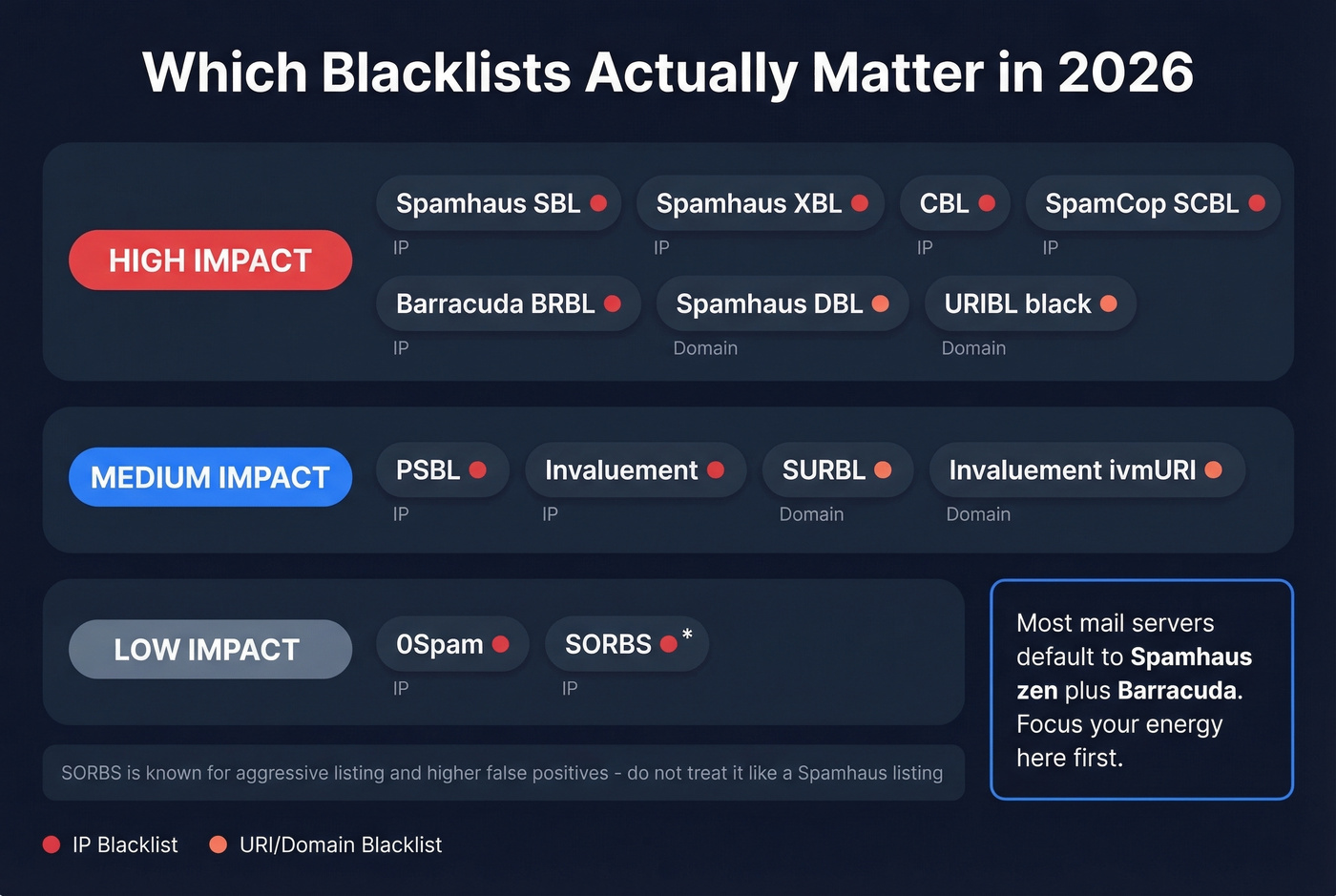
Let's be honest: being listed on some obscure blacklist that three mail servers reference isn't going to tank your deliverability. The lists that matter are the ones major mail servers and spam gateways actually query.
| Blacklist | Type | Impact | Delisting |
|---|---|---|---|
| Spamhaus SBL | IP | High | Manual via ISP/network owner |
| Spamhaus XBL | IP | High | Auto after fix |
| CBL | IP | High | Self-removal |
| SpamCop SCBL | IP | High | Auto 24-48h |
| Barracuda BRBL | IP | High | Manual request |
| PSBL | IP | Medium | Auto after trap stops |
| Invaluement | IP | Medium | Request via portal |
| Spamhaus DBL | URI/Domain | High | Manual request |
| URIBL (black) | URI/Domain | High | Auto or request |
| SURBL | URI/Domain | Medium | Request via portal |
| Invaluement ivmURI | URI/Domain | Medium | Request via portal |
| 0Spam rbl.0spam.org | IP | Low-Medium | Auto within 24h |
| 0Spam bl.0spam.org | IP | Low-Medium | Account-based self-serve removal |
In practice, many mail servers default to Spamhaus zen (which bundles SBL, XBL, and PBL) plus Barracuda. SpamCop is a common addition. This is what sysadmins actually wire into their mail transfer agents - we've seen this confirmed repeatedly in admin forums.
SORBS deserves a mention because you'll see it in scan results, but it's known for aggressive listing with higher false-positive rates. Don't treat a SORBS listing the way you'd treat a Spamhaus listing. And don't lose sleep over a listing on a list nobody uses - focus your energy on the high-impact lists above.
How to Interpret Your Results
A clean scan across all major lists is great news - but it doesn't guarantee inbox delivery. Gmail, Outlook, and Yahoo all maintain internal reputation systems that go far beyond public blacklists. If your scans are clean but emails still land in spam, check URI/domain blocklists (not just IP lists), content reputation, SPF/DKIM/DMARC authentication failures, and your Google Postmaster Tools dashboard.
On MultiRBL specifically, blue/neutral entries are informational. They aren't listings - they're data points. Sending removal requests to list operators for neutral entries wastes everyone's time and can hurt your credibility.
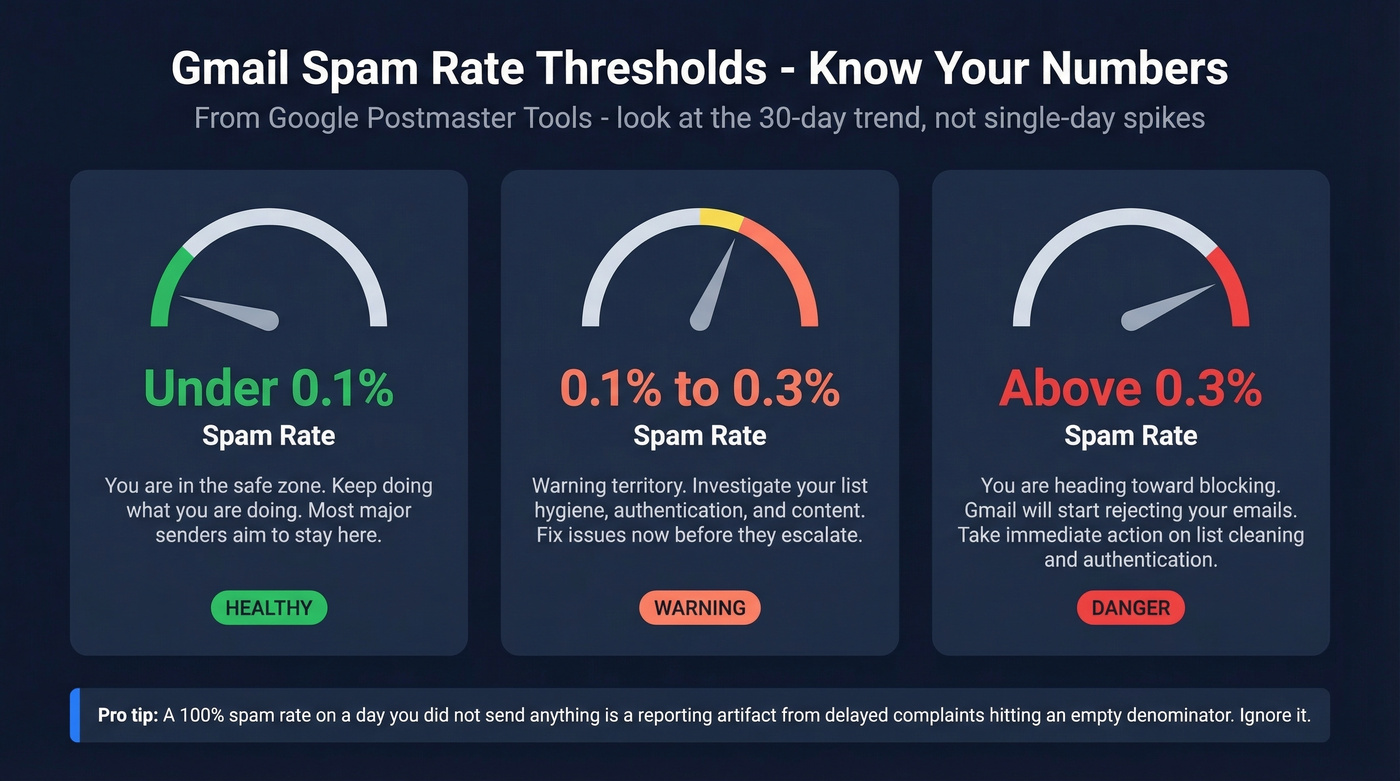
One Postmaster Tools quirk worth knowing: you'll sometimes see a 100% spam rate on days when you didn't even send anything. That's a reporting artifact caused by delayed complaints hitting an empty denominator. Ignore single-day spikes and look at the 30-day trend instead. A sustained spam rate above 0.1% is a warning sign. Above 0.3% consistently, and you're heading toward blocking territory.
How to Get Delisted
Fix the Root Cause First
Requesting delisting before fixing the underlying problem is pointless. You'll get relisted within hours. Before you submit a single removal request:
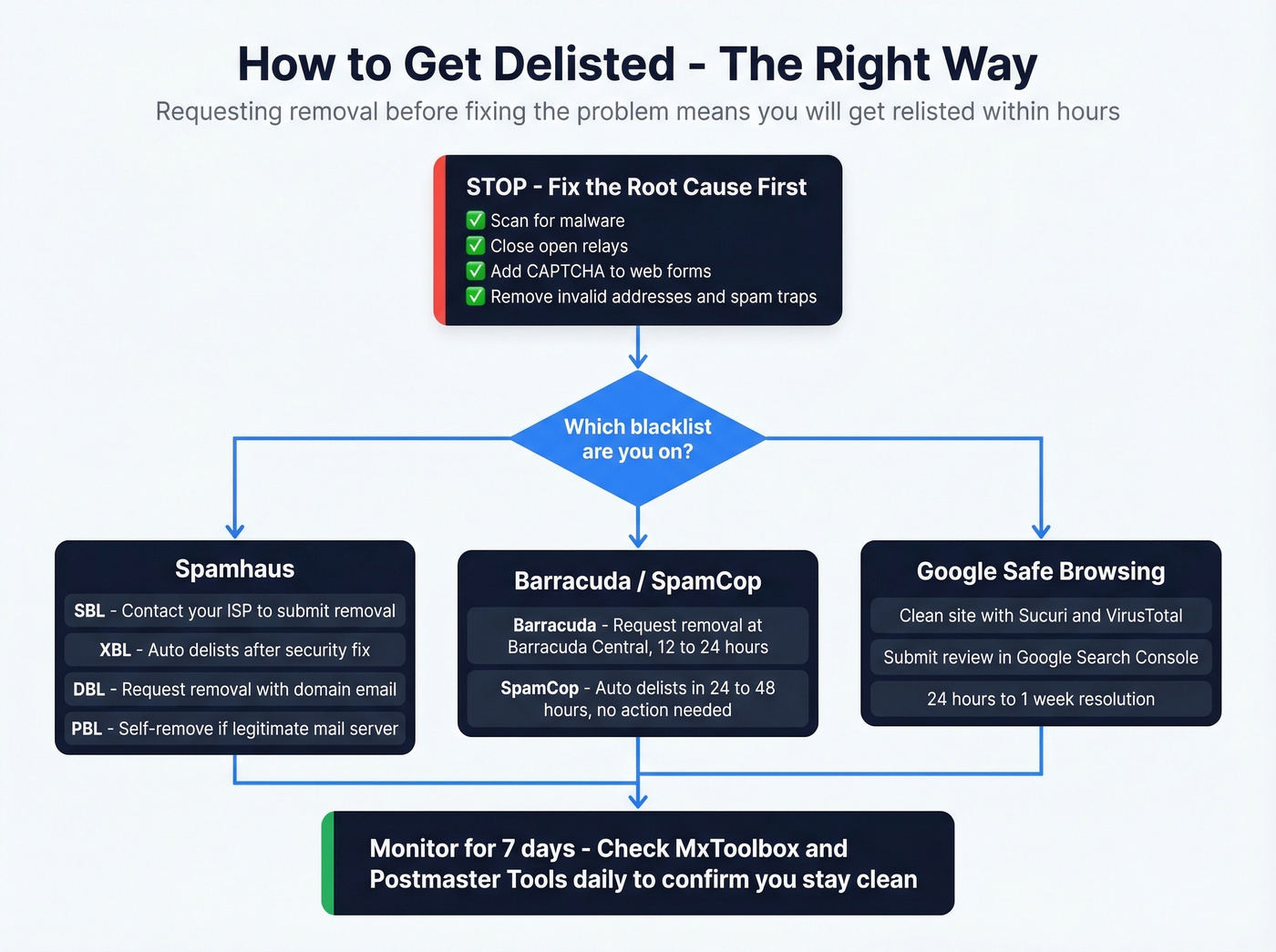
- Scan your server and website for malware
- Close any open relays
- Add CAPTCHA and rate limiting to web forms
- Remove invalid addresses and spam traps from your lists
- Verify SPF, DKIM, and DMARC alignment
Spamhaus
Stop sending immediately once you confirm a Spamhaus listing. Continued sending worsens your reputation and delays delisting. Use the Spamhaus Lookup tool to identify exactly which list you're on - the remediation path differs for each:
- SBL: The ISP or network owner submits the removal request, not the end user. Contact your hosting provider and have them use the "Contact the SBL Team" link on your listing page. Typical resolution is 24-48 hours after validation.
- XBL: Uses CBL data. Follow CBL's instructions - delisting is often automatic within hours once the security issue is corrected.
- DBL: Domain owners can request removal directly using an email address associated with the listed domain. Free webmail addresses won't work.
- PBL: A policy list, not a spam list. You can self-remove if you're running a legitimate mail server on a static IP.
Spamhaus doesn't accept payment for faster removal. Anyone offering "paid Spamhaus delisting" is running a scam.
Barracuda, SpamCop, and Others
Barracuda BRBL: Look up your IP at Barracuda Central, then click Request Removal. You'll get a verification email. Typical turnaround is 12-24 hours.
SpamCop auto-delists within 24-48 hours as long as no new spam reports come in. Nothing to submit.
SORBS: Look up your IP, identify which sub-list you're on, and follow the delisting link. You'll need to create an account. Timeline varies from hours to days.
UCEProtect: Level 1 listings expire automatically after 7 days. Levels 2 and 3 require contacting your host or network operator.
Google Safe Browsing
If your website is flagged, go to Google Search Console > Security Issues to see the specific category. Before requesting review, scan your site with Sucuri SiteCheck and VirusTotal to confirm you've cleaned everything. Then submit a Request Review through Search Console. Minor infections typically clear within 24-48 hours; complex compromises can take a week or more. Also check Norton Safe Web and McAfee TrustedSource separately - they maintain independent reputation databases.
How to Prevent Future Blacklisting
Lock Down Authentication
SPF, DKIM, and DMARC aren't optional anymore. Set your SPF record with -all (hard fail) rather than ~all. Sign all outbound mail with DKIM. Publish a DMARC policy - start with p=none for monitoring, then move to p=quarantine or p=reject once everything's aligned. Authentication failures are one of the fastest paths to a blacklisting. If you want to go deeper on alignment, see DMARC alignment and SPF record specifics.
Monitor and Warm Up
Set up Google Postmaster Tools and check it weekly. Wondering whether your sending domain is flagged shouldn't be a question you ask only after deliverability tanks - proactive monitoring catches problems early. The spam rate benchmarks are straightforward: below 0.1% is healthy, above 0.3% consistently means you're in trouble. Catching a spike early, before it triggers a listing, is the whole point.
If you're spinning up a new domain or IP for outbound, warm it up gradually over 2-4 weeks. Start with small volumes to engaged recipients, then ramp. Sudden volume spikes from a fresh domain are a textbook blacklist trigger. Keep your sending volume consistent day to day - erratic patterns look like spam. For sending limits and pacing, use an email velocity framework.
Clean Your Contact Data
Look, most blacklistings are a data quality problem, not a sending problem. The #1 preventable cause we see is bad contact data - invalid email addresses that bounce, recycled addresses that are now spam traps, and honeypot addresses that exist solely to catch senders who don't verify their lists. Email addresses decay at 2-3% per month, so even a list that was clean 60 days ago can have enough invalid addresses to trigger a listing.
If you're running cold outbound, verify every address before sending. Prospeo's 5-step verification with catch-all handling, spam-trap removal, and honeypot filtering prevents the bounces and trap hits that trigger listings in the first place. If you’re troubleshooting list hygiene, start with spam trap removal and bounce diagnostics in our email bounce rate guide. For a broader system view, see our email deliverability playbook.
If you're running cold outbound at scale, it also helps to pressure-test your copy and targeting: use proven cold email marketing benchmarks and keep a set of high-performing cold email follow-up templates ready.
Stack Optimize built to $1M ARR using Prospeo while maintaining 94%+ deliverability, sub-3% bounce rates, and zero domain flags across all clients.
If you're reading this article, bad data already cost you. Stack Optimize built a $1M agency on Prospeo and maintained 94%+ deliverability with under 3% bounce rates - zero domain flags across every client. That's what happens when every email passes proprietary catch-all verification before it reaches your outbox.
Replace the data that got you blacklisted. 75 free verified emails to start.
FAQ
How do I check if my domain is blacklisted?
Run your domain through MxToolbox for an instant scan across 100+ blacklists, then follow up with a direct Spamhaus lookup and Google Postmaster Tools. Always check both IP-based and URI/domain-based lists - a clean result on one doesn't guarantee you're clear on the other.
How long does blacklist removal take?
Most blacklists delist within 24-48 hours after you've fixed the underlying issue. SpamCop auto-expires without any action needed. UCEProtect Level 1 takes a full 7 days. Spamhaus requires a manual submission from the ISP or domain owner, with typical resolution in 24-48 hours after validation.
Can I pay to get delisted faster?
No legitimate blacklist charges for removal. Spamhaus explicitly states they don't accept payment for delisting. Any service offering "paid delisting" is either a scam or a middleman charging you for something you can do yourself for free through the list operator's portal.
Why do my emails go to spam even though I'm not blacklisted?
IP blacklists aren't the only filter. Gmail, Outlook, and Yahoo maintain internal reputation scores independent of public lists. Check URI/domain blocklists separately, verify SPF/DKIM/DMARC authentication is passing, review content for flagged URLs, and monitor Google Postmaster Tools for your domain's internal reputation score.