

How to Create a Sales Deck That Actually Closes Deals
You're reusing your 40-slide investor pitch from 2023 in customer meetings. The prospect is polite, nods along, then goes dark. That deck was built to raise money, not close deals - and it's costing you pipeline.
A sales deck has one job: visually and textually present your sales narrative in a way that convinces someone to buy. Learning how to create a sales deck built for buyers, not investors, is the single highest-leverage thing most sales teams can do this quarter.
Sales Deck vs Pitch Deck
Most guides treat these as the same thing. They're different tools for different audiences. The 10/20/30 rule everyone cites? That's for investor pitches, not sales meetings. Investors spend an average of 3 minutes 44 seconds reviewing a pitch deck. Your buyer needs more depth, more personalization, and a clear path to "yes."
| Pitch Deck | Sales Deck | |
|---|---|---|
| Slides | 10-15 | 15-30 |
| Audience | Investors, partners | Buyers, committees |
| Goal | Opens doors | Closes deals |
| Tone | Inspirational | Consultative |
| Detail level | High-level vision | Pricing, ROI, implementation |
Here's the thing: nobody reads 30 slides. Build 30, show 10-15. The modular library is the whole game, and most teams never build one.
The 8-Slide Structure That Works
Based on analysis of 100,000+ sales deck sessions, here's the structure that consistently performs. We've seen this skeleton hold up across SaaS, services, and hardware - you'll add or subtract slides depending on the meeting, but the bones stay the same.
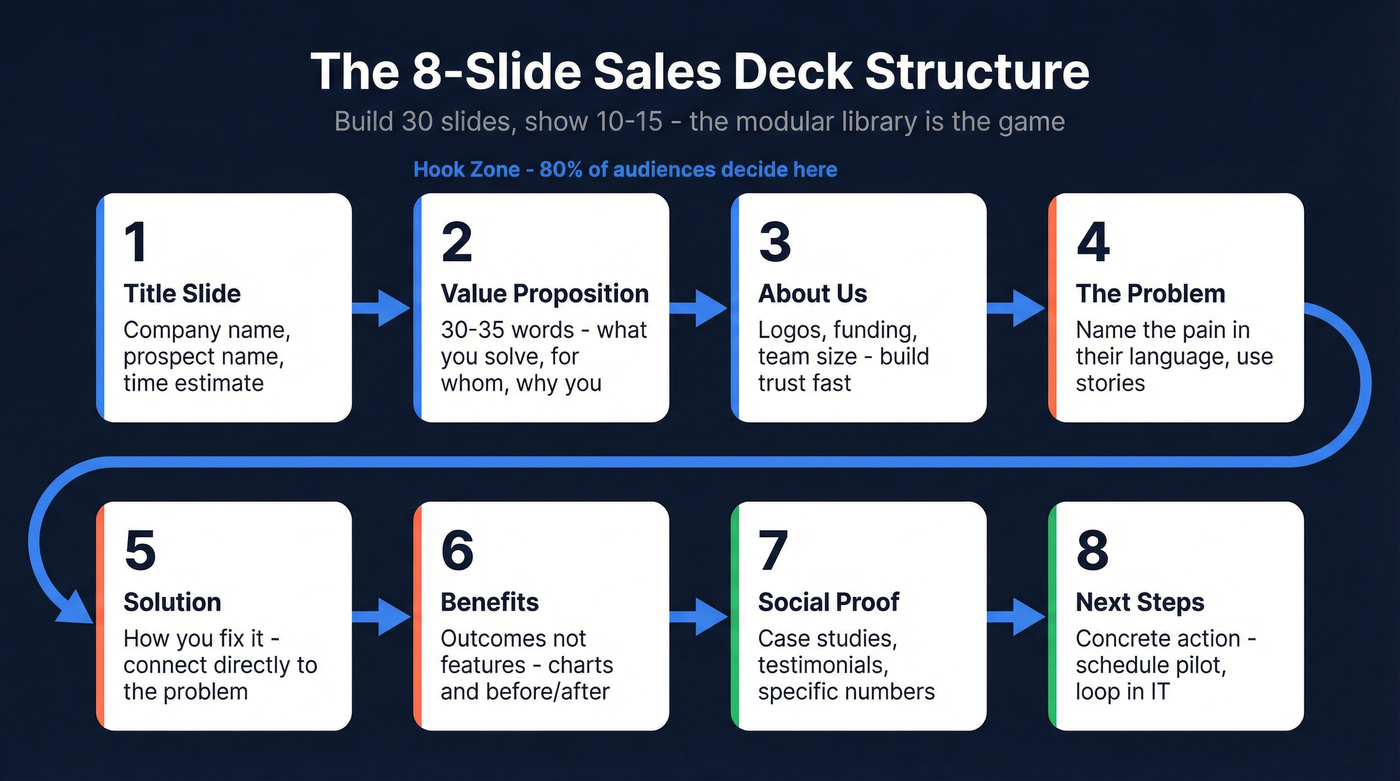
- Title - Company name, prospect name, and how long the deck takes ("5 minutes"). Sets expectations immediately.
- Unique Value Proposition - 30-35 words answering three questions: what you solve, who you solve it for, and why you're best. This isn't your tagline. It's your thesis. (If you need help tightening this, start with a few sample elevator pitches and adapt.)
- About Us - Credibility in 60 seconds. Logos, funding, team size - whatever makes the buyer trust you enough to keep listening.
- Problem - Name the pain in the prospect's language. This is where sales deck storytelling matters most. 63% of people remember stories from a presentation; only 5% remember an individual data point.
- Solution - How you fix the problem. Connect directly to slide 4 - no gap, no pivot.
- Benefits - Outcomes, not features. Presentations built around visuals are 43% more persuasive than text-heavy ones. Use charts, before/after comparisons, and customer metrics here.
- Social Proof - Case studies, testimonials, logos. The more specific the numbers, the better.
- Next Steps - Not "any questions?" but a concrete action: schedule a pilot, loop in IT, send the security questionnaire.
If your first three slides don't hook, you've lost the room. Data shows 80% of audiences stay engaged when the opening three slides land. Front-load your strongest material.
An alternative narrative framework worth knowing: the "coin the shift" approach, where you name a market trend, present evidence, show who's winning, identify the gap, then position your solution. It works especially well in categories where buyers don't yet know they have a problem.
Adapt by Meeting Type
Not every meeting needs all eight slides. Budget 1-2 minutes per slide and work backward from your time slot.
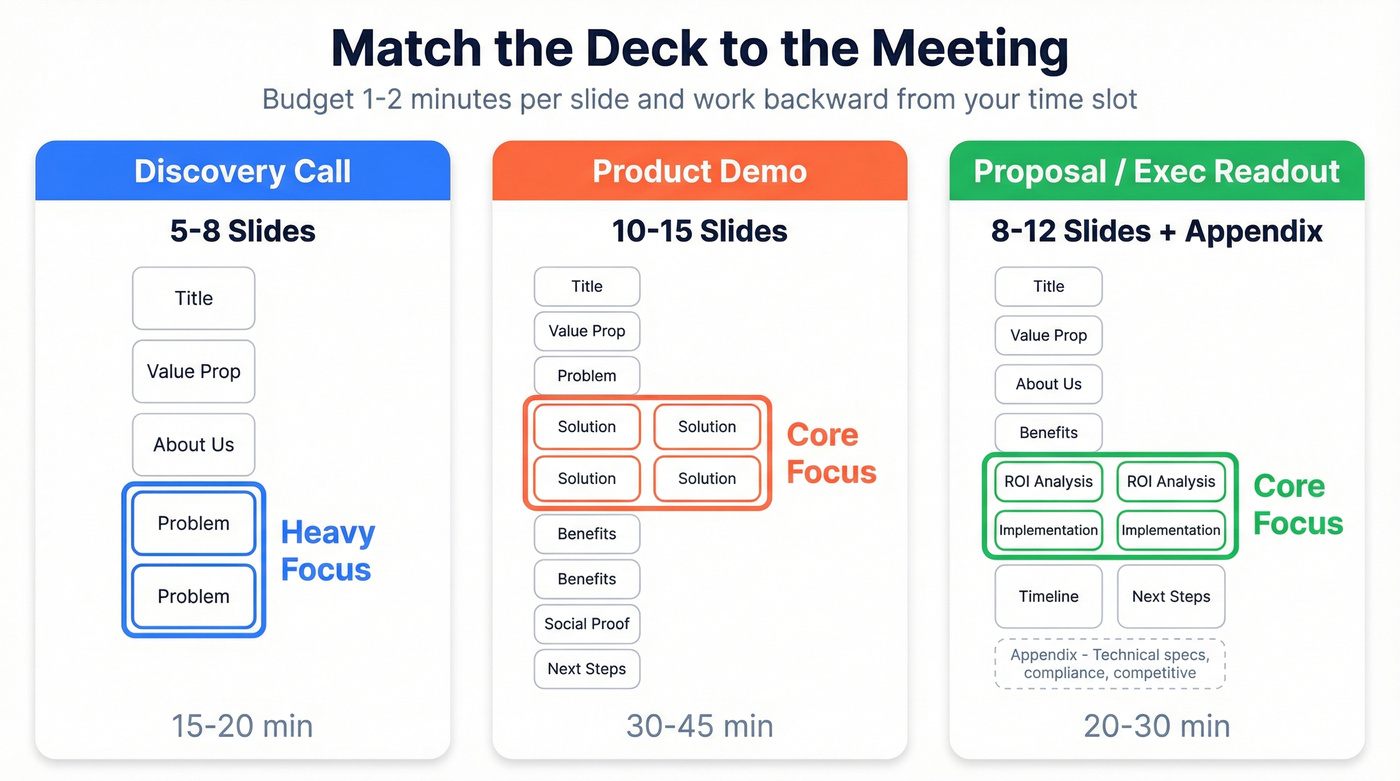
| Meeting Type | Slides | Focus |
|---|---|---|
| Discovery | 5-8 | Problem-heavy, light on solution |
| Demo | 10-15 | Solution + features + proof |
| Proposal / Exec Readout | 8-12 + appendix | ROI, implementation, timeline |
A 20-minute discovery call doesn't need your pricing slide. A proposal meeting with the CFO doesn't need your product walkthrough. Match the deck to the conversation, not the other way around.
One thing we've learned the hard way: build two versions of every deck. A visual-first version for live presentations where you control the narrative, and a detail-rich version for email follow-ups that has to stand on its own without your voice behind it. If you're tightening your post-call process, keep a few sales follow-up templates handy. Threads on r/sales make the same point constantly - deck-building is time-consuming and there's rarely a sales-ready version when you need it. The two-version approach plus a modular slide library cuts that work in half.

A tailored sales deck means nothing if you're presenting to the wrong people. Prospeo maps entire buying committees with 98% accurate emails and verified direct dials across 300M+ profiles - so you show up with the right slides for every stakeholder.
Know every decision-maker before you open your deck.
Tailor by Stakeholder
The average B2B purchase involves 6-10 stakeholders. Each one cares about something different, and a deck that resonates with your champion will bore the CFO and confuse IT. Build a modular library of 30 slides, then assemble 10-15 per meeting based on who's in the room.
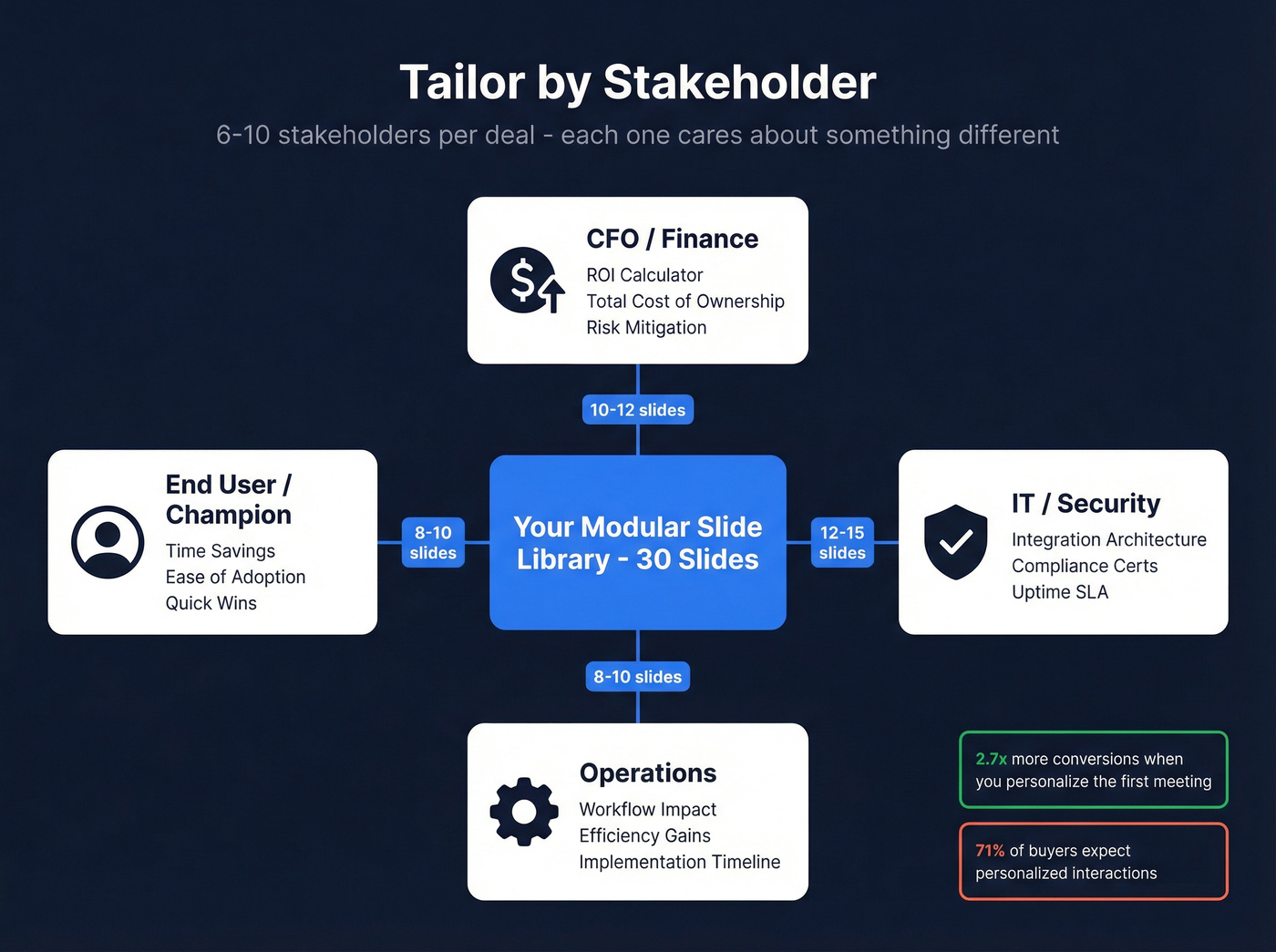
Start every discovery call by asking: "Who else will be involved in this decision?" The answer determines which slides you pull. (If you want a tighter first-call flow, use a discovery call script and swap in your deck slides as prompts.)
| Stakeholder | Priority Slides |
|---|---|
| CFO / Finance | ROI, TCO, risk mitigation |
| IT / Security | Integrations, compliance, uptime |
| Ops | Workflow impact, efficiency gains |
| End User | Time savings, ease of adoption |
This isn't optional. 71% of buyers expect personalized interactions, and 76% get frustrated when they don't get them. Personalized decks get shared internally 2.3x more often and are read 41% longer. Teams that customize their first meeting see 2.7x more conversions.
Let's be honest - most reps skip personalization because they don't know who's on the buying committee until they're already in the room. Before you can tailor slides to a CFO vs. an IT director, you need verified contact data for every stakeholder on the account. Tools like Prospeo let you map the full committee with verified emails and direct dials before your first meeting, so you show up with the right slides for the right people. This is also where account-based selling best practices make the biggest difference.
Design Rules That Earn Their Keep
Stop obsessing over design. Wrong content for the wrong audience kills more deals than ugly slides. That said, a few rules matter.
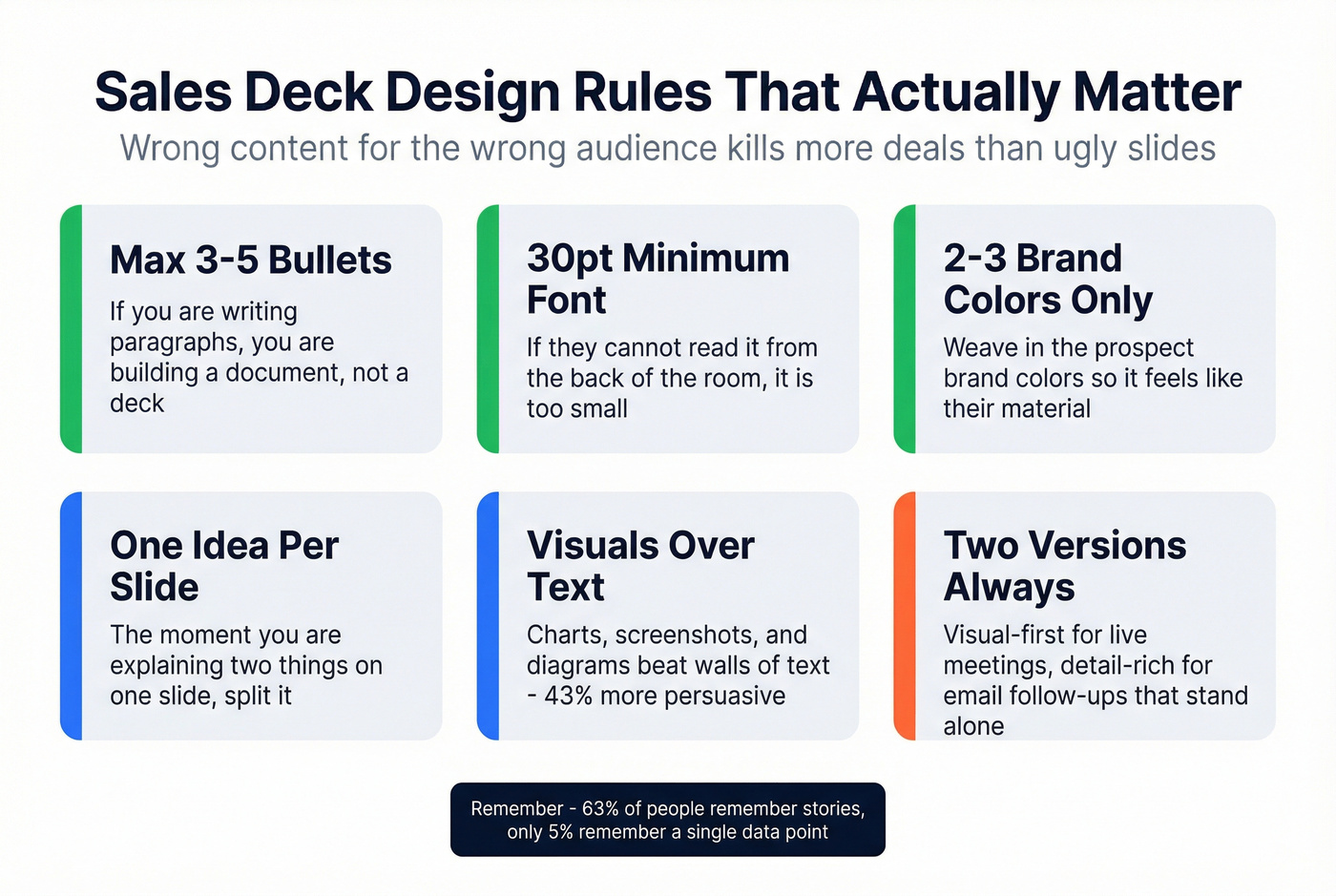
Keep slides to 3-5 bullets max. If you're writing paragraphs, you're building a document, not a deck. Use a 30-point minimum font - if they can't read it from the back of a conference room, it's too small. Stick to 2-3 brand colors, and consider weaving in the prospect's brand colors so it feels like their material. Charts, screenshots, and diagrams beat walls of text every time.
The moment you're explaining two things on one slide, split it.
Keep Your Deck Current
An outdated deck with last year's pricing or a churned customer's logo destroys credibility instantly. Don't rely on memory - set update triggers:
- Product changes or new feature launches
- New case study with strong metrics
- Pricing or packaging shifts
- Competitive moves that change your positioning
- Quarterly review, even if nothing obvious changed
Maintain version control and label files with dates. For larger teams, sales enablement platforms can auto-assemble decks from approved content libraries - worth exploring once you have 30+ modular slides in rotation. The modular library concept means when one slide updates, every deck that uses it stays current automatically. If you're building a repeatable system, treat this as part of sales process optimization, not a one-off project.
Skip this if your team is under five reps. At that size, a shared Google Drive folder with clear naming conventions and a monthly calendar reminder works fine. Don't over-engineer the process before you've nailed the content.
Build the Deck, Then Reach the Buyer
The structure matters. The personalization matters more. But none of it works if your deck lands in the wrong inbox or bounces entirely.
We've watched teams materially improve close rates by swapping the investor pitch for a proper sales deck and getting it in front of every decision-maker on the account. Now you know how to create a sales deck that earns attention - nail the eight slides, tailor by stakeholder, and make sure you're presenting to the full buying committee, not just the one person who took your first call. Then lock in the follow-through with a solid sales meeting follow-up email.
71% of buyers expect personalization, but you can't personalize a deck for a CFO you haven't identified yet. Prospeo's 30+ search filters - including job title, department, and seniority - let you map 6-10 stakeholders per account in minutes, not hours.
Stop guessing who's in the room. Start knowing.
FAQ
How many slides should a sales deck have?
Most high-performing sales decks use 8-15 slides for the core narrative, with additional slides in an appendix for objection handling, technical specs, or competitive comparisons. Budget 1-2 minutes per slide - a 20-minute meeting means 10-15 slides max.
Should I send the deck before the meeting?
Present live so you control the narrative and can adapt in real time. If a stakeholder insists on pre-reading, send a condensed 5-6 slide teaser that creates curiosity without giving away your full story.
What's the best tool for building a sales deck?
Google Slides works best for speed and real-time collaboration. Canva adds visual polish without a designer, with free and paid tiers. PowerPoint remains the standard if your company runs Microsoft 365.
How do I make sure my deck reaches every decision-maker?
Use a contact data platform to find verified emails and direct dials for each stakeholder on the buying committee. Map the full committee before your first meeting and send tailored follow-up decks to each role - that's where personalization actually pays off.