

How to Find a Company's Tech Stack - From Quick Checks to Deep Reconnaissance
You've got a demo in two hours and need to know if the prospect runs Salesforce or HubSpot. That's the easy version. The harder version - finding hundreds of companies running a specific stack so you can build targeted pipeline - requires a different playbook entirely.
Here's the thing: detection is always incomplete. A 2020 Gartner Marketing Technology Survey found 68% of marketing technology leaders struggled to use the full breadth of their martech capabilities, so what companies actually use often differs wildly from what they've bought. What follows is how to get as close to the truth as possible.
Quick Recommendations
Check one company right now, free: Install the WhatRuns extension or use BuiltWith's free single-site lookup. Takes about 30 seconds.
Go deep on one company - free, 30 minutes: Read their subprocessor list, check DNS TXT records, and curl their API headers. You'll find backend tools that browser extensions miss entirely.
Find companies BY tech stack at scale: Use a B2B database with technographic filters. Prospeo lets you search by technology, layer on buyer intent and company size across 30+ filters, and export verified contacts - starting free.
5-Minute Free Tech Stack Lookups
These tools scan what's visible in a site's frontend code. None of them reliably detect backend infrastructure like databases, internal security tools, or data warehouses. The consensus on r/sales is that built-in technology filters in tools like Apollo feel incomplete and return suspiciously few results. Dedicated scanners do better for frontend tech.

BuiltWith Free Lookup
Use this if you want one of the broadest technology lists for a single site. BuiltWith tracks data from 414 million domains and over 113,000 technologies, updated weekly. The free tier gives you individual site lookups forever with no account required.
Skip this if you need real-time accuracy. BuiltWith depends on crawl schedules, so it can lag behind actual changes. We've seen it miss newer tools like UnifyGTM that were clearly running on a site.
Wappalyzer Browser Extension
Use this if you want the most current frontend detection. Wappalyzer tends to be more up to date for client-side technologies than crawl-based alternatives. The free tier gives you 50 lookups per month.
Skip this if you need backend visibility. Wappalyzer's "backend" detections like Okta are inferred from frontend scripts and won't appear for every customer.
WhatRuns
The simplest option: 100% free, unlimited checks, zero friction. Install the extension and get a technology snapshot while browsing any prospect's site. It won't do bulk analysis or offer API access, but for quick single-site checks, nothing is faster.
StackShare
StackShare covers 1.5 million companies and 7,000+ technologies, but the data is self-reported by engineers. When a company has an active profile, the data is often more accurate than any scanner - the engineers themselves listed what they use. The problem is most companies outside developer-focused startups don't maintain a profile, which makes it unreliable as a primary source.
30-Minute Deep Dives (Free)
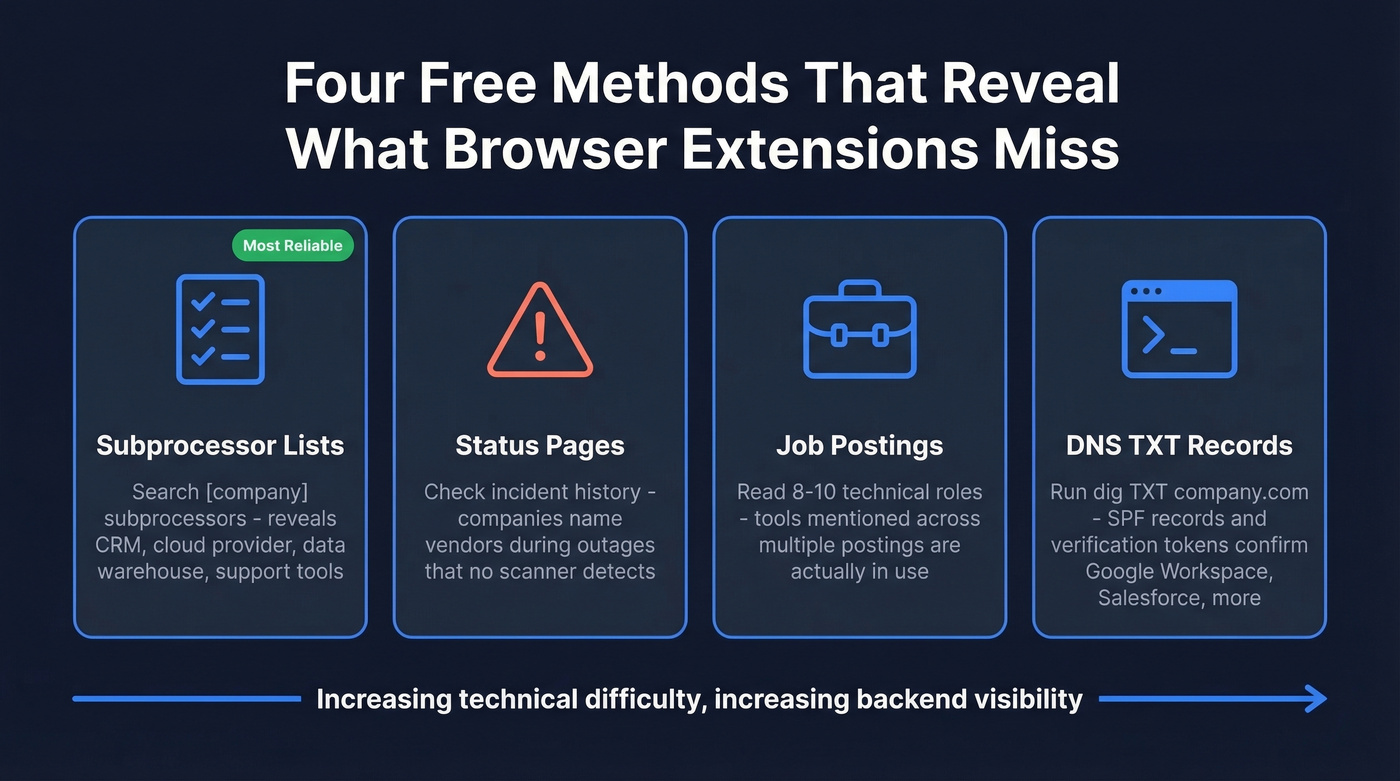
Browser extensions only see the frontend. The real intelligence lives in compliance documents, infrastructure records, and hiring patterns.
Subprocessor and Trust Center Lists
Search "[company name] subprocessors" or check their trust center. Many companies disclose third-party vendors that process customer data for compliance reasons - you'll find their CRM, support platform, cloud provider, and often their data warehouse all in one document. A Bloomberry analysis positions this as the single most reliable free method, and we agree. It's the one technique we recommend to every sales rep we talk to.
Status Pages and Incident History
Public status pages often reveal cloud providers and regions through their component lists. Incident history is even better. During the July 2024 CrowdStrike incident, companies' status pages explicitly named CrowdStrike as the cause, confirming a security vendor no browser extension would ever detect.
Job Postings
Look at 8-10 technical job postings from the same company. A single posting might list aspirational "nice to have" tools, but when Snowflake or dbt appears across multiple roles, they're actually using it. Focus on frequency, not individual mentions.
DNS TXT Records
Run dig TXT company.com and look for verification tokens. A google-site-verification entry confirms Google Workspace. An _spf.salesforce.com include in their SPF record confirms Salesforce. These are infrastructure-level signals that can't be faked or missed by crawl timing.

Knowing a prospect's tech stack is step one. Step two is reaching the right buyer. Prospeo's 30+ search filters include technographic data powered by Wappalyzer and live job posting signals - so you can find every company running Salesforce, HubSpot, or Snowflake, then export verified emails (98% accuracy) and direct dials in the same workflow.
Find companies by tech stack and their decision-makers in one search.
Advanced Reconnaissance
HTTP Header Fingerprinting
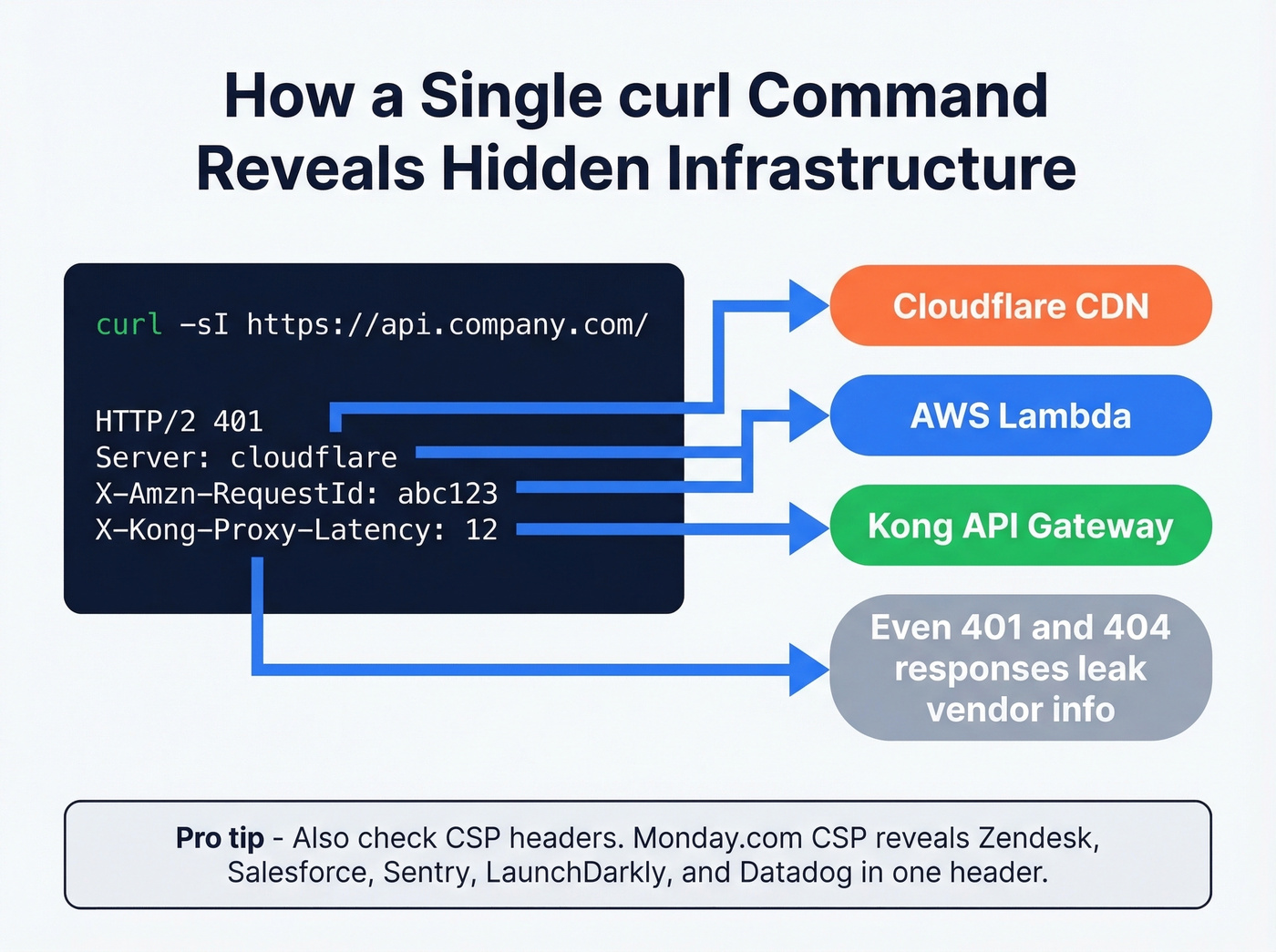
Run curl -sI https://api.company.com/ - even a 401 or 404 response leaks infrastructure details. In our testing, this method consistently reveals vendors that no browser extension catches.
If you're doing this for pipeline generation, keep a simple confidence score next to each vendor you find.
| Header / Value | Vendor |
|---|---|
Apigw-Requestid |
AWS API Gateway |
X-Amzn-RequestId |
AWS Lambda |
X-Cache: Hit from cloudfront |
AWS CloudFront |
Server: cloudflare |
Cloudflare |
X-Azure-Ref |
Azure API Mgmt |
Server: AkamaiGHost |
Akamai |
X-Kong-* / Server: openresty |
Kong |
X-Powered-By: Express |
Node.js / Express |
X-Apigee-* |
Google Apigee |
Via: 1.1 vegur |
Heroku |
x-vercel-* |
Vercel |
x-render-* |
Render |
CSP Header Analysis
The Content-Security-Policy header acts as a manifest of every third-party domain a site trusts. Monday.com's CSP, for example, reveals connections to Zendesk, Salesforce, Sentry, LaunchDarkly, and Datadog - all in a single header. Run curl -sI https://company.com | grep content-security-policy and map the domains. We've found CSP headers often surface more third-party vendors than any browser extension.
Subdomain Enumeration and Performance API
Tools like amass (amass enum -passive -d company.com) or subfinder reveal subdomains that directly name internal tools - kafka.company.com, grafana.company.com, consul.company.com.
For an even sneakier approach, open a company's site in your browser and run performance.getEntriesByType("resource") in the console. This dumps every third-party resource the page loaded, including analytics, A/B testing, and tracking pixels that extensions sometimes miss.
Tool Pricing Comparison
| Tool | Free Tier | Paid Starting | Best For |
|---|---|---|---|
| WhatRuns | Unlimited | - | Quick single-site checks |
| BuiltWith | Single lookups forever | $295/mo (Basic) | Bulk technology lists |
| Wappalyzer | 50 lookups/mo | $250/mo (Pro) | Frontend detection + API |
| SimilarTech | - | $249/mo (Starter) | Market-level analysis |
| Prospeo | 75 emails + 100 extension credits/mo | ~$0.01/email | Tech stack to verified contacts |
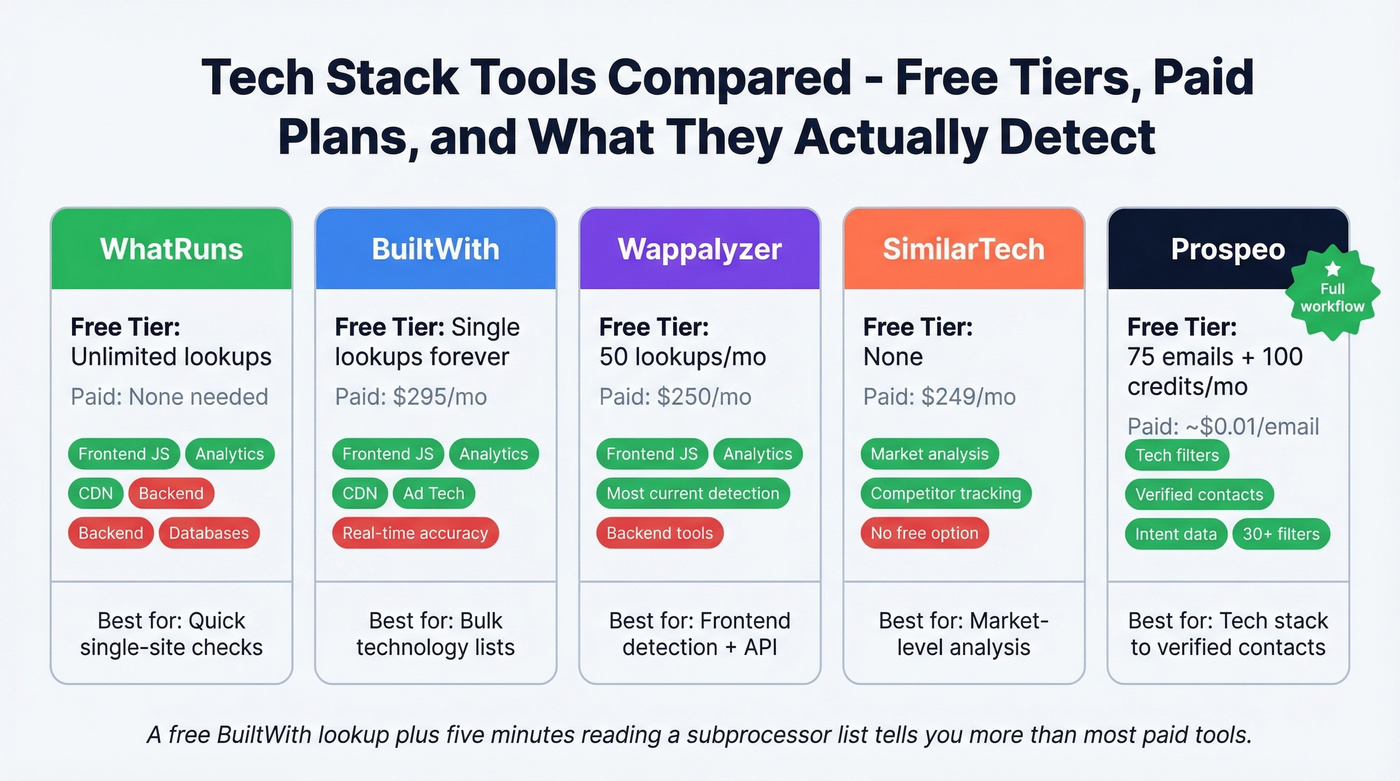
Let's be honest: you don't need a $500/month platform. A free BuiltWith lookup plus five minutes reading a subprocessor list tells you more than most paid tools. Pay only when you need the reverse - finding companies that run a specific technology and getting verified contact data for decision-makers.
If you're building lists, it's worth comparing technographic data providers before you commit.
Verifying Your Findings
Not all signals carry equal weight. Before you act on a finding, score your confidence:
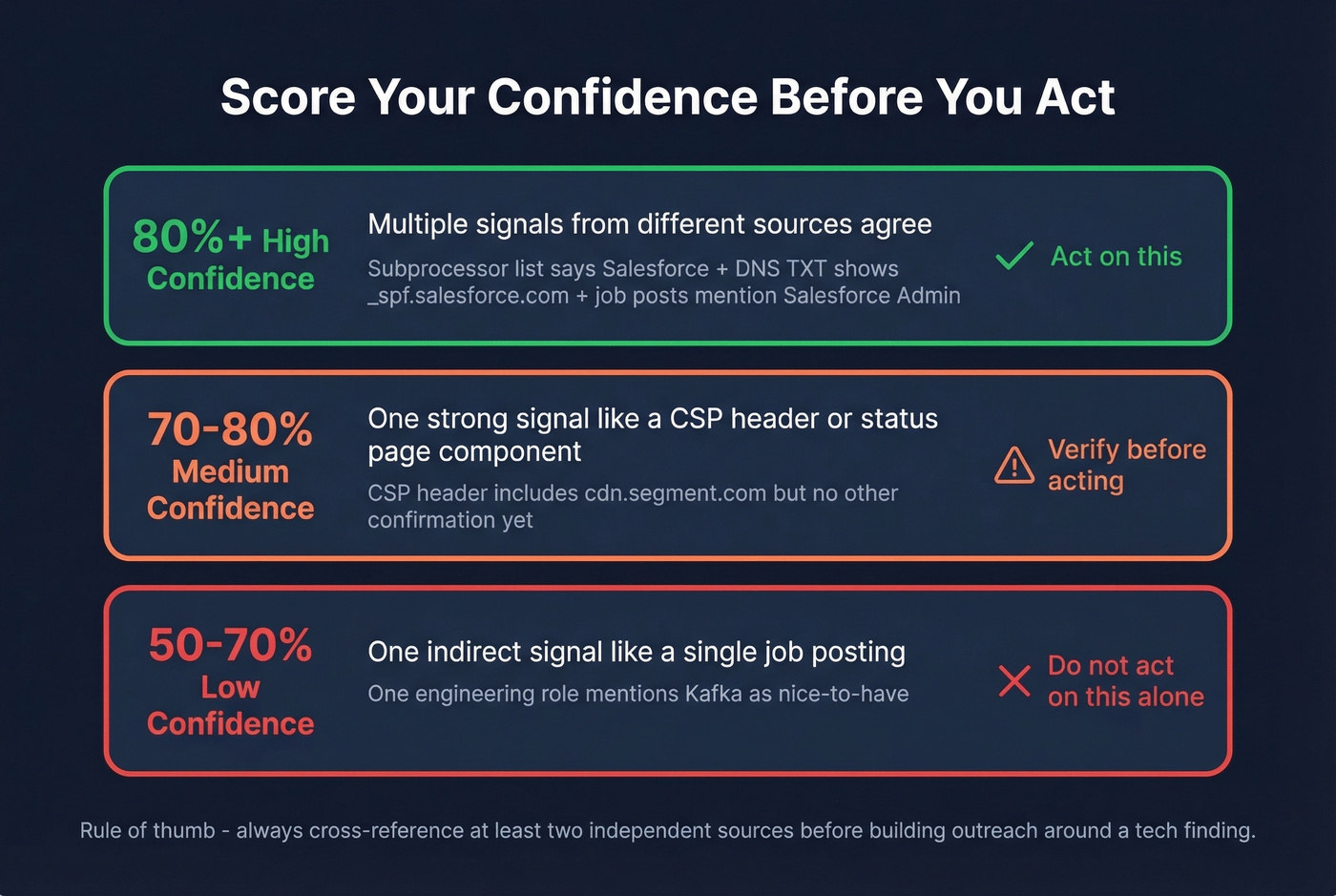
- High (80%+): Multiple recent signals from different sources. Subprocessor list confirms Salesforce AND DNS TXT records show
_spf.salesforce.com. - Medium (70-80%): Single strong signal like a CSP header or status page component.
- Low (50-70%): One indirect signal like a single job posting mentioning a tool.
The Databar framework puts it well: always cross-reference at least two independent sources before acting on a finding. Reddit threads consistently flag that AI-powered tech detection tools feel "random" without manual verification, and in our experience, cross-referencing two sources catches most false positives.
This same cross-checking mindset applies when you enrich accounts and contacts for outreach.
Reverse Lookup: Find Companies by Technology
Everything above helps you analyze one company at a time. But the real sales use case flips the process: you know your best customers run Snowflake + HubSpot + Salesforce, and you need 200 more companies that match that profile.
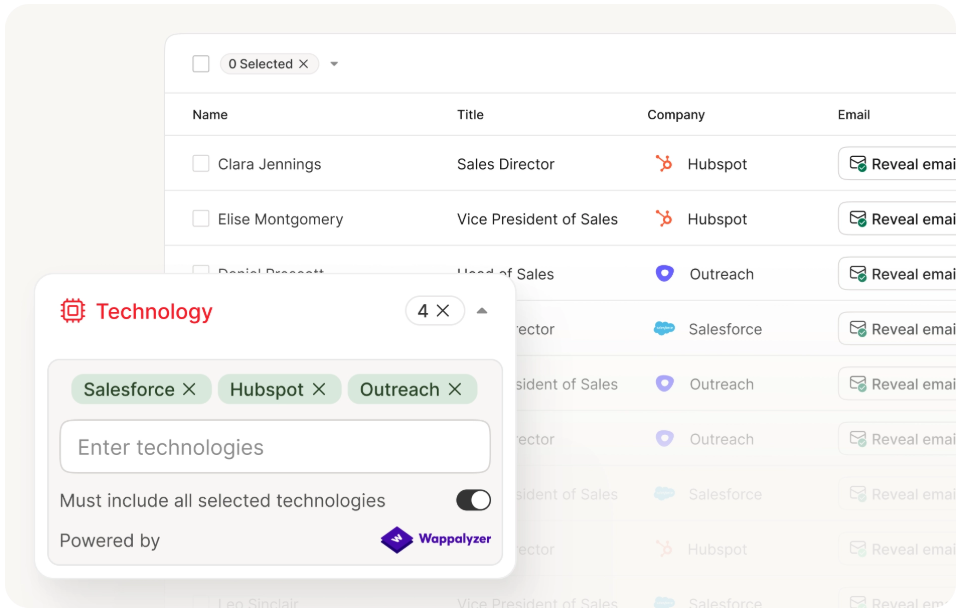
Prospeo's technographic filters - powered by frontend detection plus live job posting signals - let you search by technology and layer on 30+ filters including buyer intent, headcount growth, and company size across 300M+ professional profiles. The output isn't just a company list; it's verified contacts with 98% email accuracy and direct mobile numbers. The free tier gives you 75 emails per month to test the workflow.
If you're evaluating vendors for this workflow, start with our breakdown of the best technographic data tools and B2B list providers.
DNS records and CSP headers tell you what a company uses. But building pipeline means finding hundreds of companies running that same stack - and reaching the people who own those tools. Prospeo tracks technologies across 300M+ profiles, layers in buyer intent from 15,000 Bombora topics, and returns contacts at $0.01/email with a 7-day data refresh cycle.
Turn tech stack intelligence into targeted pipeline in minutes, not hours.
FAQ
What's the most accurate free tech stack checker?
WhatRuns and Wappalyzer's free tier are the most reliable for frontend technologies - both detect JavaScript frameworks, analytics, and CDNs with high accuracy. Neither detects backend infrastructure, so cross-reference with DNS TXT records and subprocessor lists for a fuller picture.
Can you detect backend technologies from outside?
Partially. Curl API headers, DNS TXT records, and subprocessor lists reveal backend tools like databases, cloud providers, and security vendors that browser scanners miss. Combine at least two sources for any finding you plan to act on.
How do I find companies that use a specific technology?
Use a B2B database with technographic filters. Prospeo lets you search by technology, layer on buyer intent and company size across 30+ filters, and export verified contacts - 75 free emails per month with 98% accuracy.
How often should I re-check a prospect's tech stack?
Re-verify every 60-90 days. Companies swap tools frequently - especially marketing and analytics platforms - and crawl-based scanners can lag weeks behind actual changes.