

How to Find Any Email Address: 7 Methods That Actually Work
Your boss forwarded you a prospect's name and company. "Get me their email." You've got five minutes. And every result on the page wants you to sign up before showing you a single method.
Here's the thing: finding a professional email address isn't hard once you know which approach fits your situation. We've tested dozens of methods over the years, from scrappy Google tricks to enterprise-grade enrichment APIs, and the gap between what works and what wastes your time is enormous.
Seven methods below, ranked by speed and reliability.
What You Need (Quick Version)
Your approach depends on what you're solving for:
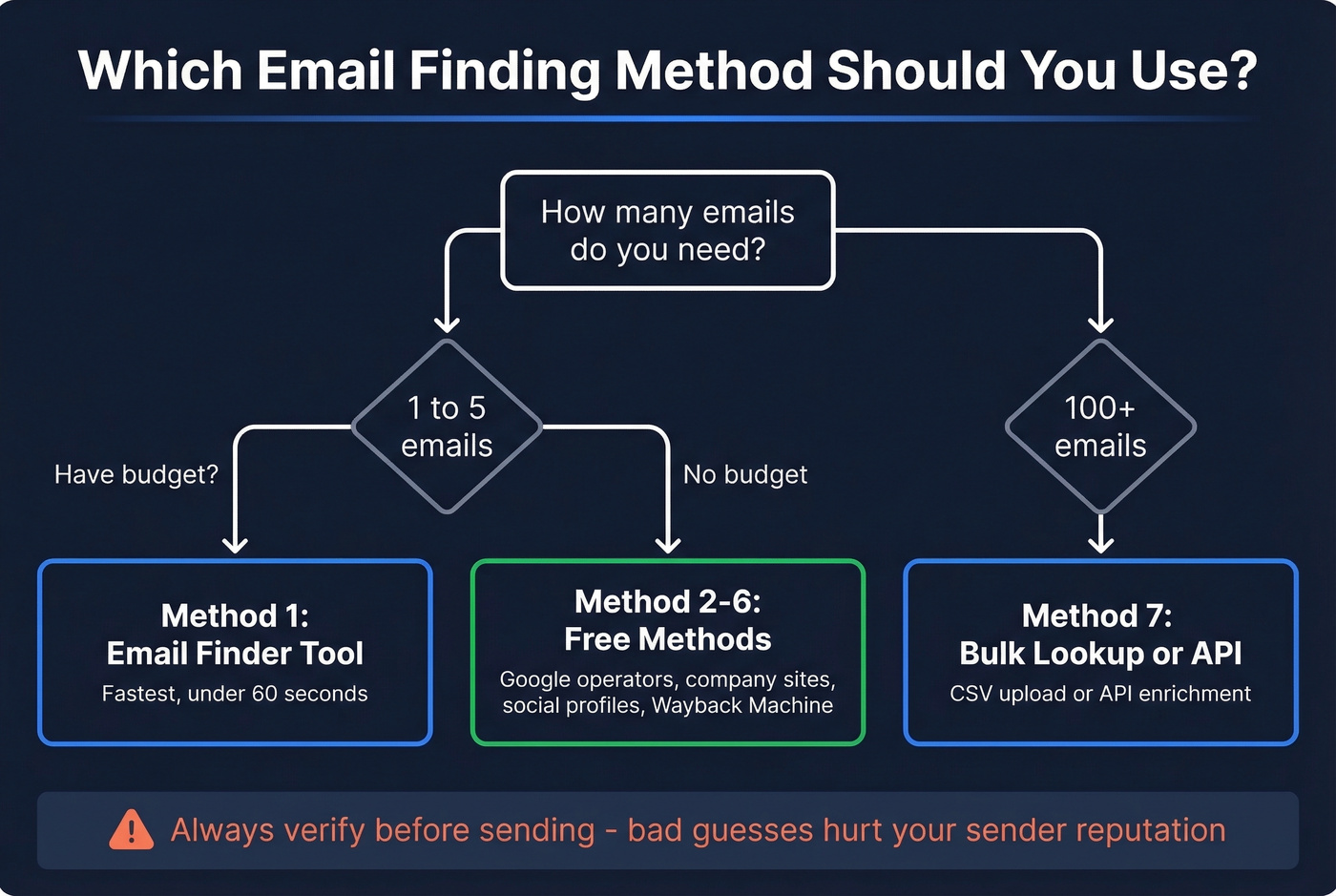
- Need one email fast? Use an email finder tool or guess the pattern and verify (Methods 1-2).
- No budget at all? Google operators, company websites, social profiles, or the Wayback Machine will get you there (Methods 2-5).
- Need 100+ emails by Friday? Bulk CSV upload or API enrichment - skip the manual work entirely (Method 7).
7 Proven Ways to Find Someone's Email
1. Use an Email Finder Tool
This is the fastest path from "I have a name and a company" to "I have a verified email." You enter a first name, last name, and company domain. The tool pattern-matches against known formats, cross-references its database, and runs real-time verification before returning a result. The whole thing takes seconds.
The results speak for themselves: agency Meritt saw bounce rates drop from 35% to under 4% and pipeline triple from $100K to $300K per week after switching their data source.

Hunter is a solid alternative if you already have emails and need a verification layer, though it's less useful as a primary source at scale. Snov.io punches above its weight for international leads, especially if you need built-in automation at $39/mo.
Use this if: You need a verified email in under a minute, or you're building a repeatable prospecting workflow. Skip this if: You're looking for personal Gmail/Yahoo addresses - these tools focus on professional emails.
2. Guess the Pattern and Verify
Every company has an email format. Figure out the pattern, construct the address, verify it. Done.
If you get stuck, use a name to email approach to generate likely variants, then verify the best candidates.
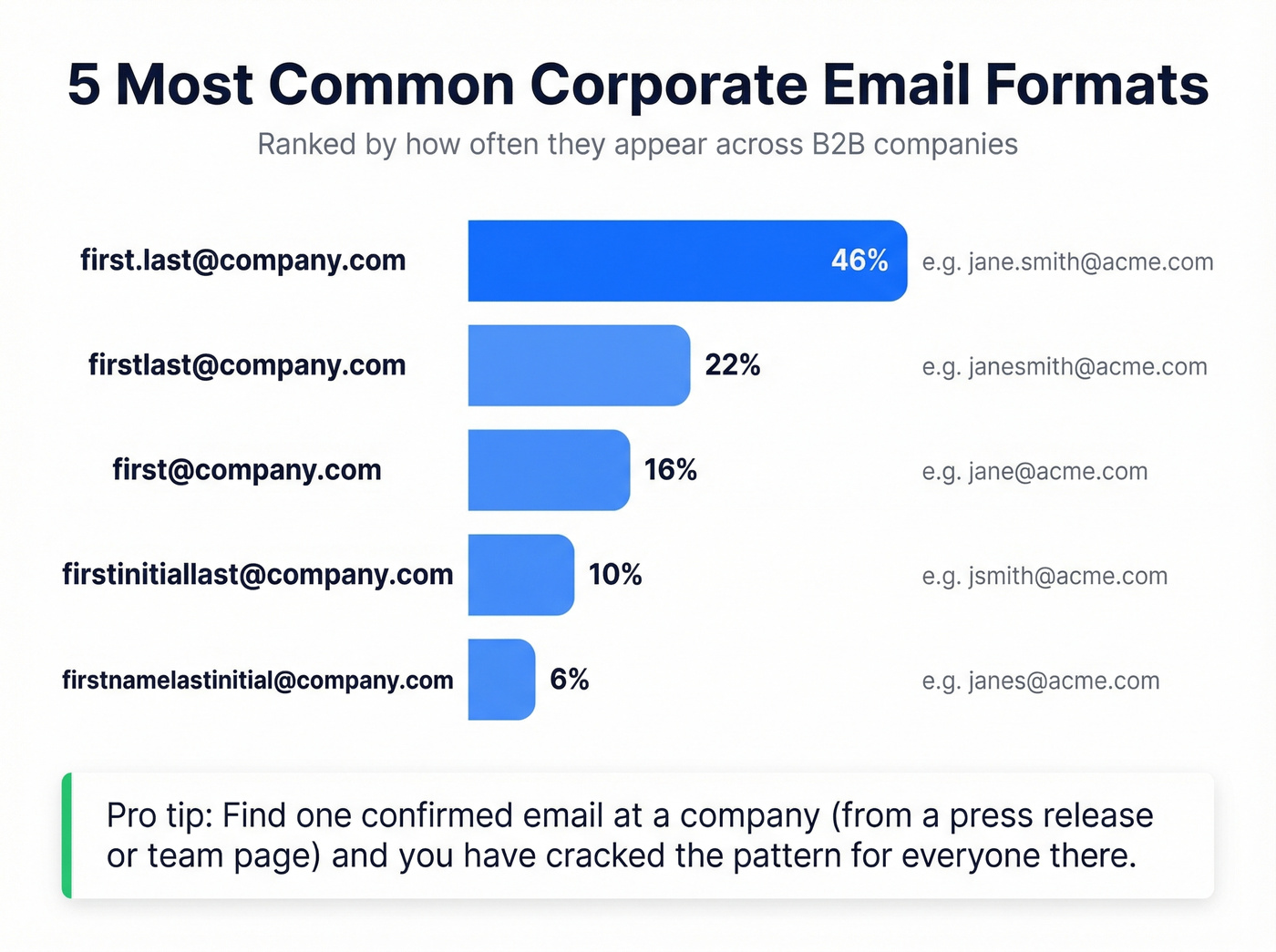
The five most common corporate email formats, roughly ranked by prevalence:
first.last@company.com- the most common by farfirstlast@company.com- no separatorfirst@company.com- common at smaller companiesfirstinitiallastname@company.comlikejsmith@firstnamelastinitial@company.comlikejohns@
A practical note on separators: dots are the easiest to read and communicate verbally. Underscores get hidden when text is underlined. Hyphens work but are clunky to dictate over the phone.
Once you've guessed, verify before sending. A bad guess that bounces hurts your sender reputation. Run it through any free verification tool, or use the Google operator method below to see if that address appears anywhere on the web. If you find one confirmed email at a company - say, from a press release - you've cracked the pattern for everyone there.
3. Google Search Operators
Underrated and completely free. Google's advanced search operators surface addresses that are publicly indexed but buried in pages you'd never find by browsing. Four templates you can copy and run right now:
Company domain sweep:
site:example.com ("@example.com" OR "contact" OR "team" OR "email")
Role-based search:
site:example.com ("marketing" OR "PR" OR "sales") (contact OR email OR "@")
PR and press contacts:
site:example.com (press OR "media") ("contact" OR "email")
PDF documents - press kits, whitepapers, and internal docs often contain emails:
filetype:pdf "@example.com"
Add -jobs to filter out career page noise that clutters results.
One important warning: several operators recommended in older guides are dead. link: was dropped in 2017. info: is gone too. phonebook: hasn't worked since 2010. Stick to the templates above.
4. Company Websites and Team Pages
Before you fire up any tool, spend 60 seconds checking these pages on the company's website:
- About / Team - many companies list leadership with direct emails
- Contact / Press - press contacts are almost always real, monitored inboxes
- Careers - recruiting contacts sometimes include direct emails
- Blog author bios - especially at smaller companies
A trick most people miss: right-click the page, hit "View Page Source," and search for mailto:. Developers often embed email links in the HTML even when they aren't visually displayed on the page. We've found hidden emails this way more times than we can count.
5. Social Profiles and Public Bios
Professional profile bios, Twitter/X bios, and personal websites are surprisingly productive sources. Developers often list their email on GitHub or GitLab profiles. Founders frequently include contact info on their personal sites.
The key distinction: B2B email finder tools search for work emails. If you need someone's personal Gmail or Yahoo address, you're in different territory - check their public profiles, personal website, or reach out through mutual connections. No reliable at-scale automated tool exists for personal email discovery, and privacy constraints make it a fundamentally different problem.
6. The Wayback Machine
Niche but powerful when it works.
If a company recently redesigned their website and removed a team page, the Wayback Machine probably has the old version cached. Navigate to web.archive.org, paste the company's URL, and browse snapshots from before the redesign. Old team pages, contact directories, and press pages often contain emails that are still active even though the page is gone. This method is especially useful for recovering contact details that have been scrubbed from a current site - we've pulled valid CMO emails from pages that were taken down two years prior.
7. Scale with Bulk Lookup or API
When you need 100+ emails - for an outbound campaign targeting a specific ICP, or an agency running 500-1,000 emails a day - manual methods don't scale. You need bulk enrichment.
The workflow is straightforward. Export a CSV of names and companies from your CRM or spreadsheet, upload it to an enrichment tool, and get back verified emails plus additional data points like titles, phone numbers, and company info. Or connect via API and enrich records automatically as they enter your system.
Prospeo's enrichment API runs a 92% match rate and returns 50+ data points per enrichment. Native integrations with Salesforce, HubSpot, Instantly, Lemlist, and Clay mean enriched contacts flow straight into your sequencer. Credit-based pricing means you pay for results, not seats - a meaningful difference when you're enriching thousands of records versus paying per-user fees that scale with headcount.

Use this if: You're running outbound at scale and need clean data flowing into your sequencer weekly. Skip this if: You need one email for one person. Use Method 1 instead.

You just learned 7 ways to find an email address. Prospeo combines the best of them into one lookup - 300M+ profiles, 98% email accuracy, and real-time verification so you never send to a dead inbox. Meritt cut their bounce rate from 35% to under 4% on day one.
Find your first 75 emails free - no credit card, no sales call.
Email Finder Tool Comparison
Let's be honest: the "stack five tools" advice you see everywhere is written by people selling integrations, not by people who actually send cold emails. You need one good finder and one manual backup method. That's it.
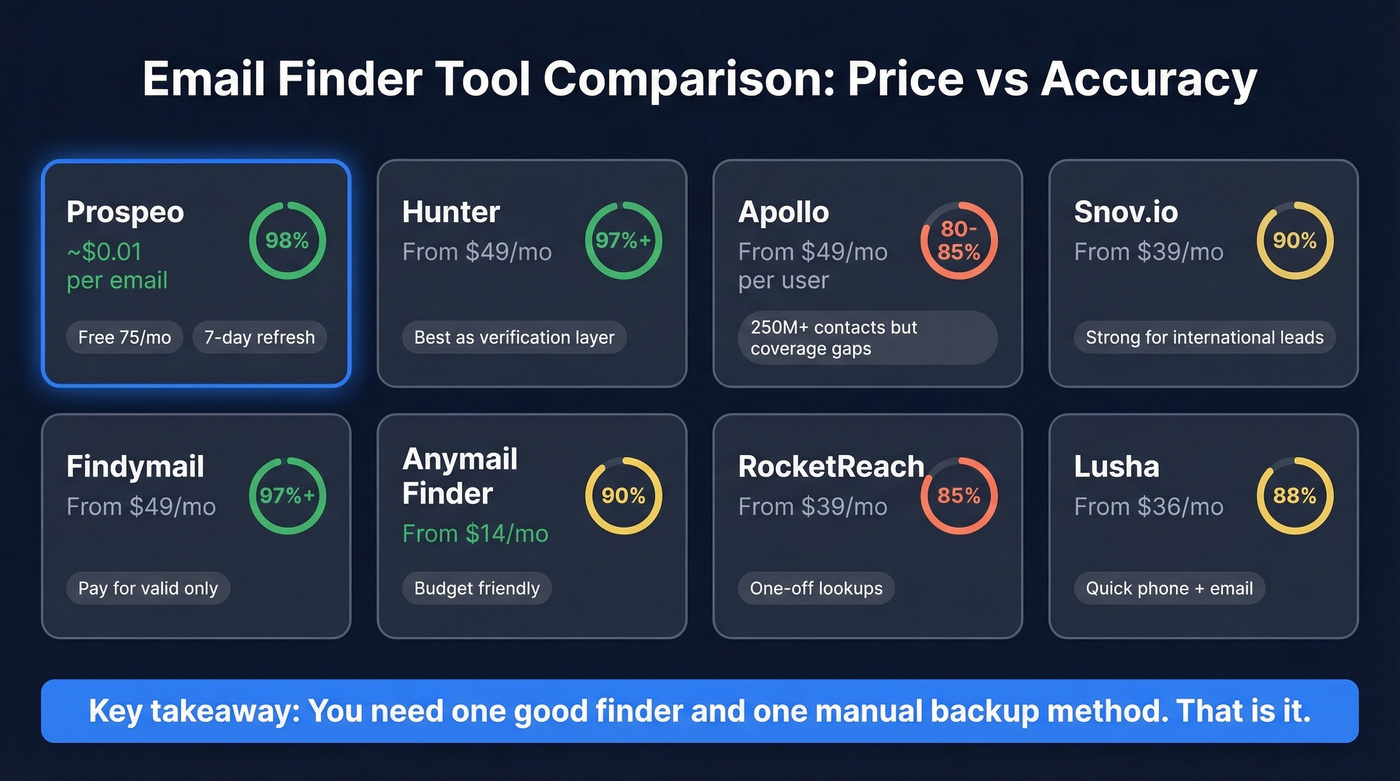
| Tool | Pricing | Credits | Accuracy | Best For |
|---|---|---|---|---|
| Prospeo | Free 75/mo; ~$0.01/email | Credit-based | 98% | Accuracy + 7-day refresh |
| Hunter | Free 25/mo; from $49/mo | 2,000 (on $49 plan) | 97%+ | Verification layer |
| Apollo | Free tier; from $49/mo/user | Varies | ~80-85% | Large DB, 250M+ contacts |
| Snov.io | Trial credits; from $39/mo | 1,000 | ~90% | International leads |
| Findymail | 10 free credits; from $49/mo | Credit-based | 97%+ | Pay-for-valid model |
| Anymail Finder | 100 free credits; from $14/mo | Credit-based | ~90% | Budget option |
| RocketReach | Limited free; from $39/mo | 70 lookups | ~85% | One-off lookups |
| Lusha | Limited free; from $36/mo | Credit-based | ~88% | Quick phone + email |
Apollo has the biggest database, but Reddit threads on r/sales consistently flag coverage gaps for UK and small-business targets, especially on older contacts - one user reported it couldn't pull emails for their own current clients. Apollo's per-seat pricing also adds up fast once you're past a few reps. Hunter functions better as a second layer than a primary source; the database just isn't deep enough for prospecting at scale. Cognism is worth a look for EU/UK data, but expect enterprise-level pricing north of $1,000/mo.
Manual methods work for one-off lookups. But if you need 100+ verified emails this week, Prospeo's bulk enrichment returns 50+ data points per contact at a 92% match rate - flowing directly into HubSpot, Salesforce, or your sequencer. At roughly $0.01 per email, it costs 90% less than ZoomInfo.
Stop uploading CSVs and praying. Get clean data at scale.
How Email Verification Actually Works
Every email finder tool talks about "verification," but the process behind that word varies wildly. A proper verification pipeline runs five steps:
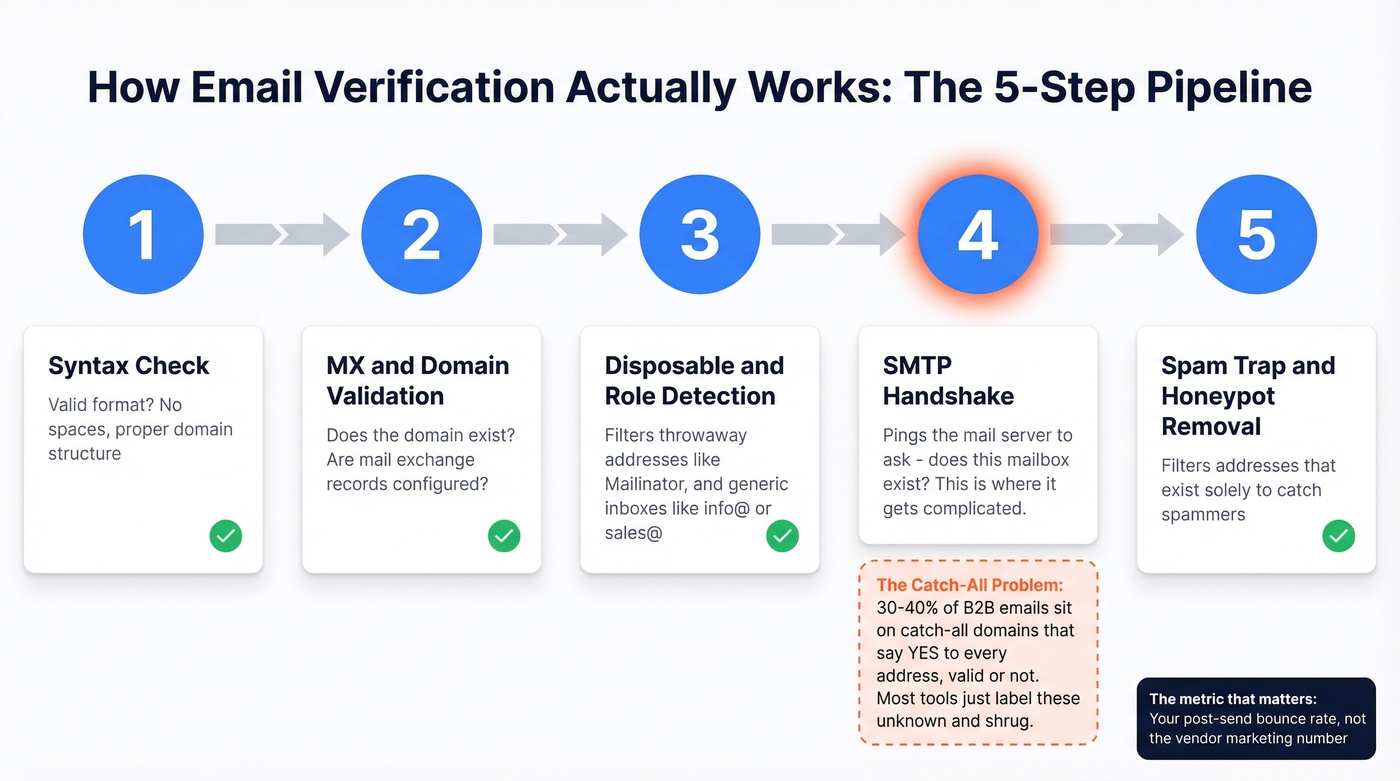
- Syntax check - Is the email formatted correctly? No spaces, valid characters, proper domain structure.
- MX and domain validation - Does the domain exist? Does it have mail exchange records configured to receive email?
- Disposable and role-based detection - Is this a throwaway address from Mailinator or Guerrilla Mail? Is it a generic role address like info@ or sales@ that nobody monitors?
- SMTP handshake - The tool pings the mail server and asks "does this mailbox exist?" without actually sending an email. This is where most verification happens - and where it gets complicated.
- Spam-trap and honeypot removal - Filtering out addresses that exist solely to catch spammers.
The catch-all problem is where most tools fall apart. Around 30-40% of B2B email addresses sit on catch-all domains - servers configured to accept all incoming mail regardless of whether the specific mailbox exists. The SMTP handshake returns "yes" for every address, valid or not. Most tools just label these "unknown" and shrug. That's not verification - that's a coin flip.
Enterprise security gateways from Proofpoint, Mimecast, and Barracuda add complexity by blocking verification probes entirely, producing even more "unknown" results.
The benchmark that matters isn't the vendor's marketing number - it's your post-send bounce rate. Keep total bounces below 2% and hard bounces below 1%. Anything above 5% and you're actively damaging your sending domain's reputation. If you're consistently above 3%, your data source is the problem, not your sending infrastructure.
Legal Compliance Cheat Sheet
Finding a work email is legal. What you do with it determines whether you're compliant or facing fines.
| Requirement | CAN-SPAM (US) | GDPR (EU) | PECR (UK) |
|---|---|---|---|
| Consent model | Opt-out | Opt-in (often consent or legitimate interest) | Consent/soft opt-in |
| Max penalty | $53,088/email | EUR 20M or 4% revenue | GBP 500,000 |
| Opt-out window | 10 business days | Immediate | Immediate |
| Physical address | Required | Required | Required |
| Subject lines | Must be truthful | Must be truthful | Must be truthful |
The numbers are real. GDPR enforcement has resulted in EUR 5.88B in cumulative fines across 2,245 actions through early 2026. CAN-SPAM penalties run up to $53,088 per individual violation.
Practical rules for B2B outreach: always include a working opt-out mechanism, use truthful subject lines and sender information, include a physical mailing address, and honor opt-out requests within the required window. For EU/UK prospects, you need either explicit consent or a defensible "legitimate interest" basis - and you need to document which one you're relying on.
FAQ: Finding Email Addresses
Is it legal to find someone's work email?
Yes - in most B2B jurisdictions, locating a professional email is perfectly legal. Compliance depends on what you do next: CAN-SPAM requires opt-out links, truthful headers, and a physical address; GDPR adds consent or legitimate-interest requirements. Use verified data to minimize spam complaints and bounces.
How do I find an email for someone at a specific company?
Enter their name and company domain into an email finder tool for an instant verified result. If you don't have a tool, look up one known email at the company to identify the naming pattern, construct the address, and verify it. Google operators can also surface indexed contact pages listing the person directly.
What's a catch-all domain?
A catch-all domain accepts all incoming mail regardless of the recipient address - anyrandomstring@company.com won't bounce. Around 30-40% of B2B emails sit on catch-all servers, which is why basic verification tools return "unknown" instead of a definitive valid or invalid result. Look for tools with dedicated catch-all handling.
What bounce rate is too high?
Keep total bounces below 2% and hard bounces below 1%. Anything above 5% is actively damaging your sending domain's reputation and will tank deliverability over time. If you're consistently above 3%, the problem isn't your sending infrastructure - it's your data source.
What's a good free tool to find an email address?
Prospeo's free tier includes 75 verified emails and 100 Chrome extension credits per month with full verification - no credit card required. Hunter offers 25 free searches per month, and Anymail Finder provides 100 free credits. For zero-budget situations, Google search operators and company team pages cost nothing and work surprisingly well.